AWS Big Data Blog
Amazon Athena adds 1-minute reservations and new capacity control features
Many of you choose serverless services for your analytics workloads because of its simplicity and elasticity. But many of you running mission-critical queries face a common challenge: ensuring your high-priority workloads run when needed and without interference from other queries in your account.
Amazon Athena is a serverless interactive query service that makes it simple to analyze data using SQL. Capacity Reservations is a feature of Athena that addresses the need to run critical workloads by providing dedicated serverless capacity for the workloads you specify. With Capacity Reservations, you request capacity in the form of Data Processing Units (DPU) and you assign them to your workloads.
In this post, we highlight three new capabilities that make Capacity Reservations more flexible and easier to manage: reduced minimums for fine-grained capacity adjustments, an autoscaling solution for dynamic workloads, and capacity cost and performance controls.
Now available: 1-minute reservations and 4 DPU minimum
Yesterday, we announced a big change for Capacity Reservations: you can now reserve as few as 4 DPU (down from 24 DPU) for as little as 1 minute (down from 60 minutes). This update lets you make frequent, fine-grained capacity adjustments to closely match your workload patterns and hold less capacity, with savings up to 95% for workloads that complete in under an hour.
We’ve optimized Athena for interactive queries that need a quick response, but many of you use Athena for non-interactive queries as well. For example, you may have queries that run on a schedule to prepare data for downstream analysis or perform updates to Apache Iceberg tables. These queries often process larger volumes of data and run for longer than interactive queries. If you’re using Athena’s scan-based pricing option, all your queries count towards your account-level quota. This means that your latency sensitive interactive queries can sometimes end up queued behind non-interactive queries that are running in your account.
Capacity Reservations addresses prioritization problems like this by making it possible to assign dedicated capacity to Athena workgroups. For example, Twilio operates a query platform that serves 1,500+ users who run over 2.5 million queries per month. They use Capacity Reservations for important workloads that need to have dedicated capacity to run optimally and avoid competing with other workloads.
Capacity Reservations have worked well when your workloads have been large and predictable. For example, users accessing dashboards at the start of the workday, or data processing jobs that run continuously 24/7. However, you’ve told us that you wanted more flexibility to update your reservations more frequently, to better match changes in demand.
With Athena’s new 4 DPU and 1-minute minimums, you’re now able to adjust capacity more frequently and match demand more closely than before. We’re excited to see how these updates benefit your mission-critical query workloads.
Autoscaling for dynamic workloads
The reduced minimums enable frequent capacity adjustments, but making those adjustments requires effort. Consider a business intelligence workload that peaks in the morning as executives review dashboards but decreases throughout the day. You want this workload isolated so that high-priority queries aren’t queued behind less important queries.
With 1-minute minimums, you can now adjust capacity to closely track these patterns. However, manually adjusting capacity this frequently is tedious—you need to monitor utilization, decide when to scale, and periodically adjust DPU.
We recently launched an autoscaling solution that uses AWS Step Functions to orchestrate capacity adjustments. It monitors capacity utilization metrics that Athena emits to Amazon CloudWatch at 1-minute granularity, analyzes utilization signal over configurable intervals, then conditionally adds or removes DPU so you can maintain consistent performance even during traffic spikes.
We have made this available as a 1-click deployment from the Athena console: just click Set up autoscaling on the details page for your reservation. When you do, a AWS CloudFormation template sets up all the resources you need. Among the resources set up is the Step Functions state machine, which you can view by opening Athena’s left-side navigation menu and clicking Workflows.
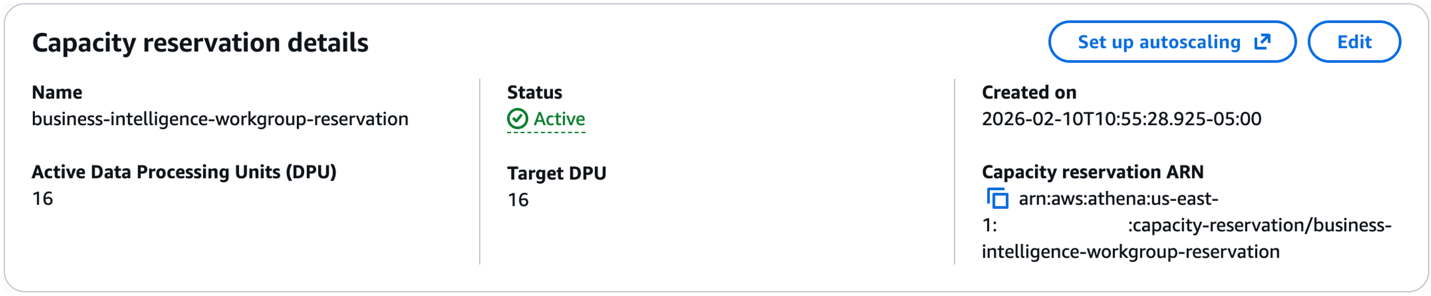
You can also find the template and information on the configurable autoscaling parameters in our documentation. See Automatically adjust capacity in the Athena User Guide.
We chose Step Functions for this solution to enable extensibility and customization. Step Functions integrates tightly with AWS services and allows you to define sophisticated state machines in Amazon States Language, a JSON-based language for serverless workflows. This makes it straightforward to add conditional logic, integrate additional services, or modify the workflow to match your specific requirements.
Control DPU usage at the workgroup and query levels
Part of the ease of use and simplicity of Athena is that it allocates capacity to queries automatically based on their complexity. However, sometimes preventing a single query from using too much capacity or operating at a required level of concurrency is more important than individual query performance. We recently released new DPU cost and performance controls so you can set constraints on Athena’s capacity allocation behavior when you’re using Capacity Reservations.
You can control DPU allocation in two places: workgroup-level controls that apply to all queries in that workgroup, or per query using the StartQueryExecution API. Both approaches set a type of budget that Athena adheres to when planning queries and determining how much capacity to allocate.
You can set minimum and maximum DPU limits from 4 to 124 DPU in increments of 4. Setting a maximum prevents Athena from allocating more DPU than specified. When you set a minimum, you instruct Athena to allocate at least the specified DPU. This can be beneficial when you know that a specific query requires a specific number of DPU to run optimally for your use case. Set both to create a range. For example, a minimum of 4 and maximum of 16 lets Athena start with 4 DPU and scale to 16 if needed. Setting them to the same value forces queries to run on an exact number of DPU.
Controls that you set at the workgroup-level are visible in the workgroup details page and the reservation that the workgroup has been added to.
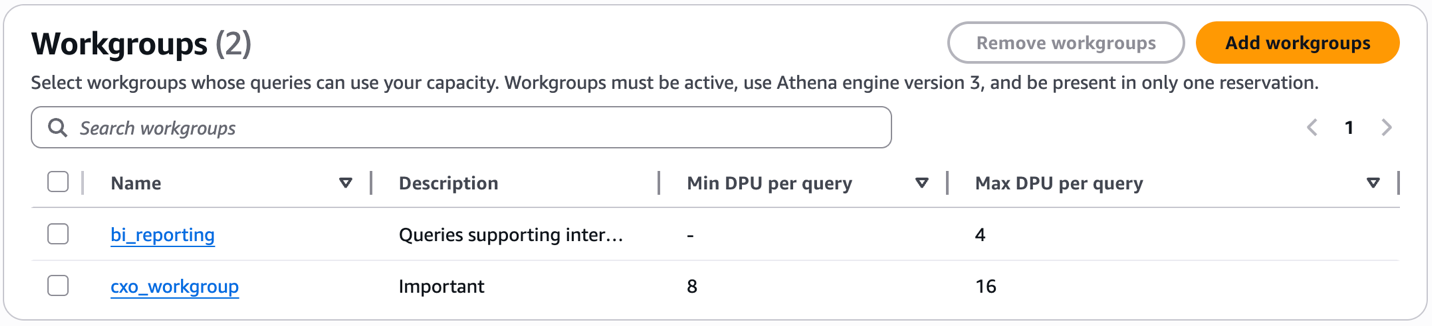
Last but not least: every query you run on reserved capacity now reports its DPU usage in the Athena console and GetQueryExecution / BatchGetQueryExecution APIs, giving you complete visibility into capacity utilization.
Moving to Capacity Reservations
Getting started with Capacity Reservations involves creating a reservation with your desired DPU count, then assigning workgroups to that reservation. For end users, nothing changes. You continue running queries as usual and no SQL changes are needed. For administrators, you create a Capacity Reservation with your desired DPU count, then assign workgroups to that reservation. Athena automatically routes queries from assigned workgroups to your reserved capacity, isolated from other queries in your account and no impact to your account-level concurrency quota.
Conclusion
These updates to Capacity Reservations give you greater flexibility and control over your Athena workloads. The reduced minimums let you adjust capacity in smaller increments and shorter time windows, allowing you to match your usage patterns more closely than before. Autoscaling eliminates the work of making those adjustments manually. And DPU controls give you fine-grained influence over how individual queries consume capacity. Together, these capabilities help you optimize costs, manage concurrency, and deliver predictable performance for your most critical workloads—all while preserving Athena’s serverless benefits.
To learn more, see Athena Capacity Reservations in the Athena User Guide, Athena pricing page, or create your first Capacity Reservation in the Athena console.