AWS Big Data Blog
Amazon Redshift multi-Region disaster recovery
Modern enterprises trust Amazon Redshift to power their most demanding analytics workloads and increasingly require multi-Region disaster recovery to protect those workloads against Regional disruptions. From real-time fraud detection and regulatory reporting to customer-facing dashboards processing millions of transactions daily, organizations are designing for resilience from day one. In financial services, for example, regulatory frameworks increasingly mandate geographic redundancy for data infrastructure, making cross-Region disaster recovery (DR) not only a technical consideration but a compliance requirement. A well-designed DR strategy keeps your analytics infrastructure available and responsive regardless of Regional disruptions, protecting revenue streams, maintaining regulatory standing, and preserving customer trust.
In our previous blog post, Implement disaster recovery with Amazon Redshift, we covered node-level recovery, Availability Zone (AZ) recovery, Multi-AZ deployments, cross-Region backup setup, CNAME implementation, Amazon Redshift Spectrum and Redshift Data sharing considerations.
In this post, we walk through the core concepts of cross-Region disaster recovery, introduce a framework for assessing your requirements, and then dive deep into three primary DR strategies for Amazon Redshift: Active-Passive, Active-Active, and a Hybrid approach. For each strategy, we cover architecture, trade-offs, implementation guidance, and cost considerations so you can make an informed decision for your workload.
What is disaster recovery?
Disaster recovery includes the set of policies, tools, and procedures that enable an organization to restore critical systems and data after an incident. It helps maintain business continuity during events such as a regional AWS outage, accidental data deletion, infrastructure failure, or a security event.
Any DR strategy depends on two key metrics:
- Recovery Point Objective (RPO): The maximum acceptable amount of data loss, measured in time. An RPO of 30 minutes means you can tolerate losing up to 30 minutes of data that you can reproduce from your source systems.
- Recovery Time Objective (RTO): The maximum tolerance for downtime, before restoring business operations after a disaster is declared. An RTO of 30 minutes means your systems must be fully operational within 30 minutes of a failure.
These two numbers drive all architectural decisions for DR and understanding them helps clarify the trade-offs between various DR strategies.
Assessing your DR requirements
Before selecting a strategy, you need to assess your workload’s criticality and your organization’s tolerance for data loss and downtime. Ask yourself:
- What is the business impact of downtime? If your Amazon Redshift cluster powers customer-facing applications, regulatory reporting, or real-time risk calculations, even an hour of downtime might be unacceptable. If it powers internal dashboards refreshed daily, a 2-hour RTO might be acceptable.
- Can data be backfilled from upstream sources? If your data pipeline originates from Amazon Managed Streaming for Apache Kafka (Amazon MSK) or Amazon Simple Storage Service (Amazon S3), you might be able to replay events after a failover, relaxing your RPO requirements. If data is generated in-place or cannot be replayed, you need tighter replication.
- What are your regulatory obligations? Financial services, healthcare, and government workloads often have explicit RPO/RTO requirements mandated by regulators. These are non-negotiable floors.
- What is your cost tolerance? Active-active architectures can double your infrastructure spend. Active-passive approaches offer significant savings at the cost of slightly longer recovery times.
The following table serves as a quick reference to match your requirements to a DR strategy:
| Requirement | Recommended strategy |
| RPO: 10–30 min, RTO: 1–2 hours, cost-sensitive | Active-Passive |
| RPO: Near-zero, RTO: Minutes, mission-critical | Active-Active |
| Mixed criticality across data tiers | Hybrid |
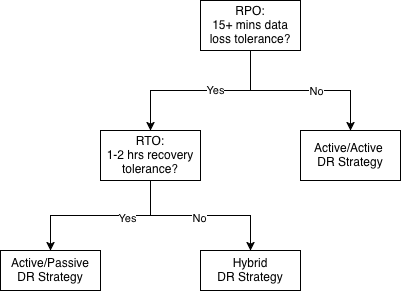
The following decision tree helps you select the right disaster recovery strategy based on your workload’s RPO and RTO requirements.
Cross-Region best practices
Regardless of which strategy you choose, the following practices apply universally to Amazon Redshift DR implementations.
Use multi-Region AWS KMS keys: Encrypt your Amazon Redshift clusters and S3 data with multi-Region AWS Key Management Service (AWS KMS) keys. This avoids the need to re-encrypt data during failover, which can add significant time to your RTO. Note that AWS KMS allows only one replica of a multi-Region key per AWS Region within the same partition. This is a service-level constraint. In most DR scenarios, a single multi-Region key per Region is sufficient since all resources in that Region can share the same key.
Automate with infrastructure as code: Define all DR Region infrastructure with infrastructure as code (IaC), such as Terraform, AWS CloudFormation, or AWS Cloud Development Kit (AWS CDK). IaC supports consistency between Regions, removes manual configuration errors, and enables rapid provisioning during failover. For organizations using Terraform Enterprise, verify that your workspace configuration supports multi-Region deployments.
Implement comprehensive monitoring. Use Amazon CloudWatch alarms where possible:
- S3 Cross-Region Replication status and latency.
- AWS Glue Catalog replication status.
- Amazon DynamoDB Global Tables replication latency.
Early detection of replication failures is critical. A silent replication failure discovered during a disaster is far worse than one caught proactively. For detailed metrics monitoring configuration, see the Amazon CloudWatch alarms user guide.
Test quarterly. DR plans that aren’t tested regularly are more likely to fail during an actual disaster. Conduct quarterly failover tests that measure actual RTO and RPO against your targets. Validate data consistency post-failover. Document lessons learned and update your runbooks accordingly.
Use Amazon Redshift Spectrum. For cold and warm data tiers, you can query data directly in Amazon S3 without loading it into Amazon Redshift. This can reduce your data restoration requirements during failover. Remember that your cluster and S3 bucket must be in the same Region. Recreate external schemas in the DR Region pointing to your replicated S3 data. For Amazon Redshift Serverless endpoints and Redshift provisioned clusters without Spectrum, the DR strategy relies on snapshot replication and cross-Region restore. The same principles apply regardless of whether you use RA3 or RG (Graviton) node types.
Strategy 1: Active-Passive with snapshot replication
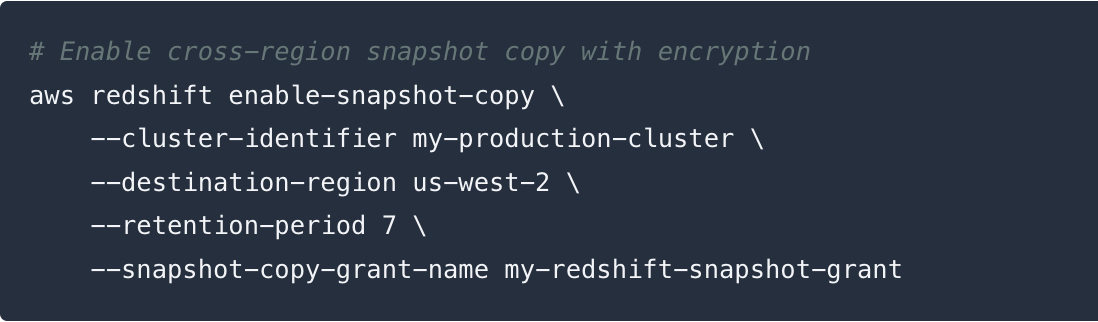
In an active-passive configuration, your primary AWS Region runs the end-to-end workload, including data ingestion, processing, and serving data through Amazon Redshift. Amazon Redshift replicates data to the DR Region using its built-in cross-Region snapshot feature. During a disaster, you restore clusters from replicated snapshots in the DR Region.
RPO: 15 minutes plus time for data replication | RTO: 1–2 hours | Cost: Low
Snapshots in Amazon Redshift provisioned clusters
By default, Amazon Redshift provisioned clusters take a new snapshot every 8 hours, or whenever 5 GB of data changes are detected on any single node, whichever comes first. The 5 GB threshold is evaluated per node independently.
Amazon Redshift offers automated snapshots of your cluster at no extra storage cost in both your primary and DR Regions. You will incur charges for the data transfer when Amazon Redshift copies snapshots across Regions. The initial cross-Region copy is a full snapshot transfer. Subsequent copies are incremental, transferring only the changed blocks since the last snapshot, which significantly reduces transfer time and cost.
When to customize the automatic snapshot schedule
You can override the default and set a custom schedule, with a minimum frequency of once per hour. However, this is only useful in one scenario:
| Cluster type | Recommendation |
| ≥ 5 GB of changes per node per hour | Keep the default — already snapshotting frequently enough |
| < 5 GB of changes per node per hour | Customize the schedule to take snapshots more often |
When to use manual snapshots
If you need a guaranteed RPO of less than 1 hour (for example, every 15 minutes), or need to retain backups beyond 35 days, use manual snapshots scheduled at the frequency you want. Manual snapshots incur additional storage charges but are retained until explicitly deleted.
Comparing automatic and manual snapshots
| Automatic snapshots | Manual snapshots | |
| Frequency | Every 8 hours or 5 GB change (customizable to run hourly) | Any frequency you choose |
| Best for | RPO ≥ 1 hour | RPO < 1 hour (for example, 15 min) |
| Cost | No additional cost (included with cluster) | Additional storage charges. |
| Retention | 1–35 days (configurable) | Until explicitly deleted |
| Cross-Region copy | Supported (incremental) | Supported (incremental) |
Architecture
The following diagram illustrates the Active-Passive DR architecture.

The Active-Passive strategy keeps compute resources in the DR Region ready to be spun up from snapshots when needed. When replicating data, consider the other services that are part of your end-to-end data pipeline. In the Amazon Redshift data sharing model, the producer cluster creates and owns the data, while consumer clusters read from the producer through data shares. In a DR context, the producer is restored first in the DR Region, then consumer clusters are resumed to serve read workloads.
- Amazon S3 is frequently used with Amazon Redshift. For complete data resiliency, replicate data in Amazon S3 as well using Amazon S3 Cross-Region Replication (S3 CRR). It continuously replicates your S3 data lake to the DR Region with near-zero lag. For Apache Iceberg tables, we recommend using replication for Amazon S3 Tables, a capability of Amazon S3, to guarantee that both the data and the associated metadata (manifests, snapshots) are replicated consistently to the DR Region.
- Customers use AWS Glue Data Catalog and AWS Lake Formation to catalog and maintain permissions. Read this post on how to build multi region resilient data architecture using AWS Glue and AWS Lake Formation.
- Customers often use Amazon DynamoDB alongside Amazon Redshift in data pipeline architectures to track pipeline orchestration state, such as job IDs, processing timestamps, batch completion flags, and ingestion checkpoints that tell your pipeline which data has been processed. Amazon DynamoDB Global Tables replicate this state across both Regions, so pipeline state is available in the DR Region and you know exactly where to resume processing after failover.
DR Region (Passive) components:
- Amazon Redshift clusters ready to restore from snapshots.
- AWS Lambda functions with data transformation pipelines code deployed and ready.
- Amazon MSK infrastructure defined in IaC but not provisioned.
- Amazon EMR job definitions ready but not running.
Failover sequence (20–60 minutes):
- Restore the Amazon Redshift cluster in DR Region, from the latest cross-Region snapshot (this is typically the longest step).
- Provision and start Amazon MSK clusters in the DR Region.
- Disable S3 event triggers for AWS Glue Catalog (to prevent split-brain metadata updates).
- Stand up Amazon EMR and resume data processing.
- Resume paused Amazon Redshift consumer clusters.
- Recreate external schemas pointing to the DR Region’s AWS Glue Catalog. Note: External schemas, external schema-level permissions, and references to external resources (for example, S3 paths, AWS Glue Catalog databases) included in the Amazon Redshift snapshot, contain references to primary Region resources. Plan to recreate these in your DR Region as part of your failover runbook. Database users, groups, and their internal permissions are replicated with the snapshot. Plan to script external schema recreation as part of your failover runbook.
- Update query or application service endpoints to the DR Region.
- Update Lambda data transformation pipelines to point to the new producer endpoint.
When to choose Active-Passive
- You can tolerate 15–20 minutes of data loss.
- A 1–2 hour RTO is acceptable for your business.
- Cost optimization is a priority.
- Data can be backfilled or replayed from upstream sources (for example, Amazon MSK topic retention).
Strategy 2: Active-Active multi-Region
In an Active-Active configuration, both your primary and DR Regions run fully operational data pipelines simultaneously. Data is ingested, processed, and served in both Regions at all times. Failover becomes a matter of redirecting traffic rather than restoring infrastructure. This reduces RTO to minutes.
RPO: Near-zero | RTO: < 1 hour (often minutes) | Cost: High
Architecture
The following diagram illustrates the Active-Active DR architecture. Active-Active requires mirroring your entire pipeline, from ingestion through serving, across both Regions.

Real-time replication layer:
- Amazon MSK Replicator: Mirrors Kafka topics in real time from the primary Region to the secondary Region. This is the earliest point of replication in the pipeline, so the DR Region processes the same events with minimal lag.
- Amazon DynamoDB Global Tables: Active state tracking across both Regions keeps pipeline controls and job state synchronized.
- Active Amazon EMR processing: Both Regions continuously process incoming data, maintaining fresh state in their respective S3 data lakes and AWS Glue Catalogs.
- Active Amazon Redshift producer clusters: Both Regions continuously ingest processed data, maintaining near-identical warehouse state.
- Mirrored data transformation pipelines: Data transformation events are actively processed in the DR Region through DynamoDB replication, keeping derived data consistent. In the Active-Active model, both Regions maintain their own Amazon Redshift cluster that independently ingests the same source data, so the DR Region’s Amazon Redshift already has current data. The mirrored pipeline supports the transformation logic and derived datasets stay synchronized.
DR Region (Active) components:
- Amazon Redshift clusters paused but ready (can be activated in minutes).
- Any Amazon Redshift data shares synchronized regularly between Regions.
- External schemas active and synchronized.
- Query or application service endpoints pre-configured and tested.
Failover sequence (minutes):
- Failover Amazon MSK consumers to the DR Region’s Amazon MSK cluster.
- Resume Amazon Redshift consumer clusters in the DR Region.
- Update query or application service endpoints to point to the DR Region.
- Promote the DR Region’s Lambda data transformation pipelines functions to act as primary.
Because the DR Region’s pipeline is already running, there is no infrastructure provisioning delay. Failover is primarily a configuration change.
Cost considerations
Active-Active essentially doubles your infrastructure costs. You are running full Amazon MSK, Amazon EMR, and Amazon Redshift clusters in both Regions simultaneously. For large-scale deployments (1+ PB), this represents a significant ongoing investment. The business case rests on the cost of downtime exceeding the cost of duplicate infrastructure. This is a calculation that often favors Active-Active for customer-facing or regulatory workloads.
When to choose Active-Active
- You require near-zero RPO with no tolerance for data loss.
- RTO must be measured in minutes, not hours.
- Your analytics infrastructure directly impacts customer-facing operations or regulatory compliance.
- The cost of downtime (financial, reputational, regulatory) exceeds the cost of duplicate infrastructure.
- You have strict Service Level Agreements (SLAs). For example, zero RPO and full-service functionality within 4 hours including data ingestion.
Strategy 3: Hybrid — tiered DR by data criticality
Not all data in your warehouse is equally critical. Some real-time insights and regulatory reports demand near-zero RPO, while historical trend analyses and archived compliance data can tolerate hours of recovery time. A Hybrid approach applies different DR strategies to different data tiers, optimizing cost while protecting what matters most.
RPO: Varies by tier | RTO: 30 minutes – 2 hours | Cost: Medium
Architecture
The following diagram illustrates the Hybrid DR architecture.

The Hybrid strategy requires a data model that supports clear separation at the schema or table level, with different recovery objectives applied per tier.
Tier 1: Hot data (Active-Active):
- Real-time dashboards, regulatory reporting, customer-facing analytics.
- Near-zero RPO through Amazon MSK Replicator and active Amazon Redshift producer in both Regions.
- RTO: Minutes.
Tier 2: Warm data (Active-Passive):
- Daily reports, historical trend analysis, internal operational data.
- RPO: 1 hour through hourly Amazon Redshift snapshots replicated cross-Region.
- RTO: 1–2 hours.
Tier 3: Cold data (S3 replication only):
- Archived data, long-term compliance storage, infrequently accessed history.
- RPO: Hours (S3 CRR with standard replication lag).
- RTO: 2+ hours (restore from S3 into Amazon Redshift Spectrum or a new cluster).
- No active Amazon Redshift infrastructure in DR Region for this tier.
Implementation considerations
- Your data model must support clear separation at the schema or table level to apply different recovery strategies. To achieve different RPO/RTO per data tier, while avoiding unnecessary table level maintenance complexities, consider using separate clusters or namespaces for each tier, or use a combination of cluster snapshots and S3-based backups (UNLOAD) for finer-grained table-level recovery.
- Workload Management (WLM) queues or separate clusters may be needed to isolate hot, warm, and cold workloads.
- Monitoring must track replication latency independently for each tier.
- Failover runbooks must be tier-aware. Operators need to know which systems to restore first.
When to choose Hybrid
- You have clearly defined data tiers with meaningfully different criticality.
- Your data model already supports or can be refactored to support hot/cold separation.
- You want to protect mission-critical data with Active-Active while managing costs for less critical workloads.
- Your organization has the operational maturity to manage tiered failover procedures.
Testing your DR strategy
Schedule quarterly DR tests that include:
- Failover execution following your documented runbook.
- RTO measurement from disaster declaration to full operational status.
- RPO validation to verify data consistency.
- Application testing to confirm connectivity.
- Failback procedure documentation.
- Lessons learned and runbook updates.
Conclusion
Disaster recovery for Amazon Redshift is not a one-size-fits-all problem. The right strategy depends on your RPO and RTO requirements, your data’s criticality, your ability to replay data from upstream sources, and your cost tolerance.
- Active-Passive offers a cost-effective path to 10–20 minute RPO and 1–2 hour RTO, suitable for most analytics workloads.
- Active-Active delivers near-zero RPO and minute-scale RTO for mission-critical services where downtime cost exceeds infrastructure cost.
- Hybrid lets you apply the right level of protection to the right data, optimizing cost without compromising on what matters most.
Whichever strategy you choose, the fundamentals remain the same: replicate early in the pipeline, automate your infrastructure, monitor replication health continuously, and test your failover procedures regularly. DR is not a project you complete. You maintain it as an ongoing practice.
Next steps
- Explore Amazon Redshift cross-region snapshot copy to get started with snapshot replication.
- Learn about Amazon MSK Replicator for active-active Kafka topic mirroring.
- Review AWS Disaster Recovery of Workloads on AWS for broader DR patterns.
- Use AWS Resilience Hub to assess and improve the resilience of your Amazon Redshift workloads.