AWS Big Data Blog
Build RAG-ready indexes from Amazon S3 with Amazon OpenSearch intelligent ingestion
Much of an organization’s most valuable knowledge sits in documents such as contracts, product manuals, research reports, support runbooks, and financial filings. This content is stored in Amazon Simple Storage Service (Amazon S3) as structured data (JSON, NDJSON, and JSON array) and unstructured data (PDF, Word, text, and Markdown). Generative AI applications, Retrieval Augmented Generation (RAG) assistants, and enterprise search experiences are only as good as their access to this content. Yet it’s often the hardest data to make discoverable and searchable. To extract this data, customers must run complex ingestion pipelines with multiple steps:
- Running a document parser that extracts text while keeping the layout, reading order, and tables.
- Extracting and interpreting the charts, diagrams, and screenshots inside those documents.
- Chunking and processing the extracted text through an embedding model and writing the results into a vector index.
Each layer brings its own infrastructure, scaling decisions, and failure modes. The complexity compounds, and many organizations spend weeks to make it work end to end.
Today, we’re excited to announce Amazon OpenSearch intelligent ingestion, a fully managed and serverless ingestion capability in Amazon OpenSearch Serverless (NextGen). You start from your collection, point to your data in Amazon S3, and choose how it should be processed. Intelligent ingestion then handles the rest: it discovers your content from S3, parses the documents, describes the images, chunks the content, generates vector embeddings, and indexes the results. There are no pipelines to configure, no document processing infrastructure to operate, and no capacity to size ahead of time.
With intelligent ingestion, you can:
- Go from raw documents to semantic search without manual pipelines. Ingest PDF, Word, and Markdown files, parsed with their layout and tables intact, into indexes ready for semantic and hybrid search.
- Make visual content searchable. When documents contain charts, diagrams, screenshots, or photos, a vision-language model writes detailed text descriptions. You can then find information that only appears in images.
- Ingest structured data without pipeline code. Load JSON, NDJSON, and CSV data and apply transformations during ingestion, with optional semantic search enrichment.
- Choose one-time or continuous ingestion streams. Use Ingestion Jobs for one-time or periodic loads such as migrations and backfills. Use Ingestion Streams to keep your index continuously in sync as new objects arrive in your bucket.
- Pay only for active processing. Capacity scales automatically with your workload, and you aren’t charged for idle ingestion capacity.
In this post, we explain how intelligent ingestion works and when to use Ingestion Jobs or Ingestion Streams. We then walk through ingesting a batch of unstructured documents from Amazon S3 and processing their contents into RAG-ready intelligence in Amazon OpenSearch Serverless (NextGen). You can ingest logs and structured data with the same workflow. Load JSON, NDJSON, and JSON array data, such as application logs, audit trails, or product catalogs, from Amazon S3 and apply transformations during ingestion, with optional semantic enrichment. Your RAG knowledge base and your log analytics can share a single ingestion experience.
Solution overview
Intelligent ingestion runs inside Amazon OpenSearch Serverless (NextGen) collections and manages the whole path from your S3 bucket to your index. When you create an Ingestion Job or an Ingestion Stream, you only need to specify two things:
- The source – An Amazon S3 bucket and prefix that contain your data.
- The destination – The index in your Amazon OpenSearch Serverless (NextGen) collection where the processed data lands.
From there, intelligent ingestion runs the following steps for you.
- Data discovery: Intelligent ingestion automatically scans the objects under your S3 prefix. For Ingestion Streams, it detects new objects as they arrive using Amazon Simple Queue Service (Amazon SQS) notifications.
- Document parsing: When PDF and Word files are detected, intelligent ingestion automatically parses them into structured content, keeping headings, reading order, and tables.
- Image understanding: When it detects images in the PDF and Word files, it generates rich text descriptions so visual content can be indexed alongside the surrounding text.
- Chunking and embedding: Intelligent ingestion splits content into chunks sized for retrieval and generates vector embeddings using OpenSearch Automatic Semantic Enrichment.
- Indexing: Intelligent ingestion writes the chunks, sparse embeddings, and metadata into your index and scales capacity up and down for the workload, within your predefined OpenSearch Compute Unit (OCU) limits for the collection group.
Ingestion Jobs or Ingestion Streams
| Ingestion Jobs | Ingestion Streams | |
| Use when | You have a fixed dataset to load once | Your data keeps arriving or changing |
| Typical scenarios | Initial loads, migrations, backfills, proofs of concept | Knowledge bases that grow, continuously updated document libraries |
| Behavior | Ingests all objects under the prefix, then completes | Keeps the index in sync as new objects arrive |
Prerequisites
To follow along with this post, you need:
- An AWS account with permissions to create and manage Amazon OpenSearch Serverless (NextGen) collections.
- An Amazon S3 bucket containing your data.
- An AWS Identity and Access Management (IAM) role and the permissions required for intelligent ingestion to read from Amazon S3.
How it works
Starting from the AWS Management Console page for Amazon OpenSearch Serverless, you can now see a new Ingestion tab. You can start by choosing Create ingestion job, or review the existing jobs on this tab.
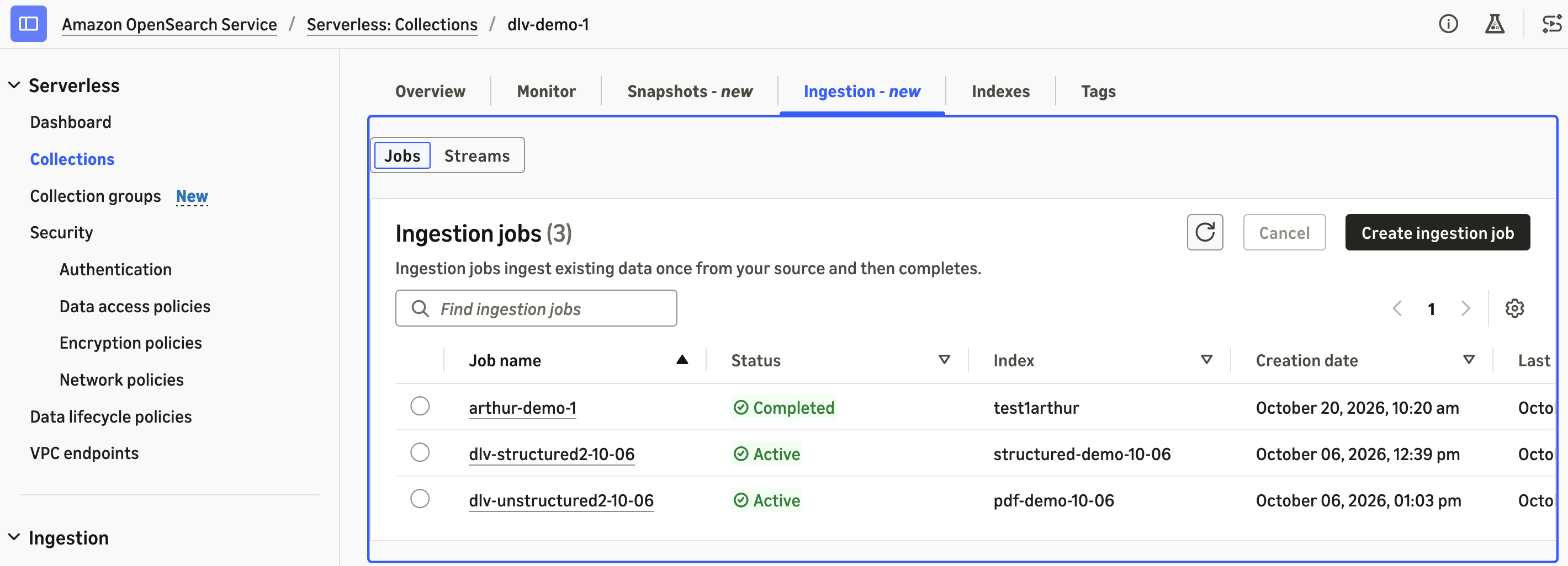
Figure 1: The Ingestion tab on the Amazon OpenSearch Service console
Intelligent ingestion supports three modes for different source configurations. For a static dataset on Amazon S3, select One-time batch to ingest it once, and the ingestion job automatically terminates after completion.
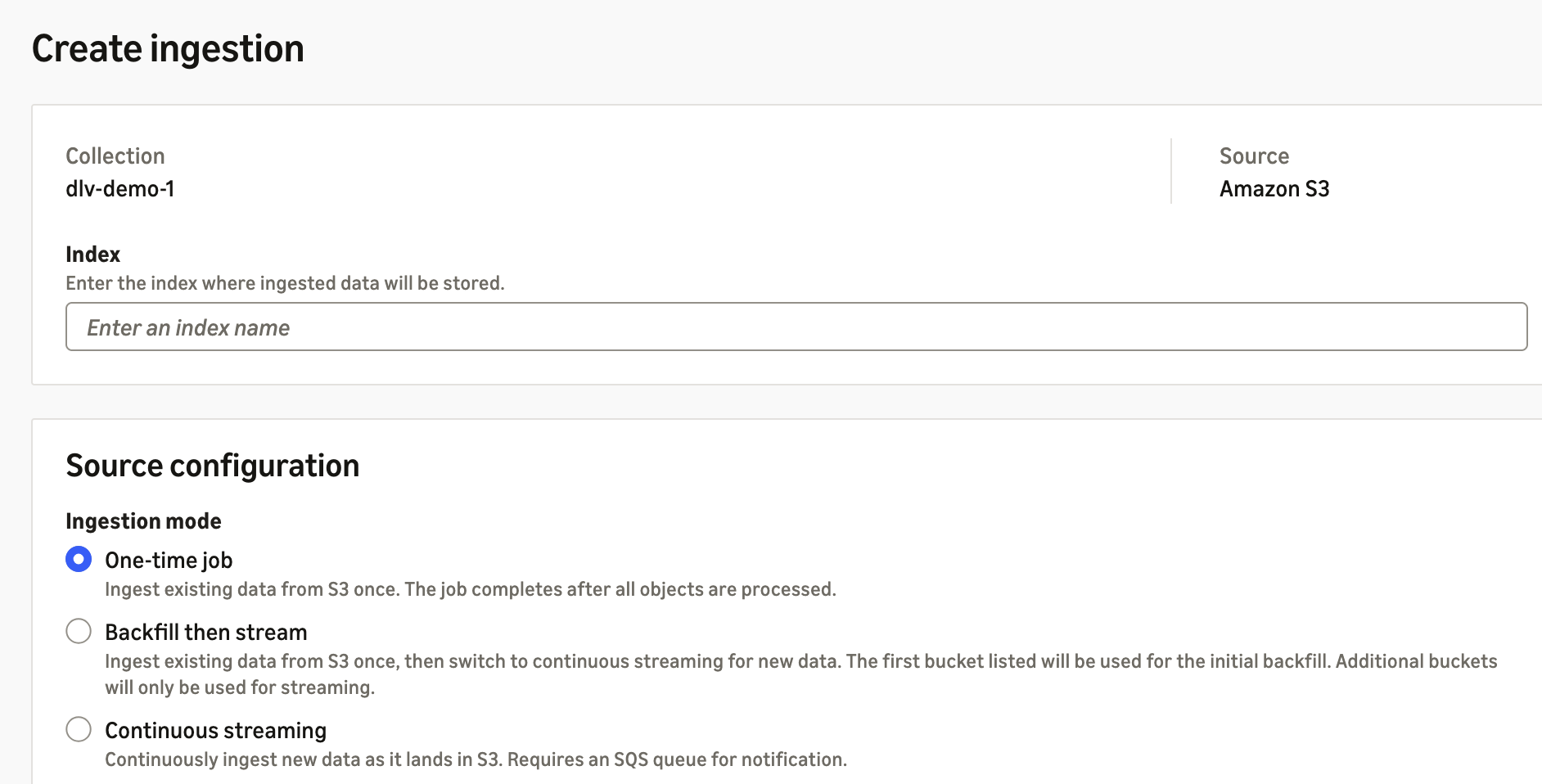
Figure 2: Selecting the One-time batch ingestion mode
For new S3 buckets that are about to receive new data input, select Continuous streaming to continuously monitor notifications and ingest when new data becomes available. If the S3 bucket already has some data in it, select Batch then stream to ingest the existing data and then switch to continuous streaming mode. For both scenarios, intelligent ingestion relies on your Amazon SQS queue to receive Amazon S3 object notifications, and requires the Amazon Resource Name (ARN) of an IAM role to assume and operate it for data ingestion.
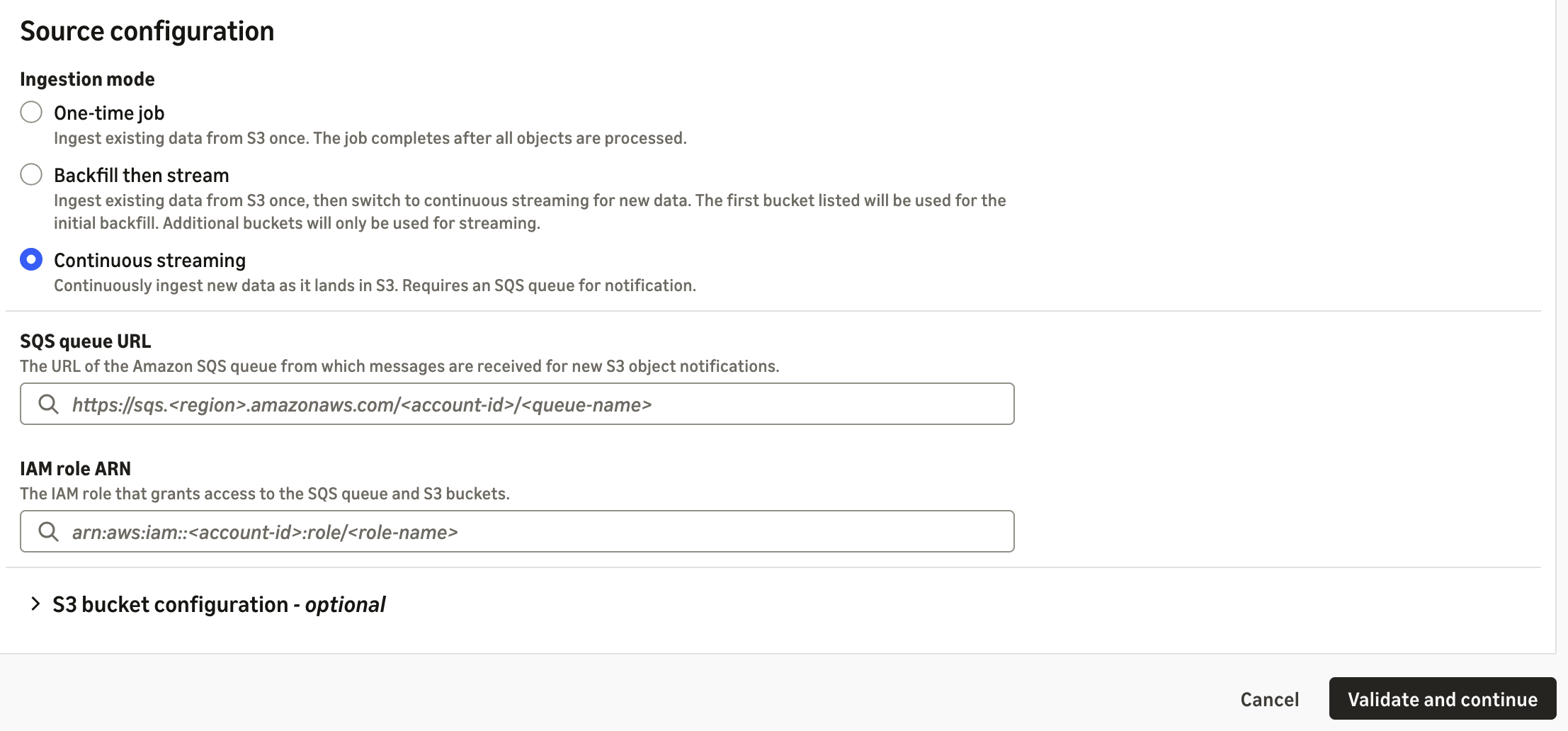
Figure 3: Configuring continuous streaming with an Amazon SQS queue and IAM role
Backfill then stream works as a combination of the other two modes. You can specify one bucket for the initial backfill and additional buckets for streaming new data.
The intelligent ingestion feature works automatically with S3 buckets within the same AWS account. You can browse for the S3 bucket within this page, and optionally define a prefix to specify which folders or files within the bucket should be ingested. Intelligent ingestion also works with S3 buckets in a different AWS account. For cross-account, you need to provide the other AWS account ID, along with the Amazon S3 bucket, IAM role ARN, and optionally Amazon SQS in that account to access both resources.
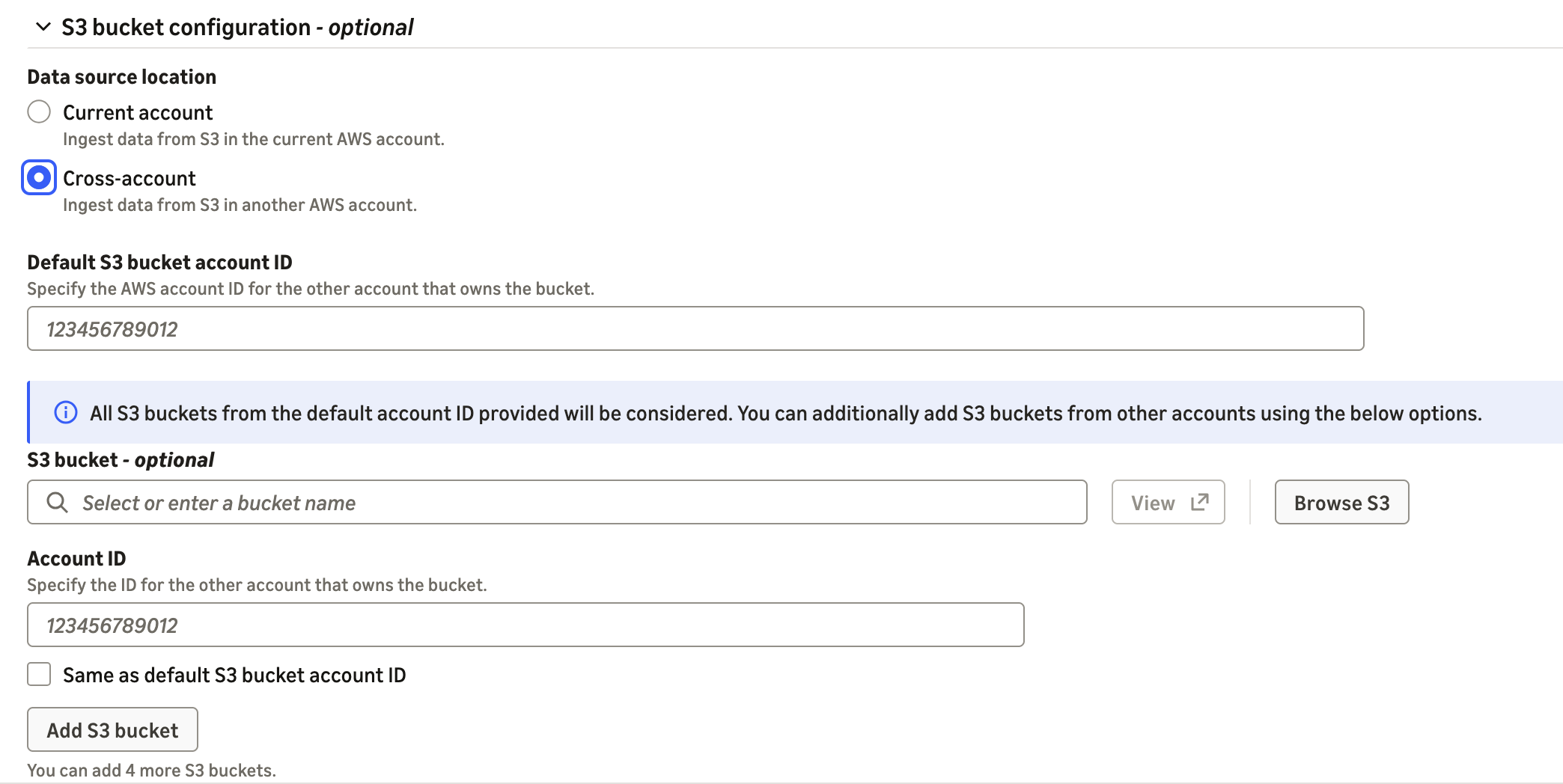
Figure 4: Selecting an Amazon S3 bucket and optional cross-account access
To get started, choose Create ingestion job and complete the configuration, and then choose Validate and continue. On this page, review the configuration, enter a name for the ingestion job or stream, and start the ingestion. The ingestion job or stream then appears on the Ingestion tab of the Amazon OpenSearch Serverless (NextGen) collection for a managerial view.
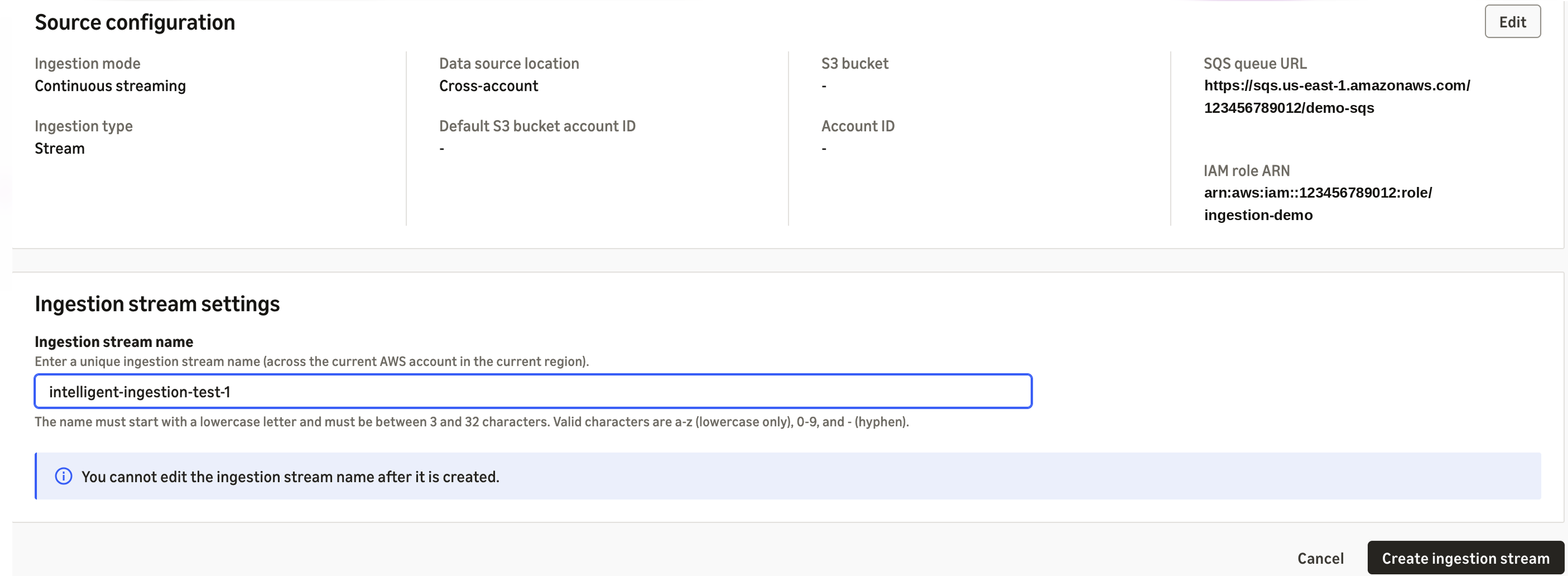
Figure 5: Reviewing and naming the ingestion job before starting
After it’s started, intelligent ingestion first scans the S3 bucket for data types and determines the processing mechanism for the content (structured data, unstructured data, or data with images). Intelligent ingestion automatically handles the tasks for the ingestion. You can monitor the number of documents it has scanned and indexed on the same page. Your data is now searchable in Amazon OpenSearch Serverless.
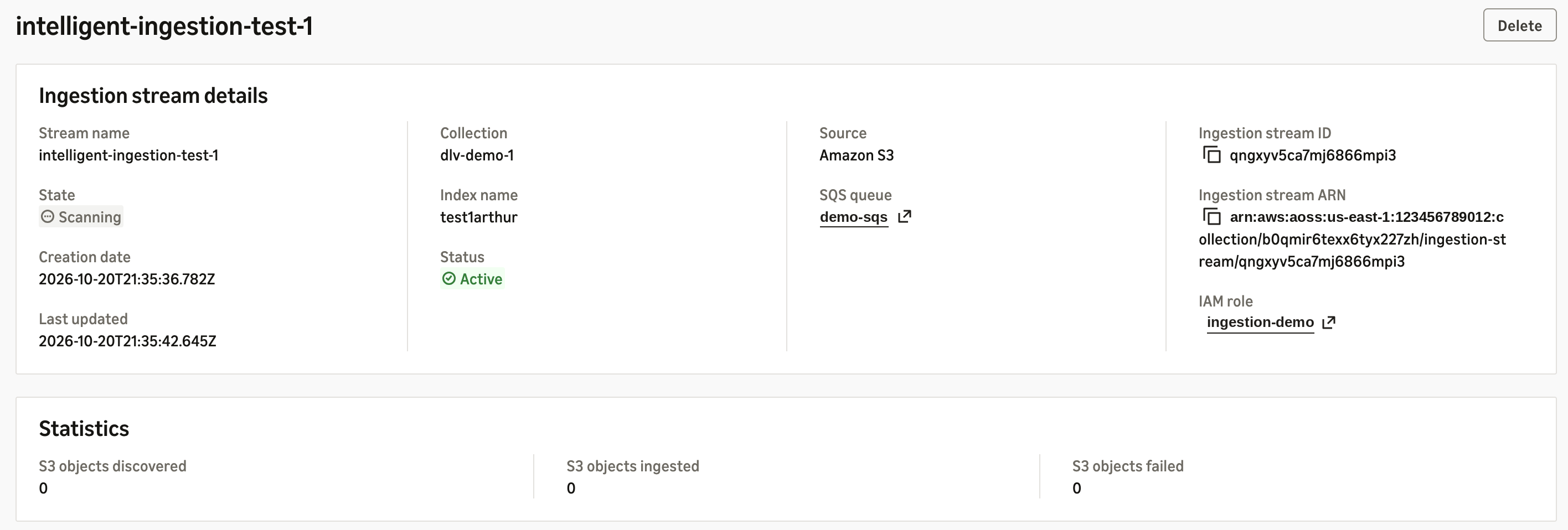
Figure 6: Monitoring documents scanned and indexed
Cost
Intelligent ingestion charges only for what you actually use.
Structured data such as JSON can be processed and ingested directly to OpenSearch Serverless for indexing. You pay for the standard OCU for each data ingestion worker while it is actively running. After the ingestion job completes, it automatically terminates and stops the billing.
Unstructured data such as PDF and Word documents requires additional parsing, chunking, and in some cases image understanding. Intelligent ingestion can automatically use the serverless indexing OCU (within your predefined limits) to extract text and chunk the pages into structured data. It charges the standard OCU rate, for example $0.24 per hour in US East (N. Virginia). This incurs an additional charge on top of structured data ingestion. Based on our internal testing, the one additional OCU can process 600 PDF pages per hour, which is $0.40 per 1,000 PDF pages processed and ready for ingestion. Intelligent ingestion uses Amazon Nova 2 Lite to translate the images within the PDF and Word files into semantic meanings. The Amazon Bedrock model inference cost is exactly the same as the public rates on Amazon Bedrock for Nova 2 Lite: $0.30 per 1M input tokens and $2.50 per 1M output tokens. Based on our internal testing, every 1,000 images consumes 0.5M input tokens on average, and 0.5M output tokens on average. You pay around $1.40 to process 1,000 images.
Clean up
To avoid future charges, delete the resources you created for this walkthrough. Delete any Ingestion Streams you created, then delete the OpenSearch collection and the sample documents in your S3 bucket if you no longer need them. Ingestion Jobs stop consuming capacity after they complete.
Conclusion
In this post, we showed how Amazon OpenSearch intelligent ingestion turns enterprise documents in Amazon S3 into RAG-ready intelligence without an ingestion pipeline to manage. You choose a source, a processing behavior, and a destination. Intelligent ingestion then parses your documents, describes their images, chunks the content, generates vector embeddings, and indexes the results. It scales with your workload and charges only for active processing. What once took weeks of pipeline engineering now takes only a few clicks or one API call, so your team can focus on the search and generative AI experiences your users need. Intelligent ingestion is available today for Amazon OpenSearch Serverless (NextGen) collections, with Amazon S3 as the data source, in six supported AWS Regions.
Ready to make your documents searchable? Open the Amazon OpenSearch Service console, choose your collection, and create your first Ingestion Job. Start with a small set of documents to see results in minutes, then add an Ingestion Stream to keep your index in sync as your content grows. To learn more, see Intelligent ingestion in the Amazon OpenSearch Service Developer Guide. For pricing details, see Amazon OpenSearch Service pricing.