AWS Big Data Blog
Building unified data pipelines with Apache Iceberg and Apache Flink
You can process real-time data from your data lake with Amazon Managed Service for Apache Flink without maintaining two separate pipelines. Yet many teams do exactly that, and the cost adds up fast. In this post, you build a unified pipeline using Apache Iceberg and Amazon Managed Service for Apache Flink that replaces the dual-pipeline approach. This walkthrough is for intermediate AWS users who are comfortable with Amazon Simple Storage Service (Amazon S3) and AWS Glue Data Catalog but new to streaming from Apache Iceberg tables.
The dual-pipeline problem
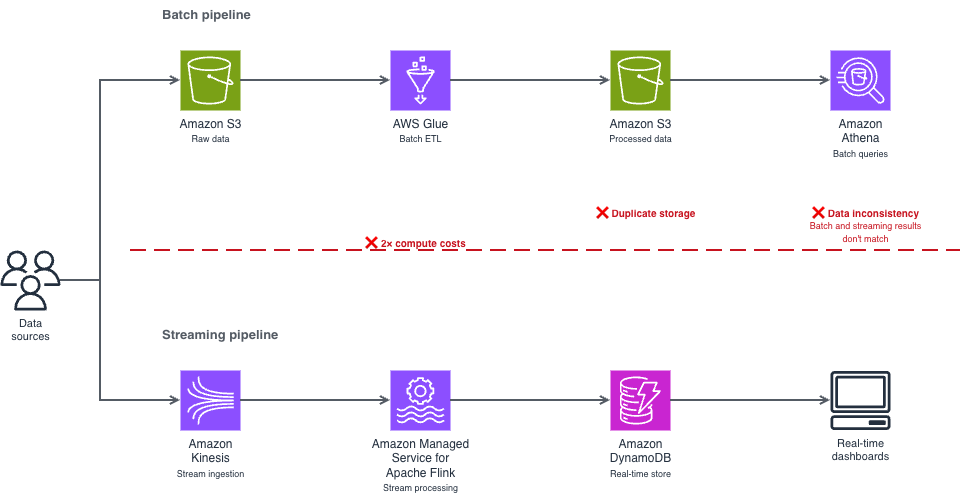
This dual-pipeline approach creates three problems:
- Double the infrastructure costs. You run and pay for two separate compute environments, two storage layers, and two sets of monitoring. For example, if you’re spending $10,000/month on separate streaming and batch infrastructure, a meaningful portion of that spend is pure duplication.
- Data synchronization issues. Your batch and streaming consumers read from different copies of the data, processed at different times. When a transaction shows up in your real-time dashboard but not in your batch report (or vice versa), debugging the inconsistency takes hours.
- Operational complexity. Two pipelines mean two deployment processes, two failure modes to monitor, and two sets of schema evolution to manage. Your team spends time reconciling systems instead of building features.
Where this pattern fits
Before diving into the implementation, consider whether streaming from your data lake is the right approach for your use case.
Streaming from Apache Iceberg tables works well when you need data available within seconds to minutes and you query recent data frequently, multiple times per hour. Common scenarios include:
- Operational data stores — Stream customer profile updates to serve downstream applications like recommendation engines. When a customer updates their preferences, those changes reach your operational data store within seconds.
- Fraud detection — Stream transactions for immediate analysis. Start with a 3-second monitor interval and adjust based on your detection accuracy needs.
- Live dashboards — Power real-time analytics directly from your lake. This is the strongest starting point if you’re evaluating the approach for the first time, because the feedback loop is immediate and straightforward to validate.
- Event-driven architectures — Trigger downstream processes based on data changes in your Apache Iceberg tables.
Batch processing remains more cost-effective when you process data once per day or less, or you primarily query historical data. Batch queries on Apache Iceberg tables cost less because they don’t require a continuous Apache Flink runtime.
How Apache Iceberg solves this
Apache Iceberg’s snapshot-based architecture removes the need for a separate streaming pipeline. Think of snapshots like Git commits for your data. Each time you write data to your Iceberg table, Iceberg creates a new snapshot that points to the new data files while preserving references to existing files. Apache Flink reads only the changes between snapshots (the new files that arrived after the last checkpoint), rather than scanning the entire table. Atomicity, Consistency, Isolation, Durability (ACID) transactions prevent your concurrent reads and writes from producing partial or inconsistent results. For example, if your batch extract, transform, and load (ETL) job is writing 10,000 records while your Flink application is reading, ACID transactions mean that your streaming query sees either the complete batch of 10,000 records or none of them, not a partial set that could skew your analytics.
The result is a single pipeline that handles both real-time and batch access from the same data, through the same storage layer, with the same schema.
Solution architecture
Your architecture uses four AWS services and one open source table format working together. The following diagram shows how these components connect, replacing the dual-pipeline pattern shown earlier with a single unified flow.
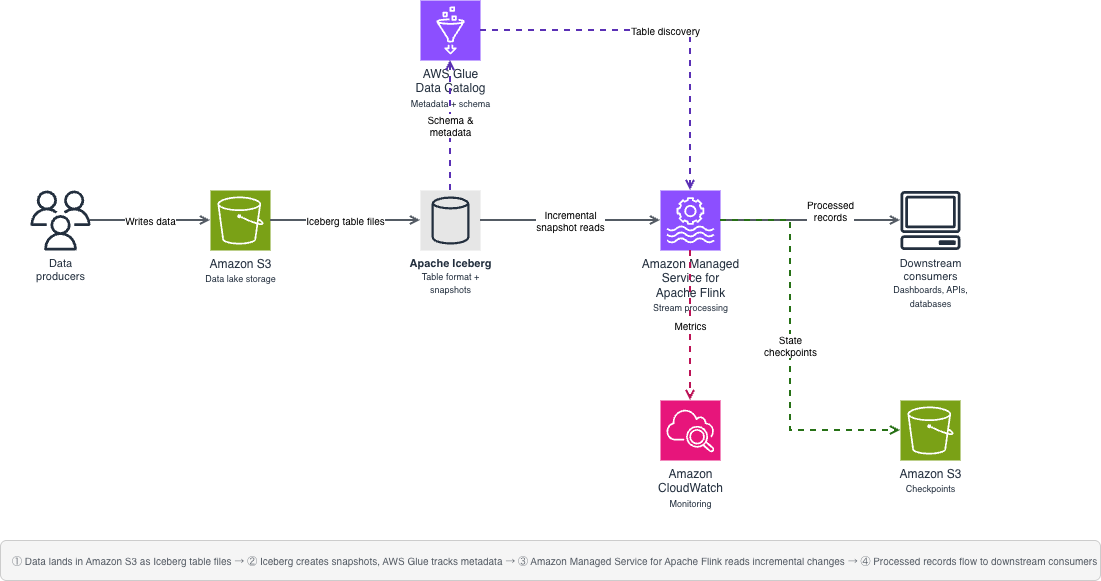
Your source data lands in Amazon S3 as Apache Iceberg table files. AWS Glue Data Catalog tracks the metadata and schema. When new data arrives, Apache Iceberg creates a new snapshot that your application detects. Your Flink application monitors these snapshots and processes new records incrementally, reading only the files that arrived after the last checkpoint, not the entire table.
You use four main components:
- Amazon S3 — Foundational storage layer for your data lake
- Data Catalog — Metadata and schema management for Apache Iceberg tables
- Apache Iceberg — Table format with snapshot-based streaming capabilities
- Amazon Managed Service for Apache Flink — Stream processing and incremental consumption
Important notices
Before implementing this solution, evaluate these risks for your environment:
- Data security: Streaming from data lakes exposes data to additional processing systems. Classify your data before implementation—customer profile updates and transaction data typically contain personally identifiable information (PII) and treat them as confidential. Apply encryption at rest and in transit for confidential data. Key risks include unauthorized data access through misconfigured Amazon S3 bucket policies or overly permissive IAM roles. Mitigations: use the resource-scoped IAM policy and TLS-enforcing bucket policy provided in the Security section.
- Data integrity: Misconfigured checkpoints or schema changes during streaming can lead to data inconsistency. Mitigations: enable exactly-once processing semantics and test schema evolution in a non-production environment first.
- Compliance: Verify that real-time data processing meets your regulatory requirements. For workloads subject to HIPAA, confirm that you use HIPAA Eligible Services and have a Business Associate Agreement (BAA) with AWS. For PCI-DSS or GDPR workloads, review the relevant compliance documentation on the AWS Compliance page. Implement data retention policies that comply with your regulatory framework.
- Cost: Nearly continuous streaming incurs ongoing compute costs. Monitor usage to avoid unexpected charges. Cost estimates in this post are based on pricing as of March 2026 and might change. Verify current pricing on the relevant AWS service pricing pages.
- Operational: Pipeline failures might impact downstream systems. Implement monitoring and alerting before running in production.
Prerequisites
Before you begin, make sure that you have the following in place. This walkthrough assumes intermediate Python skills (comfortable with functions, error handling, and environment variables), basic Apache Flink concepts (streaming compared to batch processing), and basic AWS Identity and Access Management (AWS IAM) knowledge (creating roles and attaching policies). Plan for approximately 90–120 minutes, including setup, implementation, and testing. First-time setup might take longer as you download dependencies and configure AWS resources. Expected AWS costs: approximately $5–10 if you complete the walkthrough within 2 hours and clean up resources immediately afterward. The primary cost driver is Amazon Managed Service for Apache Flink runtime ($0.11/hour per Kinesis Processing Unit (KPU)). You can minimize costs by stopping your application when not in use.
- An AWS account with AWS IAM permissions for:
s3:GetObject,s3:PutObject,s3:ListBucketon your data bucket;glue:GetDatabase,glue:GetTablefor catalog access; andflink:CreateApplication,flink:StartApplicationfor Amazon Managed Service for Apache Flink - An existing Amazon S3 bucket for your data lake
- An AWS Glue Data Catalog database configured
- Apache Flink 1.19.1 installed locally
- Python 3.8 or later
- Java 11 or a more recent version
- AWS Command Line Interface (AWS CLI) configured with credentials (aws configure)
Required Java Archive (JAR) dependencies
You need multiple JAR files because your Flink application coordinates between different systems—Amazon S3 for storage, AWS Glue for metadata, Hadoop for file operations, and Apache Iceberg for the table format. Each JAR handles a specific part of this integration. Missing even one causes ClassNotFoundException errors at runtime.
- iceberg-flink-runtime-1.19-1.6.1.jar — Core Apache Iceberg integration with Apache Flink
- iceberg-aws-bundle-1.6.1.jar — AWS-specific Apache Iceberg functionality for Amazon S3 and AWS Glue
- flink-s3-fs-hadoop-1.19.1.jar — Provides Apache Flink read and write access to Amazon S3
- flink-sql-connector-hive-3.1.3_2.12-1.19.1.jar — Hive metastore connector for catalog compatibility
- hadoop-common-3.4.0.jar — Core Hadoop libraries required by Apache Iceberg
- flink-shaded-hadoop-2-uber-2.8.3-10.0.jar — Repackaged Hadoop dependencies that avoid version conflicts with Apache Flink
- hadoop-hdfs-client-3.4.0.jar — Hadoop Distributed File System (HDFS) client libraries for file system operations
- flink-json-1.19.1.jar — JSON format support for Apache Flink
- hadoop-aws-3.4.0.jar — Hadoop integration with AWS services
- hadoop-client-3.4.0.jar — Hadoop client libraries
- aws-java-sdk-bundle-1.12.261.jar — AWS SDK for authentication and service access
Technical implementation
The sample code in this post is available under the MIT-0 license.This section walks you through building the streaming pipeline step by step. You create a single Python file, iceberg_streaming.py, with three functions that run in sequence. Your main() function calls them in order: set up the Apache Flink environment, register the Data Catalog, then start the streaming query.
Set up your Apache Flink environment
To prepare your Apache Flink environment:
- Download the required JAR files listed in the prerequisites section.
- Place the JAR files in a lib directory in your project folder.
- Configure your
HADOOP_CLASSPATHenvironment variable to point to the lib directory. - Create your streaming execution environment by adding the following function to
iceberg_streaming.py:
- Verify your environment by running flink –version. If the command isn’t found, confirm that Apache Flink 1.19.1 is installed and that your PATH includes the Flink bin directory.
Configure AWS Glue Data Catalog
To connect your Flink application to Data Catalog:
- Open your
iceberg_streaming.pyfile. - Add the
create_iceberg_source()function shown in the following section. - Replace the placeholder values with your actual AWS resources before running. These values are static configuration strings, not user input — do not construct them from external or untrusted sources at runtime.
- Save the file.
Set up streaming logic
This function configures Apache Flink to monitor your Apache Iceberg table continuously and process new records as they arrive. Checkpointing runs every 10 seconds to track progress—if the job restarts, it resumes from the last checkpoint rather than reprocessing the entire table.Notice the monitor-interval parameter, it controls how frequently Apache Flink checks for new Apache Iceberg snapshots. A 3-second interval provides near real-time processing but generates approximately 1,200 Amazon S3 LIST API calls per hour (at $0.005 per 1,000 requests, roughly $0.04/month per table based on pricing as of March 2026). For less time-sensitive workloads, increase this to 30s to reduce API costs by 90%.Replace customer_events with the name of your Apache Iceberg table in Data Catalog:
Putting it together
Your main() function calls the three steps in order:
Run the pipeline locally:python iceberg_streaming.pyPackage the application and submit it to Amazon Managed Service for Apache Flink using the console or the AWS Command Line Interface (AWS CLI).
Running in production
Moving from a local test to a production deployment requires tuning four areas: performance, monitoring, cost, and security. This section covers the key decisions for each.
Performance tuning
Determine your latency requirements before tuning. For fraud detection, you need subsecond processing. For daily reporting dashboards, you can tolerate minutes of delay.
Partition pruning reduces the amount of data scanned per query. Proper partitioning can significantly reduce query times for time series data partitioned by date. To implement, create your Apache Iceberg table with partition columns (PARTITIONED BY (date_column) in your CREATE TABLE statement), then include partition filters in your WHERE clause: WHERE date_column >= CURRENT_DATE - INTERVAL '7' DAY.
Parallel processing matches your data volume and throughput requirements. For most workloads under 10,000 records per second, a parallelism of 1–4 is sufficient. Scale up incrementally and monitor backpressure metrics (indicators that data arrives faster than your pipeline processes it, causing queuing) to find the right setting.
Checkpoint tuning balances reliability and latency. Consider how much data you can afford to reprocess after a failure. If you process 1,000 records per second with 10-second checkpoints, a failure means reprocessing up to 10,000 records. When that’s acceptable, 10 seconds works well. For faster recovery or higher volumes, reduce to 5 seconds.
Resource allocation — Right-size your Apache Flink cluster to avoid over-provisioning. Monitor CPU and memory utilization during your initial runs and adjust task manager resources accordingly.
Monitoring
Configure your production deployment with the following checkpoint settings. These work well for moderate data volumes (up to 10,000 records per second), providing exactly-once processing semantics. This means that the pipeline processes each record exactly once, even if your application restarts. Adjust the checkpoint interval based on your latency requirements. Add this to your setup_environment() function after creating the table environment.
Use Amazon CloudWatch to track checkpoint duration, records processed per second, and backpressure metrics. A 10-second checkpoint interval means writing state to Amazon S3 360 times per hour. For a 1 MB state size, that’s approximately 8.6 GB per day in checkpoint storage—at Amazon S3 Standard pricing of $0.023/GB, roughly $0.20/day or $6/month per application based on current pricing. If the checkpoint duration exceeds 50% of your interval, increase the interval or add parallelism.
Cost management
Use Amazon S3 Intelligent-Tiering for your Apache Iceberg data files, which typically have predictable access patterns after initial processing. Configure Apache Iceberg’s table expiration to automatically clean up early snapshots. This can reduce storage costs by an estimated 20–30%, though your results vary depending on write frequency and retention policies.
Right-size your Apache Flink resources based on actual throughput needs. Start with a minimal configuration and scale up based on observed backpressure and checkpoint duration metrics. Use Amazon Elastic Compute Cloud (Amazon EC2) Spot Instances where workload interruptions are acceptable, for example, in development and testing environments.
Set data retention policies on both your Apache Iceberg tables and checkpoint storage to avoid storing data longer than necessary.
Security
Security is a shared responsibility between you and AWS. AWS is responsible for the security of the cloud, including the hardware, software, networking, and facilities that run AWS services. You are responsible for security in the cloud, configuring access controls, encrypting data, and managing your application security. Apply these controls in priority order.
AWS IAM roles — Use AWS IAM roles with least-privilege access, scoped to specific resources. The following example policy restricts permissions to your data lake bucket and AWS Glue catalog:
Scoping permissions to specific Amazon S3 buckets, AWS Glue databases, and AWS Key Management Service (AWS KMS) keys restrict access to only the resources your pipeline requires. Review IAM policies quarterly using the IAM Access Analyzer to identify and remove unused permissions.
Encryption — Configure server-side encryption with AWS Key Management Service (AWS KMS) customer managed keys (SSE-KMS) for your Amazon S3 buckets. Using customer managed keys requires additional review from your security team. Confirm your key management policies, rotation procedures, and access controls before implementation. Enable automatic key rotation annually. For encryption in transit, enforce TLS by adding a bucket policy that denies non-HTTPS access:
Amazon S3 bucket hardening — Enable Block Public Access on your buckets to prevent accidental public exposure:
Enable versioning on buckets that store critical data and checkpoints to protect against accidental deletion. For production environments with sensitive data, consider enabling MFA Delete on versioned buckets. Enable S3 server access logging to track requests for security auditing.
Amazon Virtual Private Cloud (Amazon VPC) –Use Amazon VPC endpoints for private communication between your Apache Flink cluster and AWS services, removing public internet routing by keeping traffic within the AWS network.
Access logging – Enable AWS CloudTrail data events to log Amazon S3 object-level API calls (GetObject, PutObject) and Data Catalog API calls. Store logs in a separate Amazon S3 bucket with restricted access and enable log file integrity validation. Run regular compliance checks using AWS Config.
Operational practices
Set up a continuous integration and continuous deployment (CI/CD) pipeline to automate deployment and testing. Use version control to track schema and code changes. With Apache Iceberg’s schema evolution support, you can add columns without rewriting existing data files. Establish rollback procedures using Apache Iceberg’s snapshot-based architecture, so you can roll back to a previous table state if a bad write corrupts your data.
Troubleshooting
If you run into issues during setup or execution, use the following table to diagnose common errors.
| Error | Cause | Solution |
| ClassNotFoundException | Missing JAR files | Check the dependencies in your lib directory and confirm HADOOP_CLASSPATH points to the correct path |
| Table not found | Database name mismatch | Check that the database name in t_env.use_database() matches the AWS Glue database where you registered your table |
| Checkpoint failures | Amazon S3 permissions | Check that your Amazon S3 bucket policy grants s3:PutObject for the checkpoint location |
| AWS credential errors | Missing AWS IAM configuration | Check that the AWS IAM role attached to your Apache Flink application has glue:GetTable, glue:GetDatabase, and s3:GetObject permissions on the relevant resources |
| Snapshot not found | Table modified during query | Increase monitor-interval or implement retry logic in your process_record() function |
| Schema mismatch | Table schema changed between snapshots | Review Apache Iceberg schema evolution settings and confirm backward compatibility |
Clean up
To avoid ongoing charges, delete the resources that you created during this walkthrough.
- Stop your Amazon Managed Service for Apache Flink application. Open the Amazon Managed Service for Apache Flink console, choose your application name, choose Stop, and confirm the action. Or use the AWS CLI:
aws kinesisanalyticsv2 stop-application --application-name your-app-name
- Delete the Amazon S3 buckets that you created for data storage and checkpoints. For instructions, see Deleting a bucket in the Amazon S3 User Guide.
- Remove the Apache Iceberg tables from your Data Catalog.
- Delete the AWS IAM roles and policies created specifically for this walkthrough.
- If you created an Amazon VPC or Amazon VPC endpoints for testing, delete those resources.
Conclusion
Maintaining separate streaming and batch pipelines doubles your infrastructure costs, creates data synchronization issues, and adds operational complexity that slows your team down. In this post, you replaced that dual-pipeline architecture with a single system built on Apache Iceberg and Amazon Managed Service for Apache Flink. You configured a Flink environment with the required JAR dependencies, connected it to Data Catalog, and implemented streaming queries that read new records incrementally with exactly-once processing semantics. The same data, the same storage layer, the same schema—accessible to both your real-time and batch consumers.
To extend this solution, try these next steps based on your use case:
- If you’re processing high volumes (>10,000 records/sec): Start with partition pruning. Add PARTITIONED BY (date_column) to your table definition, this typically reduces query times by 60–80%.
- If you need production monitoring: Implement custom Amazon CloudWatch metrics. Track checkpoint duration, records processed per second, and backpressure to catch issues before they impact your pipeline.
- If you have variable workloads: Configure auto scaling for your Apache Flink cluster. See the Amazon Managed Service for Apache Flink Developer Guide for detailed guidance.
Share your implementation experience in the comments, your use case, data volumes, latency improvements, and cost reductions help other readers calibrate their expectations. To get started, try the Amazon Managed Service for Apache Flink Developer Guide and the Apache Iceberg documentation on the Apache Iceberg website.