AWS Big Data Blog
Choose the right streaming ingestion path for Apache Iceberg tables on AWS
Choosing the streaming ingestion path to write to Apache Iceberg tables is a key step in building low-latency, high value data lakes. Organizations are building AI agents, operational dashboards, and powering analytics that demand real-time data to create actionable insights. Apache Iceberg lets these workloads share a single table format, but reducing ingestion latency depends on choosing the right streaming path into those tables.
Choosing that path is a trade-off between operational and technical requirements. Operationally, it determines how much infrastructure you manage, whether you write configuration or application code, how fresh your data can be, and how portable your solution is. Technically, it determines whether you can apply row-level updates and deletes, who runs compaction, how your pipeline handles schema changes from upstream producers, and what you pay per GB ingested. These decisions are expensive to reverse because they live in your pipeline code, IAM model, and operational runbooks, not in the table itself.
In this post, we compare five AWS ingestion paths that write to Iceberg tables: streaming tables for Apache Iceberg (native delivery from Amazon Managed Streaming for Apache Kafka (Amazon MSK) and Amazon Kinesis Data Streams), Amazon MSK Connect with the Apache Iceberg sink connector, Amazon Data Firehose, Amazon Managed Service for Apache Flink, and Apache Spark Structured Streaming on Amazon EMR. We evaluate each against eight technical criteria, call out production caveats, and close with a decision framework you can apply to your own workload.
This is a live blog post, and we will evolve it as new features are released in this space to simplify and evolve Iceberg integration for real-time analytics use cases.
Operational considerations for evaluating an Iceberg sink
When you design a real-time analytics solution on Apache Iceberg, a handful of questions shape which approach fits your workload best. Before diving into the eight technical criteria that shape your decision, it is important to consider the non-technical considerations for choosing an ingestion path. These operational considerations inform the path that you need for your specific team and organizational goals:
- Do you want a fully managed solution? If so, streaming tables for Apache Iceberg and Amazon Data Firehose are your best options.
- Do you prefer to manage configurations, or write applications? If you prefer configurations, streaming tables, Amazon Data Firehose, and MSK Connect are the best options. If you prefer writing applications, Managed Service for Apache Flink and Apache Spark Structured Streaming on Amazon EMR are the best.
- Do you require sub-minute data freshness? If so, Managed Service for Apache Flink and Apache Spark Structured Streaming on Amazon EMR are the only options that can support sub-minute data freshness, while also managing the data compaction needed for most sub-minute workloads.
- Do you require a portable, open source solution? If so, MSK Connect, Managed Service for Apache Flink, and Apache Spark Structured Streaming on Amazon EMR are the best options.
Eight technical criteria for evaluating an Iceberg sink
After you decide your operational considerations, your technical requirements inform what path is supported for your needs. These considerations are subject to change over time as each solution releases new versions and features to support more Iceberg workloads. However, because they drive what is possible for each path, they must factor into your decision with your operational goals. These technical considerations will be the focus of this post, as they are the primary factors which drive which solution is feasible for your workload, in addition to the operational considerations in the previous section.
| Criteria | Description |
| Upsert behavior | Is your workload append-only, or do you need row-level UPDATE and DELETE? A change data capture (CDC) workload usually wants the Iceberg table to mirror the current state of the source. When a record changes in the database, it should change in the table. A logging or IoT workload is the opposite: every event is appended as it arrives, and past events are never modified. |
| Table maintenance | How do you want to handle Iceberg table maintenance? Amazon S3 Tables, a capability of Amazon Simple Storage Service (Amazon S3), compacts files, expires snapshots, and removes orphan files for you automatically. Or, you can run maintenance yourself to run more frequently, as part of the sink pipeline itself. |
| Schema evolution | What should happen to your Iceberg table when a producer adds, renames, drops, or retypes a field? |
| Message serialization | Which input formats do you use: JSON, Avro, Protobuf? Do you use a schema registry, and if so, which one? |
| Source and destination support | Which stream sources are you working with: Amazon MSK, Kinesis Data Streams, or direct API calls to Amazon Data Firehose? And where do you need the data to land: in fully managed Amazon S3 Tables, where AWS handles compaction and maintenance, or in self-managed Iceberg tables in your own S3 bucket, catalogued through the AWS Glue Data Catalog? |
| Scalability and performance | How does the writer scale as throughput grows, and how much tuning does that scaling require? |
| Fan-out to multiple tables | Does each source stream or topic map to a single Iceberg table, or do you need to route records into several destination tables based on their content? |
| Data transformation and analytics | Do you need to filter, enrich, aggregate, or reshape records in flight? If so, what kind of processing? |
After you know your requirements for these eight criteria, you can decide on the best solution for writing your real-time data to Iceberg tables.
Reference architecture
The following reference architecture outlines the high-level solution for writing real-time data to Iceberg tables based on your requirements. The differentiating features we will discuss in this post are the Stream Processor, which takes your data from Stream Storage (Amazon MSK or Amazon Kinesis Data Streams), and writes the data to your stream sink (Apache Iceberg tables).
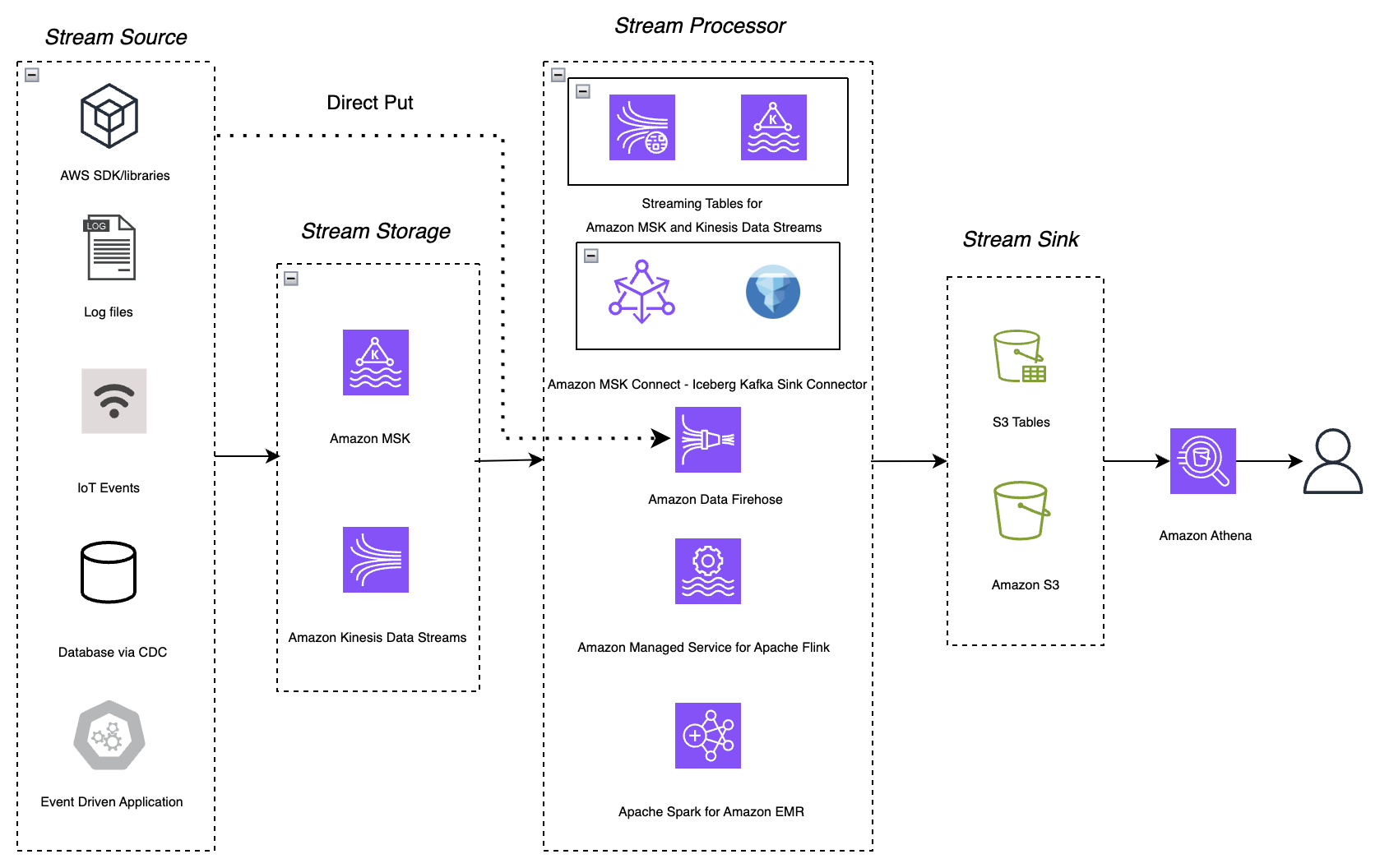
Figure 1: Five-stage streaming ingestion pattern for Apache Iceberg on AWS
The architecture works as follows:
- Stream sources: Applications built with the AWS SDKs and libraries, log files, IoT events, change data capture (CDC) from a database, and event-driven applications produce records.
- Stream storage: Producers write records to Amazon MSK or Amazon Kinesis Data Streams. Alternatively, producers can skip stream storage and send records straight to Amazon Data Firehose using Direct PUT.
- Stream processing: One of the five stream processing options covered in this post reads the records and writes them to Iceberg tables.
- Stream sink: The ingestion option writes the data to Iceberg tables in Amazon S3 Tables or in a general-purpose Amazon S3 bucket.
- Analytics. Users query the Iceberg tables with Amazon Athena.
Side-by-side comparison
The following matrix summarizes all five options against the eight criteria. Each solution will be discussed in-depth in the next section.
| Criterion | Option A: Streaming tables |
Option B: MSK Connect Iceberg sink |
Option C: Amazon Data Firehose |
Option D: Managed Service for Apache Flink |
Option E: Apache Spark on Amazon EMR |
| Upsert behavior | No | No | Full | Full | Partial |
| Iceberg table maintenance | Full | Partial | Partial | Full | Partial |
| Schema evolution | No | Full | Partial | Full | Full |
| Message serialization | Partial | Full | Partial | Full | Full |
| Source support | Full | Partial | Full | Full | Full |
| Scalability and performance | Full | Full | Partial | Full | Full |
| Fan-out to multiple tables | No | Full | Full | Full | Full |
| Data transformations | No | Partial | Full | Full | Full |
Option A: Streaming tables for Apache Iceberg
Streaming tables are a native delivery capability of Amazon MSK Express brokers and Amazon Kinesis Data Streams On-Demand mode. You select a topic or stream, point the delivery at a schema registered in AWS Glue Schema Registry and choose an S3 table bucket as the destination, and the service continuously materializes the data as a queryable Iceberg table. There are no connectors to manage, no pipeline code, and no consumer applications to deploy or scale.
The delivery pipeline reads records, buffers them to the configured data freshness interval, validates and converts each record against the registered schema, performs inline compaction into optimized Parquet files, and commits them to the table. Records that fail validation are routed to a dead-letter queue in Amazon S3. Because the destination uses S3 Tables, the managed S3 Tables maintenance jobs (compaction, snapshot expiration, and unreferenced file removal) apply to it, and you can configure record expiration on the partition column to enforce data retention automatically.
When to choose it
Choose streaming tables when you want a query-ready Iceberg table from an MSK Express topic or a Kinesis Data Streams On-Demand stream, with nothing to build or operate. There’s no connector, consumer application, or compaction job to manage, and delivery doesn’t use your stream’s read capacity. It’s a good fit for append-only workloads such as event logs, clickstream, and telemetry, and for raw landing zones that feed downstream processing.
What stands out
- Lowest operational effort. There’s no infrastructure to operate. You enable delivery from the AWS Management Console, the Amazon MSK and Kinesis APIs, or your infrastructure-as-code templates.
- Lower cost. Delivery costs up to 60% less than running a self-managed pipeline to achieve the same result. Because the service writes optimally sized files, downstream engines scan less data per query, which reduces query costs by up to an additional 30%. For details, see the AWS Big Data Blog: Deliver real-time data to streaming tables for Apache Iceberg with Amazon Kinesis Data Streams.
- Fully managed maintenance. The small-file problem is handled at the source: records are compacted inline during ingestion rather than in a separate job afterward. S3 Tables then continue to optimize the table over its lifetime.
- Built-in write coordination. Write coordination and exactly-once delivery semantics are built in, eliminating the concurrent-writer conflicts that otherwise surface as failed commits.
- No impact on your consumers. Delivery doesn’t compete with your applications for resources. On MSK, it runs on the Express broker backend, so it uses none of your broker’s read capacity and adds no cross-Availability Zone transfer charges. On Kinesis, it doesn’t consume your stream’s read limits or enhanced fan-out (EFO).
- Not limited to Iceberg. When Iceberg isn’t required, you can deliver to general purpose S3 buckets in the source format, which is useful for archival, backup, or machine learning (ML) training data.
Caveats to plan for
For an up-to-date list of the supported configurations for streaming tables, refer to the Key concepts and Supported configurations. At the time of writing, some caveats are:
- Append-only, and read-only. Streaming tables are append-only, and read-only to you. All write operations from your own engines are not permitted, and individual rows cannot be deleted outside the record expiration job. If your workload needs CDC with update and delete operations, the pipeline cannot apply them, and instead will append all operations to the table.
- No fan-out or transformation. All records in a topic land in a single table, and there is no in-flight transformation. You can deliver one topic to several tables, but only as duplicate copies rather than content-based routing.
- Fixed partitioning and minute-level freshness. Partitioning is time-based on an hourly granularity, data freshness is configurable between 5-15 minutes, and cross-Region delivery is not supported.
Option B: Amazon MSK Connect with the Apache Iceberg sink connector
The Apache Iceberg sink connector is a Kafka Connect connector that runs on Amazon MSK Connect. You configure it rather than write code, and it can scale automatically by adding tasks as your topic partitions grow. It can create destination tables for you and can fan out records from a single topic to multiple Iceberg tables. If your team already runs Kafka Connect, it fits neatly into how you operate today.

Figure 2: Web app data capture into Iceberg using Iceberg sink connector on Amazon MSK Connect
When to choose it
MSK Connect is a good fit when you’re already running Kafka Connect and want multi-table routing without writing code. It suits append-only ingestion, or raw change data capture (CDC) that you merge downstream. Choose it when you’re prepared to own compaction separately.
What stands out
- No application code. You configure the connector rather than build and version an application.
- Scales with the topic. Task parallelism follows topic partitions, so throughput scaling is predictable and mostly automatic.
- Automatic table creation and schema evolution. The connector can create tables it needs and propagates schema changes from the Kafka schema into the Iceberg table.
- Full serialization coverage. Avro, JSON, and Protobuf through the standard Kafka Connect converters, with schema registry support.
- Fan-out supported. Records from one topic can be routed into several destination tables based on record content.
Caveats to plan for
- Insert-only writes. The connector does not support UPDATE or DELETE. As with streaming tables, mutable CDC workloads rule this option out unless you add a downstream merge step.
- No embedded table maintenance. There’s no built-in compaction, snapshot expiration, or orphan-file cleanup, so you orchestrate and schedule separate Spark or Flink jobs. Continuous Kafka Connect commits produce many small files, and without an aggressive compaction schedule, query performance degrades over time.
- Limited transformations. Only Simple Message Transformations are available, with no joins, aggregations, or stateful logic at ingestion time.
- No branch writes. You can’t write to Iceberg branches, which limits staged commits and safe promotion workflows.
- Kafka-only, with worker overhead. Kafka sources only and you own connector plugin versions, worker scaling, and upgrades.
Option C: Amazon Data Firehose
Amazon Data Firehose is the serverless path. It supports the widest range of sources of any option: Amazon MSK, Kinesis Data Streams, and direct API PUT from applications and the AWS SDK, with no cluster or application to size. Firehose also handles row-level mutations: it routes records from a single stream into different Iceberg tables and applies inserts, updates, and deletes automatically, using JQ expressions for routing and unique keys for matching. You can enforce table-level and column-level access control through AWS Lake Formation, and you can invoke an AWS Lambda function to transform records in flight.
When to choose it
Firehose is a good fit when you want serverless simplicity with JSON producers, need modest change data capture (CDC) support without writing code, or need Direct PUT ingestion. Choose it after you’ve committed to an external compaction strategy up front, since Firehose won’t manage file layout for you.
What stands out
- Broadest source support. Firehose reads from MSK, Kinesis Data Streams, and Direct PUT, so producers that aren’t already on a stream can write to it directly.
- CDC without code. Firehose applies inserts, updates, and deletes automatically from routing metadata, which is uncommon for a no-code sink.
- Multi-table routing. A single stream can feed many Iceberg tables through JQ-based routing expressions.
- Transformation and governance hooks. Use a Lambda function to reshape records in flight, and Lake Formation for fine-grained access control on the destination tables.
- Automatic scaling for append-only workloads. Set the AppendOnly flag to true on CreateDeliveryStream, and Firehose scales automatically to match throughput for insert-only workloads.
Caveats to plan for
- Firehose produces small files. Firehose can’t aggregate across input shards. It doesn’t shuffle or hash-distribute records before writing, so you can’t control how records are grouped into files the way you can with Flink or Spark. The result is many small, loosely organized files, so plan a compaction strategy accordingly.
- No built-in table maintenance or inline compaction. Firehose has no embedded compaction or snapshot management, which can lead to small files that increase cost and degrade query performance. Plan to use S3 Tables or use AWS Glue Data Catalog automatic compaction and storage optimization from day one to optimize query performance.
- Throughput trades off against partition count. Firehose is optimized for either many partitions or very high throughput, but not both. As ingest throughput rises, the number of partitions you can actively write to decreases. Throughput is measured after any Lambda transformation, so a function that expands records can push you into a lower partition tier. For the current throughput-to-partition limits, see Considerations and limitations in the Amazon Data Firehose documentation.
- JSON in, Parquet out. Input must be JSON and output is always Parquet. Avro or Protobuf producers need a conversion layer or a Lambda function, and each record can contain only one JSON object.
- Strict column matching, additive-only schema evolution. Column names and types in the source must match the target table exactly. Extra fields are skipped, and mismatches send records to the S3 error bucket. Schema evolution is limited to adding columns. Renames, deletions, and type changes require manual intervention. There’s no schema registry enforcement, which raises the risk of bad data landing in your tables.
- Update cost and single-writer guidance. Each update writes a delete file followed by a data file, which incurs Amazon S3 PUT charges and makes update-heavy workloads more expensive than they first look. Avoid pointing multiple Firehose streams at the same table: Iceberg uses optimistic concurrency control, so only one writer commits at a time. Note also that Amazon MSK Serverless isn’t supported as a source.
Option D: Amazon Managed Service for Apache Flink
Amazon Managed Service for Apache Flink is a flexible and feature-rich option across all eight criteria. It reads from both Amazon MSK and Kinesis Data Streams and writes to Iceberg tables through the Flink Iceberg sink. You get the Flink programming model in SQL, Java, Python, or Scala.
The main difference is Flink’s stream-native execution model. It processes records one at a time rather than in micro-batches, and it carries first-class event-time semantics with watermarks. This matters for correctness when events arrive late or out of order: a windowed aggregation keyed on event time produces the same result no matter what order the events arrive in, which micro-batch engines can only approximate. Exactly-once delivery comes from aligning Iceberg commits with Flink checkpoints.
When to choose it
Choose Managed Service for Apache Flink when you need change data capture (CDC) with updates and deletes, event-time correctness, transformation at ingest, or fan-out to multiple tables, and you’d rather not operate separate compaction jobs. For demanding, long-lived pipelines, it’s the default choice.
What stands out
- Full upsert support. Equality deletes and changelog streams give you genuine CDC semantics, including deletes, without a downstream merge job.
- Embedded table maintenance. With the Iceberg 1.10 or later sink, Flink can run compaction as part of the streaming pipeline.
- Fan-out with content-based routing. A single application can write to many Iceberg tables and route records among them based on content, using multiple sinks or a SQL statement set. For details, see the AWS Big Data Blog: Build a dynamic streaming data lake with Apache Iceberg and Apache Flink.
- Rich in-flight transformations. Joins, windowed aggregations, enrichment from reference data, and stateful pattern detection all run in the ingestion path, so the table you land is already in the shape your consumers want.
- Broad serialization and schema evolution. Flink supports Avro, JSON, and Protobuf with AWS Glue Schema Registry integration, and the sink evolves the table schema as the stream’s schema changes.
Caveats to plan for
- Highest operational complexity. This is the only option that requires you to write and maintain an application. You own Flink job configuration, dependency versions, parallelism and scaling, and fine-tuning for your workload.
- Tune the checkpoint interval. The checkpoint interval controls how often Flink commits, which in turn controls file size. Commit too frequently and you generate small files. Commit too infrequently and data freshness suffers. This is the setting that most affects downstream query performance.
- Small files still accumulate between compaction cycles. Even with embedded maintenance, streaming workloads produce small files between cycles. Embedded compaction reduces the problem, but doesn’t eliminate it.
- Team expertise. Teams without Flink experience should plan for ramp-up on state, watermarks, and backpressure. The Managed Service for Apache Flink Agent Skill shortens this by generating idiomatic application code.
Option E: Apache Spark Structured Streaming on Amazon EMR
Spark Structured Streaming on Amazon EMR is a natural fit if your data engineering practice is already built on Spark. It reads from both Amazon MSK and Kinesis Data Streams and writes to Iceberg tables. You get full MERGE INTO support for upserts, you can express transformations in SQL, Python, or Scala, and a single job can write to multiple tables. Because batch and streaming share the same DataFrame API, the same transformation code can serve both a nightly reprocessing job and a continuous pipeline.
When to choose it
Spark on Amazon EMR is a good choice when your team already runs Spark at scale, you need MERGE semantics, and latency in the range of minutes is acceptable. It also makes sense when you’d rather extend a platform you already operate than introduce a new runtime. One requirement to plan for: deduplicate your records before every MERGE.
What stands out
- Full Iceberg feature access. You get MERGE INTO and the complete set of Iceberg Spark procedures, including rewrite_data_files, expire_snapshots, and remove_orphan_files.
- Compaction in the pipeline. You can configure Spark to compact files as part of the pipeline, using fanout writes and distribution modes, which gives you more control over file layout than Firehose or MSK Connect offer.
- Existing team skills carry over. Your skills, libraries, notebooks, and CI/CD pipelines work as-is. For many teams, this is the deciding factor.
Caveats to plan for
- Deduplicate before every MERGE. If a source batch contains more than one row for the same key, MERGE INTO is ambiguous. Spark might apply one of the duplicate rows non-deterministically (so the same query returns different results on different runs), or it might detect the conflict and fail the batch with a “multiple matching rows” error. To avoid this, deduplicate or rank your change records before the MERGE (for example, by event timestamp within each key). This is a correctness requirement, not a performance optimization.
- Micro-batch latency. Spark’s micro-batch model puts a latency floor in the range of tens of seconds to minutes. It also approximates the event-time semantics that Apache Flink handles natively.
- Higher cost at comparable throughput. Cluster overhead and the micro-batch model typically make Spark more expensive than an equivalent Flink application for the same continuous workload.
- Read parallelism matches your source partition count. Spark creates one task per source partition, one per Kinesis shard, or one per MSK topic partition. When the source has few partitions, you get few tasks, so adding executors doesn’t raise throughput, and your pipeline stalls on an under-partitioned source. When the source has many partitions, Spark caching is not automatically tuned, and significant performance degradation can occur as consumers are churned in the Spark cache. To add parallelism, add more shards or partitions, repartition early in the micro-batch, and make sure you tune the consumer cache size to your workload requirements.
- Self-managed maintenance. In-pipeline compaction is configuration you own and tune. It isn’t a managed behavior of the sink, so you’re responsible for scheduling and maintaining it.
Conclusion
In this post, we compared five AWS paths for writing to Apache Iceberg tables: streaming tables for Apache Iceberg, Amazon MSK Connect with the Apache Iceberg sink connector, Amazon Data Firehose, Amazon Managed Service for Apache Flink, and Apache Spark on Amazon EMR. We evaluated them on two layers. The operational considerations (how much you want to run, how fresh your data must be, and how portable your pipeline needs to be) change slowly. The technical criteria (upsert behavior, table maintenance, schema evolution, serialization, source and destination support, scalability, fan-out, and transformation) change as each service releases features. Both are key aspects of how you choose your path to write real-time data to Apache Iceberg.
Start with operational considerations, because they narrow the field before you consider a single feature. If you want the lowest cost, lowest overhead solution to deliver real-time data for your use case, then we recommend streaming tables for Amazon MSK and Amazon Kinesis Data Streams. If you want to have full control over your pipeline, with a portable solution that can run anywhere, then consider Amazon Managed Service for Apache Flink or Apache Spark Structured Streaming on Amazon EMR.
Then, consider the technical specifications of your solution. For technical considerations, two questions narrow the field fast. First, what is your write pattern: append-only, or do you need row-level updates and deletes? Second, who owns compaction: the service, or your team? Answer those two and you are usually down to one or two options. Append-only workloads that want the lowest operational effort start with streaming tables. Change data capture with updates and deletes points toward Managed Service for Apache Flink.
Matching the right path to your workload gives you a low-cost, low-maintenance route from stream to queryable table, without the small files, failed commits, and unmet CDC requirements that surface later. Whether you are ingesting ecommerce clickstreams, financial transactions, or IoT device telemetry, start with those two questions, then dive into the linked solution guides for the path you choose.
- Deliver Apache Kafka data to streaming tables for Apache Iceberg with Amazon MSK Express brokers.
- Use Amazon MSK Connect and Iceberg Kafka Connect to build a real-time data lake.
- Stream real-time data into Apache Iceberg tables in Amazon S3 using Amazon Data Firehose.
- Streaming to Apache Iceberg with Apache Flink on AWS.
- Streaming to Apache Iceberg with Apache Spark on AWS.