AWS Big Data Blog
Deliver petabytes of Apache Kafka data to Amazon S3 at up to 60% lower cost with Amazon MSK Express brokers
Amazon Managed Streaming for Apache Kafka (Amazon MSK) Express brokers deliver Apache Kafka topic data to general purpose Amazon Simple Storage Service (Amazon S3) buckets at lower cost and without the operational overhead of running Kafka Connect. Because Express brokers handle both ingestion and delivery, you can reduce your ingestion and delivery costs by up to 60% compared to self-managed alternatives. There is no connector or infrastructure to manage, you pay only for the data delivered, and delivery doesn’t consume broker throughput.
Many Kafka workloads need a durable copy at rest in Amazon S3 for backup and archive. Compliance rules often require you to keep raw events for years for audits. You require a replayable copy that outlives topic retention, raw training data for artificial intelligence and machine learning (AI/ML) models, and a staging area for scheduled extract, transform, and load (ETL) jobs. For analytics, Express brokers also deliver to streaming tables, which continuously materialize your Kafka topics as Apache Iceberg tables on Amazon S3 Tables, a capability of Amazon S3, with no Kafka connectors, Apache Flink jobs, or custom consumers to run. The tables are registered automatically in AWS Glue Data Catalog, so you can query them with Amazon Athena, Amazon Redshift, and Apache Spark, and inline compaction reduces downstream query costs by up to 30%. Because delivery doesn’t add broker load, one topic can feed both an S3 bucket and a streaming table. For more information, see Deliver Apache Kafka data to streaming tables for Apache Iceberg with Amazon MSK Express brokers.
In this post, we look at the two challenges of delivering Kafka data to Amazon S3 today, managing Kafka brokers and managing the delivery pipeline, and how Express brokers and data delivery to Amazon S3 address each one. We then walk through the architecture and show how to get started on the console and with Agent Skills.
Challenges with delivering streaming data to Amazon S3 on self-managed Kafka
To deliver Kafka data to Amazon S3 today, you typically run an S3 sink connector on Kafka Connect next to your Kafka cluster. That leaves you with two systems to run:
Managing Kafka brokers: You size and provision broker storage upfront, monitor its utilization to avoid disruptions, and keep paying for it even if your workload scales down. You recover failed brokers, manage Kafka configurations for availability and performance, and patch brokers during maintenance windows. Adding capacity means provisioning brokers and rebalancing partitions, which can take hours or days, so you size the cluster for peak traffic and plan scaling well ahead.
Managing the delivery pipeline: Running Kafka Connect typically causes the following three challenges:
- Operational complexity: You find or build a connector, take it through security approval, deploy it, and apply security updates across your Kafka Connect workers. When delivery fails, you troubleshoot across brokers, workers, and Amazon S3.
- Cost: You size Kafka Connect workers for peak demand and keep paying for it when traffic is low, and a pipeline assembled from several services adds a charge at every hop.
- Contention with real-time consumers: A connector reading from a Kafka topic consumes broker egress throughput, so feeding the archive competes with your real-time applications. Cluster scaling and version upgrades can also interrupt delivery.
How Express brokers and data delivery to Amazon S3 address these challenges
Managing Kafka brokers: Express brokers include pay-as-you-go storage that scales automatically, so there’s no storage to size, provision, or monitor. When your workload scales down, the cluster uses less storage and your storage charges go down automatically. MSK recovers failed brokers for you, manages critical cluster and topic configurations for availability and performance on your behalf, and updates cluster hardware on an ongoing basis with no maintenance windows. To add capacity, you add brokers, and Express rebalances partitions onto them in minutes, so you don’t need to over-provision for traffic spikes or plan scaling far ahead. For details, see Simplifying Kafka operations with Amazon MSK Express brokers. To move from self-managed or third-party Kafka, Amazon MSK Replicator copies your data and consumer group offsets into an Express cluster, and the migrate-to-msk Agent Skill recommends a right-sized Express cluster before you start. For more information, see Migrate Kafka workloads to an Amazon MSK cluster.
Managing the delivery pipeline: Data delivery to Amazon S3 is built into Express brokers, so there’s no Kafka Connect to run. You create a channel on a topic, and MSK runs the delivery. This addresses each of the three challenges:
- Operational complexity: There’s no connector to find, build, or take through security approval, nothing to deploy beyond the channel, and no workers to patch. MSK handles retries and backpressure. When a record can’t be processed, the channel writes its identifiers and error context to a dead-letter queue (DLQ) bucket and delivery continues, and you troubleshoot in one place, through the channel’s Amazon CloudWatch metrics and logs.
- Cost: There’s no capacity to size for peak, because MSK scales delivery with your workload. You pay only for the data delivered, billed per byte, so you pay less when traffic is low. Delivery adds one charge on top of standard Amazon S3 charges, with no connector or worker fees, no charge for the broker egress that delivery uses, and no charge for records routed to the DLQ.
- Contention with real-time consumers: The channel reads the topic without consuming broker throughput, so archiving doesn’t compete with your real-time applications, and you can add channels to a topic without adding broker load. Capacity scaling and version upgrades happen without delivery gaps.
MSK data delivery to Amazon S3 architecture
Producers write to a Kafka topic exactly as they do today. The channel reads records from the topic, batches them, and writes them as objects to your S3 bucket. You choose the compression (NONE, GZIP, or ZSTD), the storage class (S3 Standard, S3 Intelligent-Tiering, or S3 Glacier Instant Retrieval), and an output key template that defines the object key layout, such as date-based prefixes with the partition and offset in each object name. Records keep the format the producer wrote them in, whether JSON, UTF-8 strings, or raw bytes, and no schema registry is required.
For JSON and String records, the channel validates each record. If a record fails validation, the channel writes the record’s identifiers and the error context to the DLQ bucket in Amazon S3, and delivery continues. You can also send delivery logs to Amazon CloudWatch Logs, Amazon S3, or Amazon Data Firehose.
The following diagram illustrates this architecture.
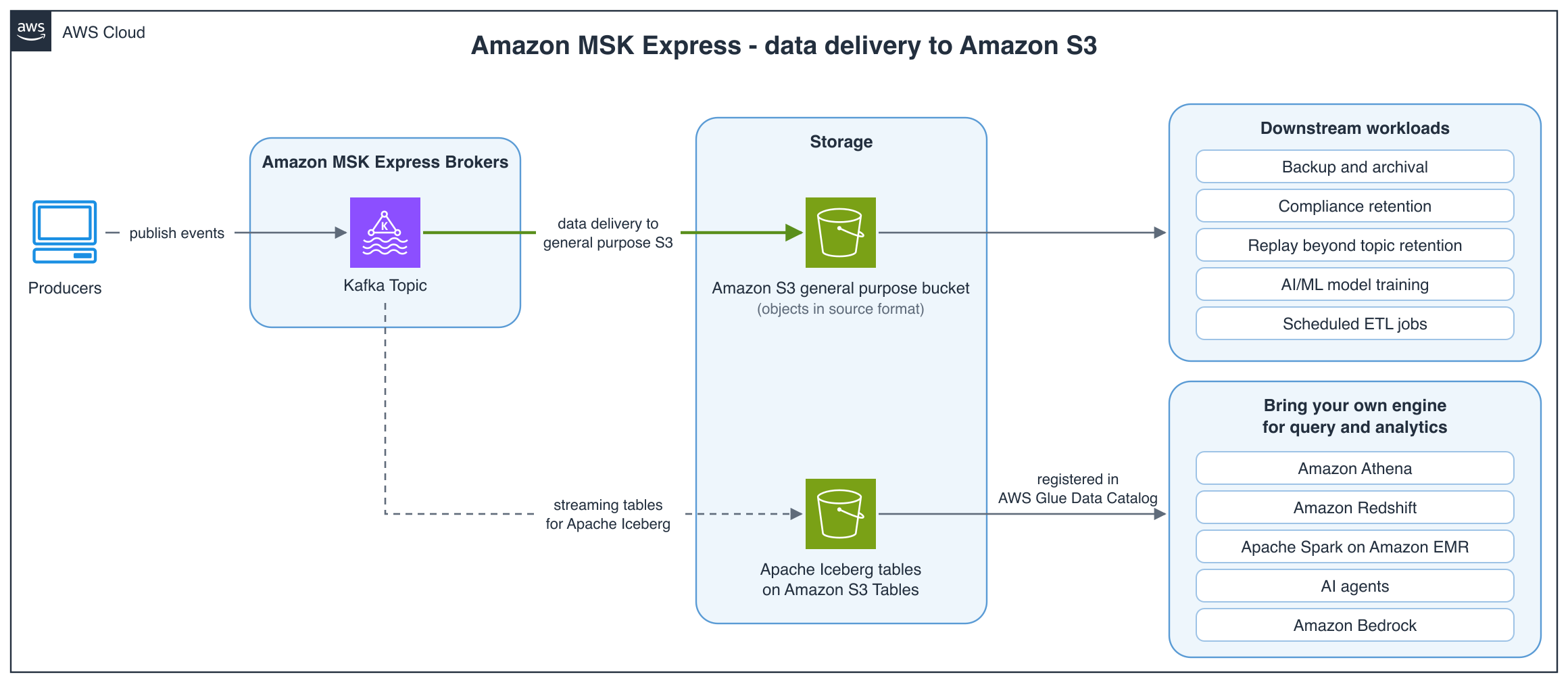
Figure 1: Producers publish to a Kafka topic on Amazon MSK Express brokers. Data delivery writes the topic to a general purpose S3 bucket as objects in their source format, which you can use for backup and archival, compliance retention, replay beyond topic retention, AI/ML model training, and scheduled ETL jobs. Streaming tables write the same topic to Apache Iceberg tables on Amazon S3 Tables, registered in AWS Glue Data Catalog, so you can bring your own engine for query and analytics, such as Amazon Athena, Amazon Redshift, Apache Spark on Amazon EMR, or AI agents built with Amazon Bedrock. No connector runs between the cluster and Amazon S3
Before you plan your deployment, review Requirements and supported configurations in the Amazon MSK Developer Guide for supported Regions, accounts, and configurations.
Getting started
To get started, open the Amazon MSK console, choose your Express broker cluster, and create a channel on the Channel tab with data delivery to general purpose S3 as the destination type. For step-by-step instructions, see Create your first Channel. Before you deploy to production, review the prerequisites, supported configurations, service execution role, output key template, and recommended alarms in the Amazon MSK Developer Guide.
If you’re moving from an existing connector, create the channel before you retire the connector, and keep both running until you confirm that the delivered data overlaps.
You can also manage channels with the Amazon MSK APIs and the AWS Command Line Interface (AWS CLI) (for example, aws kafka create-channel) through infrastructure as code or automation across many clusters and topics, or let an AI agent do it for you, as the next section shows.
Getting started with Agent Skills
AWS publishes open source Agent Skills, available through the Agent Toolkit for AWS, that give AI coding agents guidance for configuring delivery on services. The managing-amazon-msk skill covers data delivery to Amazon S3 on an Express broker cluster. The skills guide your agent through the setup steps that are easy to get wrong: the IAM role and trust policy, output key template rules, DLQ setup, and verifying delivery after the channel is running.
Installing as an Agent Skill
Skills are discovered automatically by compatible tools through the SKILL.md file. Follow the Agent Toolkit installation guide, then add the skill for the service you are working with:
We also recommend installing the AWS MCP Server, which gives your agent tools for searching AWS documentation, blogs, and Skills dynamically at runtime. This makes both discovery and installation more flexible, and the agent itself more accurate. To verify the installation, interact with the skill in your preferred tool.
To begin delivery, prompt your agent of choice. For Amazon MSK, “Set up data delivery from my orders topic to my archive bucket”:
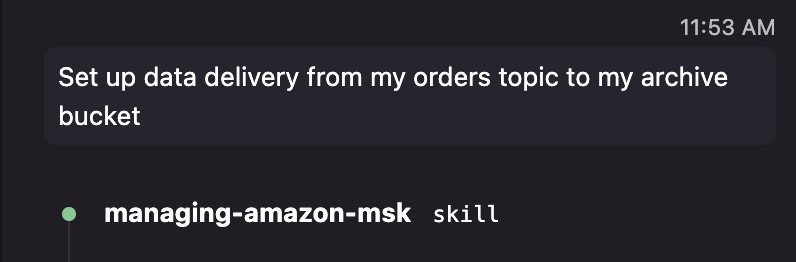
Figure 2: Issuing the delivery prompt in an agent chat
The agent first dynamically loads the relevant skill, inventories the clusters, topics, and buckets available in your account. It then confirms the resources to use or create before creating the delivery configuration. After creation, the agent summarizes the status and can help with the data operations that follow, such as setting up an AWS Glue crawler so the delivered objects are queryable as partitioned tables in Amazon Athena, or configuring CloudWatch alarms on delivery freshness and dead-letter queue activity.
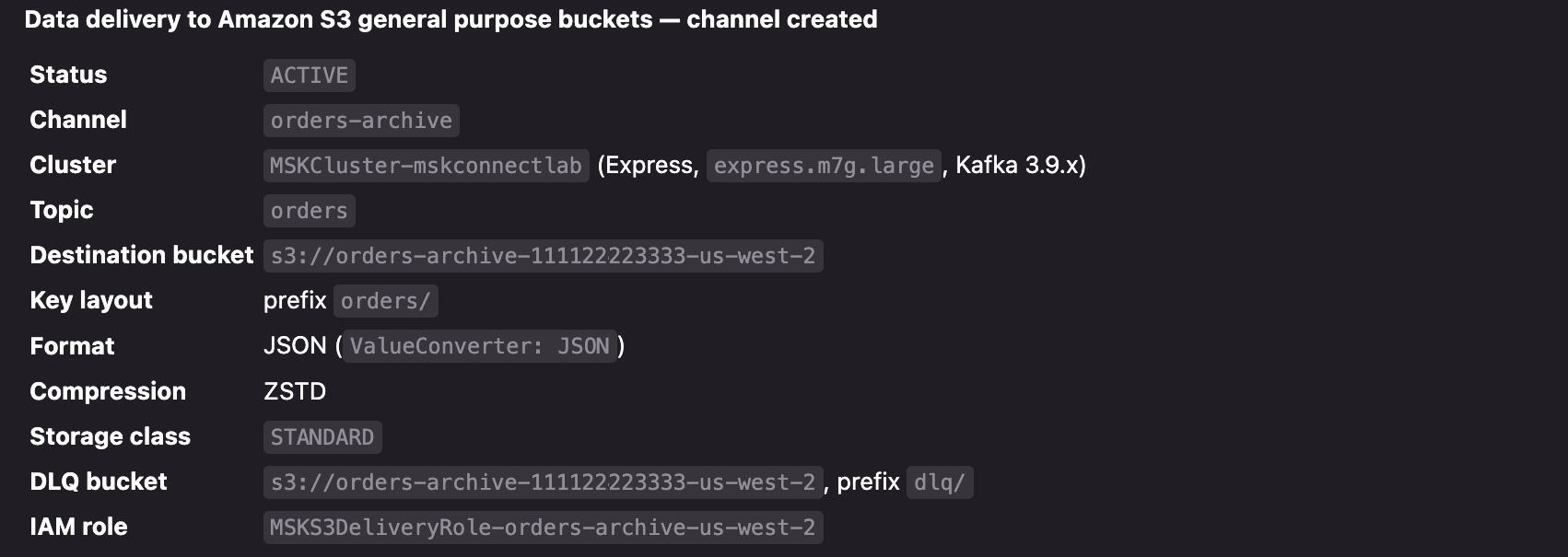
Figure 3: The agent creates the channel
Clean up
To avoid ongoing charges, delete the resources you created for this walkthrough. An active channel keeps delivering records and incurring delivery charges until you delete it. On Amazon MSK, open your cluster in the Amazon MSK console, choose the Channel tab, and delete the channel. Objects already written to Amazon S3 keep incurring storage charges after the channel is deleted, so delete the delivered objects, and the destination and DLQ buckets if you no longer need them. Finally, delete the IAM service execution role and any CloudWatch log groups created for the channel, including any that your agent created.
Conclusion
With data delivery to Amazon S3 on Amazon MSK, you can keep a durable copy of your streaming data in Amazon S3 without running a connector. You pay only for data that is delivered, and delivery doesn’t compete with your real-time consumers for throughput.
To learn more, see Amazon MSK data delivery to Amazon S3 in the Amazon MSK Developer Guide. For pricing, see Amazon MSK pricing. If you want to query your streaming data as Apache Iceberg tables instead of raw objects, see Deliver Apache Kafka data to streaming tables for Apache Iceberg with Amazon MSK Express brokers.