AWS Big Data Blog
How GPU acceleration builds billion-scale vector indexes on Amazon OpenSearch Service
Modern search demands high-performance vector indexing and scalability to keep pace with the rapid growth of generative AI applications. As datasets grow into the billions, traditional CPU-based indexing often becomes a bottleneck, stalling productivity and innovation velocity.
With GPU-accelerated vector (k-NN) indexing now available on Amazon OpenSearch Service and Amazon OpenSearch Serverless, you can scale to billions of vectors efficiently. Powered by NVIDIA cuVS, an open-source library for GPU-accelerated vector search, this capability offloads compute-intensive vector index building to specialized GPU workers while your existing CPU infrastructure continues serving search. The result is faster, more cost-efficient construction of large-scale vector indexes without sacrificing query performance.
Our earlier post went into those performance and cost benefits in detail. This post goes a level deeper into how the capability works. We walk through the decoupled architecture that makes this possible. We explain how a GPU-built index is converted into one that your CPU data nodes can search with no quality tradeoff. We also show how the approach holds up at scale, with a benchmark of one billion 1024-dimensional vectors. Finally, we share the operational best practices we recommend for running GPU-accelerated index builds in production.
Use cases and benefits
As companies across industries build AI-powered and agentic applications to deliver richer customer experiences, GPU acceleration for vector indexing helps across a range of use cases. A few examples:
- Adopt new embedding models faster: When an organization upgrades to a newer embedding model, every vector has to be regenerated and reindexed. At hundreds of millions to billions of vectors, a CPU rebuild can take days or weeks. GPU acceleration shortens that rebuild to hours, so you can move to a higher-quality model while significantly reducing the reindexing window and availability risk.
- Accelerate large-scale reindexing: A global ecommerce application managing billions of product listings, customer reviews, and behavioral signals must rebuild its vector index rapidly as new products and embeddings are added. GPU acceleration completes this within a tight operational window, keeping search relevance current.
- Absorb bursty or high-sustained writes: A media company covering a major sporting event, such as the World Cup or Olympics, needs to index millions of real-time embeddings simultaneously. These embeddings span match highlights, commentary clips, athlete profiles, and fan-generated content, and millions of viewers search for related content at the same time. GPU workers absorb the indexing burst without competing with CPU nodes serving live search traffic, avoiding the latency spikes that usually accompany heavy writes.
- Right-size clusters for mixed read/write workloads: A retail system traditionally over-provisions its CPU cluster to handle both peak indexing loads during catalog refreshes and concurrent search traffic, paying for peak capacity around the clock. By offloading indexing to GPUs, the CPU cluster can be right sized for search alone, reducing infrastructure costs without sacrificing performance.
- Speed up migrations to semantic search or to OpenSearch: Whether you’re converting a text-based corpus to vector embeddings for the first time or migrating an existing vector workload from another database to Amazon OpenSearch Service, GPU-accelerated indexing compresses what would be days of index building into hours, keeping pace with upstream GPU-powered embedding generation and minimizing cutover risk.
When does GPU acceleration activate?
GPU acceleration activates automatically once you opt in. On OpenSearch Service domains, you enable it by turning on the Vector Acceleration option, and from that point on, no changes to code or API flags are needed. On OpenSearch Serverless, GPU index-build acceleration is on by default for NextGen vector search collections. Figure 1 illustrates the index build workflow. OpenSearch automatically routes vector indexing operations to GPU or CPU based on segment size, optimizing performance and falling back to CPU if issues arise.
When OpenSearch flushes or merges a segment, it compares the segment’s vector data size against a configurable window bounded by index.knn.remote_index_build.size.min and index.knn.remote_index_build.size.max. The lower bound defaults to 50 MB. Segments above the lower bound are offloaded to a remote GPU worker, and smaller segments build locally on CPU. The segment vector size is calculated as:
segment_vector_size = num_vectors × dimensions × bytes_per_element
This means two workloads with identical document counts can produce different segment sizes:
| Vectors | Dimensions | Encoding | Segment Vector Size |
| 100,000 | 1536 | Float32 | ~586 MB |
| 100,000 | 768 | Byte | ~74 MB |
Both examples exceed the default 50 MB lower bound, so with default settings both segments would be offloaded to a GPU worker.
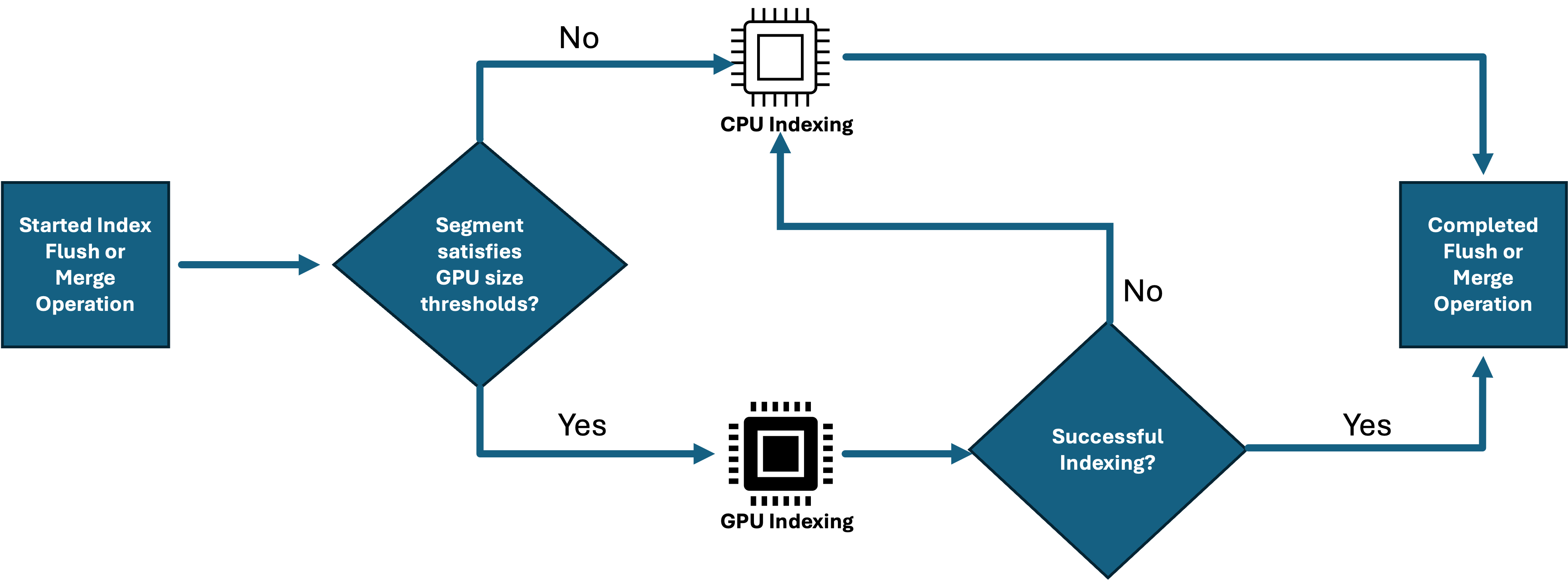
Figure 1: Simplified flow for index builds
Decoupled indexing architecture
An OpenSearch index is internally divided into segments, each containing its own vector graph. This segment-level structure is what makes GPU offload practical. Each segment’s graph can be built independently on a GPU worker without coordinating across the full index. Building on this, the key architectural insight is separating where vectors are indexed from where they are searched. Existing CPU data nodes continue handling ingestion, search, and non-vector workloads. When a segment is ready for vector index construction, the heavy graph-building work is offloaded to dedicated GPU workers, and the finished index is returned to the data node for serving.
The index build workflow
- Ingest – Documents with vector fields are ingested into your OpenSearch Service domain or OpenSearch Serverless collection as usual. Vectors accumulate in segments on CPU data nodes.
- Offload – When a segment flushes or merges and its vector data falls within the GPU activation window, the data node uploads the raw vectors to Amazon Simple Storage Service (Amazon S3) and submits a build request.
- Build – A GPU worker from a managed warm pool picks up the job, loads the vectors, and builds the index using CAGRA (CUDA ANN Graph), the GPU-native graph algorithm in NVIDIA cuVS. The resulting CAGRA graph is then converted to a Hierarchical Navigable Small World (HNSW) graph compatible with CPU-based search.
- Return – The completed HNSW index is written back to Amazon S3 and downloaded by the data node, which then uses it to serve search queries.
Fully managed GPU index builds
Enable Vector Acceleration, and Amazon OpenSearch Service handles the rest:
Automatic scaling – GPU workers scale up and down automatically based on the number of pending build jobs. During a bulk ingest or reindex, more GPU workers spin up to handle the load. When the queue drains, they scale back to zero.
Automatic instance selection – The service selects the right GPU instance type for each build job based on segment size. No capacity planning or instance selection is required on your part.
Pay only for active builds – You’re charged only when GPUs are actively building indexes, not while they are idle. Even if Vector Acceleration is enabled on your domain or collection, GPU charges, measured in OpenSearch Compute Units (OCUs), apply only when segments reach the activation threshold and trigger an index build. There is no standing GPU infrastructure cost.
Your cost therefore scales directly with indexing activity. Bursty reindexing workloads consume GPU capacity for the duration of the build, and GPU cost returns to zero until the next build.
Figure 2 illustrates the decoupled GPU workflow. Amazon S3 acts as the intermediary between data nodes and GPU workers, allowing them to operate independently. Data nodes upload raw vectors to Amazon S3, GPU workers build the CAGRA graph and convert it to HNSW, and the completed index is returned to the data nodes for serving, with search running uninterrupted throughout.
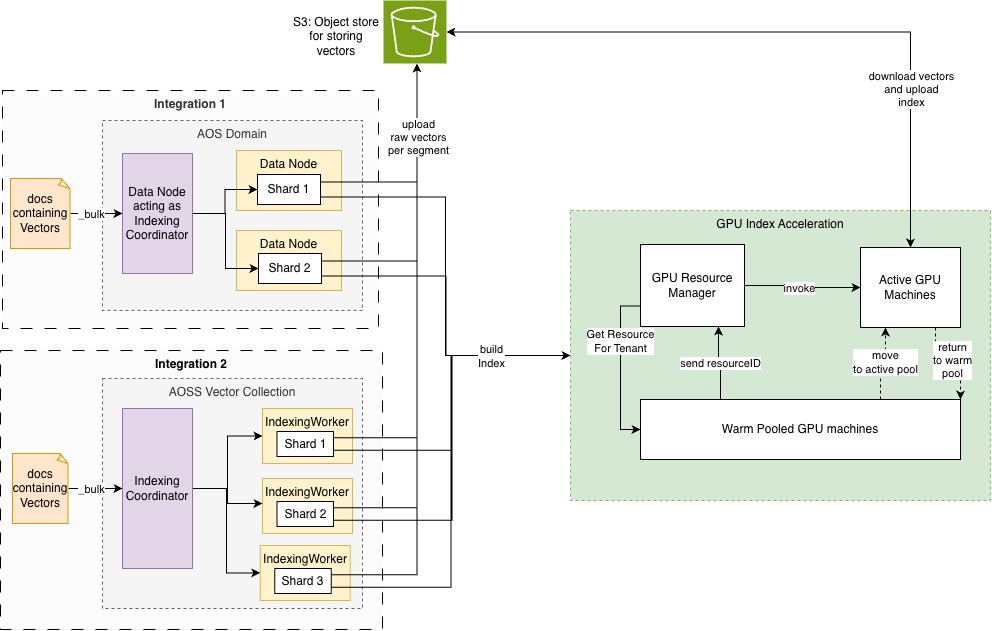
Figure 2: GPU index flow architecture
Inside the CAGRA-to-HNSW conversion
In the previous section, we described how GPU workers build the vector index and return it to data nodes. But how does a GPU-built graph become searchable on CPU, and does this conversion sacrifice quality? The short answer: it doesn’t.
The CAGRA algorithm
The GPU workers use the CAGRA algorithm integrated through the cuVS GPU backend of the Facebook AI Similarity Search (Faiss) library. CAGRA is a graph-based indexing approach built from the ground up for GPU acceleration. It first builds a k-NN graph using another approximate nearest neighbors method like Inverted File with Product Quantization (IVF-PQ) or Nearest Neighbor Descent (NN-Descent). It then removes redundant paths between neighbors to form a navigable search graph.
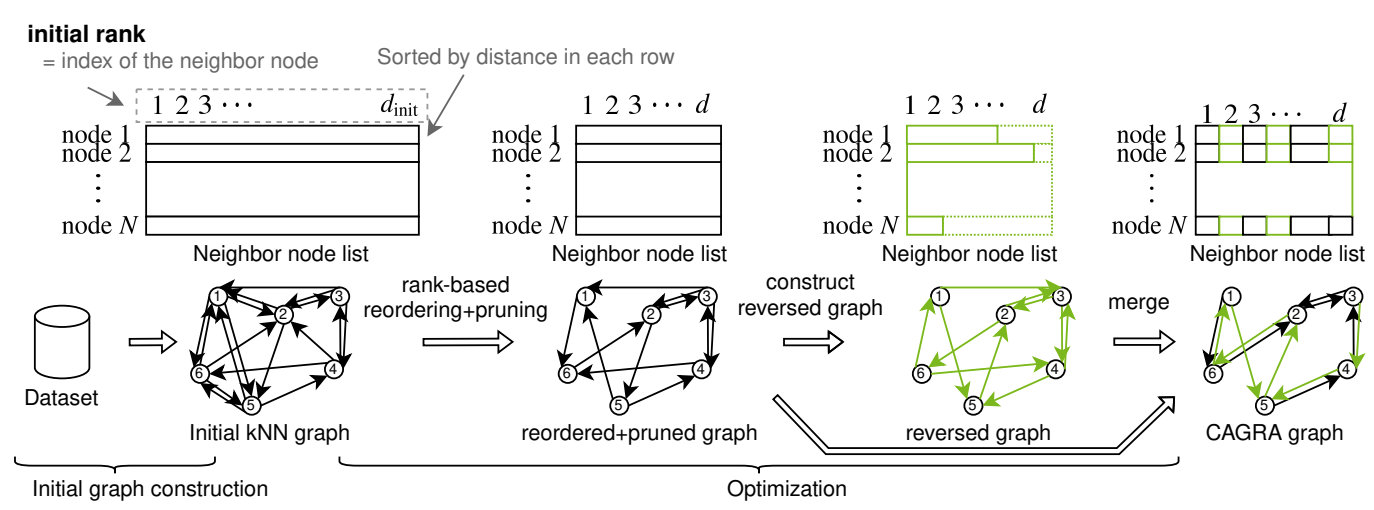
Figure 3: Construction flow of the CAGRA graph
Source: CAGRA: Highly Parallel Graph Construction and Approximate Nearest Neighbor Search for GPUs
How the GPU worker builds the index
When the GPU workers receive a vector index build request, it carries the necessary parameters for constructing the segment-specific vector index. The vector index build component initiates the process by retrieving the vector file from Amazon S3 and loading it into CPU memory. These vectors are then used to construct a CAGRA index using Faiss. After constructing the CAGRA index on GPU, the system converts it into an HNSW graph format for compatibility with CPU-based search operations. The resulting index is uploaded to Amazon S3, completing the build request.
Converting the CAGRA graph to HNSW
A typical HNSW index is a multilayered hierarchical graph. The bottom layer (layer 0) of the graph contains the vectors, and the upper layers are sparse subsets used solely for navigation. They help the search algorithm find a good entry point into the bottom layer. However, our HNSW implementation uses the CAGRA graph as the bottom layer and, similar to the CAGRA search method, starts with random entry points into the graph, avoiding the need for the upper layers altogether.
This means the GPU handles the heavy lifting of building the base-layer graph. Reusing that graph as the HNSW base layer avoids rebuilding it on the CPU, which keeps conversion overhead low. As Figure 4 shows, the CAGRA graph becomes the base layer. At query time, the search selects a random set of nodes in the graph and traverses it by following the nearest neighbor links. This is known as greedy search.

Figure 4: Searching an HNSW-converted CAGRA graph
Same recall, faster build
Previous benchmarks have confirmed that GPU-built indexes achieve the same recall as CPU-built HNSW with no quality tradeoff. This is because the bottom-layer graph structure produced by CAGRA is equivalent in connectivity and search quality to what HNSW constructs on CPU. Only the build method differs.
Scaling beyond GPU memory
Out-of-core construction
Traditional GPU indexing requires the entire dataset to reside in GPU memory, creating a hard ceiling on index size based on available hardware. CAGRA removes this limitation through out-of-core k-NN graph construction. When IVF-PQ is used to build the initial k-NN graph for CAGRA, data is streamed from system memory to the GPU in batches, so the full dataset never needs to fit in GPU memory at once. Meanwhile, the GPU still handles the computationally intensive distance calculations and graph optimization.
Quantization
GPU-accelerated indexing supports the quantization levels available in OpenSearch, including 2×, 8×, 16×, and 32× compression. Quantization is applied before vectors are sent to the GPU. This reduces both the data transfer size to GPU workers and the memory footprint during graph construction. This means that you can build indexes over larger segments, improving cost efficiency.
Indexing one billion 1024-dimensional vectors on the GPU
Dataset setup
To evaluate a realistic large-scale workload, we used a dataset containing one billion vectors in 1024 dimensions. Because uniformly random vectors yield misleading results for both index construction and recall, we required data that maintained the structure of real-world embeddings. We created this dataset using the cuVS synthetic dataset generator in cuvs-bench, which outputs synthetic data whose distribution mimics an actual embedding dataset derived from Common Crawl. You can use this approach to build a realistic dataset without exposing or distributing sensitive original data. The generator can produce the complete one-billion-vector dataset, 10,000 query vectors, and the associated ground-truth labels in roughly two hours on a single Amazon Elastic Compute Cloud (Amazon EC2) g6e.16xlarge instance.
Cluster configuration
We designed the benchmark cluster on OpenSearch Service following OpenSearch vector search performance tuning best practices and conducted the benchmark using the OpenSearch Benchmark framework.
| Setting | Value | Rationale |
| Data Nodes | 24 × r8g.4xlarge | Memory-optimized instances for large vector indexes |
| Primary shards | 48 | Keeps shard size manageable and maximizes parallelism |
| Replicas | 0 | Maximizes indexing throughput. Replicas added after build |
| GPU workers | 10 (pre-scaled) | Avoids cold-start effects during measurement |
| Bulk clients | 160 | Saturates ingestion pipeline across 24 nodes |
| Bulk size | 500 docs/request | Balances per-request overhead vs. memory pressure |
| Refresh interval | -1 (during ingest) | Prevents small segment creation. Force merge after ingesting |
| Merge autothrottle | Disabled | Avoids artificial bottleneck during benchmark |
Key best practices applied
- Memory-optimized instances – r8g.4xlarge provides sufficient heap and native memory for loading HNSW graphs post-build.
- Disabled refresh during bulk ingest – Prevents creation of many small segments that would each trigger individual GPU builds.
- High number of bulk clients – Saturates ingestion across nodes and makes sure that GPUs are busy building the indexes.
We used the default HNSW build and search settings in OpenSearch (such as m and ef_construction) since the defaults are what most users start with, and they keep the benchmark representative.
Benchmark results
| Dataset | Index (min) | Recall @k=100 | Recall @1 | P50 (search) | P90 (search) | P99 (search) | Vector Acceleration OCU Used |
| 1024D 1B | 274 | 0.93 | 0.93 | 26.47ms | 32.5ms | 66.6ms | 44 |
Build time scales linearly with data volume
Our earlier benchmark on OpenSearch Service indexed one billion 128-dimensional vectors (BigANN SIFT dataset) in approximately 35.5 minutes. In our latest benchmark, we scaled dimensionality 8x to 1024 dimensions and completed the index build in 274 minutes, roughly proportional to the increase in data volume. This demonstrates that GPU acceleration maintains consistent throughput efficiency as dimensionality grows: build time scales with data volume rather than fixed startup costs, so you can predictably estimate index build time from your dataset size. Search latency also stayed low at this scale, so the resulting index supported responsive queries without trading away build speed.
Optimizing bulk ingestion for GPU-accelerated indexing
When loading large volumes of vector data, temporarily adjusting index behavior can significantly reduce GPU processing overhead. This approach works if your use case can tolerate a brief period of data staleness. During full index builds, this is generally acceptable, because newly ingested vectors are not searchable until you re-enable refresh. By disabling refresh during bulk ingestion ("index.refresh_interval": "-1"), you prevent the continuous creation of small segments. Each of these would otherwise trigger an individual GPU build job. After ingestion is complete, we enable the refresh interval and complete the refresh to make the segment searchable. This means the GPU builds the vector index once across large, well-packed segments rather than repeatedly across many small ones, resulting in faster overall indexing throughput.
After enabling GPU acceleration, you can monitor builds through Amazon CloudWatch metrics (cluster-level) and the OpenSearch k-NN Stats API (per-node). If a GPU build fails, the system automatically falls back to CPU-based index building, so your data remains indexed.
Future optimization
Today, the completed HNSW index (graph structure and vectors) is transferred back from GPU workers to data nodes through Amazon S3. Because data nodes already hold the raw vectors locally, a future optimization will transfer only the graph structure (neighbor lists). This significantly reduces the data written back to Amazon S3 and the download time to data nodes.
Conclusion
GPU-accelerated indexing lets you build billion-scale vector indexes on Amazon OpenSearch Service in hours instead of days, without changing how queries are served on both OpenSearch Service domains and OpenSearch Serverless collections. In this post, we showed how OpenSearch Service offloads eligible index builds to GPU workers, builds a CAGRA graph through the NVIDIA cuVS backend in Faiss, and converts it into a CPU-searchable HNSW index. We then demonstrated the approach at scale on one billion 1024-dimensional vectors, and shared best practices for optimizing bulk ingestion and monitoring build activity and OCU usage.
Get started
Ready to try GPU-accelerated vector indexing? In a supported AWS Region, you can enable GPU acceleration when you create or update an OpenSearch Service domain running OpenSearch 3.1 or later. Use the AWS Management Console, AWS Command Line Interface (AWS CLI), or AWS SDK. For a new OpenSearch Serverless deployment, create a NextGen vector search collection, where GPU index-build acceleration is enabled by default and can be controlled for individual indexes. For a Classic vector collection, enable GPU acceleration at the collection level.
Acknowledgments
The authors would like to thank Ben Gardner, Manas Singh, Zack Meeks, Jiahong Liu, James Yi, Jinsol Park from NVIDIA for their contributions to this post.