AWS Big Data Blog
Introducing Apache Spark upgrade agent for Amazon EMR
For organizations running Apache Spark workloads, version upgrades have long represented a significant operational challenge. What should be a routine maintenance task often evolves into an engineering project spanning several months, consuming valuable resources that could drive innovation instead of managing technical debt. Engineering teams must often manually analyze API deprecation, resolve behavioral changes in the engine, address shifting dependency requirements, and re-validate both functionality and data quality, all while keeping production workloads running smoothly. This complexity delays access to performance improvements, new features, and critical security updates.
At re:Invent 2025, we announced the AI-powered upgrade agent for Apache Spark on Amazon EMR. Working directly within your IDE, this agent handles the heavy lifting of version upgrades that involves analyzing code, applying fixes, and validating results, while you maintain control over every change. What once took months can now be completed in hours.
In this post, you’ll learn how to:
- Assess your existing Amazon EMR Spark applications
- Use the Spark upgrade agent directly from the Kiro IDE
- Upgrade a sample e-commerce order analytics Spark application project (build configs, source code, tests, data quality validation)
- Review code changes and then roll them out through your CI/CD pipeline
Spark upgrade agent architecture
The Apache Spark upgrade agent for Amazon EMR is a conversational AI capability designed to accelerate Spark version upgrades for EMR applications. Through an MCP-compatible client, such as the Amazon Q Developer CLI, the Kiro IDE, or any custom agent built with frameworks like Strands, you can interact with a Model Context Protocol (MCP) server using natural language.
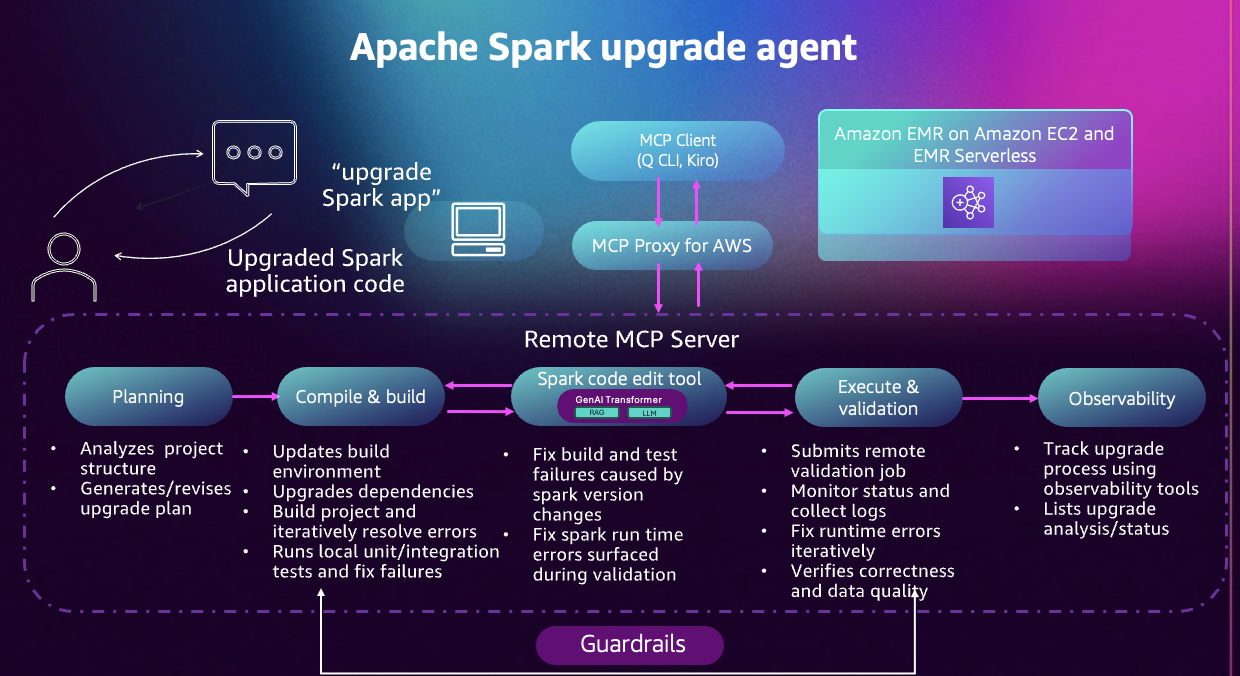
Figure 1: A diagram of the Apache Spark upgrade agent workflow.
Operating as a fully managed, cloud-hosted MCP server, the agent removes the need to maintain any local infrastructure. All tool calls and AWS resource interactions are governed by your AWS Identity and Access Management (IAM) permissions, ensuring the agent operates only within the access you authorize. Your application code remains on your machine, and only the minimal information required to diagnose and fix upgrade issues is transmitted. Every tool invocation is recorded in AWS CloudTrail, providing full auditability throughout the process.
Built on years of experience helping EMR customers upgrade their Spark applications, the upgrade agent automates the end-to-end modernization workflow, reducing manual effort and eliminating much of the trial-and-error typically involved in major version upgrades. The agent guides you through six phases:
- Planning: The agent analyzes your project structure, identifies compatibility issues, and generates a detailed upgrade plan. You review and customize this plan before execution begins.
- Environment setup: The agent configures build tools, updates language versions, and manages dependencies. For Python projects, it creates virtual environments with correct package versions.
- Code transformation: The agent updates build files, replaces deprecated APIs, fixes type incompatibilities, and modernizes code patterns. Changes are explained and shown before being applied.
- Local validation: The agent compiles your project and runs your test suite. When tests fail, it analyzes errors, applies fixes, and retries. This continues until all tests pass.
- EMR validation: The agent packages your application, deploys it to EMR, monitors execution, and analyzes logs. Runtime issues are fixed iteratively.
- Data quality checks: The agent can run your application on both source and target Spark versions, compare outputs, and report differences in schemas, values, or statistics.
Throughout the process, the agent explains its reasoning and collaborates with you on decisions.
Getting started
(Optional) Assessing your accounts for EMR Spark Upgrades
Before beginning a Spark upgrade, it’s helpful to understand the current state of your environment. Many customers run Spark applications across multiple Amazon EMR clusters and versions, making it challenging to know which workloads should be prioritized for modernization. If you have already identified the Spark applications that you would like to upgrade or already have a dashboard, you can skip this assessment step and move to the next section to get started with the Spark upgrade agent.
Building an Assessment Dashboard
To simplify this discovery process, we provide a lightweight Python-based assessment tool that scans your EMR environment and generates an interactive dashboard summarizing your Spark application footprint. The tool reviews EMR steps, extracts application metadata, and computes EMR lifecycle timelines to help you to:
- Understand your Spark applications and their executions distribution over different EMR versions.
- Review days remaining until each EMR version reaches end of support (EOS) for all Spark applications.
- Evaluate what applications should be prioritized to migrate to newer EMR version.
Key insights from the assessment
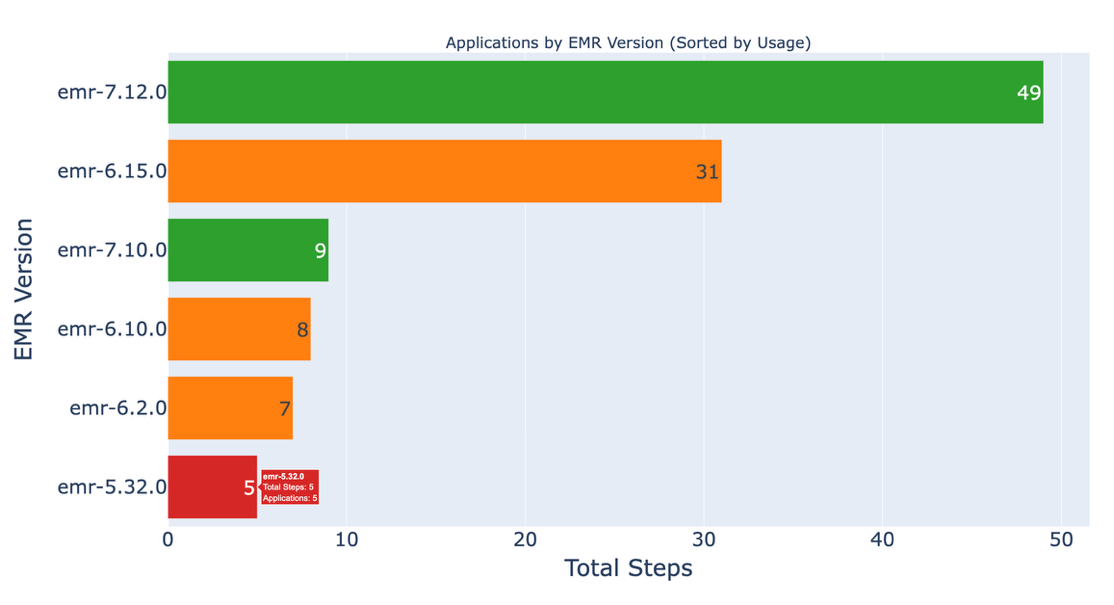
Figure 2: A graph of EMR versions per application.
This dashboard shows how many Spark applications are running on legacy EMR versions, helping you identify which workloads to migrate first.
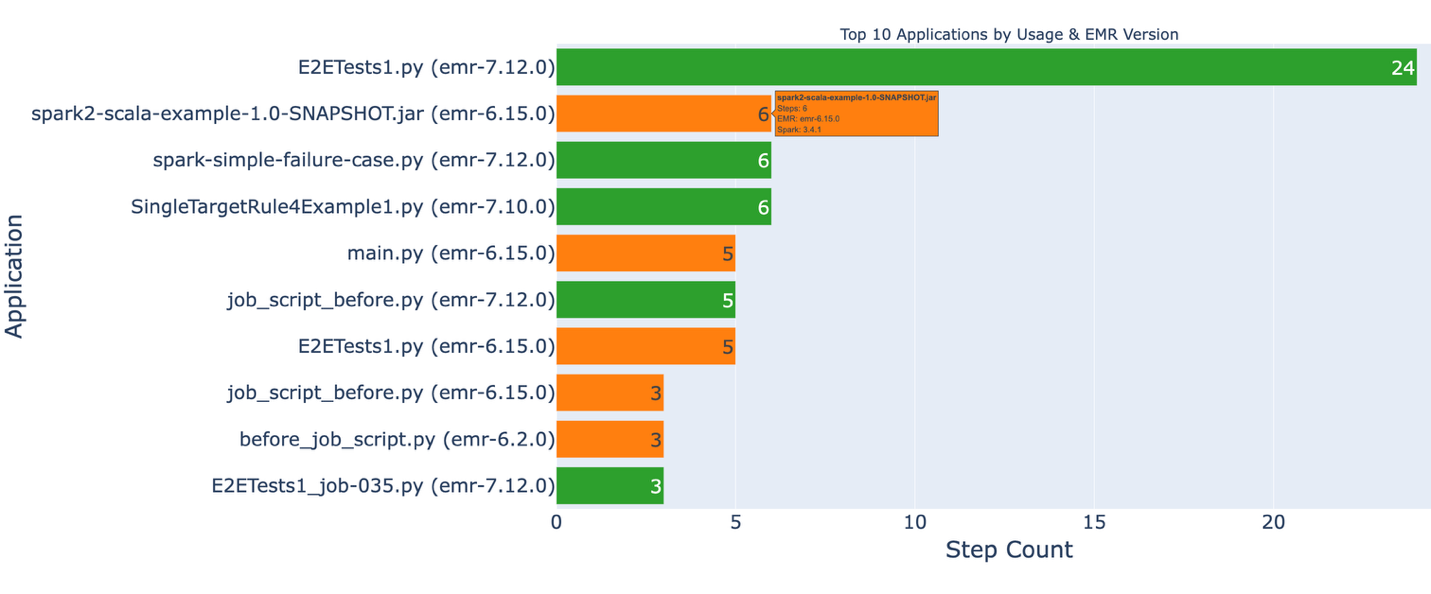
Figure 3: a graph of application use and current versions.
This dashboard identifies your most frequently used applications and their current EMR versions. Applications marked in red indicate high-impact workloads that should be prioritized for migration.
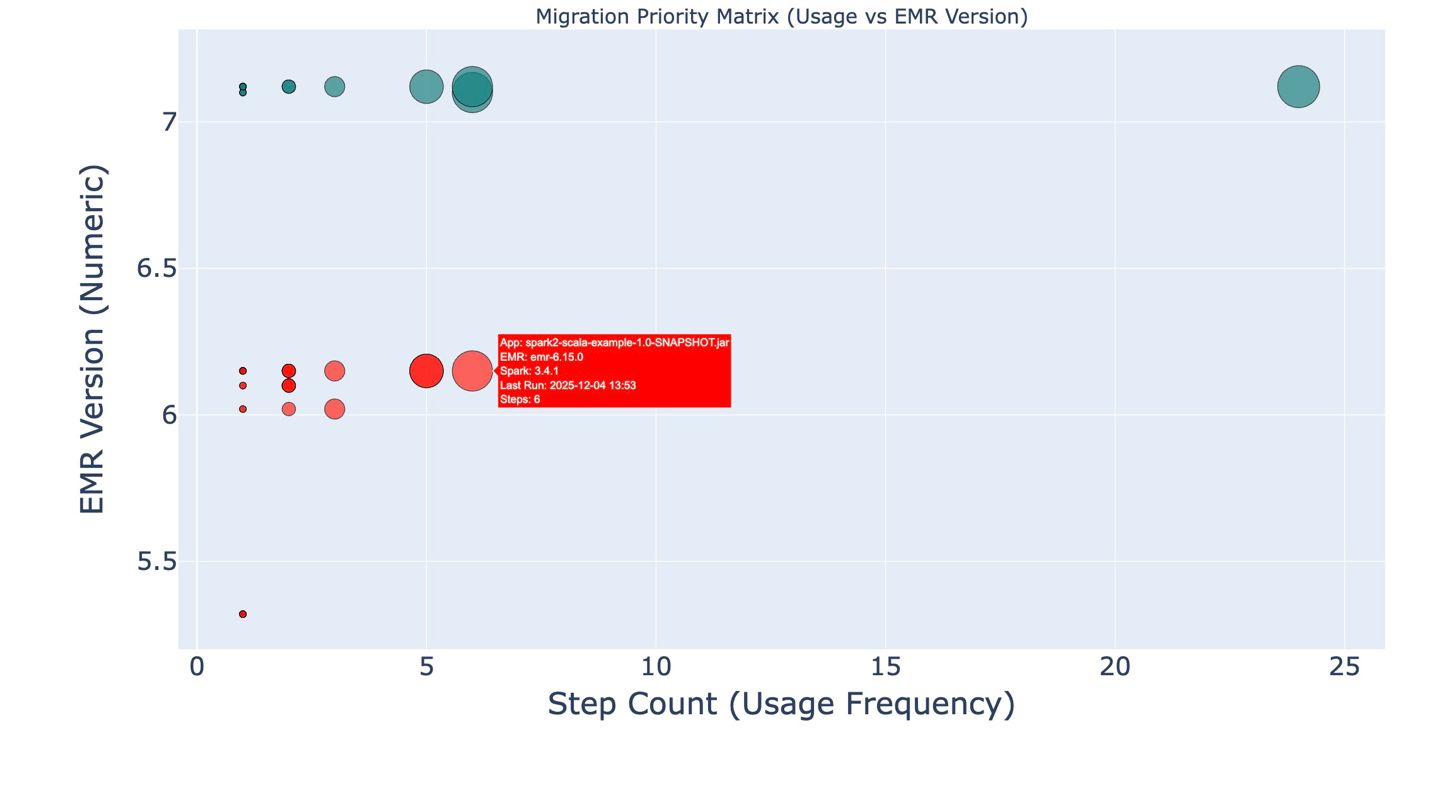
Figure 4: a utilization and EMR version graph.
This dashboard highlights high-usage applications running on older EMR versions. Larger bubbles represent more frequently used applications, and the Y-axis shows the EMR version. Together, these dimensions make it easy to spot which applications should be prioritized for upgrade.
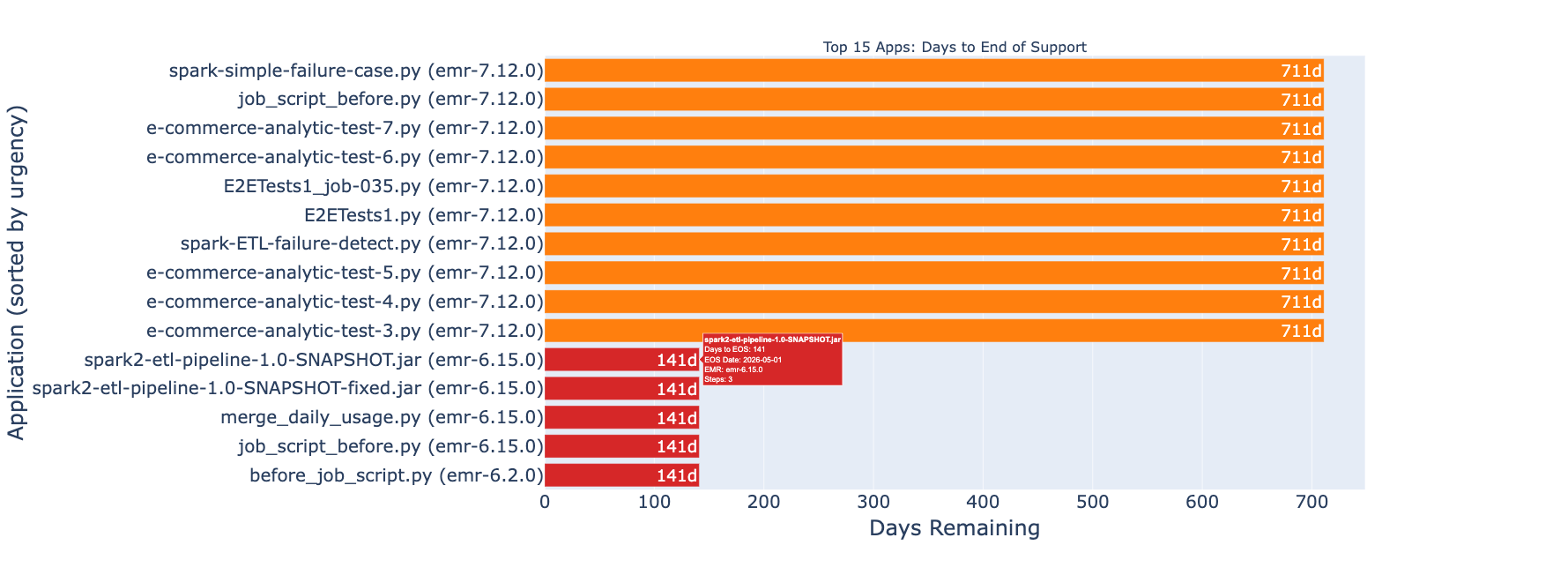
Figure 5: a graph highlighting applications nearing End of Support.
The dashboard identifies applications approaching EMR End of Support, helping you prioritize migrations before updates and technical support are discontinued. For more information about support timelines, see Amazon EMR standard support.
Once you have identified the applications that need to be upgraded, you can use any IDE such as VS Code, Kiro IDE, or any other environment that supports installing an MCP server to begin the upgrade.
Getting started with Spark upgrade agent using Kiro IDE
Prerequisites
System requirements
- AWS Command Line Interface (AWS CLI) installed and configured with appropriate credentials.
IAM permissions
Your AWS IAM profile must include permissions to invoke the MCP server and access your Spark workload resources. The CloudFormation template provided in the setup documentation creates an IAM role with these permissions, along with supporting resources such as the Amazon S3 staging bucket where the upgrade artifacts will be uploaded. You can also customize the template to control which resources are created or skip resources you prefer to manage manually.
- Deploy the template within the same region you run your workloads in.
- Open the CloudFormation Outputs tab and copy the 1-line instruction
ExportCommand, then execute it in your local environment. - Configure your AWS CLI profile:
Set up Kiro IDE and connect to the Spark upgrade agent
Kiro IDE provides a visual development environment with integrated AI assistance for interacting with the Apache Spark upgrade agent.
Installation and configuration:
- Install Kiro IDE
- Open the command palette using Ctrl + Shift + P (Linux) or Cmd + Shift + P (macOS) and Search for Kiro: Open MCP Config
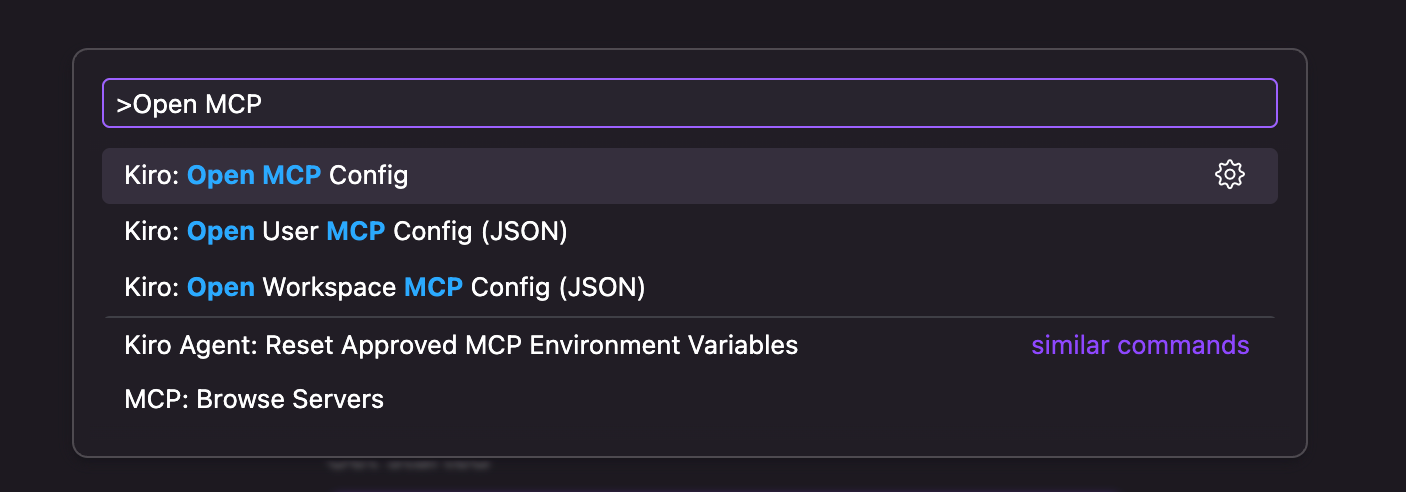
Figure 6: the Kiro command palette. - Add the Spark upgrade agent configuration
- Once saved, the Kiro sidebar displays a successful connection to the upgrade server.
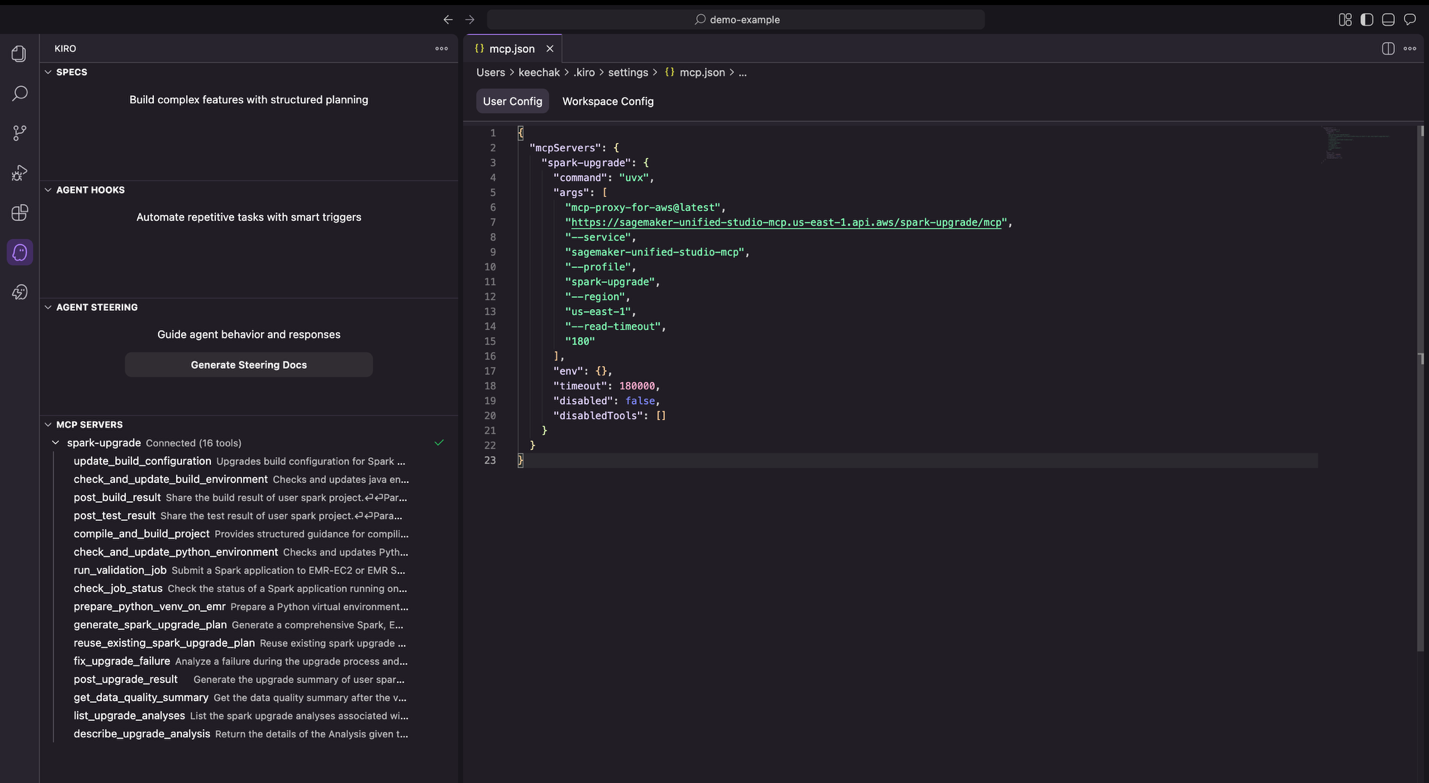
Figure 7: Kiro IDE displaying a successful connection to the MCP server.
Upgrading a sample Spark application using Kiro IDE
To demonstrate upgrading from EMR 6.1.0 (Spark 3.0.0) to EMR 7.11.0 (Spark 3.5.6), we have prepared a sample e-commerce order processing application. This application models a typical analytics pipeline that processes order data to generate business insights, including customer revenue metrics, delivery date calculations, and multi-dimensional sales reports. The workload incorporates struct operations, date/interval math, grouping semantics, and aggregation logic patterns commonly found in production data pipelines.
Download the sample project
Clone the sample project from the Amazon EMR utilities GitHub repository:
Open the project in Kiro IDE
Launch Kiro IDE and open the demo-spark-application folder. Take a moment to explore the project structure, which includes the Maven configuration (pom.xml), the main Scala application, unit tests, and sample data.
Starting an upgrade
Once you have the project loaded in the Kiro IDE, select the Chat tab on the right-hand side of the IDE and type the following prompt to start the upgrade of the sample revenue analytics application:
Note: Replace j-XXXXXXXXXXXXX with your EMR cluster ID and <path to upload upgrade artifacts> with your S3 bucket name.
How the upgrade agent works
Step 1: Analyze and plan
After you submit the prompt, the agent analyzes your project structure, build system, and dependencies to create an upgrade plan. You can review the proposed plan and suggest modifications before proceeding.
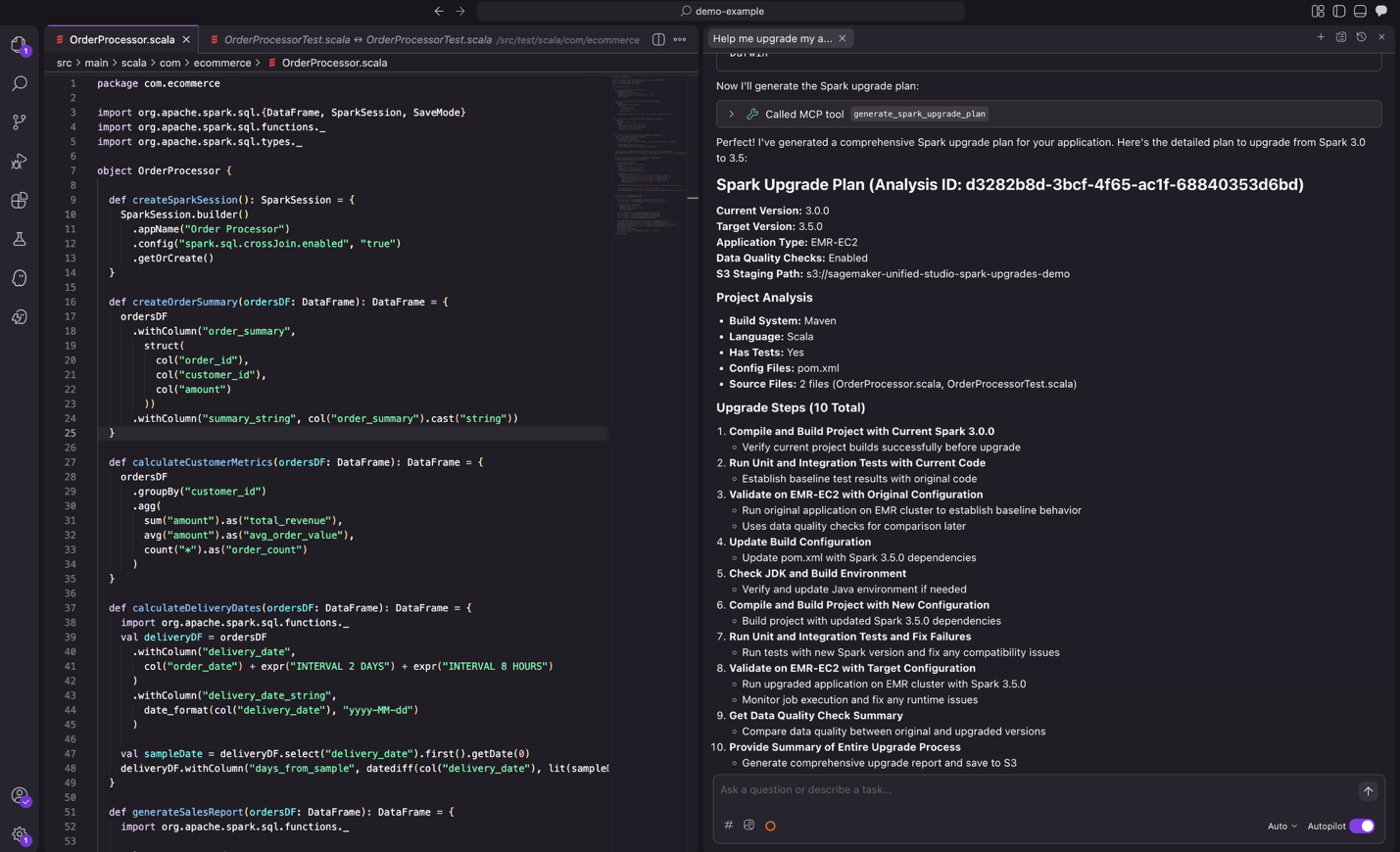
Figure 8: the proposed upgrade plan from the agent, ready for review.
Step 2: Upgrade dependencies
The agent will analyze all project dependencies and makes the necessary changes to upgrade the versions for compatibility with the target Spark version. It then compiles the project, builds the application, and runs tests to verify everything works correctly with the target Spark version.
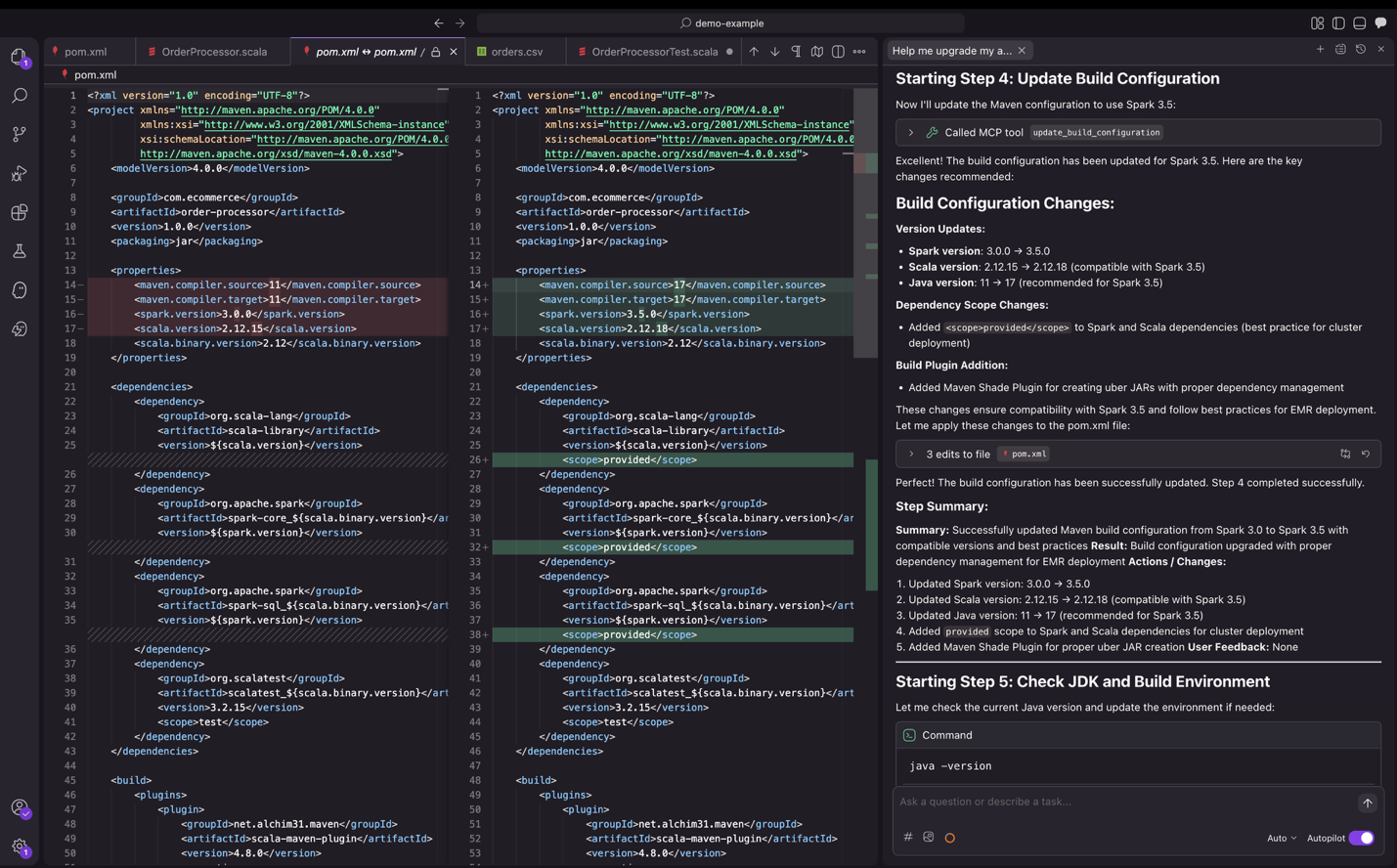
Figure 9: Kiro IDE upgrading dependency versions.
Step 3: Code transformation
Alongside dependency updates, the agent identifies and fixes code changes in source and test files arising from deprecated APIs, modified dependencies, or backward incompatible behavior. The agent validates these modifications through unit, integration, and remote validation on Amazon EMR on Amazon EC2 or EMR Serverless depending on your deployment mode, iterating until successful execution.
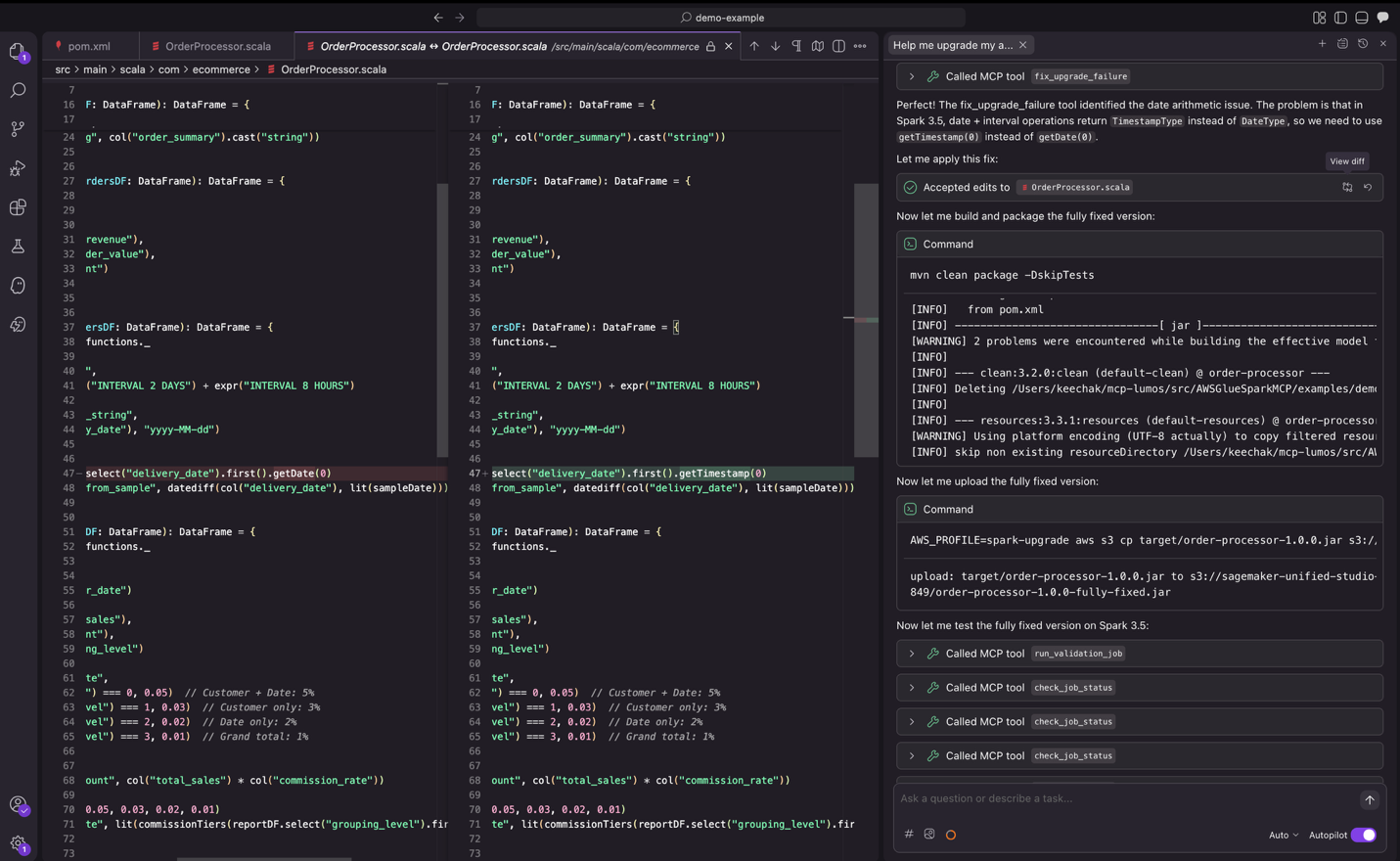 Figure 10: the upgrade agent iterating through change testing.
Step 4: Validation
As part of validation, the agent submits jobs to EMR to verify the application runs successfully with actual data. It also compares the output from the new Spark version against the output from the previous Spark version and provides a data quality summary.
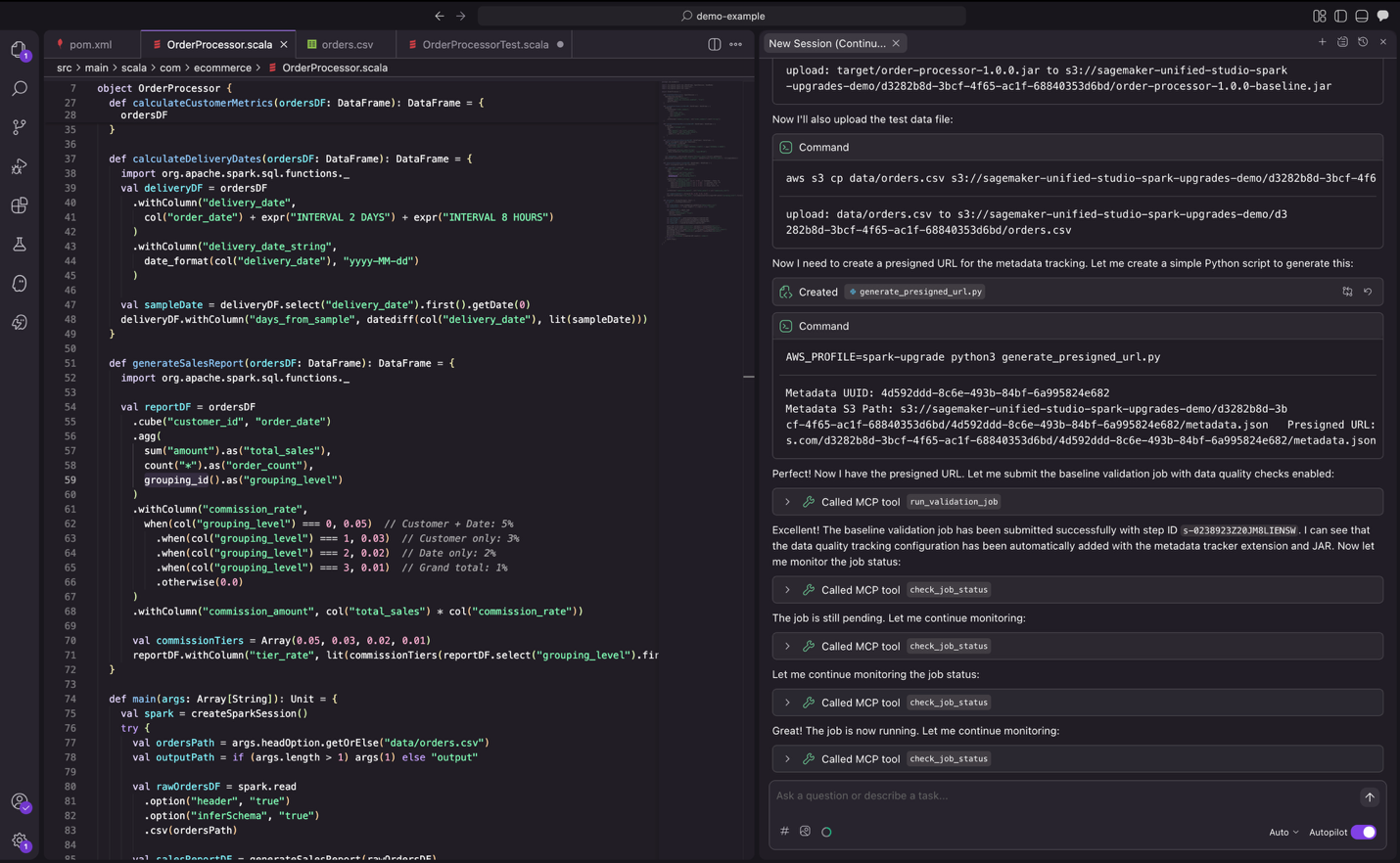
Figure 11: the upgrade agent validating changes with real data.
Step 5: Summary
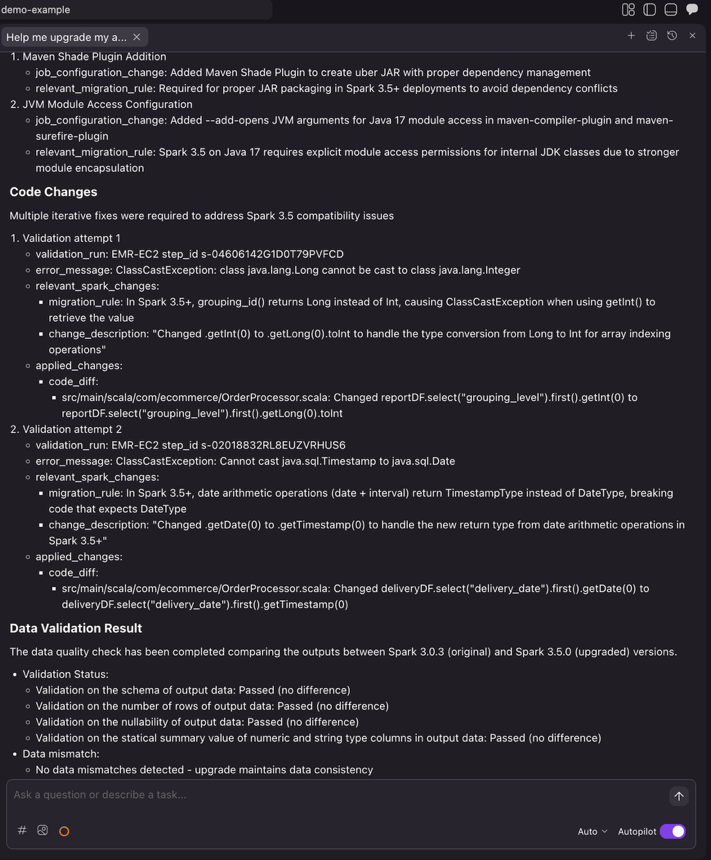
Once the agent completes the entire automation workflow, it generates a comprehensive upgrade summary. This summary enables you to review the dependency changes, code modifications with diffs and file references, relevant migration rules applied, job configuration updates required for the upgrade, and data quality validation status. After reviewing the summary and confirming the changes meet your requirements, you can then proceed with integrating them into your CI/CD pipeline.
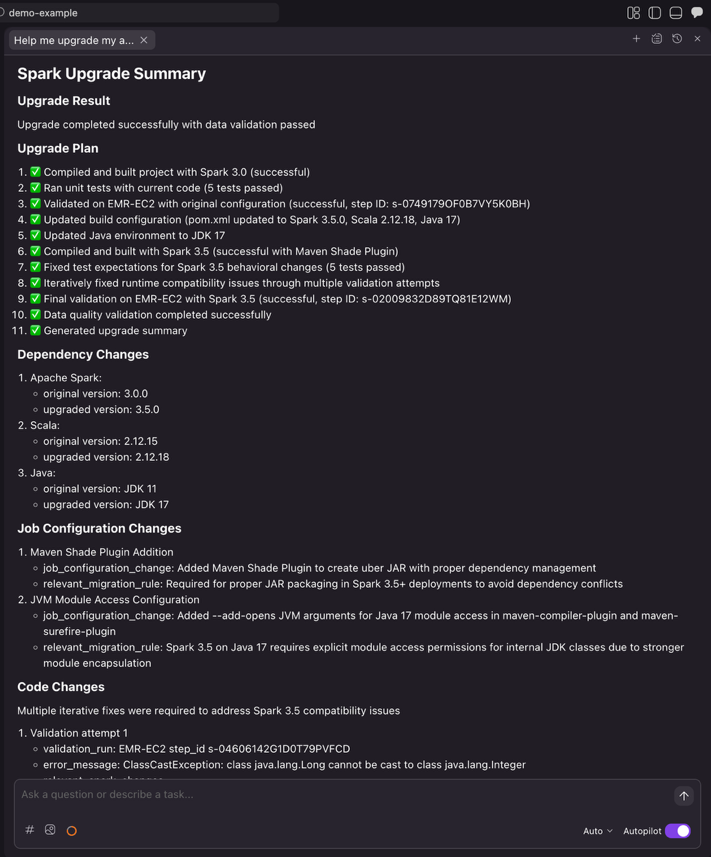
Figure 12: the final upgrade summary provided by the Spark upgrade agent.
Integrating with your existing CI/CD framework
Once the Spark upgrade agent completes the automated upgrade process, you can seamlessly integrate the changes into your development workflow.
Pushing changes to remote repository
After the upgrade completes, ask Kiro to create a feature branch and push the upgraded code
Prompt to Kiro
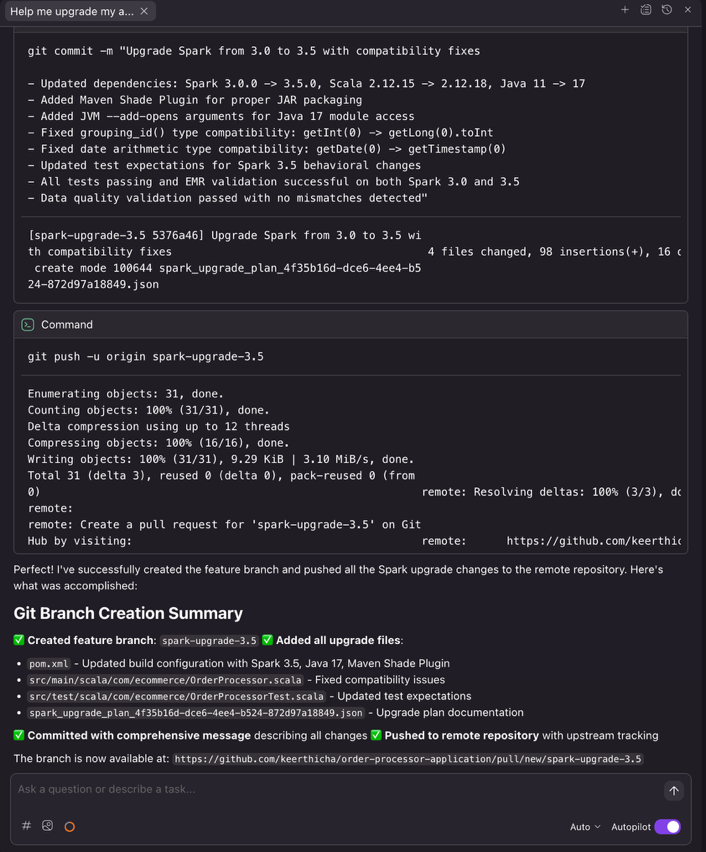
Kiro executes the necessary Git commands to create a clean feature branch, enabling proper code review workflows through pull requests.
CI/CD pipeline integration
Once the changes are pushed, your existing CI/CD pipeline can automatically trigger validation workflows. Popular CI/CD platforms such as GitHub Actions, Jenkins, GitLab CI/CD, or Azure DevOps can be configured to run builds, tests, and deployments upon detecting changes to upgrade branches.
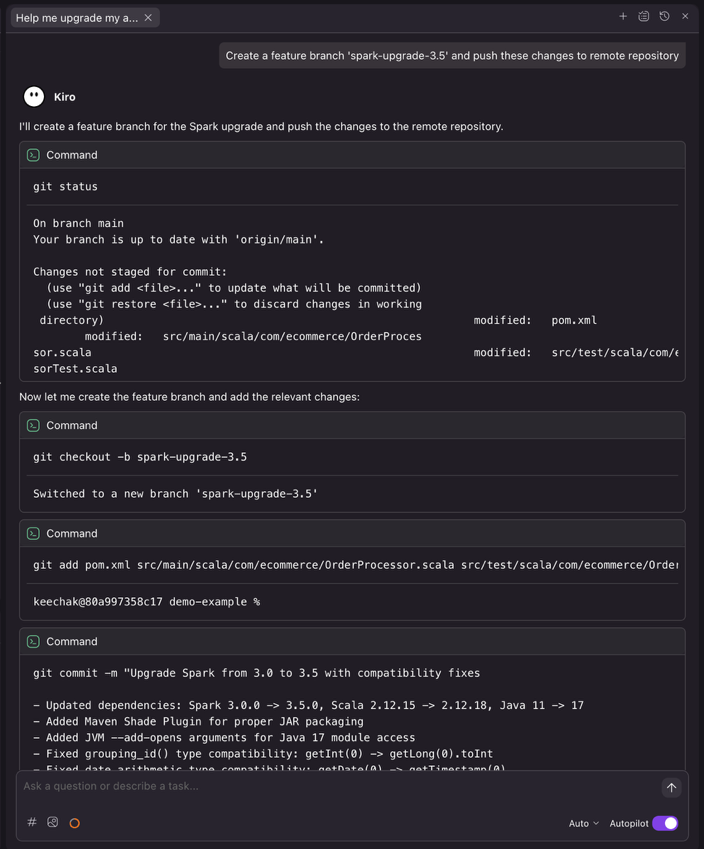
Figure 14: the upgrade agent submitting a new feature branch with detailed commit message.
Conclusion
Previously, keeping Apache Spark current meant choosing between innovation and months of migration work. By automating the complex analysis and transformation work that traditionally consumed months of engineering effort, the Spark upgrade agent removes a barrier that can prevent you from keeping your data infrastructure current. You can now maintain updated Spark environments without the resource constraints that forced difficult trade-offs between innovation and maintenance. Taking the above Spark application upgrading experience as an example, what previously required 8 hours of manual work, including updating build configs, resolving build/compile failures, fixing runtime issues, and reviewing data quality results, now takes just 30 minutes with the automated agent.
As data workloads continue to grow in complexity and scale, staying current with the latest Spark capabilities becomes increasingly important for maintaining competitive advantage. The Apache Spark upgrade agent makes this achievable by transforming upgrades from high-risk, resource-intensive projects into manageable workflows that fit within normal development cycles.
Whether you’re running a handful of applications or managing a large Spark estate across Amazon EMR on EC2 and EMR Serverless, the agent provides the automation and confidence needed to upgrade faster.Ready to upgrade your Spark applications? Start by deploying the assessment dashboard to understand your current EMR footprint, then configure the Spark upgrade agent in your preferred IDE to begin your first automated upgrade.
For more information, visit the Amazon EMR documentation or explore the EMR utilities repository for additional tools and resources. Refer for details on which versions are supported are listed here in Amazon EMR documentation.
Special thanks
A special thanks to everyone who contributed from Engineering and Science to the launch of the Spark upgrade agent and the Remote MCP Service: Chris Kha, Chuhan Liu, Liyuan Lin, Maheedhar Reddy Chappidi, Raghavendhar Thiruvoipadi Vidyasagar, Rishabh Nair, Tina Shao, Wei Tang, Xiaoxi Liu, Jason Cai, Jinyang Li, Mingmei Yang, Hirva Patel, Jeremy Samuel, Weijing Cai, Kartik Panjabi, Tim Kraska, Kinshuk Pahare, Santosh Chandrachood, Paul Meighan, and Rick Sears.
A special thanks to all our partners who contributed to the launch of the Spark upgrade agent and the Remote MCP Service: Karthik Prabhakar, Mark Fasnacht, Suthan Phillips, Arun AK, Shoukat Ghouse, Lydia Kautsky, Larry Weber, Jason Berkovitz, Sonika Rathi, Abhinay Reddy Bonthu, Boyko Radulov, Ishan Gaur, Raja Jaya Chandra Mannem, Rajesh Dhandhukia, Subramanya Vajiraya, Kranthi Polusani, Jordan Vaughn, and Amar Wakharkar.