AWS Big Data Blog
Navigating architectural choices for a lakehouse using Amazon SageMaker
Organizations today are using data more than ever to drive decision-making and innovation. Because they work with petabytes of information, they have traditionally gravitated towards two distinct paradigms—data lakes and data warehouses. While each paradigm excels at specific use cases, they often create unintended barriers between the data assets.
Data lakes are often built on object storage such as Amazon Simple Storage Service (Amazon S3), which provide flexibility by supporting diverse data formats and schema-on-read capabilities. This enables multi-engine access where various processing frameworks (such as Apache Spark, Trino, and Presto) can query the same data. On the other hand, data warehouses (such as Amazon Redshift) excel in areas such as ACID (atomicity, consistency, isolation and durability) compliance, performance optimization, and straightforward deployment, making them suitable for structured and complex queries. As data volumes grow and analytics needs become more complex, organizations seek to bridge these silos and use the strengths of both paradigms. This is where the concept of lakehouse architecture is applied, offering a unified approach to data management and analytics.
Over time, several distinct lakehouse approaches have emerged. In this post, we show you how to evaluate and choose the right lakehouse pattern for your needs.
The data lake centric lakehouse approach begins with the scalability, cost-effectiveness, and flexibility of a traditional data lake built on object storage. The goal is to add a layer of transactional capabilities and data management traditionally found in databases, primarily through open table formats (such as Apache Hudi, Delta Lake, or Apache Iceberg). While open table formats have made significant strides by introducing ACID guarantees for single-table operations in data lakes, implementing multi-table transactions with complex referential integrity constraints and joins remains challenging. The fundamental nature of querying petabytes of files on object storage, often through distributed query engines, can result in slow interactive queries at high concurrency when compared to a highly optimized, indexed, and materialized data warehouse. Open table formats introduce compaction and indexing, but the full suite of intelligent storage optimizations found in highly mature, proprietary data warehouses is still evolving in data lake-centric architecture.
The data warehouse centric lakehouse approach offers robust analytical capabilities but has significant interoperability challenges. Though data warehouses provide JAVA Database Connectivity (JDBC) and Open Database Connectivity (ODBC) drivers for external access, the underlying data remains in proprietary formats, making it difficult for external tools or services to directly access it without complex extract, transform, and load (ETL) or API layers. This can lead to data duplication and latency. A data warehouse architecture might support reading open table formats, but its ability to write to them or participate in their transactional layers can be limited. This restricts true interoperability and can create shadow data silos.
On AWS, you can build a modern, open lakehouse architecture to achieve unified access to both data warehouses and data lakes. By using this approach, you can build sophisticated analytics, machine learning (ML), and generative AI applications while maintaining a single source of truth for their data. You don’t have to choose between a data lake or data warehouse. You can use existing investments and preserve the strengths of both paradigms while eliminating their respective weaknesses. The lakehouse architecture on AWS embraces open table formats such as Apache Hudi, Delta Lake, and Apache Iceberg.
You can accelerate your lakehouse journey with the next generation of Amazon SageMaker, which delivers an integrated experience for analytics and AI with unified access to data. SageMaker is built on an open lakehouse architecture that is fully compatible with Apache Iceberg. By extending support for Apache Iceberg REST APIs, SageMaker significantly adds interoperability and accessibility across various Apache Iceberg-compatible query engines and tools. At the core of this architecture is a metadata management layer built on AWS Glue Data Catalog and AWS Lake Formation, which provide unified governance and centralized access control.
Foundations of the Amazon SageMaker lakehouse architecture
The lakehouse architecture of Amazon SageMaker has four main components that work together to create a unified data platform.
- Flexible storage to adapt to the workload patterns and requirements
- Technical catalog that serves as a single source of truth for all metadata
- Integrated permission management with fine-grained access control across all data assets
- Open access framework built on Apache Iceberg REST APIs for universal compatibility
Catalogs and permissions
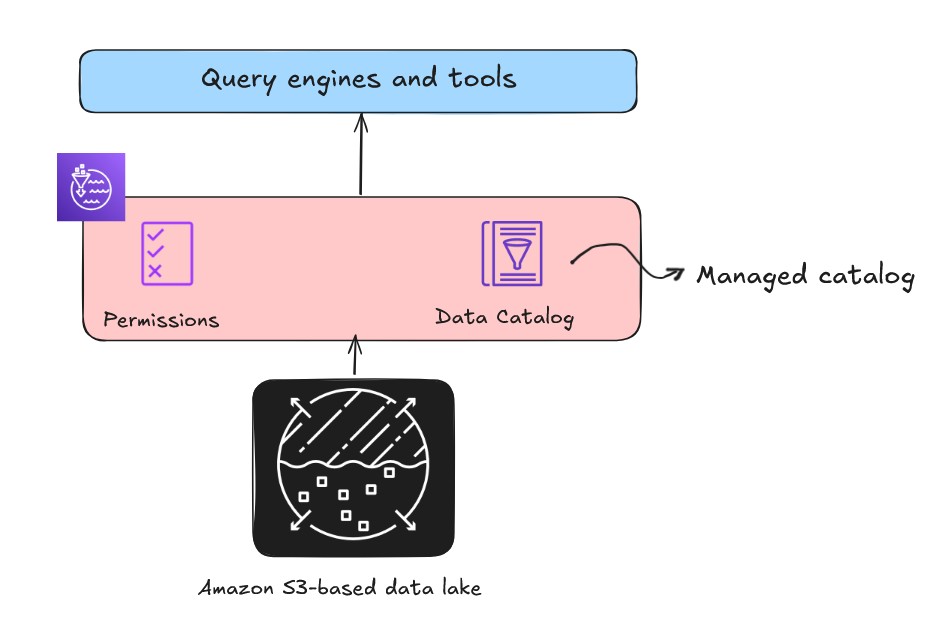
When building an open lakehouse, the catalog—your central repository of metadata—is a critical component for data discovery and governance. There are two types of catalogs in the lakehouse architecture of Amazon SageMaker: managed catalogs and federated catalogs.
- Managed catalog refers to when the metadata is managed by the lakehouse, and the data is stored in a general purpose S3 bucket.
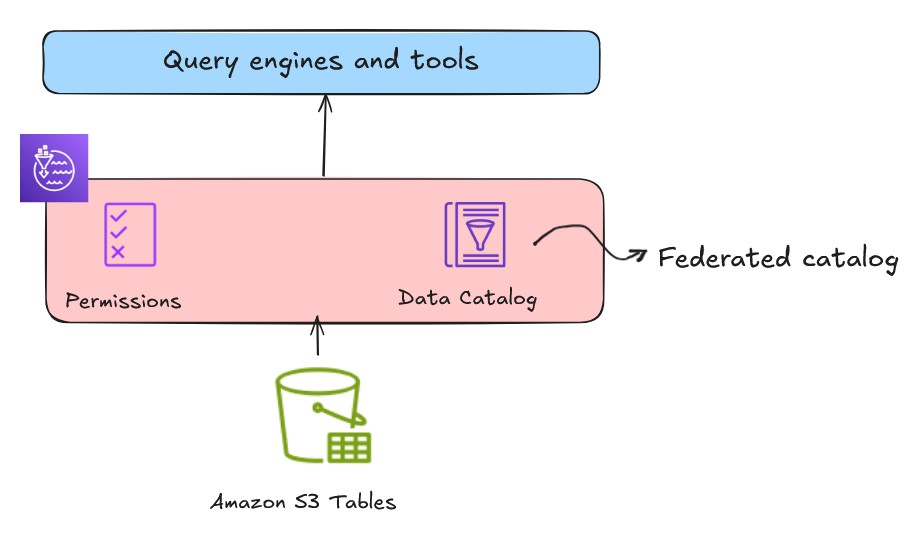
- Federated catalog refers to mounting or connecting to external or existing data sources so you can query data from data sources such as Amazon Redshift, Snowflake, and Amazon DynamoDB without explicitly moving the data. For more information, see Data connections in the lakehouse architecture of Amazon SageMaker.
You can use an AWS Glue crawler to automatically discover and register this metadata in Data Catalog. Data Catalog stores the schema and table metadata of your data assets, effectively turning files into logical tables. After your data is cataloged, the next challenge is controlling who can access it. While you could use complex S3 bucket policies for every folder, this approach is difficult to manage and scale. Lake Formation provides a centralized database-style permissions model on the Data Catalog, giving you the flexibility to grant or revoke fine-grained access at row, column, and cell levels for individual users or roles.
Open access with Apache Iceberg REST APIs
The lakehouse architecture described in the preceding section and shown in the following figure also uses the AWS Glue Iceberg REST catalog through the service endpoint, which provides OSS compatibility, enabling increased interoperability for managing Iceberg table metadata across Spark and other open source analytics engines. You can choose the appropriate API based on table format and use case requirements.
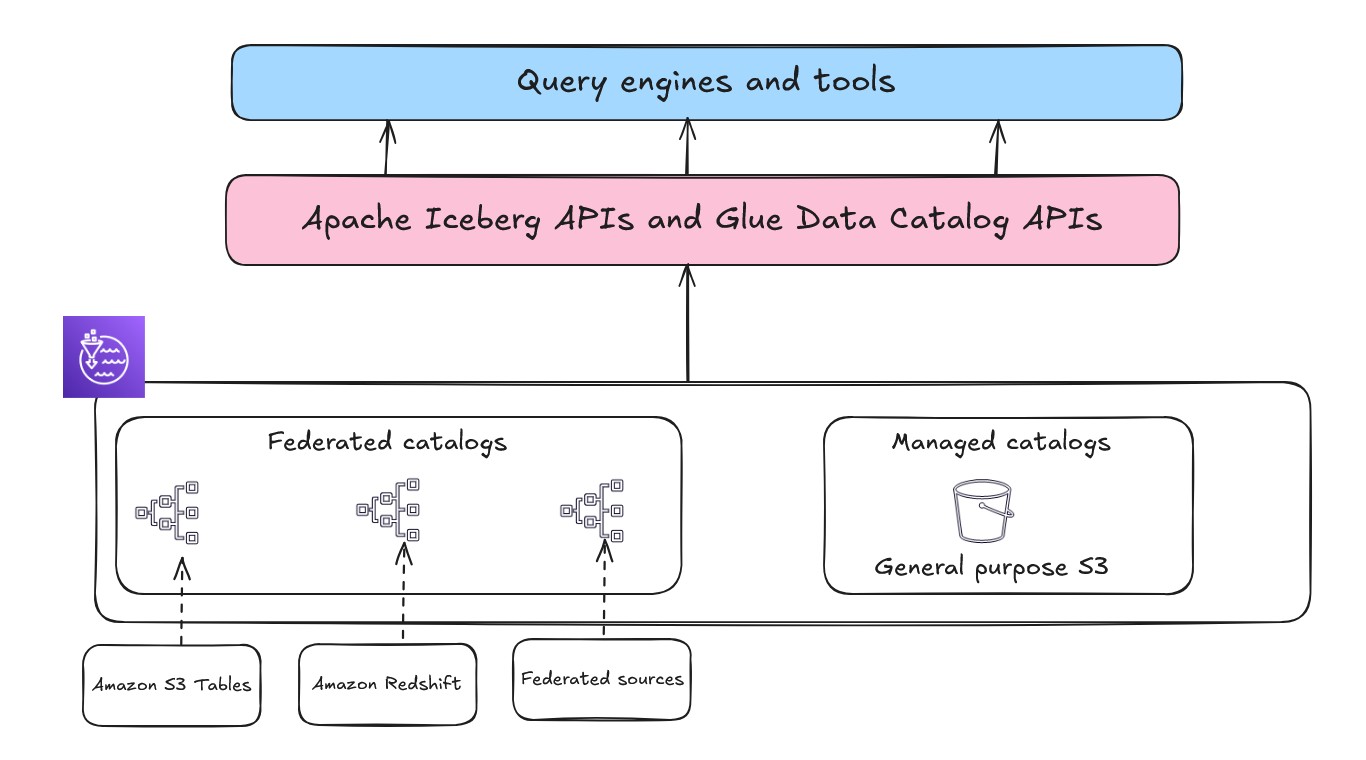
In this post, we explore various lakehouse architecture patterns, focusing on how to optimally use data lake and data warehouse to create robust, scalable, and performance-driven data solutions.
Bringing data into your lakehouse on AWS
When building a lakehouse architecture, you can choose from three distinct patterns to access and integrate your data, each offering unique advantages for different use cases.
- Traditional ETL is the classic method of extracting data, transforming it and loading it into your lakehouse.
When to use it:
-
- You need complex transformations and require highly curated and optimized data sets for downstream applications for better performance
- You need to perform historical data migrations
- You need data quality enforcement and standardization at scale
- You need highly governed curated data in a lakehouse
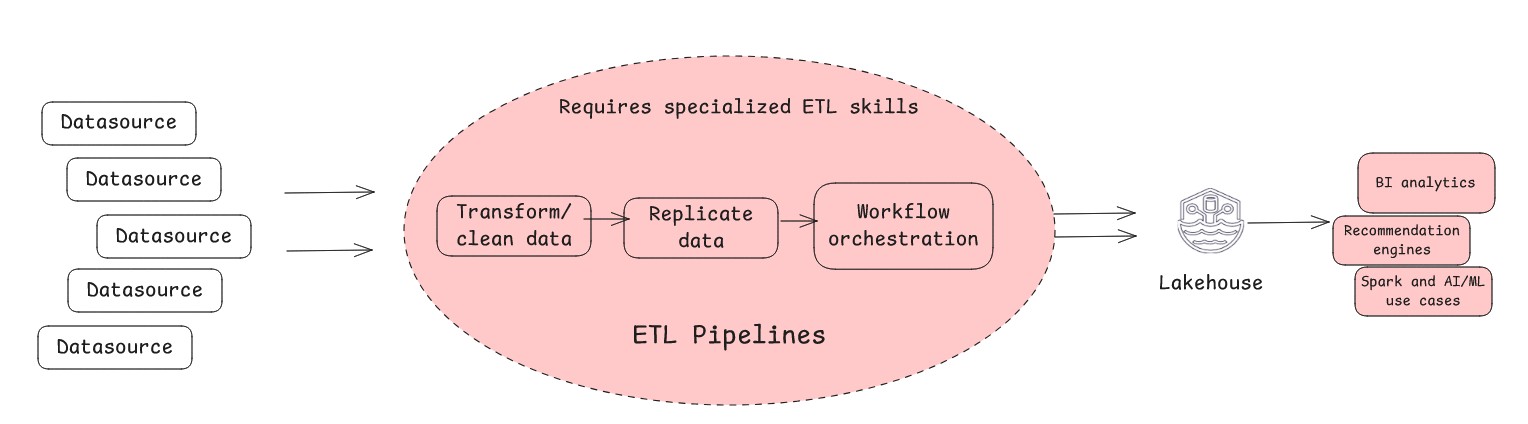
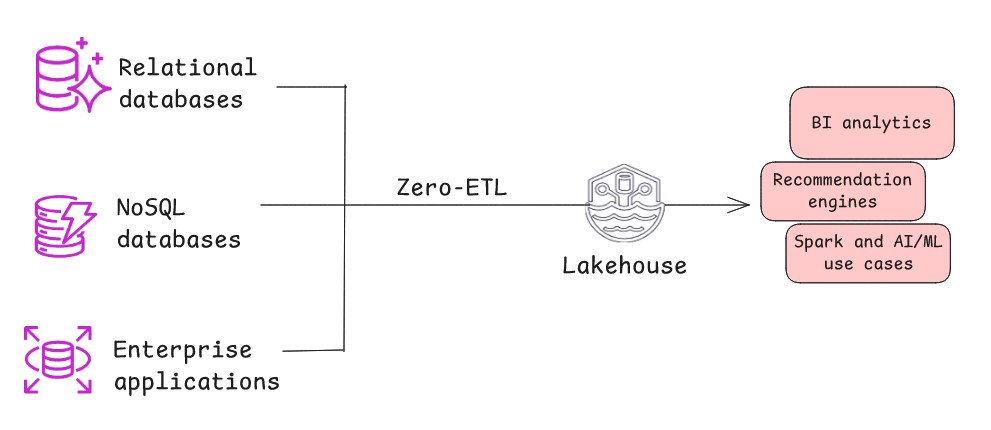
- Zero-ETL is a modern architectural pattern where data automatically and continuously replicates from a source system to lakehouse with minimal or no manual intervention or custom code. Behind the scenes, the pattern uses change data capture (CDC) to automatically stream all new inserts, updates, and deletes from the source to the target. This architectural pattern is effective when the source system maintains a high degree of data cleanliness and structure, minimizing the need for heavy pre-load transformations, or when data refinement and aggregation can occur at the target end within lakehouse. Zero-ETL replicates data with minimal delay, and the transformation logic is performed on the target end closer to where the insights are generated by shifting it to a more efficient, post-load phase.
When to use it:
-
- You need to reduce operational complexity and gain flexible control over data replication for both near real-time and batch use cases.
- You need limited customization. While zero-ETL implies minimal work, some light transformations might still be required on the replicated data.
- You need to minimize the need for specialized ETL expertise.
- You need to maintain data freshness without processing delays and reduce risk of data inconsistencies. Zero-ETL facilitates faster time-to-insight.
- Data federation (no-movement approach) is a method that enables querying and combining data from multiple disparate sources without physically moving or copying it into a single centralized location. This query-in-place approach allows the query engine to connect directly to the external source systems, delegate and execute queries, and combine results on the fly for presentation to the user. The effectiveness of this architecture pattern depends on three key factors: network latency between systems, source system performance capabilities, and the query engine’s ability to push down predicates to optimize query execution. This no-movement approach can significantly reduce data duplication and storage costs while providing real-time access to source data.
When to use it:
-
- You need to query the source system directly to use operational analytics.
- You don’t want to duplicate data to save on storage space and associated costs within your Lakehouse.
- You’re willing to trade some query performance and governance for immediate data availability and one-time analysis of live data.
- You don’t need to frequently query the data.
Understanding the storage layer of your lakehouse on AWS
Now that you’ve seen different ways to get data into a lakehouse, the next question is where to store the data. As shown in the following figure, you can architect a modern open lakehouse on AWS by storing the data in a data lake (Amazon S3 or Amazon S3 Tables) or data warehouse (Redshift Managed Storage), so you can optimize for both flexibility and performance based on your specific workload requirements.
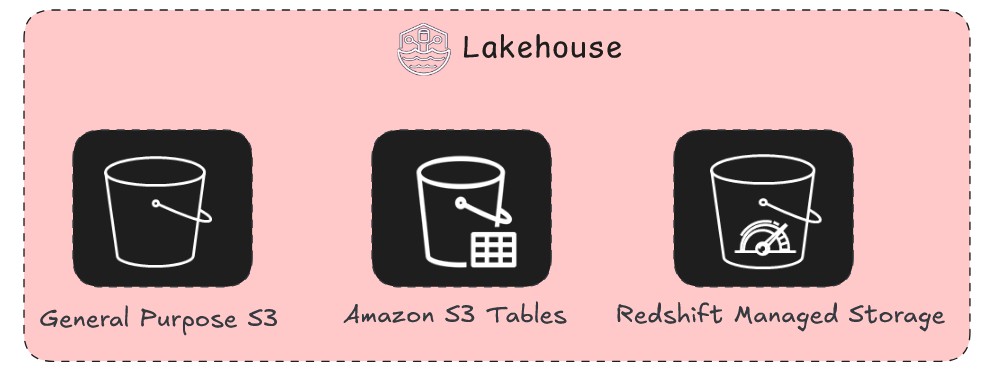
A modern lakehouse isn’t a single storage technology but a strategic combination of them. The decision of where and how to store your data impacts everything from the speed of your dashboards to the efficiency of your ML models. You must consider not only the initial cost of storage but also the long-term costs of data retrieval, the latency required by your users, and the governance necessary to maintain a single source of truth. In this section, we delve into architectural patterns for the data lake and the data warehouse and provide a clear framework for when to use each storage pattern. While they have historically been seen as competing architectures, the modern and open lakehouse approach uses both to create a single, powerful data platform.
General purpose S3
A general purpose S3 bucket in Amazon S3 is the standard, foundational bucket type used for storing objects. It provides flexibility so that you can store your data in its native format without a rigid upfront schema. Because of the ability of an S3 bucket to decouple storage from compute, you can store the data in a highly scalable location, while a variety of query engines can access and process it independently. This means that you can choose the right tool for the job without having to move or duplicate the data. You can store petabytes of data without ever having to provision or manage storage capacity, and its tiered storage classes provide significant cost savings by automatically moving less-frequently accessed data to more affordable storage.
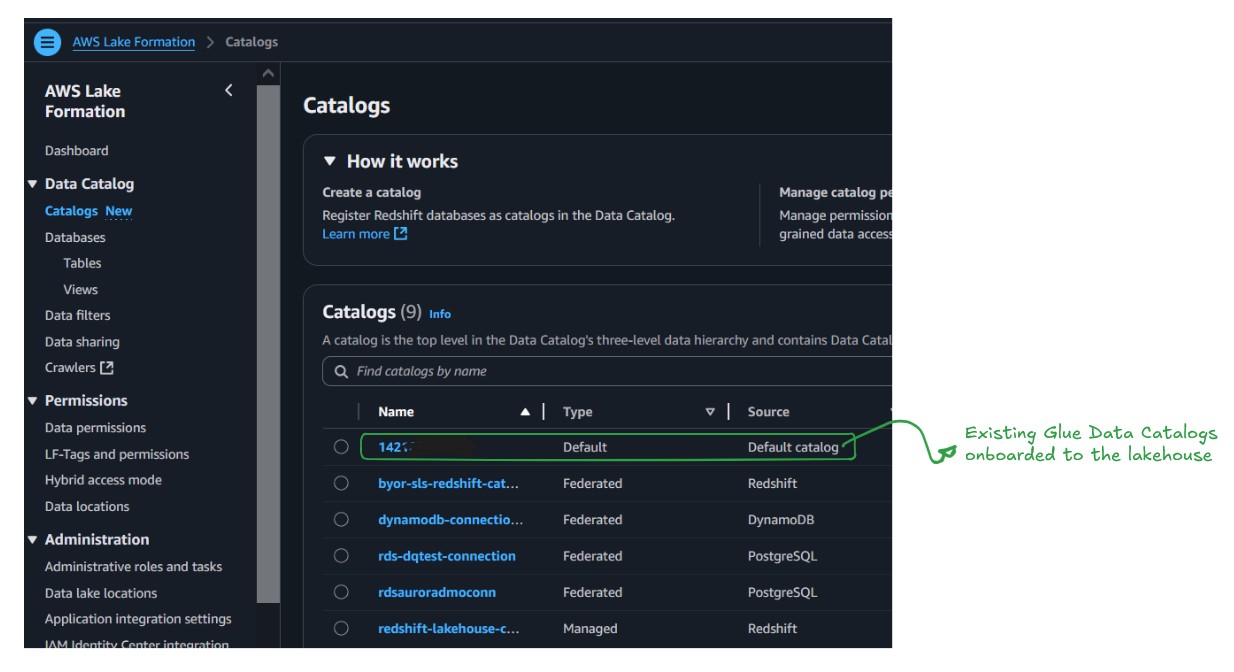
The existing Data Catalog functions as a managed catalog. It’s identified by the AWS account number, which means there is no migration needed for existing Data Catalogs; they’re already available in the lakehouse and become the default catalog for the new data, as shown in the following figure.
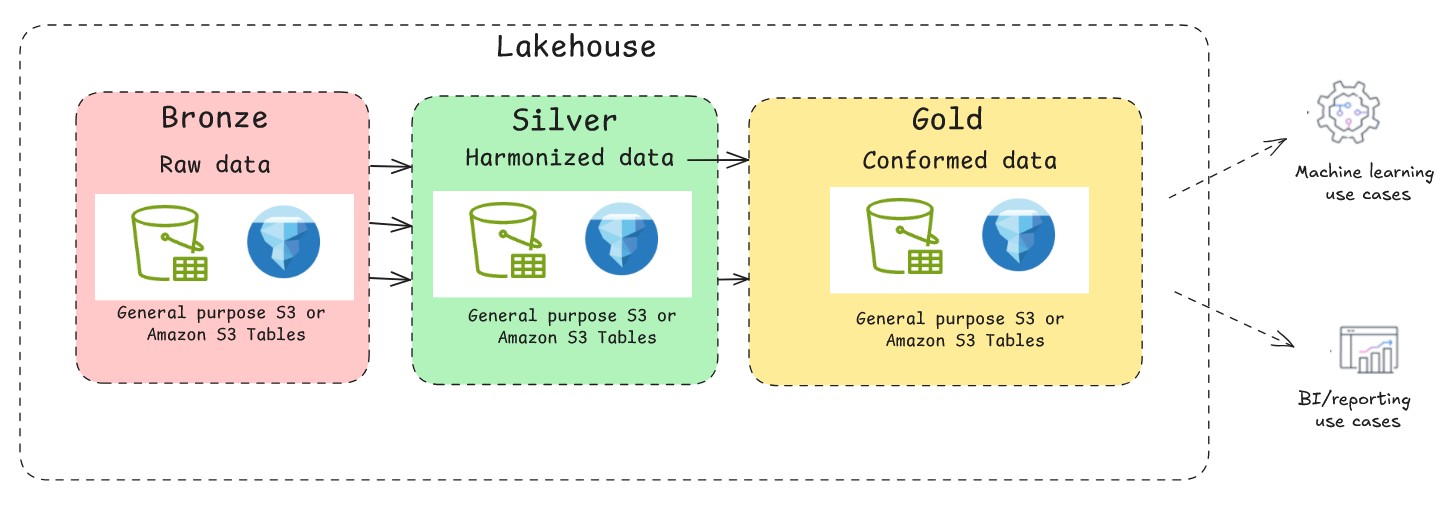
A foundational data lake on general purpose S3 is highly efficient for append-only workloads. However, its file-based nature lacks the transactional guarantees of a traditional database. This is where you can use the support of open-source transactional table formats such as Apache Hudi, Delta Lake, and Apache Iceberg. With these table formats, you can implement multi-version concurrency control, allowing multiple readers and writers to operate simultaneously without conflicts. They provide snapshot isolation, so that readers see consistent views of data even during write operations. A typical medallion architecture pattern with Apache Iceberg is depicted in the following figure. When building a lakehouse on AWS with Apache Iceberg, customers can choose between two primary approaches for storing their data on Amazon S3: General purpose S3 buckets with self-managed Iceberg or using the fully managed S3 Tables. Each path has distinct advantages, and the right choice depends on your specific needs for control, performance, and operational overhead.
General purpose S3 with Self-managed Iceberg
Using general purpose S3 buckets with self-managed Iceberg is a traditional approach where you store both data and Iceberg metadata files in standard S3 buckets. With this option, you maintain full control but are responsible for managing the complete Iceberg table lifecycle, including essential maintenance tasks such as compaction and garbage collection.
When to use it:
- Maximum control: This approach provides complete control over the entire data life cycle. You can fine-tune every aspect of table maintenance, such as defining your own compaction schedules and strategies, which can be crucial for specific high-performance workloads or to optimize costs.
- Flexibility and customization: It is ideal for organizations with strong in-house data engineering expertise that need to integrate with a wider range of open-source tools and custom scripts. You can use Amazon EMR or Apache Spark to manage the table operations.
- Lower upfront costs: You pay only for Amazon S3 storage, API requests, and the compute resources you use for maintenance. This can be more cost-effective for smaller or less-frequent workloads where continuous, automated optimization isn’t necessary.
Note: The query performance depends entirely on your optimization strategy. Without continuous, scheduled jobs for compaction, performance can degrade over time as data gets fragmented. You must monitor these jobs to ensure efficient querying.
S3 Tables
S3 Tables provides S3 storage that’s optimized for analytic workloads and provides Apache Iceberg compatibility to store tabular data at scale. You can integrate S3 table buckets and tables with Data Catalog and register the catalog as a Lake Formation data location from the Lake Formation console or using service APIs, as shown in the following figure. This catalog will be registered and mounted as a federated lakehouse catalog.
When to use it:
- Simplified operations: S3 Tables automatically handles table maintenance tasks such as compaction, snapshot management and orphan file cleanup in the background. This automation eliminates the need to build and manage custom maintenance jobs, significantly reducing your operational overhead.
- Automated optimization: S3 Tables provides built-in automatic optimizations that improve query performance. These optimizations include background processes such as file compaction to address the small files problem and data layout optimizations specific to tabular data. However, this automation trades flexibility for convenience. Because you can’t control the timing or method of compaction operations, workloads with specific performance requirements might experience varying query performance.
- Focus on data usage: S3 Tables reduces the engineering overhead and shifts the focus to data consumption, data governance and value creation.
- Simplified entry to open table formats: It’s suitable for teams who are new to the concept of Apache Iceberg but want to use transactional capabilities on data lake.
- No external catalog: Suitable for smaller teams who don’t want to manage an external catalog.
Redshift managed storage
While the data lake serves as the central source of truth for all your data, it’s not the most suitable data store for every job. For the most demanding business intelligence and reporting workloads, the data lake’s open and flexible nature can introduce performance unpredictability. To help ensure the desired performance, consider transitioning a curated subset of your data from the data lake to a data warehouse for the following reasons:
- High concurrency BI and reporting: When hundreds of business users are concurrently running complex queries on live dashboards, a data warehouse is specifically optimized to handle these workloads with predictable, sub-second query latency.
- Predictable performance SLAs:– For critical business processes that require data to be delivered at a guaranteed speed, such as financial reporting or end-of-day sales analysis, a data warehouse provides consistent performance.
- Complex SQL workloads: While data lakes are powerful, they can struggle with highly complex queries involving numerous joins and massive aggregations. A data warehouse is purpose-built to run these relational workloads efficiently.
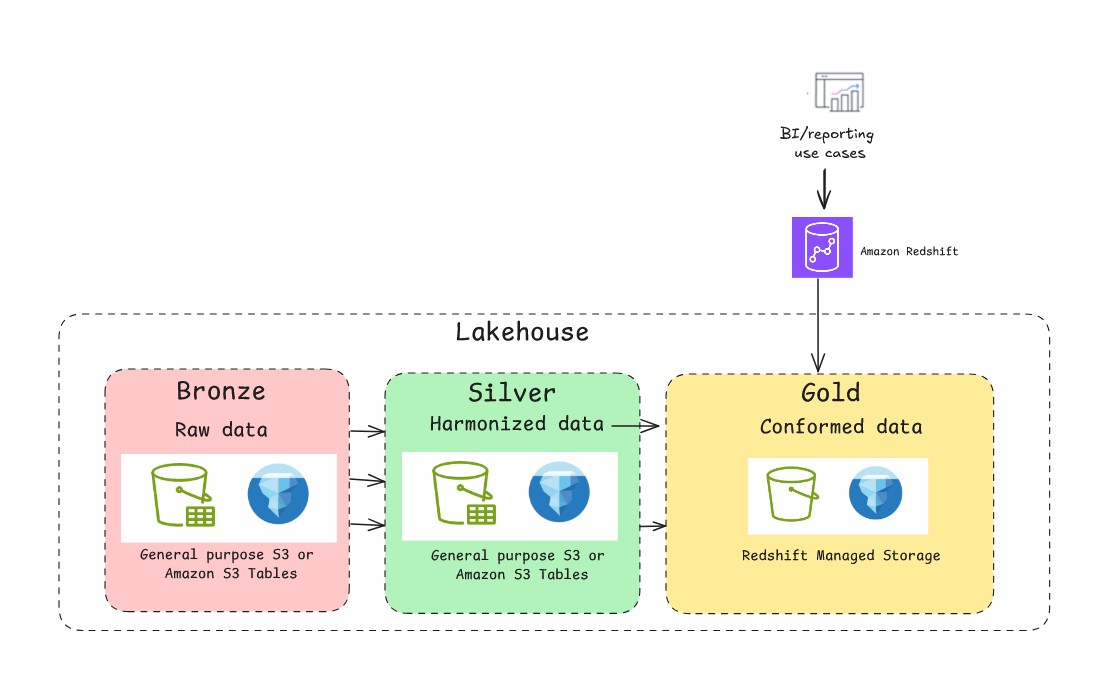
The lakehouse architecture on AWS supports Redshift Managed Storage (RMS), a storage option provided by Amazon Redshift, a fully managed, petabyte-scale data warehouse service in the cloud. RMS storage supports the automatic table optimization offered in Amazon Redshift such as built-in query optimizations for data warehousing workloads, automated materialized views, and AI-driven optimizations and scaling for frequently running workloads.
Federated RMS catalog: Onboard existing Amazon Redshift data warehouses to lakehouse
Implementing a federated catalog with existing Amazon Redshift data warehouses creates a metadata-only integration that requires no data movement. This approach lets you extend your established Amazon Redshift investments into a modern open lakehouse framework while maintaining compatibility with existing workflows. Amazon Redshift uses a hierarchical data organization structure:
- Cluster level: Starts with a namespace
- Database level: Contains multiple databases
- Schema level: Organizes tables within databases
When you register your existing Amazon Redshift provisioned or serverless namespaces as a federated catalog in Data Catalog, this hierarchy maps directly into the lakehouse metadata layer. The lakehouse implementation on AWS supports multiple catalogs using a dynamic hierarchy to organize and map the underlying storage metadata.
After you register a namespace, the federated catalog automatically mounts across all Amazon Redshift data warehouses in your AWS Region and account. During this process, Amazon Redshift internally creates external databases that correspond to data shares. This mechanism remains completely abstracted from end users. By using federated catalogs, you can create and use immediate visibility and accessibility across your data ecosystem. Permissions on the federated catalogs can be managed by Lake Formation for both same account and cross account access.
The real capability of federated catalogs emerges when accessing Amazon Redshift-managed storage from external AWS engines such as Amazon Athena, Amazon EMR, or open source Spark. Because Amazon Redshift uses proprietary block-based storage that only Amazon Redshift engines can read natively, AWS automatically provisions a service-managed Amazon Redshift Serverless instance in the background. This service-managed instance acts as a translation layer between external engines and Amazon Redshift managed storage. AWS establishes automatic data shares between your registered federated catalog and the service-managed Amazon Redshift Serverless instance to enable secure, efficient data access. AWS also creates a service-managed Amazon S3 bucket in the background for data transfer.
When an external engine such as Athena submits queries against Amazon Redshift federated catalog, Lake Formation handles the credential vending by providing the temporary credentials to the requesting service. The query executes through the service-managed Amazon Redshift Serverless, which accesses data through automatically established data shares, processes results, offloads them to a service-managed Amazon S3 staging area, and then returns results to the original requesting engine.
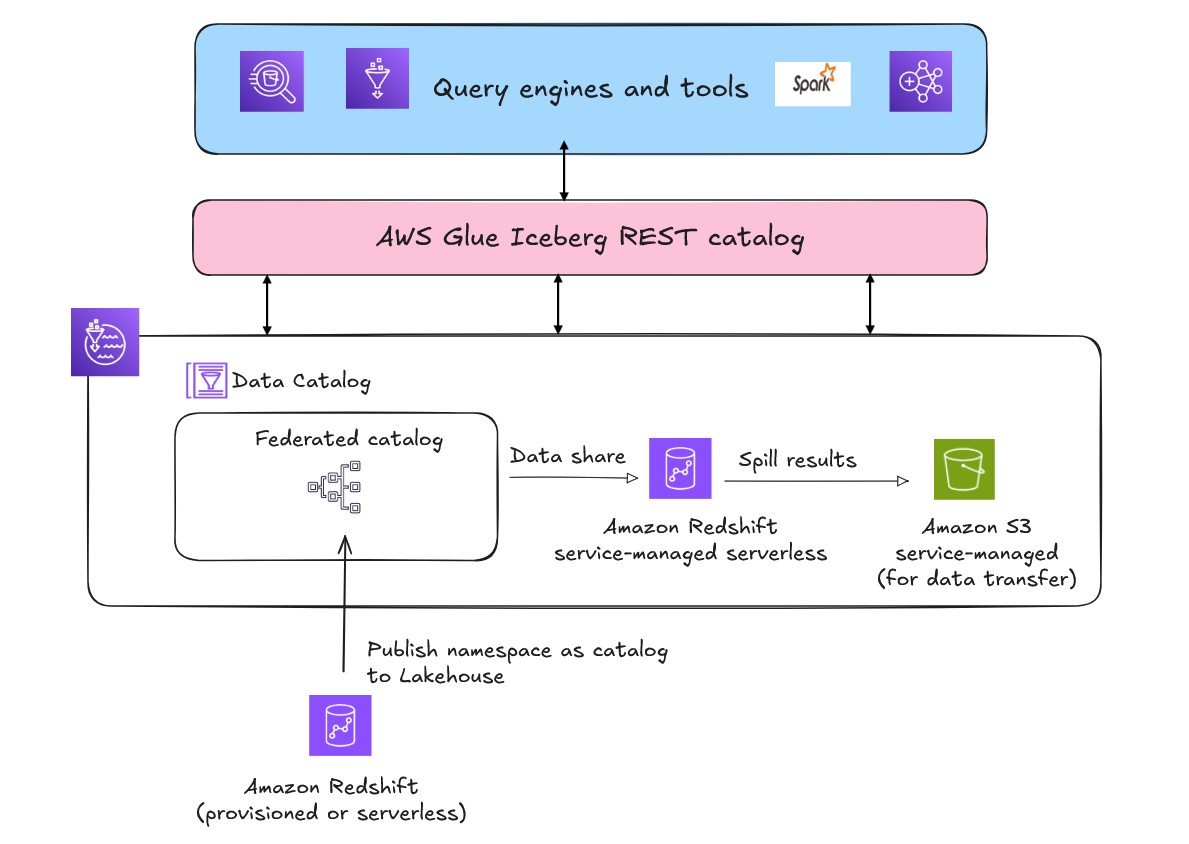
To track the compute cost of the federated catalog of existing Amazon Redshift warehouse, use the following tag.
aws:redshift-serverless:LakehouseManagedWorkgroup value: "True"
To activate the AWS generated cost allocation tags for billing insight, follow the activation instructions. You can also view the computational cost of the resources in AWS Billing.
When to use it:
- Existing Amazon Redshift investments: Federated catalogs are designed for organizations with existing Amazon Redshift deployments who want to use their data across multiple services without migration.
- Cross-service data sharing:– Implement so teams can share existing data in an Amazon Redshift data warehouse across different warehouses and centralize their permissions.
- Enterprise integration requirements: This approach is suitable for organizations that need to integrate with established data governance. It also maintains compatibility with current workflows while adding lakehouse capabilities.
- Infrastructure control and pricing:– You can retain full control over compute capacity for their existing warehouses for predictable workloads. You can optimize compute capacity, choose between on-demand and reserved capacity pricing, and fine-tune performance parameters. This provides cost predictability and performance control for consistent workloads.
When implementing lakehouse architecture with multiple catalog types, selecting the appropriate query engine is crucial for both performance and cost optimization. This post focuses on the storage foundation of lakehouse, however for critical workloads involving extensive Amazon Redshift data operations, consider executing queries within Amazon Redshift or using Spark when possible. Complex joins spanning multiple Amazon Redshift tables through external engines might result in higher compute costs if the engines don’t support full predicate push-down.
Other use-cases
Build a multi-warehouse architecture
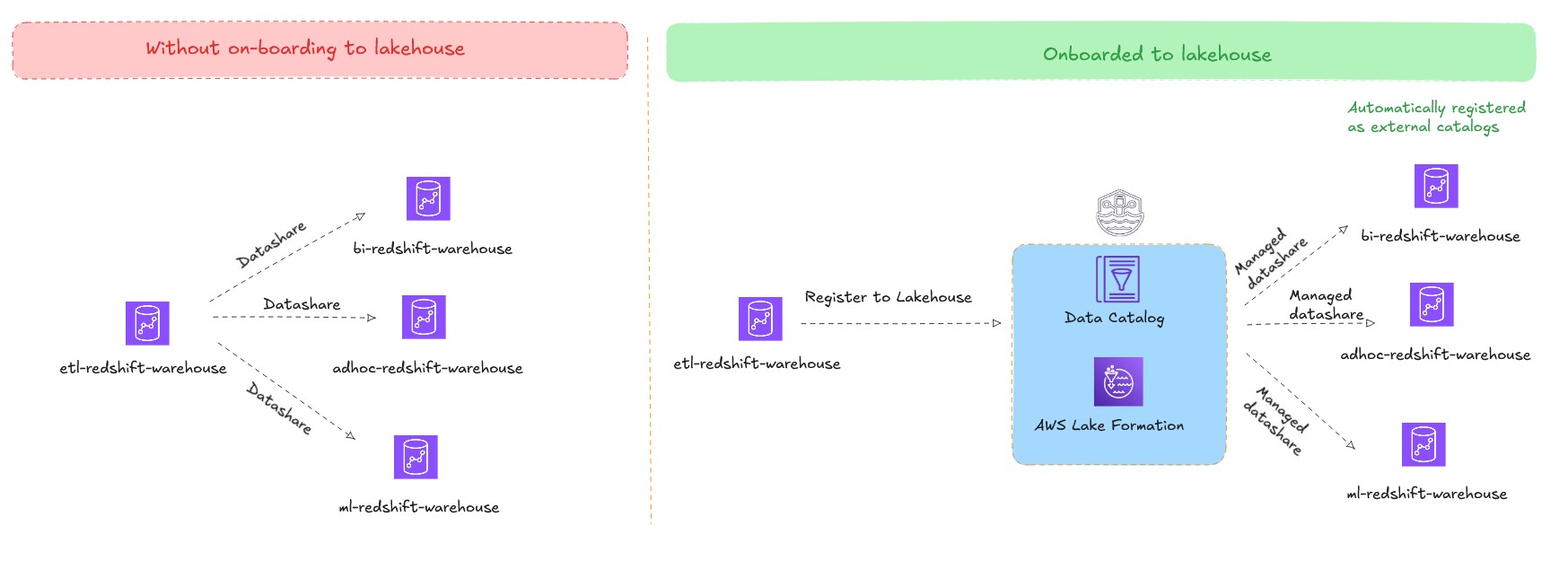
Amazon Redshift supports data sharing, which you can use to share live data between source and target Amazon Redshift clusters. By using data sharing, you can share live data without creating copies or moving data, enabling uses cases such as workload isolation (hub and spoke architecture) and cross group collaboration (data mesh architecture). Without a lakehouse architecture, you must create an explicit data share between source and target Amazon Redshift clusters. While managing these data shares in small deployments is relatively straightforward, it becomes complex in data mesh architectures.
The lakehouse architecture addresses this challenge so customers can publish their existing Amazon Redshift warehouses as federated catalogs. These federated catalogs are automatically mounted and made available as external databases in other consumer Amazon Redshift warehouses within the same account and Region. By using this approach, you can maintain a single copy of data and use multiple data warehouses to query it, eliminating the need to create and manage multiple data shares and scale with workload isolation. The permission management becomes centralized through Lake Formation, streamlining governance across the entire multi-warehouse environment.
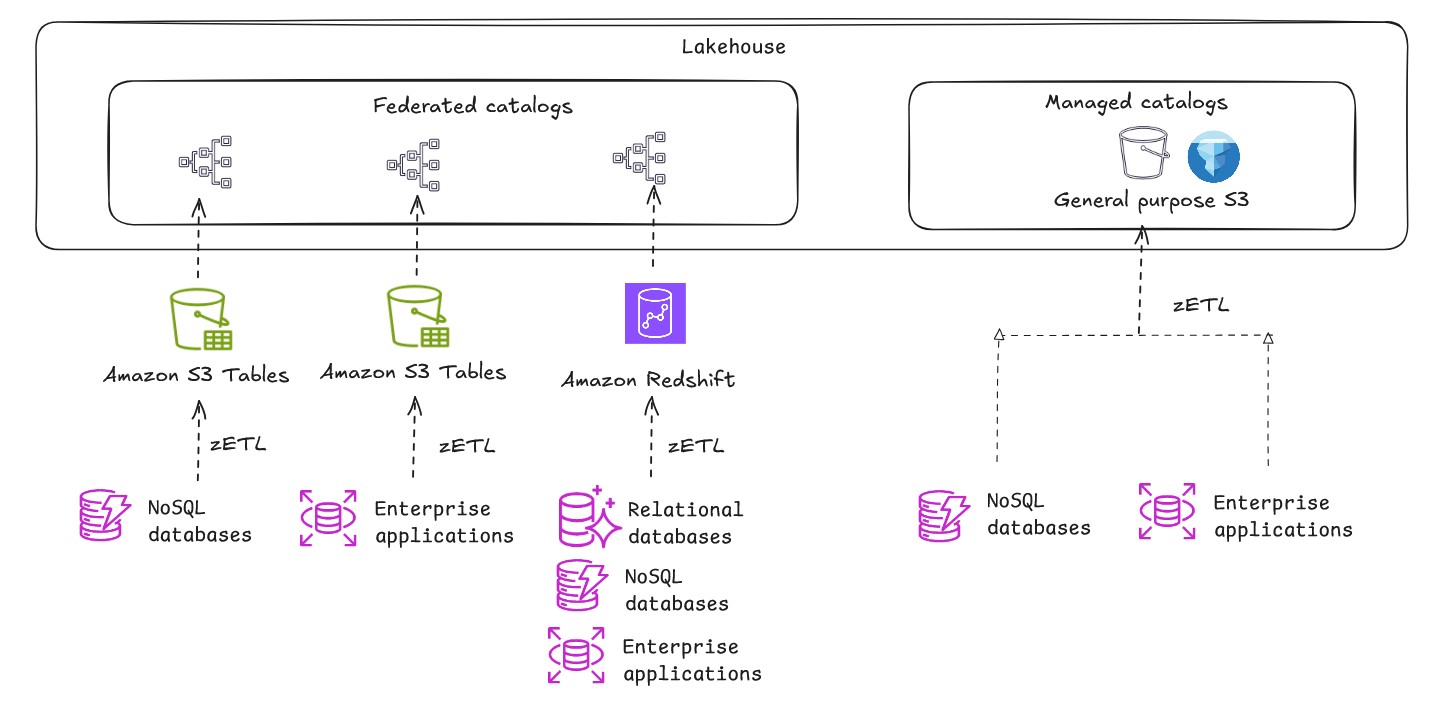
Near real-time analytics on petabytes of transactional data with no pipeline management:
Zero-ETL integrations seamlessly replicate transactional data from OLTP data sources to Amazon Redshift, general purpose S3 (with self-managed Iceberg) or S3 Tables. This approach eliminates the need to maintain complex ETL pipelines, reducing the number of moving parts in your data architecture and potential points of failure. Business users can analyze fresh operational data immediately rather than working with stale data from the last ETL run.
See Aurora zero-ETL integrations for a list of OLTP data sources that can be replicated to an existing Amazon Redshift warehouse.
See Zero-ETL integrations for information about other supported data sources that can be replicated to an existing Amazon Redshift warehouse, general purpose S3 with self-managed Iceberg, and S3 Tables.
Conclusion
A lakehouse architecture isn’t about choosing between a data lake and a data warehouse. Instead, it’s an approach to interoperability where both frameworks coexist and serve different purposes within a unified data architecture. By understanding fundamental storage patterns, implementing effective catalog strategies, and using native storage capabilities, you can build scalable, high-performance data architectures that support both your current analytics needs and future innovation. For more information, see The lakehouse architecture of Amazon SageMaker.