AWS Big Data Blog
Streamline Apache Kafka cluster operations and migrations with Agent Skills for Amazon MSK
Amazon Managed Streaming for Apache Kafka (Amazon MSK) manages core operational tasks for running Apache Kafka, including cluster provisioning, patching, high availability, and more. But operating Kafka clusters at scale still involves decisions that benefit from deep domain knowledge. For example, where do I start investigating application latency? How do I right-size a cluster to balance performance and cost? How do I analyze my applications, cluster configurations, and other requirements to support a smooth migration from self-managed Kafka to Amazon MSK?
With the new Agent Skills for Amazon MSK, you can access AI-assisted guidance for operations and migration planning directly in your development environment. Two complementary skills, managing-amazon-msk and migrate-to-msk, encode domain expertise based on AWS best practices, structured troubleshooting workflows, and programmatic sizing and compatibility analysis.
In this post, we walk through installing both skills and demonstrate their key capabilities. These include diagnosing a performance issue, sizing a cluster with cost breakdowns, and migration planning from self-managed Kafka to Amazon MSK including discovery, compatibility assessment, and target sizing.
How Agent Skills enhance documentation
Baseline large language models encode knowledge from their training data. That data can go stale as services evolve, and it often lacks the specific, contextual detail a task needs. As a result, a general-purpose assistant can produce answers that sound convincing but are factually wrong (hallucinations). For example, Amazon MSK Provisioned clusters come in two broker types, Standard and Express. Both broker types include their own considerations to achieve your performance, latency, availability, and durability requirements. Because training data mixes the two together, general-purpose assistants routinely conflate them and apply advice to the incorrect broker type.
These skills solve this problem by encoding the correct context for Amazon MSK broker operations, performance management, client configuration, and migrations, aligned with AWS best practices. This helps agents give more accurate, contextual guidance.
Overview of solution
The two Amazon MSK Agent Skills cover the full lifecycle of Amazon MSK cluster ownership:
Skill 1: managing-amazon-msk
Operations expertise for Amazon MSK Provisioned clusters with both Standard and Express broker types:
| Workflow | What it does |
| Performance troubleshooting | Structured decision tree: CPU saturation, batch size analysis, Amazon Elastic Block Store (Amazon EBS) throughput entitlements (Standard), Express brokers entitlements |
| Consumer lag diagnosis | Determines if lag is broker-side, partition-level (hot keys), or client-side. Provides targeted fixes |
| Storage management | Amazon EBS expansion, auto scaling, retention planning, tiered storage (Standard only) |
| Cluster sizing and pricing | Programmatic right-sizing and cost estimate tool comparing all Standard and Express instance types with cost breakdowns |
| Monitoring and alarms | Set up actionable Amazon CloudWatch alarms with broker-type-aware thresholds that follow best practices for monitoring |
| Maintenance operations | Rolling restart impact analysis, patching and broker upgrades, version upgrade planning, and transient failure analysis (distinguishing expected maintenance disruptions from real issues). |
Skill 2: migrate-to-msk
Migration planning from self-managed Apache Kafka to Amazon MSK in three phases:
| Phase | What it does |
| Discovery | Inventories your source cluster from infrastructure as code (IaC) files, Kafka CLI output, or manual input. Produces a standardized cluster-config.json |
| Assessment | Five-pillar compatibility check (topology, version, configs, auth, quotas) plus target cluster sizing using the AWS-published Amazon MSK Sizing and Pricing workbook |
| Simulation (Optional) | Deploys temporary Amazon MSK cluster and Amazon EC2 load-generation fleet in your account to test performance under synthetic load before you migrate. Produces an Amazon CloudWatch dashboard with throughput, broker health, latency, and consumer lag metrics. |
After assessment, the skill provides guidance on using Amazon MSK Replicator for the actual data migration to your new Amazon MSK cluster.
Prerequisites
To use the tool, you need:
- An AI coding assistant that supports Agent Skills, such as Kiro IDE, Amazon Q Developer, or any tool that supports the Model Context Protocol (MCP).
- AWS Command Line Interface (AWS CLI) version 2.35.0 or later.
- Python 3.12+ and uv installed (Python package runner used by the migrate-to-msk skill).
- Agent Toolkit for AWS and AWS MCP server installed.
- For installation instructions, refer to Setting up the AWS MCP Server in the Agent Toolkit for AWS User Guide.
- An AWS Identity and Access Management (IAM) role configured with access scoped to each skill’s needs:
- For managing-amazon-msk:
- Permissions to describe and manage Amazon MSK clusters, retrieve Amazon CloudWatch metrics for performance diagnostics, and create and delete CloudWatch alarms.
- For migrate-to-msk:
- Optional read-only access (CloudWatch metrics, describe clusters) to gather runtime metrics from an existing AWS estate for a more accurate assessment.
- The optional Simulation phase requires permissions to create AWS CloudFormation stacks.
- For managing-amazon-msk:
Installing the AWS MCP server and skills
Both skills are available in the Agent Toolkit for AWS on the GitHub website.
After initial setup following the steps in the Agent Toolkit instructions, install the Amazon MSK skills with:
For more information on managing skills, refer to Managing skills with the AWS CLI in the Agent Toolkit for AWS User Guide.
Verify MCP installation by checking the MCP server status in your IDE’s MCP panel.
Verify skill installation with:
You should see both skills listed for your detected agents. To confirm they’re active, ask your AI assistant an Amazon MSK question, and it should load the skill to engage with broker-type-aware guidance.
Scenario 1: Diagnosing high latency
During your evaluation of Amazon MSK your team notices elevated produce latency. You ask the AI assistant for help,
“Our Amazon MSK Express broker cluster is experiencing high produce latency that we think is related to our client application. The producer code is in this working directory. Can you help diagnose?”
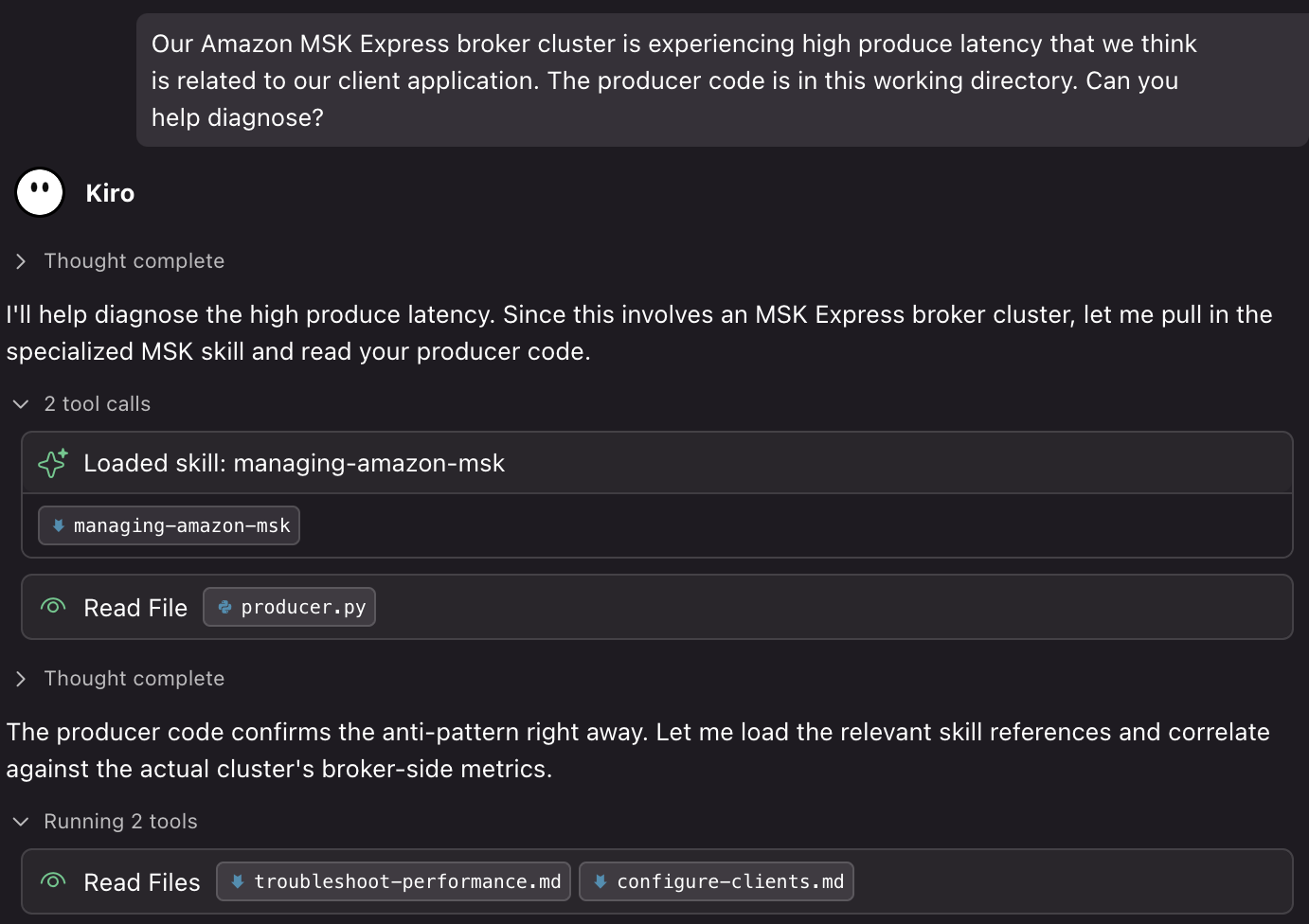
The agent immediately identifies that this question would be well suited for the managing-amazon-msk-skill and activates it. In the same step, the agent opens your producer code to diagnose the real client configuration. The skill ships with reference guides, and the agent selects the two that matter for this specific problem. It then maps your application code directly onto the skill’s diagnostic workflow, landing on a diagnosis:
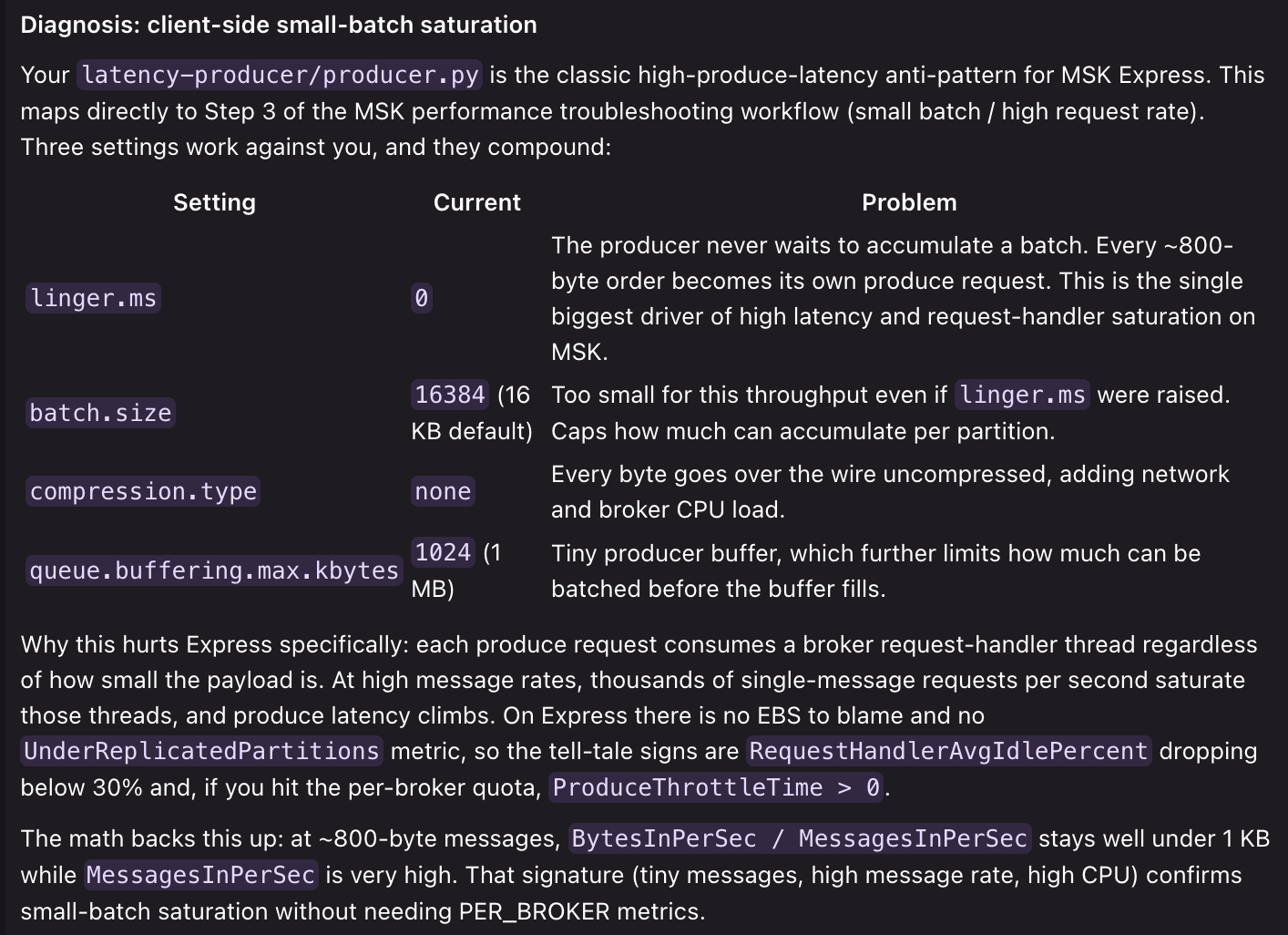
The skill identifies three compounding anti-patterns in the configuration, specifically linger.ms=0, an undersized batch.size, and compression.type=none. It then explains why they negatively impact Kafka cluster performance: every tiny message becomes its own produce request, saturating broker request-handler threads. Based on these observations, the skill delivers a targeted solution:
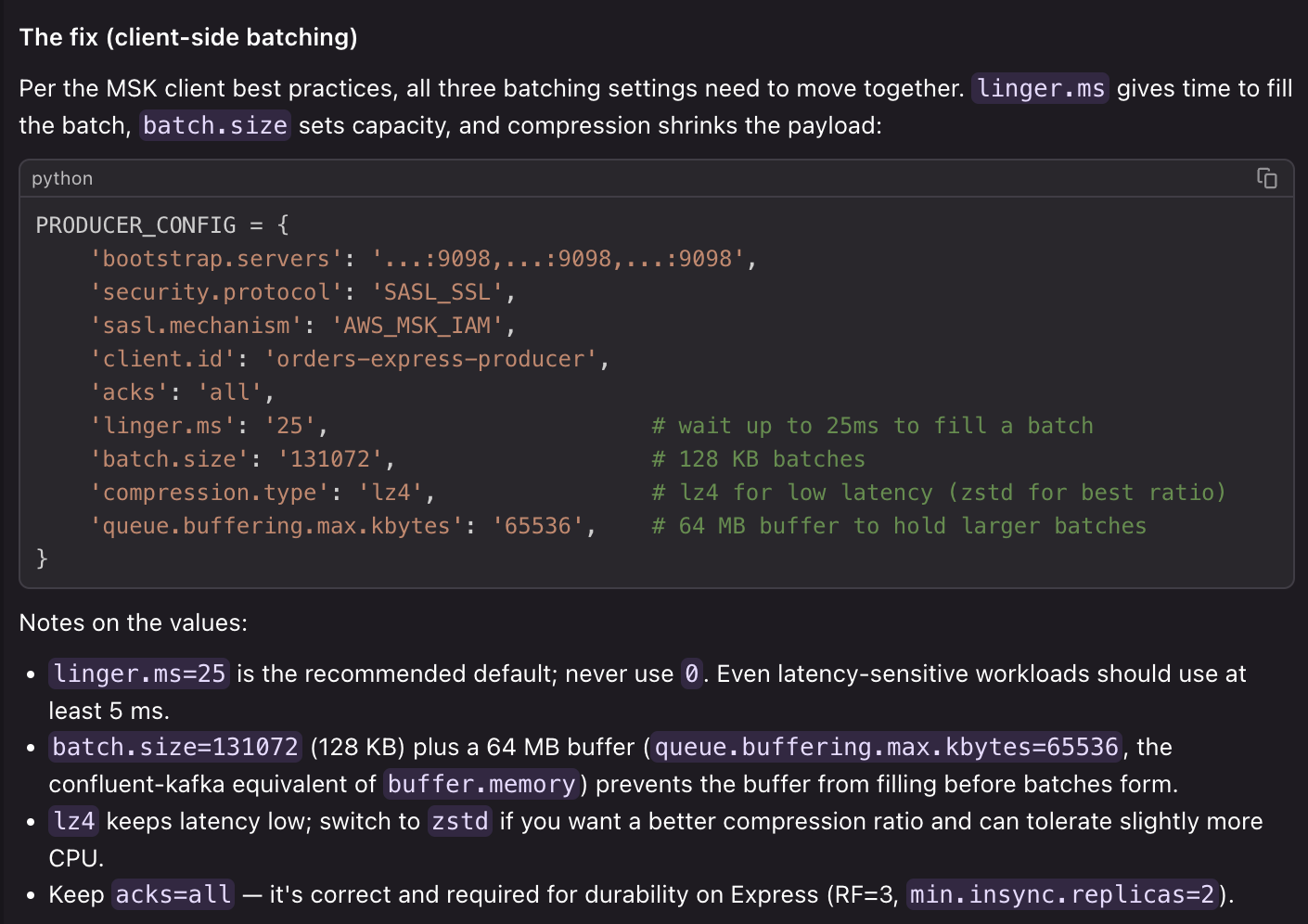
The skill uses best practice client-configuration references to provide specific recommendations to improve your application. It then goes on to provide additional context, considerations, and the Amazon CloudWatch metrics to observe to verify that the configurations have improved your end-to-end performance.
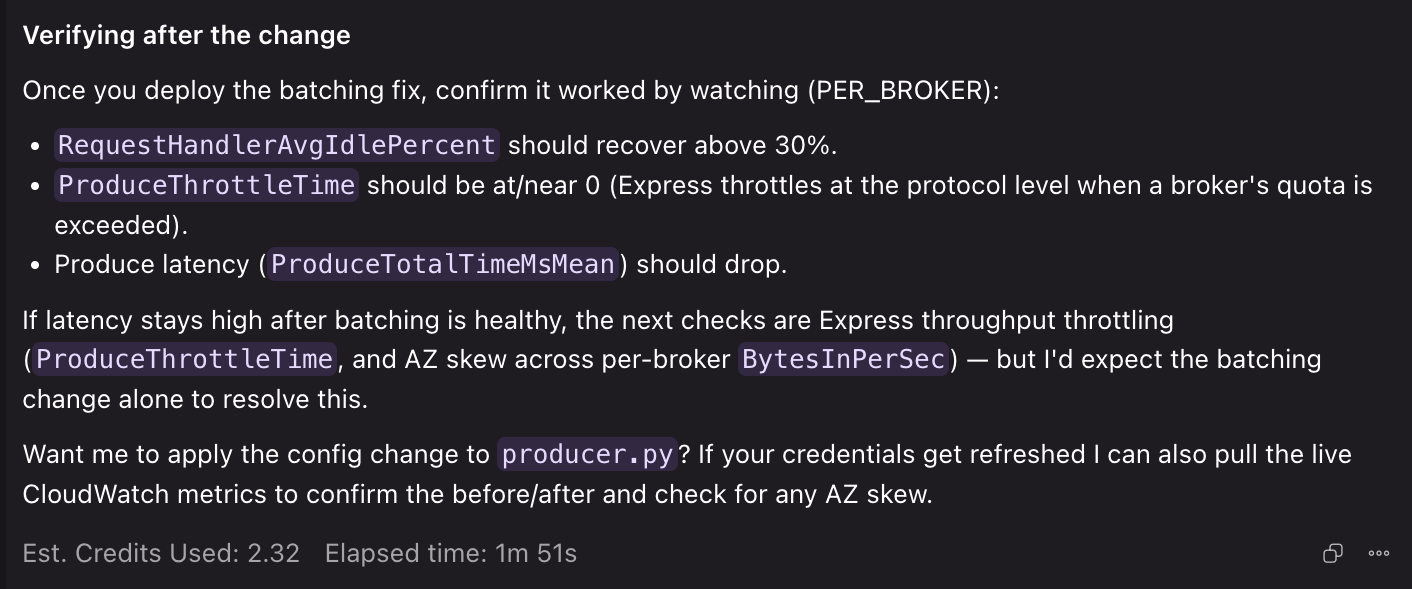
You can try this yourself by bringing your own producer code and letting the skill diagnose it. If you give it access to the AWS CLI the agent can pull live Amazon CloudWatch metrics from your actual cluster. This lets it correlate broker-side signals with what it sees in your client configuration for a more complete diagnosis.
Scenario 2: Migrating to Amazon MSK Express brokers
The migrate-to-msk skill guides you through a structured migration from self-managed Apache Kafka to Amazon MSK in three phases: discovery, assessment, and optional simulation. When you prompt the skill, it launches the discovery phase.
Phase 1: Discovery — analyze your source cluster
In this scenario, you point the skill at your infrastructure as code (IaC) files describing a self-managed Kafka deployment:
“Here’s our Kafka infrastructure, can you help us plan a migration to Amazon MSK Express brokers?”
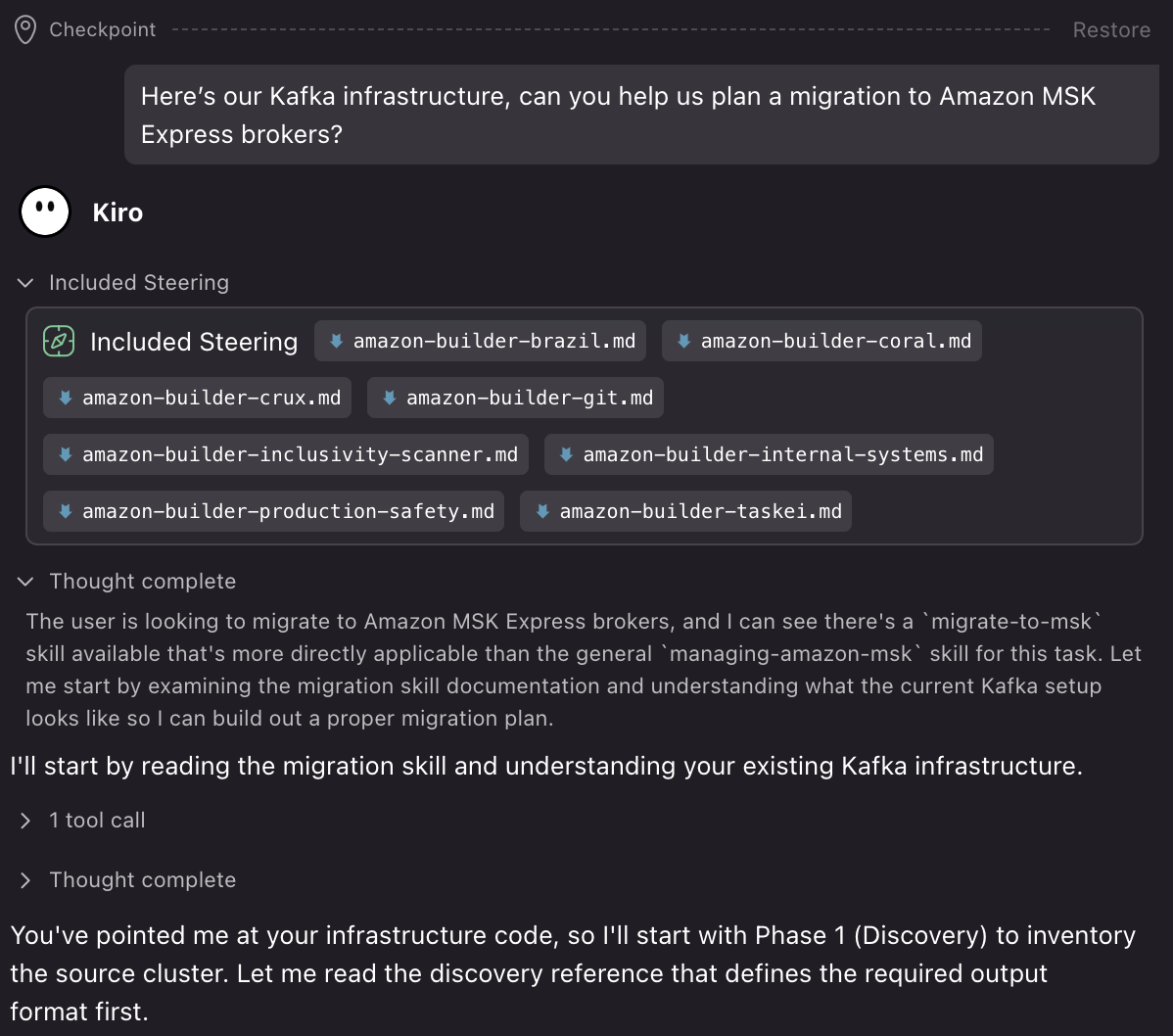
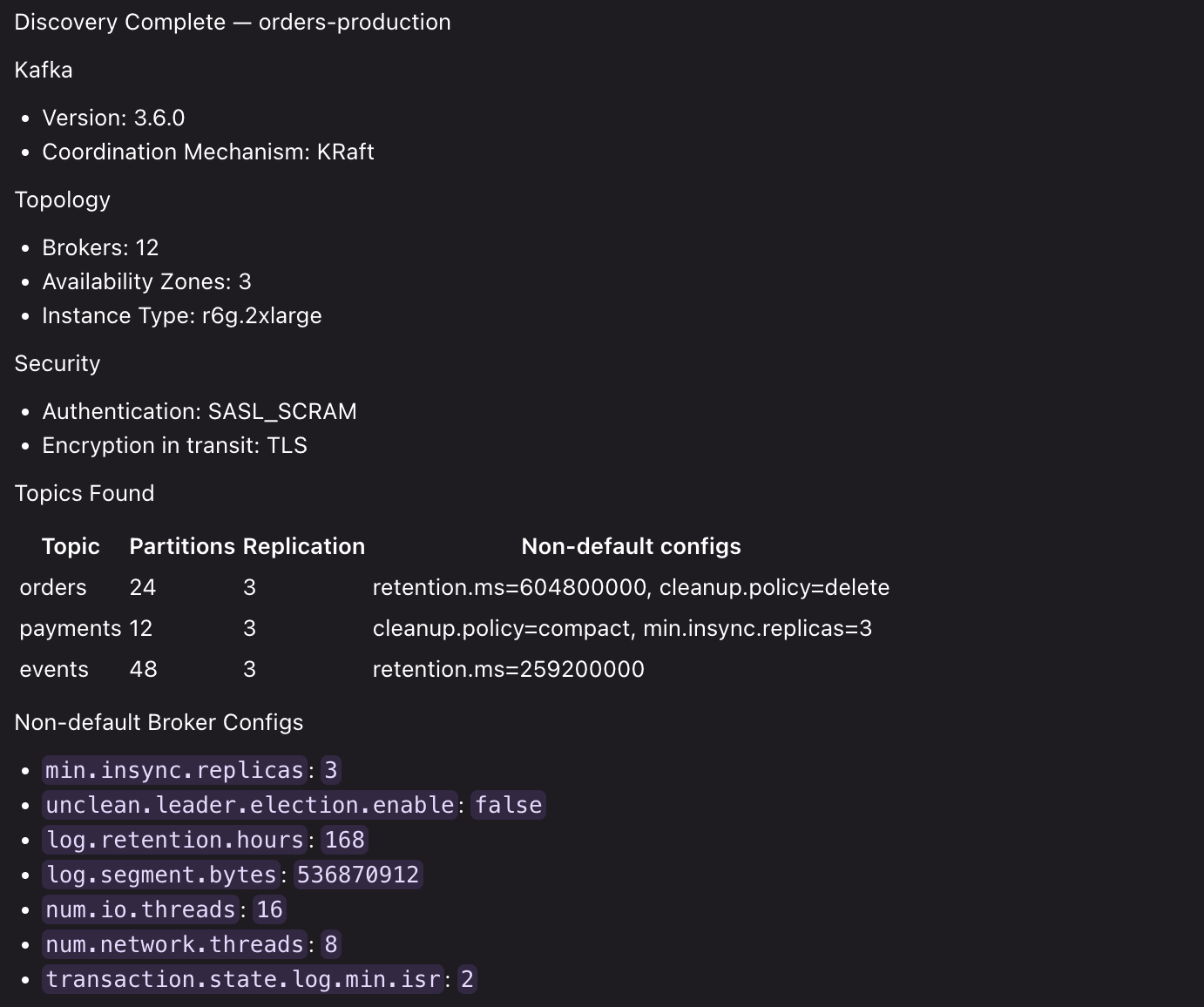
The skill pulls static details: broker topology, versions, security configuration, and topic definitions directly from your IaC files.
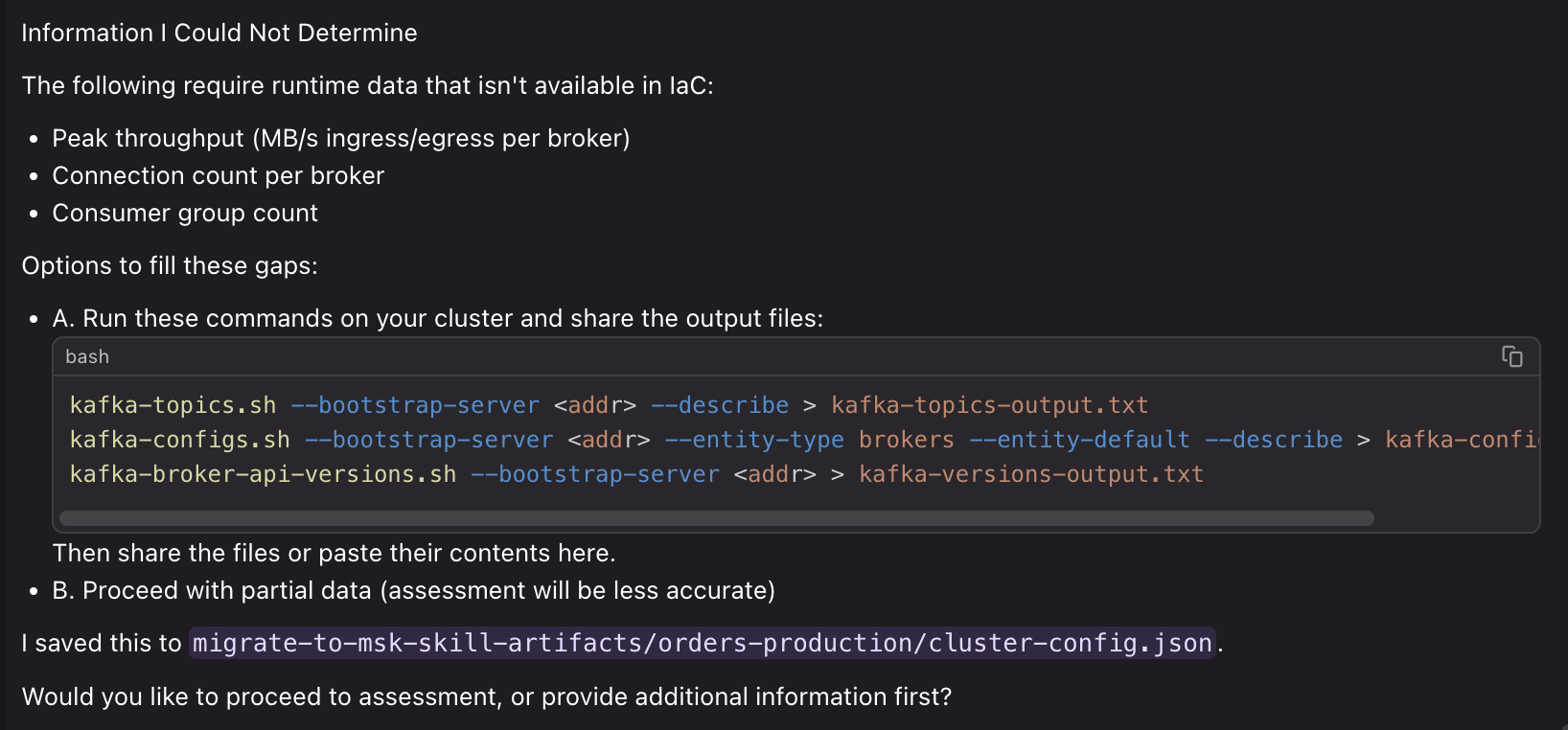
For runtime values the skill can’t derive from IaC, such as actual peak throughput or consumer-group count, the skill identifies these as flagged gaps. For each gap, the skill provides the specific Kafka CLI commands you can run against your live cluster to capture those values.
The skill supports discovery from multiple source types: Terraform, CDK, CloudFormation, Docker Compose, Kubernetes manifests, or manual input in conversation.
Phase 2: Assessment — validate compatibility and size the target
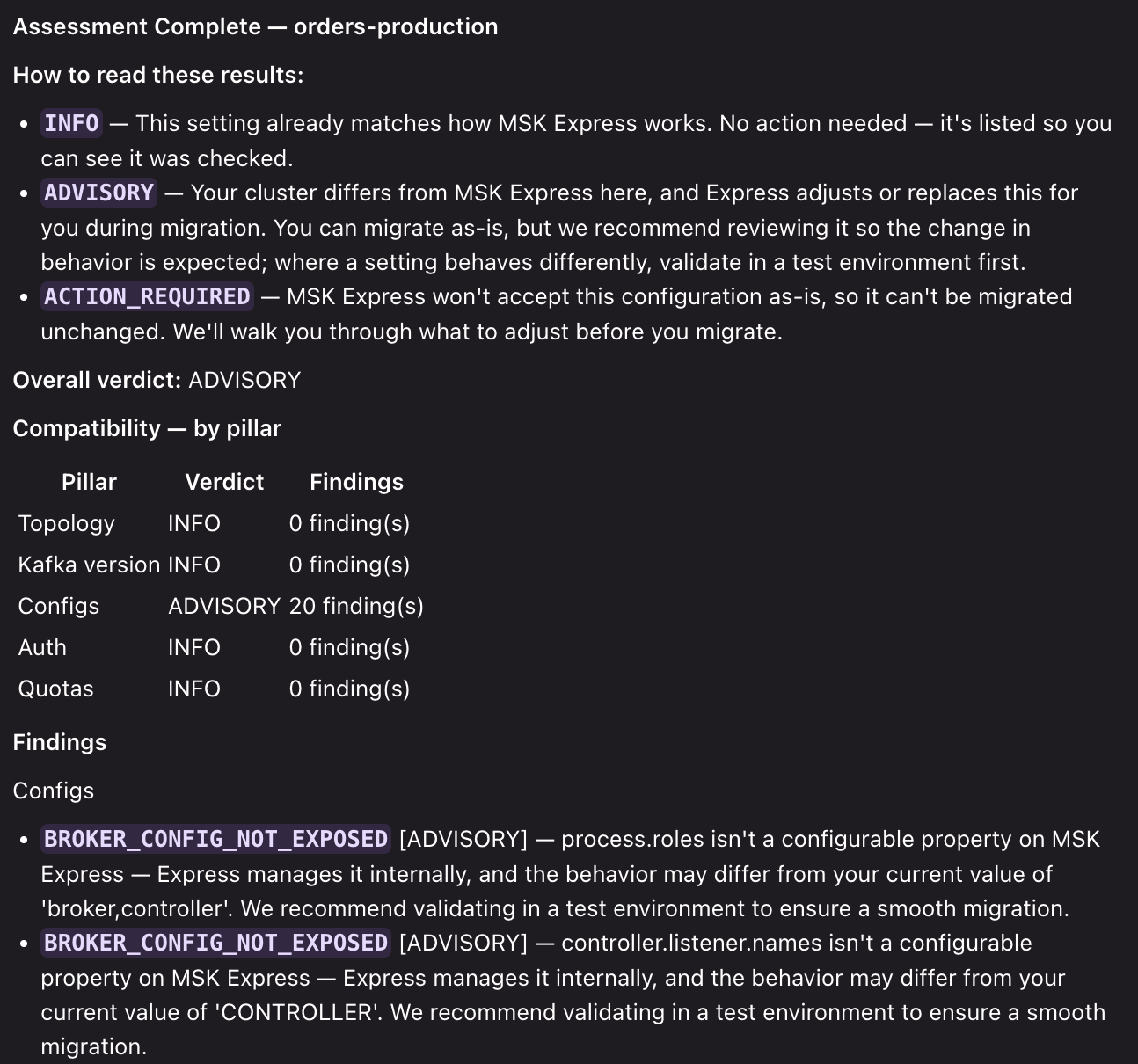
With discovery complete, the assessment phase runs two independent analyses against your current cluster infrastructure.
Compatibility assessment evaluates your source cluster across five pillars:
| Pillar | What it checks |
| Topology | AZ count, broker count, KRaft or ZooKeeper |
| Kafka version | Source version against Amazon MSK supported set (3.6, 3.8, 3.9) |
| Configs | Broker and topic configs against Amazon MSK’s editable/enforced/range-restricted sets |
| Auth | Authentication mechanism compatibility |
| Quotas | Peak workload against Amazon MSK per-broker ceilings |
Each pillar produces one of the following finding types:
| Verdict | Meaning |
INFO |
Already aligns with Amazon MSK. No action needed. |
ADVISORY |
Amazon MSK handles this differently, but migration can proceed. Review so the behavior change is expected. |
ACTION_REQUIRED |
Amazon MSK will not accept this in its current form. Remediation recommended. |
Target sizing uses your current cluster’s usage metrics to perform right-sizing for Amazon MSK, including instance type, broker count, and projected monthly cost for your workload. This gives you a shareable artifact to use for sizing against different inputs and assumptions.
Next, you ask the skill to run the assessment:
“Assess my cluster for Amazon MSK Express broker compatibility and size the target”:
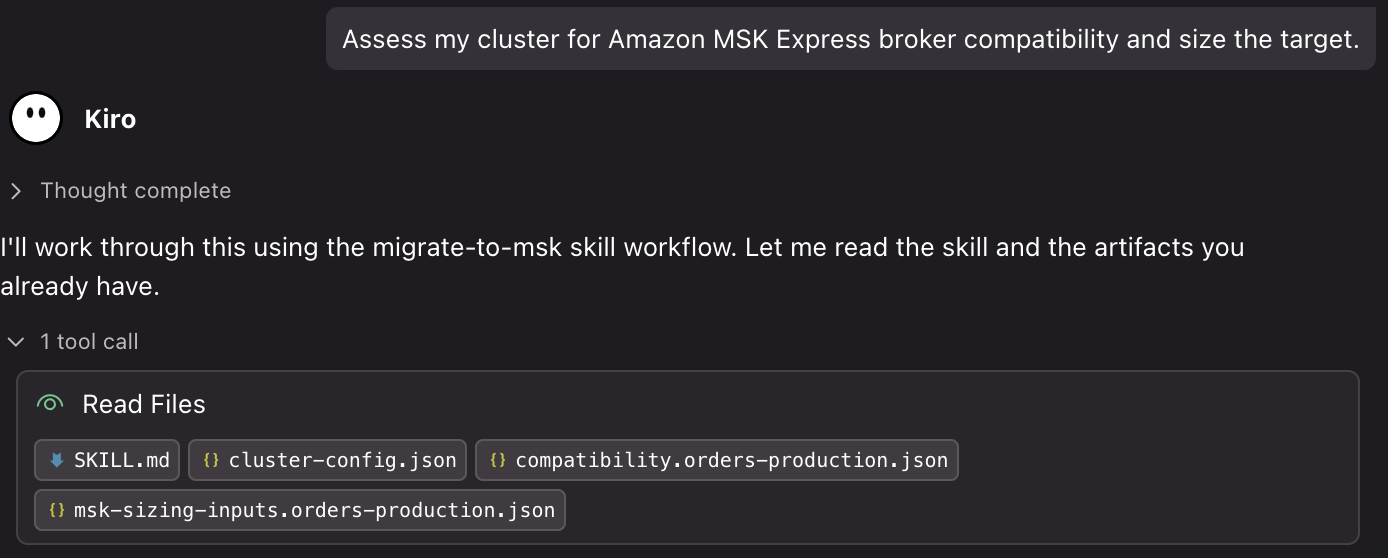
The skill runs both analyses against your cluster configuration. It outputs a compatibility report, sizing inputs, and sizing outputs, giving you a complete picture of what needs attention before migration and what your target cluster should look like.
Once you’ve validated compatibility and provisioned your Amazon MSK Express brokers, Amazon MSK Replicator handles the actual data migration. Amazon MSK Replicator is the native AWS solution for replicating data between Amazon MSK Provisioned clusters. For migrations, it supports replication of data from self-managed Apache Kafka clusters (including on-premises, self-hosted on AWS, or other cloud providers) to Amazon MSK Provisioned clusters.
Phase 3: Simulation (optional) — validate performance before cutover
With assessment complete, you can optionally ask the skill to guide you through setting up a live test environment:
“Can we run a simulation to see how Amazon MSK Express brokers handle our workload before we commit to migrating?”
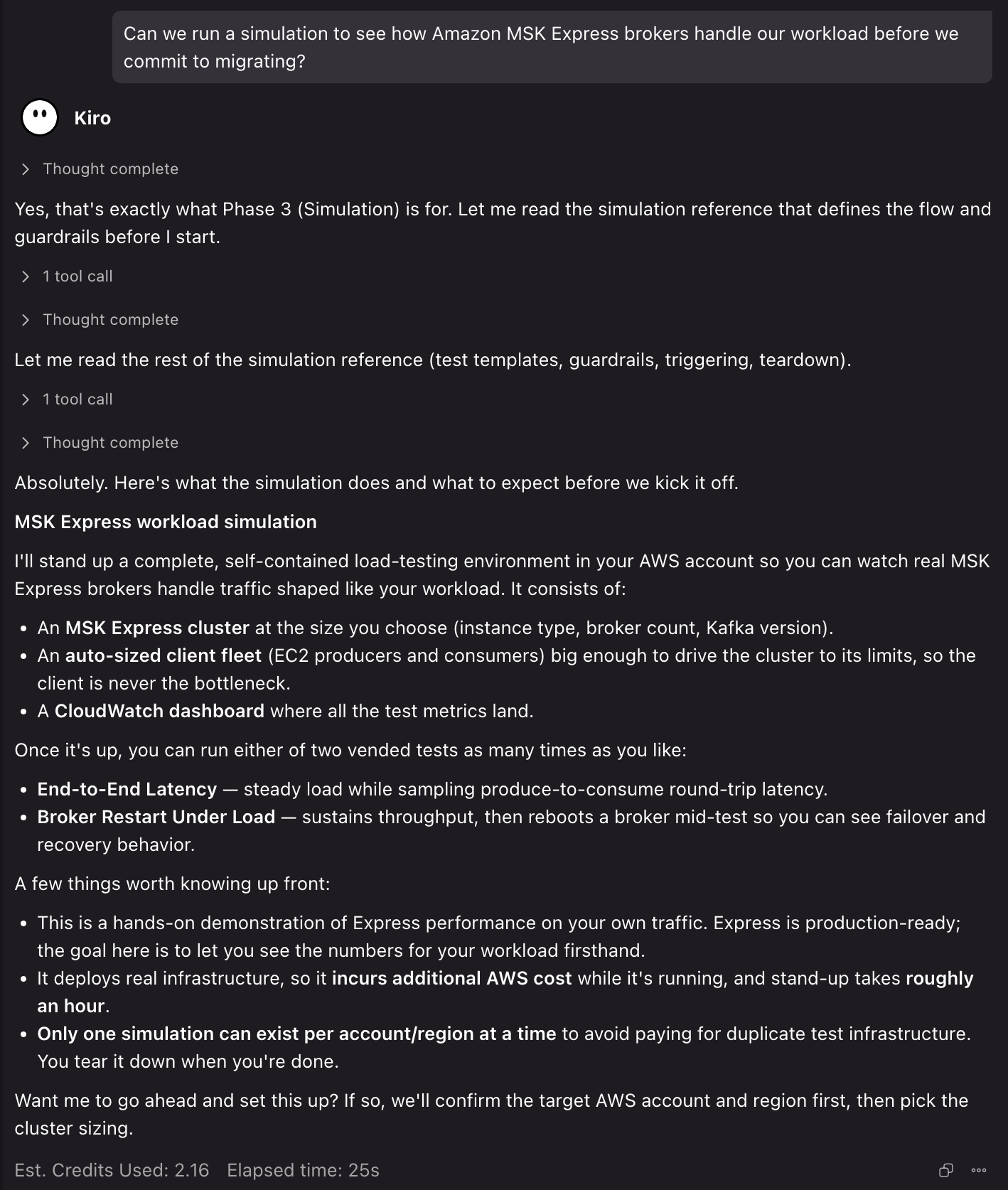
The skill walks you through deploying temporary Amazon MSK Express brokers and EC2 client fleet in your own AWS account. These are sized from your Phase 2 workbook or numbers you provide, so that you can see real performance on your actual workload rather than relying on estimates. It confirms the target account and permission before deploying any billable resources.
Once the cluster is up, you choose a provided test (end-to-end latency or broker restart under load), and the skill runs it. It then surfaces metrics related to throughput, broker health, latency, and consumer lag on a CloudWatch dashboard. When you’re done, the skill helps you tear the stack down so you stop incurring cost.
Scenario 3: Sizing a cluster with cost breakdowns
You’re planning a new streaming workload and need to determine the right configuration:
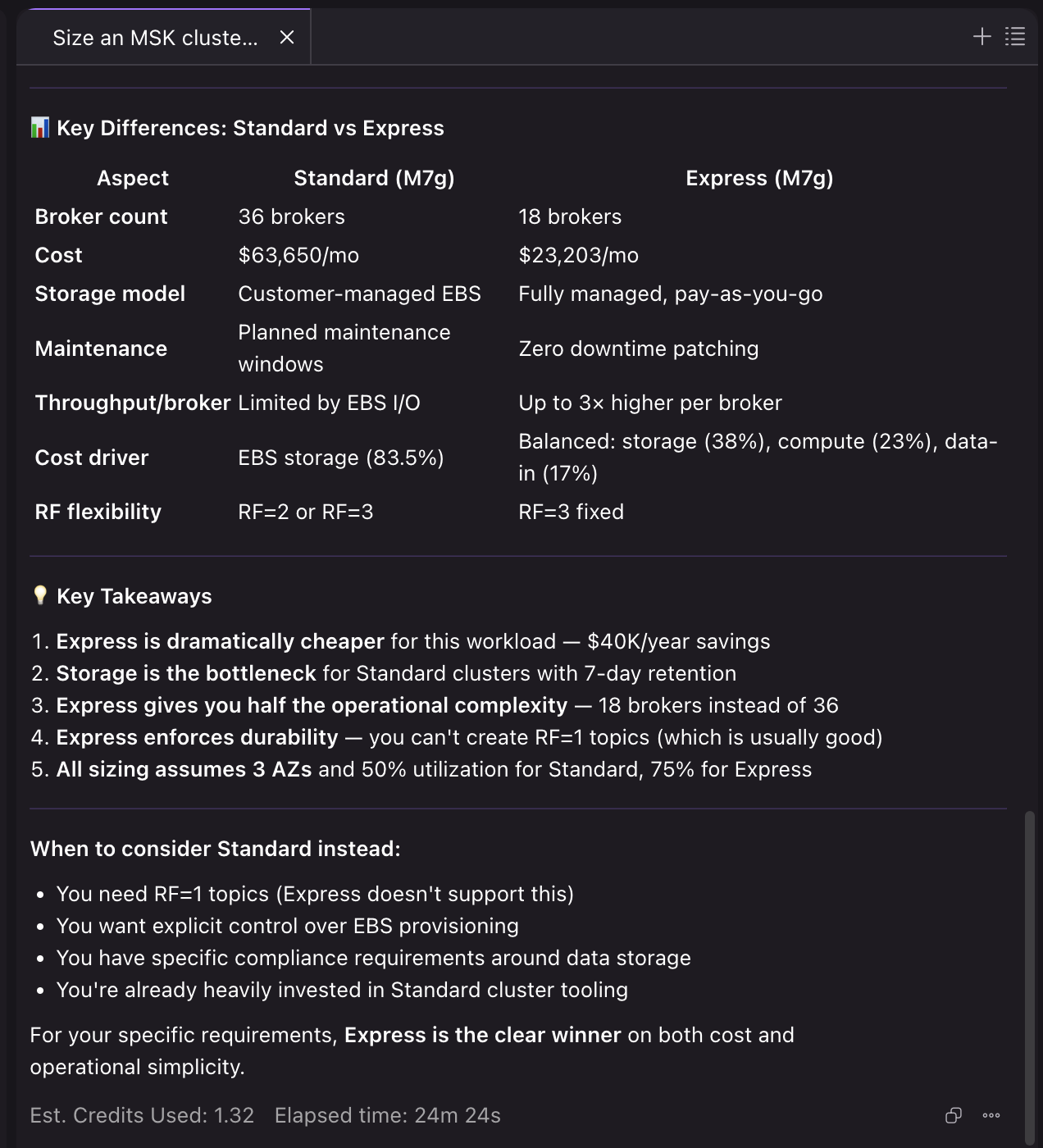
“Size an Amazon MSK cluster for 200 MiB/s peak ingress, 600 MiB/s peak egress (3 consumer groups), 1,500 partition replicas, 168 hours retention. Compare Standard and Express.”
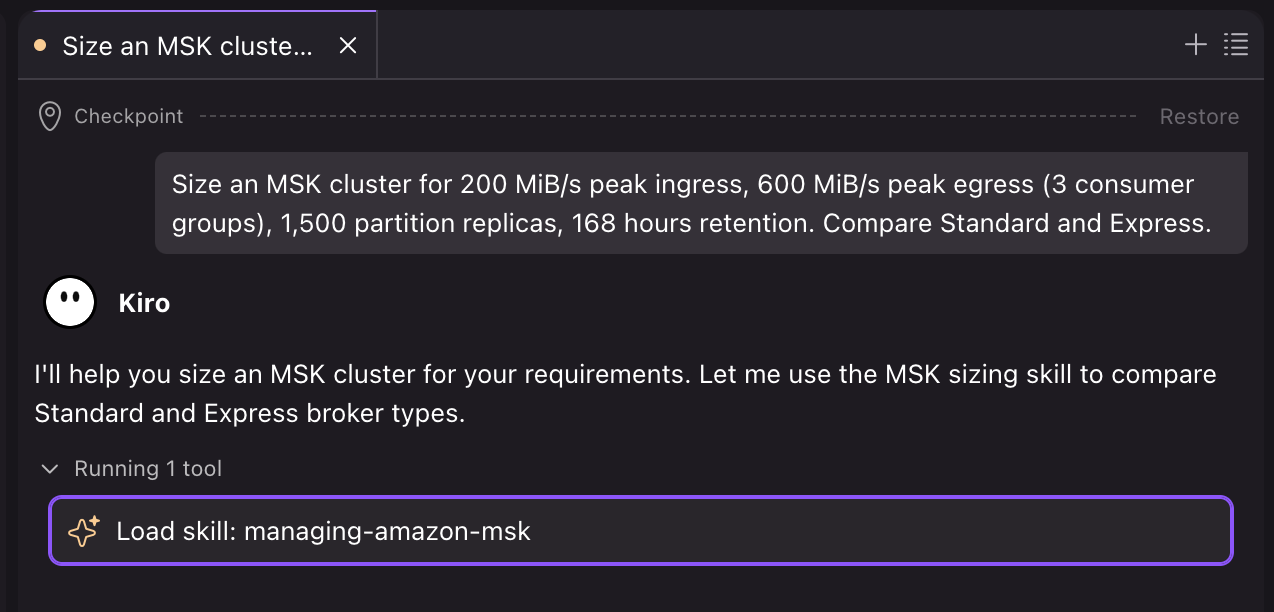
The skill’s programmatic sizing calculator evaluates your workload against every available instance type simultaneously, sizing across four constraints: ingress capacity, egress capacity, partition limits, and storage volume. Each is rounded up to a multiple of 3 Availability Zones (AZs).
When you ask the skill to size a cluster, it uses its sizing script to identify and recommend the least expensive viable option per broker class, and to break down the cluster cost across various sizing dimensions.
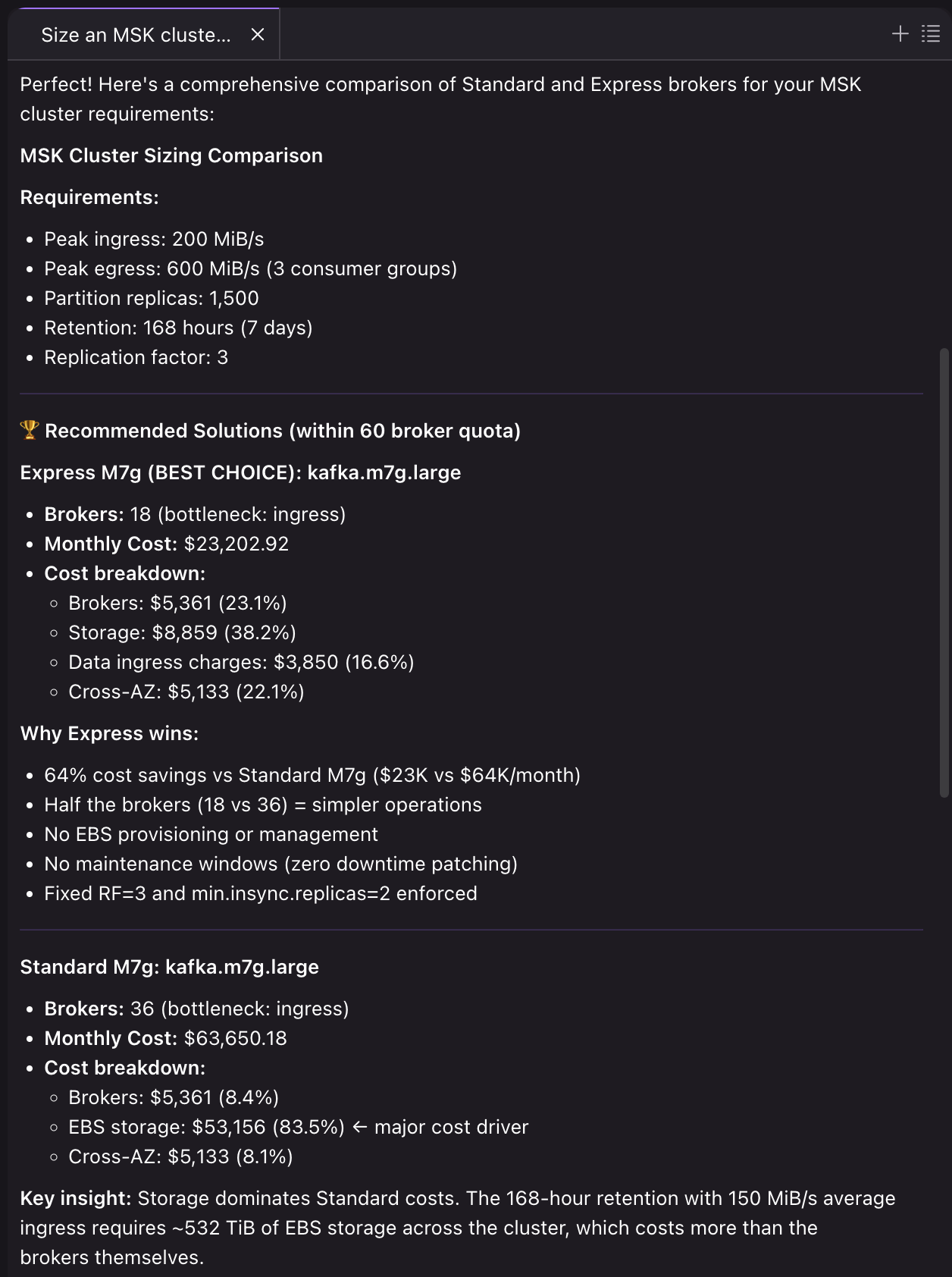
The calculator accounts for factors that manual sizing often misses, such as replication overhead on EBS, network bandwidth, and cross-AZ data transfer costs. The skill flags exactly which constraint is the bottleneck for each instance type, so you understand why a particular broker count was chosen.
Security considerations
Both skills recommend Transport Layer Security (TLS) encryption and IAM authentication. Discovery and assessment outputs contain broker addresses and configuration details. Treat them as sensitive and avoid sharing them in public channels without redaction. The migration artifacts do not store passwords or secrets.
Cleaning up
If you ran the optional Simulation phase with the migrate-to-msk skill, it deployed real resources in your AWS account, including an Amazon MSK Express cluster and an EC2 load-generation fleet, that continue to incur charges until you delete them. Ask the skill to tear down the simulation, or delete its CloudFormation stack yourself, to stop incurring cost. Only one simulation can exist per account at a time.
Migration artifacts (migrate-to-msk-skill-artifacts/) are local files that you can delete at your discretion.
Conclusion
Traditionally, Kafka administrators have relied on web-based UIs and dashboards for cluster health management and troubleshooting. With these skills, you can accelerate agent workflows that integrate directly into development environments and DevOps processes. Amazon MSK aims to expand this Agent Skills portfolio with additional tools and capabilities, so customers can build more sophisticated agentic DevOps workflows for their streaming infrastructure.
The Amazon MSK Agent Skills bring structured, broker-type-aware expertise to operating and migrating Amazon MSK clusters. Instead of searching through documentation to determine whether a metric applies to Standard or Express, or manually cross-referencing compatibility matrices for a migration, you get targeted guidance that routes to the correct path based on your cluster’s actual configuration.
Get started by installing both skills from the Agent Toolkit for AWS on the GitHub website into your development environment. Then try a prompt like:
“Size Amazon MSK Express brokers for 100 MiB/s ingress with 3 consumer groups and 72-hour retention”
or
“My Amazon MSK Express brokers have high produce latency. Help me diagnose”
The skills support you at any stage in the cluster lifecycle.
To learn more, visit the Amazon MSK documentation or open the Amazon MSK console. Have questions or feedback? Open an issue in the Agent Toolkit for AWS repository on the GitHub website.