AWS Big Data Blog
The next generation of Amazon OpenSearch Serverless: Built from the ground up for agents
Audience note: This is the deep-dive technical launch post. For a shorter overview of what changed and why, see the related post on the AWS News Blog.
Today, we are announcing a ground-up re-architecture of Amazon OpenSearch Serverless that delivers up to 20 times faster autoscaling, scale to zero, and up to 60% lower cost than provisioning clusters for peak load. Amazon OpenSearch Service is a fully managed, open source retrieval engine that unifies vector, lexical, hybrid, and agentic search, delivering low-latency, accurate and relevant results. Amazon OpenSearch Serverless is an automatically scaled deployment option.
Modern workloads are increasingly dynamic and unpredictable. An ecommerce platform sees a 10x traffic spike during a flash sale. An artificial intelligence (AI) agent triggers hundreds of concurrent vector queries while reasoning through a multi-step task, then goes idle. A multi-tenant SaaS application serves dozens of tenants with wildly different activity patterns. These workloads need infrastructure that scales up to meet demand and releases resources when demand drops.
That is why we rebuilt the Amazon OpenSearch Serverless architecture from the ground up. The new architecture decouples compute from storage. The service provisions infrastructure in seconds instead of minutes, and scales compute all the way to zero when your application is idle. In this post, we walk through the new architecture, what it means for your applications, and how to get started with a hands-on tutorial.
--generation NEXTGEN in the CLI. To continue using the Classic architecture, specify --generation CLASSIC in the CLI or omit the optional --generation parameter.
What this means for your applications
The new architecture delivers improvements across three pillars: performance, cost, and a simplified user experience.
Performance: Autoscaling in seconds
An OpenSearch Compute Unit (OCU) is the unit of compute capacity that powers your indexing and search workloads. Amazon OpenSearch Serverless now provisions additional OCUs in seconds. When traffic arrives, the service adds resources in line with demand instead of reacting after a worker is already under pressure. The same mechanism scales the infrastructure back down quickly when traffic drops. The new architecture scales capacity up to 20 times faster than the previous architecture, so your users experience consistent performance during traffic surges, and you stop paying for capacity when you no longer need it.
Cost efficiency: Pay only for what you use
Indexing, search, storage, and Vector Index GPU-Acceleration are metered and billed independently, so you can see and optimize each dimension of your workload separately.
Decoupled compute and storage: OpenSearch Serverless now has full decoupling between compute and storage, allowing OCUs to scale up and down irrespective of the amount of data stored in a collection. This is powered by a new storage layer that is accessible to both indexing and search OCUs. You can now have multiple indices with data indexed in them but not pay any compute costs if you are not actively indexing or searching data. For workloads with significant idle time, the new architecture can reduce infrastructure costs by up to 60% compared to the cost of provisioning OpenSearch Service domains for peak capacity.
Scale to zero: When no requests arrive within the idle timeout window (10 minutes), the service releases compute resources and your OCU usage scales to 0. When traffic resumes, capacity is back in approximately 10 seconds. During this window, the service queues incoming requests and serves them once capacity is available; it does not drop them. If you anticipate a burst of traffic, for example before a scheduled batch job or a marketing campaign, you can send a lightweight query (such as a match_all with size=1) to warm the collection before your application starts sending production traffic. This reduces the latency your users experience on the first real request. Indexing and search scale independently. If you have no search requests, search OCUs scale to zero, even while OpenSearch Serverless maintains indexing OCUs for indexing requests, and vice versa.
Simplified experience: Fewer steps to production
We also simplified the day-to-day experience of running OpenSearch Serverless:
With the new architecture, you can provision a collection and start sending requests in seconds. There is no need for capacity planning, no sizing decisions, and no waiting for infrastructure to warm up. This makes Amazon OpenSearch Serverless a natural fit for agentic workloads, where an AI agent can spin up a vector search or retrieval step on demand and expect a response without delay.
To make getting started even faster, we have introduced Express Create on the console. You supply a collection name and a collection type, choose Express Create, and your collection is active in seconds with no upfront network, encryption, or access policies to configure. You can add those later if your workload requires them.
Collection groups and collections can also be created programmatically using the AWS Command Line Interface (AWS CLI) and AWS SDKs. AWS CloudFormation support is coming soon.
The new architecture introduces two endpoint formats on the on.aws domain. The per-collection endpoint (<collectionId>.aoss.<region>.on.aws) works the same way as before with one endpoint per collection. The per-account Regional endpoint (<accountId>.aoss.<region>.on.aws) is new: it serves all of your collections through a single hostname, with the target collection identified in each request using the x-amz-aoss-collection-name or x-amz-aoss-collection-id header. This means one connection pool, one Transport Layer Security (TLS) session, and one endpoint to manage regardless of how many collections you have — a significant improvement for multi-tenant workloads where each tenant maps to its own collection. Both endpoints use standard AWS PrivateLink, so you create virtual private cloud (VPC) endpoints from the VPC console or the EC2 API just like any other AWS service. Private Domain Name System (DNS) is configured automatically, eliminating the Amazon Route 53 Private Hosted Zones, forwarding rules, and custom DNS infrastructure that were required with the original architecture. Cross-VPC, cross-account, and on-premises access all work using standard vpce-* DNS names with no additional setup.
Collection groups are the new unit of organization for your collections. You can share compute capacity across multiple collections with Collection Groups, which reduces cost for smaller collections that have complementary traffic patterns. You can also assign different AWS Key Management Service (AWS KMS) keys to collections within the same group, so you get both cost efficiency and per-collection encryption isolation. Collection groups are required when creating collections with the new architecture.
You also get the benefits of OpenSearch open-source releases without needing to manage versions and upgrades. The service tracks upstream releases automatically.
Amazon OpenSearch Serverless is also available on the Vercel Marketplace, making it straightforward for developers to add search infrastructure directly from their Vercel projects. You can link an existing AWS account through delegated access, or get started through a Limited Scope Account with USD $100 in AWS credit if you are new to AWS.
The integration creates a collection with sensible defaults, scale-to-zero billing, public endpoints, and AWS-managed encryption, and automatically sets connection details as environment variables in your Vercel project. You can choose from Search or Vector Search collection types depending on your use case, whether that is full-text search or semantic and AI-powered search.
How the architecture works
The new Amazon OpenSearch Serverless architecture separates compute from storage entirely. OCUs are stateless and read from and write to a distributed shared storage layer that is accessible to both indexing and search OCUs. The storage layer is designed for high durability, keeping your data available independently of the compute nodes that process it.
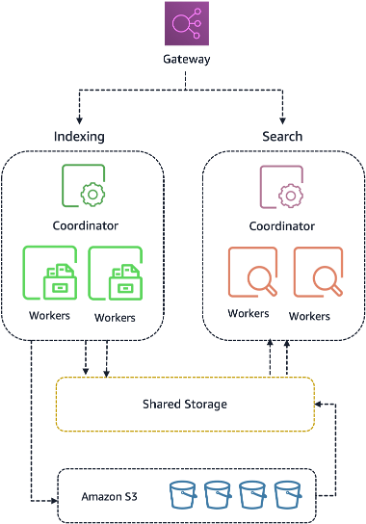
This design has two practical consequences:
- Fast provisioning. New OCUs start serving requests in seconds because there is no local disk to bootstrap. The OCU mounts the shared storage layer and begins processing immediately.
- Efficient scale down. Idle capacity can be released with no impact to your stored data, because the data never lived on the OCU. When traffic subsides, compute resources are released and your cost drops accordingly.
Architecture comparison
The following table summarizes the key differences between the original and new architectures:
| Capability | Classic Architecture | NextGen Architecture |
| Minimum capacity | 2 OCUs (always on) | 0 OCUs (scale to zero) |
| Scaling speed | Minutes | Seconds |
| Storage | Local storage per compute node | Distributed shared storage (decoupled) |
| Collection organization |
Individual collections (Default) Collection groups (Optional) |
Collection groups (required) |
| Cold start from zero | N/A (always on) | ~10 seconds |
| Endpoint | Per-collection endpoint | Regional endpoint (static per account) |
| Cost vs. OpenSearch Service domain | Baseline | Up to 60% lower cost |
| Scaling speed (vs. Classic) | Baseline | Up to 20 times faster than baseline |
Walkthrough: Create a vector collection and observe scale to zero
In this walkthrough, you create a vector search collection with Express Create, index a few sample documents with embeddings, run a k-nearest neighbor (k-NN) query, and watch the collection scale to zero in Amazon CloudWatch. The entire process takes about 10 minutes.
Prerequisites
- An AWS account with permissions to create Amazon OpenSearch Serverless collections.
- AWS Command Line Interface (AWS CLI) configured with appropriate credentials.
- curl 7.75 or later (for built-in
--aws-sigv4support).
Step 1: Configure security policies
Create encryption, network, and data access policies. These must exist before the collection can be created.
Note: If you use the AWS console’s Express Create workflow, these policies are created automatically.
Important: After creating the data access policy, wait approximately 30 to 60 seconds for the policy to propagate before making API calls to the collection. If you receive a 403 Forbidden error, wait and retry.
Step 2: Create a collection group and collection
Create a collection group with scale-to-zero capacity limits, then create a vector search collection within it.
The collection status transitions to ACTIVE within seconds.
Step 3: Create a vector index
Retrieve the collection endpoint and create a k-NN index using 3-dimensional vectors:
Note: If the collection has scaled to zero, the first request might take a few seconds while capacity scales up. If the request times out, wait 10 to 15 seconds and retry.
Step 4: Index sample documents with embeddings
Step 5: Run a k-NN query
Search for the two nearest neighbors to a query vector. Wait 30 seconds after indexing to allow the vector index to build before running this query:
The response returns the two most similar items, in this case, the headphone documents whose embeddings are closest to your query vector.
You can also run this query in OpenSearch UI by navigating to your collection in the Amazon OpenSearch Service console and choosing the OpenSearch UI Application URL. Then follow the steps outlined in this blog to create a workspace. Then navigate to Dev Tools and paste and run the following query.
Step 6: Observe scale to zero
After a period of inactivity (no indexing or search traffic), the collection group scales down to 0 OCU. Verify with:
In the response, currentCapacity.search.capacityInOcu and currentCapacity.indexing.capacityInOcu will show 0 after the collection has scaled down.
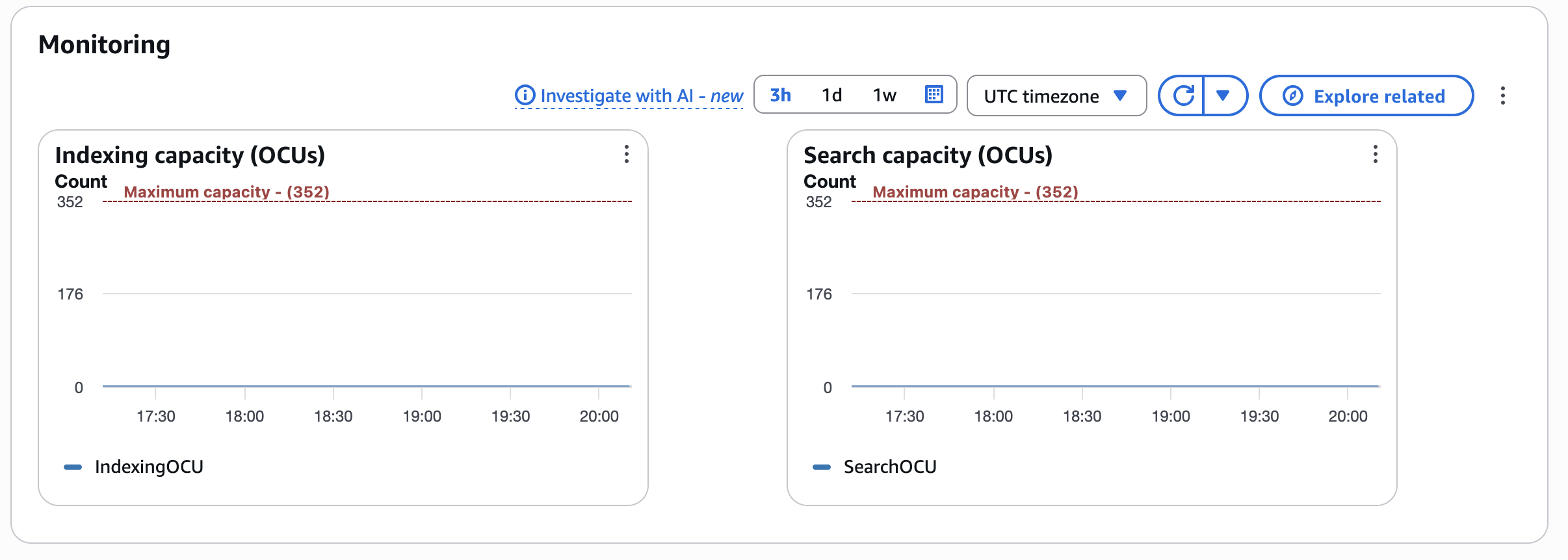
You can also navigate to the Collection groups page in the Amazon OpenSearch Service console. Choose your collection group, then scroll down to the Monitoring section. Here you can see two charts: Indexing capacity (OCUs) and Search capacity (OCUs). After 10 minutes of idle time (no indexing or search requests), both metrics drop to zero, confirming that the service has released all compute resources for your collection.
Clean up
To avoid ongoing charges, delete the resources you created in this walkthrough when you are done. Delete the collection first so the collection group becomes empty, then delete the group, then remove the security and access policies.
Upgrading existing collections
To move to the new architecture, create a new collection group and collection, then reindex your data into it. For a step-by-step walkthrough of the reindexing process, refer to Perform reindexing in Amazon OpenSearch Serverless using Amazon OpenSearch Ingestion. Your queries and index mappings remain the same. Only the collection endpoint changes. With the new static Regional endpoint, that is a one-time update.
The new architecture supports SEARCH and VECTORSEARCH collection types. TIMESERIES is not supported at launch.
Conclusion
The new Amazon OpenSearch Serverless architecture is available today. You can create your first OpenSearch Serverless collection in seconds with Express Create, scale it to handle production traffic, and your OpenSearch Serverless compute costs drop to zero when it sits idle.
To learn more:
- Amazon OpenSearch Service documentation.
- Amazon OpenSearch Service console.
- Amazon OpenSearch Service pricing page.
If you have questions or feedback, open a support case or reach out through your AWS account team. We look forward to seeing what you build.