AWS Compute Blog
Category: Best Practices

Operating Lambda: Performance optimization – Part 3
This post is the final part in a 3-part series on performance optimization in Lambda. The Lambda service makes frequent performance improvements in the underlying hardware, software, and architecture of the service. This post identifies the parts of the Lambda lifecycle where developers can make the most impact on performance.
Operating Lambda: Performance optimization – Part 2
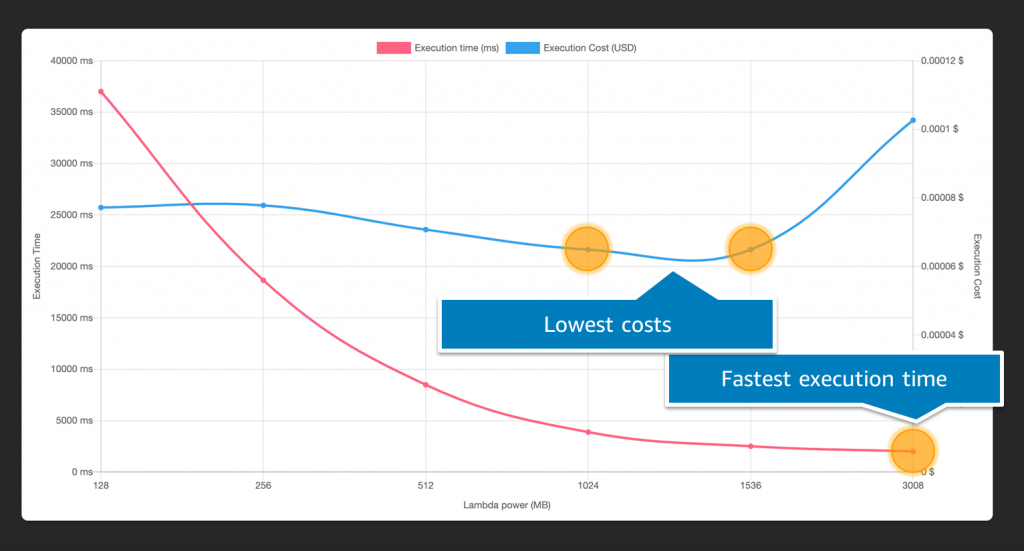
This post is the second in a 3-part series on performance optimization in Lambda. It explains the effect of the memory configuration on Lambda performance, and why the memory setting also controls the compute power and networking I/O available to a function.

Operating Lambda: Isolating and resolving issues
This blog post outlines a general approach to debugging Lambda performance issues and errors. This provides a repeatable process for isolating and resolving problems in your serverless workloads. Using the walkthrough of the Coffee Lookup application, I show how to reproduce a production bug, isolate the cause of errors, and then isolate the performance issue.

Operating Lambda: Using CloudWatch Logs Insights
CloudWatch Logs Insights allows you to search and analyze log data to find the causes of issues and help validate fixes when they are deployed. This post shows how to enable the feature for a Lambda function and search across logs. It explains why structured logging can be helpful for parsing data in analysis.

Operating Lambda: Debugging configurations – Part 2
This is the second post in a series on debugging Lambda-based applications. This post shows how to identify and resolve memory and CPU-bound functions, and how to understand and use timeouts effectively in production applications.

Operating Lambda: Debugging code – Part 1
Debugging serverless applications is different to debugging single-server or monolithic applications. You must consider debugging across multiple invocations and services, and understanding the state of a distributed workload.

Supporting AWS Graviton2 and x86 instance types in the same Auto Scaling group
This post is written by Tyler Lynch, Sr. Solutions Architect – EdTech, and Praneeth Tekula, Technical Account Manager. As customers seek performance improvements and to cost optimize their workloads, they are evaluating and adopting AWS Graviton2 based instances. This post provides instructions on how to configure your Amazon EC2 Auto Scaling group (ASG) to use […]
Operating Lambda: Building a solid security foundation – Part 2
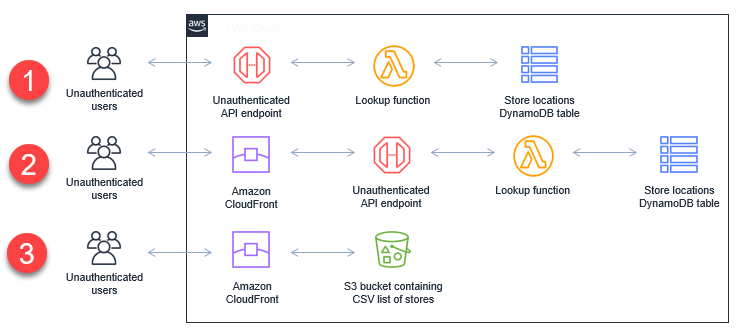
In this blog post, I explain how to secure workloads with public endpoints and the different authentication and authorization options available. I also show different approaches to exposing APIs publicly.

Operating Lambda: Building a solid security foundation – Part 1
This post explains the Lambda execution environment and how the service protects customer data. It covers important steps you should take to prevent data leakage between invocations and provides additional security resources to review.

Operating Lambda: Application design – Part 3
This post discusses choosing and managing runtimes, the effect on performance, and how you can use multiple runtimes within a single serverless application. It explains the networking model and whether a Lambda function must have access to a customer VPC or can run with the default VPC configuration. It also compares the different invocation modes for Lambda functions.