AWS Compute Blog
Implementing dynamic feature flags with AWS AppConfig on AWS Lambda
Feature flags (also known as feature toggles) allow you to change application behavior in real time without deploying new code. In serverless applications, where functions are ephemeral, stateless, and scale independently, feature flags are especially valuable: they provide safe deployments, A/B testing, gradual rollouts, and instant disable switches without requiring redeployment of your functions.
Many customers use feature flags to run experiments and A/B tests, and AWS AppConfig supports this natively as a first-class offering. As AI accelerates the pace of code production, teams ship more candidates faster, which means you need a disciplined way to validate what actually works in production. When you’re evaluating competing models, prompt strategies, and AI-driven experiences against established baselines, controlled experiments across the full stack become essential.
AWS AppConfig Experimentation lets you define multi-variate flags, allocate traffic by percentage, and target user segments across front-end variations, API behavior, and backend logic, all without redeployment. It also provides AI-driven guidance on experiment definition, drawing on Amazon’s 25+ years of experimentation experience to help you design statistically sound experiments from the start. Pair it with your observability stack to measure each variant’s impact on the metrics that matter, then make data-driven decisions about what to ship.
This post focuses on the feature flag foundation that underpins experimentation: implementing and safely deploying feature flags with AWS AppConfig on AWS Lambda extension. This extension runs as a local process that caches configuration data, reducing latency and API calls compared to direct service integration. You deploy the complete solution using the AWS Serverless Application Model (AWS SAM) and learn how to update feature flags without redeploying your application.
The challenge: dynamic configuration in serverless applications
Lambda functions are ephemeral and stateless. Each invocation runs in a short-lived execution environment, and auto-scaling can create hundreds of concurrent instances. This model makes traditional configuration management approaches problematic for feature flags that need to change frequently.
Common approaches to managing configuration in Lambda functions each have trade-offs:
- Environment variables are simple to use, but not dynamic or usable to control releases. Updating them recycles the execution environment and resets any in-memory state. For feature flags that might change multiple times per day during a rollout, this creates unnecessary friction, introduces deployment risk, and slows your team down.
- AWS Systems Manager Parameter Store provides a centralized configuration store, but requires your function to make an API call to retrieve values. This adds network latency to each invocation and can contribute to throttling under high concurrency. You must also implement your own caching logic to avoid repeated calls. Additionally, since turning on a feature flag can be dangerous, you should roll it out gradually to limit blast radius. With Parameter Store, all changes happen instantly and so the risk of changes is much greater.
- Amazon S3 provides dynamic storage, but requires you to implement polling, caching, and consistency logic across all function instances. You also lose the benefit of safe deployment mechanisms.
Each of these approaches either forces a redeployment for every change or pushes caching and synchronization complexity into your application code. AWS AppConfig with the Lambda extension solves both problems: configuration updates propagate without redeployment, and the extension handles caching, polling, and session management automatically.
How the AWS AppConfig Lambda extension works
AWS AppConfig is designed for dynamic configuration management. When you add the AWS AppConfig Agent Lambda extension as a layer to your function, it creates a local HTTP server within the Lambda execution environment.
Here is how the interaction works:
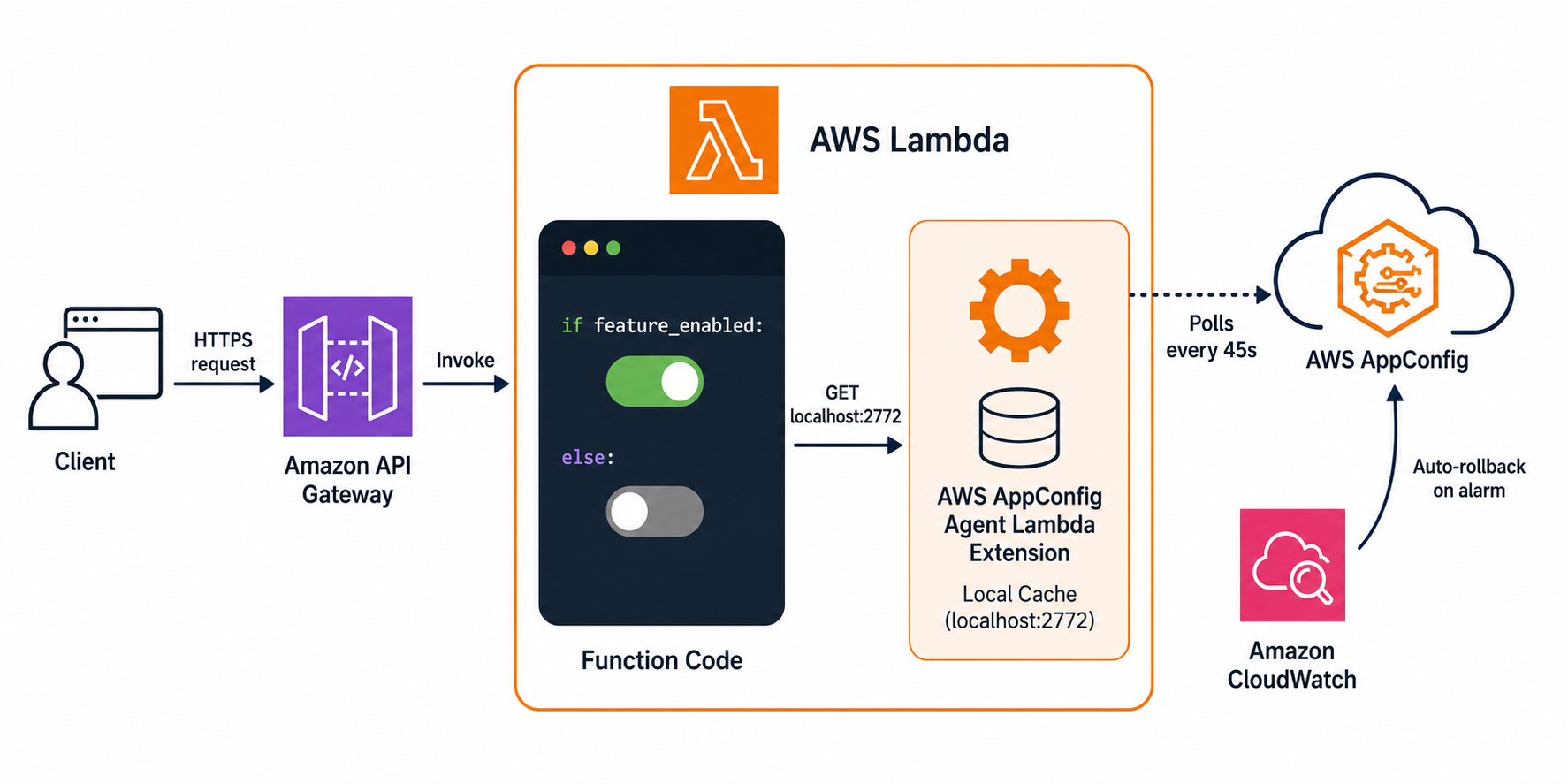
Figure 1 – Architecture overview showing the feature toggle solution with AWS Lambda, AWS AppConfig Agent Extension, and AWS AppConfig.
- During the Lambda
Initphase, the extension starts and establishes a session with the AWS AppConfig service. It retrieves the current configuration and caches it locally. - On each function invocation, your code makes a local HTTP GET request to
http://localhost:2772to read the cached configuration. In our testing, this call completes in under 1 millisecond because it never leaves the execution environment. - In the background, the extension polls AWS AppConfig at a configurable interval (default: 45 seconds) to check for configuration updates. When a new version is available, it updates the local cache.
Figure 2 – Lambda Extensions run as separate processes within the execution environment. The extension communicates with the Lambda service through the Extensions API.
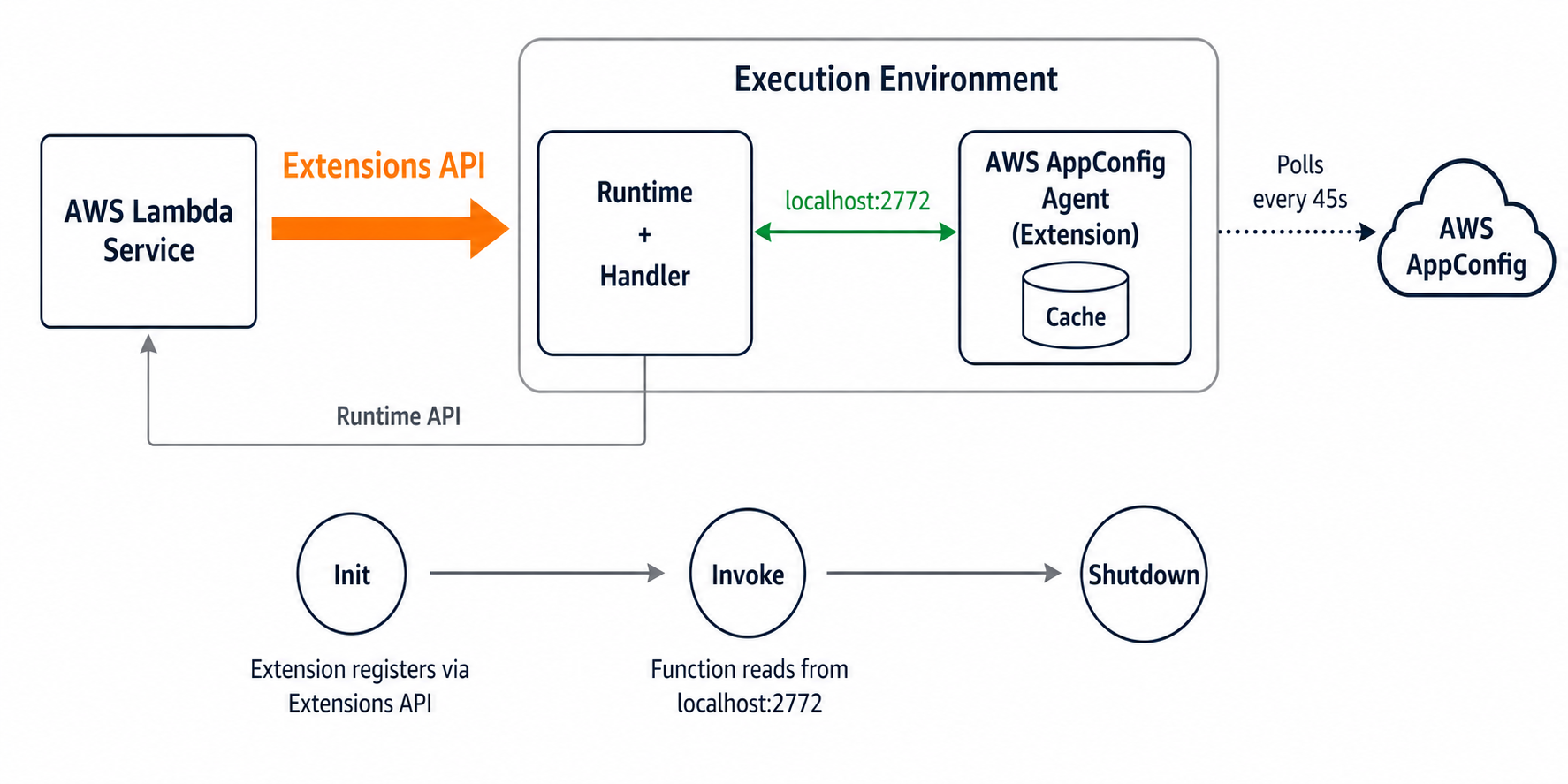
This design provides several advantages over direct API integration:
- Low latency: local HTTP calls are orders of magnitude faster than cross-network API calls.
- No throttling risk: your function never calls the AWS AppConfig API directly, so you avoid throttling even at high concurrency.
- Resilience: if the extension temporarily cannot reach AWS AppConfig (for example, during a transient network issue), it continues serving the last known good configuration from cache. Your function never fails because of a configuration fetch error.
- Cost efficiency: the extension batches polling across invocations. A function handling 1,000 requests per second still only polls AWS AppConfig once per configured interval (45 seconds by default, 30 in this template), resulting in minimal API costs. Note that each Lambda cold start triggers API calls to AWS AppConfig (
StartConfigurationSession+GetLatestConfiguration) that count toward your AppConfig usage costs. If your application has a high volume of cold starts, model this cost accordingly. - Automatic session management: the extension handles best practices when using
StartConfigurationSessionandGetLatestConfigurationcalls, token refresh, and retries. - Minimal code: your function only needs a simple HTTP GET to read flags.
Deploying the solution with AWS SAM
Prerequisites
To deploy this solution, you need:
- AWS SAM CLI installed.
- Python 3.13 or later.
- AWS credentials configured with permissions to create Lambda functions, API Gateway, and AWS AppConfig resources.
Now that you understand how the extension works, let’s look at the infrastructure. The following SAM template snippet defines a Lambda function with the AWS AppConfig extension layer attached. Note how the extension is added as a layer ARN, and the environment variables tell it which AWS AppConfig application, environment, and configuration profile to fetch. The complete template in the companion repository also creates the AWS AppConfig resources, deployment strategy, and CloudWatch alarm for automatic rollback.
Deploy the stack:
SAM creates the Lambda function with the extension layer attached and least-privilege IAM permissions scoped to the specific AWS AppConfig resource ARN.
Reading feature flags from your Lambda function
Your function reads feature flags with a simple HTTP GET request using Python’s standard library. No external dependencies are required:
Notice that the flags drive real execution paths, selecting which algorithm runs, not merely populating a display field. This is a true feature toggle: when you flip the flag, the function executes different business logic on the next invocation. The following example shows a freeform configuration profile (AWS.Freeform type). For production use, consider the AWS.AppConfig.FeatureFlags type instead (see Best Practices below), which provides a console UI for non-technical users and tools for managing flag lifecycle:
Safe deployments with deployment strategies
One of the most valuable features of AWS AppConfig for production environments is controlled deployments. Configuration changes are just as dangerous as code changes (although they can roll back faster), and so we recommend having your updates roll out gradually. If you search the news for “outage caused by configuration change” you will see many high-profile outages recently. Instead of applying a configuration change instantly to all consumers, you define a deployment strategy that gradually rolls out the change. The following snippet (included in the full template) shows a linear rollout:
This strategy applies the new configuration linearly: 20% of consumers receive the update every 2 minutes over a 10-minute window. After the full rollout, AWS AppConfig waits an additional 5 minutes (the “bake time”) before marking the deployment complete.
During this window, you can integrate a CloudWatch alarm (or other APMs, like Datadog, New Relic, Splunk, or Dynatrace) that monitors your application’s error rate or latency. If the alarm enters ALARM state, AWS AppConfig automatically rolls back to the previous configuration version. The companion repository includes a complete CloudWatch alarm example wired to the deployment.
Updating feature flags without code deployments
After your stack is deployed, you can update any feature flag by creating a new configuration version and starting a deployment:
Within the poll interval, all running Lambda instances pick up the new configuration. No code changes, no redeployment, no downtime. Reverting a flag is equally fast and symmetric. Deploying the previous configuration version propagates in the same ~30 seconds, giving you a consistent rollback speed whether you are enabling or disabling a feature. Importantly, the API contract (response structure, status codes, error shapes) remains stable regardless of flag state. Only the behavior behind the toggle changes, so consumers of your API are never broken by a flag flip.
Best practices
The AWS AppConfig Agent Lambda extension may add time to your function’s Init phase as it establishes a session and retrieves the initial configuration. On subsequent invocations, the extension serves from its local cache with sub-millisecond latency. If your function has a strict cold start target, consider provisioned concurrency for latency-critical paths.
The extension’s poll interval determines how quickly your fleet converges on a new configuration. The template configures 30 seconds (the AWS default is 45 seconds). This interval suits most rollouts. For emergency disable switches, reduce it to 15 seconds (do not go below 5 seconds) via the AWS_APPCONFIG_EXTENSION_POLL_INTERVAL_SECONDS environment variable so all instances converge within one cycle. The extension is also resilient to network failures. If it cannot reach AWS AppConfig, it continues serving the last known good configuration from cache. Your function never fails because of an upstream connectivity issue.
Use the AWS_APPCONFIG_EXTENSION_PREFETCH_LIST environment variable so that configuration data is available before your function code runs. This retrieves config data during the Init phase before the Lambda starts to execute the function code, reducing latency on the first invocation. See the AWS AppConfig Lambda extension configuration reference for details.
Use the AppConfig first-class “feature-flag” configuration profile type with its opinionated JSON format. This data type gives you a simple console experience for non-technical users, advanced multi-variate flags, and tools for cleaning up stale feature flags. Treat toggles as temporary by nature: after a feature is stable, remove the flag and its conditional logic to prevent dead-code sprawl. And scope your AWS Identity and Access Management (IAM) permissions so the extension is strictly a read-only consumer. Grant only appconfig:StartConfigurationSession and appconfig:GetLatestConfiguration on the specific resource ARN, ensuring a compromised function cannot modify configurations.
Clean up
To avoid ongoing charges, delete the resources you created in this walkthrough. Run the following command from the project directory:
This removes the Lambda function, API Gateway endpoint, and all AWS AppConfig resources created by the template.
Conclusion
The AWS AppConfig Lambda extension provides a lightweight, managed approach to feature flags in serverless applications. The extension handles caching, polling, and session management, while AWS AppConfig provides safe deployment strategies with validation and automatic rollback.
Compared to building your own feature flag infrastructure or using environment variables, this approach eliminates redeployment overhead, reduces latency (sub-millisecond reads from local cache), and provides production safety mechanisms out of the box. Your function code stays simple: a single HTTP GET to a local endpoint.
The pattern shown in this post applies beyond simple boolean flags. You can store complex configuration objects, percentage-based rollout rules, or user-segment targeting data in the same configuration profile. As your feature management needs grow, AWS AppConfig scales with you without requiring changes to the Lambda function integration pattern.
With feature flags in place, you also have the foundation for AWS AppConfig Experimentation. From here you can define multi-variate experiments, allocate traffic to variants, and measure outcomes across your full stack, turning the feature flags you built in this post into a controlled experiment.
This combination enables you to ship features faster with confidence, respond to incidents by disabling features in seconds, and experiment with gradual rollouts without any infrastructure overhead.
You can find the complete source code in the GitHub repository.
If you have questions or feedback about this solution, leave a comment on this post.
For more information, see:
For more serverless learning resources, visit Serverless Land.