Containers

Simplify hybrid Kubernetes networking with Amazon EKS Hybrid Nodes gateway

Organizations are increasingly adopting Amazon Elastic Kubernetes Service (Amazon EKS) and Amazon EKS Hybrid Nodes as they migrate and modernize applications across cloud and on-premises environments. Amazon EKS Hybrid Nodes enables users to integrate their on-premises and edge computing infrastructure with EKS clusters as remote nodes. This creates a unified Kubernetes management experience across distributed environments while addressing latency, compliance, and data residency requirements.

However, managing hybrid Kubernetes networking between the Amazon Virtual Private Cloud (Amazon VPC) and on-premises nodes can be challenging, often requiring network changes and coordination between Kubernetes platform teams and network infrastructure teams. A common architecture requirement for EKS Hybrid Nodes is to make on-premises pod networks routable across hybrid networks, which some customers cannot achieve due to constraints like overlapping IP addresses or complex BGP routing requirements.

We are excited to announce the general availability of the Amazon EKS Hybrid Nodes gateway, a new feature for Amazon EKS that simplifies hybrid Kubernetes networking for Amazon EKS Hybrid Nodes. The Amazon EKS Hybrid Nodes gateway automatically manages and forwards pod-to-pod traffic between the EKS VPC and on-premises environments, eliminating the need for complex networking changes to existing on-premises infrastructure. It also handles the control plane to webhook connectivity and allows AWS services such as Application Load Balancers, and Amazon Managed Service for Prometheus to seamlessly communicate with remote pods running on hybrid nodes.

EKS Hybrid Nodes gateway supports a range of use cases, including:

  • Cross-environment pod-to-pod networking & cloud migrations: Organizations migrating applications to Amazon EKS while maintaining some workloads on-premises due to data residency, compliance, or infrastructure requirements. The gateway enables seamless pod-to-pod communication between cloud and on-premises without requiring network infrastructure changes.
  • Webhook operations: Customers running admission controllers and policy enforcement tools (cert-manager, OPA, Kyverno) on hybrid nodes. The gateway automatically routes control plane traffic to webhook endpoints on hybrid nodes, removing the need to make on-premises pod networks routable.
  • AWS service integrations: Applications with components distributed across cloud and on-premises environments that require AWS service integrations. The gateway enables VPC-to-hybrid pod connectivity, allowing consistent AWS service integrations for metrics scraping, health checks, and load balancing across hybrid environments.

By abstracting away the underlying network complexity, Amazon EKS Hybrid Nodes gateway allows users to focus on their application modernization efforts rather than managing complex hybrid networking. The EKS Hybrid Nodes gateway is open source and is available on Github.

In this post, we walk you through the architecture of Amazon EKS Hybrid Nodes gateway, deep dive into how it works, and demonstrate how it simplifies hybrid Kubernetes networking across your cloud and on-premises EKS environments.

Overview

The Amazon EKS Hybrid Nodes gateway utilizes the Cilium Container Network Interface’s (CNI) VXLAN Tunnel Endpoint (VTEP) feature. It creates VXLAN tunnels between EC2-based gateway nodes in your VPC and Cilium-managed hybrid nodes in your on-premises environment, and automatically maintains VPC route table entries to direct hybrid pod traffic to the correct gateway instance. In addition, Cilium on hybrid nodes encapsulates VPC-bound traffic and forwards it through the VXLAN tunnel to the remote VTEP device, the EKS Hybrid Nodes gateway. With this approach, users do not need to deploy additional components or configure complex BGP routing on their hybrid nodes.

To deploy Amazon EKS Hybrid Nodes gateway, you must use the AWS-maintained Cilium build, which includes a  CiliumVTEPConfig CustomResourceDefinitions (CRD). The CRD enables the gateway to dynamically register itself as the remote VTEP device for hybrid nodes. You also need to configure dedicated compute capacity (an EKS Auto Mode node pool, EKS managed node group, or self-managed nodes) in the AWS Region for hosting the gateway pods.

The EKS Hybrid Nodes gateway is deployed with an active-standby pair using Kubernetes Lease-based leader election, with pod anti-affinity ensuring the two gateway pods run on separate EC2 nodes. For high availability, we recommend deploying the gateway pair across two different Availability Zones (AZs). To enable fast failover, both gateways establish VXLAN tunnels to all hybrid nodes and maintain identical tunnel states, including Forwarding Database (FDB), ARP, and route entries. Only the leader pod manages VPC route table entries and the CiliumVTEPConfig CRD, ensuring bidirectional symmetric routing through the active/leader’s VXLAN tunnel.

Architecture

For this walkthrough, we create an Amazon EKS cluster with both EKS Auto Mode and EKS Hybrid Nodes enabled. We then register on-premises machines to the cluster as hybrid nodes and install Cilium CNI with the VTEP feature enabled. We create a dedicated NodePool and NodeClass for hosting the hybrid nodes gateway. The NodeClass disables the source/destination check on the primary ENI of the gateway nodes, allowing the gateway to forward transit traffic. We then attach an IAM policy to the gateway node role, granting the gateway permission to manage VPC route table entries. Finally, we deploy the hybrid nodes gateway with an active-standby pair using a Helm chart.
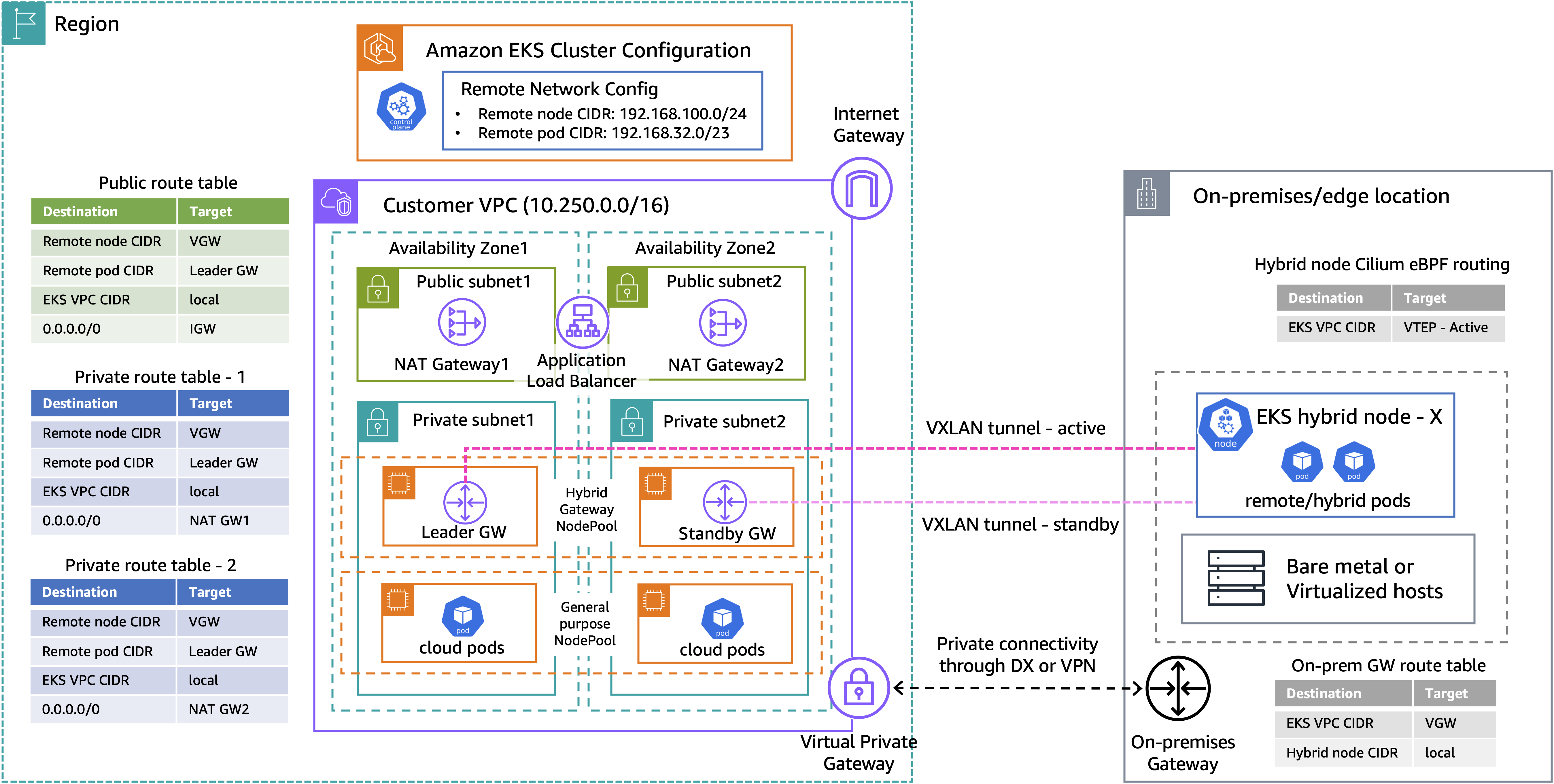
Figure 1: Amazon EKS Hybrid Nodes gateway networking architecture

Figure 1: Amazon EKS Hybrid Nodes gateway networking architecture

The above diagram presents a high-level architecture for our demo walkthrough. The Amazon VPC consists of two public subnets and two private subnets for hosting the EKS Auto Mode worker nodes. When using the Amazon EKS Hybrid Nodes gateway, the existing networking prerequisites for EKS Hybrid Nodes still apply, except that the remote pod network no longer needs to be routable. You can use either AWS Direct Connect or AWS Site-to-Site VPN to build private network connectivity between your on-premises environment and the EKS VPC. Additionally, security groups and firewall rules must be configured to allow bidirectional communication between environments, including UDP port 8472 for VXLAN traffic.

Once the gateway pair is deployed, the leader updates the configured VPC route tables with the remote pod CIDR pointing to its own primary ENI. It also creates the CiliumVTEPConfig resource so that Cilium agents on the hybrid nodes forward VPC-bound traffic through the leader’s VXLAN tunnel, ensuring symmetric routing paths.

For illustration purposes, we use the following CIDRs for the demo setup:

  • Amazon EKS VPC CIDR: 10.250.0.0/16
  • On-premises Node CIDR (RemoteNodeNetwork): 192.168.100.0/24
  • On-premises Pod CIDR (RemotePodNetwork): 192.168.32.0/23

Prerequisites

The following prerequisites are necessary to complete this solution:

  • Amazon VPC with two private and two public subnets, across two AZs.
  • On-premises compute nodes running a compatible operating system.
  • Private connectivity between the on-premises network and Amazon VPC (through VPN or Direct Connect).
  • Two RFC-1918 or CGNAT CIDR blocks for RemoteNodeNetwork and RemotePodNetwork
  • Configure the on-premises firewall and the EKS cluster security groups to allow bi-directional communications between environments, as per the networking prerequisites.
  • The following tools:

Walkthrough

The following steps walk you through how to deploy Amazon EKS Hybrid Nodes gateway across a hybrid EKS cluster enabled with EKS Auto Mode and EKS Hybrid Nodes.

Creating an EKS cluster enabled with EKS Auto Mode and EKS Hybrid Nodes

  1. First, we prepare a cluster-configuration.yaml ClusterConfig file, which includes the autoModeConfig that enables EKS Auto Mode and the remoteNetworkConfig that enables EKS Hybrid Nodes. Replace the RemoteNodeNetwork and RemotePodNetwork CIDRs based on your own network requirements.
apiVersion: eksctl.io/v1alpha5
kind: ClusterConfig
metadata:
  name: <"CLUSTER_NAME">
  region: <"CLUSTER_REGION">
  version: <"KUBERNETES_VERSION">
# Disable default networking add-ons as EKS Auto Mode
# comes integrated VPC CNI, kube-proxy, and CoreDNS
addonsConfig:
  disableDefaultAddons: true

vpc:
  subnets:
    public:
      public-one: { id: "PUBLIC_SUBNET_ID_1" }
      public-two: { id: "PUBLIC_SUBNET_ID_2"  }
    private:
      private-one: { id: "PRIVATE_SUBNET_ID_1" }
      private-two: { id: "PRIVATE_SUBNET_ID_2" }
      
  controlPlaneSubnetIDs: ["PRIVATE_SUBNET_ID_1", "PRIVATE_SUBNET_ID_2"]
  controlPlaneSecurityGroupIDs: ["ADDITIONAL_CONTROL_PLANE_SECURITY_GROUP_ID"]

autoModeConfig:
  enabled: true
  nodePools: ["system", "general-purpose"]

remoteNetworkConfig:
  # Either ssm or ira
  iam:
    provider: ssm
  # Required
  remoteNodeNetworks:
  - cidrs: ["192.168.100.0/24"]
  # Optional
  remotePodNetworks:
  - cidrs: ["192.168.32.0/23"]
  1. Deploy the EKS cluster using the ClusterConfig file.
eksctl create cluster -f cluster-configuration.yaml
  1. Wait for the cluster state to become Active.
aws eks describe-cluster \
    --name <"CLUSTER_NAME"> \
    --output json \
    --query 'cluster.status'

Prepare hybrid nodes

  1. Install the kube-proxy and CoreDNS add-ons required by EKS Hybrid Nodes. To learn more about deploying Amazon EKS add-ons with EKS Hybrid Nodes, see Configure add-ons for hybrid nodes.
aws eks create-addon --cluster-name hybrid-eks-cluster --addon-name kube-proxy
aws eks create-addon --cluster-name hybrid-eks-cluster --addon-name coredns
  1. Amazon EKS Hybrid Nodes use temporary AWS Identity and Access Management (IAM) credentials provisioned by AWS Systems Manager hybrid activations or AWS IAM Roles Anywhere to authenticate with the EKS cluster. Follow the Amazon EKS user guide to create the required Hybrid Nodes IAM role (AmazonEKSHybridNodesRole) using either one of the two options. Then, create an Amazon EKS access entry for Hybrid Nodes IAM role to enable your hybrid nodes to join the cluster.
  2. Use EKS Hybrid Nodes CLI (nodeadm) to bootstrap and install all required components for your hybrid nodes to connect to the cluster. See Connect hybrid nodes in the EKS user guide for details. Prepare a nodeConfig.yaml configuration file using the temporary IAM credentials from the last step. The following is an example for using Systems Manager hybrid activations for hybrid nodes credentials.
apiVersion: node.eks.aws/v1alpha1
kind: NodeConfig
spec:
  cluster:
    name: <"CLUSTER_NAME">
    region: <"CLUSTER_REGION">
  hybrid:
    ssm:
      activationCode: <"SSM_ACTIVATION_CODE">
      activationId: <"SSM_ACTIVATION_ID">
  1. Run the nodeadm init command with your nodeConfig.yaml to join your hybrid nodes to the EKS cluster.
nodeadm init --config-source file://nodeConfig.yaml

Install Cilium CNI

  1. Since this is a newly provisioned cluster, the hybrid nodes will show NotReady until a CNI is installed. We prepare a cilium-values.yaml file for Cilium CNI installation. The pod CIDR range provisioned by Cilium IPAM must match the RemotePodNetwork as defined at the EKS ClusterConfig. We enable the VTEP feature for EKS Hybrid Nodes gateway integration, and disable l7Proxy to ensure VTEP routing is handled in the eBPF datapath rather than through the kernel routing tables.

Additionally, for a mixed mode cluster with both EC2 nodes and hybrid nodes, we recommend you run at least one replica of CoreDNS on each side. See Configure mixed mode clusters in the EKS user guide for more details.

affinity:
  nodeAffinity:
    requiredDuringSchedulingIgnoredDuringExecution:
      nodeSelectorTerms:
        - matchExpressions:
            - key: eks.amazonaws.com/compute-type
              operator: In
              values:
                - hybrid

ipam:
  mode: cluster-pool
  operator:
    clusterPoolIPv4MaskSize: 25
    clusterPoolIPv4PodCIDRList:
      - "192.168.32.0/23"

operator:
  affinity:
    nodeAffinity:
      requiredDuringSchedulingIgnoredDuringExecution:
        nodeSelectorTerms:
          - matchExpressions:
              - key: eks.amazonaws.com/compute-type
                operator: In
                values:
                  - hybrid
  unmanagedPodWatcher:
    restart: false

loadBalancer:
  serviceTopology: true

envoy:
  enabled: false

kubeProxyReplacement: "false"

# Enabled VTEP support for the EKS Hybrid Nodes gateway
vtep: 
  enabled: true
  
# Disable L7 proxy to ensure VTEP routing is handled in the eBPF datapath
l7Proxy: false
  1. Install a compatible version of Cilium on EKS Hybrid Nodes using Helm with the preceding configuration.
helm install cilium oci://public.ecr.aws/eks/cilium/cilium \
    --version <CILIUM_VERSION> \
    --namespace kube-system \
    --values cilium-values.yaml
  1. Verify the hybrid nodes are in Ready status, and the CiliumVTEPConfig CRD is installed correctly.
$ kubectl get nodes -l eks.amazonaws.com/compute-type=hybrid  
NAME                   STATUS   ROLES    AGE     VERSION
mi-00f79ce86426a4482   Ready    <none>   7d21h   v1.35.2-eks-f69f56f
mi-07e98be24c2f847d3   Ready    <none>   7d21h   v1.35.2-eks-f69f56f

$ kubectl get crd ciliumvtepconfigs.cilium.io 
NAME                          CREATED AT
ciliumvtepconfigs.cilium.io   2026-04-18T01:29:54Z

Prepare hybrid nodes gateway installation

The following three sections walk you through preparing the EKS cluster for hybrid nodes gateway installation.

Create EKS Auto Mode NodePool and NodeClass for gateway installation

  1. When using EKS Auto Mode, you must create a dedicated NodePool and NodeClass for hosting the hybrid nodes gateway. First, use the following command to retrieve the Auto Mode node role, which is required in the gateway NodeClass configuration.
kubectl get nodeclass default -o jsonpath='{.spec.role}'
  1. Next, prepare a gateway-nodepool.yaml to define the NodePool and NodeClass  configurations. The advancedNetworking.sourceDestCheck: DisabledPrimaryENI setting disables EC2 source/destination check on the node’s primary ENI, allowing the gateway to forward transit traffic. The hybrid-gateway-node: NoSchedule taint ensures only gateway pods with a matching toleration are scheduled on these nodes, and the hybrid-gateway-node: "true" label is used by the gateway installation Helm chart to target gateway pods deployment to these nodes. See Get started with EKS Hybrid Nodes gateway in the EKS user guide for further details.
---
apiVersion: eks.amazonaws.com/v1
kind: NodeClass
metadata:
  name: eks-hybrid-nodes-gateway
spec:
  advancedNetworking:
    sourceDestCheck: DisabledPrimaryENI
  role: <"AUTO_MODE_NODE_ROLE">
  securityGroupSelectorTerms:
    - tags:
        aws:eks:cluster-name: <"CLUSTER_NAME">
  subnetSelectorTerms:
    - tags:
        kubernetes.io/role/internal-elb: "1"
---
apiVersion: karpenter.sh/v1
kind: NodePool
metadata:
  name: eks-hybrid-nodes-gateway
spec:
  template:
    metadata:
      labels:
        hybrid-gateway-node: "true"
    spec:
      expireAfter: 336h
      nodeClassRef:
        group: eks.amazonaws.com
        kind: NodeClass
        name: eks-hybrid-nodes-gateway
      requirements:
        - key: karpenter.sh/capacity-type
          operator: In
          values:
            - on-demand
        - key: eks.amazonaws.com/instance-category
          operator: In
          values:
            - c
            - m
            - r
        - key: eks.amazonaws.com/instance-generation
          operator: Gt
          values:
            - "4"
        - key: kubernetes.io/arch
          operator: In
          values:
            - amd64
        - key: kubernetes.io/os
          operator: In
          values:
            - linux
      taints:
        - key: hybrid-gateway-node
          effect: NoSchedule
      terminationGracePeriod: 24h0m0s
  disruption:
    budgets:
      - nodes: 10%
    consolidateAfter: 30s
    consolidationPolicy: WhenEmptyOrUnderutilized
  1. Create the EKS Auto Mode NodePool and NodeClass for gateway installation.
kubectl apply -f gateway-nodepool.yaml

Create IAM policy for VPC route table management

  1. The gateway nodes need IAM permissions to manage VPC route tables and update route entries for remote pod network. Create an IAM policy gateway-iam-policy.json with the following permissions.
{
  "Version": "2012-10-17",
  "Statement": [
    {
      "Effect": "Allow",
      "Action": [
        "ec2:DescribeRouteTables",
        "ec2:CreateRoute",
        "ec2:ReplaceRoute",
        "ec2:DescribeInstances"
      ],
      "Resource": "*"
    }
  ]
}
  1. Apply the IAM policy to the EKS Auto Mode node role.
ROLE_NAME=$(kubectl get nodeclass default -o jsonpath='{.spec.role}')

aws iam put-role-policy \
--role-name $ROLE_NAME \
--policy-name HybridGatewayRouteTableAccess \
--policy-document file://gateway-iam-policy.json

Update EKS cluster security group to allow VXLAN traffic

  1. To allow VXLAN tunnel traffic, add an inbound rule for UDP port 8472 from the remote node network CIDR to the EKS cluster security group. Ensure the corresponding rule is also applied at your on-premises firewall.
CLUSTER_SG=$(aws eks describe-cluster --name hybrid-eks-cluster \
--query "cluster.resourcesVpcConfig.clusterSecurityGroupId" \
--output text --region ap-southeast-2)

# Allow VXLAN tunnel traffic from on-prem node network 
aws ec2 authorize-security-group-ingress \
--group-id $CLUSTER_SG \
--protocol udp \
--port 8472 \
--cidr 192.168.100.0/24 \
--region ap-southeast-2

Install EKS Hybrid Nodes gateway

  1. Use an AWS provided helm chart to deploy the EKS Hybrid Nodes gateway. Include all the VPC route tables that are required to communicate with the remote pod networks.
helm install eks-hybrid-nodes-gateway \
oci://public.ecr.aws/eks/eks-hybrid-nodes-gateway \
--version 1.0.0 \
--namespace eks-hybrid-nodes-gateway \
--create-namespace \
--set vpcCIDR=10.250.0.0/16 \
--set podCIDRs=192.168.32.0/23 \
--set routeTableIDs="eks-vpc-rtb_id1\,eks-vpc-rtb_id2"
  1. Validate that both gateway pods are running and note they are automatically spread across two AZs. The gateway pods use their node’s IP addresses because the Helm chart deploys them with hostNetwork: true.
$ kubectl get pods -n eks-hybrid-nodes-gateway -o wide
NAME                                       READY   STATUS    RESTARTS   AGE   IP             NODE                  NOMINATED NODE   READINESS GATES
eks-hybrid-nodes-gateway-9db9dbf86-5sncf   1/1     Running   0          21m   10.250.3.111   i-0cded7fb2ff632e2c   <none>           <none>
eks-hybrid-nodes-gateway-9db9dbf86-7l2lk   1/1     Running   0          20m   10.250.1.31    i-0e9c3fd413c0f8a89   <none>           <none>
  1. Use the following command to identify which gateway pod has been elected as the leader. We can also confirm the leader is on node i-0cded7fb2ff632e2c by matching its node IP (10.250.3.111).
$ kubectl get lease -n eks-hybrid-nodes-gateway
NAME                    HOLDER                                                                                 AGE
hybrid-gateway-leader   ip-10-250-3-111.ap-southeast-2.compute.internal_ef8d7e19-0f8e-4573-977d-2d0511320eb8   47m
  1. Next, verify the relevant VPC route tables are updated with the remote pod CIDR pointing to the primary ENI of the leader node instance.
$ aws ec2 describe-route-tables \
  --route-table-ids rtb-0d2e8c5f796002786 rtb-04b074834cb2e808a rtb-0a0ad177f42ea0648 \
  --query "RouteTables[].Routes[?DestinationCidrBlock=='192.168.32.0/23']" \
  --output table --region ap-southeast-2
----------------------------------------------------------------------------------------------------------------------
|                                                 DescribeRouteTables                                                |
+----------------------+----------------------+------------------+------------------------+---------------+----------+
| DestinationCidrBlock |     InstanceId       | InstanceOwnerId  |  NetworkInterfaceId    |    Origin     |  State   |
+----------------------+----------------------+------------------+------------------------+---------------+----------+
|  192.168.32.0/23     |  i-0cded7fb2ff632e2c |  111111111111    |  eni-07abe7aa8b9957390 |  CreateRoute  |  active  |
|  192.168.32.0/23     |  i-0cded7fb2ff632e2c |  111111111111    |  eni-07abe7aa8b9957390 |  CreateRoute  |  active  |
|  192.168.32.0/23     |  i-0cded7fb2ff632e2c |  111111111111    |  eni-07abe7aa8b9957390 |  CreateRoute  |  active  |
+----------------------+----------------------+------------------+------------------------+---------------+----------+
  1. Confirm the CiliumVTEPConfig resource has been created by the gateway and synced to the Cilium agents on the hybrid nodes, with the remote VTEP set to the leader gateway (10.250.3.111).
$  kubectl get ciliumvtepconfig hybrid-gateway -o yaml
apiVersion: cilium.io/v2
kind: CiliumVTEPConfig
metadata:
  creationTimestamp: "2026-04-18T06:00:37Z"
  generation: 3
  name: hybrid-gateway
  resourceVersion: "4844761"
  uid: 60ea036f-4f9a-4531-8bc8-5158f7dc34b6
spec:
  endpoints:
  - cidr: 10.250.0.0/16
    mac: 6e:36:87:8d:47:d8
    name: vpc-gateway
    tunnelEndpoint: 10.250.3.111
status:
  conditions:
  - lastTransitionTime: "2026-04-18T06:00:37Z"
    message: All endpoints synced to BPF map
    observedGeneration: 3
    reason: Synced
    status: "True"
    type: Ready
  endpointCount: 1
  endpointStatuses:
  - lastSyncTime: "2026-04-18T06:27:00Z"
    name: vpc-gateway
    synced: true
  1. Lastly, confirm the source/destination check has been disabled on both hybrid gateway nodes.
INSTANCES=$(aws ec2 describe-instances \
--filters "Name=tag:eks:kubernetes-node-pool-name,Values=eks-hybrid-nodes-gateway" \
"Name=instance-state-name,Values=running" \
--query "Reservations[].Instances[].InstanceId" \
--output text --region ap-southeast-2)

for id in $INSTANCES; do
VAL=$(aws ec2 describe-instance-attribute --instance-id $id \
--attribute sourceDestCheck --region ap-southeast-2 \
--query "SourceDestCheck.Value" --output text)
echo "$id: $VAL"
done

i-0cded7fb2ff632e2c: False
i-0e9c3fd413c0f8a89: False

Testing

The following three sections walk you through end-to-end network testing for the hybrid nodes gateway.

Cross-environment pod-to-pod test

  1. To test cross-environment pod-to-pod connectivity, we use netshoot, a well-known network troubleshooting toolkit container. Use the following yaml file to deploy 2x netshoot pods – one on a cloud node and one on a hybrid node.
---
apiVersion: v1
kind: Pod
metadata:
  name: netshoot-cloud
spec:
  containers:
    - name: netshoot-cloud
      image: nicolaka/netshoot
      command: ["sleep", "86400"]
  affinity:
    nodeAffinity:
      requiredDuringSchedulingIgnoredDuringExecution:
        nodeSelectorTerms:
          - matchExpressions:
              - key: eks.amazonaws.com/compute-type
                operator: NotIn
                values:
                  - hybrid
              - key: hybrid-gateway-node
                operator: NotIn
                values:
                  - "true"
---
apiVersion: v1
kind: Pod
metadata:
  name: netshoot-hybrid
spec:
  containers:
    - name: netshoot-hybrid
      image: nicolaka/netshoot
      command: ["sleep", "86400"]
  nodeSelector:
    eks.amazonaws.com/compute-type: hybrid
  1. Run bidirectional ping tests to verify the pods can communicate with each other across environments.
$ kubectl get pods -o wide
NAME              READY   STATUS    RESTARTS      AGE   IP               NODE                   NOMINATED NODE   READINESS GATES
netshoot-cloud    1/1     Running   1 (16h ago)   40h   10.250.3.48      i-00750a27eb7c0aade    <none>           <none>
netshoot-hybrid   1/1     Running   1 (16h ago)   40h   192.168.32.186   mi-07e98be24c2f847d3   <none>           <none>

$ kubectl exec netshoot-cloud -- ping -c 5 -W 2 192.168.32.186
PING 192.168.32.186 (192.168.32.186) 56(84) bytes of data.
64 bytes from 192.168.32.186: icmp_seq=1 ttl=62 time=13.7 ms
64 bytes from 192.168.32.186: icmp_seq=2 ttl=62 time=9.73 ms
64 bytes from 192.168.32.186: icmp_seq=3 ttl=62 time=11.1 ms
64 bytes from 192.168.32.186: icmp_seq=4 ttl=62 time=18.1 ms
64 bytes from 192.168.32.186: icmp_seq=5 ttl=62 time=15.2 ms

--- 192.168.32.186 ping statistics ---
5 packets transmitted, 5 received, 0% packet loss, time 4005ms
rtt min/avg/max/mdev = 9.729/13.546/18.065/2.961 ms

$ kubectl exec netshoot-hybrid -- ping -c 5 -W 2 10.250.3.48
PING 10.250.3.48 (10.250.3.48) 56(84) bytes of data.
64 bytes from 10.250.3.48: icmp_seq=1 ttl=124 time=13.0 ms
64 bytes from 10.250.3.48: icmp_seq=2 ttl=124 time=14.7 ms
64 bytes from 10.250.3.48: icmp_seq=3 ttl=124 time=12.2 ms
64 bytes from 10.250.3.48: icmp_seq=4 ttl=124 time=10.5 ms
64 bytes from 10.250.3.48: icmp_seq=5 ttl=124 time=10.5 ms

--- 10.250.3.48 ping statistics ---
5 packets transmitted, 5 received, 0% packet loss, time 4007ms
rtt min/avg/max/mdev = 10.496/12.185/14.690/1.580 ms
  1. Run traceroute tests to validate pod-to-pod traffic is passing through the leader gateway’s VXLAN tunnel.
$ kubectl exec netshoot-cloud -- traceroute -n -w 2 192.168.32.186
traceroute to 192.168.32.186 (192.168.32.186), 30 hops max, 46 byte packets
 1  10.250.3.183  0.006 ms  0.005 ms  0.004 ms          # cloud pod's Auto Mode node
 2  10.250.3.111  0.368 ms  0.218 ms  0.210 ms          # leader gateway
 3  *  *  *                                             # VXLAN tunnel (no ICMP TTL response)
 4  192.168.32.186  13.090 ms  10.886 ms  14.232 ms     # hybrid pod

$ kubectl exec netshoot-hybrid -- traceroute -n -w 2 10.250.3.48
traceroute to 10.250.3.48 (10.250.3.48), 30 hops max, 46 byte packets
 1  10.250.3.111  17.765 ms  19.529 ms  10.970 ms      # leader gateway
 2  10.250.3.183  15.202 ms  17.660 ms  17.181 ms      # cloud pod's Auto Mode node
 3  10.250.3.48  14.953 ms  11.637 ms  16.148 ms       # cloud pod

VPC-to-hybrid pod test

  1. To test VPC-to-hybrid pod communication, we use an EC2 instance (10.250.0.7) deployed within the same VPC. Confirm that traffic is routed via the VPC route table and forwarded through the leader gateway’s VXLAN tunnel. This direct connectivity between EKS VPC and on-premises hybrid pods also enables additional use cases such as control plane webhook communications and AWS service integrations across hybrid environments.
ubuntu@ip-10-250-0-7:~$ ping 192.168.32.186 -c 5 -W 2
PING 192.168.32.186 (192.168.32.186) 56(84) bytes of data.
64 bytes from 192.168.32.186: icmp_seq=1 ttl=63 time=10.8 ms
64 bytes from 192.168.32.186: icmp_seq=2 ttl=63 time=12.3 ms
64 bytes from 192.168.32.186: icmp_seq=3 ttl=63 time=13.7 ms
64 bytes from 192.168.32.186: icmp_seq=4 ttl=63 time=11.1 ms
64 bytes from 192.168.32.186: icmp_seq=5 ttl=63 time=10.8 ms

--- 192.168.32.186 ping statistics ---
5 packets transmitted, 5 received, 0% packet loss, time 4006ms
rtt min/avg/max/mdev = 10.802/11.750/13.741/1.139 ms

ubuntu@ip-10-250-0-7:~$ traceroute 192.168.32.186 -w 2
traceroute to 192.168.32.186 (192.168.32.186), 64 hops max
  1   10.250.3.111  0.695ms  0.536ms  0.559ms          # leader gateway
  2   *  *  *                                          # VXLAN tunnel (no ICMP TTL resposne)
  3   192.168.32.186  15.448ms  10.224ms  9.776ms      # hybrid pod

Failover test

  1. To test the gateway automatic failover capability, run a continuous ping from the cloud pod to the hybrid pod using the -D flag to print timestamps:
$ kubectl exec netshoot-cloud -- ping -D -W 1 192.168.32.186
  1. While the ping is running, use the following command to remove the leader gateway’s node and terminate the underlying EC2 instance. This simulates a sudden node failure, forcing the standby gateway to take over leadership.
kubectl delete node  i-0cded7fb2ff632e2c
  1. Observe the ping output, in our case packets 5 through 9 are lost during the failover, with traffic resuming at packet 10. The timestamps show the failover completed in approximately 6.2 seconds.
PING 192.168.32.186 (192.168.32.186) 56(84) bytes of data.
[1776508698.503897] 64 bytes from 192.168.32.186: icmp_seq=1 ttl=62 time=13.3 ms
[1776508699.501973] 64 bytes from 192.168.32.186: icmp_seq=2 ttl=62 time=10.0 ms
[1776508700.503424] 64 bytes from 192.168.32.186: icmp_seq=3 ttl=62 time=10.4 ms
[1776508701.505993] 64 bytes from 192.168.32.186: icmp_seq=4 ttl=62 time=11.5 ms
[1776508707.708150] 64 bytes from 192.168.32.186: icmp_seq=10 ttl=62 time=11.3 ms
[1776508708.709717] 64 bytes from 192.168.32.186: icmp_seq=11 ttl=62 time=11.5 ms
[1776508709.714187] 64 bytes from 192.168.32.186: icmp_seq=12 ttl=62 time=14.4 ms
  1. As expected, we can see the leader gateway is now failed over to 10.250.1.31, which is the previous standby gateway.
$ kubectl get lease -n eks-hybrid-nodes-gateway
NAME                    HOLDER                                                                                AGE
hybrid-gateway-leader   ip-10-250-1-31.ap-southeast-2.compute.internal_450191bf-a04f-4389-bcdb-9f2b3f27720f   4h41m

Cleaning up

To avoid incurring long-term charges, delete the AWS resources created as part of the demo walkthrough.

helm uninstall eks-hybrid-nodes-gateway -n eks-hybrid-nodes-gateway
helm uninstall cilium -n kube-system
kubectl delete -f gateway-nodepool.yaml
eksctl delete cluster --name <CLUSTER_NAME> --region <CLUSTER_REGION>

Uninstalling the hybrid nodes gateway does not automatically remove the VPC route table entries created by the gateway. Use the following command to clean the routes for your remote pod CIDRs from the VPC route tables.

aws ec2 delete-route \
  --route-table-id <eks-vpc-rtb_id> \
  --destination-cidr-block <remote-pod-cidr> \
  --region <CLUSTER_REGION>

Clean up other prerequisite resources that you created if they’re no longer needed.

Additional considerations

The Amazon EKS Hybrid Nodes gateway is available in all AWS Regions where EKS Hybrid Nodes is supported, except China Regions. There is no additional charge for using the gateway itself. You pay for the EC2 instances hosting the gateway pods and any applicable EKS Auto Mode management fees. For more information, see the Amazon EKS pricing.

Gateway scalability is determined by the EC2 instance performance – including network bandwidth, packets per second (PPS), and the number of concurrent VXLAN tunnels (hybrid nodes). As a general guidance, an instance type such as c6i.xlarge or m6i.xlarge is suitable for most deployments. Refer to the Amazon EKS Hybrid Nodes gateway operations in the EKS user guide for additional information.

Each gateway deployment serves a single EKS cluster, and you must deploy a separate gateway pair for each cluster. Note that the gateway does not provide built-in traffic encryption. If you require encryption in transit across hybrid cloud environments, consider using AWS Direct Connect with MACsec or a VPN connection.

Conclusion

In this post, we walked through deploying the Amazon EKS Hybrid Nodes gateway to simplify hybrid Kubernetes networking between your EKS cluster VPC and on-premises hybrid nodes. The gateway automates VXLAN tunnel management and VPC route table updates, enabling seamless pod-to-pod communication, webhook connectivity, and AWS service integration across hybrid environments, without requiring changes to your existing on-premises network infrastructure.

To learn more about Amazon EKS Hybrid Nodes and EKS Hybrid Nodes gateway, see the following resources:


About the authors


Sheng Chen is a Sr. Specialist Solutions Architect at AWS Australia, bringing over 20 years of experience in IT infrastructure, cloud architecture, and multi-cloud networking. In his current role, Sheng helps customers accelerate cloud migrations and infrastructure modernization by leveraging cloud-native technologies. He specializes in Amazon EKS, AWS hybrid cloud services, platform engineering and AI infrastructure.

Eric Chapman is a Product Manager Technical at AWS. He focuses on bringing the power of Amazon EKS to wherever customers need to run their Kubernetes workloads.