AWS Database Blog
Assess and migrate SQL Server Full-Text Search to Babelfish for Aurora PostgreSQL
When migrating SQL Server workloads to Amazon Aurora PostgreSQL, Full-Text Search (FTS) is one of the complex features to address. Babelfish simplifies the overall move by providing T-SQL compatibility on Aurora PostgreSQL, but FTS is where compatibility gaps emerge. Babelfish for Aurora PostgreSQL provides only partial support for CONTAINS and doesn’t support FREETEXT, CONTAINSTABLE, or FREETEXTTABLE, limiting the availability of the Full-Text Search query capabilities of SQL Server.
In this post, we present a six-checkpoint decision tree for assessing whether your SQL Server Full-Text Search workload can migrate to Babelfish on Aurora PostgreSQL, and what workarounds you need along the way. By the end, this framework can help you understand what migrates directly, what needs a custom function, and what requires an alternative approach.
Prerequisites
This post assumes you are evaluating a migration from SQL Server to Aurora PostgreSQL using Babelfish, and you want to understand how your Full-Text Search (FTS) features will translate. We assume you have:
- An active AWS account (only required after you proceed with the migration).
- Self-managed SQL Server on Amazon Elastic Compute Cloud (Amazon EC2), an on-premises relational database management server (RDBMS) or an Amazon Relational Database Service (Amazon RDS) instance (for this post, we use Amazon RDS for SQL Server).
- Babelfish Compass tool for analysis.
- An Aurora PostgreSQL cluster that supports Babelfish. Babelfish is available starting with Aurora PostgreSQL 13.4, but Full-Text Search support requires Babelfish 4.0.0 or higher. For the latest supported features, see Supported functionalities by version. We recommend using the latest supported version. You don’t need the Aurora cluster to work through the decision tree. It’s only required after you decide to proceed with the migration.
Decision tree overview
Before proceeding with the Babelfish decision tree, use the Babelfish Compass tool to analyze your SQL Server DDL and understand exactly what you’re working with. For details, see Migrate SQL Server to Babelfish for Aurora PostgreSQL using the Compass tool and AWS DMS. There are two ways to provide DDL to the Compass tool:
Option A: Automatic DDL generation
Compass can connect directly to your SQL Server instance and generate the DDL automatically. This removes the need to manually export scripts from SQL Server Management Studio (SSMS).
On Windows:
On Linux/Mac:
The login specified should be a member of the sysadmin role to have permission to generate the DDL. Omit -sqldblist or set it to all to generate DDL for all user databases on the server. Compass connects to the SQL Server, generates the DDL files, and runs the analysis in a single step.
Option B: Manual DDL export through SSMS
If Compass can’t connect directly to your SQL Server (for example, because of network restrictions), you can manually export the DDL using SSMS. To do this, in SSMS Object Explorer, open the context menu for a database (right-click), choose Tasks, Generate Scripts, and then follow the dialog.
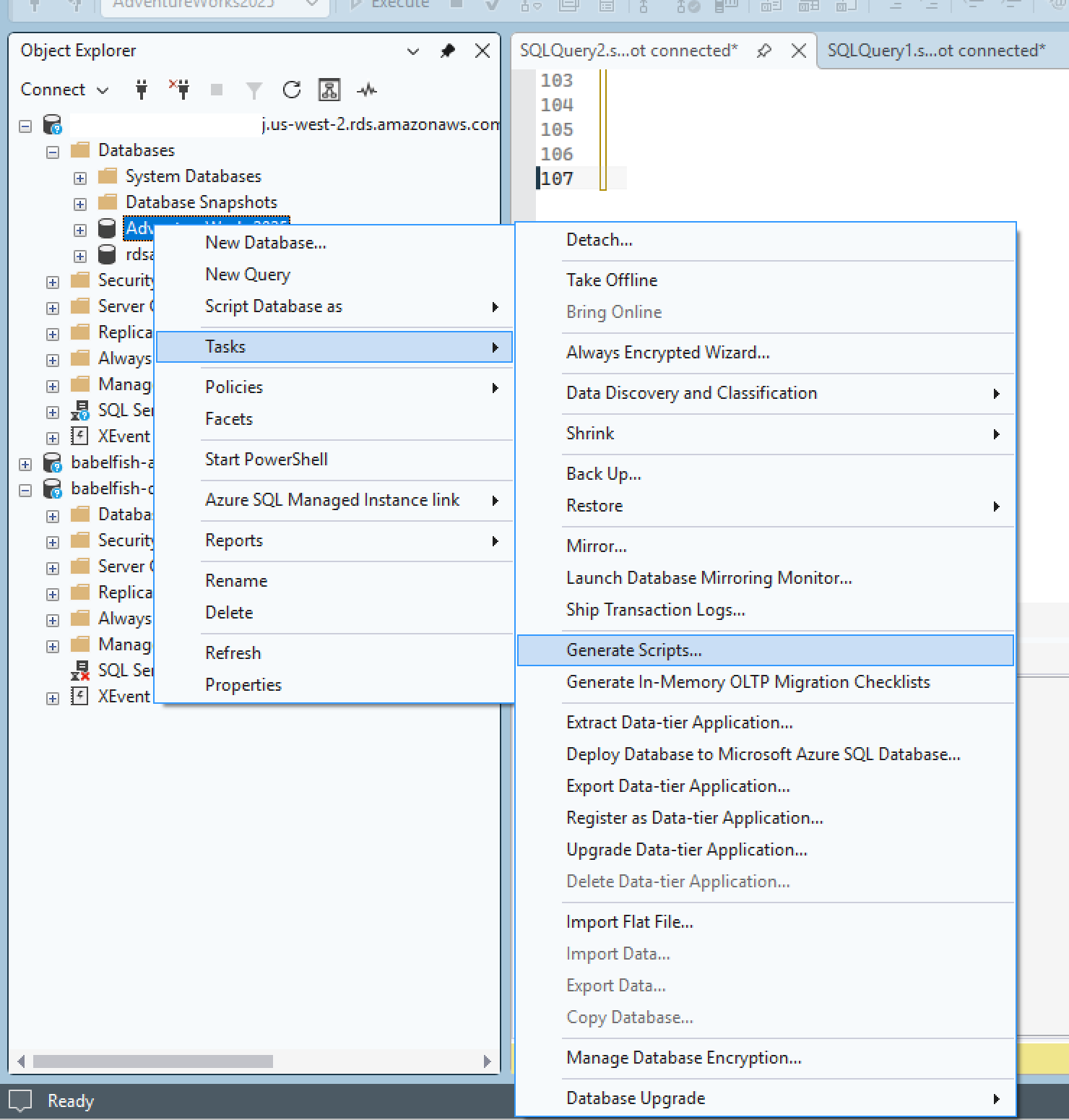
Figure 1: Generating DDL scripts from SQL Server Management Studio
In the end SSMS produces a DDL/SQL script as output. You then use this script (or scripts) as input for Babelfish Compass to generate an assessment report.
On Windows:
On Linux/Mac:
The Compass report flags every FTS-related construct and tells you where each falls on the compatibility spectrum. For detailed usage instructions, see the Babelfish Compass User Guide.
Now, we walk through six structured checkpoints in a decision tree. At each one, you answer a question about your FTS workload. Based on the answer, you either move forward, apply a workaround, or identify a component that requires an alternative approach.
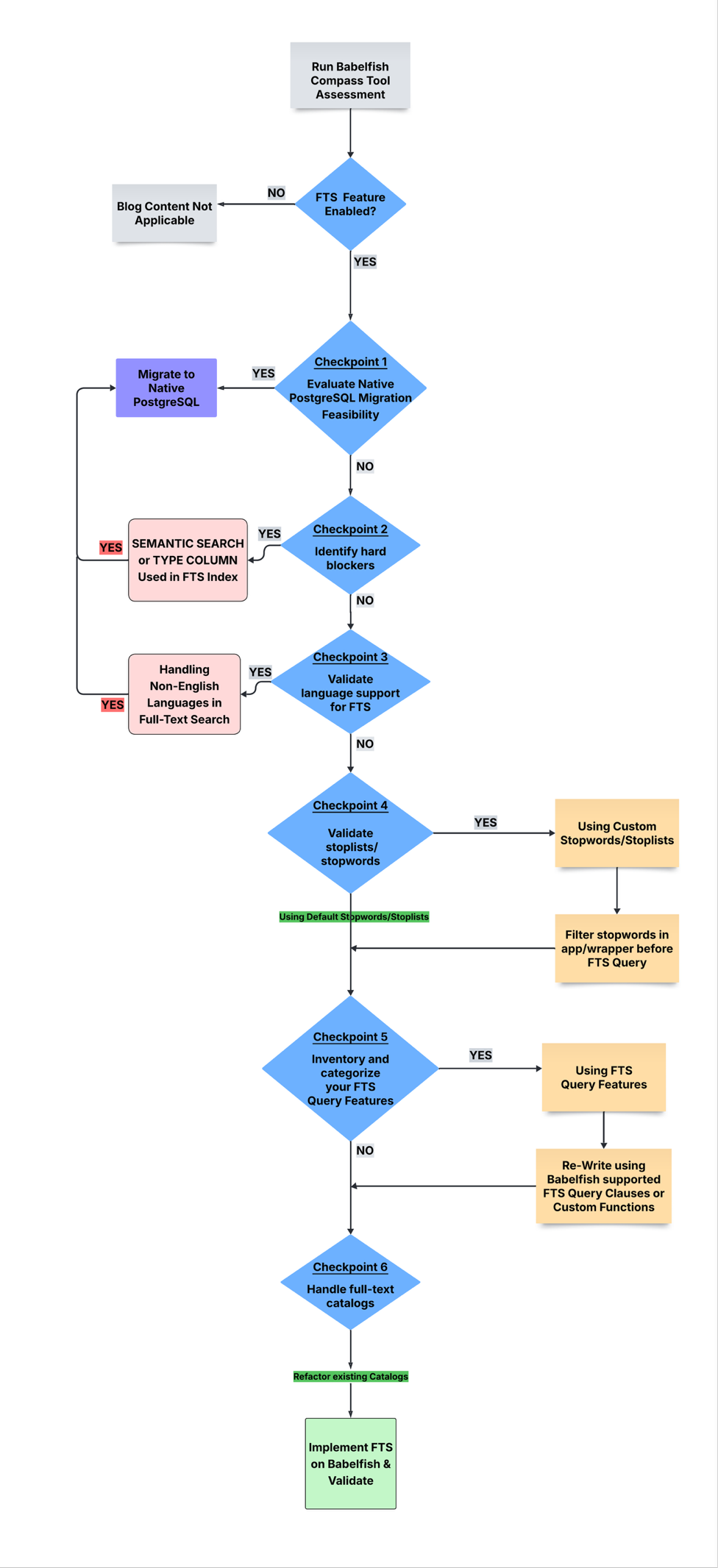
Figure 2: Full-Text Search migration decision tree with six checkpoints
How the decision flow works
Each of the following checkpoints explains what to look for and provides the hands-on steps to assess your workload.
Checkpoint 1: Evaluate native PostgreSQL migration feasibility
Before proceeding with the Babelfish route, consider whether fully modernizing to native PostgreSQL makes more sense for your FTS workload.
To make this decision, assess the full scope of your FTS usage by reviewing stored procedures, application code, dynamically generated SQL, and reporting layer queries to identify every FTS query across the stack. Some factors to consider:
- FTS complexity – If your FTS queries are straightforward and isolated from other business logic, modernizing to the native PostgreSQL
tsvector/tsquerysearch might be the better long-term path. - FTS footprint – Count how many places in your codebase use FTS queries. Run a search across your application code, stored procedures, SSIS packages, and reporting layer for
CONTAINS,FREETEXT,CONTAINSTABLE, andFREETEXTTABLE. A handful of isolated queries might require less effort to rewrite for native PostgreSQL. - Application semantics – SQL Server and PostgreSQL handle transactions and errors very differently (for example, rollback behavior and nested transactions). Babelfish preserves the behavior of SQL Server in these areas automatically. If your application depends on these semantics alongside FTS, the Babelfish route avoids a much larger rewrite.
- Team expertise – If your team has PostgreSQL experience, native migration might require less learning curve adjustment. If your team is primarily skilled in SQL Server, they can continue working in T-SQL with Babelfish while the underlying engine changes, which reduces the learning curve and migration risk.
This decision doesn’t need to be all-or-nothing. In many workloads, most of the application logic runs well on Babelfish while only a subset of the FTS features hit compatibility gaps. In that case, consider a hybrid approach: migrate the bulk of the workload to Babelfish and handle specific FTS components that cannot migrate through native PostgreSQL full-text search or Amazon OpenSearch Service. The remaining checkpoints in this post help you identify exactly which FTS features fall into each category.
If you decide that full modernization is the right approach, see Migrate full-text search from SQL Server to Amazon Aurora PostgreSQL-Compatible Edition or Amazon RDS for PostgreSQL. Otherwise, continue to Checkpoint 2.
Checkpoint 2: Identify hard blockers
Two SQL Server FTS features have no equivalent in Babelfish and currently don’t have any workaround:
- SEMANTIC SEARCH – If you use semantic search, key phrase extraction, or document similarity queries in your application, you cannot currently use Babelfish to implement these capabilities. This is a hard stop for that part of the workload. Run the following queries on your SQL Server database to confirm.
If this query returns any rows, the Semantic Language Statistics database exists on your SQL Server instance, and your workload might rely on Semantic Search features such as SEMANTICKEYPHRASETABLE or SEMANTICSIMILARITYTABLE.
You can’t migrate Semantic Search features to Babelfish because it lacks equivalent functionality today. Consider a full modernization as discussed in Checkpoint 1.
If the query returns an empty result set, your instance does not have the Semantic Language Statistics database registered, and Semantic Search is not active.
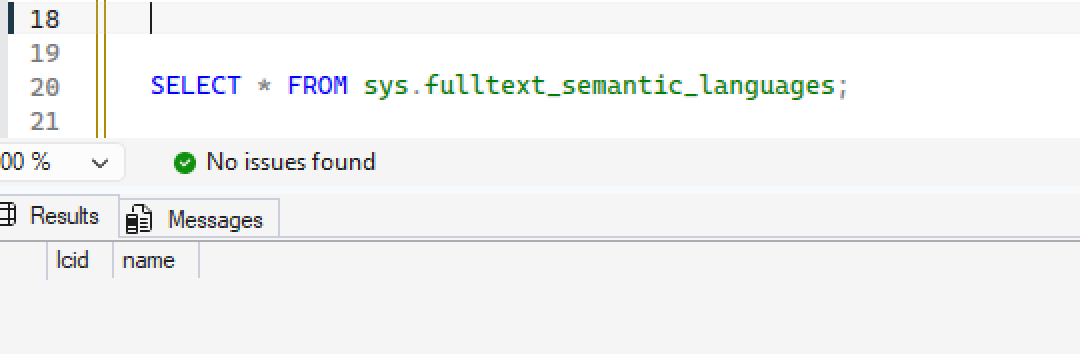
Figure 3: Checking for Semantic Search language statistics on SQL Server
- TYPE COLUMN – If your SQL Server full-text indexes use TYPE COLUMN to index embedded documents (PDFs, Word files stored in varbinary/image columns), Babelfish on Aurora PostgreSQL doesn’t support this capability.
If this query returns any rows like shown in the screenshot, your full-text indexes use TYPE COLUMN to index binary document content such as PDFs or Word files that you store in VARBINARY or IMAGE columns. Babelfish doesn’t support the TYPE COLUMN option in CREATE FULLTEXT INDEX. This feature blocks migration. Revisit Checkpoint 1 and evaluate the native PostgreSQL migration path. For more information, see Limitations in Babelfish Full Text Search.
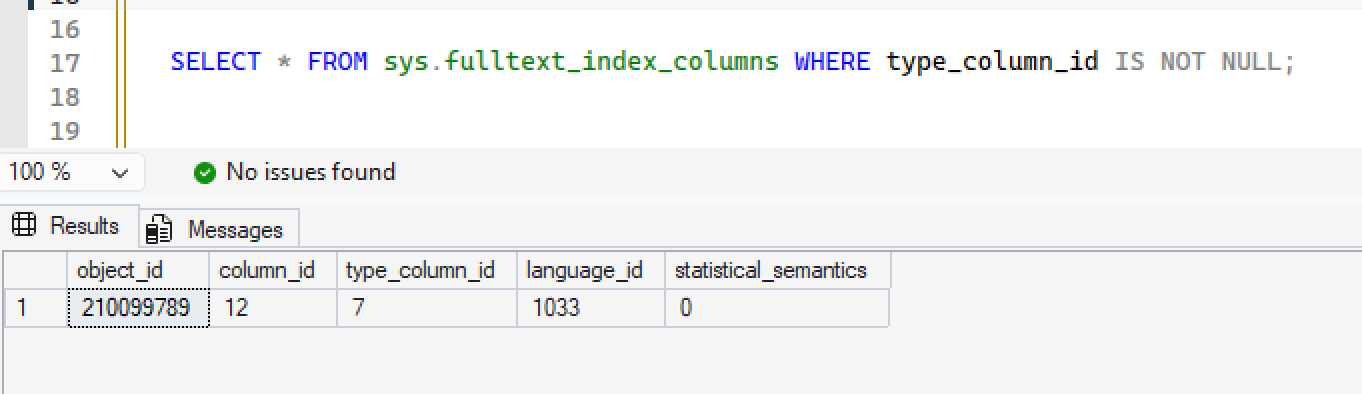
Figure 4: Checking for TYPE COLUMN usage in full-text indexes
If the query returns an empty result set, none of your full-text indexes reference a TYPE COLUMN. Continue to Checkpoint 3.
If either query returns results, that component of your workload cannot migrate to Babelfish. You need to either redesign it using native PostgreSQL full-text search or Amazon OpenSearch Service.
Checkpoint 3: Validate language support for FTS
Check what languages your SQL Server FTS use:
If this query returns any language other than English (lcid 1033), that language is a blocker because Babelfish full-text search only supports English. As a next step, to confirm which languages your full-text indexed columns use, run the following query:
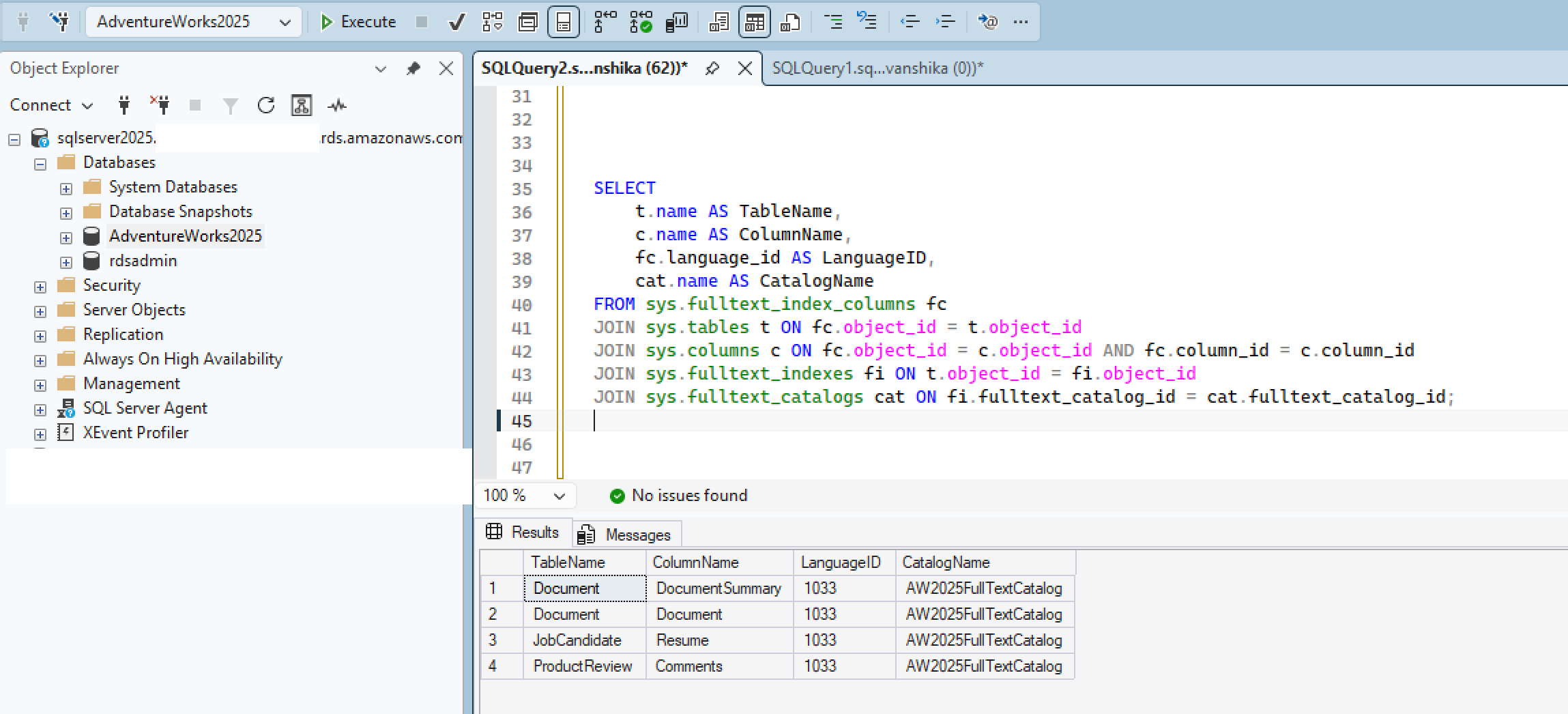
Figure 5: Verifying full-text index languages on SQL Server
If all rows return language_id = 1033 (English), your full-text search should be compatible with Babelfish, as shown in the preceding screenshot. Continue to Checkpoint 4. If any row returns a different language_id, that column’s full-text index is a blocker.
However, multi-language support using NCHAR/NVARCHAR with SQL_Latin1_General_CP1_CI_AS collation is supported.
Checkpoint 4: Validate stoplists/stopwords
If you have customized your SQL Server stoplists with application-specific words, be aware that Babelfish can’t reproduce them. Check what exists in your source database:
If either query returns rows, you have custom stoplists that will require a redesign rather than a straightforward migration step.
Babelfish doesn’t support CREATE, ALTER, or DROP FULLTEXT STOPLIST, and there’s no Babelfish stopword configuration you can add entries to. You can find the default supported stopwords in the Babelfish stopword file on GitHub.
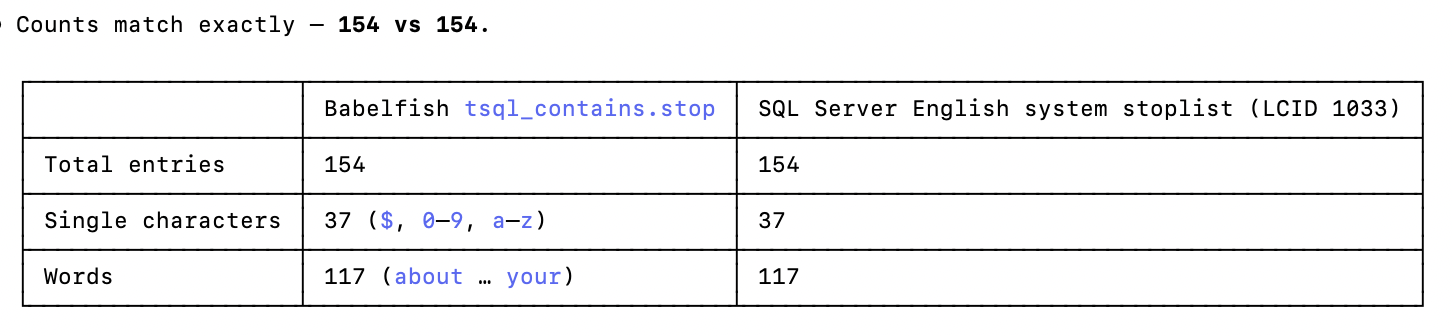
Figure 6: Reviewing custom stoplists and stopwords on SQL Server
Run the following query on SQL Server to further verify:
You can’t replace or extend the stoplist, because this is a system-level constraint rather than a Babelfish gap. Aurora PostgreSQL doesn’t provide access to install custom dictionary files under $SHAREDIR. This prevents direct use of file-backed dictionaries such as custom stopword dictionaries. Where built-in dictionaries are not sufficient, implement stopword handling with database tables and functions, or with application-side query expansion. For more details, see Migrate multilingual full-text search from SQL Server to PostgreSQL.
Applied to Babelfish, this means storing your custom stopwords in a table and filtering them out of the search string in your application or in a wrapper procedure before the string reaches CONTAINS.
If no custom stoplists exist, no action is needed. Babelfish includes the standard English stopwords of SQL Server by default.
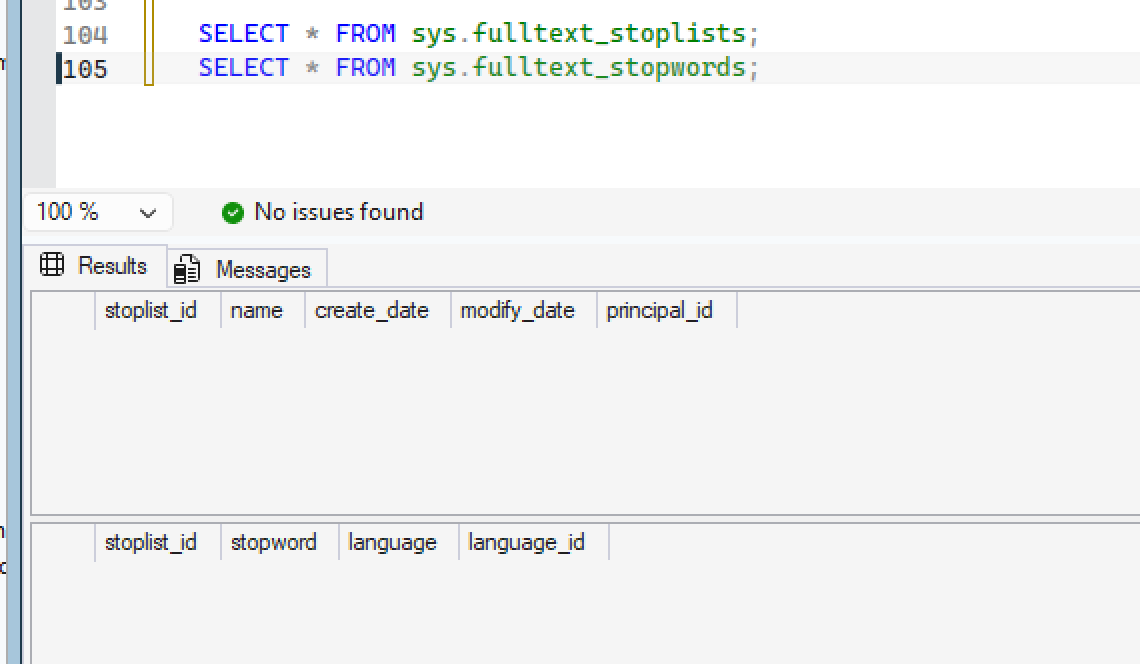
Figure 7: Counting the default English system stopwords
Checkpoint 5: Inventory and categorize your FTS query features
Go through the Compass Report, Application source code, JAR files, SSIS packages, reporting layer queries for CONTAINS, FREETEXT, CONTAINSTABLE, and FREETEXTTABLE usage. Categorize each occurrence as:
- Directly supported –
CONTAINS(works in Babelfish. Test your specific patterns carefully) - Needs custom function –
FREETEXT,CONTAINSTABLE,FREETEXTTABLE
For category (b), custom PL/pgSQL functions can replicate the behavior using the PostgreSQL tsvector/tsquery engine.
The following sample demonstrates how to create a custom CONTAINSTABLE equivalent in Babelfish using PL/pgSQL. Because this is a PL/pgSQL function, create it on the PostgreSQL side (port 5432), not through the T-SQL endpoint. After you create it, you can call it from both sides. This function replicates the table-valued search behavior by using the PostgreSQL tsvector and tsquery engine.
Call the function from both sides:
Note:
- The sample demonstrates two matching functions.
plainto_tsquerytakes plain search words and safely combines them with AND (recommended for arbitrary free-text input), whereasto_tsquerygives you operator control: OR (|), AND (&), NOT (!), and prefix matching (:*). Use whichever fits your use case per column. CONTAINSTABLEis a reserved keyword in T-SQL, so wrap it in square brackets as shown to tell the parser it’s the function name and not the built-in keyword.- For production use, add GIN indexes on the
tsvectorcolumns for performance, and implement a ranking mechanism usingts_rank()to more closely replicate the ranked results of SQL Server.
Checkpoint 6: Handle full-text catalogs
Babelfish doesn’t support catalogs. However, creating a Full-Text Index does not require a Full-Text Catalog. If your DDL scripts reference catalogs, you must remove those references. In SQL Server, a full-text index is typically created under a named catalog. Because Babelfish doesn’t support catalogs, remove the ON clause. For example, the following commands create an FTS index in SQL Server:
On your Babelfish cluster (through the TDS port using T-SQL), you rewrite them as a single command that drops the catalog reference:
To make this change, scan your scripts for any ON <catalog_name> clauses and remove them.
All checkpoints are complete, leaving you with a viable path to implement FTS on Babelfish. At this point, you know exactly what migrates directly, what needs a custom function, and what requires an alternative. Before you begin implementation, review some of the following behavior differences to avoid surprises during testing.
Additional considerations and behavior differences
Beyond the Compass report, here are a few behavior differences to be aware of as you plan and test your migration:
- Check your target Babelfish version: FTS support requires Babelfish 4.0.0 or higher and continues to improve with each release. Verify feature support for your version in the Babelfish FTS documentation.
- Performance might differ: The Babelfish FTS implementation might behave differently from that of SQL Server under heavy workloads. Benchmark your heaviest FTS queries after migration to identify any regressions.
- Ranking scores will not be identical: Result ordering might differ between SQL Server and Babelfish for the same FTS query.
- Index population timing might vary: Full-text index population in Babelfish might take more or less time than in SQL Server, depending on data volume. Note that to re-index, you must drop and recreate the full-text index.
- Index differs from SQL Server: Babelfish FTS uses the PostgreSQL GIN (Generalized Inverted Index) under the hood. For details, see GIN Implementation in the PostgreSQL documentation.
To verify the index type on your Babelfish cluster, connect through the PostgreSQL endpoint (port 5432) and run:
You should see USING gin (to_tsvector(...)) in the index definition, confirming that Babelfish creates GIN indexes for full-text search.

Figure 8: Confirming the GIN index definition on Babelfish
Conclusion
By working through the six checkpoints in this decision tree, you can classify every Full-Text Search feature in your SQL Server workload into one of three categories: migrates directly to Babelfish, needs a custom PL/pgSQL function, or requires an alternative approach such as native PostgreSQL full-text search or Amazon OpenSearch Service. This gives you a clear migration plan to help minimize surprises at cutover.
To get started, export your DDL, run Babelfish Compass, and work through each checkpoint against your own workload.