AWS Database Blog
Migrate multilingual full-text search from SQL Server to PostgreSQL
After migrating full-text search from SQL Server to PostgreSQL, equivalent searches can silently return different results. For example, cafe may no longer match café, and stemming behavior can diverge. This happens because the two engines handle text comparison, linguistic processing, and accents differently. A previous AWS Database Blog post demonstrated the core steps for migrating full-text search (FTS) from Microsoft SQL Server to Amazon Aurora PostgreSQL-Compatible Edition or Amazon Relational Database Service (Amazon RDS) for PostgreSQL.
SQL Server uses collation for ordinary comparison and ordering, the indexed column’s language for word breaking and stemming, and the full-text catalog’s ACCENT_SENSITIVITY setting for FTS accent handling. PostgreSQL uses collation for ordinary comparisons and text search configurations for tokenization and normalization. In PostgreSQL, use an unaccent dictionary to implement accent-insensitive FTS.
Native PostgreSQL FTS keeps search close to transactional data and provides transactional consistency. Consider Amazon OpenSearch Service for features such as fuzzy matching, custom analyzers, faceting, highlighting, independent scaling, or workload isolation. In this post, we show how to reproduce SQL Server full-text search behavior on Aurora PostgreSQL and RDS for PostgreSQL. We walk through collation compared to text search configuration, language-specific tokenization for eight languages, accent-insensitive search, and synonym expansion. We also outline what to test to confirm behavior matches.
Prerequisites
To run the sample queries, you need:
- An Aurora PostgreSQL DB cluster or an RDS for PostgreSQL DB instance. We validated the examples with SQL Server 2022 CU16 (build 16.0.4165.4) and Aurora PostgreSQL 16.8.
- AWS CloudShell, which includes the psql client, or another PostgreSQL client with the necessary database credentials and network connectivity to the DB cluster or instance.
- Support for the required International Components for Unicode (ICU) functionality and extensions, including unaccent and
pg_bigm. Verify availability for your target engine version in the Aurora PostgreSQL extension-version documentation or RDS for PostgreSQL extension-version documentation, and test the examples on your selected release before implementation.
Solution overview
Migrating full-text search (FTS) from SQL Server to Aurora PostgreSQL or Amazon RDS for PostgreSQL involves migrating the schema and data. You then reimplement the search functionality on the target database. The workflow consists of the following stages:
- Schema conversion – AWS Database Migration Service (AWS DMS) Schema Conversion (DMS SC) or the AWS Schema Conversion Tool (AWS SCT) reads the source SQL Server metadata and converts tables to PostgreSQL-compatible formats.
- Data migration – AWS DMS copies and applies the data from SQL Server to PostgreSQL.
- FTS adaptation – SQL Server full-text catalogs and indexes require reimplementation in PostgreSQL. Identify the columns that require full-text search, and convert their content to
tsvectorvalues by using the appropriate PostgreSQL text search configuration. Create GIN indexes on the resultingtsvectorexpressions or columns. - Query rewriting – Applications that use SQL Server FTS predicates (such as
CONTAINSandFREETEXT) must be updated to PostgreSQL equivalents (such asto_tsvector,to_tsquery, andplainto_tsquery).
The following architecture diagram shows these stages, from the source SQL Server database through schema conversion and data migration to FTS adaptation and query rewriting for Aurora PostgreSQL or Amazon RDS for PostgreSQL.
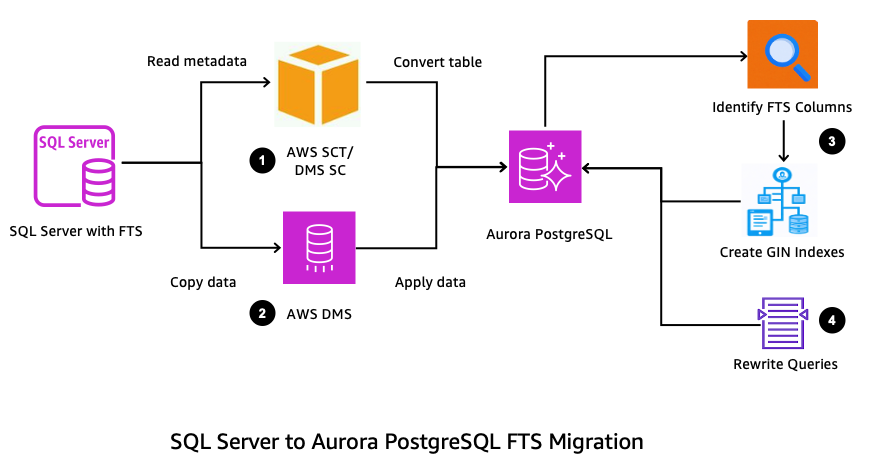
Figure 1: Full-text search migration workflow from SQL Server to Aurora PostgreSQL or Amazon RDS for PostgreSQL
Language and collation in PostgreSQL
In PostgreSQL, language processing and collation are handled in two separate layers:
- Collation (
libcor ICU-based): PostgreSQL collations control string comparison and ordering, character classification and case conversion, and supported pattern-matching operations. Aurora PostgreSQL supports thelibcand ICU collation providers. ICU collations provide customizable, locale-aware behavior. Collations don’t control full-text search tokenization or normalization. PostgreSQL text search configurations control these operations by selecting the parser and dictionaries. - Text search configuration: Defines the parser and dictionaries that PostgreSQL uses to tokenize and normalize text, including stemming and stop-word removal. PostgreSQL provides built-in configurations such as english, dutch, and simple. Although PostgreSQL supports custom file-based dictionaries such as
ispell, you can’t generally upload the required dictionary files to the server file system in Aurora PostgreSQL or RDS for PostgreSQL. Thepg_bigmextension is separate from PostgreSQL text search configurations andto_tsvector. It provides bigram-based GIN indexing forLIKE, regular-expression, and similarity searches, which can be useful for languages such as Japanese, Chinese, and Korean.
Version compatibility: Extension and ICU availability varies by Aurora PostgreSQL and RDS for PostgreSQL engine version. The examples in this post were validated on Aurora PostgreSQL 16.8, which supports ICU 60.2, pg_bigm 1.2, and unaccent 1.1. Verify availability for your selected engine release in the Aurora PostgreSQL or RDS for PostgreSQL extension-version documentation.
The following diagram shows the three separate paths that PostgreSQL uses for ordinary text operations, native full-text search, and bigram-based search.
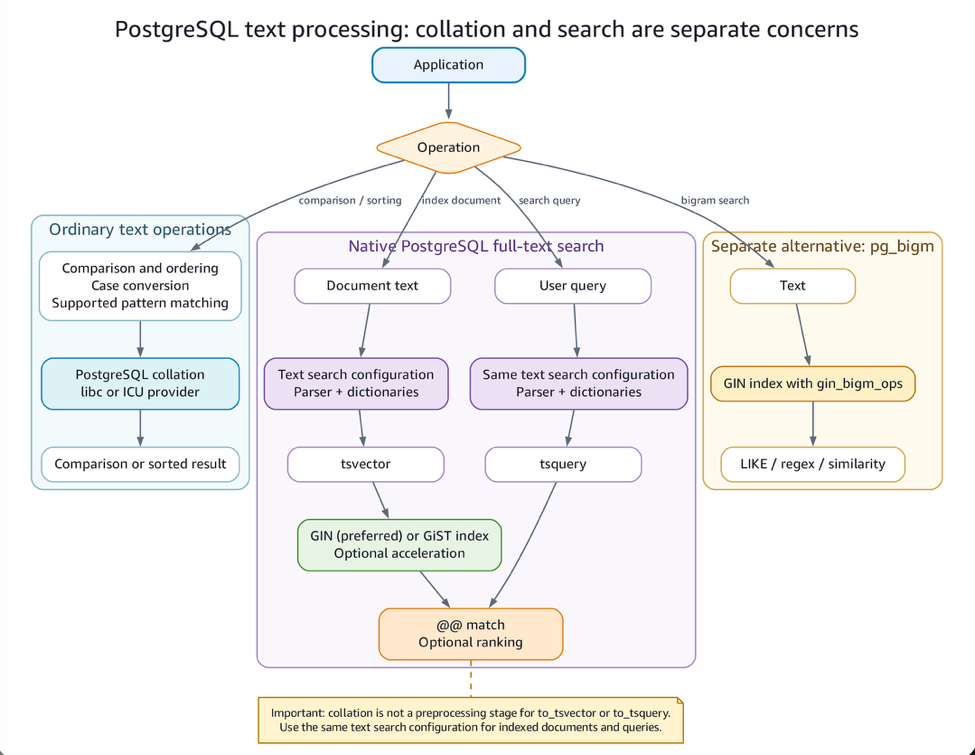
Figure 2: The three separate paths PostgreSQL uses for ordinary text operations, native full-text search, and bigram-based search
For ordinary text operations, PostgreSQL uses a libc or ICU collation to control comparison, ordering, case conversion, and supported pattern matching. Native full-text search uses the same text search configuration to process document text and user queries. The configuration applies a parser and dictionaries to produce tsvector values for documents and tsquery values for queries. PostgreSQL can use a GIN or GiST index to accelerate document searches and uses the @@ operator to match the resulting values. Separately, the pg_bigm extension provides bigram-based indexing for LIKE, regular-expression, and similarity searches. Collation is independent of these full-text and bigram search paths and doesn’t preprocess text for full-text search.
Differences in full-text search architecture
The following table summarizes the architectural differences:
| Concept | SQL Server | PostgreSQL (Aurora/RDS) |
| Stopwords | Stoplist | Dictionaries (english_stem) |
| Synonyms | Thesaurus XML | Synonym Dictionary Thesaurus Dictionary |
| Queries | CONTAINS, FREETEXT | to_tsquery, websearch_to_tsquery |
Collation and ICU in PostgreSQL
SQL Server configures FTS through the indexed column’s language, stoplists, and full-text catalog accent sensitivity. PostgreSQL uses text search configurations to select parsers and dictionaries that produce tsvector and tsquery values. In both engines, ordinary collation controls string comparison and ordering separately from FTS. The following diagram compares these models.
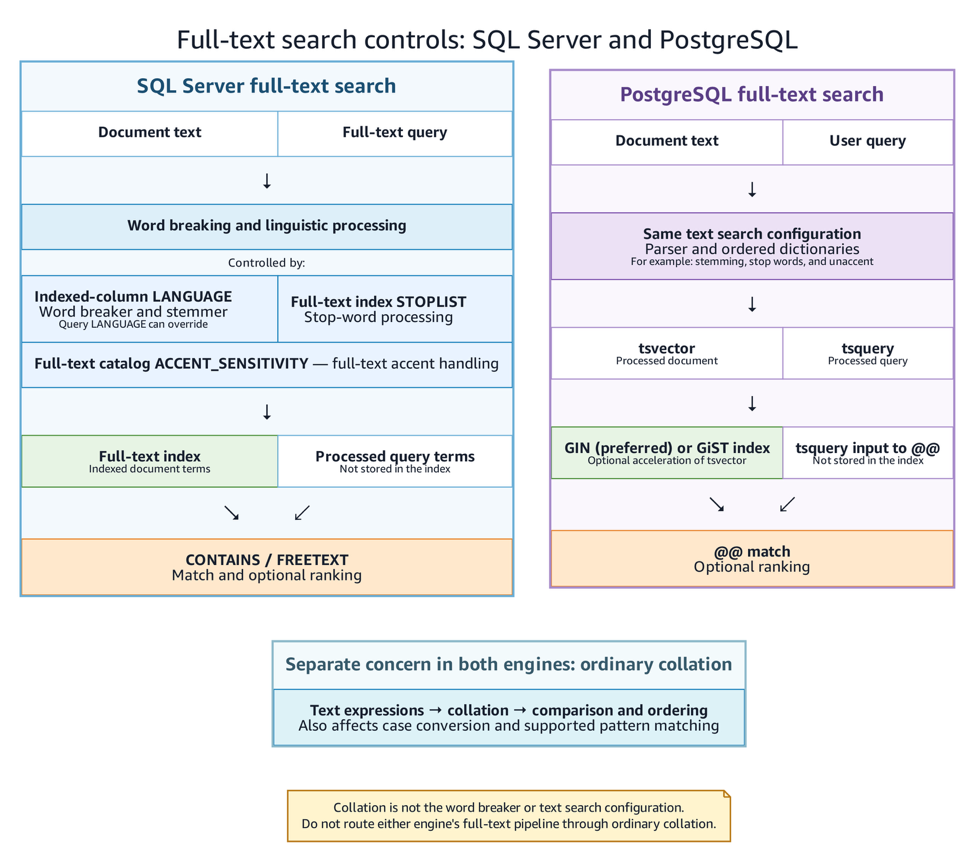
Figure 3: Full-text search controls compared between SQL Server and PostgreSQL
In SQL Server, the indexed column’s language controls word breaking and stemming, the stoplist excludes specified words, and the full-text catalog’s ACCENT_SENSITIVITY setting controls accent handling. Applications query the full-text index by using predicates such as CONTAINS and FREETEXT. In PostgreSQL, the same text search configuration processes documents and queries to produce tsvector and tsquery values. PostgreSQL can use a GIN or GiST index to accelerate matching with the @@ operator. In both engines, collation remains separate from the full-text search pipeline.
PostgreSQL supports both libc and ICU collations. libc is the default collation.
With ICU collations, you can define locale-aware sort orders for a wide range of languages (for example, en-US, nl-NL, fr-FR). This provides fine-grained control over case and accent sensitivity independent of FTS. For example, you can define one collation for accent-sensitive comparisons (café ≠ cafe) and another for accent-insensitive searches, while still using the same text search configuration.
Language-specific tokenization
PostgreSQL text search configurations select parsers and dictionaries for tokenization, stemming, and stop-word removal. The following examples demonstrate language-specific behavior. For Chinese, Japanese, and Korean (CJK) text, pg_bigm provides separate bigram indexing for LIKE, regular-expression, and similarity searches.
For example:
- An English configuration reduces
runningto the lexemerun.
- The Dutch configuration stems Dutch words. It does not split compound words. However, prefix matching can match the beginning of an indexed compound lexeme such as
werkplaats.
- A custom French text search configuration combines accent removal with French stemming.
- The German configuration performs German stemming and normalizes umlauts. It does not split compound words.
- Spanish configuration handles accented characters, and gender and number variations:
- With
pg_bigm, Japanese text such as “東京駅” (Tokyo Station) is divided into overlapping bigrams. You can use a bigram index withLIKEand regular-expression searches to perform partial matching without predefined dictionaries. This approach is useful for Chinese, Japanese, and Korean (CJK) text.
Both Arabic and Hebrew are right-to-left (RTL) Semitic languages, and PostgreSQL fully supports storing and indexing RTL text. However, their full-text search behavior differs:
- PostgreSQL includes an Arabic Snowball stemmer that can conflate some inflected forms. The stemmer does not provide general root-based morphological analysis, so validate the required word forms with representative Arabic text and queries.
- Hebrew does not have a built-in stemmer in PostgreSQL, so search is token-based. To achieve root-level or prefix-insensitive matching, Hebrew typically requires manual normalization or custom processing.
Stopwords, thesaurus, and synonyms
SQL Server uses stoplists for excluded words and thesaurus XML files for synonyms (for example, car = automobile). PostgreSQL ships built-in dictionaries (Snowball stemmers for English, French, Dutch, and others), but file-based dictionaries like ispell and thesaurus XML equivalents are not available on Aurora PostgreSQL or RDS for PostgreSQL. Implement custom stopwords and synonyms using SQL tables and functions instead.
The following example uses a user-defined make_syn_tsquery function (full source in the sample GitHub repository) so a search for ‘automobile’ also returns documents containing ‘car’ or ‘auto’:
Accent sensitivity and Unicode
As discussed earlier, ordinary collation and full-text accent handling are separate concerns in both engines. In PostgreSQL, use an ICU collation for accent-insensitive ordinary string comparisons. For accent-insensitive full-text search, use a custom text search configuration such as public.french_unaccent, and apply the same configuration when indexing documents and processing queries.
For French, accents often change word meaning. With ICU collations, you can define both accent-sensitive and accent-insensitive behavior side by side:
With these collations:
- A query using
fr_sensitivewill not match “café” and “cafe” as equal. - A comparison using
fr_insensitivewill treat “café” and “cafe” as equal. This collation affects ordinary string comparison and ordering, not full-text tokenization.
Performance and indexing considerations
PostgreSQL supports GIN and GiST indexes for tsvector values. Query plans and maintenance behavior depend on the data, workload, statistics, and configuration. Consider the following:
- Index type – GIN indexes store lexemes and are commonly used for full-text search. GiST indexes use signatures and can require rechecking candidate matches.
- GIN pending list – With
fastupdateenabled, inserts and updates can accumulate in a pending list before entries are moved into the main index. PostgreSQL cleans this list duringautovacuumor when it exceeds gin_pending_list_limit. - Vacuum and statistics – Autovacuum maintains table and index storage and refreshes planner statistics. Monitor and tune
autovacuumfor write-intensive tables. - Parallel execution – PostgreSQL can use parallel plans when the query and planner cost estimates make them eligible. Parallel execution is not guaranteed.
- Partitioning – Partition pruning can limit a query to relevant partitions when predicates include the partition key. Partitioning does not automatically improve every FTS query.
- Plan validation – Use
EXPLAIN (ANALYZE, BUFFERS)with representative data to verify whether PostgreSQL uses the intended index and to measure execution time and buffer activity.
For more information, see:
- PostgreSQL preferred index types for text search.
- PostgreSQL GIN fast-update technique.
- Using EXPLAIN.
Considerations and limitations
Before deploying the migrated full-text search implementation to production, consider the following limitations:
- Custom dictionary files – Aurora PostgreSQL and RDS for PostgreSQL don’t provide access to install custom dictionary files under
$SHAREDIR. This prevents direct use of file-backed dictionaries such asispell,synonym,thesaurus, and custom stop-word dictionaries. Where built-in dictionaries aren’t sufficient, implement stop-word and synonym handling with database tables and functions or application-side query expansion. - Compound words – The built-in Dutch and German text search configurations stem words but don’t split compound words into their components. Prefix matching can address some use cases, but validate compound-word searches against representative application data.
- Arabic morphology – The Arabic Snowball stemmer in PostgreSQL can normalize some inflected forms, but it doesn’t provide general root-based morphological analysis. Applications that require root-level Arabic matching might need additional normalization or external language-processing capabilities.
- Hebrew stemming – PostgreSQL doesn’t include a built-in Hebrew stemmer. The simple configuration supports token-based matching, but matching across prefixed forms or other morphology-aware behavior requires custom normalization or processing.
These behaviors can produce different results from SQL Server even when the schema, data, and queries have been migrated correctly. Test the target implementation with representative multilingual content, query terms, expected matches, and non-matches before production use.
Migration checklist
Use this checklist when planning the migration:
- Review source collations – Identify which SQL Server collations are in use (case sensitivity, accent sensitivity) and plan equivalent
glibcor ICU collations in PostgreSQL. - Inventory FTS objects – Document catalogs, stoplists, and thesaurus XML files from SQL Server.
- Map to PostgreSQL dictionaries – Select suitable built-in dictionaries and define the necessary database or application-level normalization. Apply the chosen normalization consistently when indexing documents and processing queries.
- Choose text search configurations – Select appropriate built-in configurations, such as english, french, or dutch. For CJK text, plan for separate
pg_bigmbigram indexing. - Recreate indexes – Define
tsvectorcolumns or expressions and create GIN indexes for search efficiency. - Rewrite queries – Update SQL Server FTS predicates (
CONTAINS,FREETEXT) into PostgreSQL equivalents (to_tsvector,to_tsquery,plainto_tsquery,websearch_to_tsquery). - Validate accent and case sensitivity – Test queries with and without accents (for example, café compared to cafe) and confirm that behavior matches business requirements.
- Benchmark performance – Measure query response times and index sizes. Tune
autovacuum,gin_pending_list_limit, and partitioning as needed. - Consider OpenSearch integration – For advanced features such as fuzzy matching, faceting, or large-scale log and text analytics, evaluate Amazon OpenSearch Service alongside PostgreSQL.
Clean up
To remove the sample objects created in this walkthrough, run the following commands:
Dropping the docs table also removes its indexes and the sequence owned by its serial column.
If you installed the extensions specifically for this walkthrough in a disposable database, and no other objects use them, you can also remove them:
Conclusion
PostgreSQL separates collation from full-text linguistic processing, including tokenization, stemming, and accent handling. When migrating multilingual workloads, test language-specific behavior, synonyms, query results, and index performance with representative data.
To get started, use the sample GitHub repository to run these examples in a non-production Aurora PostgreSQL or RDS for PostgreSQL environment. For further reading, see the PostgreSQL full-text search documentation.