AWS Database Blog
Automated JDBC query caching with the AWS Advanced JDBC Wrapper
When read queries dominate your database load, response times slow down and costs climb, even when the underlying data rarely changes. The traditional fix is building a custom cache layer, but that means implementing external cache logic for every query, handling serialization, and keeping the cache consistent with the database. That’s a significant engineering investment that pulls focus away from core business features.
Today, we’re announcing the Remote Query Cache Plugin for the AWS Advanced JDBC Wrapper. The plugin handles query caching automatically. It intercepts JDBC queries, caches results in Amazon ElastiCache for Valkey, and serves subsequent identical queries from cache. Your only application change is prefixing queries with SQL hints.
In this post, we show you how to use Amazon CloudWatch Database Insights to identify queries to cache, configure the Remote Query Cache Plugin in your Java applications, and monitor cache effectiveness using Amazon CloudWatch.
The challenges of implementing external caching
When you want to add caching to your database application, you typically face three major obstacles:
Complex application rewrites: Adding caching to an existing application typically requires changes at the application layer to annotate service code methods, configure cache parameters, and manage TTL in separate configuration files. These changes can spread across your code base and be tied to your specific framework.
Learning new APIs and patterns: Integrating caching means learning new client libraries, understanding serialization frameworks, and implementing error handling for cache failures. You must become proficient with these technologies while maintaining existing database code.
Cache management complexity: You must manually manage cache invalidation, right-size your cache server, generate cache keys consistently, monitor cache hit rates, and gracefully handle failures when the cache server goes down.
As a result, you face a difficult choice: invest significant engineering resources in building caching logic, or accept higher database costs and suboptimal performance.
How the AWS Advanced JDBC Wrapper Remote Query Cache Plugin solves these challenges
With the Remote Query Cache Plugin, you get integrated query result caching for your existing PostgreSQL, MySQL, and MariaDB applications. The plugin works transparently with your application without the overhead of building a cache layer yourself.
You only need to add SQL hints to mark which queries should be cached. The plugin handles caching operations transparently: checking Amazon ElastiCache for Valkey, managing misses, serializing results, and populating the cache automatically.
The plugin works through your existing JDBC interface. You continue using familiar patterns with Spring Data JPA, Hibernate, Spring JDBC Template, or native JDBC. The plugin manages the Valkey client, serialization, and error handling behind the scenes.
The plugin generates cache keys automatically, manages expiration through configurable TTL (time-to-live) values, and falls back to database queries when cache is unavailable. The plugin emits metrics to Amazon CloudWatch for monitoring without custom instrumentation.
Architecture overview
The following diagram illustrates how the Remote Query Cache Plugin works with the read-through cache:
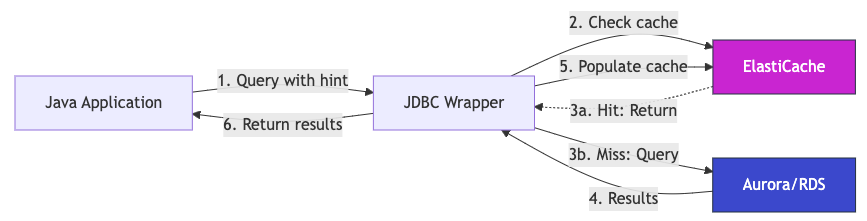
Figure 1: Remote Query Cache Plugin read-through cache flow between the Java application, Amazon ElastiCache for Valkey, and Amazon Aurora or Amazon RDS.
How it works:
- The application runs a query with a cache hint (
/* CACHE_PARAM(ttl=<duration>) */). - The plugin checks ElastiCache for cached results matching the query.
- Cache hit (3a): Results return immediately to the plugin in microseconds, skipping steps 4 and 5. Cache miss (3b): The plugin forwards the query to the Aurora/RDS database.
- The database runs the query and returns fresh results to the plugin.
- The plugin asynchronously populates ElastiCache with the results for future requests.
- The plugin returns results to the application.
The plugin populates the cache on first access, requiring minimal application logic changes and only configuration of SQL hints.
How to identify which queries to cache
While not every query will benefit from caching, a good place to start is SELECT statements that run frequently and contribute meaningfully to database load. These are typically queries that aggregate or join large datasets to return a small, stable result set.
For databases running on Amazon Relational Database Service (Amazon RDS) and Amazon Aurora, you can identify these queries using CloudWatch Database Insights. The describe-dimension-keys CLI command returns the top SQL statements ranked by db.load.avg. This metric measures average active sessions and reflects how much database capacity each query consumes.
Find top SELECT statements by database load
The command filters results to SELECT statements only and sorts them by db.load.avg descending. The db.load.avg value represents the average number of active sessions for that query during the time window. A value of 0.42 means the query occupied 42% of one active database session on average. Queries at the top of the list are consuming the most database capacity and are strong candidates for caching.
Example output
Consider an e-commerce application running under normal traffic. The command might return output like this:
The first three queries are strong caching candidates: a product catalog join (db.load.avg 0.42), a user profile lookup (0.18), and a regional tax rate fetch (0.09). They have high database load, are SELECT-only, and are backed by data that changes infrequently. The fourth query (live order count, 0.02) should not be cached because its result changes with every new order.
What makes a good candidate
| Signal | What to look for |
High db.load.avg |
Query contributes meaningfully to database load. |
| SELECT statement | Only read queries are safe to cache. |
| Stable result set | Data changes infrequently relative to the TTL you choose. |
| Repeated execution | Called many times per minute. High frequency amplifies the benefit. |
Once you identify candidates, you add hints to those queries in this format: /* CACHE_PARAM(ttl=<duration>) */. The Remote Query Cache Plugin handles the rest.
Prerequisites
Before you begin, confirm you have:
- An Amazon ElastiCache for Valkey serverless cache (recommended), a self-managed ElastiCache Valkey cluster, or a self-managed Valkey cache.
- AWS Advanced JDBC Wrapper 4.0.1 or later.
- Your application using PostgreSQL, MySQL, or MariaDB with JDBC.
Consider using Amazon ElastiCache Serverless because it offers zero infrastructure management, automatic scaling, and built-in high availability.
Set up cache using the Remote Query Cache Plugin
Enabling the Remote Query Cache Plugin requires three steps: add the driver dependency, configure the connection, and add SQL query hints to queries you want to cache.
Step 1: Add the AWS Advanced JDBC Wrapper dependency
First, add the wrapper dependency to your Maven configuration (Gradle is also supported).
Maven:
Gradle:
Step 2: Configure the cache connection
Update your database connection configuration to enable the Remote Query Cache Plugin. The configuration varies slightly depending on your framework.
Example Spring Boot (application.yml):
Database authentication: This example uses username and password as placeholders. The AWS Advanced JDBC Wrapper supports multiple authentication methods, including IAM database authentication and AWS Secrets Manager. For details, see the Secrets Manager Plugin.
Key configuration properties:
wrapperPlugins=remoteQueryCache: Enables the Remote Query Cache Plugin.cacheEndpointAddrRw: Amazon ElastiCache endpoint for read/write operations.cacheName: Your Amazon ElastiCache cluster name (for IAM authentication).cacheUsername: Cache username (usedefaultfor Amazon ElastiCache Serverless).cacheIamRegion: AWS Region for IAM authentication.cacheUseSSL=true: Enables TLS encryption for data in transit between the application and ElastiCache. Set this totruefor all deployments.
Step 3: Add SQL hints to target queries
Mark which queries should be cached by adding a SQL hint with a TTL (time-to-live). The syntax is /* CACHE_PARAM(ttl=<duration>) */ at the beginning of your SELECT statement.
Spring Data:
The Remote query cache plugin documentation includes additional examples for Hibernate and Spring Data.
Monitor performance with OpenTelemetry
You can configure the Remote Query Cache Plugin to emit cache metrics through the AWS Distro for OpenTelemetry (ADOT) Collector, which captures hit and miss counts, bypass events, and health check status. This gives you real-time visibility into cache effectiveness. You can also enable distributed tracing to see when queries hit the cache versus the database. The plugin forwards traces to AWS X-Ray, as described in the Remote Query Cache Plugin telemetry docs and the Telemetry configuration guide.
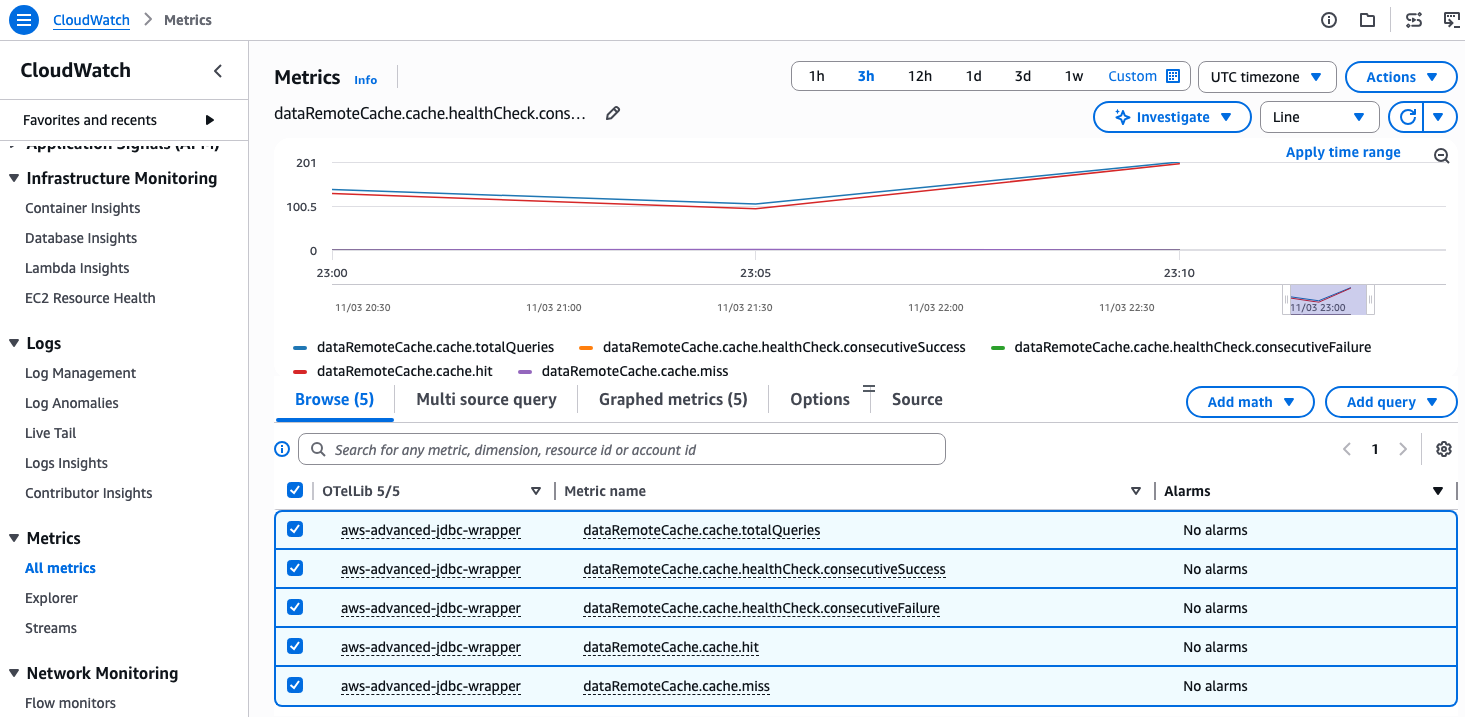
Figure 2: Amazon CloudWatch dashboard displaying cache hit/miss metrics, health checks, and query performance collected via OpenTelemetry.
Security considerations
This solution follows the AWS shared responsibility model. AWS secures the underlying ElastiCache and RDS/Aurora infrastructure. You are responsible for configuring access controls, enabling encryption, and managing credentials.
Encryption in transit: Set cacheUseSSL=true in your connection URL to encrypt all traffic between your application and ElastiCache.
Encryption at rest: Amazon ElastiCache Serverless enables encryption at rest by default. For node-based clusters, set AtRestEncryptionEnabled=true at creation time.
IAM authentication for ElastiCache: To use IAM authentication instead of a static password, set cacheIamRegion and cacheName in the connection URL. Attach the following policy to your application’s IAM role:
IAM permissions for Performance Insights CLI: The aws pi describe-dimension-keys and aws rds describe-db-instances commands require the following minimum permissions:
Clean up
If you created an Amazon ElastiCache for Valkey cluster for testing, delete it to avoid ongoing charges using the ElastiCache console or the AWS Command Line Interface (AWS CLI). Deleting the cache permanently removes all cached data. Your application will fall back to querying the database directly until you provision a new cache.
To revert the code changes:
- Remove
wrapperPlugins=remoteQueryCacheand the cache parameters from your connection URL. - Remove the
/* CACHE_PARAM(ttl=...) */hints from your queries. - Remove the wrapper dependency from your build configuration if you are not using other wrapper plugins.
Conclusion
In this post, we showed how to reduce database load and improve application performance with automated query caching that requires minimal architectural changes. You configure the AWS Advanced JDBC Wrapper Remote Query Cache Plugin to communicate with Amazon ElastiCache for Valkey and mark which queries to cache using SQL hints. Cache lookups, serialization, connection pooling, authentication, and graceful failure handling are managed automatically. By offloading repetitive read queries to Amazon ElastiCache, you can reserve database capacity for write-heavy or latency-sensitive operations.
To get started, use Amazon CloudWatch Database Insights on your Aurora or RDS instance to identify your top SELECT queries by database load. Run the aws pi describe-dimension-keys command from this post to surface the candidates. Then, add the /* CACHE_PARAM(ttl=<duration>) */ hint to your highest-load candidates and deploy your application with the wrapper configured. To compare query latency between direct PostgreSQL, the AWS JDBC Wrapper, and the Remote Query Cache Plugin side by side, try the jdbc-caching-demo sample on GitHub.