AWS Database Blog
Automated PII redaction for Amazon RDS for PostgreSQL audit logs
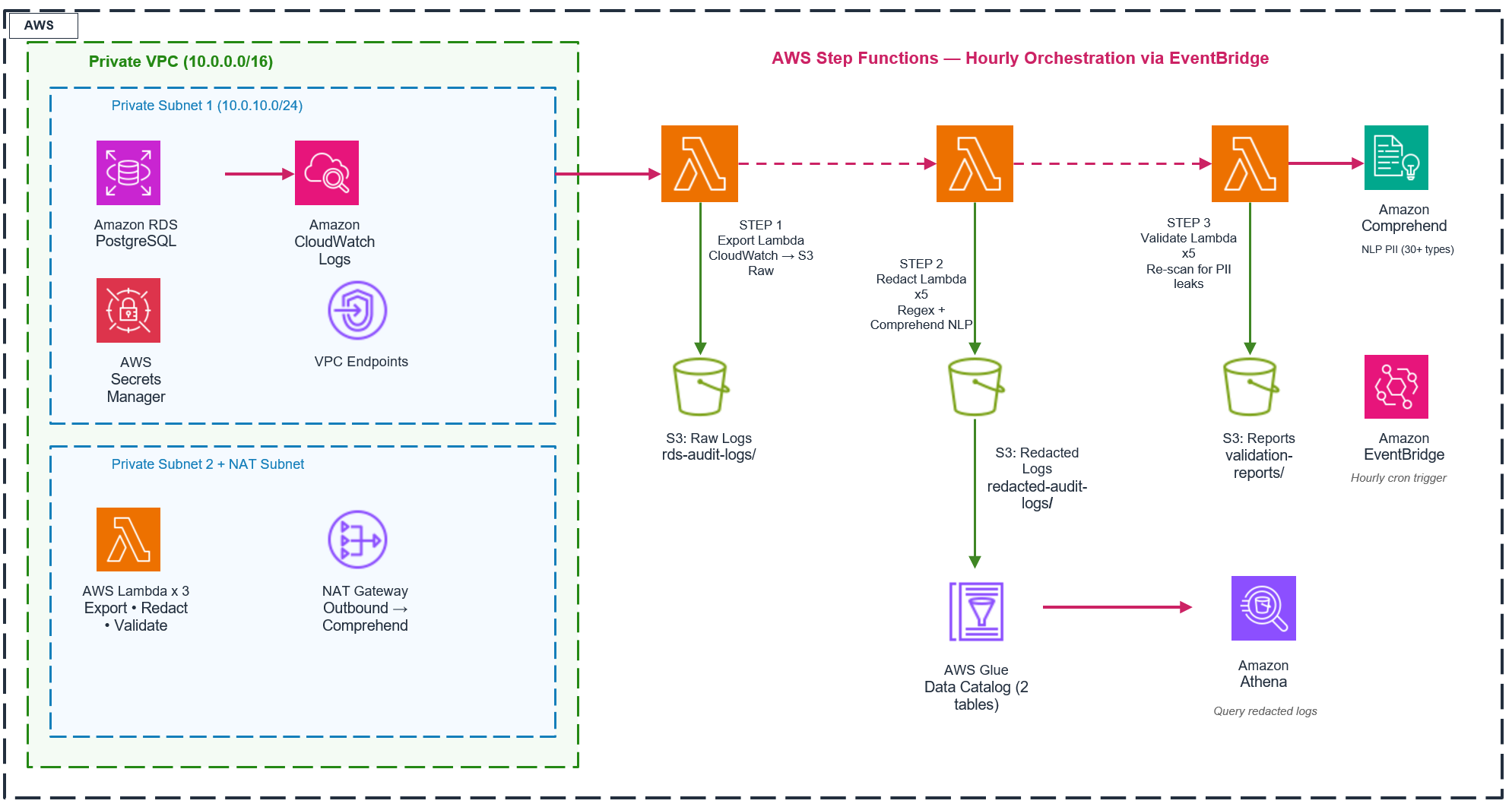
In this post, we show you how to deploy a serverless pipeline that creates an irreversibly redacted, queryable archive of Amazon Relational Database Service (Amazon RDS) for PostgreSQL audit logs. The pipeline permanently removes Social Security numbers (SSNs), credit cards, email, names, and more than 30 types of personally identifiable information (PII) before storing clean logs in Amazon Simple Storage Service (Amazon S3) for query through Amazon Athena. The entire solution deploys from a single AWS CloudFormation template.
The challenge: pgAudit with pgaudit.log_parameter = on writes every SQL statement into Amazon CloudWatch Logs as cleartext. This includes sensitive data such as names, Social Security numbers, credit card numbers, and email addresses. Organizations subject to GDPR, HIPAA, or PCI-DSS need these audit logs for compliance, but the PII within them must not be accessible to every team that consumes the logs.
CloudWatch Logs Data Protection is the native, zero-cost feature for masking PII in log groups. Enable it as your first line of defense. However, its masking is reversible: any IAM principal with the logs:Unmask permission can view the original data. For compliance frameworks that require permanent separation of PII from audit evidence, reversible masking is insufficient. This pipeline creates an irreversibly redacted copy in Amazon S3. No permission, API call, or configuration change can recover the original values. The redacted archive is queryable through Amazon Athena, shareable cross-account, and retainable for years through S3 lifecycle rules. Our recommendation: enable both. Use CloudWatch Logs Data Protection for your live stream, and this pipeline for the permanent audit artifact.
Solution overview
We provide a CloudFormation template you can use to customize and deploy this solution.
Prerequisites
Before deploying, make sure you have the following in place:
- AWS account – An active AWS account with permissions to create AWS CloudFormation stacks, AWS Identity and Access Management (IAM) roles, virtual private clouds (VPCs), Amazon RDS instances, AWS Lambda functions, and Amazon S3 buckets (AdministratorAccess or equivalent).
- AWS CLI v2 – Installed and configured with valid credentials (
aws configure). Required for the CLI and script deployment options. Install guide. - AWS Region – A Region that supports all services used in this template. Recommended: us-east-1, us-west-2, or eu-west-1.
- Service Quotas – Verify your account has capacity for the resources this template creates.
Template parameters and deployment
Only four parameters, all with sensible defaults. Deploy without changing anything.
| Parameter | Default | Description |
| ProjectName | rds-pii-redaction | Prefix for all resource names. |
| DBInstanceClass | db.t4g.micro | RDS instance size. |
| DBAllocatedStorage | 20 | Storage in GB (gp3). Range: 20–1000. |
| EnvironmentType | Single-AZ | Single-AZ – Single-AZ deployment. Multi-AZ – Multi-AZ deployment, deletion protection. |
| RawLogsBucketName | (auto-generated) | Custom S3 bucket name for raw logs. Leave empty for auto-generated. |
| RedactedLogsBucketName | (auto-generated) | Custom S3 bucket name for redacted logs. Leave empty for auto-generated. |
Use existing VPC
| Parameter | Default | Description |
| ExistingVPCId | (empty) | Your VPC ID. Leave empty to create new. |
| ExistingSubnet1 / ExistingSubnet2 | (empty) | Private subnet IDs in 2 different AZs. |
| ExistingRDSSecurityGroupId | (empty) | SG for RDS. Inbound 5432 from Lambda SG. |
| ExistingLambdaSecurityGroupId | (empty) | SG for Lambda. Outbound 443 and 5432. |
How to deploy – three options
You can find the source code and CloudFormation template on this GitHub repository. Choose one of the following three deployment methods.
Option A: AWS console
- Open the AWS CloudFormation console.
- Choose Create stack, and then choose With new resources.
- Upload
template.yaml, and then choose Next. - For Stack name, enter
rds-pii-redaction, and then choose Next twice. - Select the IAM acknowledgment, and then choose Submit.
- Wait 15–20 minutes.
Option B: AWS CLI
Option C: Deploy script
Test and validate — PostgreSQL to Athena
After the stack is deployed, get your database endpoint and credentials and connect using your preferred PostgreSQL client. Then run the following steps to generate PII test data, trigger the redaction pipeline, and verify the results in Athena.
Step 1: Get database credentials
Step 2: Create table
Step 3: Insert records with PII
Insert test records using synthetic data to demonstrate the redaction pipeline. Important: Always use fictitious data for testing.
Step 4: Run queries that also contain PII
Step 5: Run the redaction pipeline
Step 6: Monitor execution
Wait for status: SUCCEEDED (typically 2–5 minutes).
Step 7: Verify S3 output
Query redacted data in Athena — confirm PII is gone
After the pipeline runs, query the redacted archive in Athena to confirm that no PII remains.
One-time Athena setup
- Open the Athena console.
- Choose Settings, choose Manage, and then set the query result location to
s3://rds-pii-redaction-redacted-logs-<YOUR_ACCOUNT_ID>/athena-results/. - Select the rds-pii-redaction_audit_db database.
You should see two tables:
- redacted_audit_events — the redacted SQL audit logs.
- validation_reports — pass/fail reports.
The query result location is a standard Athena requirement. It isn’t specific to this template.
Athena queries
Run the following queries to inspect the redacted data.
Query 1: Verify data
Query 2: View redacted INSERTs
Expected output:
AUDIT: SESSION,3,1,WRITE,DML,TABLE,public.customers,
"INSERT INTO customers (full_name, email, phone, ssn, credit_card, address) VALUES
('[REDACTED_NAME]', '[REDACTED_EMAIL]', '[REDACTED_PHONE]',
'[REDACTED_SSN]', '[REDACTED_CREDIT_CARD]', '[REDACTED_ADDRESS]')"
Query 3: Confirm SSNs redacted
Query 4: Confirm credit cards redacted
Query 5: All redacted sensitive data
Query 6: PII leak check — verification
Must return zero rows:
Zero rows confirms that no pattern-detectable PII (SSNs, credit cards, email, phone numbers) survived in the redacted archive. For types detected by natural language processing (NLP), such as names and addresses, review the validation reports in Query 7. Consult your compliance team about whether a redacted copy satisfies your audit evidence requirements.
Query 7: Validation reports
Security note
Unredacted PII remains in the source CloudWatch Logs log group. Enable CloudWatch Logs Data Protection on those log groups as an additional layer. Restrict the logs:Unmask permission to a minimal set of principals. For additional hardening (TLS, KMS, Lambda concurrency, IAM separation), see the Security Considerations section in the README.
Cleanup
To remove all resources and stop incurring charges, empty the S3 buckets and delete the stack:
Delete the stack:
Wait for the deletion to complete:
All 45 resources are removed. No orphaned resources remain.
Cost considerations
Pipeline cost depends on Amazon Comprehend volume. At low activity (100 log events/hour), expect approximately $73/month, dominated by infrastructure (NAT Gateway, VPC Endpoints). At high activity (10,000 events/hour), Comprehend adds approximately $70/month for a total of approximately $161/month. CloudWatch Logs Data Protection masks PII at no additional charge but produces no archive. The pipeline cost is the cost of irreversibility. To optimize: reduce pipeline frequency, remove VPC Interface Endpoints in development, or deploy into an existing VPC to share NAT Gateway costs.
Conclusion
In this post, we showed how to deploy an automated PII redaction pipeline for Amazon RDS for PostgreSQL audit logs using AWS Step Functions, Amazon Comprehend, and a single AWS CloudFormation template. Unlike reversible masking, the redacted archive cannot be unmasked by any IAM permission. This makes it suitable for external audit handoff, cross-account sharing, and long-term retention. For immediate protection of your live log stream, enable CloudWatch Logs Data Protection. For a permanent, queryable, auditor-safe archive, deploy this pipeline alongside it.