AWS Database Blog
Best practices for upgrading Amazon RDS for MySQL 8.0 to 8.4 with prechecks, Blue/Green, and rollback
Upgrading a production MySQL database across major versions is one of the most high-stakes operations a database team faces. Compatibility breaks, unexpected downtime, and the risk of no easy rollback can stall upgrade plans for months. Amazon Relational Database Service (Amazon RDS) for MySQL 8.0 standard support ends on July 31, 2026, and Amazon RDS for MySQL now supports long-term support (LTS) version 8.4. Teams running MySQL 8.0 workloads need a reliable, low-risk path to MySQL 8.4. However, upgrading from 8.0 to 8.4 involves significant compatibility changes that you must evaluate and test before proceeding. In this post, you learn how to build a complete upgrade workflow for RDS for MySQL 8.0 to 8.4, covering pre-upgrade compatibility checks, Amazon RDS Blue/Green Deployments for minimal downtime, and a rollback strategy for added protection.
If you need to stay on MySQL 8.0 beyond that date, check the latest updates on RDS Extended Support. For a detailed breakdown of Extended Support costs, see Upgrade strategies for Amazon RDS for MySQL 8.0 to 8.4. You can also consider Amazon Aurora MySQL-Compatible Edition, which provides its own release calendar and still supports MySQL 8.0 without having to use extended support at least until 30 April 2028.
Solution overview
This post is part of a two-part series on upgrading RDS for MySQL 8.0 to 8.4. Here, we focus on the step-by-step implementation, covering pre-upgrade compatibility checks, Blue/Green Deployments, and rollback preparation. For an overview of upgrade strategies, Extended Support costs, and key considerations, see Upgrade strategies for Amazon RDS for MySQL 8.0 to 8.4.
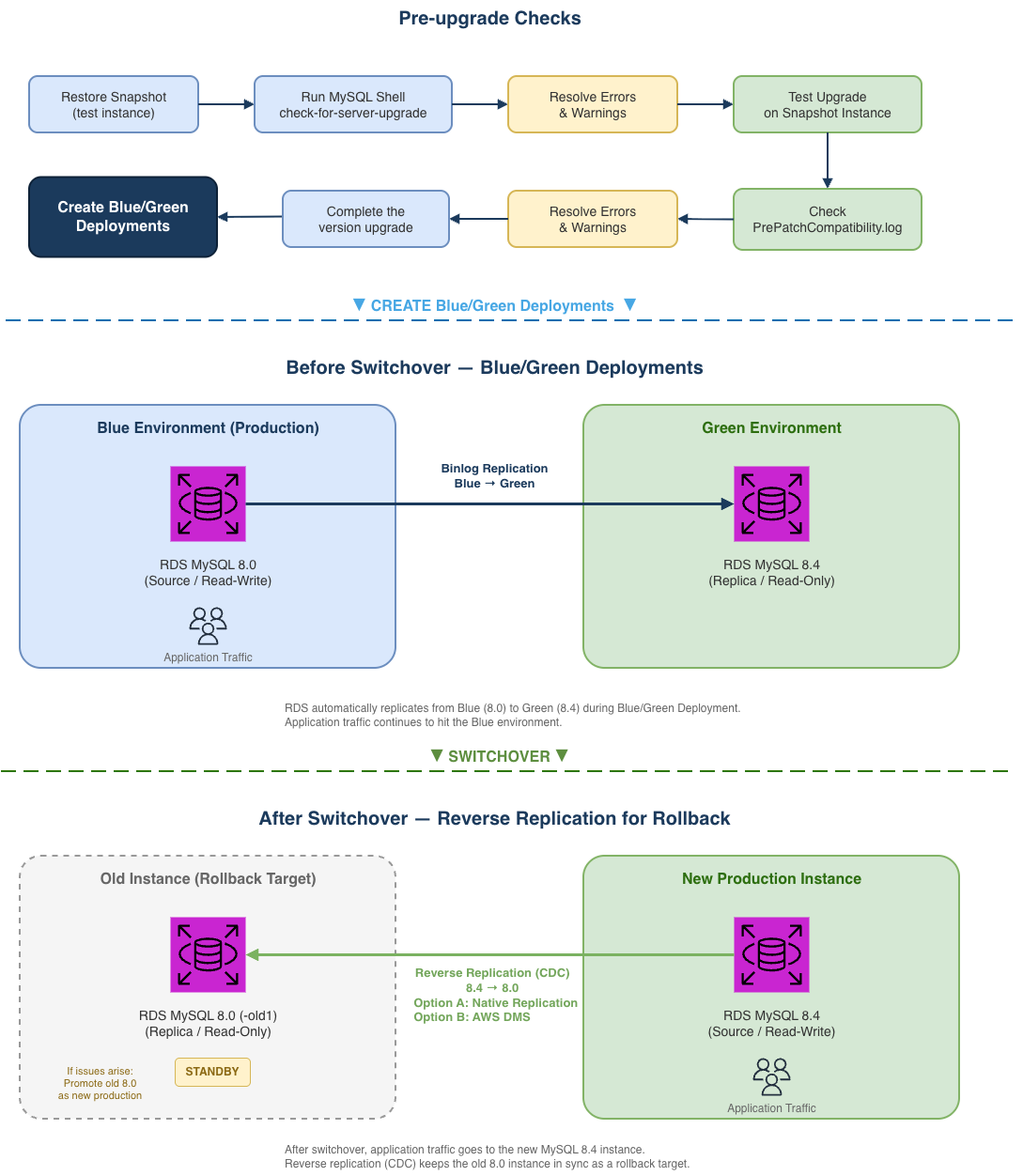
In this post, we walk you through a complete upgrade workflow covering three tightly coupled phases:
- Pre-upgrade checks: Identify incompatibilities using the MySQL Shell upgrade checker utility and RDS built-in validation.
- Blue/Green Deployments: Perform the upgrade with minimal downtime using Amazon RDS Blue/Green Deployments.
- Rollback preparation: Set up reverse replication before switchover so you can roll back with confidence.
These phases are not independent: pre-check results determine whether the green environment can upgrade successfully, the binlog position from Blue/Green Deployments creation feeds into the rollback setup, and you need to make sure the rollback solution is ready before you switchover. The following architecture diagram illustrates the complete workflow, helping you understand how each phase interacts with the others.
Prerequisites
Blue/Green Deployments and RDS for MySQL 8.4 are available in all AWS Regions. Before you begin, make sure you have the following resources in place:
- An Amazon RDS for MySQL 8.0 instance with automatic backups enabled.
- An Amazon Elastic Compute Cloud (Amazon EC2) instance or bastion host in the same VPC for running MySQL Shell.
- A custom DB parameter group created for MySQL 8.4.
- An IAM user or role with at least the following permissions for Blue/Green Deployments:
- Create Blue/Green Deployments
- rds:CreateBlueGreenDeployment
- rds:AddTagsToResource
- rds:CreateDBInstanceReadReplica
- Switchover Blue/Green Deployments
- rds:SwitchoverBlueGreenDeployment
- rds:ModifyDBInstance
- rds:PromoteReadReplica
- Delete Blue/Green Deployments
- rds:DeleteBlueGreenDeployment
- rds:DeleteDBInstance
- Create Blue/Green Deployments
- (For rollback) An AWS Database Migration Service (AWS DMS) replication instance, or network connectivity between the 8.4 and 8.0 instances for native replication. Make sure the security groups associated with both instances allow MySQL traffic on port 3306 between them. If using AWS DMS, see AWS DMS identity-based policy examples for IAM permission best practices.
Phase 1: Pre-upgrade checks
Before upgrading, use the MySQL Shell check-for-server-upgrade utility to identify incompatibilities. Because the utility performs intensive metadata scans across all databases, we recommend running it against a snapshot-restored instance rather than your production database to avoid impacting workload performance. If you are working in a dev/test environment, you can skip the snapshot restore and run the check directly.
To run the pre-upgrade check:
- Restore a DB snapshot of your MySQL 8.0 production instance. This gives you an isolated copy to safely run the check without affecting production.
- Connect to your Amazon EC2 bastion host (or any instance in the same VPC that has MySQL Shell installed). If MySQL Shell is not already installed, see Installing MySQL Shell.
- The upgrade checker utility requires RELOAD, PROCESS, and SELECT privileges. Before running the check, make sure your user account has these privileges. You can use the RDS master user, or grant the required privileges with the following commands:
- Run the upgrade checker:
The utility categorizes findings into three severity levels:
- Error (blocks upgrade).
- Warning (evaluate case-by-case).
- Notice (informational).
Whether an RDS for MySQL instance can successfully upgrade from 8.0 to 8.4 is ultimately determined by the RDS pre-upgrade validation. Therefore, this section focuses on the intersection of MySQL Shell’s check-for-server-upgrade findings and the RDS built-in pre-upgrade checks, providing a practical reference for planning your upgrade (detailed in the following section).
MySQL Shell vs. RDS pre-upgrade checks
The MySQL Shell upgrade checker and the RDS built-in pre-upgrade validation have slightly different default check items. The following table provides the main differences between the two. For detailed explanations and resolution steps for each check item, please see the “Understanding and resolving pre-upgrade check errors” section.
Items with a Source of Shell Only are not enforced by the RDS upgrade validation, so their Severity is marked as -.
| Check item | Source | Severity | Notes |
| Removed system variables | Shell Only | – | Can be ignored. RDS upgrade validation does not enforce this item |
| System variables with new default values | Both | Warning | This check lists parameters whose default values have changed in MySQL 8.4. If you have customized any of these in your MySQL 8.0 parameter group. |
| Issues reported by ‘check table x for upgrade’ command | Both | Varies | Severity depends on the storage engine; handle based on actual precheck output. Typically, if the result shows “Corrupt”, the upgrade checker treats it as an Error item. |
| Checks for foreign keys not referencing a full unique index | Both | Warning | MySQL 8.4 may forbid foreign keys to partial indexes, this check identifies such cases to warn the user. |
| Check for deprecated or invalid user authentication methods. | Both | Warning | MySQL 8.4 may deprecate or remove some authentication methods, this check identifies users still using them. |
| Check for deprecated or removed plugin usage. | Both | Error | RDS does not support these plugins (authentication_fido, keyring_file, keyring_encrypted_file, keyring_oci), so this check is unlikely to be triggered on RDS. If flagged, please verify and remove the plugin. |
| Check for deprecated or invalid default authentication methods in system | Shell Only | – | Can be ignored, RDS upgrade checks ignore this item |
| Check for deprecated or invalid authentication methods in use by MySQL | Shell Only | – | Can be ignored, RDS upgrade checks ignore this item |
| Checks for errors in column definitions | Both | Error | Identifies column definitions that MySQL 8.4 may no longer support. |
| Check for allowed values in System Variables. | Both | Error | Checks whether system variables use values that MySQL 8.4 no longer allows. |
| Checks for user privileges that will be removed | Both | Notice | Informational only. Verifies users with grants that the upgrade process will remove. |
| Checks for partitions by key using columns with prefix key indexes | Both | Error | MySQL 8.4 no longer supports indexes on column prefixes for key partitioning. The partition function ignores these indexes, so MySQL 8.4 no longer allows them. |
| Use of AUTO_INCREMENT for DOUBLE and FLOAT data types | RDS Only | Error | MySQL 8.4 deprecates AUTO_INCREMENT for DOUBLE and FLOAT data types. |
| RDS checked for the use of non-inclusive language in SQL statements. | RDS Only | Error | MySQL 8.4 no longer allows non-inclusive language in SQL statements. |
| memcached plugin needs to be uninstalled before upgrade | RDS Only | Error | MySQL 8.3 no longer supports the InnoDB memcached plugin |
| DB instance must have enough free disk space | RDS Only | Error | Make sure the instance has at least 2 GiB of free storage space. |
| Detect system objects created as tables in sys schema | RDS Only | Error | Remove any user-created tables in the sys schema before upgrading. |
The RDS built-in pre-upgrade validation only runs when you initiate an actual upgrade. If the validation finds blocking issues at that point, the upgrade fails and you need to resolve them and reschedule another maintenance window. Running the MySQL Shell upgrade checker beforehand helps you identify and resolve these issues in advance.
The recommended approach:
- Run the MySQL Shell upgrade checker to resolve the overlapping items. RDS manages shell-only items marked “can be ignored” internally.
- Perform a test upgrade on a snapshot-restored instance to catch the RDS-only items via
PrePatchCompatibility.log.
Understanding and resolving pre-upgrade check errors
To show you the pre-upgrade check process and the Error items that block upgrades, we reproduced several Error items on our test environment. In the following sections, we walk you through the actual precheck output and the suggested resolution for each item, so you can interpret and resolve precheck errors in practice.
Issues reported by ‘check table x for upgrade’ command
Runs CHECK TABLE … FOR UPGRADE against each tables. Depending on the scope of impact, the severity varies. The following are examples of both Error and Warning types.
|
Check item |
Issues reported by ‘check table x for upgrade’ command
|
|
Description |
The View references a table, column, or function that no longer exists, or the definer/invoker lacks the required privileges. The “Corrupt” status indicates this is an Error-level finding that blocks the upgrade. |
|
Remediation |
Identify the invalid references and remove or fix them:
|
|
Check item |
Issues reported by ‘check table x for upgrade’ command
|
|
Description |
The table uses COMPACT or REDUNDANT row format, where each BLOB/TEXT column stores a 768-byte prefix inline. With many such columns, the total row size exceeds InnoDB’s 8126-byte page limit. |
|
Remediation |
Changing some columns to TEXT or BLOB or using ROW_FORMAT=DYNAMIC or ROW_FORMAT=COMPRESSED may help. This is a Warning item and does not block the upgrade, but INSERT or UPDATE operations that exceed the row size limit may fail after the upgrade. |
Check for deprecated or removed plugin usage
|
Check item |
Check for deprecated or removed plugin usage.
|
|
Description |
RDS for MySQL does not support installing the plugins that the precheck scans for (authentication_fido, keyring_file, keyring_encrypted_file, keyring_oci), so this item cannot be reproduced. If detected, remove the reported plugin(s) and retry the upgrade. |
|
Remediation |
Uninstall the plugin(s) if found. |
Checks for errors in column definitions
|
Check item |
Checks for errors in column definitions. Identifies column definitions that may not be supported in future versions of MySQL.
|
|
Description |
Using DOUBLE or FLOAT with AUTO_INCREMENT is no longer allowed in MySQL 8.4. This check and “Use of AUTO_INCREMENT for DOUBLE and FLOAT data types” point to the same affected tables. |
|
Remediation |
Change the column type to an integer type (for example: BIGINT). |
Check for allowed values in system variables
|
Check item |
Check for allowed values in system variables. The following system variables are using values that are not allowed.
|
|
Description |
Checks whether system variables use values that are no longer allowed in MySQL 8.4. |
|
Remediation |
Find non-default system variables and change the value(s). |
Checks for partitions by key using columns with prefix key indexes
|
Check item |
Checks for partitions by key using columns with prefix key indexes. Indexes on column prefixes are not supported for key partitioning, they are ignored by the partition function and so they are not allowed as of 8.4.0. This check identifies tables with partitions defined this way, they should be fixed before upgrading to 8.4.0. More information: Partitioning limitations
|
|
Description |
Tables partitioned by key using columns with prefix key indexes are no longer compatible in MySQL 8.4. |
|
Remediation |
If the partition key column uses a prefix index (for example: KEY(col(10))), remove the prefix and use the full column, or redesign the partition strategy (for example: switch to RANGE or HASH). |
Use of AUTO_INCREMENT for DOUBLE and FLOAT data types
|
Check item |
Use of AUTO_INCREMENT for DOUBLE and FLOAT data types. Starting with MySQL version 8.4.0, the use of AUTO_INCREMENT is deprecated for DOUBLE and FLOAT data types.
|
|
Description |
This is the RDS-specific check for the same issue as “Checks for errors in column definitions”. Both checks point to the same affected tables. |
|
Remediation |
Same as “Checks for errors in column definitions” — change the column type to an integer type. |
RDS checked for the use of non-inclusive language in SQL statements
|
Check item |
RDS checked for the use of non-inclusive language in SQL statements. Starting with MySQL version 8.4.0, the use of non-inclusive language in SQL statements isn’t allowed.
|
|
Description |
Starting with MySQL 8.4.0, non-inclusive language (for example: MASTER, SLAVE) in SQL statements is no longer allowed. |
|
Remediation |
Replace non-inclusive keywords:
|
memcached plugin needs to be uninstalled before upgrade
|
Check item |
memcached plugin needs to be uninstalled before upgrade. Starting with MySQL version 8.3.0, the InnoDB memcached plugin is no longer supported.
|
|
Description |
The InnoDB memcached plugin is no longer supported starting with MySQL 8.3.0. Remove it before upgrading. |
|
Remediation |
Remove the MEMCACHED option from the Option Group associated with the DB instance. |
DB instance must have enough free disk space
|
Check item |
DB instance must have enough free disk space. The DB instance must have at least 2 GiB free space for an upgrade to MySQL 8.0.30 and above.
|
|
Description |
The DB instance must have at least 2 GiB of free disk space for upgrades to MySQL 8.0.30 and above. |
|
Remediation |
Scale up the storage so that the instance has more than 2 GiB of free storage space (FreeStorageSpace). |
Detect system objects created as tables in sys schema
|
Check item |
Detect system objects created as tables in sys schema.
|
|
Description |
Detects whether system objects in the sys schema have been created as regular tables. These objects can conflict during the upgrade process. |
|
Remediation |
If results are returned: |
Key compatibility changes in MySQL 8.4
The following changes most commonly affect RDS for MySQL upgrades:
mysql_native_password deprecation: MySQL 8.4 defaults to caching_sha2_password. Existing users with mysql_native_password continue to work after the upgrade, but newly created users will use caching_sha2_password. To change the default authentication plugin, modify the authentication_policy parameter in your DB parameter group. If you do not plan to keep using mysql_native_password, consider switching affected users to caching_sha2_password on your MySQL 8.0 instance and validating application connectivity before proceeding with the upgrade.
Applications using older client drivers that do not support caching_sha2_password will fail to connect with the error: Authentication plugin ‘caching_sha2_password’ cannot be loaded. The following minimum driver versions are required:
| Driver | Minimum support version |
| Java MySQL Connector/J | 8.0.9 |
| Python PyMySQL | 0.9.0 |
| Go MySQL Driver | 1.4.0 |
| PHP mysqli/PDO | 7.4.4 |
Query affected users:
restrict_fk_on_non_standard_key: New parameter in MySQL 8.4 (default ON) that blocks CREATE TABLE and ALTER TABLE statements from creating foreign keys on non-unique or partial keys. This does not affect existing foreign keys or the upgrade itself. It only applies to data definition language (DDL) operations after the upgrade. If your application creates or modifies foreign keys at runtime, set this parameter to OFF in your MySQL 8.4 parameter group, or adjust your DDL statements accordingly.
memcached plugin removal: If enabled in your option group, disable it before upgrading (the RDS pre-upgrade validation can also flag this as an Error).
Parameter default value changes in MySQL 8.4
Beyond the compatibility changes above, MySQL 8.4 also changes the default values for several system variables. If you have explicitly set some of these in your MySQL 8.0 parameter group, verify whether your values need to carry over to the MySQL 8.4 parameter group. If you are using the engine defaults, be aware of the new behavior. The following table only includes parameters that are modifiable in the RDS for MySQL 8.4 parameter group.
| Parameter | 8.0 default | 8.4 default |
| group_replication_consistency | EVENTUAL | BEFORE_ON_PRIMARY_FAILOVER |
| group_replication_exit_state_action | READ_ONLY | OFFLINE_MODE |
| innodb_adaptive_hash_index | ON | OFF |
| innodb_buffer_pool_instances | 8 (or 1 if innodb_buffer_pool_size < 1 GB) | MAX(1, #vcpu/4) |
| innodb_change_buffering | all | none |
| innodb_io_capacity | 200 | 10000 |
| innodb_io_capacity_max | 200 | 2 × innodb_io_capacity |
| innodb_numa_interleave | OFF | ON |
| innodb_page_cleaners | 4 | innodb_buffer_pool_instances |
| innodb_parallel_read_threads | 4 | MAX(#vcpu/8, 4) |
| innodb_read_io_threads | 4 | MAX(#vcpu/2, 4) |
You can check which parameters have been explicitly modified in your current parameter group:
For the complete list of changes, see Amazon RDS for MySQL LTS version 8.4 is now generally available.
Go/no-go checklist
Before proceeding to Phase 2, confirm:
Phase 2: Blue/Green Deployments (minimize downtime)
Amazon RDS Blue/Green Deployments lets you upgrade the major engine version, without affecting production. When you’re ready, you promote the staging environment to become the new production database with downtime typically five seconds or lower for single-Region configurations. This makes Blue/Green Deployments a practical choice for major version upgrades with minimal disruption. The following sections walk you through creating Blue/Green Deployments, upgrading the green environment to MySQL 8.4, and performing the switchover.
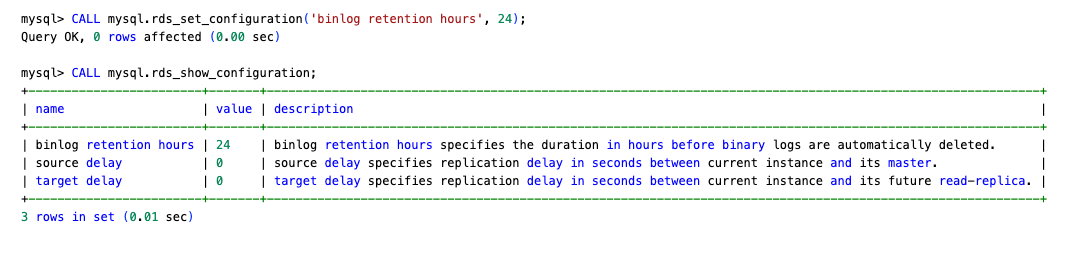
Prechecks
Before creating the deployment, confirm:
Create and upgrade the green environment
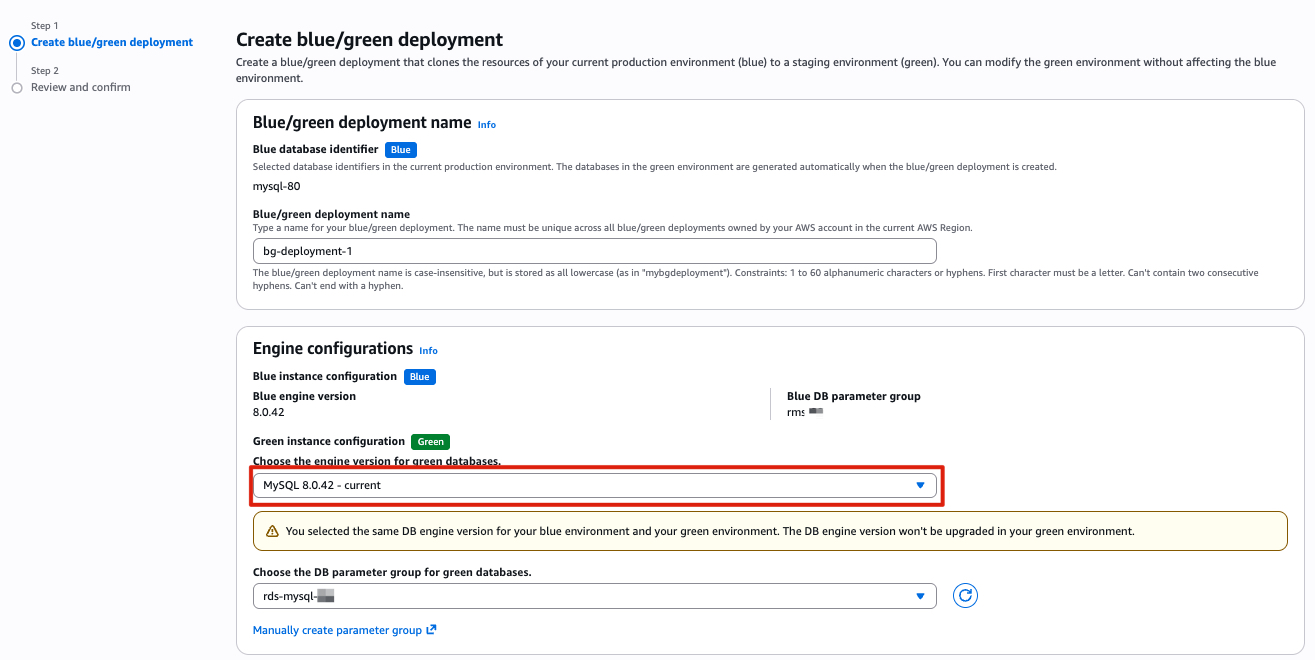
- Create the Blue/Green Deployments: Select the same engine version as the source instance initially. This avoids a failed automatic upgrade requiring you to rebuild the entire deployment.
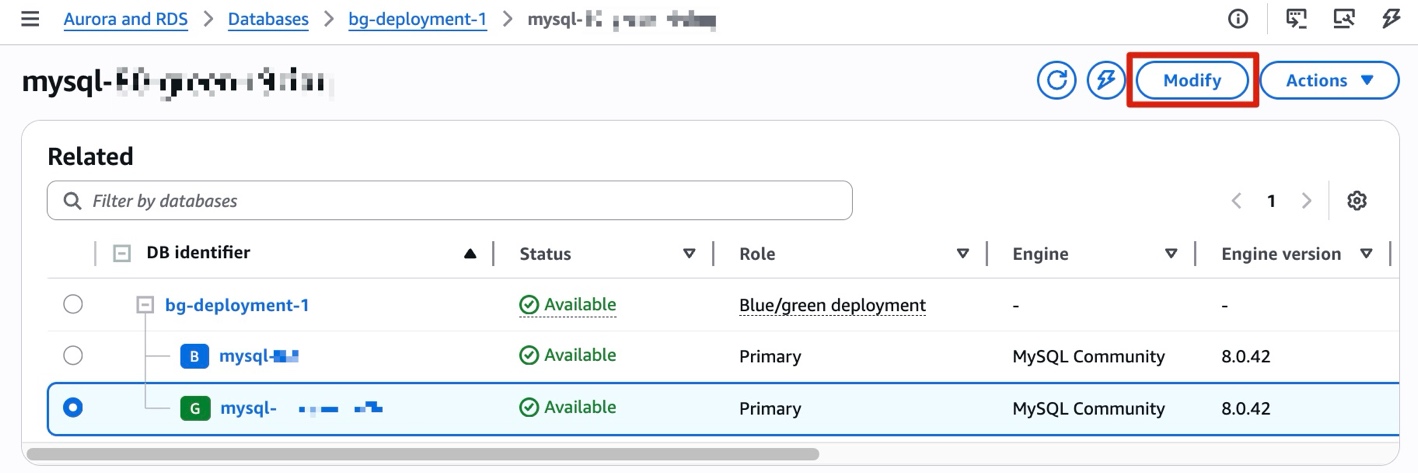
- After creation completes, manually upgrade the green instance to MySQL 8.4.x. Select your pre-configured MySQL 8.4 parameter group, or the default parameter group if you’re not customizing any parameters.
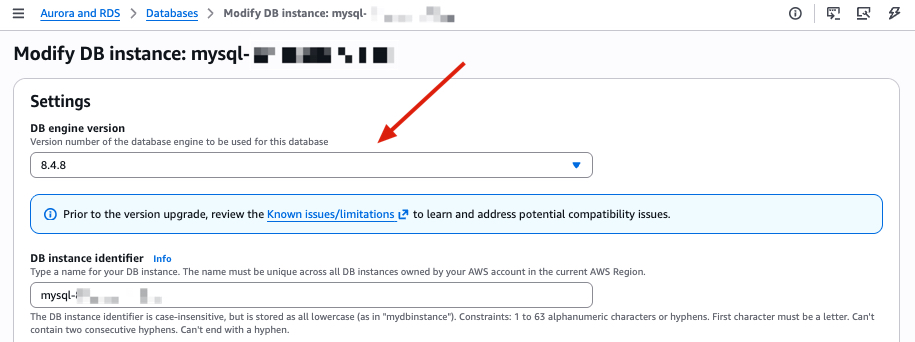
- If the upgrade fails, check the green instance’s
PrePatchCompatibility.logand Recent events for details. Resolve the issues and retry. - (Optional) If you plan to set up a rollback path in Phase 3, verify that binlog retention on the green instance (MySQL 8.4) is set to at least 24 hours before switchover. Otherwise, binlog files might be purged after switchover, making reverse replication impossible.
Switchover
Before switching over:
- Confirm
ReplicaLagon the green instance is near zero. - Check for long-running queries on the blue instance (
SHOW PROCESSLIST). - Verify both environments show Available status.
- Verify that the application isn’t caching DNS, or if it is then the cache TTL is 5 seconds or less.
- Complete the rollback setup in Phase 3 first
Set the switchover timeout to your acceptable downtime window (maximum 60 minutes). During switchover, existing connections are dropped.
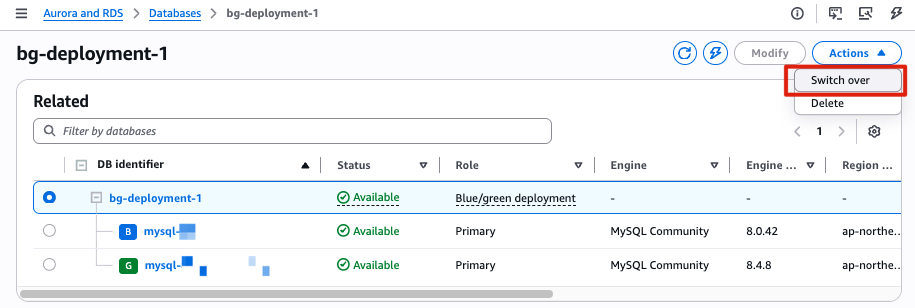
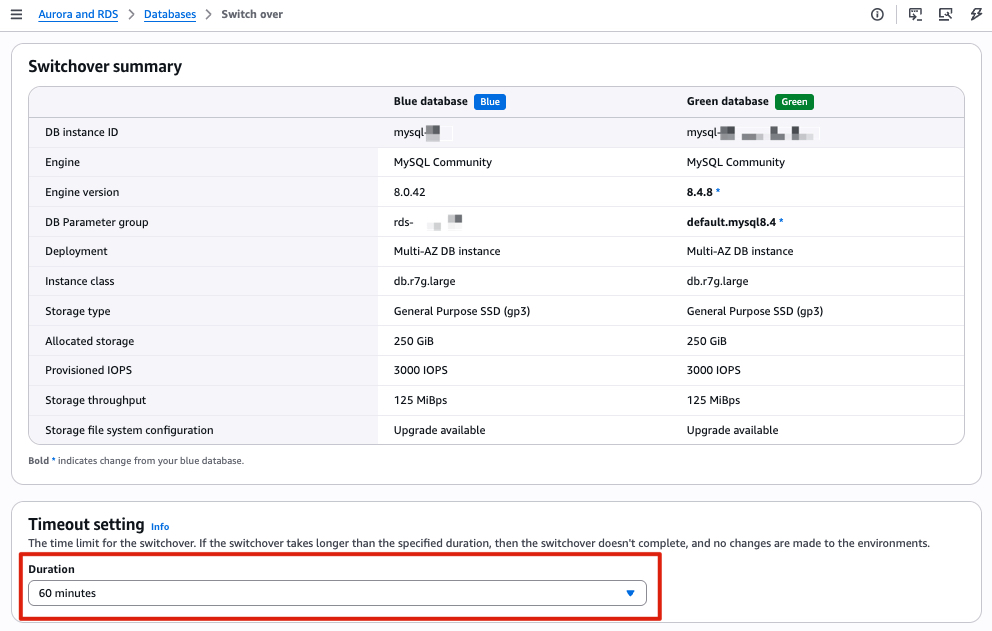
After a successful switchover, RDS renames the old instance with a -old1 suffix and sets it to read-only. The new MySQL 8.4 instance takes the original name and endpoint. RDS automatically disconnects replication at this point. Blue/Green Deployments is a one-time operation. You can delete the Blue/Green Deployments at your convenience; doing so does not delete the old instance. If you do not need a rollback path, the upgrade is complete at this point.
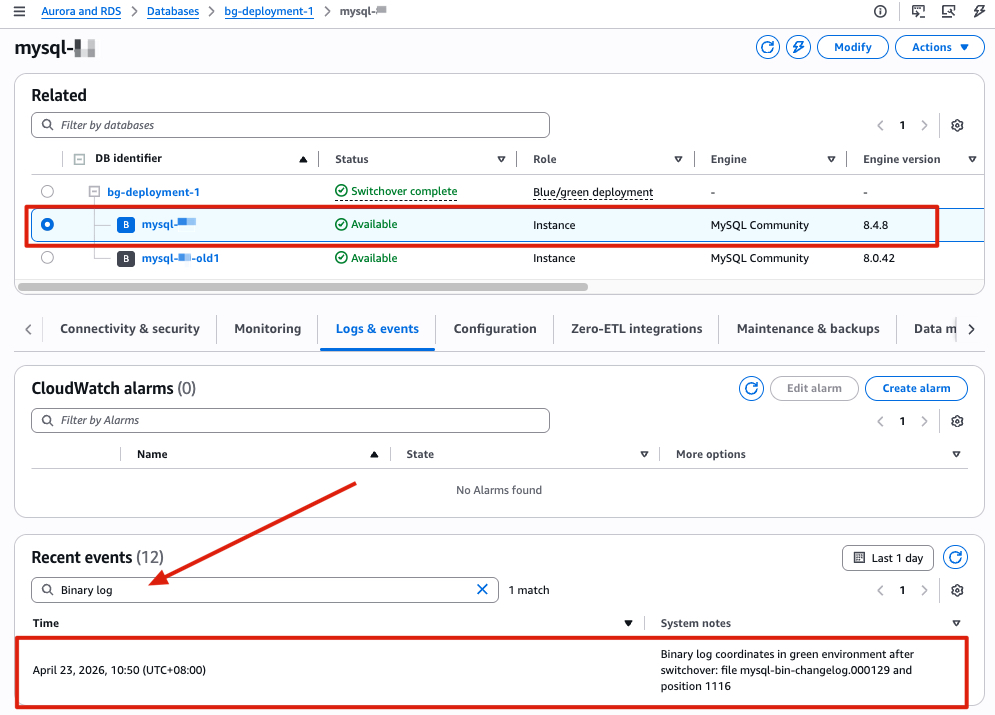
Important: Note the binlog position recorded after switchover completed, you will need it for the rollback setup in Phase 3. Following these steps to find the binlog position after switchover:
- Open the Amazon RDS console and select your new MySQL 8.4 instance.
- Open the Logs & events tab and search for Binary log. Note the last recorded binlog file name and position. For example, in our test environment, the values are
mysql-bin-changelog.000129and position1116.
Phase 3: Rollback preparation
Set up reverse replication from the new MySQL 8.4 instance to the old MySQL 8.0 instance after switchover, so you have a working rollback path if issues arise post-upgrade. This approach uses change data capture (CDC) to synchronize only incremental changes. The key input is the binlog position recorded in the switchover event (Logs & events → Recent events on the new MySQL 8.4 instance). Use this position to establish reverse replication back to the old 8.0 instance.
The following table provides a brief comparison between Option A (native replication) and Option B (AWS DMS) to help you choose the approach that best fits your environment:
| Criteria | Native Replication | AWS DMS |
| Setup complexity | Lower | Higher |
| Additional cost | None | DMS instance cost |
| LOB handling | Automatic | Requires DMS task configuration |
| When to use | Direct network connectivity available | Complex environments or when native replication isn’t feasible |
Option A: Native replication (preferred)
Migration between RDS for MySQL instances is a homogeneous data migration. We recommend native replication as the preferred approach, because native database migration tools generally provide better performance and accuracy compared to AWS DMS.
After switchover, you do not need to change the read_only parameter to 0 on the MySQL 8.0 -old1 instance. In replication setups, it can be useful to enable read_only on replica servers to make sure that replicas accept updates only from the source server and not from clients.
- Retrieve the binlog position from the new MySQL 8.4 instance (Logs & events → Recent events).
- On the MySQL 8.4 instance, create a replication user.
- On the MySQL 8.0
-old1instance, configure replication using the binlog position from step 1:
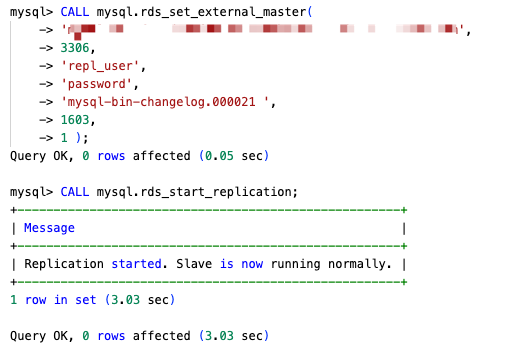
- Verify with
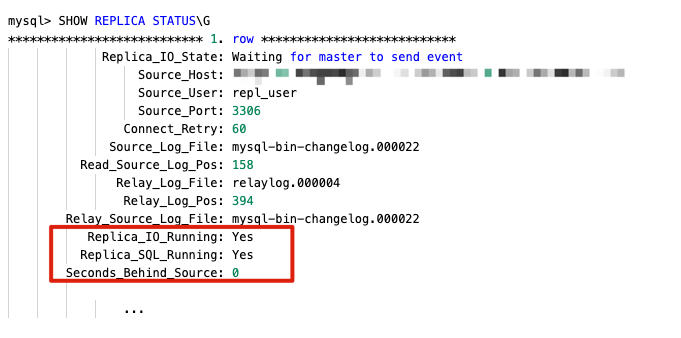
SHOW REPLICA STATUS\Gand confirm the following:- Replica_IO_Running: Yes
- Replica_SQL_Running: Yes
- Seconds_Behind_Master is decreasing, approaching 0, and is not -1 or NULL
Option B: AWS DMS
If native replication is not suitable for your environment, you can use AWS DMS as an alternative to set up the rollback path.
Because the MySQL 8.0 -old instance is set to read-only after switchover, change the read_only parameter to 0 in its parameter group before creating the task.
- Step 1: Create a DMS replication instance
- Instance class & Allocated storage: based on workload
- Engine version: use the default
- Virtual private cloud (VPC): use the same VPC as both the MySQL 8.4 (source) and MySQL 8.0 (target) instances. Note: If the source and target instances are in different VPCs, you need to configure VPC peering or another network connectivity option before creating the replication instance.
- Step 2: Create DMS endpoints
- Source endpoint: use the MySQL 8.4 instance endpoint (after switchover)
- Target endpoint: use the old MySQL 8.0
-old1instance endpoint - Test both endpoint connections from the replication instance before proceeding
- Step 3: Create a CDC-only DMS task
- Migration type: CDC only (ongoing replication)
- CDC start position: enter the binlog position from the switchover event (Logs & events → Recent events on the new MySQL 8.4 instance)
- Include LOB columns in replication: if your tables contain LOB columns, consider using Limited LOB mode for faster replication. This mode truncates LOB value that exceeds the configured Maximum LOB size, so you need to set it appropriately.
- Maximum LOB size (KB): query the maximum LOB size in your instance first, then set accordingly:
- Table mappings: either explicitly include the databases you want to synchronize, or use
%to include every database and exclude system databases (mysql, sys, information_schema, performance_schema). - Step 4: Monitor the task
- Once the task status shows Replication ongoing, CDC synchronization is active and the rollback path is ready.
Once you have validated that the new RDS for MySQL 8.4 environment is working as expected, you can stop the DMS replication task and delete the old RDS for MySQL 8.0 instance.
Clean up
After completing the upgrade and confirming your application is running normally on MySQL 8.4, you should remove the resources created during this process to avoid incurring additional charges. Follow these steps in the AWS Management Console or the AWS Command Line Interface (AWS CLI):
- Deleting Blue/Green Deployments (deleting the deployment does not delete the DB instances).
- Open the Amazon RDS console and choose Databases.
- Select the Blue/Green Deployment → Choose Actions → ‘Delete’.
- Snapshot-restored RDS instance used for pre-upgrade checks.
- The old RDS for MySQL 8.0
-old1instance (after you confirm rollback is no longer needed). For more AWS CLI options, see Deleting a DB instance.- Open the Amazon RDS console and choose Databases.
- Select the instance → Choose ‘Actions’ → ‘Delete’.
- Amazon EC2 instance used for running prechecks (if applicable). For more AWS CLI options, see Terminate Amazon EC2 instances.
- Open the Amazon EC2 console and choose Instances.
- Select the EC2 instance used for running prechecks → Choose ‘Instance state’ → ‘Terminate (delete) instance’.
- AWS DMS replication instance, endpoints, and task (if you used Option B for rollback).
- Tasks:
- Open the AWS DMS console and choose Tasks.
- Select the DMS task used for rollback.
- If the task is still running, choose ‘Actions’ → ‘Stop’.
- After the task has stopped, choose ‘Actions’ → ‘Delete’.
- Endpoints:
- Choose Endpoints.
- Select the source and target endpoints → Choose ‘Actions’ → ‘Delete’.
- Deleting a replication instance:
- Choose Provisioned instances.
- Select the replication instance → Choose ‘Actions’ → ‘Delete’.
- Tasks:
Conclusion
In this post, we walked through a three-phase approach for upgrading Amazon RDS for MySQL 8.0 to 8.4: interpreting pre-upgrade compatibility checks, performing the upgrade with minimal downtime using Amazon RDS Blue/Green Deployments, and setting up a rollback path with reverse replication. These phases give you a tested, reversible upgrade path with minimal downtime, reducing the risk that typically stalls major version upgrades. With MySQL 8.0 standard support ending on July 31, 2026, we encourage you to start planning your upgrade and validating your workloads against MySQL 8.4’s new features and performance improvements. If you need to continue using MySQL 8.0 beyond the standard support end date, see the breakdown of Extended Support costs in Upgrade strategies for Amazon RDS for MySQL 8.0 to 8.4.
To learn more, see Upgrading a MySQL DB instance engine version and Using Amazon RDS Blue/Green Deployments. If you have questions or feedback, leave a comment on this post.