AWS Database Blog
Build semantic search with native vector support in Amazon DynamoDB
Many applications that use Amazon DynamoDB for operational data also need vector similarity search. Until now this required a separate vector database, a synchronization pipeline, and the extra architecture complexity and cost that come with them. DynamoDB now supports native vector search. You can store vector embeddings alongside your application data and run similarity searches directly in DynamoDB, so a single table serves as both your operational datastore and your vector store.
In this post, we walk you through native vector search in DynamoDB and build a working semantic search application over research paper abstracts. You generate embeddings with Amazon Bedrock, store them in DynamoDB, and search them semantically. We also cover how vector search is metered so you can estimate and control costs.
Why store vectors in DynamoDB
Maintaining your operational data in one database and vector embeddings in a separate vector store creates the following challenges:
- Data synchronization – Keeping vectors in sync with their source data adds operational overhead and risks stale results.
- Higher latency – After finding nearest neighbors in a vector store, you still need a round trip to your primary database to fetch the actual item data.
- Increased costs – Running and paying for two databases when one could serve both purposes.
- Architectural complexity – More services mean more failure modes and more to operate.
With DynamoDB vector search, you can store vectors as an attribute of your items, which addresses these challenges. When you perform a similarity search on the vector index, DynamoDB returns item data alongside the results, not only the IDs you then must look up elsewhere.
Key benefits
- Serverless and fully managed – There’s no infrastructure to provision, patch, or scale. Vector indexing and search scale automatically.
- Scales with your workload – Vector search scales horizontally, similarly to how DynamoDB scales operational workloads, so you can store and search trillions of vectors in an index.
- Predictable low-latency performance – Similarity searches run with consistent latency even as your dataset and throughput grow.
- Works with your existing data – You add a vector index to your existing table and a vector attribute to items you already store in DynamoDB. Let DynamoDB handle the rest.
- Built-in filtering – You can combine vector similarity with filtering on attributes you define in the index’s search schema.
- Pay per use – You pay only for what you use, consistent with the DynamoDB billing model.
Use cases
Native vector search in DynamoDB fits applications where you already use DynamoDB as your primary datastore and want to search the data semantically without adding architectural overhead. Common use cases include the following:
- Semantic search – Find items that match a natural-language query by meaning, even when the exact keywords don’t appear in the data.
- Recommendation engines – Suggest similar items based on the vector proximity of descriptions, images, or user behavior.
- Retrieval Augmented Generation (RAG) – Retrieve the most relevant context for a large language model (LLM) to improve response quality and reduce hallucinations.
- Agentic memory – Give AI agents long-term memory by storing conversation summaries, learned facts, and past decisions as embeddings, then retrieving the most relevant ones with vector search.
- Anomaly and fraud detection – Flag transactions or behavior that fall far from normal clusters, or that sit close to known-fraud patterns, by comparing their vectors.
Solution overview
In this walkthrough, we build a semantic search application over research paper abstracts in Python, using the arxiv-abstracts-2021 dataset on the Hugging Face website and Bedrock to generate embeddings. The result is a DynamoDB table that can answer a query such as “detecting gravitational waves from black hole mergers”. It returns the most relevant papers even when those exact words don’t appear anywhere in the paper text.
The following diagram shows the architecture. To populate the data, the application generates an embedding for each item with Bedrock. It then stores the item together with its embedding in a DynamoDB table that has a vector index. To search, the application generates an embedding for the natural-language query with Bedrock, then queries the vector index with that embedding to return the most relevant papers.
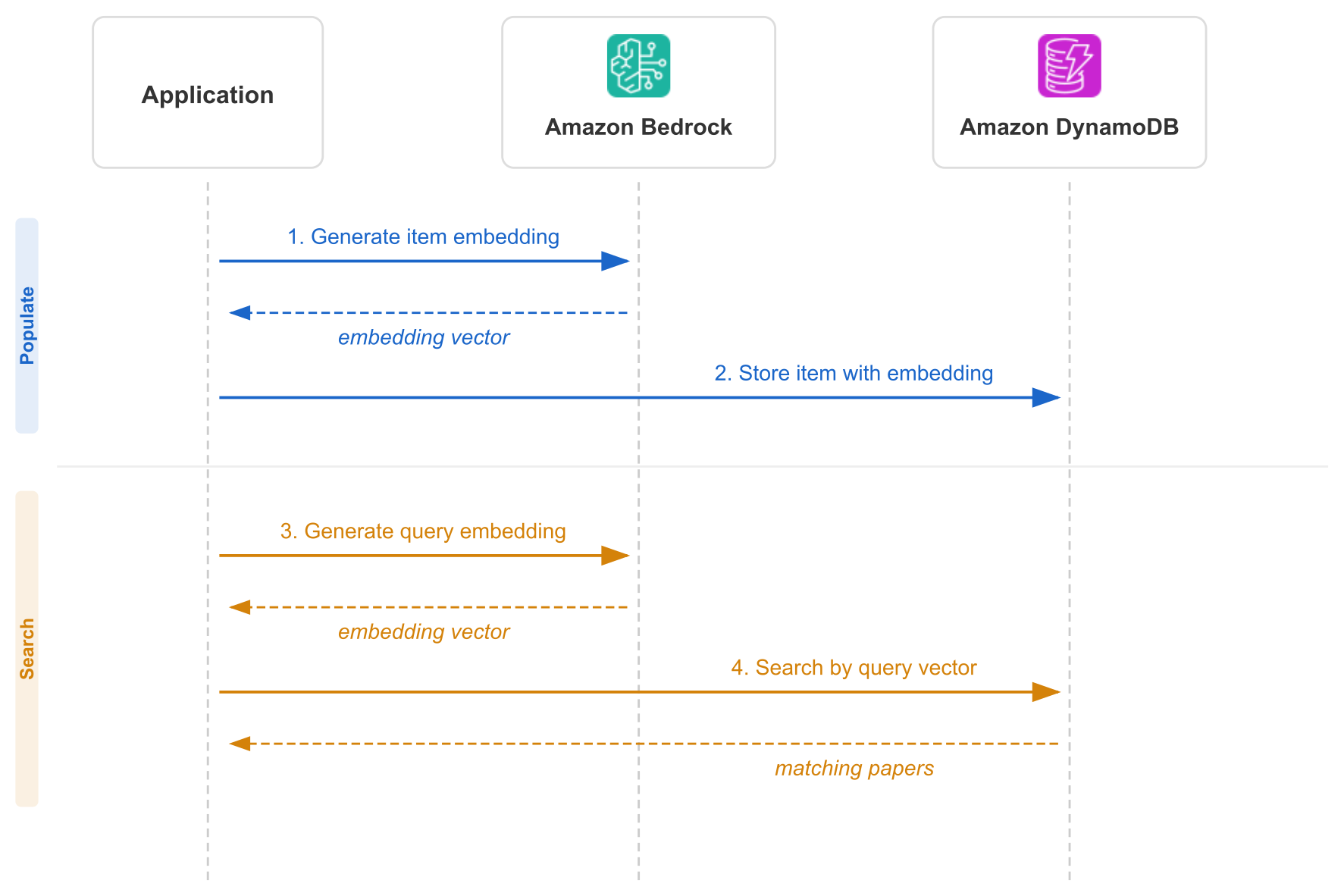
Figure 1: Populating and searching a DynamoDB vector index with embeddings from Amazon Bedrock
To find matches quickly at scale, the vector index uses approximate nearest neighbor (ANN) search. Comparing a query against every stored vector becomes prohibitively expensive and slow as a dataset grows. ANN instead trades a small amount of exactness for a large gain in speed. It returns results that are close to the true nearest neighbors while keeping search fast and cost predictable.
The walkthrough has three steps:
- Create a DynamoDB table with a vector index.
- Generate embeddings with Bedrock and populate the table.
- Search the vector index with natural-language queries.
The complete, runnable code for this walkthrough is available in the GitHub repository.
Prerequisites
This walkthrough requires the following:
- An AWS account.
- Python 3.12 or later.
- AWS credentials configured for your environment, with permissions to call the DynamoDB and Bedrock APIs.
- Access to Bedrock and the Amazon Titan Text Embeddings V2 model in your AWS Region. For instructions on requesting access to models, see the Bedrock documentation.
- The AWS SDK for Python (Boto3) version
1.43.64or later, which adds support for DynamoDB vector search.
Step 1: Create a DynamoDB table with a vector index
You can define a vector index as part of table creation. A vector index specifies which attribute holds your embeddings, the number of dimensions, and the distance function. As with other secondary index types in DynamoDB, it also specifies which attributes to project into the index.
You can also add a vector index to an existing table with the UpdateTable API. There’s no need to re-create a table to use vector search on data that’s already stored.
The following code creates the table and its vector index:
Consider the following configuration choices:
- Dimensions – The length of the vectors in the index. This value must match the embedding model’s output. DynamoDB supports vectors of up to 4,096 dimensions.
- Distance function – The measure DynamoDB uses to compare vectors and rank results by similarity. This example uses
DOT_PRODUCTbecause the embeddings are normalized to unit vectors when they are generated (see Step 2). For unit vectors, the dot product equals the cosine similarity, soDOT_PRODUCTgives the same ranking asCOSINEwhile skipping cosine’s internal normalization step. UseCOSINEwhen your vectors aren’t already normalized, because it normalizes internally, orEUCLIDEANwhen magnitude matters. ForCOSINEandEUCLIDEAN, lower scores indicate greater similarity. ForDOT_PRODUCT, higher scores indicate greater similarity. - Projection – This setting determines which attributes are copied into the index and are therefore available to return from a search. The vector and base table’s key attributes are included.
INCLUDEadds the listed attributes,ALLadds all of them, andKEYS_ONLYadds none. This example usesALLso that a search returns the complete paper record, including its title, abstract, and authors, in a single call. For workloads with many or large attributes, considerINCLUDEto project only what’s needed, which keeps the index smaller and searches cheaper. - Inline filter (optional) – A vector search can filter on combinations of projected attributes during the search. This example doesn’t use inline filtering, which will be covered in a separate blog post.
- Partition key (optional) – Scales the overall throughput of the vector index and reduces the per-search cost for large datasets. A vector index is distributed so that it scales horizontally, whether or not you define a partition key. When you define a partition key for the index, every vector search must supply a value for it. DynamoDB then limits the search to the portions of the index that hold items with that value. This reduces the cost of the search, because DynamoDB processes less data to answer it. Throughput quotas apply per partition key value, and each distinct value of the partition key gets its own quota. Defining a partition key therefore also raises the overall write and search throughput the index can sustain. This example doesn’t use a partition key, so every search covers the entire index. Partition key usage will be covered in a separate blog post.
Table and vector index creation happen asynchronously. Before loading data, use the DescribeTable API to confirm that the table and index are ACTIVE and that backfilling is complete:
When the table is ready, the table and index report ACTIVE with Backfilling: False:
Step 2: Generate embeddings and populate the table
The next step loads the first 1,000 papers from the dataset, generates vector embeddings with Bedrock (Amazon Titan Text Embeddings V2), and stores everything in DynamoDB:
This example embeds the paper title and abstract together to create a text representation that captures what a paper is about. A search for “training computers to recognize images” then matches papers about image classification and object detection. The match works even when those exact words don’t appear in the title, because the meaning is close. We embed the title and abstract because together they carry the paper’s core meaning. The authors are still stored on the item, so they’re returned with each result.
Because the script processes papers one at a time, expect roughly 2–4 minutes to load all 1,000 papers, at a few hundred milliseconds per paper. Most of that time is spent in the Bedrock embedding calls.
Each write that populates the vector index also consumes vector write capacity. Set ReturnConsumedCapacity='INDEXES' on the PutItem call to see the vector write cost. The response’s ConsumedCapacity object then reports the VectorWriteRequestBytes consumed for each vector index under a VectorIndexes map, alongside the table’s own write capacity. Use INDEXES rather than TOTAL for this, because TOTAL returns only the table’s write capacity and omits the vector index cost.
With ReturnConsumedCapacity='INDEXES', the returned ConsumedCapacity looks like this:
The table’s own write capacity and the vector index’s write cost are reported separately, so you can see how much of a write’s cost comes from maintaining the vector index. For how this cost is metered and priced, visit the Amazon DynamoDB pricing page.
Step 3: Search the vector index
With the data loaded, the table is ready for semantic searches. The following code uses the generate_embedding function from Step 2 to embed a natural-language query, then calls the SearchVectors API to find the most similar papers:
The SearchVectors response contains a SearchResults list. Each element has two parts:
Item– The projected attributes of the matching item from the vector index.Score– A similarity score that indicates how close the result is to the query vector, based on the index’s distance function.
When you set ReturnConsumedCapacity to INDEXES or TOTAL, the response also includes a ConsumedCapacity object that reports the VectorSearchRequestBytes the query processed. The default, NONE, omits it. A vector search reads only from the vector index, so there’s no separate base-table capacity to break out. INDEXES and TOTAL return the same figure here. This differs from a write, where only INDEXES exposes the vector index cost on top of the base-table write.
By default, the vector attribute isn’t returned with the items. See Things to know for why, and for how to request it.
How vector index usage is metered
A vector index is billed on three dimensions, in addition to the standard DynamoDB charges for the underlying table that holds your items. You pay for the data you write into the index, the data processed when you search, and the data you store. All three are metered per byte and billed per GB, so there are no capacity units to provision and the cost scales in proportion to the work each operation performs.
- Vector write requests – You pay for the data written into the vector index, which includes the vector itself and non-vector attributes projected into the index. A write that doesn’t touch the vector attribute or any projected attribute isn’t charged for vector writes. These charges are in addition to the standard write charge for the base table.
- Vector search – You pay for the data processed to answer a similarity search. When the index defines a partition key, a search is limited to the portions of the index holding items with the searched value of the partition key. That reduces the data processed and therefore the search cost.
- Storage – You pay for the data stored in the vector index per GB-month, at the same rate as DynamoDB table storage.
Each operation reports the vector capacity it consumed in the response’s ConsumedCapacity object, so you can attribute cost to specific writes and searches (see Step 2 and Step 3). Because vector usage is metered per byte, these values track the number of bytes each operation processed. Each vector write and each vector search has a minimum billable size of 1 KB. An operation below 1 KB is metered as 1 KB, and above that it is metered per byte. This applies to the data written into the index on a write and to the data processed to answer a similarity search.
You can use vector indexes with tables that use either the Standard or Standard-Infrequent Access table class. For the per-GB rates, see Amazon DynamoDB pricing.
To optimize cost, consider the following practices:
- Use lower dimensions, such as 256 or 512, when the use case doesn’t require maximum precision. This reduces storage, per-write, and per-search cost together.
- Project only the necessary attributes into the index, because the projected item size drives both storage and the bytes a search processes.
- Leave the embedding out of the results, which is the default, so that its bytes don’t count toward the search charge. Project the vector back only when it’s needed.
- Use an index with a partition key where it fits the access pattern. Searches then cover only the portions of the index holding items with the searched value, and process fewer bytes.
Things to know
Keep the following characteristics of DynamoDB vector search in mind as you design your application:
- On-demand capacity mode – Vector indexes are supported only on tables that use the on-demand (
PAY_PER_REQUEST) capacity mode. - Items are indexed only when they have the required attributes – An item is added to the vector index only if it contains the vector attribute. If the index defines a partition key, the item must also contain that partition key attribute in order to be included in the index.
- Eventual consistency – The vector index is updated asynchronously as items are written to the table, so vector search is eventually consistent. A newly written or updated item might not appear in search results immediately but becomes searchable shortly after the index catches up.
- The vector isn’t returned by default – Although the embedding is stored in the index,
SearchVectorsleaves it out of the results. That keeps it from inflating the processed bytes, and therefore the cost, of the search. Request it explicitly in the search’sProjectionExpressionwhen you need it. - Vector dimensions – DynamoDB supports vectors of up to 4,096 dimensions, and the index dimension must match your embedding model’s output.
- Backfill at no additional charge – When you add a vector index to an existing table with the
UpdateTableAPI, DynamoDB backfills the index at no charge. The backfill uses the vector attribute already stored on the table’s items. - Index configuration is immutable – A vector index’s configuration is set when the index is created and can’t be changed afterward. This covers its dimensions, distance function, projection, inline filter attributes, and partition key. To change any of these, create a new vector index with the settings you want. As noted earlier, DynamoDB backfills the new index at no charge. A table can have up to 5 vector indexes by default.
- Vector attributes in secondary indexes – Adding a vector attribute to your items affects any secondary index that projects all attributes. A global secondary index (GSI) or local secondary index (LSI) created with
ProjectionType: ALLautomatically copies the new vector attribute into the index. This can increase the index’s storage, write, and read costs. If an index doesn’t need the vector, project only the attributes it uses. You can replace an existing all-attributes GSI with one that projects a specific attribute set excluding the vector. An LSI, however, is fixed when the table is created and can’t be added or removed afterward, so plan its projection up front when creating the table. - Per-partition-key throughput quotas – Write and search throughput on a vector index are subject to quotas that apply per partition key value. For the current limits, see Quotas in DynamoDB. An index without a partition key is subject to a single quota. An index with a partition key gets a separate quota per value of the partition key, which raises the total throughput the index can sustain.
Cleaning up
To avoid incurring future charges, delete the resources created for this walkthrough. Deleting the DynamoDB table also removes its vector index:
Bedrock on-demand embedding calls are billed per request, so there’s no standing Bedrock resource to delete for this walkthrough.
Conclusion
With native vector search in DynamoDB, you can run similarity searches in the database you already use for operational data. Without a separate vector store, you get a simpler architecture, less operational overhead, lower latency, and lower cost, while keeping the serverless scaling and predictable performance of DynamoDB.
In this post, we created a DynamoDB table with a vector index, generated embeddings with Bedrock, loaded them into DynamoDB, and ran semantic searches with natural-language queries. Whether you’re building semantic search, recommendation engines, or RAG applications, you can use a single, serverless service for both your operational data and vector workloads.
To get started, review the DynamoDB vector search documentation and the complete code sample on GitHub, and create a table with a vector index.
Paper metadata is from the arxiv-abstracts-2021 dataset, licensed under CC0 1.0 Universal (public domain).