AWS Database Blog
Centralized traffic inspection for Oracle Database@AWS
In a previous post, Implement network connectivity patterns for Oracle Database@AWS, we covered three connectivity patterns. These are direct peering between an application VPC and the Oracle Database@AWS network, single-Region connectivity using AWS Transit Gateway, and multi-Region connectivity using AWS Cloud WAN. Whether your traffic flows between application VPCs, on-premises networks, and the Oracle Database@AWS network, or heads outbound to the internet, it needs to be inspected. This post walks you through two centralized inspection patterns that route traffic through a dedicated inspection VPC before it reaches its destination: one using AWS Transit Gateway and another using AWS Cloud WAN with service insertion.
Oracle Database@AWS is an offering that provides access to Oracle Exadata Database Service and Oracle Autonomous Database on dedicated Oracle Exadata infrastructure, managed by Oracle Cloud Infrastructure (OCI) within AWS data centers. Organizations in regulated industries like financial services, healthcare, and government often need to inspect network traffic flowing to and from these databases for intrusion detection and prevention (IDS/IPS), data loss prevention (DLP), or domain filtering.
Prerequisites
Before proceeding, you should be familiar with ODB networks, ODB peering, peered CIDRs, and the ODB transit VPC concept from the previous connectivity patterns post. You’ll need an ODB network peered to a transit VPC with connectivity to AWS Transit Gateway or AWS Cloud WAN. You should also be familiar with AWS Cloud WAN service insertion concepts, as well as Amazon Virtual Private Cloud (Amazon VPC) concepts such as route tables, subnets, NAT gateways, and internet gateways.
Important: Today you cannot deploy firewall endpoints directly in the ODB transit VPC. Traffic destined for addresses outside the transit VPC’s own CIDRs is forwarded directly over the transit gateway or AWS Cloud WAN attachment, bypassing subnet route table lookups entirely. Although you can deploy firewall endpoints in individual application VPCs for some use cases, this distributed approach introduces additional route table configuration overhead and must be repeated for every VPC, making centralized inspection the practical choice at scale.
Pattern 1: Centralized traffic inspection with AWS Transit Gateway
As shown in figure 1, this pattern connects the ODB network, an ODB transit VPC peered to it, application VPCs, a centralized inspection VPC (firewall endpoints, NAT gateway, internet gateway), and on-premises networks to a transit gateway as attachments. On-premises connectivity uses AWS Direct Connect or AWS Site-to-Site VPN. The transit gateway uses two route tables to steer traffic. The pre-inspection route table is associated with the spoke attachments (application VPCs, on-premises, ODB transit VPC) and has a default route (0.0.0.0/0) pointing to the inspection VPC attachment. The post-inspection route table is associated with the inspection VPC attachment and has specific routes for application VPC CIDRs, on-premises CIDRs, and the ODB network CIDR pointing to the respective attachments.
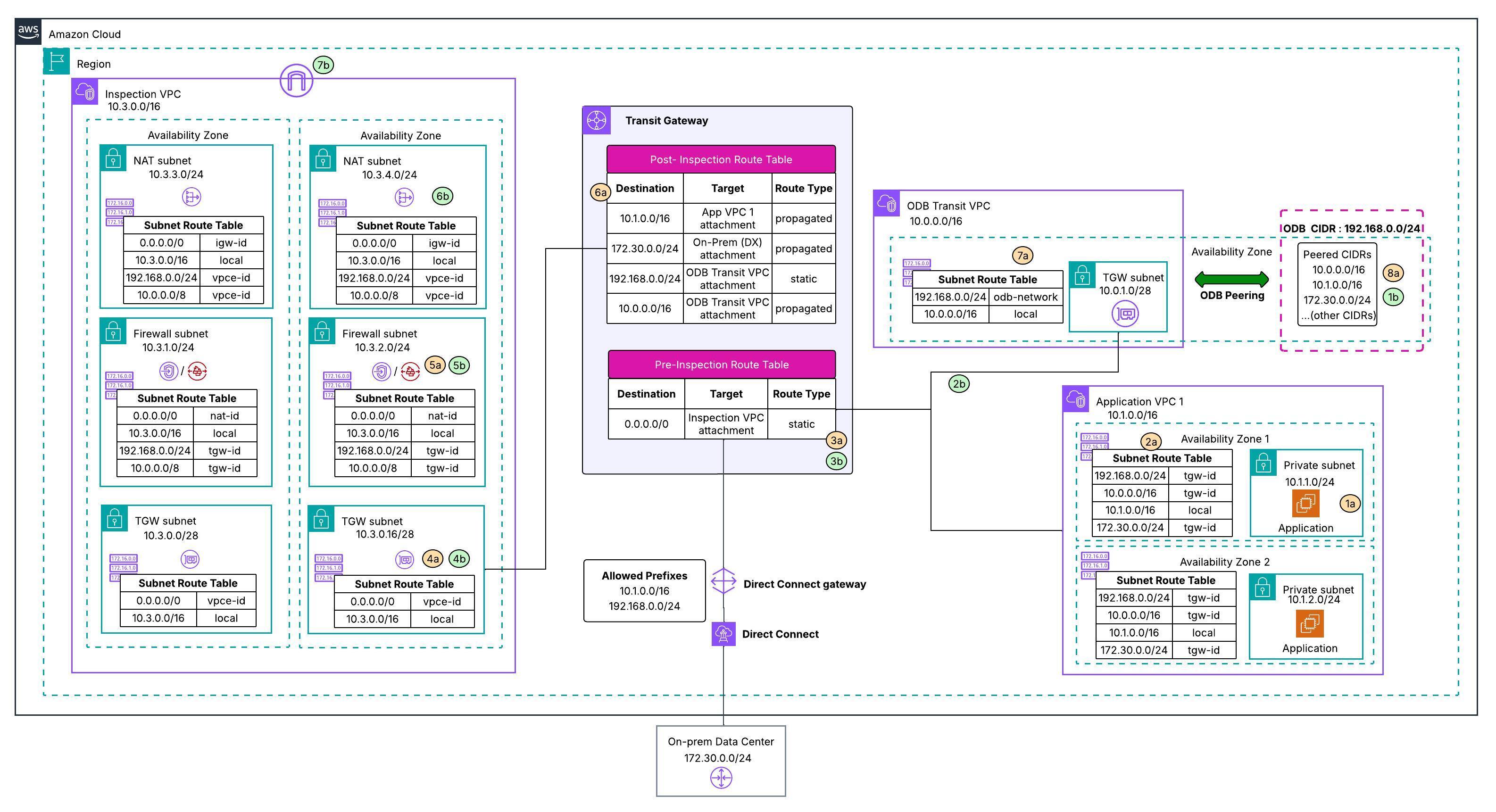
Figure 1: East-west and north-south traffic inspection using Transit Gateway with a centralized inspection VPC.
Packet walkthrough for east-west traffic flow
The following steps walk through the east-west traffic flow (labeled ‘a’ / Orange in Figure 1):
- An Amazon Elastic Compute Cloud (Amazon EC2) instance in the application VPC resolves the Oracle database hostname and initiates a connection using the resolved IP address within the ODB network CIDR.
- The application VPC subnet route table has a route for the ODB network CIDR (or a default route) pointing to the transit gateway. The packet is forwarded to the transit gateway through the application VPC attachment.
- The transit gateway performs a route table lookup in the pre-inspection route table (associated with the application VPC attachment). The default route points to the inspection VPC attachment. The packet is forwarded to the inspection VPC.
- The packet arrives in the transit gateway attachment subnet of the inspection VPC. The subnet route table routes the packet to the firewall endpoint for inspection.
- The inspection appliance processes the packet according to your security policies. If the packet passes inspection, the subnet route table directs post-inspection traffic back to the transit gateway.
- The transit gateway looks up the post-inspection route table (associated with the inspection VPC attachment). A specific route for the ODB network CIDR points to the ODB transit VPC attachment, and the packet is forwarded there.
- The ODB transit VPC subnet route table routes the packet to the ODB peering connection. The packet traverses ODB peering into the ODB network and reaches the Oracle database.
- Response traffic from the ODB network follows the symmetric reverse path.
Packet walkthrough for north-south traffic flow (internet outbound traffic)
If your Oracle database workloads require internet access, you can route this traffic through the centralized inspection VPC before it exits to the internet. Internet egress from ODB@AWS is possible through either the OCI side or the AWS side. This post covers the AWS-side egress pattern. This requires configuring specific destination CIDRs in the peered CIDRs prefix list on the ODB network. See Oracle DB@AWS Internet Outbound Traffic blog for more information.
The following steps walk through the north-south traffic flow (labeled ‘b’ / Green in Figure 1):
- Traffic from the ODB network destined for the internet matches a route configured by the peered CIDRs prefix list on the OCI side, which directs the packet to the ODB peering connection as the next hop. The packet crosses into the ODB transit VPC.
- The packet is forwarded to the transit gateway through the ODB transit VPC attachment.
- The transit gateway performs a route table lookup in the pre-inspection route table. The default route points to the inspection VPC attachment. The packet is forwarded to the inspection VPC.
- The packet arrives in the inspection VPC and is routed to the firewall endpoint for inspection.
- After inspection, the packet is routed to the NAT gateway, which performs source address translation.
- The NAT gateway forwards the packet to the internet gateway, which sends it out to the internet.
- Return traffic from the internet follows the reverse path through the internet gateway, NAT gateway, firewall, transit gateway, and back to the ODB network through the ODB transit VPC.
Pattern 2: Centralized traffic inspection with AWS Cloud WAN
As shown in Figure 2, application VPCs and on-premises networks attach to the AWS Cloud WAN core network and are mapped to their respective segments (App VPC and Hybrid). The inspection VPC attachment is mapped to a Network Function Group (NFG). A transit gateway provides connectivity between the ODB transit VPC and the AWS Cloud WAN core network via a TGW route table attachment. A static route for the ODB network CIDR points to the ODB transit VPC attachment on the transit gateway, and this TGW route table is associated with the Cloud WAN TGW route table attachment. This propagates the ODB CIDR dynamically via BGP into the Cloud WAN segment and NFG route tables.
With this in place, Cloud WAN’s service insertion actions steer traffic through the inspection NFG. East-west flows use the send-via action, while north-south flows use the send-to action, as detailed in the following sections.
East-west traffic flow (send-via action)
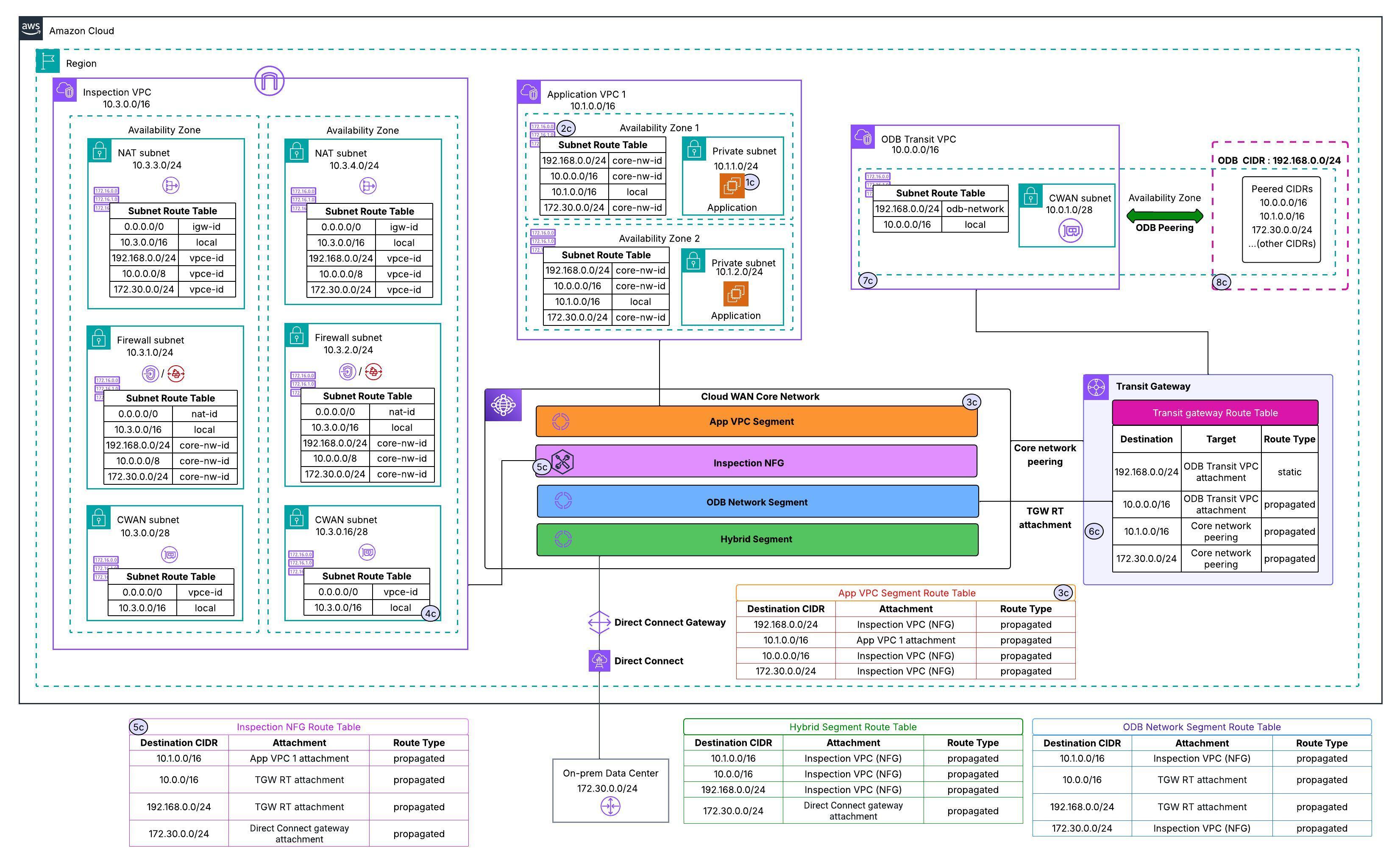
Figure 2: East-west traffic inspection using AWS Cloud WAN with service insertion.
A send-via action is configured between the ODB Network segment and the App VPC segment (and hybrid segment for on-premises traffic) through the inspection NFG.
The following steps walk through the east-west traffic flow (labeled ‘c’ in Figure 2):
- An Amazon EC2 instance in the application VPC resolves the Oracle database hostname and initiates a database connection.
- The application VPC subnet route table has a route for the ODB network CIDR pointing to the AWS Cloud WAN core network attachment. The packet is forwarded to the AWS Cloud WAN core network.
- A send-via action is configured between the App VPC segment (or hybrid segment for on-premises traffic) and the ODB Network segment. AWS Cloud WAN’s routing tables direct the packet to the inspection VPC through the NFG attachment.
- The packet arrives in the inspection VPC and is routed to the firewall endpoint for inspection.
- After inspection, the packet exits the inspection VPC and re-enters the AWS Cloud WAN core network through the NFG attachment.
- AWS Cloud WAN routes post-inspection traffic to the Transit Gateway route table attachment. The ODB network CIDR is present because it was dynamically propagated through BGP from the transit gateway.
- The transit gateway forwards the packet to the ODB transit VPC. The ODB transit VPC subnet route table routes the packet through the ODB peering connection into the ODB network, where it reaches the Oracle database.
- Return traffic follows the symmetric reverse path. The send-via action is bidirectional; traffic from the ODB network passes through the same inspection VPC before reaching the application VPC.
On-premises traffic follows the same pattern, entering AWS Cloud WAN through the Direct Connect or AWS Site-to-Site VPN attachment in the hybrid segment and passing through the inspection VPC before reaching the ODB network.
North-south traffic flow (send-to action for internet outbound traffic)
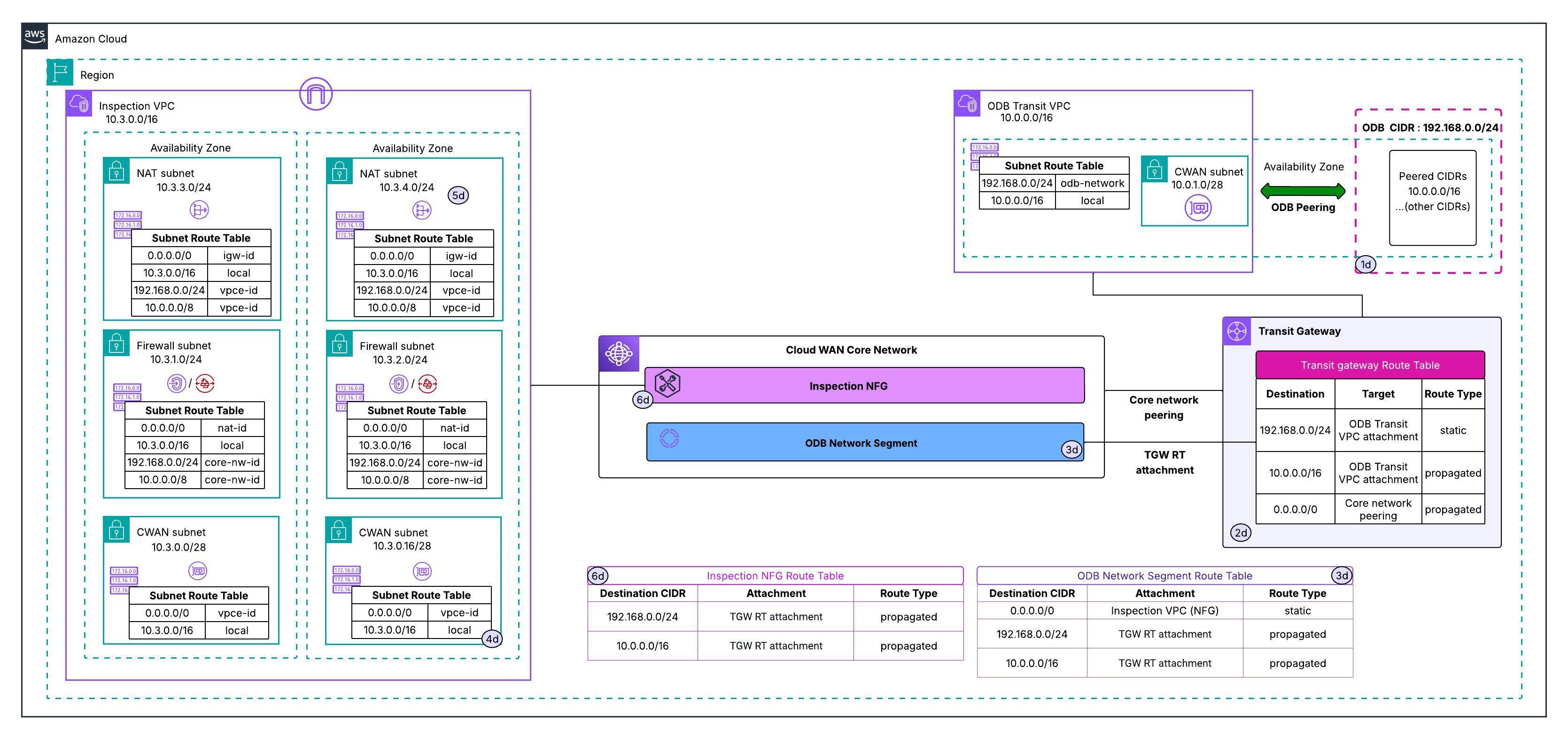
Figure 3: North-south internet outbound traffic inspection using AWS Cloud WAN service insertion.
As shown in Figure 3, a send-to action is configured on the ODB Network segment pointing to the inspection NFG. Internet egress from ODB@AWS is possible through either the OCI side or the AWS side. This post covers the AWS-side egress pattern. Internet-bound traffic from the ODB network is steered to the inspection VPC, inspected, then exits through the NAT gateway and internet gateway. As with Pattern 1, this requires configuring specific destination CIDRs in the peered CIDRs prefix list.
The following steps describe this flow (labeled ‘d’ in Figure 3):
- Traffic from the ODB network destined for the internet matches a route configured by the peered CIDRs prefix list on the OCI side, which directs the packet to the ODB peering connection as the next hop. The packet crosses into the ODB transit VPC.
- The ODB transit VPC forwards the packet to the transit gateway. The transit gateway then sends the packet to the AWS Cloud WAN core network through the TGW route table attachment.
- Because a send-to action is configured on the ODB Network segment, AWS Cloud WAN’s routing tables direct the internet-bound packet to the inspection VPC through the NFG attachment.
- The packet arrives in the inspection VPC and is routed to the firewall endpoint for inspection.
- After passing inspection, the packet is forwarded to the NAT gateway. The NAT gateway performs source NAT and forwards the packet to an internet gateway, which sends it out to the internet.
- Return traffic from the internet arrives at the internet gateway, passes through the NAT gateway for address translation, and is routed back to the firewall for inspection. After inspection, the packet re-enters the AWS Cloud WAN core network through the NFG attachment. The NFG route table has a propagated route for the ODB network CIDR pointing to the TGW route table attachment, which forwards the packet to the transit gateway, ODB transit VPC, and back into the ODB network.
These patterns extend to multi-Region deployments. You can onboard additional Regions by attaching regional VPCs, transit gateways, and inspection infrastructure to the same AWS Cloud WAN core network.
Considerations
When implementing network inspection for Oracle Database@AWS, keep these considerations in mind:
- ODB peered CIDRs – The peered CIDRs list defines all CIDRs that can communicate with the ODB network through the peering connection. For east-west traffic, include application VPC CIDRs (primary and secondary) and on-premises network CIDRs. For north-south internet-bound traffic exiting through AWS, include the specific internet destination CIDRs the database needs to reach. As of this writing, the 0.0.0.0/0 entry isn’t allowed, so you must split internet destinations into specific CIDR ranges that comply with the peered CIDR restrictions. You don’t need to include inspection VPC CIDRs because inspection is transparent and preserves the original source IP. For guidance on peered CIDRs configuration and restrictions, see Oracle DB@AWS Internet Outbound Traffic.
- Appliance mode for flow symmetry – Turn on appliance mode on the inspection VPC’s transit gateway attachment (Pattern 1) or AWS Cloud WAN attachment (Pattern 2). Without it, forward and return paths may traverse different Availability Zones, breaking stateful inspection.
- AWS Network Firewall native Transit Gateway attachment – AWS Network Firewall supports native Transit Gateway attachment for east-west inspection without a dedicated inspection VPC. North-south outbound traffic still requires a separate VPC with a NAT gateway.
- DNS traffic path – DNS queries to the ODB network follow the same inspection path as data traffic. Account for this in your firewall rules, or place Amazon Route 53 Resolver outbound endpoints in the ODB transit VPC to bypass inspection.
- Multi-Region deployments – Deploy inspection VPCs in each Region to avoid cross-Region latency and data transfer costs. In Pattern 2, AWS Cloud WAN’s feature (single-hop mode) controls which Region’s inspection VPC is used.
Conclusion
In this post, we demonstrated how to implement centralized network traffic inspection for Oracle Database@AWS using AWS Transit Gateway with a centralized inspection VPC for single-Region deployments, or AWS Cloud WAN with service insertion for multi-Region architectures. Both approaches route traffic through a dedicated inspection VPC because the ODB transit VPC doesn’t support inline inspection. For more information, see the AWS Network Firewall documentation, the AWS Cloud WAN service insertion documentation, and the Oracle Database@AWS User Guide.