AWS Database Blog
Export Amazon SimpleDB domain data to Amazon S3
As AWS continues to evolve its services to better align with customer needs and modern workloads, we’re excited to introduce a new export functionality for Amazon SimpleDB . By using this feature, you can export domain data to Amazon Simple Storage Service (Amazon S3) in JSON format, unlocking new opportunities for long-term storage, and migration to purpose-built databases.
This launch supports our continued focus on giving customers reliable access to their data and supporting downstream use in other systems and services. Now, you can use this export capability to extract domain data into Amazon S3 for retention or further processing. The export generates a complete JSON representation of Amazon SimpleDB data. By making SimpleDB data available in S3, this feature provides a practical starting point for archiving or migration planning.
In this post, we walk you through how to use the new export functionality, highlight best practices, and share monitoring functionality to help you make the most of it. Let’s get started.
Overview of Amazon SimpleDB and Amazon S3
Amazon SimpleDB is a data service for running queries on NoSQL data store in real time. It works alongside services such as Amazon S3 and Amazon Elastic Compute Cloud (Amazon EC2), helping developers build applications that store, process, and query data at cloud scale. These services are designed to make web-scale computing easier and more cost-effective for developers.
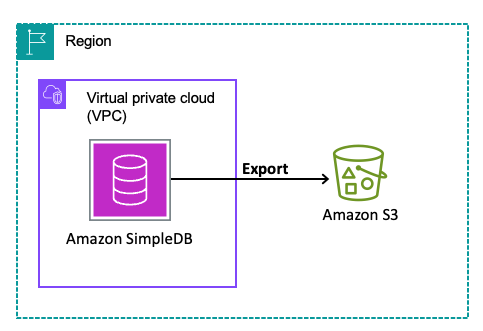
Amazon S3 is an object storage service that offers industry-leading scalability, data availability, security, and performance. This means customers of all sizes and industries can use it to store and protect any amount of data.The following diagram illustrates the solution architecture.
Prerequisites
Before you begin exporting data from Amazon SimpleDB to Amazon S3, there are a few prerequisites to complete for a successful and secure export process. This section outlines the resources, permissions, and configurations required to get started.
- SimpleDB domain: The export functionality operates at the domain level, so a SimpleDB domain must exist before you can initiate an export.
- Amazon S3 bucket: Create or designate an existing S3 bucket as the destination for the exported data. While it’s generally recommended to use a bucket in the same AWS Region for performance and cost optimisation, the export functionality does support cross-Region exports in the commercial partition. This gives you flexibility if your data needs to reside in a centralised or regulatory-compliant Region. You can also designate S3 buckets belonging to other AWS accounts if you have the appropriate permissions.
- IAM permissions: The IAM role or user using the export functionality must have the following minimum permissions:
- SimpleDB permissions:
sdb:GetExport,sdb:StartDomainExport,sdb:ListExports - S3 permissions:
s3:PutObject,s3:ListObject,s3:HeadBucket,s3:ListBucket
- SimpleDB permissions:
- AWS KMS permissions: If you want to encrypt exported data in S3 using AWS KMS:
- AWS KMS permissions:
kms:GenerateDataKey
- AWS KMS permissions:
- New version of AWS CLI or SDK with
SimpleDBv2: SimpleDB is not available in the AWS Management Console. The new SimpleDB operations to initiate and manage the exports are only available through theSimpleDBv2service in newer versions of AWS SDKs and CLI.TheSimpleDBv2service supports export related operations exclusively. For all other SimpleDB operations (for example,Select,PutAttributes), continue using the existing SimpleDB service in AWS CLI and SDKs.
Export data from Amazon SimpleDB to Amazon S3
The following steps walk you through exporting your SimpleDB domain data to Amazon S3 using the AWS CLI.
Step 1: Create or identify the destination S3 bucket
Amazon S3 provides durable, cost-effective storage, making it an ideal destination for SimpleDB domain data. Start by creating or identifying the S3 bucket where your exported data will be stored. If you already have a bucket that fits your needs, you can reuse it. Otherwise, create a new bucket using the AWS CLI:
You can select a bucket in the same AWS Region as your SimpleDB domain for performance efficiency. However, cross-Region buckets are supported, which gives you flexibility if you want to centralize data or meet compliance requirements. Apply optional security measures such as bucket policies, default server-side encryption (SSE-S3, SSE-KMS), or versioning.
Step 2: Configure IAM permissions
Create an IAM policy with the least-restricted privilege to the resources like following and attach to the IAM role or user being used to create the export:
S3ExportAccessPolicy
An additional policy is required if you want to use KMS encryption for the exported data in S3:
KMSAccessPolicy
Replace REGION, ACCOUNT_ID, DOMAIN_NAME, BUCKET_NAME and KEY_ID with your specific values.
Step 3: Initiate the export
With the S3 bucket and IAM role in place, you are ready to start the export. Initiate the export by invoking StartDomainExport API using AWS SDKs or CLI.
A sample execution and response :
When the command returns a response similar to the example above, the export request has been successfully submitted. The export then proceeds asynchronously in the background.
Note: You may provide additional options for using a custom prefix for the S3 object keys of export artefacts or a different S3 SSE algorithm. For more information, see Export Considerations.
Step4: Monitoring the status of export
The GetExport operation can be used to get the details for the given export. Make a call with a command like following:
Initially the export will be in PENDING status:
After some time, the export job will begin and exportStatus will transition to IN_PROGRESS:
You may see the exported data getting written to the provided S3 bucket now. The data will be written to a path like AWSSimpleDB/<exportId>/<domainName>/. For the example shown here, data will be written at the following path:
Initially an empty file named _started will be written. This file verifies that the destination bucket is writable. It can safely be deleted. Followed by writing of export data files (JSON) in with names like dataFile<randomPartitionIds> in data/ directory.
Once the job transitions to IN_PROGRESS, the export processing continues until completion, at which point exportStatus changes to SUCCEEDED, as shown in the following example:
Step 5: Validating the export in Amazon S3
When the export status is SUCCEEDED, verify that the data was exported successfully. You can now view and analyze the exported data files in the Amazon S3 bucket.
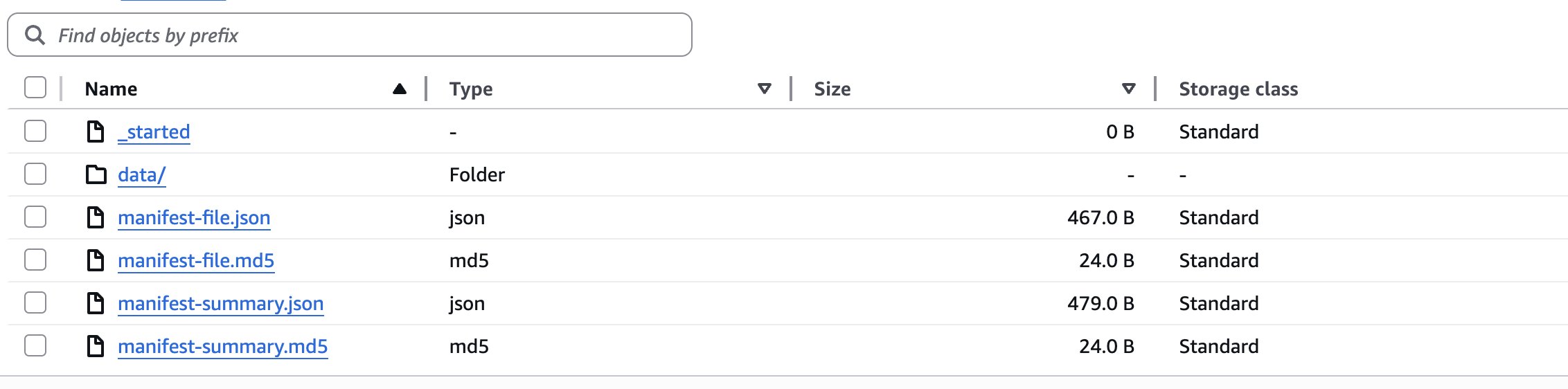
- Data: The data files with the actual domain data will be written to
data/. The JSON objects in the data file correspond to your SimpleDB items. Each object has name and attributes of the item stored againstitemNameandattributeskeys respectively.attributesis an array of objects with name and values of different attributes stored against name and value keys respectively.
Here’s a sample object:
You will also find two manifest files that allow you to verify the integrity and discover the location of the S3 objects in the data sub-folder. For more information, see Understanding Exported Data in Amazon S3.
If a failure occurs during export processing, exportStatus will transition to FAILED , and FailureCode and FailureMessage will be returned in the GetExport APIs response.
Sample execution and response:
Listing export jobs
To list all exports that were created, you can use the ListExports operation. The API returns all exports that were created within past 3 months. The results are paginated and can be filtered by domain name. The following is a sample CLI command and response:
Sample execution and response:
Important considerations:
Before running exports at scale, consider the following operational aspects that can influence export behavior, storage usage, and request limits.
- Performance and scalability: The export process is serverless and scales automatically, operating independently of your existing SimpleDB read workloads so that export operations won’t impact your application’s performance or availability.
- Asynchronous processing model: The functionality is designed as an asynchronous process primarily targeted for migration and archival use cases. Exports may take some time to complete, so plan accordingly and check completion status regularly using the
GetExportAPI. - Domain management during exports: Domain deletion will be blocked while any export request is pending or in progress for that domain. Plan your domain lifecycle management accordingly, verifying all necessary exports are completed before attempting domain deletion.
- Export frequency planning and cost considerations:
- Complete and non incremental exports: All exports are full, non-incremental snapshots of your domain data. This means every export contains the complete dataset rather than just changes since the last export.
- Rate limits: For service stability, the following limits are in place:
- 5 exports per domain within a rolling 24-hour window
- 25 exports per AWS account within a rolling 24-hour window
- Cost impact: While Amazon SimpleDB doesn’t charge for the export operations themselves, you will incur Amazon S3 costs for storage, API calls, and data transfer according to standard S3 pricing. Additionally, since data is exported in JSON format with additional metadata keywords, the exported data size will be larger than the raw data stored in SimpleDB.
For example, a domain approaching the maximum allowed size of 10 GB may result in exported data well exceeding 10 GB due to the JSON formatting overhead.
Consider the operational impact of repeated full exports, as they can increase storage usage and consume export rate limits over time.
- Data consistency and timing: Exports are not point-in-time snapshots. Instead, they work with an
exportDataCutoffTime—all data inserted before this timestamp will be included in the export. If your application continues writing to SimpleDB during the export process, newer data may not be captured in the current export. - Understanding
exportDataCutoffTime:- This timestamp is returned in the
GetExportAPI response and represents a time closer to when actual domain processing begins, rather than when the export was initially requested. - Any items inserted at timestamps before this time are guaranteed to be included in the export.
- Any items inserted at timestamps after this time are guaranteed to not be included in the export.
- However, for items that do exist in the export, any updates (including deletes) made to the item itself or the item’s attributes at timestamps after this cutoff time may or may not be included in the export.
Since exports capture data up to the cutoff time and you may run multiple exports over time, deduplication will need to be handled on your end when processing or migrating the exported data.
- This timestamp is returned in the
- Security and data integrity:
- Follow Amazon S3 security best practices for storing exported data.
- Use the provided
manifest-summary.jsonfile to verify item counts and MD5 checksums for each data file to ensure export completeness and integrity of data.
Clean up
After you validate that the export completed successfully and the data is safely stored in Amazon S3, you may want to clean up temporary resources created during the export process.
If you created a dedicated S3 bucket for testing or one-time exports, you can remove exported objects or delete the bucket when it is no longer needed:
If the bucket itself is no longer required, delete it after removing all objects:
You may also remove temporary IAM roles or policies that were created specifically for export operations if they are not needed for future exports.
If your objective was to extract and retain domain data before decommissioning workloads, you can review and delete unused domains from Amazon SimpleDB once all required exports are complete. Performing these clean up steps helps reduce unnecessary storage costs and simplifies resource management.
Conclusion
By exporting your SimpleDB domain data to Amazon S3, you can retain a complete JSON snapshot of your items and attributes in durable, cost-effective storage. This capability focuses on dependable data extraction and preservation, giving you a verified source dataset that you can review and manage as part of your next steps.
We encourage you to review your current Amazon SimpleDB domains, define your data retention or migration strategy, and begin your export today using the AWS CLI or SDK. By taking these steps now, you position your organization to maintain full control of your data and establish a reliable source dataset in Amazon S3 for archival, transformation, or future modernization initiatives. This approach gives you a practical foundation for scalability and cloud-native evolution based on your target architecture and data requirements.