AWS Database Blog
Getting started with the Oracle Database@AWS high performance networking
Oracle Database@AWS (ODB@AWS) provides access to Oracle Exadata infrastructure managed by Oracle Cloud Infrastructure (OCI) within AWS data centers. The Oracle Exadata infrastructure is physically located within AWS data centers, delivering low-latency network connectivity to AWS services like Amazon Elastic Compute Cloud (Amazon EC2), Amazon Elastic Container Service (Amazon ECS), and Amazon Elastic Kubernetes Service (Amazon EKS) running in the same Availability Zone. The application tier communicates with the database tier using Oracle’s SQL*Net protocol via TCP/IP over EC2 networking.
To meet application requirements for latency-sensitive on-premises deployments, such as trading systems and high-throughput online transaction processing (OLTP) workloads, we announced ODB@AWS high performance networking. This feature provides consistent and predictable sub-millisecond network roundtrip latency between applications hosted on EC2 and databases. There is no additional charge for EC2 instances using optimized placement for connectivity to ODB@AWS databases.
In this post, we explore Oracle Database@AWS high performance networking capabilities and provide a step-by-step guide to help you configure and deploy this feature.
How it works
This feature is currently available only for new Oracle Database@AWS networks (ODB networks) created on or after April 1, 2026, in supported Regions and Availability Zones. For regional availability details, see Unsupported Availability Zones in the Oracle Database@AWS User Guide.
ODB@AWS high performance networking uses Amazon EC2 placement groups to place your application instances in close physical proximity to your Oracle Exadata infrastructure within an AWS Availability Zone (AZ). This proximity minimizes network hops and reduces latency variability. This delivers consistent and predictable network performance for SQL*Net traffic between Oracle clients (applications hosted on EC2/ECS and EKS) and the Oracle Database server running on ODB@AWS.
High performance networking is automatically available for all ODB@AWS customers. When you create an ODB network for your databases, a placement group is automatically provisioned and associated with the newly created ODB network. You can retrieve this placement group using the AWS Command Line Interface (AWS CLI) or console and specify it when launching Amazon EC2 instances. The placement group integrates with existing Amazon EC2 APIs, including launching new EC2 instances and reserving compute capacity with EC2 On-Demand Capacity reservations.Some of the key characteristics of this feature:
- Automatic placement group provisioning – A placement group is automatically created and associated with every new ODB network (ODBN).
- Consistent latency – Consistent sub-millisecond network roundtrip latency between EC2 instances and ODB@AWS databases.
- Compatible with existing EC2 workflows – Works with standard EC2 APIs, the AWS Management Console, and supports Amazon EC2 On-Demand Capacity Reservations (ODCR), AWS Savings Plans, and Reserved Instances.
- No additional cost – High performance networking is available at no extra charge. Standard EC2 usage charges apply for launched instances.
Architecture overview
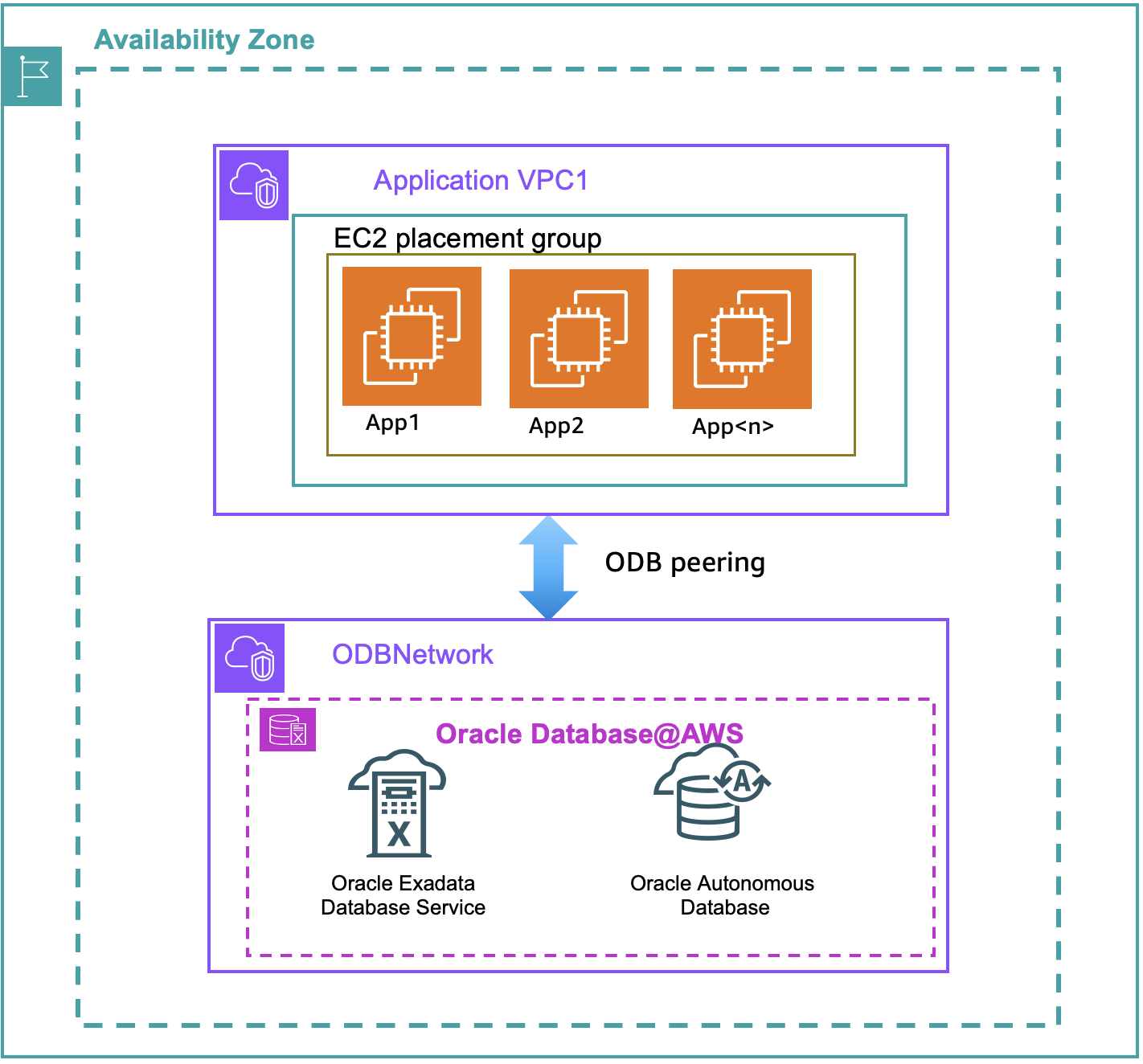
The following architecture diagram illustrates how an OCI region (parent site) connects with an AWS Region’s Availability Zone (child site) through an OCI-managed network as part of ODB@AWS. An application server deployed on Amazon EC2/ECS and EKS connects to Oracle Databases deployed in an ODB@AWS through ODB peering.
Getting started
Step 1: Create an ODB@AWS Network
Create an ODB@AWS network using the AWS Management Console or the AWS CLI. A placement group is automatically created and associated with your ODB network after your ODB network creation workflow is completed.
AWS CLI example:
Output:
Step 2: Retrieve the placement group ID
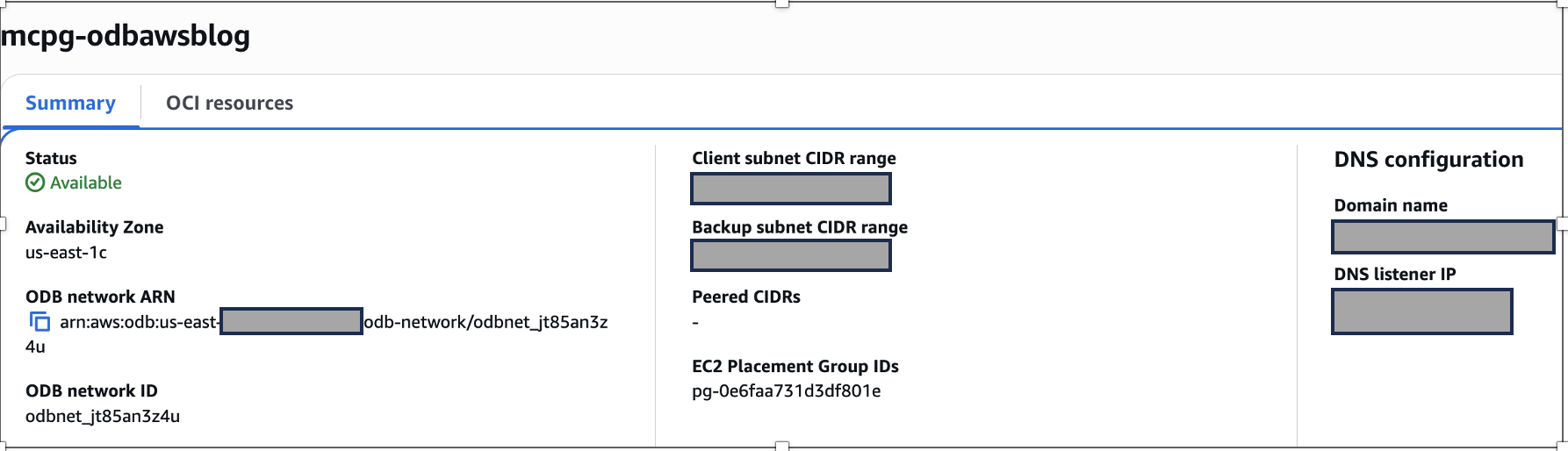
After creating your ODB network, retrieve the placement group ID using the GetODBNetwork API or from the console.
Option 1: Using AWS CLI
Query the ODB network created in Step 1 to retrieve the EC2 placement group ID:
Output (formatted for brevity):
Option 2: Using the AWS console
Navigate to the ODB@AWS console, select your ODB network, and locate the placement group ID in the network details section.

Step 3: Launch EC2 instances using the placement group
When launching Amazon EC2 instances for your application, specify the placement group ID retrieved in Step 2. This enables your instances to be placed in close proximity to your ODB@AWS database for optimal latency.
AWS CLI example:
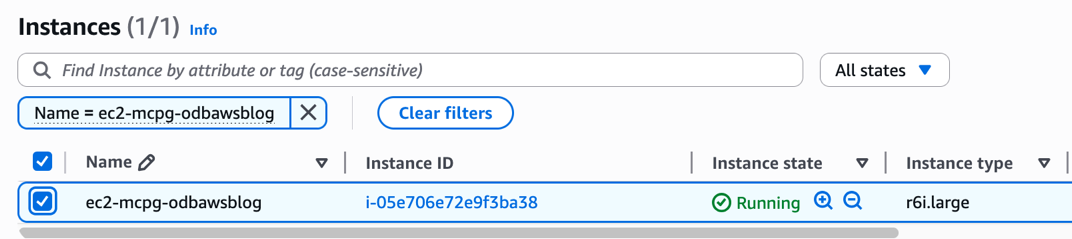
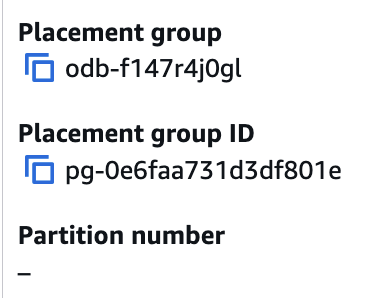
Verify the placement group assignment for the EC2 instance
Output:
Option 2: Using the AWS console
Sharing the placement group across AWS accounts
You can share the ODB@AWS placement group with other AWS accounts using AWS Resource Access Manager (AWS RAM) within the same AWS organization. This allows application teams using different AWS accounts to launch EC2 instances with optimized placement for low-latency connectivity to your ODB@AWS database. Currently, cross-org entitlement sharing through AWS License Manager is not supported on ODB@AWS. Therefore, the placement group can only be shared within the same AWS organization. For more details, see shared placement groups.
Measuring network latency
To measure and validate network latency between EC2 instances and Oracle Database@AWS (ODB@AWS), we recommend using qperf or iperf3, both of which are included by default in the Exadata OS image for VM clusters. You must install qperf or iperf3 on the EC2 instance that hosts your application. For detailed guidance, see the Oracle Exadata documentation on how to use these tools.
As an alternative approach, you can use sockperf, an open-source TCP-level latency measurement tool. sockperf provides complementary network metrics that help you:
- Establish network performance baselines for ongoing monitoring
- Compare performance metrics before and after infrastructure modifications
- Validate that sub-millisecond latency targets are consistently achieved
For a thorough performance assessment, we recommend combining qperf/iperf3/sockperf measurements with Oracle database performance tools, including:
- Automatic Workload Repository (AWR): For historical performance analysis
- Active Session History (ASH): For real-time session monitoring
- SQL Trace: For detailed SQL execution analysis
Best practices for using ODB@AWS high performance networking:
- Use placement groups selectively – ODB@AWS is a multi-cloud offering. Therefore, the network connectivity is fundamentally different than the typical on-premises deployment, and it typically adds some additional SQL*Net latency. For some workloads, this additional latency is negligible. For others, it might cause significant performance degradation. Therefore, reserve placement group usage for workloads that truly require consistent sub-millisecond latency.
- Use On-Demand Capacity Reservations (ODCR) – To minimize the risk of Insufficient Capacity Exceptions (ICE) occurrences, reserve capacity in advance using ODCR with your ODB@AWS placement group.
Conclusion
In this post, we provided a comprehensive step-by-step guide to help you get started with Oracle Database@AWS high performance networking capabilities.
Network latency directly affects application performance, particularly for latency-sensitive applications. Since AWS Availability Zones span multiple physical data centers, the physical distance between virtual machines can impact network latency and application performance.
ODB@AWS high performance networking addresses this challenge by automatically provisioning EC2 placement groups that enable your application instances hosted on EC2 to be placed in close physical proximity to your Oracle Exadata infrastructure. This allows predictable network performance for SQL*Net traffic between Oracle clients (applications hosted on EC2) and the Oracle Database server running on ODB@AWS.