AWS Database Blog
Migrate to Amazon Keyspaces with zero downtime using ZDM Proxy
For many teams running Apache Cassandra in production, migrating to a managed database service raises an immediate concern. How do you move petabytes of data, redirect live traffic, and reach production parity on a new system without incurring downtime, risking data loss, or rewriting application code? A common approach is dual writes, where you keep both systems in sync before switching over application reads.
In this post, we demonstrate how to deploy a production-ready extended version of the ZDM Proxy on AWS Fargate to migrate from self-managed Apache Cassandra to Amazon Keyspaces (for Apache Cassandra) with zero application downtime. We walk through deploying the full proxy infrastructure with a single AWS CloudFormation stack and the six migration phases, from historical data loading through dual writes, validation, and cutover. We also apply security and cost best practices for production workloads.
Customers are migrating to Amazon Keyspaces because it is a fully managed, serverless, Cassandra-compatible database service that offers automatic scaling, multi-Region replication, and 99.999% availability. AWS introduced reduced pricing for Amazon Keyspaces in November 2024 and added support for AWS Database Savings Plans in November 2025. Migrating to Amazon Keyspaces means your team stops managing nodes, compaction, and capacity planning and starts focusing on application logic.
The Zero Downtime Migration (ZDM) Proxy is an open-source tool that sits transparently between your application and both your origin Cassandra cluster and Amazon Keyspaces simultaneously. It provides the traffic routing, dual-write fan-out, and consistency validation your team needs to migrate safely with no application code changes and a clear rollback path at every stage of the process. In this solution, we run the proxy on AWS Fargate behind a Network Load Balancer and provision the entire stack with AWS CloudFormation.
Why use the ZDM proxy?
When migrating to Amazon Keyspaces, you have two primary approaches depending on your downtime tolerance.
The first option is offline migration with CQLReplicator. CQLReplicator is an open-source tool developed by AWS that uses Apache Spark on AWS Glue to scan your Cassandra token ring in parallel and write data directly to Amazon Keyspaces. This approach works well when you can schedule a maintenance window for cutover. You load historical data, validate, and then switch your application endpoint. For a detailed walkthrough of this approach, see Migrate to Amazon Keyspaces using CQLReplicator.
The second option, and the one we cover in this post, is zero-downtime migration with the ZDM Proxy. The proxy intercepts the CQL protocol at the network layer, so no application code changes are required. Both clusters receive identical writes throughout the migration. Reads can optionally be directed to either cluster or to both for consistency comparison. If any issue arises, rollback is a single endpoint change. This approach is preferred for workloads that cannot tolerate any downtime or when you need to validate Amazon Keyspaces performance under production load before committing to the cutover. This approach provides:
- No application code changes: the proxy is fully transparent to the CQL driver.
- Safe rollback: redirect traffic back to the origin cluster at any time without data loss.
- Built-in consistency validation: dual reads let you compare responses between origin and target before cutting over.
- Protocol-level compatibility: works with any CQL driver version and any Cassandra-compatible application.
Solution architecture overview
The following diagram shows the end-to-end architecture. Application traffic flows through a Network Load Balancer (NLB) to a fleet of ZDM Proxy containers running on AWS Fargate. The proxy fans out writes to both the origin Apache Cassandra cluster and the Amazon Keyspaces target simultaneously. The proxy sends writes concurrently to both Cassandra and Amazon Keyspaces. The proxy gates the client response on the primary cluster’s acknowledgment while tracking the secondary write independently for consistency monitoring. When you are ready to cut over, you switch from the primary (origin) to the target (Amazon Keyspaces) with an application configuration flag.
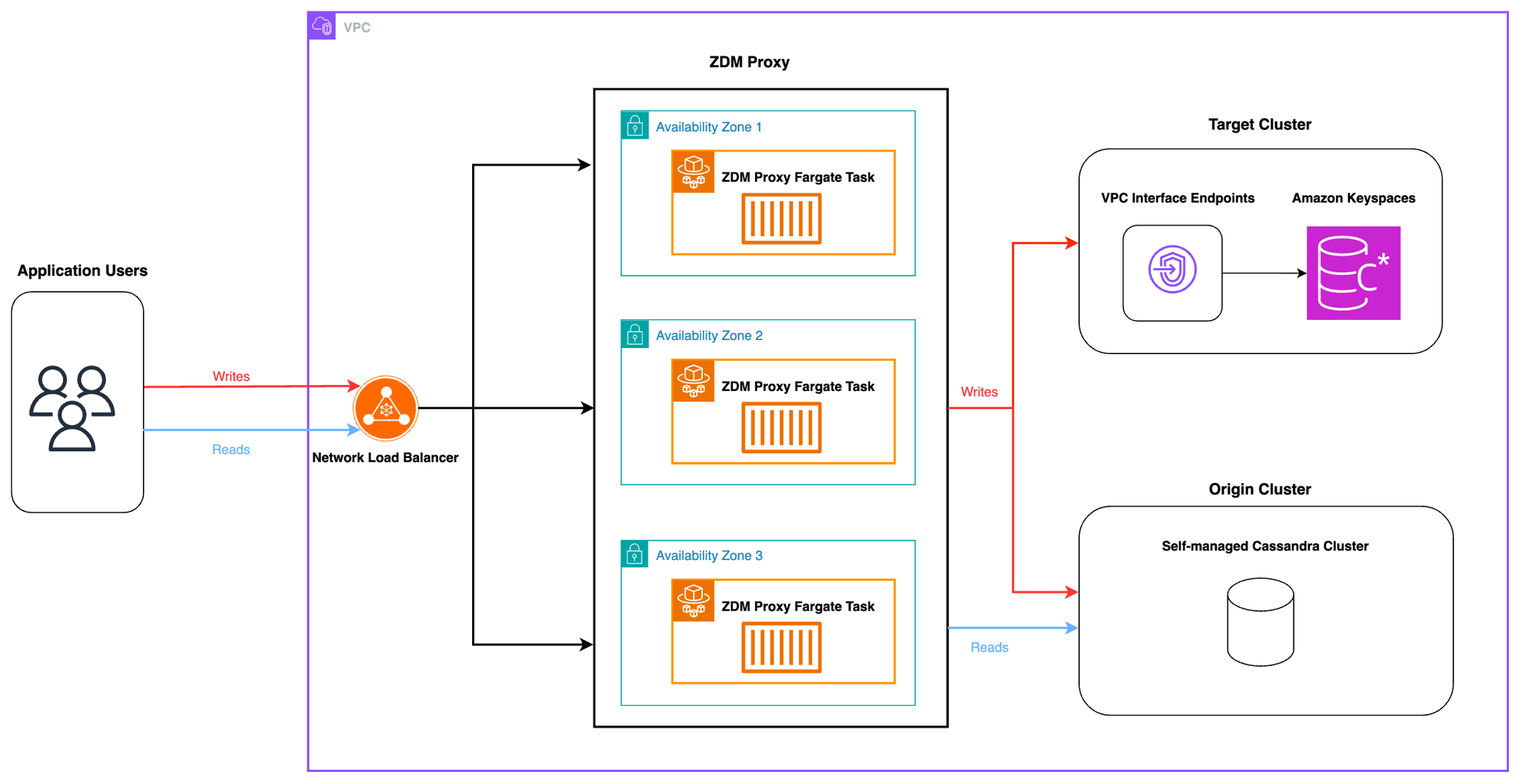
The architecture consists of the following AWS services and components:
| Component | Role and Design Rationale |
| Amazon Keyspaces | Managed, serverless target database. Cassandra-compatible, so no driver or schema changes are required. |
| AWS Fargate on Amazon Elastic Container Service (Amazon ECS) | Runs ZDM Proxy containers without managing EC2 instances. Auto-scales and spans multiple Availability Zones for high availability. |
| Network Load Balancer | Provides a stable, single CQL endpoint for applications. NLB passthrough preserves TLS end-to-end. |
| Amazon Elastic Container Registry (Amazon ECR) | Hosts the ZDM Proxy container image. Integrated with ECS task definitions for secure, versioned image pulls. |
| AWS CloudFormation | Provisions the entire proxy infrastructure (NLB, ECS cluster, task definition, service, security groups) as a single stack for repeatable deployments. |
| Amazon CloudWatch Logs | Captures proxy stdout and stderr logs through the awslogs driver. Use these logs to monitor request routing decisions, connection errors, and secondary write failures during the migration. |
| AWS Secrets Manager | Stores Cassandra and Keyspaces credentials securely. ECS tasks retrieve credentials at runtime, eliminating plaintext secrets in task definitions or environment variables. |
The solution uses NLB over an Application Load Balancer because CQL is a stateful binary TCP protocol. NLB operates at Layer 4, passes connections directly to proxy tasks, and preserves client IP addresses, which are important for Cassandra token-aware routing. The solution uses Fargate over EC2 because it eliminates node management, OS patching, and capacity reservation for what is a temporary migration workload.
Prerequisites
Before you begin, make sure you have the following:
- An AWS account with appropriate AWS Identity and Access Management (IAM) permissions (
ecr:GetAuthorizationToken,ecr:BatchCheckLayerAvailability,cloudformation:CreateStack, andiam:PassRoleat minimum). - An existing Apache Cassandra cluster running in an Amazon Virtual Private Cloud (Amazon VPC).
- Docker installed and running on your build machine.
- The AWS Command Line Interface (AWS CLI) configured with credentials.
- Familiarity with Amazon ECS, CloudFormation, and CQL.
Project structure
The extended ZDM Proxy repository is organized as follows. Each file serves a specific role in building, containerizing, and deploying the proxy to AWS Fargate.
| File | Description |
| Dockerfile | Builds the ZDM Proxy image with socat TLS support, bind-tools for DNS resolution, and the Starfield root certificate required for Keyspaces TLS verification. |
| entrypoint.sh | Container entrypoint that resolves the Keyspaces VPC endpoint, starts a socat TLS proxy on localhost:9142, configures topology awareness from the NLB, and launches the ZDM proxy binary. |
| move-docker-to-ecr.sh | Builds the Docker image locally and pushes it to an Amazon ECR repository. Handles ECR authentication and image tagging automatically. |
| zdm-proxy-cloudformation.yaml | AWS CloudFormation template that provisions the full proxy infrastructure: ECS cluster, task definition, Fargate service, NLB, VPC endpoints, Secrets Manager secrets, and security groups. |
CloudFormation template parameters
The CloudFormation template accepts the following parameters. Review each parameter carefully before deploying, particularly the network configuration values, which must match your existing VPC topology.
Network configuration
These parameters define where the proxy infrastructure is deployed within your VPC. Verify that the selected subnets span at least two Availability Zones for high availability. Also confirm that the security group allows inbound traffic on port 14002 (the ZDM Proxy listen port) from your application tier.
| Parameter | Default | Description |
| VPCId | (required) | The VPC in which the proxy infrastructure will be deployed. Must be the same VPC as your origin Cassandra cluster for low-latency connectivity. |
| PrivateSubnetIds | (required) | List of private subnet IDs for the ECS tasks and NLB. Specify at least two subnets in different Availability Zones. |
| SecurityGroupId | (required) | Security group to attach to ECS tasks and NLB. Must allow inbound traffic on the proxy listen port (14002) from the application tier, outbound to origin Cassandra (port 9042), and outbound to Amazon Keyspaces through a VPC endpoint (port 9142). |
| RouteTableId | (required) | Route table ID associated with private subnets. Required for the S3 gateway endpoint used by ECS for ECR image pulls. |
Proxy configuration
These parameters control the proxy runtime behavior, including the container image, origin cluster connection, proxy listen port, and the number of Fargate tasks to run. The target endpoint (Amazon Keyspaces) is resolved automatically through a VPC endpoint with private DNS enabled. A socat TLS proxy inside each container forwards traffic from localhost:9142 to the Keyspaces endpoint.
| Parameter | Default | Description |
| ECRImage | (required) | Full ECR image URI for the custom ZDM Proxy container image (built and pushed to your own ECR repository in Step 1). |
| ZDMOriginContactPoints | (required) | Comma-separated IP addresses or hostnames of the origin Apache Cassandra seed nodes. Must be reachable from the Fargate tasks over the VPC network. |
| ZDMOriginPort | 9042 | CQL native transport port for the origin Apache Cassandra cluster. Change this only if your cluster uses a non-default port. |
| ZDMProxyPort | 14002 | Port the ZDM Proxy listens on. The NLB listener and application connections use this port. Do not use 9142 (reserved by socat inside the container for Keyspaces TLS forwarding). |
| ServiceReplicaCount | 3 | Number of ECS tasks to run. Start with 3 for workloads up to 5,000 requests per second. Add one task per additional 2,000 requests per second. Monitor ECS CPU and memory CloudWatch metrics and adjust as needed. |
Deployment steps
The repository includes a skill (zdm-proxy-kiro-skill.md) that packages the deployment commands, dual-write test procedure, and common troubleshooting guidance. Use the skill with Kiro, Claude Code, or any AI coding assistant that supports markdown-based skills to deploy and operate the proxy with AI assistance.
Deployment consists of two steps: building and pushing the Docker image to Amazon ECR, then deploying the CloudFormation stack. Run both steps from a machine or CI/CD environment that has the AWS CLI configured with appropriate IAM permissions (ecr:GetAuthorizationToken, ecr:BatchCheckLayerAvailability, ecr:InitiateLayerUpload, cloudformation:CreateStack, and iam:PassRole at minimum).
Step 1: Build and push the Docker image to Amazon ECR
Run the provided shell script to build the ZDM Proxy container image and push it to your ECR repository. The script handles ECR login, image build, tagging, and push automatically. Before running, set the AWS_REGION and ECR_REPO_URI environment variables to match your environment.
After the script completes, verify the push completed successfully:
Expected output: a JSON response listing the image with an imagePushedAt timestamp matching the current time. Common errors at this step include ECR permission denials (verify your IAM principal has ecr:GetAuthorizationToken) and Docker daemon errors (verify Docker is running and the build context is accessible).
Step 2: Deploy the CloudFormation stack
Deploy the infrastructure stack using the AWS CLI. Replace the parameter values with your environment-specific values. The template also accepts origin credentials (ZDMOriginUsername, ZDMOriginPassword) and target Keyspaces service-specific credentials (ZDMTargetUsername, ZDMTargetPassword). The CloudFormation template stores these in AWS Secrets Manager at deploy time, and ECS tasks retrieve them at runtime. For production, pass these values by using the CLI rather than relying on template defaults.
After deployment, retrieve the NLB DNS name from the stack outputs to use as your new CQL connection endpoint:
Common deployment errors include VPC and subnet mismatches, insufficient IAM permissions, and port availability issues. Verify that your subnet IDs are in the correct VPC. Confirm that the deploying role has iam:PassRole for the ECS task role. Check that security group rules allow inbound traffic on port 14002 from the application tier, outbound on port 9042 to the origin Cassandra cluster, and outbound on port 9142 to the Keyspaces VPC endpoint.
Migration phases
A successful zero-downtime migration follows six sequential phases. Each phase has a clear entry condition, set of tasks, and exit criterion that must be met before proceeding. Rushing through phases, particularly the validation phase, is the most common cause of post-cutover issues.
Phase 1: Preparation
Before deploying any infrastructure, assess your current Cassandra workload and verify compatibility with Amazon Keyspaces. Run the Amazon Keyspaces compatibility assessment script against your schema to identify any unsupported CQL features. Key preparation tasks include:
- Inventory keyspaces and tables, including their partition key sizes and row counts.
- Identify peak write throughput (requests per second) to size the Fargate task count.
- Review the Amazon Keyspaces service quotas for your target region and request increases if needed.
- Estimate migration costs using the Amazon Keyspaces pricing calculator, factoring in the 2x write capacity during the dual-write phase.
- Create the target keyspace and tables in Amazon Keyspaces using the same schema DDL as the origin.
Phase 2: Historical data loading with CQLReplicator
Before you enable dual writes, migrate existing data from the origin Cassandra cluster to Amazon Keyspaces. The recommended tool for this is CQLReplicator. CQLReplicator uses Apache Spark on AWS Glue to scan the Cassandra token ring in parallel and write data directly to Amazon Keyspaces.
CQLReplicator preserves write timestamps (USING TIMESTAMP) so that data CQLReplicator writes during historical loading does not overwrite data the proxy writes during the subsequent dual-write phase. Key operational steps:
- Configure CQLReplicator with origin and target connection details and the list of tables to replicate.
- Start with a small table to validate the pipeline before loading production data.
- Monitor replication progress through the CloudWatch metrics published by the Glue job (rows read, rows written, error count).
- Verify row counts between origin and target for each table after the job completes.
- Run CQLReplicator in incremental mode to catch any late-arriving writes before switching to dual writes.
Phase 3: Enable dual writes
After historical data loading is complete and validated, deploy the ZDM Proxy stack (Steps 1 and 2 above) and update your application’s CQL connection endpoint to the NLB DNS name. From this point, writes from the application go to both the origin Cassandra cluster and Amazon Keyspaces simultaneously. Applications authenticate with Keyspaces service-specific credentials. The proxy forwards these to Amazon Keyspaces and uses the separately-configured origin credentials for the Cassandra cluster (controlled by the ZDM_FORWARD_CLIENT_CREDENTIALS_TO_ORIGIN setting).
The proxy handles write fan-out concurrently at the protocol level. Every write request is sent to both the origin cluster and Amazon Keyspaces simultaneously. The client response is gated on the primary cluster’s acknowledgment (origin is the primary by default), so application latency reflects only the primary write path. The proxy tracks the secondary write outcome independently and logs any failures to CloudWatch for monitoring and reconciliation.
Phase 4: Validation
The validation phase is the most critical phase, and you must not shorten it. During this phase, the proxy is configured to perform dual reads: it sends read requests to both the origin and the target, compares the responses, and logs any discrepancies. This validates that data written during Phases 2 and 3 is correct and consistent in Amazon Keyspaces.
Key validation activities and metrics to monitor:
SuccessfulRequestLatency(Keyspaces CloudWatch metric): confirm p99 latency is within acceptable bounds for your application.WriteThrottleEventsandReadThrottleEvents: if these are non-zero, increase Keyspaces provisioned capacity or switch to on-demand mode.SystemErrors: expect zero. Any non-zero count requires investigation before proceeding.- Dual-read discrepancy rate: monitor in the proxy CloudWatch logs. Proceed to cutover only when less than 0.01% of reads show discrepancies.
- Run a periodic sampling job on AWS Lambda that reads a random sample of keys from both clusters and compares results for additional confidence.
- Set up an SQS dead letter queue to capture any write failures from the secondary write path for post-migration reconciliation.
Phase 5: Cutover
Cutover moves read and write traffic to Amazon Keyspaces as the primary target. The two most common strategies are blue-green and canary cutover. In a blue-green cutover, traffic is moved atomically by reconfiguring the proxy to point reads at Amazon Keyspaces and by removing the origin from the write fan-out.
At each step of a canary cutover, monitor the validation metrics for a minimum of 15 minutes before increasing the traffic percentage. If any anomaly is detected, revert by updating the AppConfig flag, which takes effect within seconds.
Phase 6: Decommission
After the cutover has been stable for a defined period (typically 2–4 weeks, depending on your data retention and audit requirements), decommission the ZDM Proxy infrastructure by deleting the CloudFormation stack. Update application connection strings to connect directly to Amazon Keyspaces. Then proceed to decommission the origin Apache Cassandra cluster, verifying backup snapshots are archived according to your retention policy.
Security considerations
Security must be designed into the migration architecture from the start. The following considerations address the most common security gaps in proxy-based migrations.
TLS configuration
Amazon Keyspaces requires TLS for connections (port 9142). In this solution, a socat process running inside each container handles TLS termination. It listens on localhost:9142 in plain TCP and establishes a TLS connection to the Keyspaces VPC endpoint with certificate verification and SNI. The ZDM Proxy connects to socat locally, so no TLS configuration is needed on the proxy itself. For origin cluster TLS, extend the Dockerfile to inject your origin cluster’s CA certificate and configure the proxy with the certificate path. Use AWS Private Certificate Authority (Private CA) for internal CA certificates to avoid managing self-signed certificates at scale.
Credentials management
Do not pass credentials as plain-text CloudFormation parameters in production. The template accepts origin and target credentials as parameters and stores them in AWS Secrets Manager at deploy time. For production deployments, pass credential values through the CLI with --no-echo or inject them from a CI/CD secrets store rather than relying on template defaults. ECS tasks retrieve credentials from Secrets Manager at runtime through the Secrets block, so plaintext values never appear in the task definition or CloudWatch logs.
IAM roles for ECS tasks
Assign a dedicated ECS task role with least-privilege permissions. The task role needs:
secretsmanager:GetSecretValueon the specific secret ARNs for origin and target credentials.logs:CreateLogGroup,logs:CreateLogStream,logs:PutLogEventsfor CloudWatch Logs.ecr:GetAuthorizationTokenandecr:BatchGetImagefor image pulls from ECR.
Network security
Configure security group rules with the principle of least privilege. Configure the ECS task security group to allow the following:
- Inbound port 14002 (ZDM Proxy listen port) from the application tier security group only (not from
0.0.0.0/0). - Outbound port 9042 to the origin Cassandra cluster security group.
- Outbound port 9142 to the Amazon Keyspaces service endpoint (or use a VPC endpoint for Amazon Keyspaces to keep traffic within the AWS network).
Use a VPC endpoint (AWS PrivateLink) for Amazon Keyspaces to verify that Keyspaces traffic stays within the AWS network and does not traverse the public internet, reducing both cost and exposure.
Encryption at rest
Amazon Keyspaces encrypts data at rest by default using AWS owned keys. For additional control, configure customer managed keys using AWS Key Management Service (AWS KMS). Reference the AWS KMS key ARN in your keyspace configuration for full key management and rotation control.
Cost considerations
The dual-write architecture incurs temporary cost for migration. Plan your budget with the following cost components in mind.
| Cost Component | Notes |
| AWS Fargate (ECS) | Per-task vCPU and memory pricing. A 3-task cluster with 1 vCPU / 2 GB memory costs approximately $100/month. Decommission the stack after cutover. |
| Network Load Balancer | LCU-based pricing. At moderate CQL throughput, NLB costs are typically $20–$50/month during the migration period. |
| Data Transfer | Data transfer within the same VPC incurs no charge. Use a VPC endpoint for Keyspaces to avoid data transfer charges to the public endpoint. Cross-AZ traffic between Fargate tasks and origin nodes incurs standard inter-AZ charges. |
| CQLReplicator (Glue) | AWS Glue DPU hours for the historical data loading job. Cost depends on data volume and number of parallel workers. Use spot DPUs to reduce cost by up to 70%. |
The most significant post-migration cost reduction comes from decommissioning the origin Cassandra cluster. EC2 instances, EBS volumes, and the operational overhead of self-managed Cassandra are replaced by the serverless, pay-per-request pricing of Amazon Keyspaces. Use the Amazon Keyspaces pricing calculator to estimate your steady-state costs.
Next steps
You now have the architecture, deployment guide, migration phases, and security and cost frameworks needed to plan and execute a production migration to Amazon Keyspaces. Here are five concrete actions to move forward:
- Assess your current Cassandra workload. Use the Amazon Keyspaces pricing calculator to identify peak write throughput, and map out your keyspaces and table sizes to size the migration correctly.
- Estimate migration costs. Use the Amazon Keyspaces pricing calculator to compare your current Cassandra infrastructure costs against the Keyspaces steady-state cost, and budget for the temporary dual-write and Fargate costs during migration.
- Clone the repository and deploy in a non-production environment. Run through Steps 1 and 2 with a development or staging cluster. This validates the deployment process and builds team familiarity with the tooling before the production migration.
- Plan your migration schedule. Allow sufficient time for each phase, particularly Phase 4 (Validation). A typical production migration runs Phase 4 for a minimum of two weeks before cutover.
- Contact AWS Support or your AWS account team. For large-scale migrations, AWS offers proactive assistance through the Migration Acceleration Program (MAP). Your account team can also connect you with an Amazon Keyspaces specialist for schema review and performance tuning guidance.
Cleaning up
To avoid incurring ongoing charges after you complete this walkthrough, delete the resources you created:
- Delete the CloudFormation stack:
aws cloudformation delete-stack --stack-name zdm-proxy-stack. - Delete the Amazon ECR repository if you no longer need it:
aws ecr delete-repository --repository-name zdm-proxy --force. - If you created Amazon Keyspaces tables for testing purposes only, delete the tables and keyspace through the Amazon Keyspaces console or the AWS CLI.
- Remove any AWS Secrets Manager secrets you created for this walkthrough.
Conclusion
In this post, you deployed a production-ready ZDM Proxy on AWS Fargate using a single CloudFormation stack and reviewed six migration phases from historical data loading to decommission. The proxy intercepts CQL traffic at the network layer to fan out writes to both your origin Cassandra cluster and Amazon Keyspaces simultaneously, with a single-endpoint rollback path available at every stage.
The validation phase is what separates a successful migration from a failed one. Running dual reads long enough to confirm discrepancy rates below 0.01% is the work that gives you confidence at cutover. After the origin cluster is decommissioned, your team stops managing nodes, compaction, and capacity planning entirely, and the operational savings compound from day one.
To get started, clone the repository and run through Steps 1 and 2 against a development or staging cluster. By deploying the stack in a non-production environment first, you can validate the deployment process and build team familiarity with the tooling before your production migration window.