AWS Database Blog
Modernizing document storage for search, scale, and agility
Document storage in a relational database is a natural first choice when it’s already part of the stack. A JSON column or BLOB field keeps API responses, user profiles, and extracted form data in the same database as the transactional data, with no new infrastructure and no new dependencies. That choice holds up until the data has to support search and scale.
The friction starts when queries need to filter by fields within those documents. Searching millions of JSON objects by nested attributes, or filtering by fields that only exist within the stored payload, means pulling entire rows into memory, deserializing them, and filtering in code. Teams build workarounds: ETL pipelines to extract fields into indexed columns, caching layers to reduce repeated reads, and application-side filtering to handle what no single index can serve on its own.
Meanwhile, the database bears the cost in a different way. Filtering by a field inside the payload can’t use the table’s standard indexes. It needs a dedicated index defined for that specific path, and without one the query falls back to scanning and filtering in memory. Vacuum operations slow as row sizes grow. Maintenance windows stretch longer each quarter.
Not every workload needs to filter by fields within the documents. Some only read and write whole records by key, like sessions or shopping carts. Even so, they can outgrow a relational database: at high request volume, writes funnel through a single primary, creating a scaling bottleneck. A larger instance or the added complexity of sharding can relieve it, but both approaches have limits.
In this post, we walk through how to recognize when document data has outgrown relational storage. We then evaluate whether Amazon DocumentDB (with MongoDB compatibility) or Amazon DynamoDB is the right migration target. Finally, we show what a progressive migration looks like without requiring a full cutover.
The architectural mismatch
A product catalog with 5 million rows stores variable attributes as JSON: size, color, weight, brand. The scalar columns (product ID, name, category) are indexed and fast. A field inside the JSON can be indexed too, but only if you create a dedicated index for that specific path in advance. Without one, querying a nested field falls back to a sequential scan regardless of how selective the filter is.
PostgreSQL, for example, offers two ways to index JSON content, and each has limits. A GIN index supports containment and key-existence checks but not range comparisons (such as “battery life greater than 40 hours”) or sorting. An expression index can cover a specific extracted path, but you must define one for every field and query shape you expect, and each adds write overhead. Neither adapts on its own to a schema that varies across rows or to query patterns that change over time. When a query filters and sorts across nested fields that no predefined index covers, the engine scans the full table, reading and parsing each row’s JSON to evaluate the filter. Without an index on that path, the planner also has no statistics about how those values are distributed, so it can’t estimate how selective the filter is. At scale, this is the difference between a fast indexed lookup and a full scan.
There’s a second limit that shows up even when no query reaches inside the document. A workload that reads and writes whole records by key is doing key-value work on an engine built for relational workloads. It still carries the machinery of multi-row transactions, lock management, and a single primary that serializes writes, whether it uses those features or not. Scaling that workload means a larger instance or the complexity of sharding, because the relational model scales writes vertically.
Teams compensate in both directions: ETL pipelines and search sidecars to make documents queryable, read replicas and caching layers to absorb read load, sharding to push past the write ceiling. Each one solves a symptom and adds infrastructure to build, monitor, and keep in sync with the source data.
When migration becomes the safest choice
Most teams tolerate the mismatch for months or years because each workaround solves the immediate problem. The ETL pipeline makes nested fields queryable. The cache reduces repeated deserialization. The search sidecar handles queries the database can’t run efficiently. Individually, each one is a reasonable engineering decision.
The turning point comes when these systems start interacting. A document format change requires updating the ETL mapping, invalidating cached entries, and reindexing the search sidecar. All of it is coordinated across teams, with no shared schema contract to validate against. When a query returns stale results, the debugging path spans four systems. Writes slow down too: updating a single field inside a large JSON payload means rewriting the entire row, generating WAL bloat and increasing replication lag. At 5 million rows, a query that no existing index covers scans the entire table to return the few that match.
Architecture before migration
The following diagram illustrates this architecture. The application reads and writes transactional data to the relational database, reads cached documents from Amazon ElastiCache, and searches Amazon OpenSearch Service. The relational database keeps both stores in sync and feeds an AWS Glue ETL job.
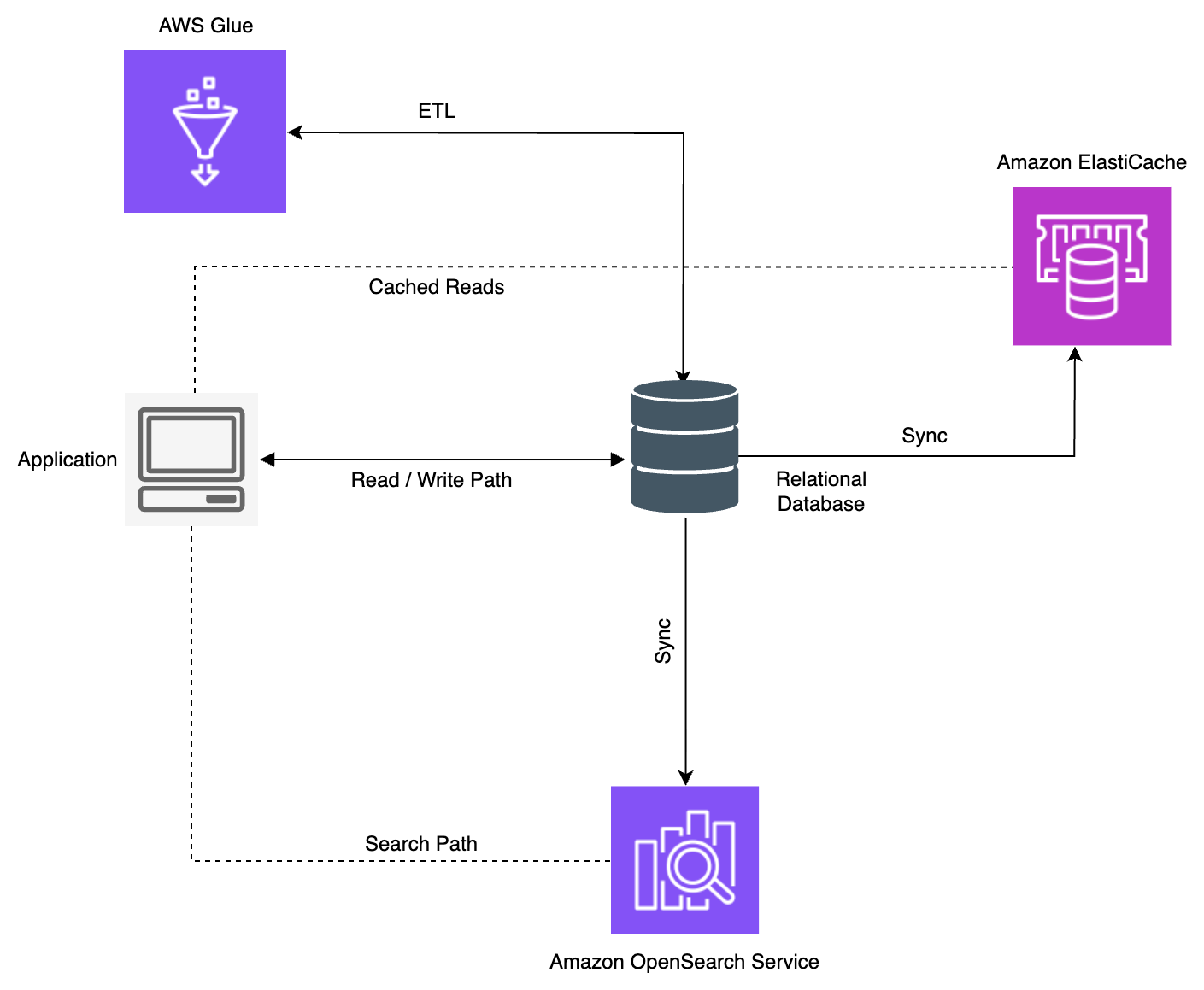
Figure 1: A relational database with ETL, cache, and search workarounds for document data
The clearest signal isn’t a latency number. It’s team velocity. In this architecture, a new feature that touches document data usually requires changes across the workaround stack: update the ETL, adjust the cache TTL, add a field to the search mapping. Engineers spend more time maintaining these systems than building on top of the data. When a new product line or integration arrives that doesn’t fit the existing architecture, extending it becomes more effort than migrating.
These signals indicate that the document data has outgrown what the relational database can efficiently serve. The next decision is where it should go.
Choose your target
The migration isn’t replacing the relational database. It stays for what it does well: transactions, joins, relational data with a fixed schema. The move is narrower: take the document data to a storage model that understands its shape. The right target depends on how the application uses the data.
When the primary need is querying inside documents: Amazon DocumentDB
Consider a product catalog where each item stores variable attributes as a JSON document:
The application needs to filter by attributes.connectivity.bluetooth >= 5.0, aggregate pricing by category, or find products available in a specific region with a specific codec. These queries require indexing on deeply nested, variable-schema fields. Amazon DocumentDB supports indexes on any document path, aggregation pipelines, and ad-hoc queries without requiring schema changes as access patterns evolve.
When the primary need is key-based access at high throughput: Amazon DynamoDB
Consider a shopping cart where each document is accessed by a known user ID:
The application gets and updates carts by user_id. Writes are frequent, latency must stay in single-digit milliseconds, and traffic spikes during sales events. DynamoDB can index non-key attributes through global and local secondary indexes. The index key must be a top-level scalar attribute you define in advance, rather than an arbitrary nested path. For attributes that you haven’t indexed, a filter expression can narrow the results. But it runs after the items are read, so it limits what’s returned rather than what’s read or the read capacity consumed (and associated cost). For workloads where the dominant access pattern is “get by key” and “put by key,” Amazon DynamoDB provides consistent single-digit millisecond performance. It scales horizontally without requiring instance sizing decisions.
The following table summarizes which store fits each access pattern:
| Access pattern | Better Fit | Why |
| Filter and search by fields inside the document | Amazon DocumentDB | Indexes any document path. DynamoDB indexes only top-level scalars, so nested fields are filtered post-read |
| Retrieve and update by key at high throughput | Amazon DynamoDB | Scales writes horizontally at steady latency. Amazon DocumentDB key reads are fast but writes scale vertically |
| Aggregation across documents | Amazon DocumentDB | Native aggregation pipelines supported |
| Flexible, evolving query patterns | Amazon DocumentDB | Ad-hoc queries without predefined keys supported |
The decision comes down to the dominant access pattern: whether the application primarily searches across documents by their content or primarily stores and retrieves individual documents by a known key.
When selecting your target, consider the pricing model differences. Amazon DocumentDB uses instance-based pricing where you pay for provisioned compute and I/O consumed, making it cost-effective for workloads with predictable throughput and complex query patterns. Amazon DynamoDB offers on-demand pricing, where you pay per request, and provisioned capacity for steady, predictable traffic. On-demand can be more economical for spiky or unpredictable key-based access patterns where you want to pay only for what you consume.
Moving document data to Amazon DocumentDB
When the dominant access pattern is querying across documents by their content, Amazon DocumentDB is the natural fit. The data carries over with little change, and its fields, including nested objects and arrays, are indexable as part of the document model.
Note: For how JSON columns map during migration, including the transformation rules that store them as nested documents, see Using Amazon DocumentDB as a target for AWS Database Migration Service.
The data on the target
In the relational database, the product catalog is a row with scalar columns and a JSON column for the variable attributes:
| Column | Type | Indexed | Notes |
| product_id | text | Yes | Primary key |
| name | text | Yes | |
| category | text | Yes | |
| attributes | jsonb | No | Not indexed by default. Each queried field needs its own expression index |
| pricing | jsonb | No | Not indexed by default. Each queried field needs its own expression index |
In Amazon DocumentDB, the same record becomes a native document in a collection. Your data stays the same. You change the model. During migration, you transform the row and its JSON column into one document where every field exists as part of the same queryable structure.
Amazon DocumentDB can index fields inside the document, including nested ones, and query against them directly. You incur costs for each index (each one adds storage and write overhead, and compound indexes work best with three or fewer fields), but you can now index the specific paths your application queries most.
How indexing changes
Consider a realistic catalog query: find SoundMax products with Bluetooth 5.0 or higher, available in black, sorted by price. It combines an equality filter (brand), a range filter (bluetooth), an array membership test (color), and a sort (price).
In PostgreSQL, no single index covers this, because the JSONB index types each handle a different part:
At 5 million rows, the plan combines both indexes and then sorts separately:
PostgreSQL query plan at 5 million rows (shortened, timings removed). It uses both indexes together, then runs a separate step to sort by price.
Each extracted path needs its own expression index, and arrays need a GIN index. GIN can’t help with the range comparison or the sort. When a new query shape appears (a different nested field, a new sort), it needs a new index tuned to it.
In Amazon DocumentDB, the same fields are indexed within one model. Nested paths go in a compound index, and the array field is indexed natively as a multikey index:
At the same 5 million documents, the plan takes the same shape, two indexes intersected, then a separate sort:
Amazon DocumentDB query plan at 5 million documents (shortened, timings removed). It uses both indexes together, then runs a separate step to sort by price.
With a fair index on each side, the query plan follows the same shape: combine two indexes and add a separate sort. The real difference is what it takes to define and maintain those indexes.
In PostgreSQL you build a separate expression index for each scalar path plus a GIN index for the array. When one database has to serve both document search and relational work, teams add ETL and search sidecars to fill the gap. In Amazon DocumentDB you index document paths directly, including nested fields and arrays, in one model, and the document store serves the document access pattern on its own. The decision comes down to model fit and operational surface area, not query speed.
Architecture after migration to Amazon DocumentDB
The following diagram shows the resulting architecture.
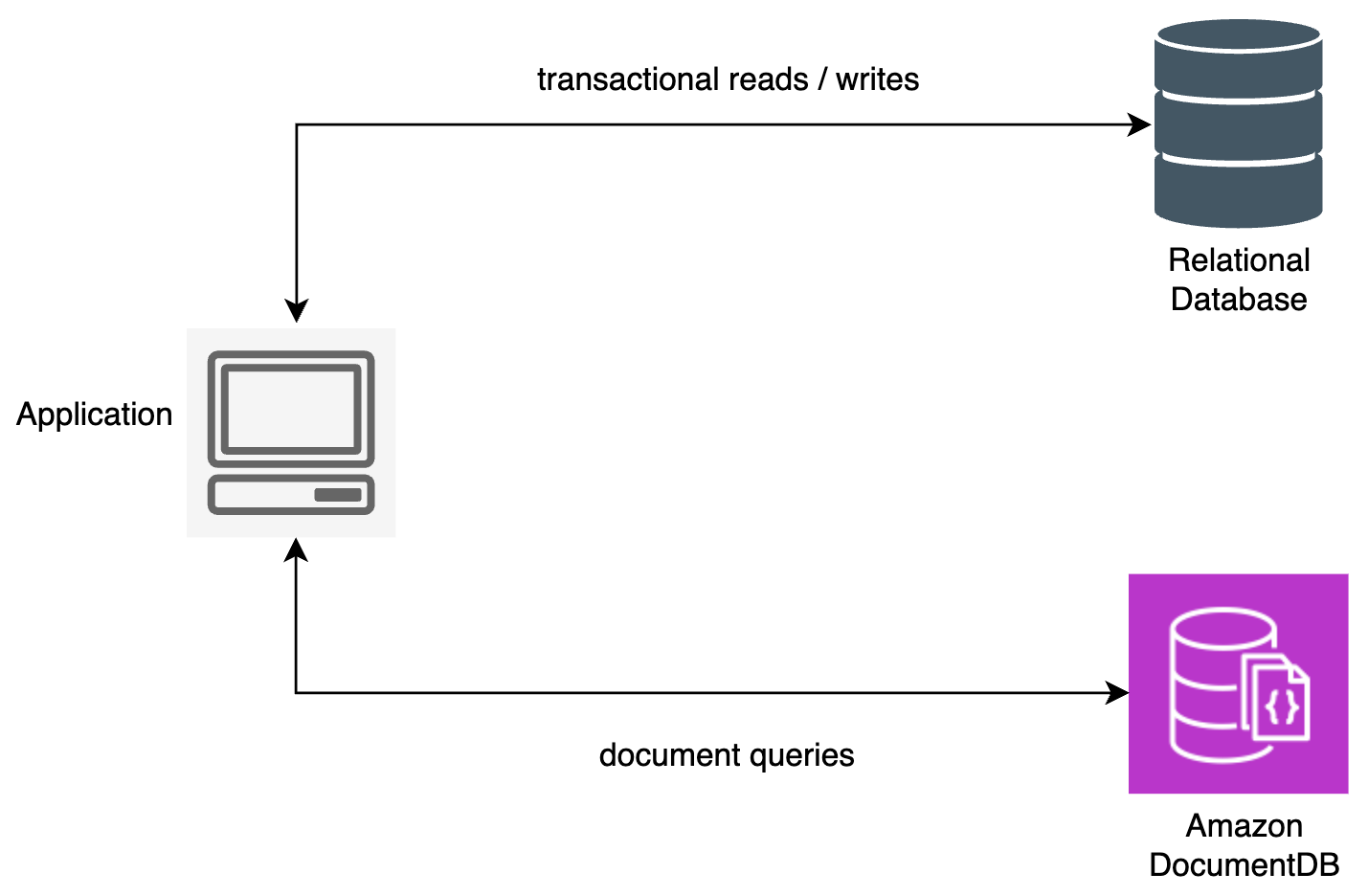
Figure 2: After migration, document data moves to Amazon DocumentDB while the relational database retains the transactional data
Moving document data to Amazon DynamoDB
When the dominant access pattern is retrieving documents by a known key at high throughput, Amazon DynamoDB is the fit. The data is the same, but the model changes: DynamoDB organizes data around the access pattern, so the design starts with the key.
The data on the target
In the relational database, the shopping cart is a row keyed by user, with the cart contents in a JSON column:
| Column | Type | Indexed | Notes |
| user_id | text | Yes | Primary key |
| last_updated | timestamp | Yes | |
| cart | jsonb | No | Not indexed by default. Each queried field needs its own expression index |
Note: DynamoDB caps item size at 400 KB, counting attribute names and values. Most carts stay well under this. But if a cart can grow large (many line items or rich product metadata), split it across multiple items or move large attributes to Amazon Simple Storage Service (Amazon S3). See Best practices for storing large items and attributes in DynamoDB.
In DynamoDB, the same data becomes an item, with the access key promoted to the partition key:
Here user_id is the partition key. The design decision that matters most is choosing a partition key that distributes reads and writes evenly. A high-cardinality key like user_id spreads load across partitions. A low-cardinality key concentrates traffic and creates hot spots.
How the access changes
Retrieving a cart in the relational database meant a query against an indexed column. In DynamoDB, it becomes a direct key lookup:
This returns the item in single-digit milliseconds, and that latency holds as the table grows from thousands to billions of items. The relational database can serve the same lookup quickly at small scale, but it scales vertically and shares resources across every workload on the instance. DynamoDB scales horizontally and isolates this access pattern from the rest of the system.
Architecture after migration to Amazon DynamoDB
The following diagram shows the resulting architecture.
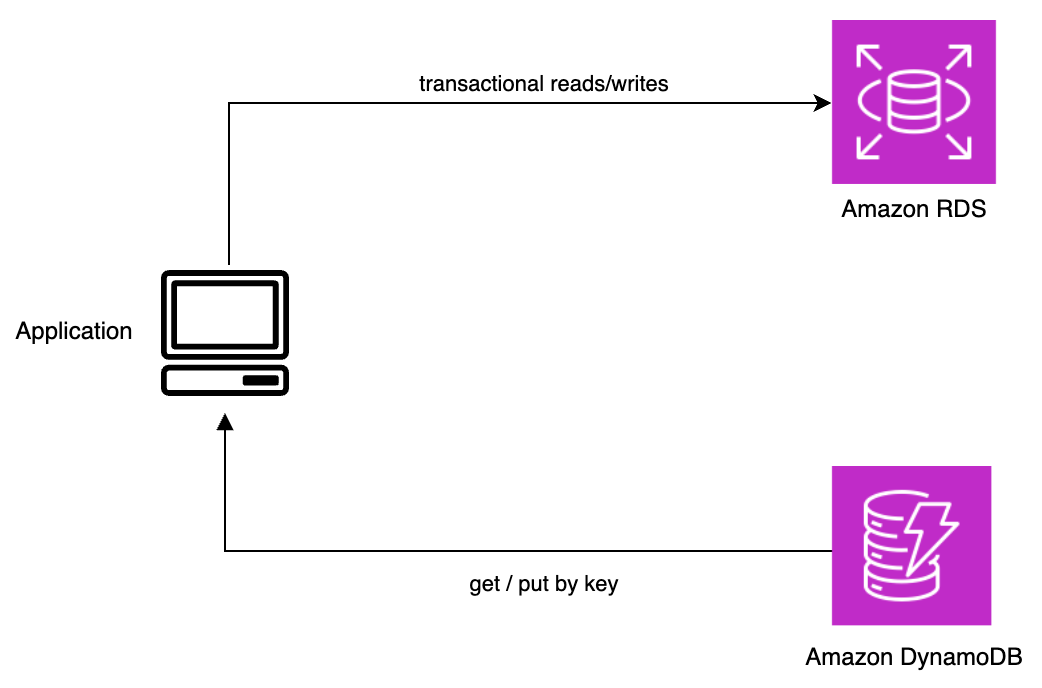
Figure 3: After migration, key-based document access moves to Amazon DynamoDB while the relational database retains the transactional data
Migration approaches
The migration pattern is the same whether the target is Amazon DocumentDB or Amazon DynamoDB. The goal is to move document data incrementally, building confidence at each step, rather than switching everything over at once.
Decide what moves
Not all the data leaves the relational database. What stays is the data the relational model serves best: transactions, joins, and records that must be updated together with strict consistency. The document data whose access pattern fits the target moves as whole documents. Drawing this boundary first gives every piece of data a single home.
Migrate incrementally
The pattern has three phases:
- Bulk load. Copy the existing documents into the target. AWS Database Migration Service (AWS DMS) supports both Amazon DocumentDB and DynamoDB as targets and handles the initial full load.
- Change data capture (CDC). Replicate ongoing writes from the relational source to the target so the two stay in sync while the application keeps reading from the source. Use this window to validate the migrated data against the source. Plan to run your own consistency check on a representative sample rather than assuming the migration tool verifies a document or key-value target for you.
- Shift traffic and cut over. Move users to the target incrementally. A canary release that routes a small percentage of users first contains the impact if something goes wrong. The percentage rises as the target proves stable.
After it serves the full load reliably, make it the primary and keep the relational source as a fallback while you build confidence. A canary is one way to shift traffic. The right strategy depends on your tolerance for risk, downtime, and rollback speed. For a comparison of approaches, refer to Deployment strategies.
Design for coexistence
The end state is hybrid by design. The relational database keeps the transactional data it handles well. The target store holds the document data. The application routes each request to the store that fits the access pattern. This is the intended architecture, not a transitional compromise.
For step-by-step setup of the bulk load and CDC phases, including mapping rules and connection configuration, refer to the following guides:
- Using Amazon DocumentDB as a target for AWS Database Migration Service
- Using an Amazon DynamoDB database as a target for AWS Database Migration Service
Conclusion
In this post, we looked at how to recognize when document data has outgrown a relational database and how to decide where it should go. The signals are familiar: queries that filter inside JSON payloads, key-based access that strains a single instance, and a growing stack of ETL, caching, and search systems built to compensate for a storage model that no longer fits.
The target follows the access pattern. Amazon DocumentDB fits workloads that query across documents by their content, because it indexes fields inside the document and serves those queries directly. Amazon DynamoDB fits workloads that read and write documents by key, because it holds latency steady as the workload scales. In both cases the relational database stays for the transactional work it handles well, and the migration replaces the workaround stack rather than adding to it. A progressive migration (bulk load, change data capture, and an incremental traffic shift) moves the data without a single risky cutover.
To learn more about the services covered in this post, refer to Amazon DocumentDB Developer Guide and Amazon DynamoDB Developer Guide.
For service overviews and pricing, visit Amazon DocumentDB and Amazon DynamoDB.
For a related migration walkthrough, see Migrating relational databases to Amazon DocumentDB with MongoDB compatibility.