AWS Database Blog
Navigating backup and recovery options for Oracle Database@AWS
Oracle Database@AWS (ODB@AWS) delivers Oracle Exadata infrastructure, managed by Oracle Cloud Infrastructure (OCI), directly within Amazon Web Services (AWS) data centers. This offering enables you to migrate Oracle databases to AWS while using the high performance, scalability, and advanced capabilities of Exadata. A critical aspect of running enterprise workloads is maintaining robust data protection. In this post, we walk you through the backup and recovery options available for ODB@AWS services: Oracle Exadata Database Service on Dedicated Infrastructure (ExaDB-D) and Oracle Autonomous AI Database on Dedicated Exadata Infrastructure (ADB-D).
Understanding the backup categories
Before exploring service-specific configurations, you should understand the four primary backup categories available in ODB@AWS:
- Automated backups: Automated Backups are entirely managed by Oracle based on your configuration. Once configured, database backups are taken automatically to your preferred backup destination.
- Manual (standalone) backup: Manual backups are on-demand backups initiated by you using OCI automation. For Exadata Cloud (ExaDB-D), when the storage destination is Object Storage or Amazon Simple Storage Service (Amazon S3), manual backups are always full backups taken at a specific point in time. When the storage destination is Autonomous Recovery Service, manual backups are incremental. For Autonomous Database Dedicated (ADB-D), manual backups are never full backups. When using Object Storage or Amazon S3, manual backups are always cumulative incremental backups. When Autonomous Recovery Service is the storage destination, manual backups are incremental.
- User-managed backups: User-managed backups are also on-demand backups that you initiate using the dbaascli utility or RMAN or any third-party tools. These backups, however, are not synchronized with the Control Plane nor are they integrated with the OCI APIs.
- Long-term backups: Long-term backups are entirely managed by Oracle based on your configuration and typically used for storing backups for longer retention periods up to 10 years with minimum of 90 days.
Choosing your backup destination
ODB@AWS supports three destinations for automated backups, each offering distinct advantages.
- Amazon S3: This option allows customers to retain backups within an AWS Region. S3 is designed to provide 99.999999999% durability and 99.99% availability of objects over a given year and is backed with Service Level Agreement.
- OCI Object Storage: Oracle Object Storage is designed to be highly durable, providing 99.999999999% (Eleven 9s) of annual durability. The service is designed for 99.9% availability. With this option, the backups are stored in OCI parent region.
- Autonomous Recovery Service: With this option, customers have the choice of storing backups within AWS or OCI regions. Autonomous Recovery Service provides a monthly uptime commitment of 99.9%, as defined in the Oracle Cloud Service Descriptions. With real-time data protection, Autonomous Recovery Service enables customers to achieve a sub-second RPO, minimizing the possibility of data loss.
The following table summarizes different backup options supported for each of the Oracle database service described in the preceding sections:
| Oracle Database service | Automated Backups | Manual Backups | User-managed Backups | Long-Term Backups |
| Oracle Autonomous AI Database on Dedicated Exadata Infrastructure | Yes | Yes | No | Yes |
| Oracle Exadata Database Service on Dedicated Infrastructure | Yes | Yes | Yes | No |
Architecture: To understand the basic components of Oracle Database@AWS, refer to the Architecture and for network design, refer to Network Design with Oracle Database@AWS.
The following architecture shows topology for Oracle Database@AWS with backup options.
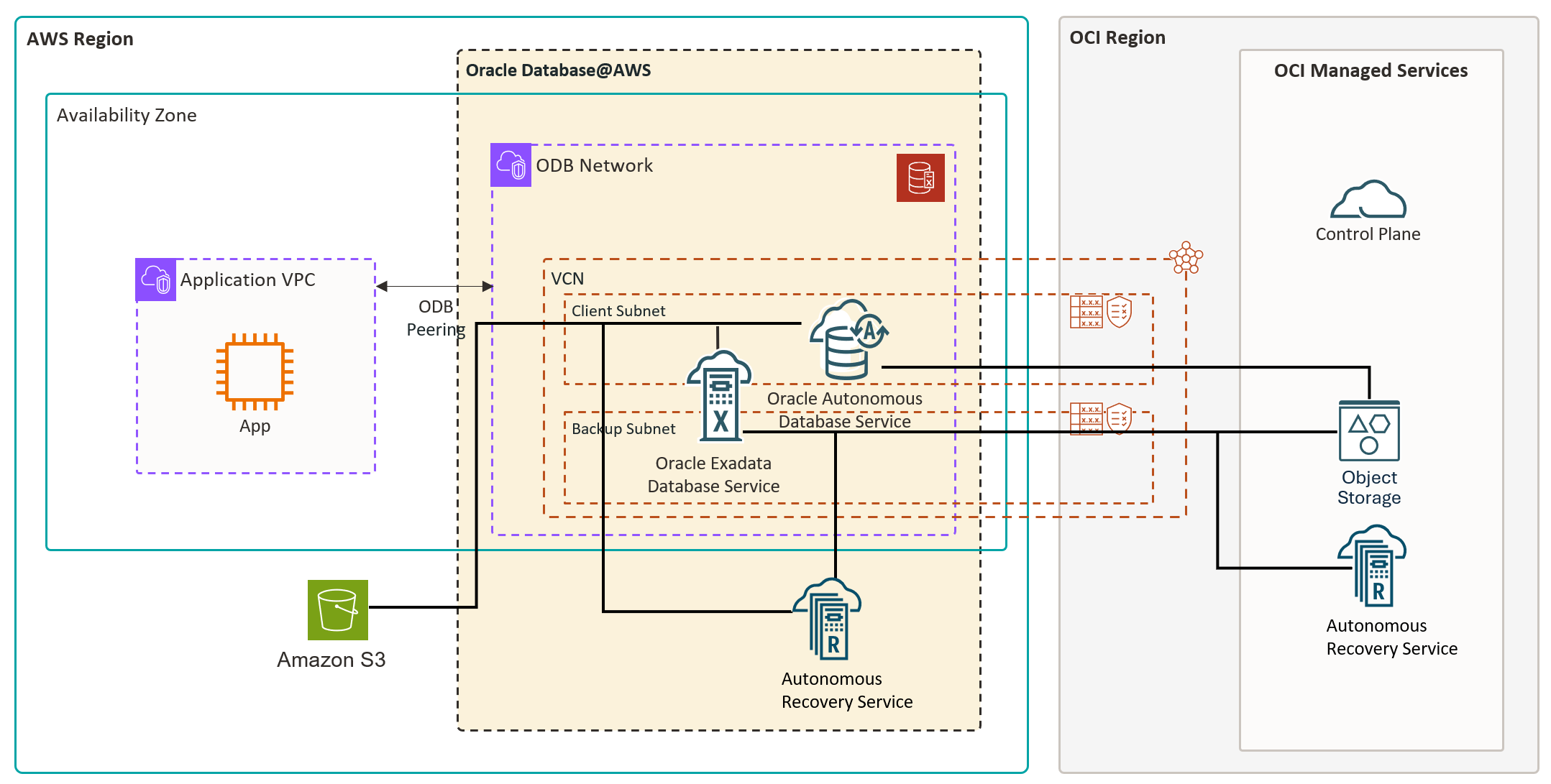
The following table summarizes different backup options, supported backup destination, and retention period for both the Oracle database services in Oracle Database@AWS.
| Service | Backup Type | Backup Destinations | Retention Period |
| Oracle Autonomous AI Database on Dedicated Exadata Infrastructure | Automated | Amazon S3 (Default) (Supports retention lock & Cross-region restore) | Between 7 and 95 days |
| OCI Object Storage (Supports Cross-region backup copy, Cross-region restore & retention lock) | Between 7 and 95 days | ||
| Autonomous Recovery Service (supports retention lock) available within AWS | Between 7 and 95 days | ||
| Manual | Same backup destination as the automatic backup destination selected during the Create Autonomous Container Database step. | Inherited from the Autonomous container database backup retention value. | |
| Long-term backups | Long-term backups are sent directly from the database to Amazon S3 when automated backups are configured with S3 or Autonomous Recovery Service. When the automated backup destination is Object Storage, long term backups are stored in Object Storage. | 90 days to 10 years | |
| Oracle Exadata Database Service on Dedicated Infrastructure | Automated | Amazon S3 (Default) (Supports Cross-region restore) | Between 7 and 60 days |
| OCI Object Storage | Between 7 and 60 days | ||
| Autonomous Recovery Service (supports retention lock) available within both AWS and OCI | Protection Policy
Bronze: 14 days Silver: 35 days (default) Gold: 65 days Platinum: 95 days User defined: 14 days – 95 days |
||
| Manual | Stored in the same backup destination as the automatic backup destination selected during the Create Exadata Database step. | Standalone backups are not subject to automatic backup retention policies. They are kept in the selected backup destination until you decide to delete them. | |
| User-managed backups | Amazon S3, Amazon FSx, Amazon EFS, Rubrik, Data Domain, Commvault, NetBackup, and others | User-managed | |
| Long-term backups | Currently not supported | Not applicable |
Let’s take a deeper look at each of these options and explore how they can be configured for both Oracle Database services described previously.
Exadata Database Service on Dedicated Infrastructure
Exadata Database Service has the following options for Oracle Database Backup and Recovery operations. These options are mutually exclusive.
Option 1: Automated backups
Automated backups are Oracle-managed backups that integrate with Amazon S3, OCI Object Storage, and Autonomous Recovery Service, and are fully managed by OCI. Automated backups are enabled by default, but you can choose to disable them during database provisioning or at any point afterward if they are not required. AWS and Oracle recommend using Oracle-managed automatic backups for your databases.
Oracle Database@AWS provides the following three choices as the backup destinationfor configuring Automatic backups on Oracle Exadata Database Service on Dedicated Infrastructure from the OCI console. These options are mutually exclusive.
- Amazon S3
- OCI Object Storage
- Autonomous Recovery Service
Let’s take a look at how to configure Automatic Backups for each of the destinations described previously by following the following steps while creating an Exadata Database.
Amazon S3
When you create an ODB network, Oracle Database@AWS automatically configures network access for Oracle managed backups to Amazon S3. OCI configures necessary DNS entries and security lists. These configurations allow traffic between the OCI Virtual Cloud Network (VCN) and Amazon S3.
To enable Automatic backups to Amazon S3 from OCI Console refer to Backup Exadata Database.
Object Storage
To enable Automatic backups to Object Storage from OCI Console refer to Backup Exadata Database.
Autonomous Recovery Service
Autonomous Recovery Service offers real-time data protection, allowing protected databases to continuously stream redo to the service and achieve sub-second RPO, minimizing the risk of data loss. Real-time data protection is an optional extra-cost feature. In addition, the service provides automated backup orchestration, continuous backup validation, optimized recovery workflows, and policy-driven lifecycle management. These capabilities reduce operational overhead and provide reliable, consistent database protection.
Autonomous Recovery Service supports Oracle Database@AWS and provides the flexibility to store backups in the same cloud provider location where your database resides. Autonomous Recovery Service creates protected databases and related backups in OCI by default. You can optionally override this default behavior for your Oracle Database@AWS.
If you enable the Store backups in the same cloud provider as the database option for protection policy, the policy-linked protected database and backups will be stored in the same cloud provider location where the Oracle Database is provisioned. For example, for Oracle Database@AWS, Autonomous Recovery Service stores the associated protected database backups within AWS if you have selected the Store backups in the same cloud provider as the database option in the protection policy. Check the Prerequisites section to verify that you have created the necessary policy and also other requirements before proceeding to Backup Exadata Database for Automatic Database Backups using Autonomous Recovery Service. These prerequisites apply only to Oracle Database@AWS deployments created before October 7th 2025, the General Availability (GA) date for Autonomous Recovery Service on Oracle Database@AWS. Deployments (ODB network) created after GA will have these prerequisites automatically configured during deployments.
If you do not select the Store backups in the same cloud provider as the database option for a protection policy, the policy-linked protected database and backups will be stored in OCI.
To enable Automatic backups to Autonomous Recovery Service from OCI Console refer to Backup Exadata Database.
Option 2: Manual backup
Standalone backups are Oracle Database backups stored in the same backup destination as the automatic backup destination selected during the Create Exadata Database step. Standalone backups are not subject to automatic backup retention policies when stored in Object Storage or Amazon S3. They remain in the selected backup destination until you choose to delete them. When using Autonomous Recovery Service as the storage destination, standalone backups follow the retention period defined by the protection policy.
To create manual backup from the OCI console refer to Backup Exadata Database.
Option 3: User-managed backups to Amazon S3 in Oracle Database@AWS
With Oracle Database@AWS, you can create user-managed backups (on-demand backups) of your database. You back up your data using dbaascli or RMAN and store it in your Amazon S3 buckets, Amazon FSx, Amazon Elastic File System (Amazon EFS), Object Storage, local filesystem or any other NFS mounts. You have full control over backup scheduling, retention policies, and storage costs while maintaining the managed service benefits of Oracle Database@AWS.
Backups can be sent to various destinations, including local filesystem, OCI Object Storage, NFS mounts depending on how the system is configured. User-managed backups complement the AWS managed backup solutions provided by Oracle Database@AWS. You can use manual backups for compliance requirements, cross-Region disaster recovery, or integration with existing backup management workflows. To enable user-managed backups, refer to Backing up in Oracle Database@AWS.
Example:
You can also use third-party tools like NetApp, CommVault, Rubrik to backup database on Exadata Database service using RMAN in Oracle Database@AWS.
Restore database options
In this section, let’s explore various database restore options from the backups discussed previously:For Exadata database on dedicated infrastructure you have the following restore options:
- Container Database (CDB) Point-in-Time Restore
- Pluggable Database (PDB) Point-in-Time Restore
- Restore from Automatic or Standalone Backup
You can restore to:
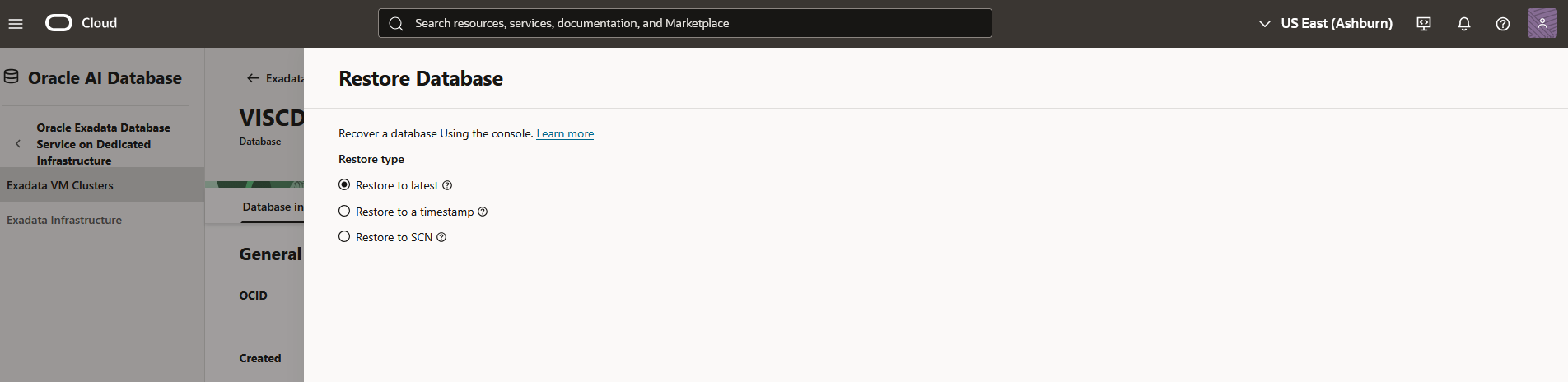
- Restore to latest: Restores the database to the last known good state with the least possible data loss.
- Restore to a timestamp: Restores the database to the timestamp specified.
- Restore to SCN: Restores the database using the SCN specified. This SCN must be valid.
- Cross-Region restore: Cross-Region restore for Exadata Databases enables you to use Amazon S3–based automated backups to perform database restores across AWS Regions.
| Oracle Database service | Method | Restore to latest | Restore to a timestamp | Restore to SCN | In-place/Out-of-place restore |
| Oracle Exadata Database Service on Dedicated Infrastructure | Container Database (CDB) Point-in-Time Restore | Yes | Yes | Yes | In-place |
| Pluggable Database (PDB) Point-in-Time Restore | Yes | Yes | No | In-place | |
| Restore from Automatic or Standalone Backup (All or Selective PDB’s) | N/A | N/A | N/A | Out-of-place | |
| Cross-region restore from S3–based automated backups | Yes | N/A | N/A | Out-of-place |
For out-of-place restore, you can choose same or different compartment, Exadata Infrastructure, VM cluster but within the same tenancy.
Autonomous AI Database on Dedicated Infrastructure
Autonomous AI Database on Dedicated Exadata Infrastructure automatically backs up your database for you. The retention period for automated backups is up to 95 days based on the Backup Retention Policy chosen for the Autonomous Container Database (ACD). You can restore and recover your database to any point-in-time in this retention period.
Autonomous AI Database supports both automatic and manual backups. It even lets you create long-term backups that are retained beyond the backup retention policy defined at an ACD level. While backing up a database, the database is fully functional. However, during the backup, life cycle management operations are not allowed. For example, stopping the database is not allowed during the backup. Terminating an Autonomous Database does not delete backups stored in Object Storage or Amazon S3 or Autonomous Recovery Service. Automatic backups are retained for a minimum of 72 hours or for the full retention period selected. Long-term backups are retained until they are explicitly deleted, expire, or only after they expire when ACD Retention Lock is enabled.
Option 1: Automated backups
By default, Automated Backups are enabled, but you can disable automatic backups while provisioning an ACD from the Oracle Cloud Infrastructure (OCI) console. After provisioning is completed with automatic backups enabled, you cannot disable them for an ACD.
AWS and Oracle recommend using Oracle-managed automatic backup for your databases.
Oracle Database@AWS provides the following three choices as the backup destination for Autonomous Database on Dedicated Infrastructure in the OCI console.
- Amazon S3 (Default)
- OCI Object Storage
- Autonomous Recovery Service
Amazon S3
To enable Automatic backups to Amazon S3 from OCI Console refer to Backup Autonomous AI Database.
Object Storage
To enable Automatic backups to object storage from OCI Console refer to Backup Autonomous AI Database.
Option 2: Manual backups
In addition to the backups created by Autonomous Database automatically, you can also create on-demand manual backups from the Oracle Cloud Infrastructure (OCI) console. For example, if you want to take a backup before a major change to make restore and recovery faster. These backups are retained up to 95 days depending on the backup retention policy (period) chosen for the ACD. Manual backups are cumulative incremental backups containing all the incremental backups from the last full backup. Manual backups are generally taken before major milestones like go-live for faster restore and recovery if needed and database cloning (Dev/Test).
Option 3: Long-term backup
Apart from the regular on-demand backups, you can also createlong-term backups for an Autonomous Database from its details page on the OCI console. Long-term backups are Oracle Database backups sent directly from the database to Amazon S3 when the ACD backups are configured with S3 or Autonomous Recovery Service or directly to Object Storage when the ACD backups use Object Storage. Long-term backups are retained beyond the backup retention policy (period) defined at the ACD level. While creating a long-term backup, you can specify its retention period anywhere from90 days to 10 years.
Oracle Database@AWS doesn’t support user-managed backups for Autonomous Database on Dedicated Infrastructure. To enable Long-Term Backup from OCI Console refer to Backup Autonomous AI Database.
Types of backups
The type of backup varies depending on the database service and storage destination. Understanding the differences between full, incremental, and cumulative incremental backups helps you choose the option that best fits your use case.
Full backup: A backup that captures all data blocks in the database at the time of the backup.
Incremental backup: A backup that captures only the changed blocks since the most recent prior backup (full or incremental).
Cumulative incremental backup: A backup that captures all changed blocks since the last full backup, regardless of how many incremental backups have been taken in between.
| Platform | Backup operation | Backup destination | Backup type | RPO |
| ADB-D | Automated | Object Storage | Weekly Full, Incremental Daily, Archive log every 15 minutes | 15 Minutes |
| Amazon S3 | Weekly Full, Incremental Daily, Archive log every 15 minutes | 15 Minutes | ||
| Autonomous Recovery Service | Full for the first time, Incremental forever, Archive log every 15 minutes. | 15 Minutes | ||
| Manual | Object Storage | Cumulative Incremental | N/A | |
| Amazon S3 | Cumulative Incremental | N/A | ||
| Autonomous Recovery Service | Incremental | N/A | ||
| Long-Term Backups | Object Storage | Full | N/A | |
| Amazon S3 | Full | N/A | ||
| ExaDB-D | Automated | Object Storage | Weekly Full, Incremental Daily, Archive log every 30 minutes by default, but you can reduce it to 15 minutes. | 30 Minutes |
| Amazon S3 | Weekly Full, Incremental Daily, Archive log every 30 minutes by default, but you can reduce it to 15 minutes. | 30 Minutes | ||
| Autonomous Recovery Service | Full for the first time, Incremental forever, Archive log every 30 minutes. Redo logs streamed in real-time enabling RPO of less than one second when real time data protection is enabled | With real-time data protection, the RPO is less than one second. Without real-time data protection, it is 30 minutes. | ||
| Manual | Object Storage | Full | N/A | |
| Amazon S3 | Full | N/A | ||
| Autonomous Recovery Service | Incremental | N/A | ||
| Long-Term Backups | Not supported | N/A | N/A |
Clone databases in ADB-D:
Autonomous Database provides flexible cloning capabilities that allow you to quickly create new database instances for development, testing, analytics, or data movement scenarios without impacting the source environment. Cloning creates a new Autonomous Database that is logically independent but based on the state of an existing database.
Full clone: Full Clone creates a complete copy of the source database, including all data, metadata, and configurations, resulting in a fully functional duplicate that behaves exactly like the original.
Metadata clone: A Metadata Clone, by contrast, copies only the database metadata (such as schemas, tables, users, roles, and other structural definitions) without including any of the data stored in those objects. Metadata clones are ideal for rapidly creating consistent schema-only environments for development or testing while minimizing storage consumption and clone creation time.
| Oracle Database service | Method | Database Instance | Backup Point in Time | Backup from list | Latest Backup Timestamp |
| Oracle Autonomous AI Database on Dedicated Exadata Infrastructure | ADB Full Clone | Yes | Yes | Yes | Yes |
| ADB Metadata Clone | Yes | No | No | No | |
| ACD Full Clone | All ADB in an ACD | No | No | Yes |
Restore database options
In this section, let’s explore various database restore options from the backups discussed previously:For Autonomous database on dedicated infrastructure you have the following restore options:
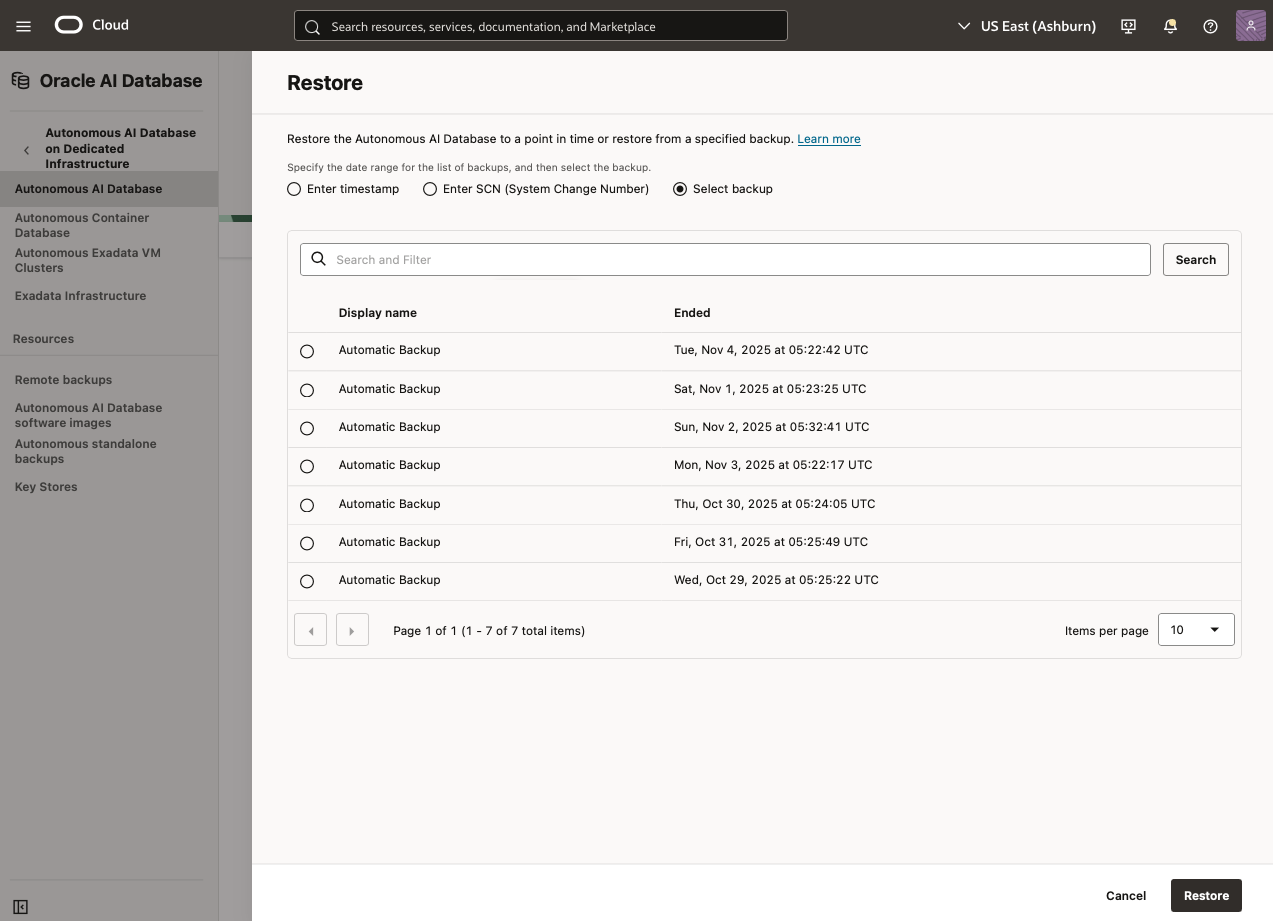
You can restore the database using one of the following options:
- Use a specific backup for restoring the database
- Use a timestamp for point in time recovery from the OCI console
- Use a specific System Change Number (SCN) for restoring the database from the OCI console
The database goes into the unavailable state while restore is in progress. You cannot connect to the database in this state. The only life cycle management operation supported in unavailable state is terminate. When the restore operation finishes, your database is opened in the same state as before restoration. For all three types of restore (by SCN, by timestamp or by using specific backup) an SCN will be returned when the restore is completed.
| Oracle Database service | Method | Restore to Selected Backup | Restore to a timestamp | Restore to SCN | In-Place/Out-of-place restore |
| Oracle Autonomous AI Database on Dedicated Exadata Infrastructure | Restore from Automatic Backup(supports PITR) | Yes | Yes | Yes | In-Place |
| Restore from Manual Backup | Yes | N/A | N/A | In-Place | |
| Restore from long-term backup | Yes | N/A | N/A | Out-of-place | |
| Cross-Region Restore from Amazon S3 & OCI OSS–based automated backups | Yes | N/A | N/A | Out-of-place |
Built-in security and encryption
Transparent Data Encryption (TDE) protects not only database data files but also all backups created from the database. TDE is enabled by default and mandatory for Autonomous Database and Exadata Database. Every backup, whether they are stored in OCI Object storage, Amazon S3 or Autonomous Recovery Service, is automatically encrypted using the same TDE master encryption key that protects the database. TDE master key can be controlled by using one of the following two ways:
- Oracle managed keys
- Customer managed keys:
-
- OCI Vault
- AWS Key Management Service (AWS KMS) (only supported for ExaDB-D)
- Oracle Key Vault (OKV)
-
Oracle-managed keys
With Oracle-managed keys, Oracle automatically creates, rotates, and secures the TDE master key used to encrypt database blocks and backups.
Backup implications:
- All backups stored in Object Storage, S3, or Recovery service are fully encrypted by default.
- Backup data cannot be decrypted without access to the Oracle-managed TDE master key.
- Perfect for customers who prefer zero operational overhead for key lifecycle management.
- Works across all backup destinations.
Customer-managed keys
(OCI Vault or AWS KMS)Customers may choose to manage the TDE master key themselves using OCI Vault or Oracle Key Vault (OKV) or AWS KMS.
Backup implications:
- The database encrypts all backup data using a TDE master key controlled by the customer.
- Access to backups requires access to your Vault or KMS key, giving you full control over encryption, rotation, disabling, and deletion.
- Disabling or deleting the key instantly renders all associated backups unreadable. This is useful for compliance but requires careful governance.
- Provides strong auditability and alignment with enterprise security policies.
Pricing
For the latest pricing information on backup costs for each destination, refer to the Oracle Database@AWS Pricing page.
When using Amazon S3 as a backup destination, there is a data transfer cost through VPC Lattice, for more information refer to the Amazon VPC Lattice pricing page.
The Recovery Service uses a virtualized GB (vGB) for consumption calculations, which is the sum of the storage consumption that would be used by weekly full backups, daily incremental backups, and archived redo log backups during a calendar month.
Best practices
- Oracle recommends configuring automated backups especially for production environments for operation efficiency.
- Configure the backup retention period as per business requirements and review the retention periods periodically and adjust as necessary.
- For ExaDB-D deployments, schedule the backup window during non-business hours to reduce performance impact so that backups run when system activity is minimal.
- Address strict backup immutability requirements using protection policies with retention lock to guard backups from creation to the end of their retention period. This eliminates any possibility of early deletion, even by a privileged user in Exadata database service on dedicated infrastructure with Recovery Service as backup destination.
- For Autonomous AI Databases, use the built-in clone feature to refresh non-production environments (full clone or metadata clone).
- For ExaDB-D deployments, review manual and user-managed backups and delete them if they are not needed.
- Take long-term backups for data that requires longer retention periods ranging from 90 days to 10 years.
- To achieve a near-zero RPO for Oracle databases, use the real-time data protection feature within the Autonomous Recovery Service. This feature continuously transfers database transactions and redo logs to the Recovery Service in real-time, reducing potential data loss to less than one second and enabling fast recovery to any point in time. Real-time data protection is an extra cost option.
- For Autonomous AI Databases, enable cross-region backups as a low-cost DR (Disaster Recovery) solution using OCI Object Storage.
- Enabling retention lock retains all ACD and Autonomous AI Database backups (including long-term backups) for the complete retention period. These backups cannot be deleted until the retention period expires. There is a 14-day grace period to disable this setting.
- For Exadata Database Service on Dedicated Infrastructure, If Maximum Availability Architecture Gold or above is configured using Data Guard, as a best practice disable the backups on standby instance for cost optimization. This avoids duplicate storage costs, and backups can be taken from the primary instance. Also, the backup destination on both primary and standby instance must be the same.
Conclusion
In this post, we explored the comprehensive backup and recovery capabilities available for Oracle Database@AWS (ODB@AWS) across both Oracle Exadata Database Service on Dedicated Infrastructure and Oracle Autonomous AI Database on Dedicated Exadata Infrastructure. We discussed the various backup options, including automated, manual, user-managed, and long-term backups, along with supported backup destinations such as Amazon S3, OCI Object Storage, and Autonomous Recovery Service.
We also examined retention policies, restore scenarios, and Point-in-Time Recovery (PITR) options, enabling you to design robust data protection and disaster recovery (DR) strategies tailored to your organization’s RPO and RTO objectives. By using Oracle-managed automation with AWS-native integration, you can achieve enhanced data durability, security, and business continuity, while maintaining operational simplicity and scalability.
To get started, try configuring the backup option that best fits your workload requirements, validate your restore processes, and assess recovery performance in your environment. We encourage you to share your experiences, feedback, and lessons learned in the comments section.