AWS Database Blog
Provisioning DMS Schema Conversion via AWS CloudFormation
AWS Database Migration Service Schema Conversion (DMS SC) converts database objects across heterogeneous systems such as Oracle or SQL Server to PostgreSQL or MySQL. In this post, we show you how DMS SC, with generative AI capabilities, elevates the code conversion experience.
Using the provided AWS CloudFormation template, you can provision all necessary prerequisites including Amazon Virtual Private Cloud (Amazon VPC) configuration, IAM roles, an S3 bucket and begin your code conversion project within minutes.
AWS DMS Schema Conversion (DMS SC)
DMS SC is a free-to-use, fully managed feature of AWS Database Migration Service (AWS DMS). AWS bills you only for the Amazon Simple Storage Service (Amazon S3) storage consumed. Unlike desktop-based tools that require local installation and maintenance, DMS SC provides a fully managed experience within the AWS DMS console.
DMS SC streamlines schema conversion as part of the overall database migration process. The service operates within the AWS DMS console and provides a cloud-native, serverless experience for converting source database schemas to a format compatible with the target engine – such as migrating from Oracle or SQL Server to Amazon Aurora PostgreSQL. DMS SC converts tables, indexes, views, stored procedures, and functions, and provides a conversion assessment summary within the AWS DMS console. This approach handles schema conversion in the AWS environment and eliminates the need to install or maintain separate AWS Schema Conversion Tool (AWS SCT) desktop clients. It removes client-side setup work and reduces friction during early migration planning. While DMS SC shares similar capabilities with AWS SCT, it is suited for cloud-native migration pipelines.
Key features of DMS SC:
- Console-based, no installation needed.
- Serverless and integrated with DMS replication.
- Converts common objects like tables, views, and procedures.
- Provides real-time conversion summaries during DMS task creation.
- Addresses challenges with complex procedural logic through generative AI capabilities.
Overview of DMS SC components
DMS SC integrates with the following AWS services to manage credentials, storage, and access:
- AWS Secrets Manager stores database credentials that DMS SC uses to connect to your source and target databases.
- Amazon S3 stores assessment reports, converted SQL code, and database schema object information.
- AWS Identity and Access Management (IAM) provides two roles: one to access Amazon S3 and another to access Secrets Manager. Configure both roles with a trust relationship similar to the following:
DMS SC configuration
In addition to the underlying AWS services, DMS SC uses these DMS-specific resources:
- Data providers for the source and target databases. A data provider defines the metadata and connection information for the database (engine type, server name, port and more).
- Instance profile. The instance profile defines the network, security, and Amazon S3 settings that DMS SC uses.
- Migration project. The migration project orchestrates the process of converting a source database schema into a format compatible with a target database.
You can configure DMS SC in two ways:
- Manually through the AWS Management Console. Refer to Accelerate your database migration journey using AWS DMS Schema Conversion for a step-by-step guide.
- Using AWS CloudFormation. For information on how to use CloudFormation, refer to Getting started with CloudFormation.
Convert schema with generative AI in DMS SC
DMS SC offers generative AI capabilities for automating the conversion of complex database code. After the DMS SC components are provisioned, you have the option to disable the use of generative AI conversion when doing the conversion. See Converting database objects with generative AI for details on how to disable it during code conversion.
When traditional rule-based logic falls short, the generative AI feature uses Amazon Bedrock along with an intelligent framework to understand, interpret, and rewrite stored procedures, triggers, packages, and user-defined functions into code compatible with the target engine (like PostgreSQL).
What makes it different:
- Instead of rejecting or only converting fragments of complex code, the generative AI model evaluates the logic — checking dependencies and data-flow — and rewrites it in the target engine’s syntax and style.
- It analyzes the structure of the business logic — loops, conditions, exceptions, and dependencies — and translates proprietary PL/SQL or T-SQL patterns into equivalent PL/pgSQL or MySQL-compatible constructs. This helps avoid manually rewriting large sections of procedural code.
- You can review, validate, and adjust the AI-generated code, reducing manual rewrite effort.
Prerequisites
Before deploying the CloudFormation template, ensure the following are in place:
- Network Resources (for VPC-based deployments):
- A VPC with at least two subnets across different Availability Zones.
- Security groups that allow connectivity to your source and target databases. The security groups must include a self-referencing inbound rule so that DMS SC can communicate internally. The security groups must belong to the same VPC where you deploy DMS SC.
- Databases:
- Source database (Oracle or SQL Server) accessible from the VPC or over a public endpoint.
- Target database (Amazon Aurora PostgreSQL or Amazon Relational Database Service (Amazon RDS) for PostgreSQL) accessible from the VPC or over a public endpoint.
- Database credentials (username and password) for both source and target databases.
- AWS Permissions:
- The IAM principal running this CloudFormation template requires permissions to create IAM roles, S3 buckets, Secrets Manager secrets, AWS Key Management Service (AWS KMS) keys, and DMS resources.
Note: For an example of user permissions required to create the preceding resources, see the shared ReadMe file. If your organization restricts these permissions, coordinate with your AWS administrator before deployment.
Create the CloudFormation Stack
The shared AWS CloudFormation template creates all the resources necessary for DMS SC. It assumes you want to analyze and convert an existing SQL Server or Oracle database (source) to an existing PostgreSQL database (target).
To provision all the required resources for DMS SC, complete the following steps:
- Create a stack with new resources (standard).
- Select the attached YAML file and choose Next.
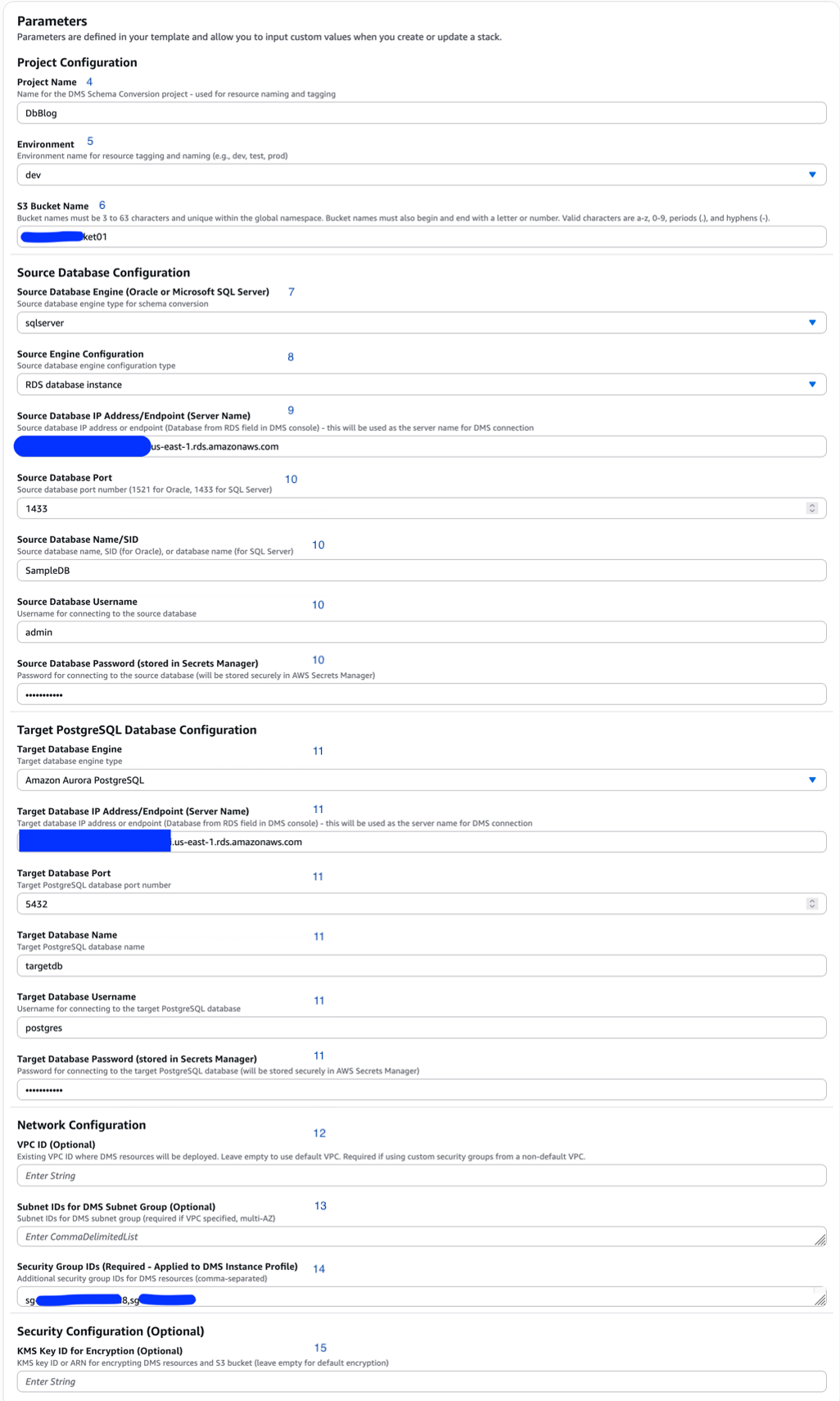
- For Stack name, enter a name. This walkthrough uses
DbBlog. - For Project Name, enter a short logical identifier for the resources this stack provisions. This walkthrough uses
DbBlog. - For Environment, enter an environment name such as
dev,test, orprod. The template uses this value in resource names (e.g.,DbBlog-dev-sc-s3-role) and S3 bucket folder paths to separate resources across environments. - For S3 Bucket Name, choose one of two options:
- Create a new S3 bucket. Provide a unique bucket name.
- Use an existing S3 bucket.
- In the Source Database Configuration section, select the Source Database Engine (Oracle or Microsoft SQL Server). The default is SQL Server.
- For Source Engine Configuration, select whether the source database runs on-premises, on Amazon Elastic Compute Cloud (Amazon EC2), or on RDS. This setting determines how DMS SC connects to your source database. On-premises databases may require VPN or AWS Direct Connect connectivity, while RDS databases use their endpoint within the AWS network.
- For Source Database IP Address/Endpoint, enter the IP or RDS endpoint of the source database server. DMS SC uses this address to connect to the source database.
- Enter the Source Database Port, Name/SID, Username, and Password. The template uses these details to create the source database secret in AWS Secrets Manager.
- Enter the same connection details for the Target Database.
Network configuration
- For VPC ID, enter the VPC ID where DMS SC resources run. Leave this empty to use the default VPC.
- For Subnet IDs, provide a comma-separated list of at least two subnet IDs across different Availability Zones. The template uses these to create a DMS Replication Subnet Group, which defines where DMS places its internal compute resources for schema conversion operations within your VPC. The template then attaches the subnet group to the DMS Instance Profile, enabling DMS to operate inside your private network.
If you leave the Subnet IDs parameter empty, the template skips creating the Replication Subnet Group and the VPC-based Instance Profile. Instead, it creates a publicly accessible DMS Instance Profile (
PubliclyAccessible: true), where DMS manages its own networking without VPC isolation. In this mode, your source and target databases must be reachable over public endpoints.Warning: Public mode is intended for development and testing only. For production workloads, provide a VPC ID and subnet IDs to ensure DMS operates within your private network with proper security group controls.
Note: The template creates a Replication Subnet Group named
<ProjectName>-<Environment>-dms-subnet-group(such as,DbBlog-dev-dms-subnet-group). If a subnet group with this name already exists in your account, stack creation fails. Verify there are no naming conflicts before deployment. - For Security Group IDs, provide one or more security group IDs (from the prerequisites) to allow DMS SC to connect to the source and target databases.
- For AWS KMS Key ID, leave empty to use template-generated encryption for the instance profile and default encryption for S3. Provide an AWS KMS key ID to use customer-managed keys.
- Choose Next again.
- On the review page, verify all parameter values are correct.
- Choose Create stack. Stack creation takes less than 10 minutes.
- When stack creation completes, navigate to the stack (
DbBlog) and choose the Resources tab to review the created resources. The template creates:- Two IAM roles: one to access Amazon S3 and another to access Secrets Manager.
- An S3 bucket with a bucket policy that stores conversion scripts and assessment reports.
- An AWS KMS key that encrypts the replication instance volumes in the DMS instance profile.
- Two secrets in AWS Secrets Manager that store credentials for the source and target databases.
- A DMS instance profile that the DMS migration project uses.
- A DMS source data provider for SQL Server or Oracle.
- A DMS target data provider for Amazon Aurora PostgreSQL or Amazon RDS for PostgreSQL.
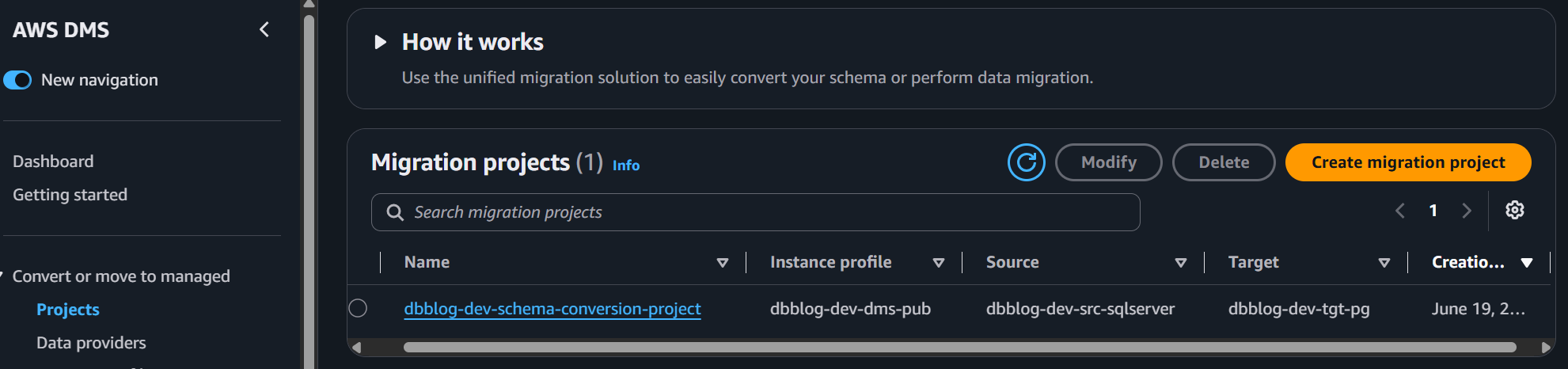
- A DMS SC migration project.
To proceed with schema conversion, open the Database Migration Service in the console and navigate to the DMS SC project as described in the “Generate and view the assessment report” section of the blog post — Accelerate your database migration journey using AWS DMS Schema Conversion.
Clean up
If you no longer need the resources created in this walkthrough, delete the CloudFormation stack to avoid incurring future charges. Open the AWS CloudFormation console, select the stack you created, and choose Delete. This removes all provisioned resources, including the IAM roles, S3 bucket, Secrets Manager secrets, AWS KMS key, and DMS resources.
Conclusion
In this post, we showed you how to use the provided CloudFormation template to expedite provisioning of DMS SC and take advantage of the managed, cloud-native experience and generative AI capabilities that DMS SC provides to accelerate code conversion.