AWS Database Blog
Query billion-scale vectors with SQL: Integrating Amazon S3 Vectors and Aurora PostgreSQL
If you already manage relational data in Amazon Aurora PostgreSQL and need to add similarity search over large embedding collections without migrating everything into your database, this post is for you. Aurora PostgreSQL with pgvector excels at low-latency similarity searches on database-resident vectors, Amazon S3 Vectors provides economical storage for massive vector datasets that may reach hundreds of millions or billions of embeddings. By connecting these services through AWS Lambda, you get a familiar SQL interface for both vector search and relational joins. A CloudFormation template is provided with this post that handles the infrastructure deployment, so you can focus on writing queries rather than wiring services together.
In this post, you’ll learn how to query Amazon S3 Vectors from Amazon Aurora PostgreSQL-Compatible Edition using standard SQL, and how to combine vector similarity results with relational filters in a single query, for example, finding the most semantically similar products and then filtering by price, stock status, or tenant in one SQL statement.
Benefits of integration S3 Vectors and Aurora PostgreSQL
S3 Vectors support basic key-value metadata that is stored alongside embeddings and can be used for simple filtering at query time. However, when your application requires complex SQL filters, multi-table joins, access-control policies, or transactional guarantees over that metadata, Aurora PostgreSQL is the right place to manage it. Meanwhile, S3 Vectors provides highly scalable, cost-optimized storage and indexing for large embedding collections that may grow to hundreds of millions or billions of vectors and require infrequent access. This separation reduces database storage pressure and allows vector search infrastructure to scale independently from transactional workloads. In practice, applications will often first filter candidate records in Aurora using structured data such as tenant ID, document type, or timestamp, and then perform similarity search in S3 Vectors to find the most semantically relevant results.
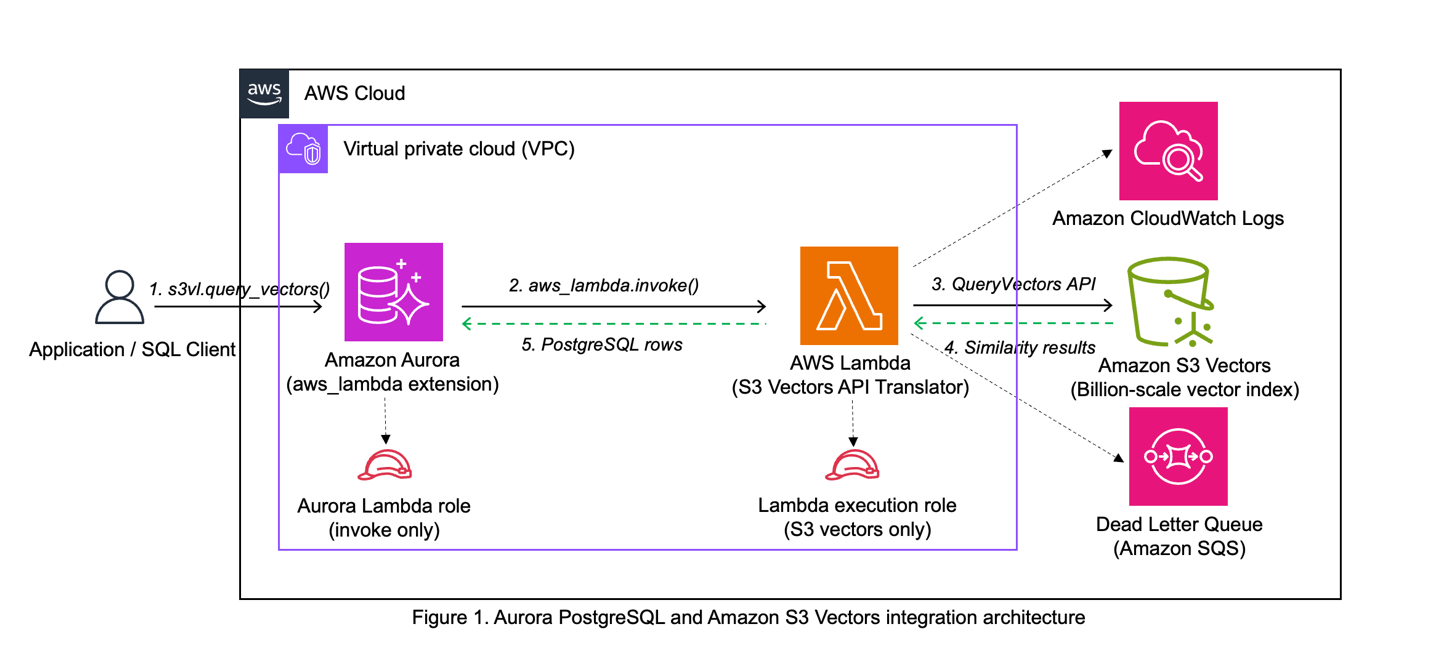
The integration bridges Aurora PostgreSQL to S3 Vectors using the native aws_lambda extension in Aurora, with Lambda serving as the translation layer. When you call s3vl.query_vectors() with your query parameters, the function uses aws_lambda_invoke() to call the Lambda function. Lambda translates the request and calls the S3 Vectors QueryVectors API, formats the response for PostgreSQL, and returns results as a standard PostgreSQL table.
The architecture demonstrates separation of concerns where Lambda handles S3 Vectors API integration while Aurora handles relational data. The architecture provides security isolation through minimal permissions – the Lambda execution role accesses only specific S3 Vectors operations, and the Aurora role can only invoke Lambda. This design allows you to update Lambda code or S3 Vectors indexes independently, making the system maintainable over time.
Security
The sample integration implements IAM role separation (Aurora role invokes Lambda only; Lambda role calls S3 Vectors APIs only), network security (Lambda in Aurora’s VPC with security group restrictions), and database security (s3vl schema access controlled by PostgreSQL permissions). No credentials are stored in the database – all authentication uses IAM roles.
Considerations for data consistency
This integration pattern distributes data across Aurora PostgreSQL and Amazon S3 Vectors, trading ACID guarantees for billion-scale vector search capabilities. Production deployments must address data consistency and synchronization between the two systems. During the synchronization window, queries may return stale results, missing products, or orphaned vector IDs. Production deployments require explicit synchronization processes (batch updates, change data capture, or event-driven updates), embedding version tracking to detect staleness, and application logic that validates results and handles inconsistencies gracefully.
This architecture is appropriate when your use case tolerates eventual consistency (for example, recommendations, content discovery) and vector scale makes database-resident storage impractical. For strong consistency requirements, consider Aurora PostgreSQL with pgvector instead.
Considerations for performance and cost
The Lambda-based approach provides reasonable performance. In testing, expect Lambda invocation latency of 100-500ms including cold starts, while Aurora pgvector delivers single-digit millisecond response times for direct queries. S3 Vectors delivers sub-second query performance for cold queries and less than 100ms for warm queries at billion-vector scale, making it suitable for applications where slightly higher latency is acceptable compared to Aurora pgvector’s single-digit millisecond response times.
From a storage cost perspective, S3 Vectors ($0.06/GB) is more economical than Aurora ($0.10/GB), making this combined approach well-suited for high-volume vector data that needs to be archived and queryable, though not at Aurora’s low latency. Compute costs are harder to generalize as they are highly application-dependent. S3 Vectors’ pay-per-query model favors infrequent use cases, while Aurora’s provisioned clusters spread fixed costs across many queries in high-volume scenarios but could be expensive in low volume situations. Aurora Serverless further blurs this distinction by scaling to zero cost when idle, making it suitable for infrequent use cases as well. We recommend evaluating query volume patterns and latency requirements to best optimize compute costs when choosing between S3 Vectors, Aurora with pgvector, or both.
For production use, optimize Lambda memory allocation, implement caching, and monitor CloudWatch metrics. Consider AWS pricing for Lambda invocations, S3 Vectors queries, and Aurora usage when planning production deployments.
Architecture
The integration uses three components: Aurora PostgreSQL provides SQL functions that invoke AWS Lambda using the native aws_lambda extension, the AWS Lambda function translates PostgreSQL requests into S3 Vectors API calls, and S3 Vectors runs similarity search on large-scale vector indexes.
PostgreSQL Layer creates a dedicated s3vl schema with configuration tables (storing the Lambda ARN and region), an index registry (mapping friendly names to S3 Vectors ARNs), and query functions that mirror S3 Vectors API operations.
Lambda Layer receives JSON payloads from Aurora, converts them to S3 Vectors API calls using boto3, and formats responses for PostgreSQL. The function deploys in your Aurora cluster’s virtual private cloud (VPC) for secure communication.
Amazon S3 Vectors stores vector embeddings and provides three core operations: QueryVectors for similarity search, GetVectors for retrieval by ID, and ListVectors for browsing index contents.
Data Flow
A typical query flows through five key stages:
- SQL query – Call
s3vl.query_vectors()with your index name, query vector, and top_k parameter - Function processing – PostgreSQL validates the parameters, looks up the index ARN, retrieves the Lambda ARN, constructs a JSON payload, and invokes Lambda using Aurora’s aws_lambda extension with IAM role authentication
- API translation – Lambda parses the payload and calls S3 Vectors QueryVectors API
- Similarity search – S3 Vectors performs k-nearest neighbor search and returns results with similarity scores, which Lambda converts to PostgreSQL-compatible JSON
- Result processing – PostgreSQL parses the response and returns a standard table format
Prerequisites
This tutorial assumes the following experience:
- Aurora PostgreSQL – Database administration, extensions (particularly aws_lambda), and SQL query optimization
- AWS Lambda – Creating, deploying, and configuring functions within a VPC
- Vector databases – Basic understanding of embeddings and similarity search concepts
- AWS CLI – Comfortable running commands for IAM roles, Lambda deployment, and resource configuration
- SQL – Writing complex queries including joins and JSON processing
AWS resources:
- Aurora PostgreSQL cluster (version 16.6 or higher, including Aurora Serverless)
- VPC with internet access via NAT Gateway or NAT Instance (required for Lambda to call AWS APIs)
- AWS CLI configured with permissions for S3 Vectors, Lambda, IAM, and RDS operations
- PostgreSQL client (psql) with network connectivity to your Aurora cluster
- Permissions to create IAM roles, Lambda functions, and S3 Vectors resources
- No existing Lambda role associated with your Aurora cluster (Aurora supports only one Lambda role per cluster)
Note: The default VPC in AWS accounts typically lacks the NAT Gateway required for Lambda integration. See the Aurora PostgreSQL Lambda Integration documentation for VPC requirements.
New to these services? Review these guides before starting:
- Getting Started with Amazon Aurora – Learn Aurora basics and connection methods
- AWS Lambda Developer Guide – Understand Lambda functions and VPC configuration
- What is a Vector Database – Learn vector similarity search concepts
Estimated time to complete: 30-45 minutes
Walkthrough
The complete source code, CloudFormation templates, and step-by-step deployment instructions are available in the AWS Samples GitHub repository. The walkthrough below focuses on the key deployment decisions and the SQL queries that demonstrate the integration’s value. For detailed CLI commands, console instructions, and troubleshooting, refer to the repository README.
- Deploy Infrastructure and Configure the Integration
- Populate with Sample Data
- Run Vector Queries
- Combine Relational and Vector Queries
Deploy and configure the integration components
Clone the repository and follow the setup instructions in the README. The deployment covers seven sub-steps: gathering your Aurora cluster details, deploying the CloudFormation stack, associating the IAM role, updating the Lambda function code, installing the PostgreSQL schema, configuring the Lambda integration, and registering the S3 Vectors index. The repository README provides both AWS CLI and AWS Management Console instructions for each sub-step. Here, we summarize the key actions.
Gather Aurora Cluster information
Collect the following configuration values from your Aurora PostgreSQL cluster in the RDS Console before deploying the CloudFormation stack:
| Parameter | RDS Console Location | Notes |
| AuroraClusterArn | Configuration tab → Resource ID | |
| VpcId | Connectivity & security tab | |
| SubnetIds | Connectivity & security tab → Subnets | Select 2–3 across different Availability Zones |
Deploy the stack
Clone the repository and prepare your deployment:
Edit parameters.json with your Aurora cluster details. Each parameter serves a specific purpose: the Aurora cluster ARN identifies your database, VPC and subnet IDs determine where Lambda runs. Remove any comment parameters (prefixed with _) from the example json file.
Your parameter.json should look like:
Deploy the CloudFormation stack (typically completes in 2-5 minutes):
During deployment, CloudFormation creates resources in a specific order to satisfy dependencies. It provisions the S3 Vectors bucket and index, creates IAM roles with least-privilege permissions (Lambda execution role for S3 Vectors APIs, Aurora role for Lambda invocation), deploys the Lambda function in your VPC with a dedicated security group, sets up CloudWatch logging for debugging and monitoring, and a dead letter queue for failed invocations.
Associate Aurora Cluster with Lambda role
After CloudFormation completes, authorize Aurora to invoke Lambda functions using the IAM role. Aurora supports only one Lambda role association per cluster, so make sure you don’t have an existing Lambda role attached:
The role association typically completes within seconds, allowing Aurora to invoke Lambda functions using this role’s permissions.
Update Lambda Function code
The CloudFormation template deploys a placeholder function to satisfy deployment dependencies. Now replace it with the actual implementation that handles S3 Vectors API calls:
The packaging script bundles the Python code with dependencies (primarily boto3 for AWS API calls). The Lambda function acts as a protocol translator, receiving JSON payloads from Aurora and converting them into S3 Vectors API calls.
Configure PostgreSQL
Connect to your Aurora cluster and install the s3vl schema, which provides SQL functions that wrap Lambda invocations:
“Note: If you encounter Lambda invocation failures or timeouts during validation, this typically indicates VPC configuration issues. See the Troubleshooting section for detailed guidance on resolving connectivity problems.”
The configure() function stores the Lambda ARN and region in a configuration table, while validate_config() executes a test invocation to verify connectivity. The register_index() function creates a mapping between a friendly name and the full S3 Vectors index ARN, letting you reference indexes by name in queries.
Populate with sample data
Upload the provided test vectors to your S3 Vectors index:
Testing and combined queries
Now you can perform vector operations by querying S3 Vectors indexes directly from SQL using the test data. You can find similar vectors, retrieve specific vectors by ID, and test with identical vectors to verify similarity scoring.
The query_vectors() function sends your vector to S3 Vectors through Lambda, which performs k-nearest neighbor search using cosine similarity. The top_k parameter controls how many nearest neighbors to return—the examples here use small values for readability, but you can request larger result sets depending on your use case. Results include vector IDs, similarity scores (ranging from -1 to 1, where 1.0 indicates identical vectors and lower values indicate less similarity), and metadata. The entire operation typically completes in 100-500 milliseconds, including Lambda invocation overhead.
Combine relational and vector queries
This is the core reason to integrate these two services: the practical advantage emerges when you combine vector similarity with relational data. This pattern is common in recommendation systems, content discovery, and similarity-based analytics. Create a sample product catalog:
This combined query demonstrates the integration’s key value: you can express complex logic entirely in SQL. The CTE performs vector similarity search to retrieve the top 10 most similar products, then the main query joins these results with your product catalog and applies business filters (in stock and under $500). In production recommendation systems, you might use this pattern to find similar products based on user behavior embeddings, then filter by inventory availability, price range, or user preferences – using native SQL queries, keeping your architecture clean by handling both vector similarity and relational filtering in the database layer.
When combining metadata stored in Amazon Aurora PostgreSQL with embeddings indexed in Amazon S3 Vectors, developers should be aware of a common hybrid-search trade-off. If an application first queries Aurora to filter rows by metadata (for example tenant, document type, or date) and then sends the remaining IDs to a vector similarity search, the search space becomes smaller, which improves performance and ensures strict metadata constraints are respected. However, this pre-filtering can reduce recall if relevant vectors are excluded by the metadata filter before similarity search occurs. In practice this trade-off is often desirable – especially for multi-tenant, security, or domain-restricted workloads – because it guarantees that results meet required metadata conditions while still enabling fast semantic retrieval. Architects should design filters carefully (for example avoiding overly selective predicates when possible) and, when needed, retrieve a slightly larger candidate set and re-rank results to balance recall, precision, and latency.
Troubleshooting
Lambda invocation failures or timeouts typically indicate VPC configuration issues. Run the validation function to check connectivity:
If validation fails with timeout errors, the most common cause is VPC networking misconfiguration (missing NAT Gateway, incorrect security group rules, or Lambda not in the same VPC as Aurora). These are general Aurora-Lambda connectivity issues, not specific to S3 Vectors. See the Aurora PostgreSQL Lambda Integration documentation for detailed VPC requirements and debugging steps.
IAM and permission errors occur when roles are misconfigured. Confirm the Aurora cluster has the Lambda invoke role attached, the Lambda execution role includes S3 Vectors API permissions, and the Lambda function exists in the correct Region.
S3 Vectors API errors suggest permission or connectivity problems. Confirm the Lambda execution role has S3 Vectors permissions, validate the S3 Vectors index ARN is correct, check that S3 Vectors service is available in your region, and confirm Lambda can reach S3 Vectors endpoints through internet access.
Performance issues often stem from Lambda cold starts causing initial delays. Review Lambda timeout settings to accommodate your query complexity. For production deployments, optimize Lambda memory allocation and implement caching strategies.
Cleaning up
To avoid incurring future charges, delete the resources when you’re done testing.
Remove PostgreSQL schema
Connect to your Aurora PostgreSQL database and remove the s3vl schema:
Remove Aurora Cluster IAM Role Association
Before deleting the CloudFormation stack, remove the Lambda role association from your Aurora cluster:
Note: Only perform this step if you used the CloudFormation template to create the Aurora Lambda role. If your Aurora cluster had a pre-existing Lambda role, skip this step.
Delete the CloudFormation stack
Delete the CloudFormation stack to remove all AWS resources created during deployment:
The CloudFormation stack deletion removes all resources created by the stack.
Verify resource cleanup
After cleanup, verify that all resources have been removed:
Note: Your Aurora PostgreSQL cluster remains unchanged and will continue to incur its normal charges.
Conclusion
This post demonstrated how to integrate Aurora PostgreSQL with Amazon S3 Vectors using AWS Lambda so you can query vector similarity results alongside relational data in single SQL queries. The architecture maintains separation of concerns—Aurora handles relational data, Lambda manages API translation, and S3 Vectors performs similarity search at scale—while using IAM roles for least-privilege access and VPC networking for secure communication. Choose Aurora pgvector for single-digit millisecond response times, or S3 Vectors for cost-effective billion-vector scale with sub-second cold query performance and sub-100ms warm query latency. For production deployments, optimize Lambda memory, implement caching, and monitor CloudWatch metrics to balance performance with cost.
To learn more, visit the Amazon Aurora PostgreSQL Vector Database, Amazon S3 Vectors, and AWS Lambda documentation. The complete source code and deployment scripts are available in the AWS Samples repository.