AWS Database Blog
Trigger AWS Lambda functions from Amazon RDS for SQL Server database events
Amazon Relational Database Service (Amazon RDS) for SQL Server is a fully managed database service that makes it simple to set up, operate, and scale SQL Server deployments in the cloud. It handles routine database tasks such as provisioning, patching, backup, recovery, and failure detection. AWS Lambda is a serverless compute service that runs your code in response to events and automatically manages the underlying compute resources, allowing you to build responsive applications without provisioning or managing servers.
Organizations using Amazon RDS for SQL Server increasingly need to integrate their database operations with serverless workflows to build modern, event-driven architectures. The ability to invoke Lambda functions in response to database events enables powerful use cases such as triggering automated workflows, sending real-time notifications, calling external APIs, and orchestrating complex business processes, all while maintaining the separation of concerns between data persistence and application logic. In this post, we demonstrate how to enable this integration by using Amazon CloudWatch subscription filters, Amazon Simple Queue Service (Amazon SQS), and Amazon Simple Notification Service (Amazon SNS) to invoke Lambda functions from RDS for SQL Server stored procedures, helping you build responsive, data-driven applications.
Solution overview
The following diagram illustrates the solution architecture.
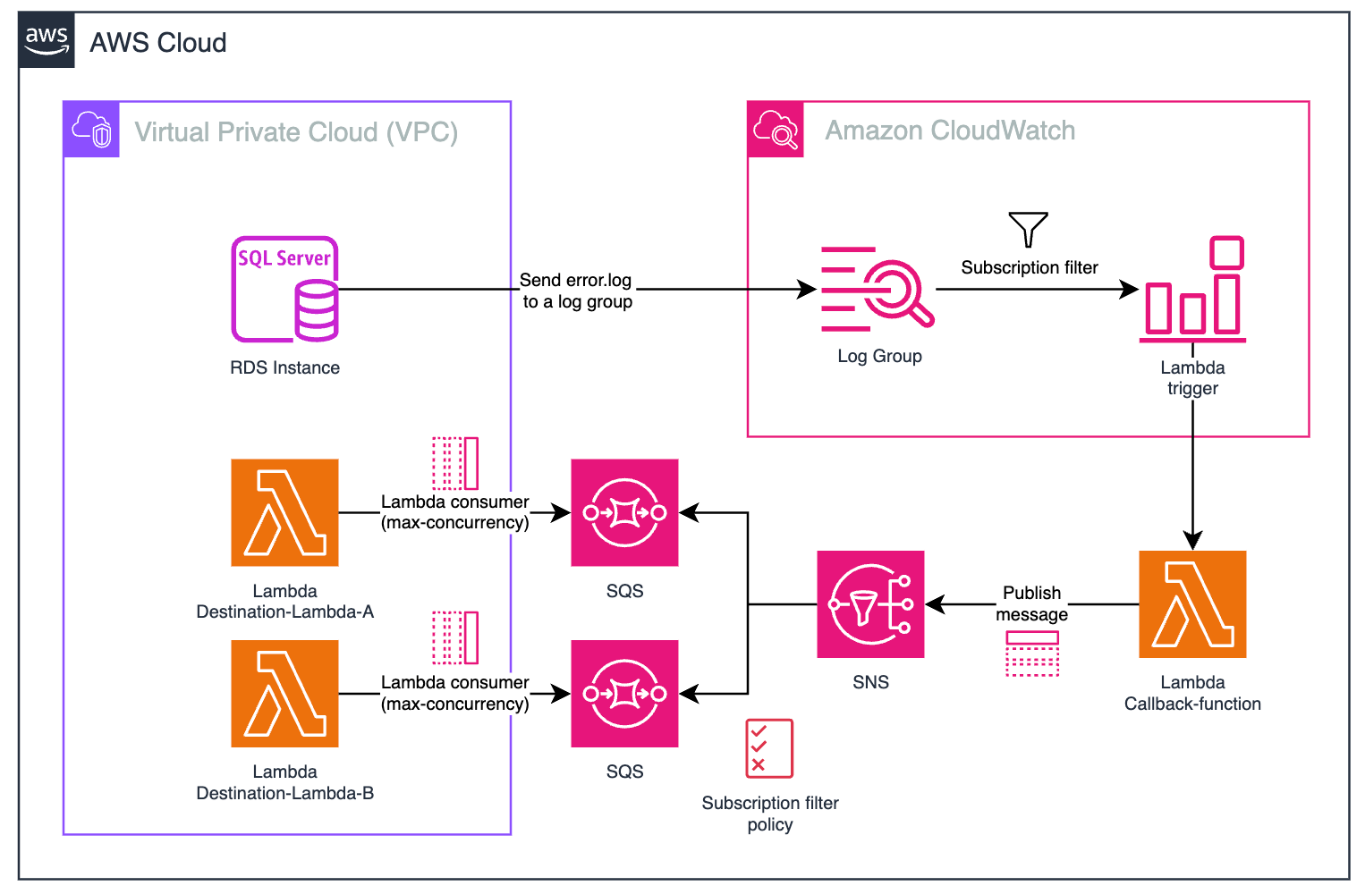
The workflow consists of the following steps:
- Amazon RDS for SQL Server publishes instance error logs to CloudWatch Logs.
- A custom message in the error logs triggers a CloudWatch metric filter.
- The changed value in the metric filter triggers a CloudWatch alarm, which invokes the Callback-Lambda function.
- The Lambda function publish messages to the SNS topic.
- The SNS topic, using the subscription filter policy, publishes the message to the respective SQS queue.
- The SQS queue triggers the Destination-Lambda function.
When SQL Server sends error logs to CloudWatch Logs, an automated processing pipeline handles these logs. You create a subscription filter to match specific log entries that begin with ##LambdaCallBack##, which serves as a marker for messages requiring Lambda function invocation. For example, with the log ##LambdaCallBack##arn:aws:lambda:eu-north-1:111122223333:function:Destination-Lambda##param##{id: 1, name: “string”}, the Lambda function CallBack-Lambda is triggered to process the message.
You can create the filter through the AWS Command Line Interface (AWS CLI), an API call, or the AWS Cloud Development Kit (AWS CDK). In this post, we use the AWS CDK.
Directly invoking the Destination-Lambda function from database events could generate unexpected costs with hundreds of Lambda executions per second. This approach also creates security concerns by requiring the Callback-Lambda function to have broad permissions for invoking multiple Lambda functions. We propose implementing a fan-out architecture using Amazon SNS with a subscription filter policy to call the respective Amazon SQS queue, which acts as a message buffer for the Destination-Lambda function. The SQS queue serves as a decoupling mechanism, allowing the proxy Lambda (Callback-Lambda) to quickly forward messages with minimal execution time, while the business logic Lambda (Destination-Lambda) processes messages asynchronously with controlled concurrency. This approach optimizes both performance and cost management.
In the following sections, we walk through the steps to enable error logging to CloudWatch, create the stored procedure, and deploy the solution using the AWS CDK.
Prerequisites
Before deploying this solution, ensure you have the following prerequisites:
- The AWS CLI installed and configured
- Python 3.11 or later
- The AWS CDK installed
- Gather the following information about the DB Instance from where you want to invoke Lambda
- DB Instance name (<mssql-instance-name>)
- VPC ID (<vpc-id>)
- Subnet ID (<subnet-id>)
- Security Group ID (<securitygroup-id>)
Publish RDS for SQL Server DB instance logs to CloudWatch
You can publish logs from your RDS for SQL Server database to CloudWatch Logs. Supported logs include both agent logs and error logs, but this post focuses on error logs. Publishing these logs to CloudWatch provides continuous visibility into database errors and activity while storing the data in highly durable storage managed by the CloudWatch Logs agent.
Complete the following steps to publish the error logs to CloudWatch:
- Open the Amazon RDS console.
- In the navigation pane, choose Databases, and then choose the DB instance that you want to modify.
- Choose Modify.
- In the Log exports section, choose the logs that you want to start publishing to CloudWatch Logs. For this post, we select Error log.
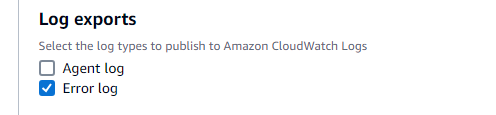
- Review Summary of modifications showing that Error log will be published to CloudWatch logs.

- Choose to apply for the modifications immediately.
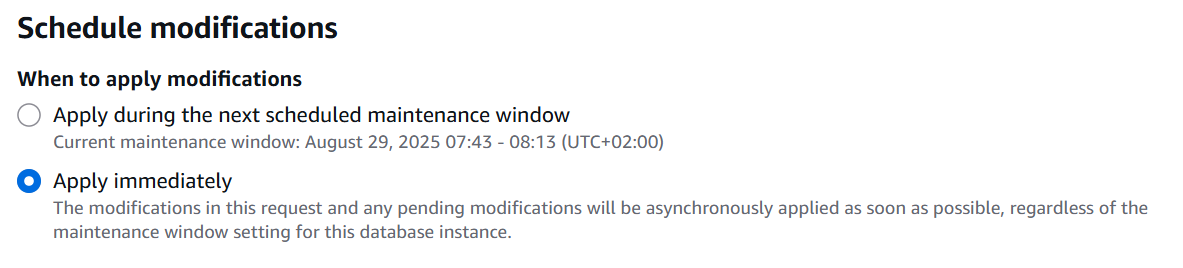
- Choose Modify DB Instance.
You can also use the AWS CLI modify-db-instance or an API call to ModifyDBInstance
Command for Windows:
Command for Linux/macOS:
Create a stored procedure to write a custom message to the ERRORLOG
The ERRORLOG captures critical information such as server startups and shutdowns, authentication failures, backup operations, resource warnings, and significant database events.SQL Server automatically creates a new ERRORLOG file when the service starts and maintains six previous log files by default (named ERRORLOG.1, ERRORLOG.2, and so on). The current log is consistently named ERRORLOG without a number.
Database users can log custom messages in the ERRORLOG using the RAISERROR statement without elevated permissions. First, create a dedicated database on the SQL Server instance to contain your code,
The following stored procedure uses RAISERROR to write custom messages to the ERRORLOG:
The custom message consists of three components:
- ##LambdaCallBack## – An identifier string for the CloudWatch filter to detect custom messages
- @LambdaARN – The Amazon Resource Name (ARN) parameter identifying the target Lambda function
- @lambdaArgs – The parameter containing arguments for Lambda function execution within the RDS instance
IMPORTANT: any information passed as arguments to sp_invoke_lambda will be written to SQL Server ERRORLOG and subsequently to CloudWatch Logs in plain text. Anyone with CloudWatch Logs access permissions can view these arguments in clear text.
If you need to pass sensitive or confidential information (such as personally identifiable information, credentials, or business-sensitive data), you MUST
- Encrypt the sensitive data before passing it as arguments to sp_invoke_lambda
- Implement the decryption logic within the Callback-Lambda function
- Verify proper key management and access controls are in place
Deploy the solution using the AWS CDK
Complete the following steps to deploy the remaining solution resources:
- Clone the AWS CDK code hosted on GitHub:
- Navigate to the directory sample-invoke-lambda-from-rds-mssql:
- Bootstrap the AWS CDK. This is required the first time you use the AWS CDK in a specific AWS environment (a combination of an AWS account and AWS Region).
- Deploy the stack:
The AWS CDK automatically provisions and configures the following resources:
- 3 Lambda functions:
- Callback-Lambda
- Destination-Lambda-A
- Destination-Lambda-B
- Subscription filter for a given RDS log group
- SNS topic with required AWS Identity and Access Management (IAM) permissions
- SNS subscription filter policy to filter based on the payload
- SQS queue with required AWS Identity and Access Management (IAM) permissions
The IAM permissions are automatically handled by the AWS CDK using least privilege principles. The AWS CDK implements these permissions following AWS security best practices, where SNS is granted sns:Publish permissions for the Callback-Lambda and SQS is configured with sqs:SendMessage for SNS integration and sqs:ReceiveMessage/sqs:DeleteMessage for the Destination-Lambda functions.
Validate the solution
Test the solution by running the stored procedure from your DB instance:
The sp_invoke_lambda stored procedure writes a custom message to the SQL Server ERRORLOG with the Lambda function name and its arguments.
You can verify the successful execution of the procedure by executing the sp_readerrorlog procedure:
Where:
- 0 – The log file number to view (0 is the current log)
- 1 – The product log type (1 for SQL Server Log, 2 for SQL Agent Log)
- ##LambdaCallBack## – The filter string that identifies custom messages in the error log”

You will see in the CloudWatch log group a log like the following screenshot.

You can also view the subscription filter configured in that log group.
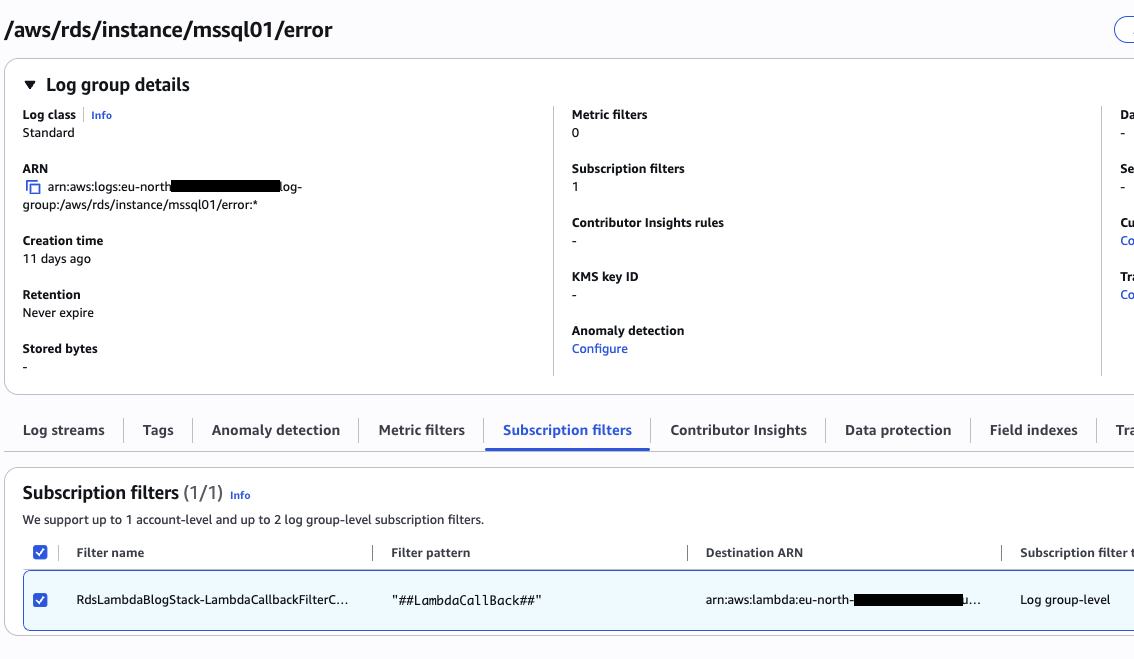
The filter triggers the Callback-Lambda function. The Python used in the AWS CDK parses the log (it’s a base64 encoded string) and publishes the message in the SNS topic. In the message is specified the message attributes:
Using this filter, the topic pushes the message to the correct SQS queue that will be consumed by the target Lambda function. The Destination-Lambda-A function will print the message with the parsed message. The following screenshot shows the complete log events.
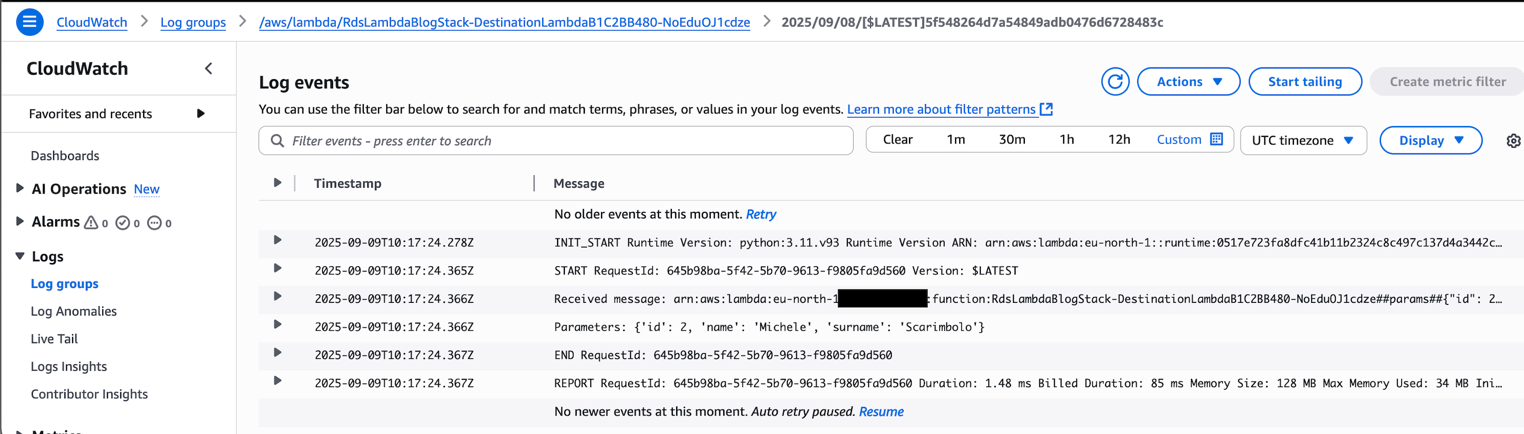
Instead, if you want to invoke the Destination-Lambda-B for a different scope:
This query will trigger the other function:
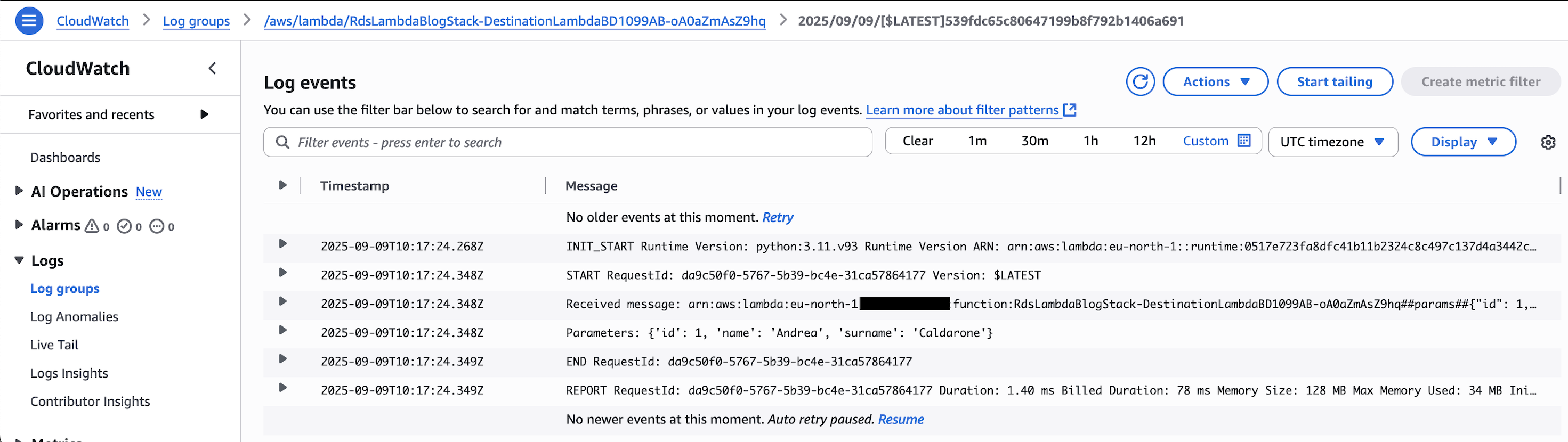
This example demonstrates how the Destination-Lambda-A and Destination-Lambda-B functions processes parameters received from RDS. While our example simply prints these parameters, you can implement your specific business logic within this Lambda function. Common use cases include calling REST APIs or sending SNS notifications for email or push alerts. This flexible approach allows you to define and implement the precise business logic your application requires. By following the steps outlined in this post, you can effectively leverage AWS services to create scalable and efficient event-driven serverless architectures.
Clean up
Clean up the resources you created by completing the following steps:
- Delete the AWS CDK resources:
- Manually delete the [Lambda] database.
- Disable ERRRORLOG publishing to CloudWatch.
- Delete the CloudWatch log group.
Conclusion
This post demonstrated how to invoke AWS Lambda functions from Amazon RDS for SQL Server stored procedures using a serverless integration pattern. You learned how to publish database error logs to Amazon CloudWatch Logs, create stored procedures that write custom messages to ERRORLOG, and deploy an automated processing pipeline using CloudWatch subscription filters, Amazon SNS, and Amazon SQS to trigger Lambda functions based on database events. The architecture provides a robust way to trigger serverless computations from database events, producing automated responses to database operations while maintaining system reliability and cost-efficiency.
To get started using this solution, download the complete AWS CDK template from the GitHub repo, and follow the steps in this post to deploy the solution in your environment.
We’d love to hear from you. Share your experience implementing this solution, ask questions, or suggest improvements by leaving a comment below. You can also join the AWS Community Builders program to connect with other builders and share your serverless architecture patterns.