AWS DevOps & Developer Productivity Blog
How Kaltura Accelerates CI/CD Using AWS CodeBuild-hosted Runners
This post was contributed by Adi Ziv, Senior Platform Engineer at Kaltura, with collaboration from AWS.
Kaltura, a leading AI video expirience cloud and corporate communications technology provider, transformed CI/CD infrastructure by migrating to AWS CodeBuild-hosted runners for GitHub Actions. This migration reduced DevOps operational overhead by 90%, accelerated build queue times by 66%, and cut infrastructure costs by 60%. Most importantly, the migration achieved these results while supporting Kaltura’s scale: over 1,000 repositories, 100+ distinct workflow types, and 1,300 daily builds across multiple development teams.
As organizations scale their engineering operations, maintaining efficient CI/CD infrastructure becomes increasingly critical. While tools like GitHub Actions simplify pipeline creation, managing the underlying infrastructure can become a significant burden for engineering teams, particularly when dealing with security requirements and private network access needs. For Kaltura, this challenge became acute as the company rapidly grew its engineering teams and onboarded new microservices weekly.
In this post, you’ll see how Kaltura modernized CI/CD infrastructure by migrating from self-managed Amazon Elastic Kubernetes Service (Amazon EKS) runners to CodeBuild-hosted runners, implementing enhanced security features while dramatically improving performance and reducing operational overhead.
Overview of Challenge and Solution
Understanding Self-Hosted Runners
GitHub-hosted runners offer zero operational overhead, automatic scaling, and a clean slate for each job, making them an excellent choice for many development teams. However, for enterprises like Kaltura with specific security and operational requirements, self-hosted runners provided a better fit. GitHub-hosted runners operate in a shared environment that, while secure, doesn’t offer the same level of granular control that enterprises may need for sensitive workloads. By moving to self-hosted runners on AWS, Kaltura gained access to robust security controls like Amazon Virtual Private Cloud (Amazon VPC) isolation, AWS Identity and Access Management (IAM) policies, and fine-grained access management. Additionally, self-hosted runners allowed Kaltura to customize hardware configurations for their specialized needs, optimize costs for their specific usage patterns, and maintain direct access to private network resources essential for their operations.
Self-hosted runners, which were initially implemented, offered the control Kaltura needed. By deploying runners within Amazon VPC, Kaltura gained crucial capabilities for enterprise-scale operations. The implementation enabled direct access to internal resources while implementing granular permissions through IAM roles. Using Amazon endpoints allowed Kaltura to avoid public API requests, ensuring all traffic remained within the organization’s secure private network.
The initial solution based on Amazon EKS
Kaltura’s initial solution deployed self-hosted GitHub Actions runners on Amazon EKS, using Karpenter for node auto-scaling. Kaltura implemented a custom controller that would poll the GitHub API for queued workflows and spin up necessary runners. While this solution provided the security and control Kaltura needed, it introduced substantial operational challenges.
The heart of the problems stemmed from Kaltura’s polling mechanism. As the solution’s scale grew, Kaltura frequently hit GitHub’s API rate limits, forcing a reduction of polling frequency to two-minute intervals. These circumstances created a cascading effect of operational issues. The DevOps teams spent considerable time maintaining runner images, infrastructure, and scaling mechanisms. Each new repository required manual configuration updates, creating bottlenecks in the development process. To meet performance SLAs, Kaltura maintained warm runner pools, significantly increasing infrastructure costs.
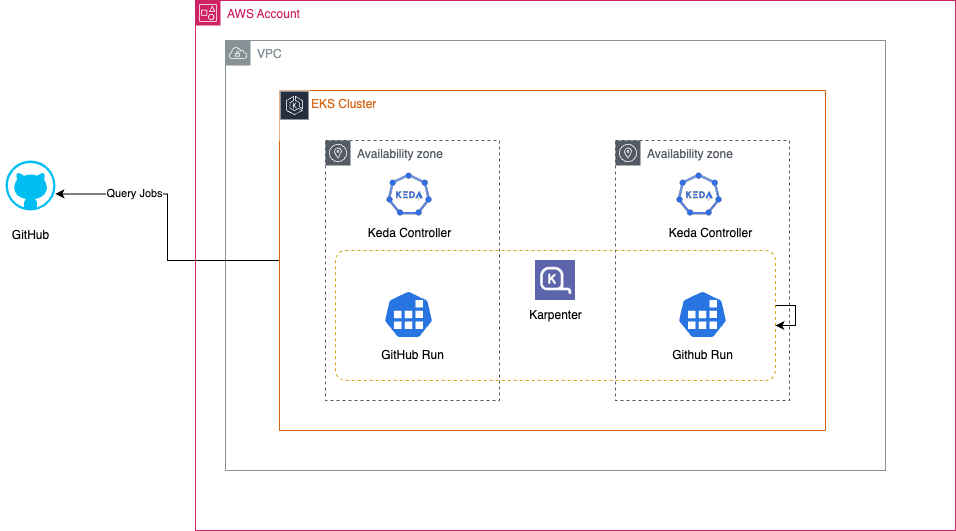
Figure 1: The initial solution was based on Amazon EKS and Karpenter spinning up GitHub Runners.
The impact on development teams was substantial. Every workflow execution faced a minimum two-minute delay between queuing and execution. These delays accumulated throughout the day, severely impacting developer productivity. The DevOps team found themselves constantly pulled away from other initiatives to handle infrastructure maintenance tasks. The situation became increasingly untenable as Kaltura continued to scale.
Kaltura’s Solution – AWS CodeBuild-hosted Runners
After evaluating several options, Kaltura chose CodeBuild-hosted runners to resolve infrastructure challenges while maintaining the security and control benefits of self-hosted solution. This new architecture fundamentally changed how the CI/CD solution operated, moving from a poll-based to a webhook-based system.
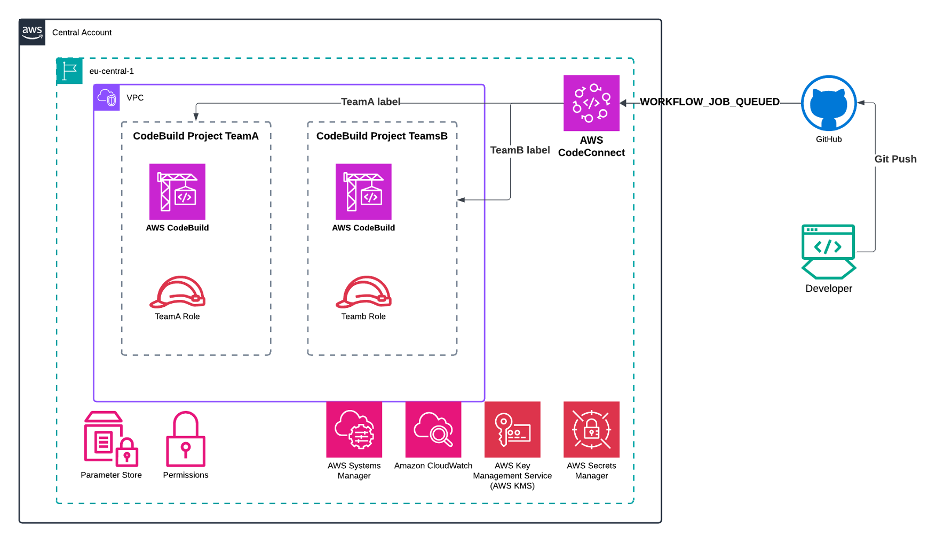
Figure 2: The solution based on AWS CodeBuild is fully managed and is based on Webhooks.
The new architecture operates through a straightforward but powerful flow. When developers push code to GitHub, GitHub sends an immediate webhook notification to AWS CodeConnections. This triggers CodeBuild, which provisions a runner within Kaltura’s Amazon VPC. The GitHub Actions workflow then executes on this CodeBuild runner, leveraging fine-grained IAM roles that follow the principle of least privilege to access AWS services.
Key Architectural Components
The webhook-based architecture eliminates previous polling challenges entirely. Instead of waiting for a periodic check, workflows begin executing immediately when triggered. CodeBuild and CodeConnections use a GitHub App with webhooks, configurable at the repository, organization, or enterprise level. This integration allows true CI/CD auto-discovery, a significant advancement from previous manual configuration requirements.
Security remains one of the major components of the new architecture. Each runner operates within Amazon VPC, maintaining strict network security requirements. Kaltura implemented fine-grained access control through IAM roles, ensuring runners access only the specific AWS services they need, such as AWS Systems Manager Parameter Store, Amazon CloudWatch, and AWS Secrets Manager. This maintains security posture while simplifying access management.
Infrastructure Management
CodeBuild’s serverless nature transformed the infrastructure management approach. Rather than maintaining a complex Amazon EKS cluster with custom controllers and scaling logic, Kaltura now leverages AWS’s managed service. This shift eliminated the need to patch runner images, maintain infrastructure, or optimize scaling mechanisms.
The system’s flexibility proved particularly valuable for diverse workflow requirements. CodeBuild supports various compute configurations, from standard instances to multi-architecture builds and specialized ARM and GPU runners. Kaltura can easily match compute resources to workflow needs through simple label configurations, without managing different runner pools or maintaining separate infrastructure stacks.
Docker Workflow Improvements
One unexpected benefit emerged in Docker build processes. Previous Amazon EKS-based solutions required complex Docker-in-Docker (DinD) configurations or alternative tools like Kaniko for container builds. CodeBuild’s native Docker support eliminated these complications. The service provides isolated build environments where Docker can run directly, with built-in layer caching capabilities that significantly improve build performance.
Auto-Discovery and Self-Service
A key benefit of the new architecture is its self-service capability. When development teams create new repositories or modify existing ones, no manual DevOps intervention is required. The system automatically provisions appropriate runners based on predefined configurations and the workflow’s runs-on label. This self-service approach has dramatically reduced Kaltura’s operational overhead while improving developer productivity.
Here’s a typical workflow configuration demonstrating new approach:
name: Hello World
on: [push]
jobs:
Hello-World-Job:
runs-on:
- codebuild-myProject-${{ github.run_id }}-${{ github.run_attempt }}
- image:${{ matrix.os }}
- instance-size:${{ matrix.size }}
- fleet:myFleet
- buildspec-override:true
strategy:
matrix:
include:
- os: arm-3.0
size: small
- os: linux-5.0
size: large
steps:
- run: echo "Hello World!"
This configuration shows how Kaltura leverages CodeBuild’s flexibility while maintaining simple, declarative workflow definitions. Teams can specify their compute needs through labels, and the system handles all the underlying provisioning and management.
Migration Approach
The migration to CodeBuild runners involved a seamless transition with minimal workflow changes. The key to its successful migration was its simplicity – most workflows required only a single change to the runs-on label:
runs-on: codebuild-myProject-${{ github.run_id }}-${{ github.run_attempt }}
Because of the 1-by-1 compatibility, it meant existing workflows continued to function without further modification.
Results
The new architecture successfully handles over 1,300 daily builds across more than 1,000 repositories and 100 workflow types while serving multiple development teams with varying security requirements. The results of the migration to CodeBuild-hosted runners delivered significant improvements across all key metrics:
Operational impact:
- 90% reduction in DevOps operational overhead
- 66% decrease in build queue times
- 60% reduction in infrastructure costs
- 30 minutes of daily time savings per developer
Most importantly, developer satisfaction has improved due to faster builds, reduced friction, and consistent performance. The self-service nature of the system has eliminated onboarding bottlenecks and accelerated the development lifecycle.
Conclusion
The transformation of Kaltura’s CI/CD infrastructure through CodeBuild-hosted runners demonstrates how modern cloud services solves complex enterprise-scale development challenges. The journey from managing self-hosted runners on Amazon EKS to leveraging AWS managed services delivered a 90% reduction in operational overhead, 66% faster build queues, and 60% cost savings while maintaining enterprise-grade security requirements.
For organizations considering a similar path, we recommend starting with a pilot program using non-critical repositories. Focus on understanding your workflow requirements, security needs, and performance bottlenecks to shape an effective migration strategy. Implement cost allocation tags and monitoring early to ensure visibility into the migration’s impact and demonstrate ROI to stakeholders.
Additional Resources:
- AWS CodeBuild product page for features and pricing
- AWS CodeBuild User Guide for implementation instructions
- Open-source examples and configurations on GitHub
- AWS re:Invent 2023 session on Continuous Integration and Delivery for AWS
- AWS re:Invent 2024 session on Continuous integration and continuous delivery (CI/CD) for AWS
About the Authors
 |
Adi Ziv is a Senior Platform Engineer at Kaltura with over a decade of experience designing and building scalable, resilient, and optimized cloud-native applications and infrastructure. He specializes in serverless, containerized, and event-driven architectures. |
 |
Michael Shapira is a Senior Solution Architect at AWS specializing in Machine Learning and Generative AI solutions. With 19 years of software development experience, he is passionate about leveraging cutting-edge AI technologies to help customers transform their businesses and accelerate their cloud adoption journey. Michael is also an active member of the AWS Machine Learning community, where he contributes to innovation and knowledge sharing while helping customers scale their AI and cloud infrastructure at enterprise level. When he’s not architecting cloud solutions, Michael enjoys capturing the world through his camera lens as an avid photographer. |
 |
Maya Morav Freiman is a Technical Account Manager at AWS helping customers maximize value from AWS services and achieve their operational and business objectives. She is part of the AWS Serverless community and has 10 years experience as a DevOps engineer. |
The content and opinions in this post are those of the third-party author and AWS is not responsible for the content or accuracy of this post.