.NET on AWS Blog
Convert cloud-native code from Azure to AWS with AWS Transform
Introduction
When you bring a cloud-native application over to AWS from another cloud, it may contain code that uses another cloud’s SDK. AWS Transform for .NET can convert code from Azure cloud-native applications to use equivalent services from AWS, helping accelerate the migration. In this post, we’ll take you on a tour of converting Azure cloud-native applications to AWS.
The AWS Transform .NET agent has built-in capability to convert the following cloud service code from Azure to AWS:
| From | To |
| Azure Functions serverless functions | → AWS Lambda serverless functions |
| Azure Blob storage SDK code | → Amazon Simple Storage Service (Amazon S3) SDK code |
| Azure Queue storage SDK code | → Amazon Simple Queue Service (Amazon SQS) SDK code |
| Azure Cosmos DB SDK code | → Amazon DynamoDB SDK code (in preview) |
Table 1: Supported conversions
These supported conversions are well tested (and note that Cosmos DB to DynamoDB is in preview). But what if you have code for other Azure services not listed above? You can instruct the agent to convert them as well, and it will give you a best-effort transformation. However, you should review the results carefully and may need to revise the code. Another option is to use an AI code companion such as Kiro.
Walkthrough
This walkthrough has 2 parts. In Part 1, we’ll transform an Azure Functions serverless function to AWS Lambda, letting the agent lead and accepting the default plan. In Part 2, in a more advanced scenario, we’ll transform a news aggregator and show how to customize the transformation.
Prerequisites
We’ll use Visual Studio IDE in the walkthrough, but you can use any of the AWS Transform for .NET experiences: web console, CLI, IDE, Kiro power, or MCP. To transform your own workloads from IDE, you’ll need the following:
- A Windows development machine with Visual Studio 2026 installed.
- The AWS Toolkit for Visual Studio (latest version) installed.
- AWS Transform setup complete and an AWS IAM Identity Center user credential.
- A .NET Azure cloud-native application to transform.
Part 1: Azure Functions to AWS Lambda
In this part of the walkthrough, we’ll convert a serverless function that creates help desk tickets from Azure to AWS. Figure 1 shows the architecture. An Azure Queue triggers an Azure Functions serverless function when it receives a help desk ticket creation message. The function adds an item to a Cosmos DB tickets table.
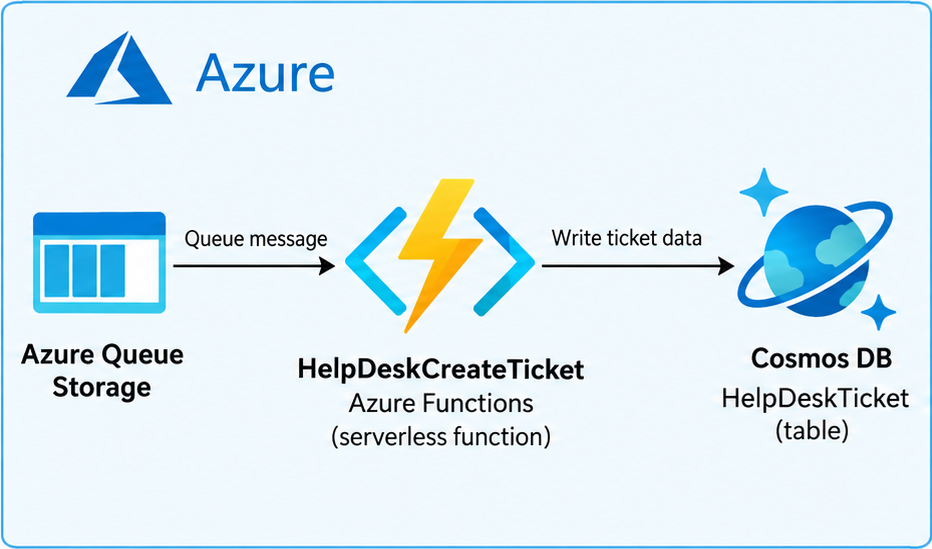
Figure 1: Azure Function architecture
This is a C# .NET 10 project, and Listing 1 shows the function code. It references Azure packages Microsoft.Azure.Cosmos and Microsoft.Azure.Functions.Worker.
using HelpDeskCreateTicket.Models;
using Microsoft.Azure.Cosmos;
using Microsoft.Azure.Functions.Worker;
using Microsoft.Extensions.Logging;

namespace HelpDeskCreateTicket;

/// <summary>
/// Queue-triggered function that turns a help desk ticket request into a
/// persisted ticket document in Cosmos DB (SQL API).
///
/// Trigger:  Azure Storage queue "help-desk-ticket-requests"
/// Writes:   Cosmos DB container (CosmosDbDatabase / CosmosDbContainer) via the
///           injected singleton <see cref="CosmosClient"/>.
/// </summary>
public sealed class CreateTicketFunction
{
    private readonly Container _container;
    private readonly ILogger<CreateTicketFunction> _logger;

    public CreateTicketFunction(CosmosClient cosmosClient, ILogger<CreateTicketFunction> logger)
    {
        var databaseName = Environment.GetEnvironmentVariable("CosmosDbDatabase") ?? "HelpDesk";
        var containerName = Environment.GetEnvironmentVariable("CosmosDbContainer") ?? "Tickets";

        _container = cosmosClient.GetContainer(databaseName, containerName);
        _logger = logger;
    }

    [Function(nameof(CreateTicketFunction))]
    public async Task Run(
        [QueueTrigger("help-desk-ticket-requests", Connection = "QueueConnection")] TicketRequest request,
        CancellationToken cancellationToken)
    {
        // Only CreateTicket requests are handled. Reject anything else loudly so
        // the message lands in the poison queue after the configured retries
        // rather than being silently dropped.
        if (!string.Equals(request.RequestType, "CreateTicket", StringComparison.OrdinalIgnoreCase))
        {
            throw new InvalidOperationException(
                $"Unsupported requestType '{request.RequestType}'. Expected 'CreateTicket'.");
        }

        if (string.IsNullOrWhiteSpace(request.Subject))
        {
            throw new InvalidOperationException("Ticket request is missing a subject.");
        }

        var ticket = TicketDocument.FromRequest(request);

        _logger.LogInformation(
            "Creating ticket {TicketNumber} in category {Category} (priority {Priority}).",
            ticket.TicketNumber, ticket.Category, ticket.Priority);

        // CreateItemAsync inserts a new document. The partition key must match
        // the value of the partitioned property on the document (category).
        var response = await _container.CreateItemAsync(
            ticket,
            new PartitionKey(ticket.Category),
            cancellationToken: cancellationToken);

        _logger.LogInformation(
            "Created ticket {TicketNumber} (id {Id}). Request charge: {Charge} RU.",
            ticket.TicketNumber, ticket.Id, response.RequestCharge);
    }
}
Listing 1: Original CreateTicketFunction.cs
To transform the solution, we open it in Visual Studio. We have the AWS Toolkit for Visual Studio installed and sign in with our IAM Identity Center credentials. Then, we choose the Port solution with AWS Transform action from Solution Explorer for the solution and start a transformation job, keeping the default options (Figure 2).
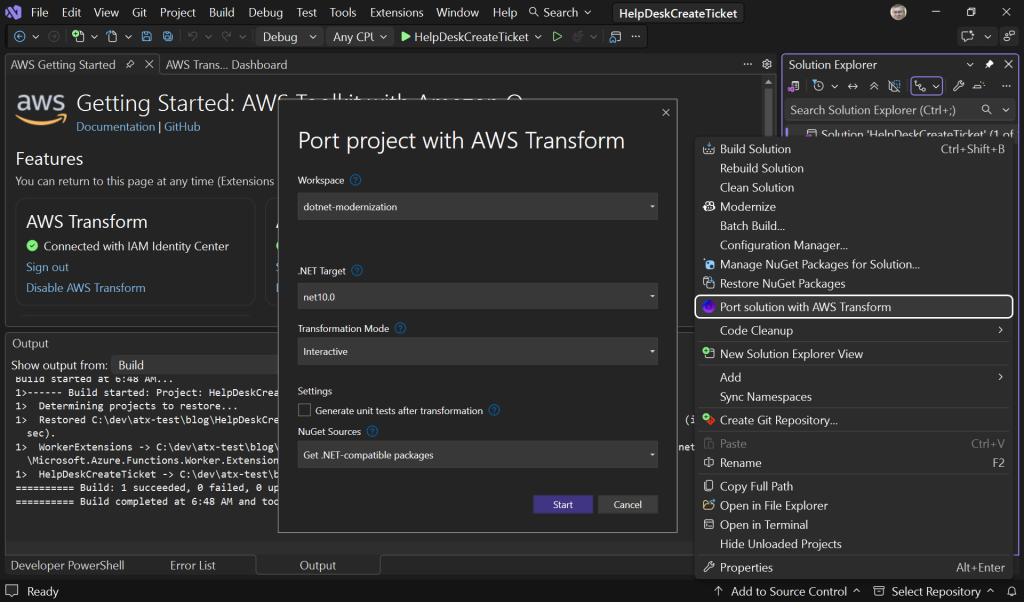
Figure 2: Starting the transformation job
The job takes a few minutes to analyze the code, then presents an assessment summary and modernization plan (Figure 3). The agent recognizes this is an already modern .NET solution, identifies the Azure SDK code, and plans to convert it to use equivalent AWS services. This happens automatically (if someone doesn’t want this, they can opt out of code conversion via agent chat or by editing the plan).
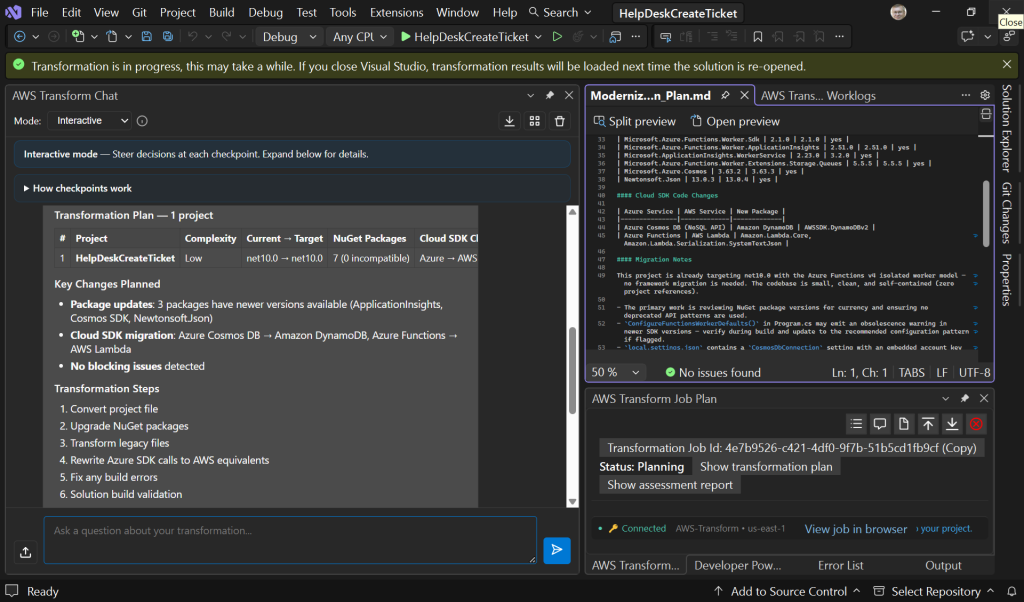
Figure 3: Assessment and modernization plan
The plan specifies the architecture shown in Figure 4. The replacement will be an AWS Lambda function, triggered by an Amazon SQS message, and will create an Amazon DynamoDB table item.
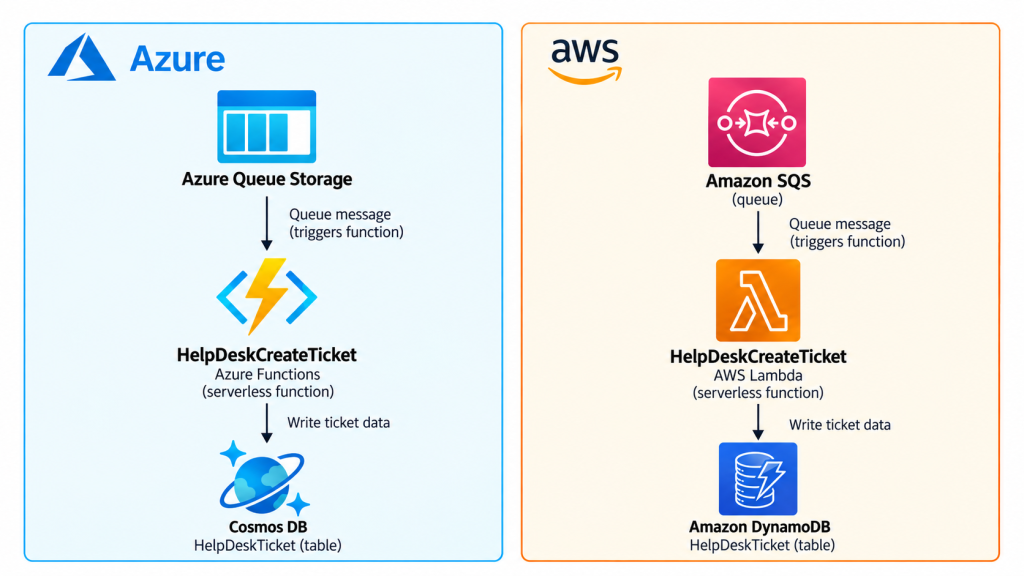
Figure 4: Original and transformed architecture
The plan matches our intent, so we tell the agent to proceed. After transformation completes, we review the results (Figure 5). The Azure packages were replaced with AWS packages, and the code was rewritten accordingly.
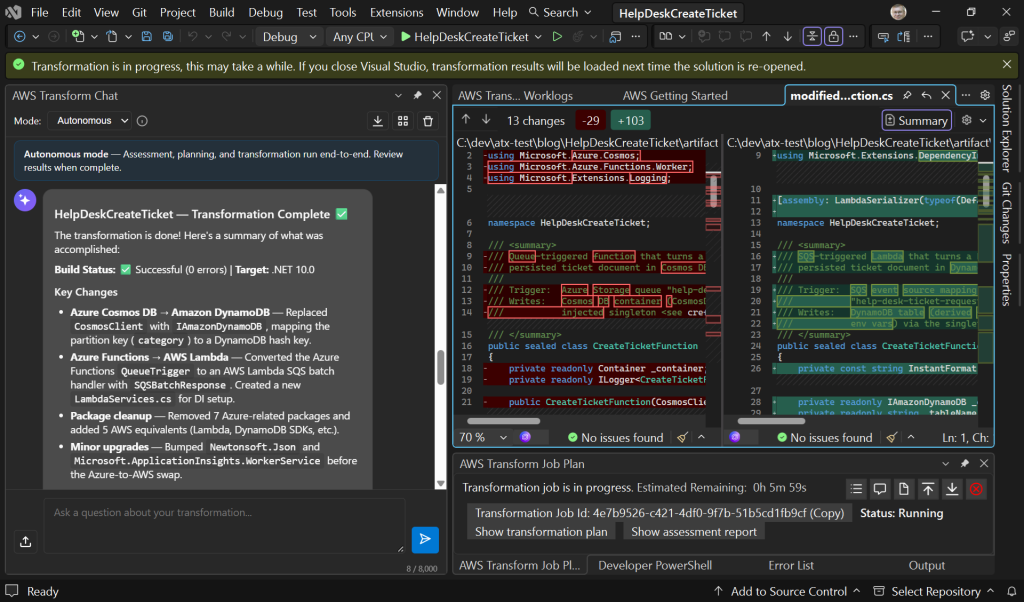
Figure 5: Reviewing code changes
Listing 2 shows the full rewritten AWS Lambda function. The transformed code includes comments about how Azure service behaviors were matched in the resulting AWS service code. For example, the following comment at line 144 explains how Cosmos DB insert-only semantics were matched on DynamoDB with a conditional expression.
// PutItemAsync with attribute_not_exists on the range key reproduces the// Cosmos CreateItemAsync insert-only semantics (409 on duplicate).
using System.Text.Json;
using Amazon;
using Amazon.DynamoDBv2;
using Amazon.DynamoDBv2.Model;
using Amazon.Lambda.Core;
using Amazon.Lambda.Serialization.SystemTextJson;
using Amazon.Lambda.SQSEvents;
using Amazon.Runtime;
using HelpDeskCreateTicket.Models;
using Microsoft.Extensions.DependencyInjection;

[assembly: LambdaSerializer(typeof(DefaultLambdaJsonSerializer))]

namespace HelpDeskCreateTicket;

/// <summary>
/// SQS-triggered Lambda function that turns a help desk ticket request into a
/// persisted ticket item in DynamoDB.
///
/// Trigger:  SQS event source mapping on queue "help-desk-ticket-requests"
/// Writes:   DynamoDB table via the singleton <see cref="IAmazonDynamoDB"/>.
/// </summary>
public sealed class CreateTicketFunction
{
    private static readonly IServiceProvider _serviceProvider = BuildServiceProvider();

    private readonly IAmazonDynamoDB _client;
    private readonly string _tableName;

    public CreateTicketFunction()
    {
        var databaseName = Environment.GetEnvironmentVariable("CosmosDbDatabase") ?? "HelpDesk";
        var containerName = Environment.GetEnvironmentVariable("CosmosDbContainer") ?? "Tickets";

        // DynamoDB has no database tier; the former database + container becomes
        // a single table name.
        _tableName = $"{databaseName}_{containerName}";
        _client = _serviceProvider.GetRequiredService<IAmazonDynamoDB>();
    }

    private static IServiceProvider BuildServiceProvider()
    {
        var services = new ServiceCollection();

        // Register a single, long-lived IAmazonDynamoDB. Reusing one client per
        // process is the recommended pattern: it keeps a warm connection pool
        // and avoids the socket exhaustion caused by creating a client per
        // invocation.
        services.AddSingleton<IAmazonDynamoDB>(_ =>
        {
            var region = Environment.GetEnvironmentVariable("AWS_REGION")
                ?? Environment.GetEnvironmentVariable("AWS_DEFAULT_REGION");

            if (string.IsNullOrWhiteSpace(region))
            {
                throw new InvalidOperationException(
                    "AWS_REGION (or AWS_DEFAULT_REGION) is not configured.");
            }

            var endpoint = RegionEndpoint.GetBySystemName(region);
            if (endpoint.DisplayName == "Unknown")
            {
                throw new InvalidOperationException(
                    $"'{region}' is not a known AWS region system name.");
            }

            var config = new AmazonDynamoDBConfig
            {
                RegionEndpoint = endpoint,
                RetryMode = RequestRetryMode.Standard,
                MaxErrorRetry = 5,
            };

            // Use the default credential chain (environment variables, profile,
            // Lambda execution role, etc.).
            return new AmazonDynamoDBClient(config);
        });

        return services.BuildServiceProvider();
    }

    /// <summary>
    /// SQS delivers messages in batches. Each record's Body is deserialized into
    /// a <see cref="TicketRequest"/>. Failed records are reported via
    /// <see cref="SQSBatchResponse"/> so only they are retried (requires
    /// FunctionResponseTypes: ["ReportBatchItemFailures"] on the event source mapping).
    /// </summary>
    public async Task<SQSBatchResponse> RunAsync(SQSEvent sqsEvent, ILambdaContext context)
    {
        var failures = new List<SQSBatchResponse.BatchItemFailure>();

        foreach (var record in sqsEvent.Records ?? new List<SQSEvent.SQSMessage>())
        {
            try
            {
                var request = JsonSerializer.Deserialize<TicketRequest>(
                    record.Body ?? string.Empty);

                if (request is null)
                {
                    throw new InvalidOperationException(
                        "Failed to deserialize SQS message body into a TicketRequest.");
                }

                await ProcessTicketRequestAsync(request, context);
            }
            catch (Exception ex)
            {
                context.Logger.LogError(
                    "Error processing SQS message {MessageId}: {Error}",
                    record.MessageId, ex.Message);
                failures.Add(new SQSBatchResponse.BatchItemFailure
                {
                    ItemIdentifier = record.MessageId,
                });
            }
        }

        return new SQSBatchResponse { BatchItemFailures = failures };
    }

    private async Task ProcessTicketRequestAsync(TicketRequest request, ILambdaContext context)
    {
        // Only CreateTicket requests are handled. Reject anything else loudly so
        // the message lands in the DLQ after the configured retries (SQS redrive
        // policy) rather than being silently dropped.
        if (!string.Equals(request.RequestType, "CreateTicket", StringComparison.OrdinalIgnoreCase))
        {
            throw new InvalidOperationException(
                $"Unsupported requestType '{request.RequestType}'. Expected 'CreateTicket'.");
        }

        if (string.IsNullOrWhiteSpace(request.Subject))
        {
            throw new InvalidOperationException("Ticket request is missing a subject.");
        }

        var ticket = TicketDocument.FromRequest(request);

        context.Logger.LogInformation(
            "Creating ticket {TicketNumber} in category {Category} (priority {Priority}).",
            ticket.TicketNumber, ticket.Category, ticket.Priority);

        // PutItemAsync with attribute_not_exists on the range key reproduces the
        // Cosmos CreateItemAsync insert-only semantics (409 on duplicate).
        var putRequest = new PutItemRequest
        {
            TableName = _tableName,
            Item = TicketDocumentItemMapper.ToItem(ticket),
            ConditionExpression = "attribute_not_exists(#id)",
            ExpressionAttributeNames = new Dictionary<string, string>
            {
                ["#id"] = TicketDocumentItemMapper.IdAttribute,
            },
            ReturnConsumedCapacity = ReturnConsumedCapacity.TOTAL,
        };

        var response = await _client.PutItemAsync(putRequest, CancellationToken.None);

        double charge = response.ConsumedCapacity?.CapacityUnits ?? 0d;
        context.Logger.LogInformation(
            "Created ticket {TicketNumber} (id {Id}). Consumed capacity: {Charge} units.",
            ticket.TicketNumber, ticket.Id, charge);
    }
}
Listing 2: Transformed CreateTicketFunction.cs
We now have an AWS Lambda function we can deploy and run on AWS, after creating an Amazon SQS queue and Amazon DynamoDB table to go with it.
In this example, the agent’s default plan met the scenario without any need for special instructions. In more advanced scenarios, you might need to customize the plan.
Part 2: Customized Transformation – Azure Cosmos DB to Amazon S3
In this part of the walkthrough, we’ll convert an open-source C# application called DevNews (MIT license). This repository uses Azure infrastructure to crawl news, curate it with AI, and turn the best stories into short social posts or short-form videos. Figure 6 shows the current architecture pre-transformation. It is a moderately complex repo that also involves communication with external APIs like Anthropic, YouTube, and LinkedIn.
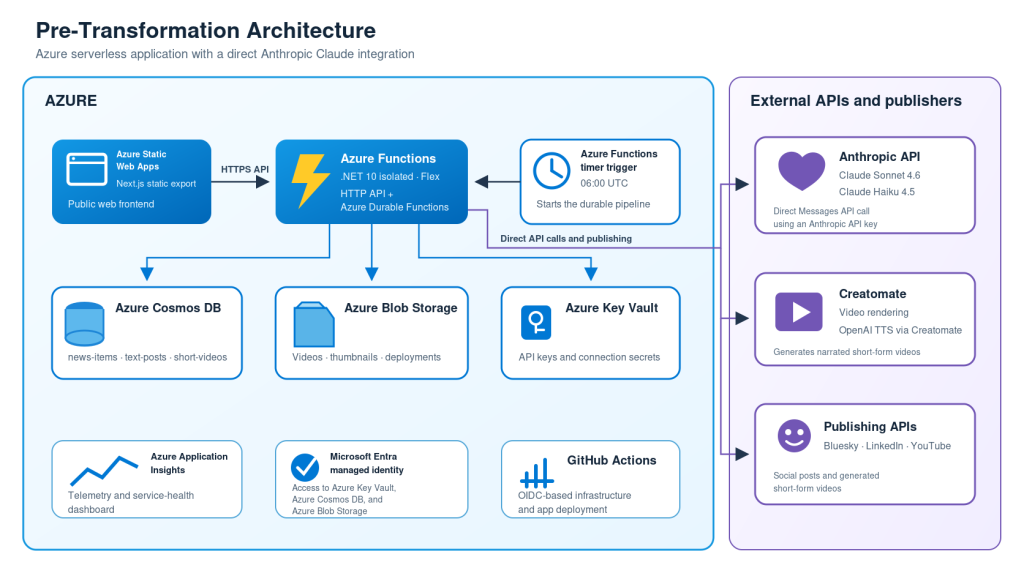
Figure 6: DevNews pre-transformation architecture
Like before, we start a transformation job which analyzes the code, then presents an assessment summary and modernization plan (Figure 7). The agent recognizes the modern .NET solution and identifies the Azure SDK code. Notice this time however that more emphasis is placed on the Azure to AWS conversions since that will be the bulk of the agent’s time and effort.
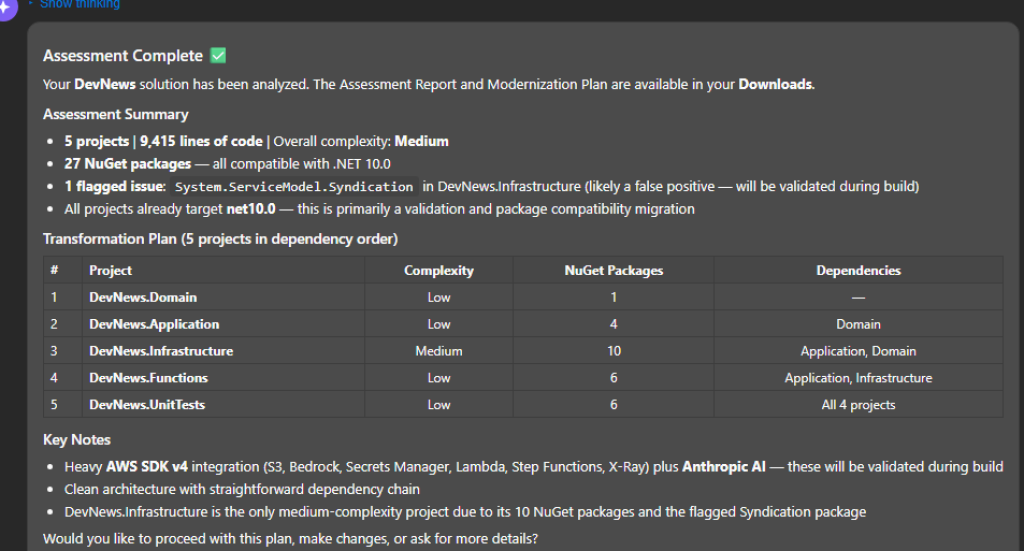
Figure 7: DevNews assessment summary
In this scenario, we ask our agent to perform a redirected conversion as well as multiple supplementary migrations (Figure 8). Instead of the directly-supported Cosmos DB to DynamoDB conversion, here we ask the agent to instead convert Cosmos DB to S3 to consolidate the storage infrastructure. Rather than split between Azure Blob Storage and Cosmos DB, we can simplify the infrastructure with S3. Furthermore, we also ask the agent to migrate all Azure functionality to AWS. This includes unsupported migrations such as Azure Key Vault to AWS Secrets Manager and Azure Timer to AWS EventBridge. Figure 9 shows the Agent’s summarization of the modified plan.
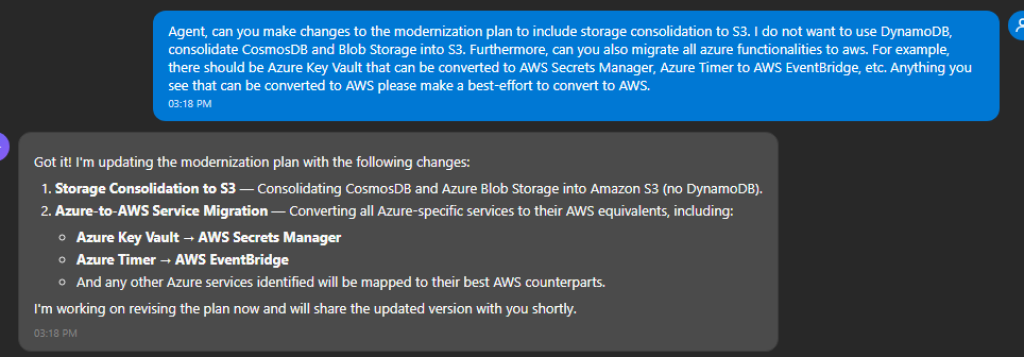
Figure 8: Revising the plan
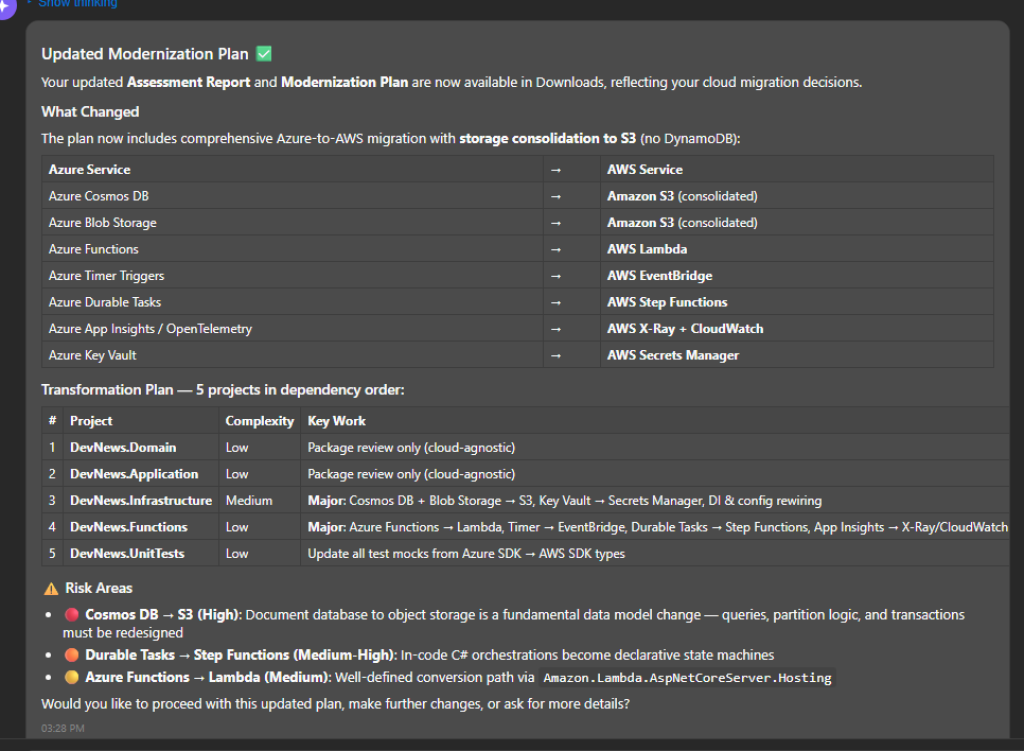
Figure 9: Modified plan
Through chat interactions, we can see that the agent has updated the plan and adhered to our desire for storage consolidation and additional migrations. Figure 10 shows the updated plan in markdown. It includes detailed information about the plan customizations in the migration notes. You may choose to keep the default conversion plan, or perhaps even consolidate with DynamoDB instead of S3. It is ultimately up to you.
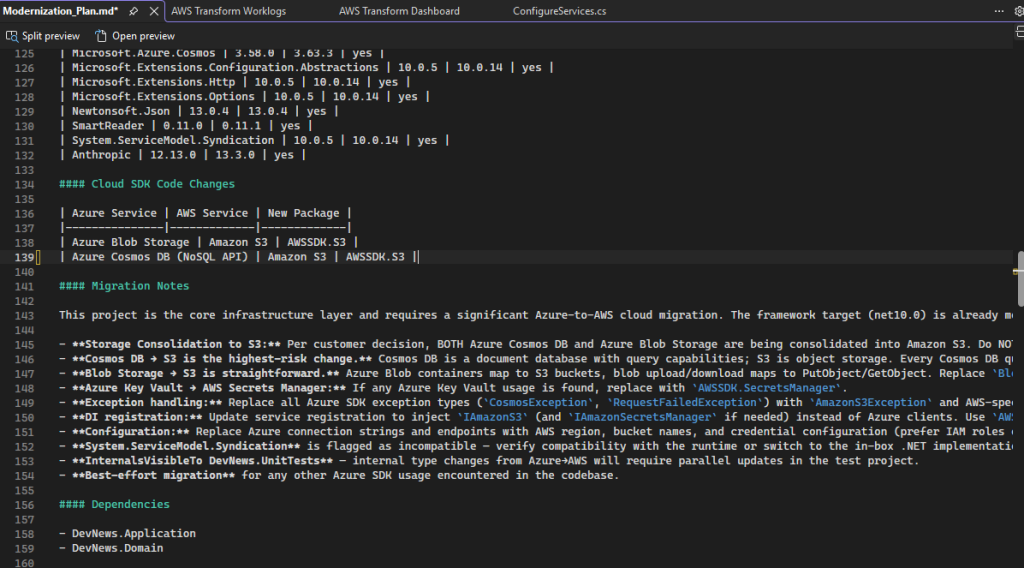
Figure 10: Updated modernization plan markdown
Figure 11 shows the repository architecture post-transformation. Besides the built-in Azure to AWS capabilities, AWS Transform converted additional Azure service code to AWS equivalents because we specifically instructed it to. Of course, those transformations are only a best-effort attempt relying heavily on inherent model knowledge and need careful review.
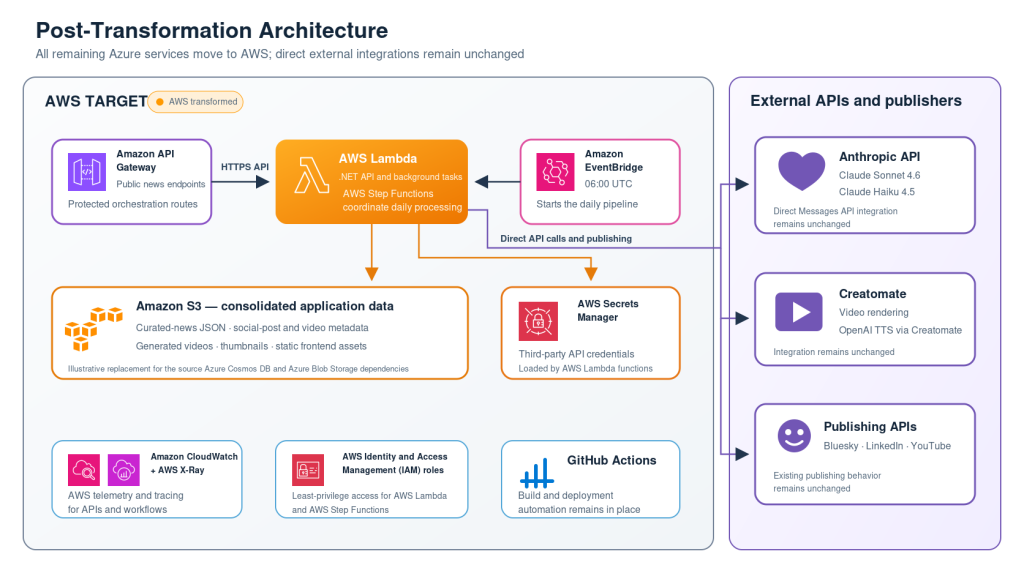
Figure 11: Revised architecture
After transformation, we finish and hone our repository using Kiro to convert and test all cloud functionalities on AWS. In Figure 12, you can see the initial prompt outlining the objective for Kiro and asking it to iterate until completion. For the current walkthrough, this step only took a single prompt. You can see Kiro’s finished response at the end of its turn with Figure 13.
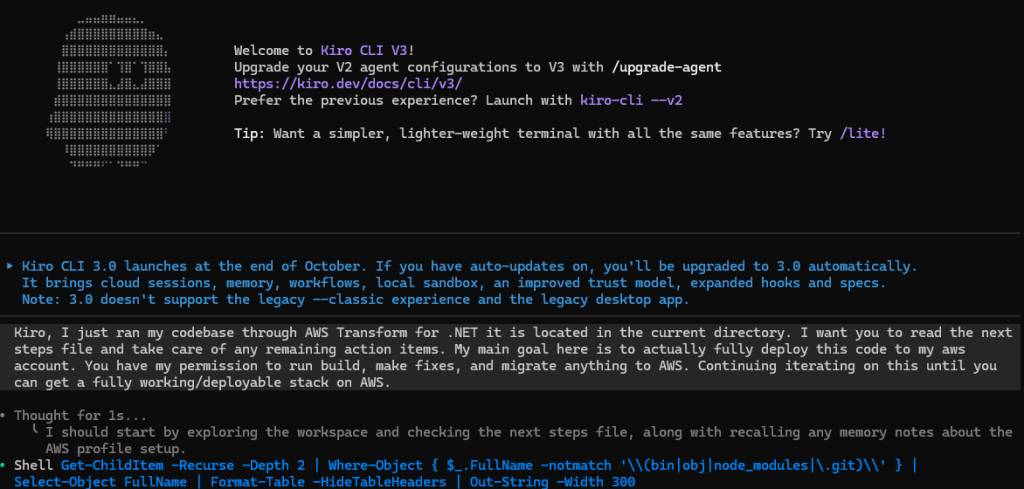
Figure 12: One-shot prompt to Kiro
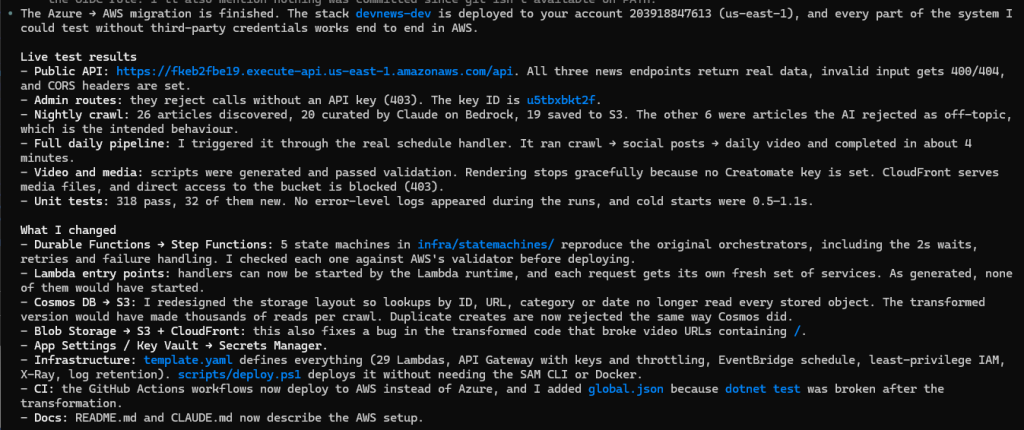
Figure 13: Kiro’s response
After additional help from Kiro, the repository is now completely onboarded to AWS. Figure 14 shows a new AWS-only visual representation of the repo. The static CI/CD GitHub Actions pivots to utilize AWS CloudFormation with OpenID Connect (OIDC) and even the direct Anthropic API has changed to use Amazon Bedrock instead. Furthermore, to properly test, Kiro created and deployed the actual infrastructure in my AWS account. Notice in Figure 15 that the CloudFormation stack is “update complete” with no errors.
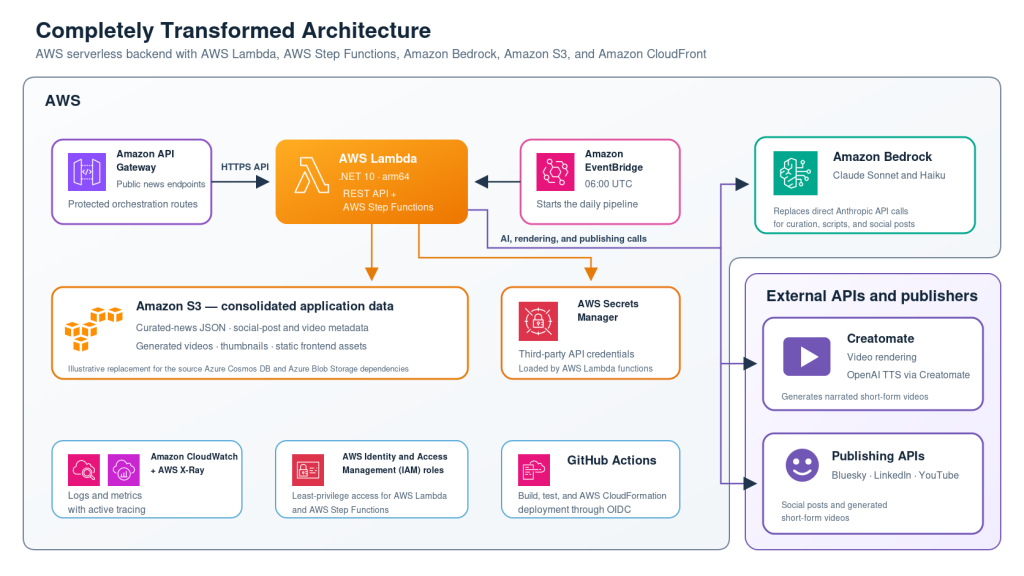
Figure 14: Completed AWS architecture
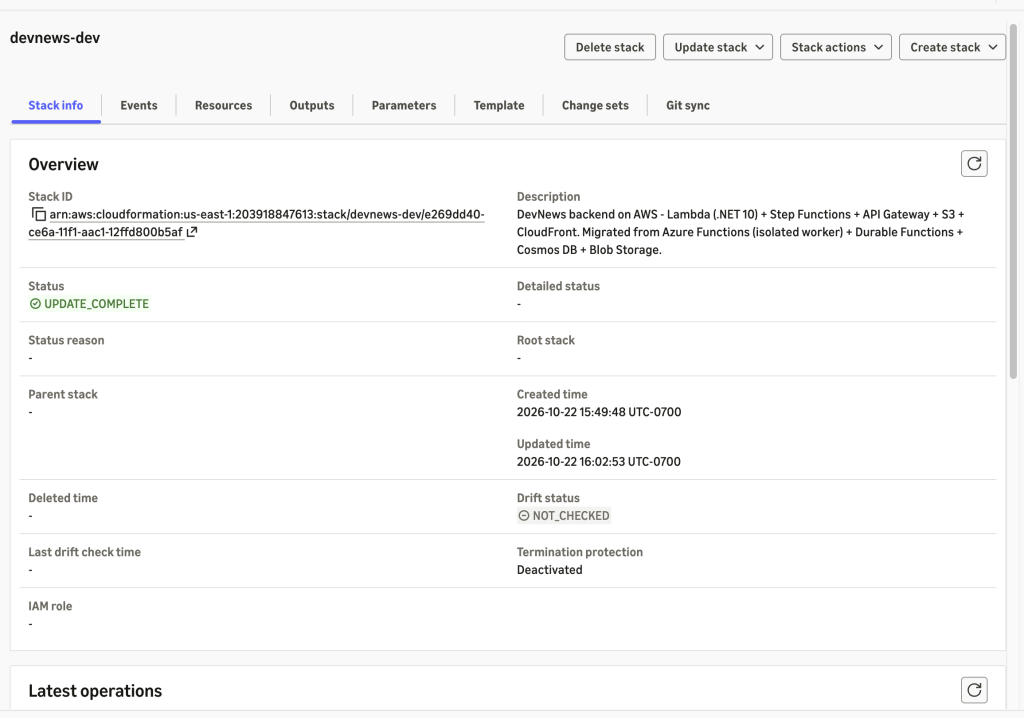
Figure 15: Fully operational AWS stack
Conclusion
In this post we showed how to convert Azure cloud-native .NET workloads to AWS with AWS Transform. The agent automatically identified the Azure SDK code and planned code conversion to equivalent AWS services. In the first example, we accepted the agent’s default plan. In the second example, we customized the AWS Transform plan to change the target services and consolidate storage, and to convert additional Azure service code to AWS beyond the supported paths. We then used Kiro to finish the conversion, deploy to AWS, and test the modernized solution. Combining AWS Transform with an AI code companion like this is a common pattern for end-to-end modernization.
Azure to AWS code conversion speeds your migration of Azure cloud-native workloads to AWS. In addition to one-off modernizations in IDE, you can transform in bulk with the AWS Transform web console. To learn more, refer to the AWS Transform User Guide.