AWS HPC Blog
Transforming HPC Operations with Intelligent Workload Orchestration on AWS
This post was contributed by Manu Pillai, Gloria Macia and Natalia Jimenez, PhD
Organizations running high-performance computing (HPC) workloads today operate largely as they have for decades: users manually specify required compute specifications for each of their jobs. Users spend valuable time analyzing workload requirements, selecting instance types, and troubleshooting infrastructure issues – time that could be spent on scientific discovery.
The solution lies in intelligent, agentic workload orchestration. This paradigm shift transforms traditional job scheduling into a dynamic, self-optimizing system. By combining AI-powered decision-making, automated infrastructure management, and continuous learning capabilities, organizations can eliminate manual resource selection. In parallel, the system automatically adapts to changing demands and learns from every execution.
This approach introduces four core capabilities working in concert: (1) Intelligent workload routing that automatically matches jobs to optimal resources; (2) Self-diagnosis that identifies root causes of failures; (3) Self-healing that autonomously corrects issues and retries workloads; and (4) Auto-optimization that continuously improves recommendations based on execution history.
In this post, we’ll demonstrate how to implement an intelligent orchestration architecture using AWS Parallel Computing Service (AWS PCS) and AI-powered agents. A GitHub repository with code samples is also provided to get started in your own account.
Overview
The core functionality is built around two agents. First, the Configuration Agent interprets job scripts and historical job run data to make infrastructure recommendations. Second, the Diagnosis Agent debugs errors and performs root cause analysis.
These two agents are both written in LangGraph, leverage general purpose Amazon Bedrock large-language models (LLMs), and are built to be deployed with Amazon Bedrock AgentCore Runtime.
For job orchestration, the solution uses AWS PCS. AWS PCS provides dynamic compute resource creation and termination and provides a managed Slurm controller. This allows us to focus on the orchestration logic rather than managing infrastructure details. Therefore, by using AWS PCS, the number of decisions our intelligent orchestrator will need to make are substantially reduced, and hence, this also reduces the opportunities for misconfiguration of our infrastructure.
The workflow registry captures all information available for a workload type, including job scripts, previous run histories, log and telemetry summaries from previous runs, and any metadata available on the workload. This entry becomes part of the context for the agent.
Before diving into the four specific capabilities of the solution, let’s review the overall architecture (Figure 1).
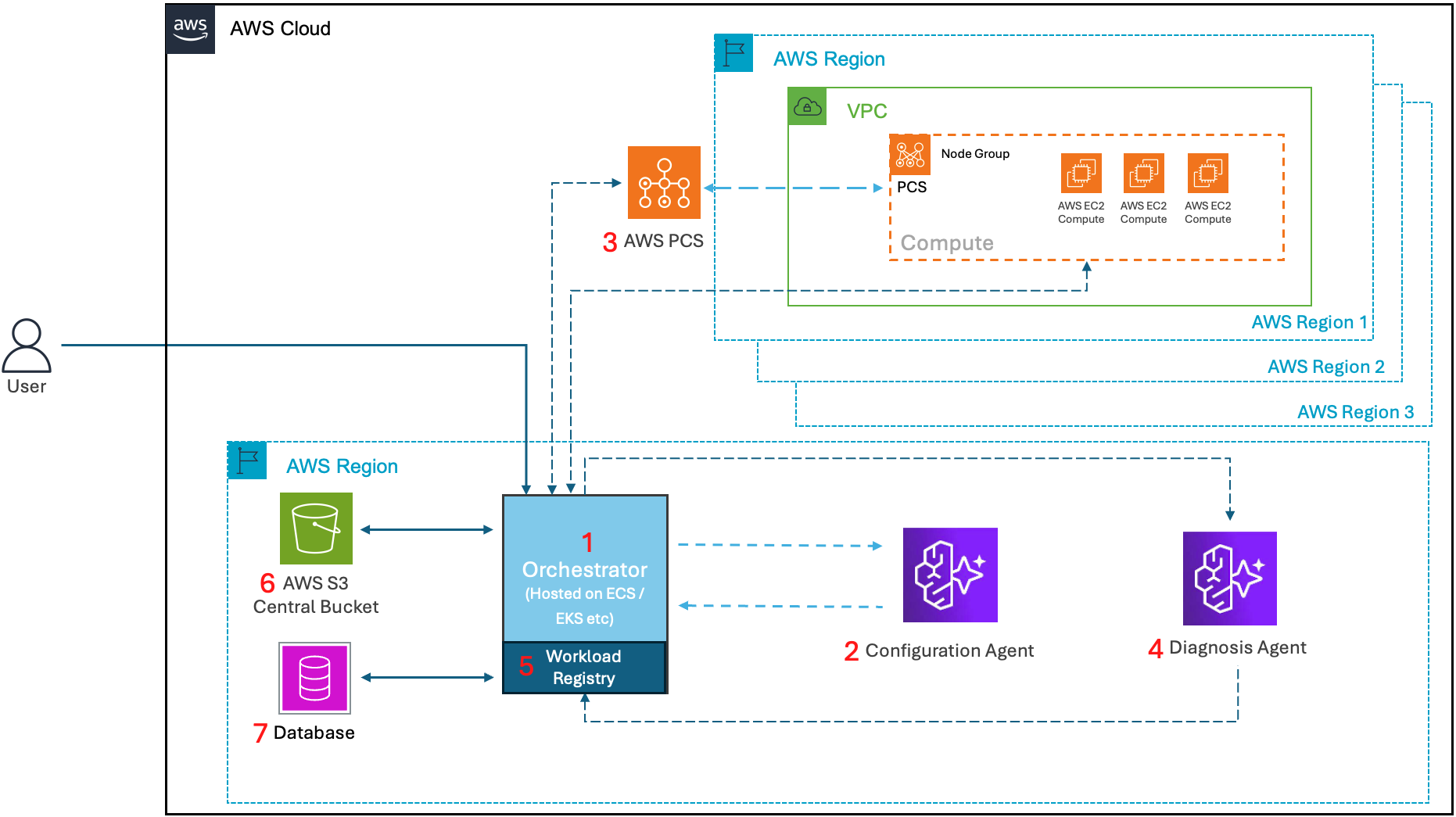
Figure 1 – Architecture diagram showing the core components of the solution.
The orchestrator completes the following workflow:
- Sends workload metadata and history to the Configuration Agent
- Receives infrastructure recommendation from the Configuration Agent
- Submits jobs with recommended configuration to AWS PCS
- Sends job logs, telemetry, and errors to the Diagnosis Agent and receives self-healing corrections
- Tracks workload requirements, execution history, and performance telemetry in the workload registry
- Stores workload data in an Amazon Simple Storage Service (Amazon S3) bucket
- Logs workload details to the database
Now that we understand the architecture, let’s dive into four capabilities of the solution:
- Intelligent workload routing
- Self-diagnosis troubleshooting
- Self-healing workflow
- Auto-optimization loop
Intelligent workload routing
Intelligent workload routing consists of recommending and deploying best-fit infrastructure for a specific job based on both job requirements and historical run data. Figure 2 provides an overview of the routing workflow.
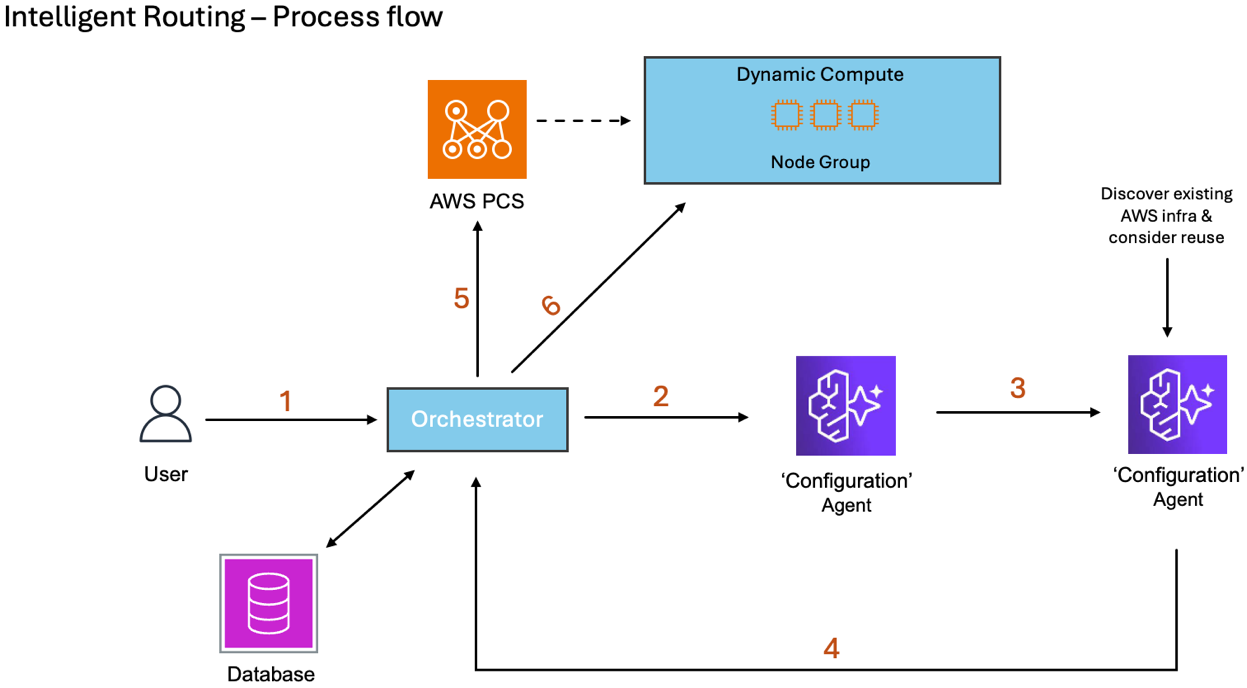
Figure 2: Workflow diagram of the intelligent workload routing capability.
The routing workflow completes the following steps:
- A user submits a job script that includes Slurm sbatch directives and job run commands
- The Orchestrator routes the request, along with workload metadata and run history, to the configuration agent
- The Configuration Agent assesses job details, provides an infrastructure recommendation, and calls itself again as part of the LangGraph workflow
- The Configuration Agent considers existing infrastructure and converts the recommendation into AWS PCS configurations and Amazon Elastic Compute Cloud (Amazon EC2) launch templates
- The Orchestrator configures AWS PCS based on the recommendation
- The Orchestrator submits the job to AWS PCS once the configuration is updated
When the job finishes and workflow completes, AWS PCS automatically terminates running instances if there are no other jobs submitted, for a cost-effective solution.
Self-diagnosis troubleshooting
The Diagnosis Agent detects, debugs, and resolves job errors. When a job completes, the Orchestrator collects and sends the job logs, telemetry metrics, run history, and any relevant information to the Diagnosis Agent. When a job fails, the Diagnosis Agent analyzes the failure and job data against historical patterns, known failure types, and generic debugging data to identify the failure’s root cause.
The automated root cause analysis reduces time-consuming troubleshooting. It identifies the failure’s cause and determines if it’s an orchestration or a workload issue. For orchestration issues, the agent determines if the infrastructure can be modified to correct the issue and sends a new configuration to the Orchestrator. The Orchestrator can then automatically deploy the changes. For workload issues, the agent provides actionable guidance for the user.
The workflow finishes with updating the workload registry with the results. Figure 3 provides an overview of the workflow.
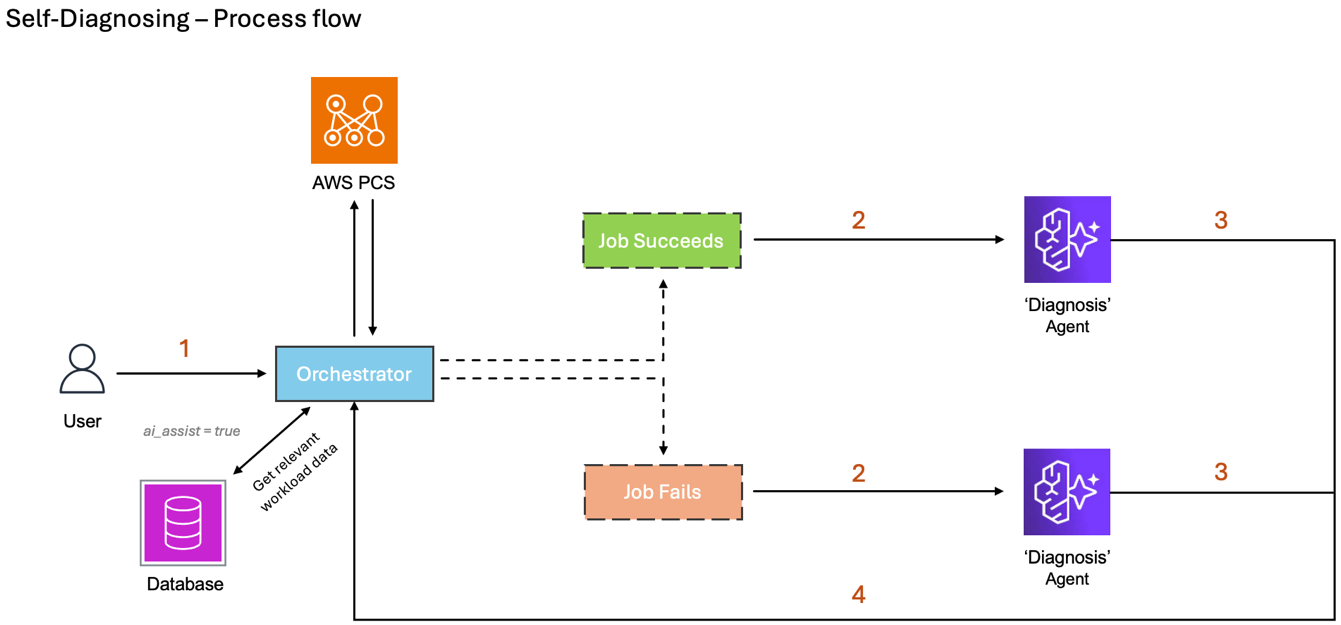
Figure 3: Workflow diagram of the Self-Diagnosing capability.
The Self-Diagnosis troubleshooting workflow completes the following steps:
- A user submits a job, and AWS PCS returns the job run results
- The Orchestrator sends job run results and relevant data to the Diagnosis Agent
- The Diagnosis Agent analyzes the data and provides a fix or optimization to the Orchestrator
- The Orchestrator updates the workload registry
The following are example scenarios and output recommendations from the Diagnosis Agent:
| Example Failure | Diagnosis | Recommendation | Action |
| Job fails to start due to insufficient GPU capacity in us-east-1 | Orchestration-level failure: Requested p5.48xlarge instance unavailable in primary region | Retry in us-west-2 where P5 capacity is available or use alternative instance type g5.48xlarge with 15% performance reduction | Workload is marked with recommendation to try in a different region. Self-healing will automatically try this workload in a different region. |
| Job terminates mid-execution with out-of-memory error | Workload-level failure: Memory consumption exceeded requested 128GB allocation at 73% job completion | User action required: Increase memory request to 256GB based on observed consumption pattern, or implement checkpointing to reduce memory footprint | Notification sent to user with detailed guidance |
Self-healing workflow
The self-healing capability enables the system to automatically correct failures and retry workloads without human intervention while learning from each attempt. This automated approach can potentially reduce time-to-solution from days (manual troubleshooting) to minutes (automatic correction and retry). Self-Healing is a job retry capability using a combination of the Self-Diagnosis output and Intelligent Routing capabilities.
The Diagnosis Agent provides root-cause analysis and recommends corrective actions for failed jobs. If job orchestration caused the failure, the Diagnosis Agent may provide auto-correctable actions. The Orchestrator retries the job through intelligent workload routing if retries are configured and auto-correctable actions received. Past-run data and corrective actions become part of the context for the Configuration Agent. For auto-correctable fixes, the Configuration Agent automatically implements the recommended changes before sending a new infrastructure recommendation to the Orchestrator.
If the retried job succeeds, the successful correction is captured on the workload type in the workload registry. This becomes the baseline infrastructure recommendation for future runs of this workload type and is altered according to the needs of each individual run. For failed retry attempts, this cycle repeats until the job succeeds or runs out of retry attempts.
Finally, the workflow escalates any blocking issues, such as retry attempt limits reached or user-required action, to the user with fix recommendations. Figure 4 provides an overview of the Self-Healing capability.
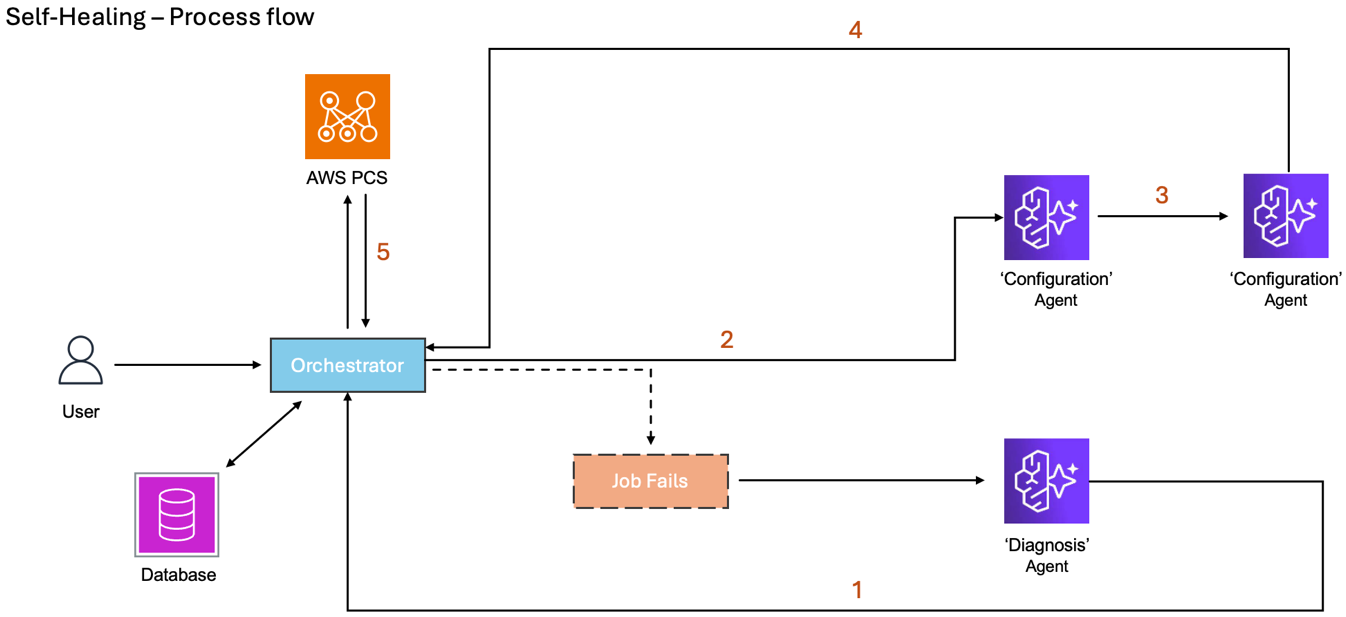
Figure 4: Workflow diagram of Self-Healing capability.
The self-healing workflow completes the following steps:
- The Orchestrator receives a fix or optimization recommendation after a job completes
- The Orchestrator starts another job through intelligent workflow routing since the workload is configured for retries
- The Configuration Agent receives job data and diagnosis for context and calls itself again as part of the LangGraph workflow
- The Configuration Agent generates and sends a new configuration
- The Orchestrator receives the new configuration, builds infrastructure and starts another job
The following are example scenarios and actions, outcomes, and learnings from the self-healing workflow:
| Initial Failure | Diagnosis | Self-Healing Action | Outcome | Learning |
| Requested instance type unavailable | Specific instance family has capacity constraints | Automatically switch to equivalent instance type with similar performance characteristics | Job completes successfully on alternative hardware | Update workload template to include alternative instance types for future submissions |
| Out-of-memory error during execution | Memory consumption pattern exceeds requested allocation | Automatically increase memory allocation based on observed usage pattern from partial execution | Job retries with increased memory and completes successfully | Update workload metadata with correct memory requirements for future recommendations |
Auto-optimization loop
The auto-optimization capability creates a continuous learning system that ensures the system becomes increasingly more effective over time by making better decisions automatically without requiring manual intervention or expertise. It improves resource recommendations based on execution history and performance telemetry. As workloads execute, the system collects comprehensive telemetry, such as the following:
| Performance Metrics | Success Patterns | Failure Patterns |
|
|
|
The Self-Optimization loop is similar to the Self-Healing capability, and it is also combines intelligent routing and self-diagnosis. When a job succeeds, the Diagnosis Agent creates an optimization recommendation instead of a fix recommendation. This recommendation is then part of the context for the Configuration Agent for future jobs in that workload type, and the Configuration Agent considers it for new infrastructure recommendations. Figure 5 shows the workflow diagram.
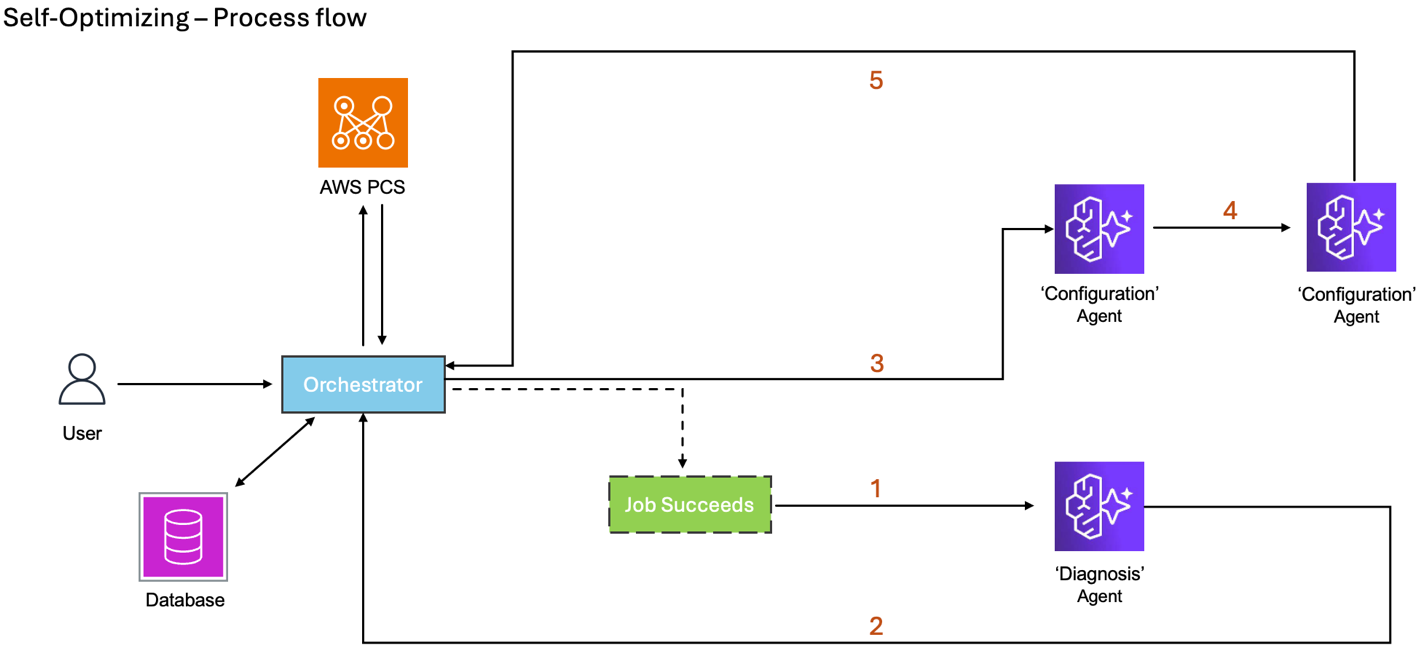
Figure 5: Workflow diagram of Self-Optimization capability.
The self-optimization loop completes the following steps:
- The Diagnosis Agent receives results when a job finishes successfully
- The Diagnosis Agent generates an optimization recommendation after job completion instead of a fix recommendation as in the self-healing capability,
- The Orchestrator starts another job through intelligent workflow routing when the next job is submitted
- The Configuration Agent receives job data and optimization for context and calls itself again as part of the LangGraph workflow
- The Configuration Agent generates and sends a new configuration to the Orchestrator
The following are example scenarios from the self-optimization loop:
| Observation | Analysis | Action | Impact |
| Workload executions show consistent 40-50% GPU utilization on P4d instances | G5 instances provide equivalent performance at 40% lower cost for this utilization pattern | Update Configuration Agent to suggest G5 instances for similar workloads | Cost reduction for entire workload family without performance loss |
| 10 executions of a specific workload show 85-92GB memory usage when 128GB requested | Memory over-provisioning with no benefit | Adjust memory recommendation to 96GB (peak usage + 10% buffer) | Enable more jobs to run concurrently on same hardware, improving throughput |
Benefits and Impact
The intelligent orchestration solution provides four specific capabilities: Intelligent Workload Routing, Self-Diagnosis, Self-Healing, and Auto-Optimization.
Together they deliver measurable improvements:
Operational Efficiency: Automated operations eliminate manual troubleshooting and reduce specialist support requirements, democratizing access. Time-to-compute and problem resolution are significantly faster through automated diagnosis.
Performance and Scalability: Optimized resource utilization prevents over- and under-provisioning by matching workloads to optimal instance types. Seamlessly scale from teraflops to petaflops, with infrastructure automatically upgraded to next-generation GPUs and specialized accelerators as they become available.
Cost Optimization: Cost-aware orchestration through automated instance type selection and storage optimization reduces compute expenses.
User Experience: Self-service capabilities enable one-click submissions with automatic resource selection and transparent failure diagnosis. Automated retry with intelligent corrections and failover ensures reliability and reduced job failure rates.
Continuous Improvement: The system becomes more effective over time through history-based recommendations, failure pattern analysis, and cost-performance optimization. Successful correction strategies are automatically applied to future issues, with reproducible execution environments preserving institutional knowledge.
Below we’ll walk through an example implementation to show how to get started.
Examples
Configuration recommendation
The JSON response below shows an example of a recommendation of infrastructure generated by the Configuration agent:
"recommendation": {
    "recommendationId": "d95c9793-ebdc-4d04-8012-7948294d480e",
    "region": "us-east-1",
    "instanceTypes": [
        "c6i.2xlarge"
    ],
    "nodeCount": 1,
    "networking": {
        "placementGroup": "cluster",
        "efaEnabled": false,
        "subnetIds": null,
        "securityGroupIds": null
    },
    "storage": {
        "ebsVolumeSizeGb": 100,
        "ebsVolumeType": "gp3",
        "fsxLustreEnabled": false,
        "fsxFileSystemId": null
    },
    "amiId": "ami-0337f3f7034925149",
    "containerImage": null,
    "estimatedCostUsd": 15.0,
    "estimatedRuntimeMinutes": 240,
    "confidenceScore": 0.85,
    "reasoning": "Selected x86_64 architecture as explicitly required by the job script. Chose c6i.2xlarge (8 vCPUs) to provide the required 4 tasks with room for OS overhead. Selected the latest PCS-compatible x86_64 AMI (ami-0337f3f7034925149). Created launch template to install GROMACS via Spack based on debugger insights showing previous failures due to missing software. Using private subnet and security groups that allow Slurm communication. EFA not enabled as single-node MPI doesn't require it. Added both ECS and PCS security groups to allow proper communication. The instance has sufficient memory (16GB) for the 8GB requirement. Using gp3 EBS for good baseline performance with sequential writes.",
    "generatedAt": "2026-03-19T10:01:18.547341592Z"
}
Diagnosis result
The JSON response below shows an example of a diagnostic result, from the agent, for a failed workload:
{
  "diagnosticId": "diag-gromacs-spack-267",
  "runId": "run-9d72164a-c86c-4c39-887f-8a59840d9d8d",
  "category": "WORKLOAD",
  "type": "DEPENDENCY_ERROR",
  "rootCause": "GROMACS software installation via Spack was likely incomplete when the job started running. The job ran for 16 minutes but failed during execution, suggesting the Spack environment setup was incomplete or GROMACS components were missing.",
  "evidence": "1. Job ID 267 exists, proving Slurm worked correctly\n2. 16-minute runtime indicates job started but failed during execution\n3. Job script attempts to load GROMACS via Spack from /shared/software/spack-${ARCH}\n4. Similar pattern to previous failures with same root cause",
  "autoCorrectable": true,
  "correctiveActions": [
    "Add a pre-job check in user_data to verify GROMACS installation is complete",
    "Increase job dependency wait time to ensure Spack installation finishes",
    "Pre-install GROMACS in the AMI instead of using Spack at runtime"
  ],
  "userActions": [
    "SSH to compute node and verify GROMACS installation: 'spack find gromacs'",
    "Check Spack installation logs in /var/log/cloud-init-output.log",
    "Verify /shared/software/spack-$(uname -m) exists and is writable"
  ],
  "confidenceScore": 0.95,
  "diagnosedAt": "2026-03-19T09:57:08.462733493Z"
}
Optimization recommendation
The below is an example of an optimization recommendation:
"optimization_recommendation": {
    "recommendationId": "opt-2026-03-19-001",
    "runId": "run-ebcbefe1-56e3-4acc-a2a0-acc35cb87b7c",
    "optimizationOpportunities": [
        {
            "area": "COST",
            "currentState": "Job completed in 183 minutes vs estimated 240 minutes, suggesting over-provisioning",
            "opportunity": "Right-size instance based on actual runtime needs",
            "impact": "Potential 25% cost reduction",
            "confidence": 0.7
        },
        {
            "area": "COMPUTE",
            "currentState": "Using c6i.2xlarge (8 vCPUs) for 4 requested tasks",
            "opportunity": "Consider c6i.xlarge with 4 vCPUs since the job completed faster than estimated",
            "impact": "50% compute cost reduction with minimal performance impact",
            "confidence": 0.75
        },
        {
            "area": "STORAGE",
            "currentState": "100GB gp3 volume with no storage I/O metrics",
            "opportunity": "Monitor storage I/O patterns to optimize EBS volume size",
            "impact": "Potential 20-30% storage cost reduction",
            "confidence": 0.6
        }
    ],
    "recommendedChanges": "{\"instance_types\":[\"c6i.xlarge\"],\"node_count\":1,\"networking.efa_enabled\":false,\"storage.ebs_volume_size_gb\":75,\"memory_gb\":8,\"cpu_cores\":4}",
    "estimatedImprovements": {
        "costReductionPercent": 45,
        "performanceImprovementPercent": 0,
        "runtimeReductionMinutes": 0
    },
    "reasoning": "1. The job completed 57 minutes faster than estimated (183 vs 240 minutes), indicating resource over-provisioning. 2. With 4 tasks requested and successful completion, c6i.xlarge (4 vCPUs) should be sufficient vs current c6i.2xlarge. 3. Actual cost ($1.035) was significantly lower than estimated ($15.00), suggesting room for optimization. 4. Single-node configuration with no apparent network bottlenecks, so EFA remains unnecessary. 5. Without storage I/O metrics, recommending modest reduction in EBS size based on typical HPC workload patterns.",
    "priority": "MEDIUM",
    "confidenceScore": 0.7,
    "analyzedAt": "2026-03-19T13:09:34.871038077Z"
}
Conclusion
Intelligent workload orchestration represents a fundamental paradigm shift from manual, reactive HPC management to automated, proactive optimization. By combining intelligent workload routing, automated self-diagnosis, autonomous self-healing, and continuous auto-optimization, organizations can transform their computing operations while accelerating innovation and time-to-insight.
Organizations implementing intelligent orchestration gain not just operational efficiency, but strategic advantages: faster iteration cycles accelerating innovation, reduced costs enabling larger-scale workloads, improved reliability through self-healing, and the ability to leverage the latest computational capabilities without specialized expertise. Sample code for the agents is available in our AWS samples repository. Follow instructions in the README file in the repo to deploy and test your agents.
Ready to transform your HPC operations? Consult with your AWS Solution Architects or visit the AWS HPC resources page to learn more about AWS Parallel Computing Service and intelligent orchestration capabilities. The journey from reactive management to proactive optimization starts with understanding your workload patterns, and AWS has the expertise and technology to guide you through every step.