IBM & Red Hat on AWS
Enable AI with enterprise data using new IBM watsonx.data features on AWS
Organizations building AI applications need unified access to structured and unstructured data while maintaining governance and control. Data scientists, engineers, and AI developers require tools that help them extract value from diverse data sources across environments.
IBM watsonx.data on AWS addresses these needs with new features that expand its capabilities. Customers can now access the Gluten accelerated Spark engine for improved performance, use AWS PrivateLink for secure connectivity, interact with a generative AI (GenAI) powered assistant for guidance, and take advantage of pay-as-you-go pricing on AWS Marketplace.
In this blog, you’ll discover how these capabilities help you build and scale AI and analytics initiatives on AWS. We’ll explore each feature and show you practical implementation patterns using AWS services.
What is IBM watsonx.data on AWS?
IBM watsonx.data is an open data lakehouse that helps you work with all your data for AI and analytics. It brings together data warehouse and data lake capabilities in a unified platform that separates compute, metadata, and storage. It enables you to work with structured, semi-structured, and unstructured data across your ecosystem.
The platform works with open table formats like Apache Iceberg, Delta Lake and Hudi, and open file formats like Parquet, ORC, and CSV, using standard APIs that integrate with common machine learning libraries. You can either manage your data directly in watsonx.data or connect it to existing data sources, which helps reduce duplicate storage costs.
For AI applications, watsonx.data includes built-in data governance features that enforce schema consistency and data integrity. Multiple fit-for-purpose query engines like Presto and Spark provide flexibility for different workload requirements.
Watsonx.data supports generative AI workloads through two vector database integrations:
- Milvus for similarity search operations, ideal for Retrieval Augmented Generation (RAG) applications focused on informational workloads with hybrid queries combining vector and metadata.
- AstraDB, powered by Apache Cassandra, for operational GenAI applications requiring high write and read throughput with global replication capabilities.
These vector capabilities help you incorporate your organization’s data into large language model responses with features for different use cases – from document summarization and Q&A to real-time production workloads.
Secure private connectivity with AWS PrivateLink
IBM watsonx.data now supports AWS PrivateLink, enabling you to securely connect to watsonx.data services from your Amazon Virtual Private Cloud (Amazon VPC) without exposing traffic to the public internet.
When working with sensitive data, AWS PrivateLink helps you meet data privacy and compliance requirements by:
- Keeping traffic between your AWS account and watsonx.data SaaS on the AWS private network
- Eliminating the need for public endpoints to access watsonx.data services
- Simplifying your network architecture with private IP-based access
- Strengthening your security posture for regulated workloads
The watsonx.data support for AWS PrivateLink provides:
- Private connectivity for both read and write operations
- Compatibility with existing authentication mechanisms and AWS Identity and Access Management policies
- Support for watsonx.data engines like Presto and Spark
- Easy setup through the watsonx.data console, command-line interface, or API
You can use AWS PrivateLink with watsonx.data to maintain security best practices while you build AI applications that need access to your enterprise data.
Accelerate your Spark workloads with Gluten engine
IBM watsonx.data on AWS now includes the Gluten Accelerated Spark Engine. This addition improves Apache Spark SQL performance for your data analytics workloads.
Gluten works as a plugin that connects Apache Spark with Velox, an open-source execution engine written in C++. When you run Spark SQL queries, Gluten offloads the execution to Velox. This process handles data more efficiently than traditional Java-based Spark execution.
You won’t need to make code changes to your existing Spark applications. Your applications continue to use familiar Spark APIs while gaining performance improvements.
Key capabilities of the Gluten engine include:
- Support for Apache Parquet and Apache Avro file formats
- Faster scans when working with large tables
- Accelerated processing for SQL operations like joins, filters, and aggregations
- Compatibility with Delta Lake, Apache Hudi, Apache Iceberg, and Hive catalogs
- Better performance for data manipulation operations (UPDATE, DELETE, MERGE INTO, INSERT)
- Automatic conversion of sort-merge joins to hash joins for improved performance
For organizations running data-intensive workloads, Gluten offers an alternative execution path. This approach helps optimize resource utilization while maintaining the flexibility of Apache Spark.
Enterprise Data Pipelines with AWS and IBM watsonx.data
Customers implementing generative AI solutions need efficient ways to prepare and use their data for AI-ready insights. This section outlines steps to build secure and governed data pipelines using AWS services integrated with watsonx.data.
Step 1: Setup your AI Foundation with Amazon S3 and watsonx.data
Register Amazon Simple Storage Service (Amazon S3) buckets with IBM watsonx.data to create a structured data foundation for AI applications. Secure your data in Amazon S3 with encryption at rest, use IAM roles for controlled access, and apply least-privilege permissions.
Figure 1 illustrates how Amazon S3 buckets are organized into logical data layers and registered with watsonx.data catalogs and processing engines.
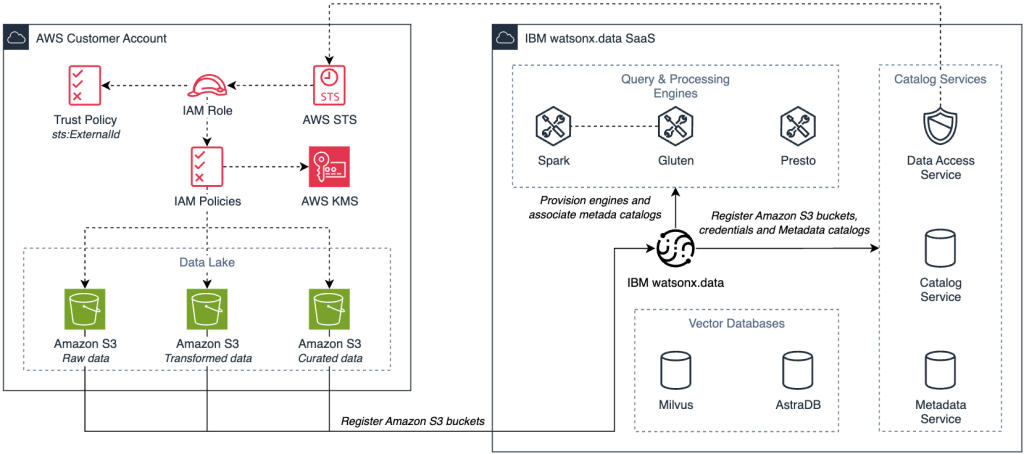
Figure 1. Amazon S3 data foundation integrated with watsonx.data catalogs and Spark engines.
This foundation establishes the storage architecture needed for an end-to-end AI data pipeline. The integration works as follows:
- Storage foundation: Amazon S3 provides durable, scalable storage for data lakes, where data is organized into layers such as raw (source data), transformed (validated and normalized data), and curated (production-ready datasets).
- Bucket registration: Register Amazon S3 buckets in watsonx.data providing bucket details, AWS region, endpoint, and either AWS Identify and Access Management (IAM) temporary credentials or an IAM Role Amazon Resource Name (ARN).
- Cross-account security: Specify an External ID in both the connection settings and IAM role trust policy to secure cross-account access and prevent the confused deputy problem.
- Catalog association: Associate registered Amazon S3 buckets with data Hive catalogs for diverse file formats and intermediate processing, and Iceberg catalogs for ACID transactions and schema evolution.
- Engine connectivity: Provision Spark and Gluten engines and associate them with catalogs for consistent metadata management and efficient data processing.
This configuration creates a unified data foundation that maintains storage flexibility while enabling powerful processing capabilities.
Step 2: Automate End-to-End Data Processing with Spark and Gluten-accelerated Engines
Figure 2 shows an event-driven architecture that processes data automatically as it arrives. It illustrates how AWS services connect Amazon S3 buckets to watsonx.data processing engines via AWS PrivateLink to orchestrate data transformation workflows.
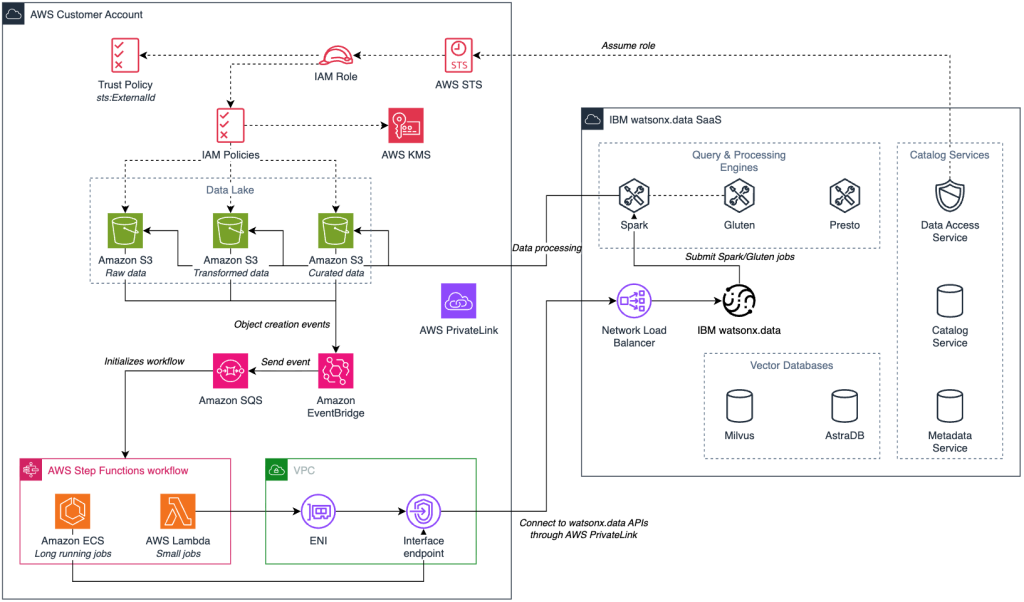
Figure 2. Serverless data pipeline using AWS services and watsonx.data engines with secure AWS PrivateLink connectivity.
This serverless pipeline automates data transformation as new files arrive in Amazon S3. The workflow works as follows:
- Data ingestion: Raw data uploaded to Amazon S3 triggers an Amazon EventBridge event that sends a message to Amazon Simple Queue Service (Amazon SQS).
- Workflow orchestration: AWS Step Functions coordinates the process using AWS Lambda functions and Amazon Elastic Container Service (Amazon ECS) tasks (for long running jobs) to submit, monitor, retry and manage Spark and Gluten-accelerated workloads on watsonx.data via an AWS PrivateLink VPC endpoint.
- Connection & authentication: connection to watsonx.data is done via Endpoint URLs and requires authentication using API key or token.
- Data in motion security:data Web Console UI, API, Presto, Milvus, and Metadata Service data in motion is encrypted by using SSL/TLS 1.3.
- Secure data access:data assumes the configured IAM role via AWS Security Token Service (AWS STS) to access Amazon S3 buckets.
- Data processing: Spark or Gluten-accelerated engines based on workload requirements.
- Data flow: Processed data moves through transformed and curated stages, writing results back to Amazon S3 buckets with encryption at rest.
- Metadata security: Metadata Service backend database is encrypted in watsonx.data.
- Output: Curated data is ready for analytics or vectorization for GenAI applications.
Step 3: Transform Enterprise Data into AI-Ready Vector Embeddings
Figure 3 shows the workflow for transforming curated text data into vector embeddings and loading them into watsonx.data’s Milvus vector database. It demonstrates a serverless, batch-optimized process using AWS Step Functions to coordinate vectorization from source data to searchable embeddings.
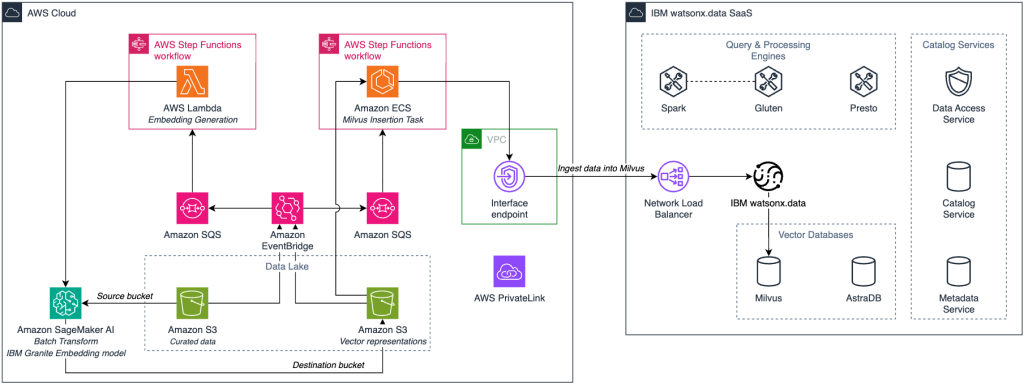
Figure 3. Automated pipeline transforming enterprise data into vector embeddings in Milvus.
The process described in the architecture flow works as follows:
- Data trigger: Curated data in Amazon S3 triggers an Amazon EventBridge event that initiates the AWS Step Functions workflow for vectorization processing.
- Pipeline orchestration: AWS Step Functions coordinates the vectorization process using AWS Lambda functions to manage data validation, Milvus collection setup, and batch processing workflows
- Embedding generation: AWS Lambda functions invoke Amazon SageMaker AI endpoints running IBM Granite embedding models to convert text data into vector representations.
- Vector storage: Generated embeddings are inserted into the watsonx.data Milvus vector database with batch optimization for efficient ingestion.
- Index optimization: Milvus indexes are created and optimized to enable high-performance similarity search capabilities for downstream applications.
- Output: The resulting Milvus database provides enterprise-ready vector search functionality for AI applications like RAG and similarity matching.
Step 4: Deliver Contextual AI Responses with Enterprise-Grounded RAG Applications
Figure 4 shows a Retrieval-Augmented Generation (RAG) architecture that combines watsonx.data’s vector capabilities with Amazon Bedrock and Amazon SageMaker AI. It illustrates how user queries move through a serverless workflow to retrieve relevant enterprise data and generate accurate, context-aware responses using IBM Granite large language models on AWS.
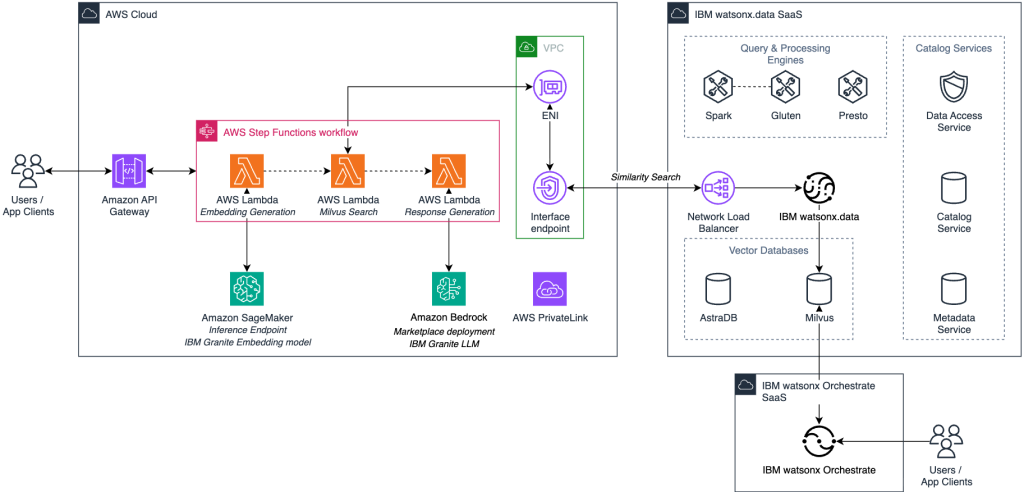
Figure 4. RAG workflow with watsonx.data Milvus vector search and Amazon Bedrock to generate enterprise-grounded responses.
This architecture lets AI applications use your organizational knowledge while keeping components separate for scalability and easier maintenance. The RAG workflow works as follows:
- Query ingestion: End user queries enter through an application interface and are processed by Amazon API Gateway for secure request handling and routing.
- Workflow orchestration: AWS Step Functions orchestrates the three-stage RAG process with state management and error handling between components.
- Query vectorization: AWS Lambda functions convert the user query to a vector embedding using Amazon SageMaker endpoints running IBM Granite embedding models.
- Context retrieval: The query vector performs similarity search in the watsonx.data Milvus vector database to retrieve the most relevant enterprise context and documents.
- Prompt enrichment: AWS Lambda functions combine the original query with retrieved context and send an enriched prompt to Amazon Bedrock for response generation.
- Response generation: Amazon Bedrock Marketplace deployment of IBM Granite large language models generates responses grounded in your enterprise data.
- Response delivery: The contextualized response is returned to the user through Amazon API Gateway with proper formatting and security controls.
- Agent integration: For AI agent workflows, IBM watsonx Orchestrate integrates with the Milvus vector database to coordinate multi-step reasoning, task planning, and automated actions based on contextually relevant information retrieved from your enterprise data.
GenAI-powered watsonx.data Assistant (Public Preview)
The IBM watsonx.data Assistant is now available in public preview. This GenAI-powered chat interface helps you navigate and understand watsonx.data through natural language interactions.
The assistant responds to your questions about the product by drawing from IBM product documentation and internal knowledge. Whether you need help setting up a data source, configuring an engine, or troubleshooting a task, the assistant provides accurate, context-aware answers. Figure 5 shows an example in the watsonx.data web console.
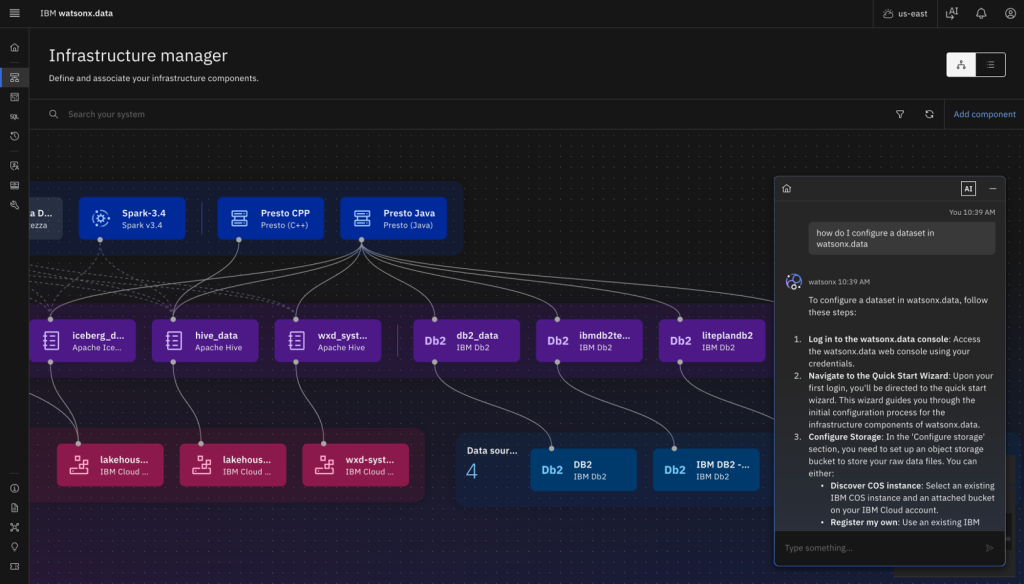
Figure 5. IBM watsonx.data Assistant uses generative AI to respond to your questions about the product by drawing from IBM product documentation and internal knowledge.
To get started with the watsonx.data Assistant:
- Log in to your watsonx.data instance
- Navigate to Configurations
- Select watsonx.data Assistant
- Toggle the Enable switch to turn it on
After enabling the assistant, choose the AI icon at the top of the watsonx.data home page. Type your question into the chat window to get immediate help.
You can try the assistant at no cost by creating a free Lite plan instance of watsonx.data on AWS.
Flexible pay-as-you-go pricing on AWS Marketplace
IBM watsonx.data is now available on AWS Marketplace with a pay-as-you-go pricing option. This model provides a way to begin using watsonx.data without upfront commitments.
With pay-as-you-go pricing on AWS Marketplace, you can:
- Scale your usage based on your actual requirements
- Match your costs to your consumption patterns
- Acquire the service directly through AWS Marketplace
- View watsonx.data charges on your AWS invoice alongside other AWS services
This option works alongside existing licensing models, giving you more flexibility in how you consume the service based on your organization’s needs.
Conclusion
The new features in IBM watsonx.data on AWS help you build and operate AI and analytics solutions more effectively. These additions address common challenges in enterprise data environments by improving performance, security, usability, and consumption flexibility.
The Gluten engine enhances Spark SQL performance for your data-intensive operations. AWS PrivateLink secures connectivity from your Amazon VPC to watsonx.data services. The GenAI Assistant guides you through product features using natural language. Pay-as-you-go pricing on AWS Marketplace gives you more flexible consumption options.
These capabilities build upon watsonx.data’s open architecture foundation, making it easier for your teams to access and analyze data from diverse sources across AWS and hybrid environments.
Visit the AWS Marketplace and get started with IBM watsonx solutions on AWS:
- AWS Marketplace: IBM watsonx.data as a Service
- AWS Marketplace: IBM watsonx.data intelligence Software
- AWS Marketplace: IBM watsonx Orchestrate as a Service
- AWS Marketplace: IBM watsonx.governance as a Service
Additional Content:
- Accelerate Data Modernization and AI with IBM Databases on AWS
- Making Data-Driven Decisions with IBM watsonx.data, an Open Data Lakehouse on AWS
- IBM watsonx.data on AWS
- watsonx.data Lakehouse Integrations with Vector DB
- watsonx.data with DataGate using MainFrame Data on AWS for Lakhouse
- AWS Partner IBM