AWS for Industries
Modernize earned premium using InsuranceLake and Coherent Spark on AWS
If your finance or actuarial team spends days reconciling earned premium spreadsheets each month, this post shows you how to reduce that to hours using AWS InsuranceLake and Coherent Spark. You want to unify the data so that teams across the organization can access and trust it. A shared data foundation gives marketing, underwriting, claims, actuarial, and finance teams one consistent view of the data, which reduces duplicate work and supports better decisions. When your data is connected, you can calculate earned premiums more accurately, improve loss reserving, and create clearer financial reports.
Today, many finance and actuarial teams rely on models built in commonly used tools (for example, Excel which provides flexibility to collaborate easily with other non-technical stakeholders) to calculate earned premium, which refers to the portion of insurance premium that an insurer has collected since the policy started. Calculating earned premium accurately is critical because it directly determines the revenue an insurer recognizes in a given period and underpins reserve adequacy, profitability analysis, and regulatory reporting. This spreadsheet-driven approach, while flexible and agile, is disconnected, error-prone, and difficult to govern, which creates reconciliation issues, version-control risks, and rising compliance challenges. It also doesn’t scale with growing transaction volumes and makes updates hard to test and deploy, limiting an insurer’s ability to adapt pricing or respond to market changes.
In this post you will explore how finance and actuarial teams can find a balance between the ability to scale models and to experiment with changes. AWS InsuranceLake accelerator solution will be used ingest commercial auto and workers compensation policy data containing written premiums and enrich it with calculated earned monthly premiums using an Excel spreadsheet-based model that has been turned into an API and made enterprise grade with Coherent Spark on AWS.
You can deploy trusted models at scale resulting in month-end earned premium calculations shrinking from days to hours. This gives the CFO earlier visibility into profitability and frees finance teams to spend time on analysis instead of reconciling spreadsheets. Calculated data is published quickly to the organization so underwriters gain real-time earned premium insights, enabling portfolio decisions based on current exposure – not stale, month-old data. Product and state expansion also accelerates, as actuaries publish new earning calculations without waiting on IT development queues. With governed access, lineage transparency, and a consistent audit trail, regulatory reviews become faster and cleaner, as every financial figure can be traced back to its source.
In addition to the business value, the technical value extends well beyond earned premium. By separating business logic, you create a reusable architectural pattern for deploying models designed and maintained in a commonly used risk analytics tool (Excel). This pattern applies to models for rating engines, reserves, commission allocations, and reinsurance settlements; it scales across the enterprise without custom development for each use case.
Solution overview
This solution architecture comprises two components:
1. InsuranceLake, an AWS solution accelerator and open source project on Github, serves as a data lake and ETL foundation for insurers. InsuranceLake helps insurers to collect, cleanse, and consume data into a cost-optimized serverless data lake.
With InsuranceLake, you can:
- Ingest batch, transactional, streaming, and unstructured data from Amazon S3.
- Validate, map, and transform data with declarative pipeline configuration and integrated AWS Glue Data Quality.
- Create a customer 360 view of your data.
- Help satisfy security and regulatory requirements with data governance tool integration and audit logging.
InsuranceLake combines 7 AWS services (Amazon S3, AWS Key Management Service (AWS KMS), AWS Lambda, AWS Step Functions, AWS Glue, Amazon DynamoDB, and Amazon Athena) and deploys in 30 minutes using AWS Cloud Development Kit (CDK). Two AWS Glue ETL jobs deliver serverless, parallelized transformation capability using the Apache Spark analytics engine. Business users of data and system product owners can write their own transformation definitions in simple JSON files, while data engineers can extend and maintain a library of transforms.
2. Coherent Global is an AWS Partner technology solution provider and global software-as-a-service (SaaS) company helping businesses understand, govern, and operationalize the business logic embedded in their Excel-based models. Coherent is trusted by global financial services firms – including Tier 1 insurers, wholesale brokers, asset managers, pension funds, and banks – to transform spreadsheet logic into reusable, governed assets that can be deployed consistently across enterprise systems. Coherent’s platform acts as a logic layer between business teams and IT, allowing insurers to separate calculation logic from downstream systems while preserving business-user ownership of models.
At the core of the Coherent platform is Coherent Spark, which compiles spreadsheet-based models into high-performance APIs. These APIs work with existing systems and data workflows. Insurers can use them to get to market faster, improve auditability and governance, and test models more accurately — all while keeping Excel as the authoring tool.
You can find out more about Coherent on the AWS Marketplace.
Solution architecture
The following architecture diagram shows how the services that comprise InsuranceLake can be integrated with Coherent Spark.
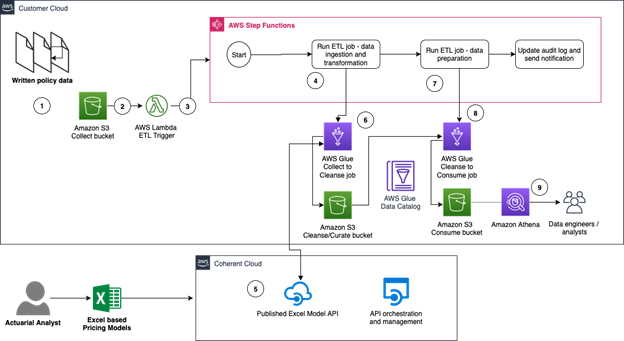
Figure 1 – InsuranceLake and Coherent Spark Platform integration reference architecture
- A broker organization transmits monthly written premium for commercial auto and workers compensation in CSV batch files. Figure 2 shows a snapshot of the general insurance synthetic written policy data included with InsuranceLake that you will ingest.
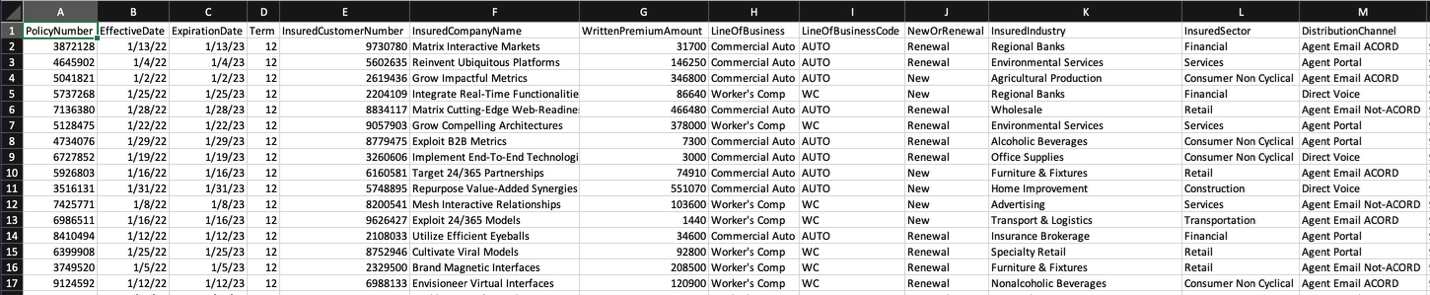
Figure 2 – Snapshot of synthetic written premium data in InsuranceLake
- The InsuranceLake Collect Amazon S3 bucket stores written premium files organized in a two level folder structure.
- The S3 bucket object creation triggers a Lambda function which extracts metadata from the file and triggers the Step Functions workflow.
- The Collect-to-Cleanse ETL job loads the raw data, performs field mapping, transforms the data to multiple rows per policy, checks data quality, and stores the resulting data in S3 and the AWS Glue Data Catalog. The transforms expand the broker data to have one row per active policy month per policy (for example, three 12 month policies will be expanded to 36 rows).This granularity enables earned premium calculation which recognizes revenue proportionally over each month of coverage rather than policy inception.
- The Collect-to-Cleanse ETL job calls the model to calculate earned premium for each policy and reporting period via the Coherent Spark API. The transform that calls the API adds a column for the model-calculated earned premium to each row of data. Figure 3 shows a snapshot of the resulting data.
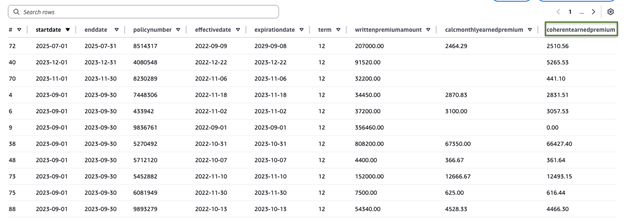
Figure 3 – Snapshot of earned premium transformed data in InsuranceLake
- The Cleanse S3 bucket stores premium data organized by data source and data type (for example, premium data). The Data Catalog stores the schema and version.
- The Cleanse-to-Consume ETL job loads the data from the Cleanse bucket and Data Catalog, performs joins and other final transforms appropriate for visualization and reporting.
- The Consume S3 bucket stores data organized by data source and data type (the same structure as Cleanse). The Data Catalog stores the schema.
- Data engineers or analysts query data with Athena for use in reports or dashboards.
Prerequisites
Set up InsuranceLake
To get started, complete the InsuranceLake Quickstart instructions to set up the example data lake in your AWS Account.
For following the Quickstart instructions and loading the written premium data twice in the following instructions, assuming a total of less than 8 Glue DPU hours and cleaning all resources when finished, your cost should not exceed $5. This cost could be less as some services are included in the Free Tier.
For a detailed cost table refer to the InsuranceLake cost documentation.
Set up Coherent Spark
To get started with Coherent Spark, you will need an API key, which can be obtained from Coherent by filling out the form located at https://www.coherent.global/insurancelake-spark-api-key or writing an email request to blogsupport@coherent.global. Please provide your name, title, and corporate e-mail address with your request. Once processed, the Coherent team will provide you with an API key and tenant name needed for the installation steps below.
The Coherent team has provided a tenant to support readers of this blog trying out the solution. The team configured and published the provided Excel file containing a daily earned premium calculation as an API. Coherent Spark Documentation is available showing the steps for preparing an Excel file, mapping the inputs and outputs, and creating a Coherent Spark service.
Solution implementation
Integrate InsuranceLake and Coherent Spark
Coherent Spark provides multiple API integration choices to support different execution patterns, performance requirements, and workload scales. You will explore two common integration patterns, the Execute API for real-time high-throughput processing and the Batch API for large-scale asynchronous execution. These options allow teams to balance responsiveness, scalability, and operational efficiency across underwriting, pricing, risk modeling, and analytics workflows. In addition, Coherent Spark provides a Python SDK which simplifies development using both APIs, and you will see how it can be used in Apache Spark User Defined Functions (UDF). Please refer to the respective API documentation for detailed integration options and examples.
The custom data transform provides two options for calling the Coherent Spark API using two different Pandas UDF helper functions. These helper functions are designed to be used with the Apache Spark DataFrame method withColumn. The implementation of the Batch API utilizes the Coherent Spark Python SDK, while the implementation of the Execute API demonstrates how to use the Python requests library. The SDK supports both APIs. Both implementations utilize Apache Spark’s ability to partition DataFrames as a means to divide API requests. In other words, there is one API request for each partition of data. The size of each API request and the number of requests can be adjusted by repartitioning the DataFrame before calling the helper functions. The below table compares the two methods.
| Helper Function | Coherent Spark API | Coherent Spark Console Diagnostics? | Uses SDK? | Maximum Partition Size | Maximum Number of Partitions |
|---|---|---|---|---|---|
| coherent_earned_premium_execute | Execute | Yes | *No | 100 rows | None |
| coherent_earned_premium_batch | Batch | No | Yes | None | Limited by the input and output buffer size required for each partition |
* The Coherent Spark Python SDK supports both API options. The blog’s custom transform implementation does not use the SDK for the Execute API.
For the amount of sample data used in this blog, the AWS Glue ETL Job execution times and Data Processing Unit (DPU) hours are similar for both API methods.
Installing the custom transformation library
To install libraries
- If you closed CloudShell after the Quickstart, open CloudShell from AWS Console again.
- Confirm you are still in the
aws-insurancelake-etldirectory (for example, use thepwdcommand). - Install Coherent Spark Python library which will be used for calling Coherent Spark APIs from within the glue job
pip install csparkNote: The pip install makes cspark available locally for packaging. To make it available to the AWS Glue ETL job at runtime, the CDK stack includes cspark in the –additional-python-modules Glue job parameter. This tells Glue to install the library automatically when the job starts.
- Open source InsuranceLake provides the datatransform_premiumdemo.py library in the
resourcesdirectory. Move it to thelib/glue_scripts/libdirectory to make it available to the ETL job.
mv resources/datatransform_premiumdemo.py lib/glue_scripts/lib- Using your favorite editor, update the earned premium data transform module with the Coherent Spark API details.
a) Open thedatatransform_premiumdemo.pyfile in thelib/glue_scripts/libdirectory using your favorite editor (for example, nano).
b) At the top of the file, edit the parameterstenant_nameandapi_access_keywith the details from the Setup Coherent steps above:
api_access_key = 'paste API key here (instructions above)'
tenant_name = 'aws-coherent-blog'
Note: For production, store credentials in AWS Secrets Manager.
To configure the transform
1. To include the datatransform_premiumdemo.py library in the ETL job, edit lib/glue_scripts/etl_collect_to_cleanse.py and at the top near the other transform imports, add the line:
from datatransform_premiumdemo import *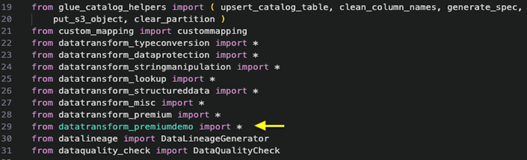
Figure 4 – Screenshot of updates to etl_collect_to_cleanse.py script
2. Download the JSON workflow transformation specification file.
curl -fl -o lib/glue_scripts/transformation-spec/lib/SyntheticGeneralData-WrittenPolicyData.json "https://d2908q01vomqb2.cloudfront.net/artifacts/IndustriesBlog/IND-1503/SyntheticGeneralData-WrittenPolicyData.json"
For more information on how InsuranceLake uses transform specification files, refer to the online documentation.
3. The custom transformation uses Coherent Spark’s Execute API for processing policy data with the value for batch processing set as false in the SyntheticGeneralData-WrittenPolicyData.json configuration file.
Follow these steps twice. The first time, leave the batch option set to false; the second time, change the batch option to true.
To modify the batch option, use your favorite editor and open SyntheticGeneralData-WrittenPolicyData.json. Update line #114, changing the parameter for the batch option. Figures 5 and 6 show the transformation specification with different values.
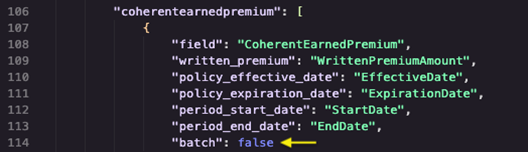
Figure 5 – Snippet from the SyntheticGeneralData-WrittenPolicyData.json file showing the batch option set to false
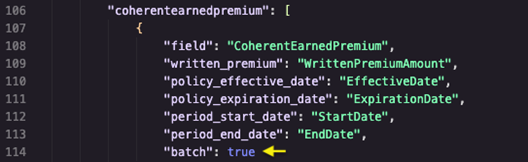
Figure 6 – Snippet from the SyntheticGeneralData-WrittenPolicyData.json file showing the batch option set to true
4. Deploy the changes to the AWS Glue stack using CDK.
cdk deploy Dev-InsuranceLakeEtlPipeline/Dev/InsuranceLakeEtlGlueTesting the custom transform
To upload test data
- Copy the syntheticgeneral-writtenpolicies.csv file to the InsuranceLake Collect S3 bucket as shown.
aws s3 cp syntheticgeneral-writtenpolicies.csv \
s3://dev-insurancelake-$(aws sts get-caller-identity --query Account --output text)-us-east-2-collect/SyntheticGeneralData/WrittenPolicyData/
To monitor the ETL job
1. Open Step Functions in the AWS Console.
2. Choose the InsuranceLake state machine: dev-insurancelake-etl-state-machine.
3. Choose the running execution. Figure 7 shows the Step Functions State Machines list below.
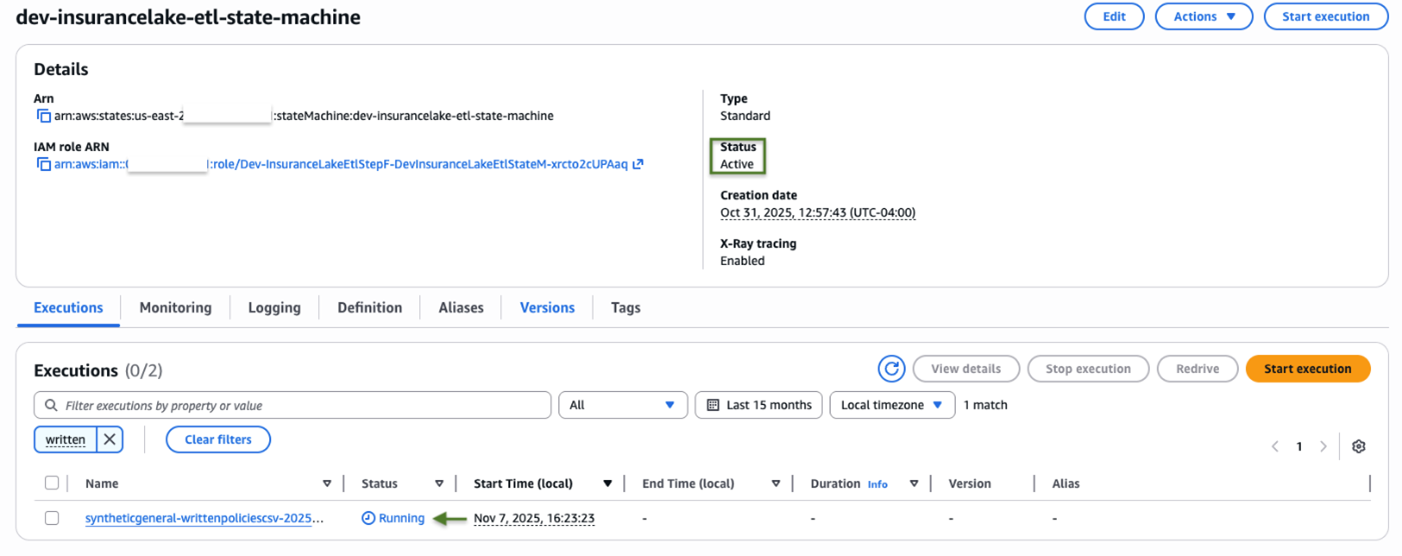
Figure 7 – Screenshot of dev-insurancelake-etl-state-machine Step Function State Machine
4. In the graph view that opens, choose the first step, DevInsuranceLakeGlueCollectJobTask. The Step Functions workflow with the first step selected is shown in Figure 8 below.
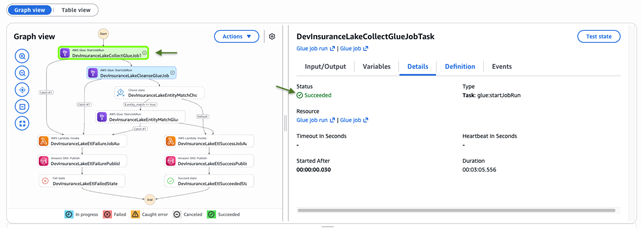
Figure 8 – Screenshot of DevInsuranceLakeCollectGlueJobTask selection in Step Functions workflow
5. Choose Glue job run and choose Output Logs. Figure 9 below shows where to choose the output logs.
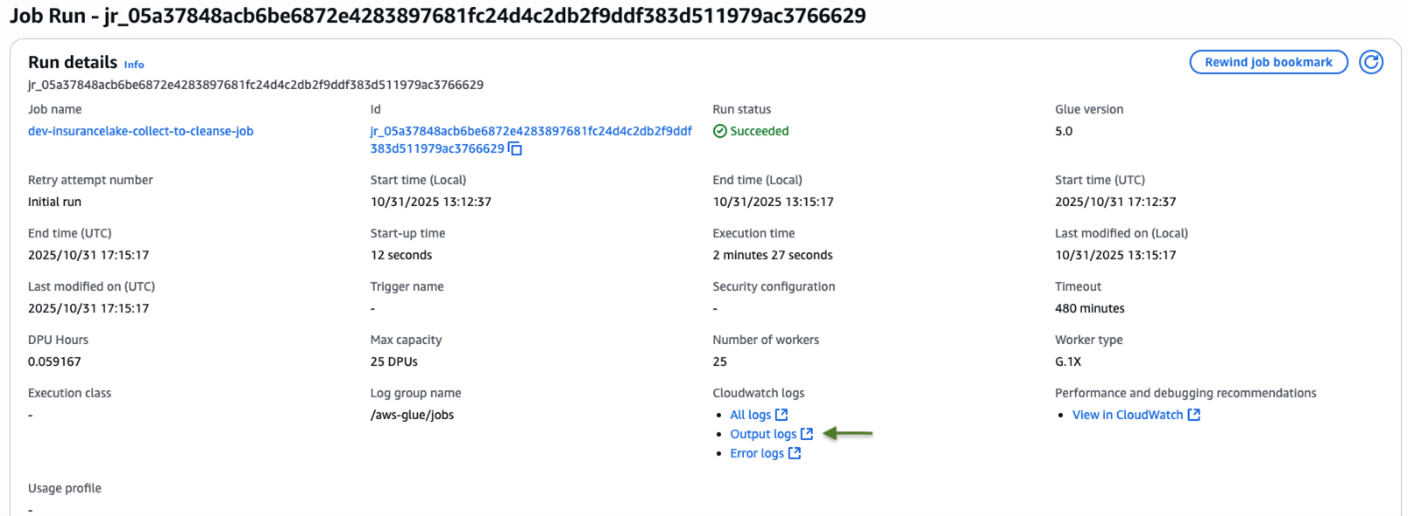
Figure 9 – Screenshot of DevInsuranceLakeGlueCollectJobTask Job Run with output log selection
6. Choose the top log stream shown (your log stream will be named differently). Figure 10 below shows an example selection.
NOTE: You must wait until the AWS Glue ETL Job starts up and begins writing to its log files to see a log stream. Use the refresh button to check if the log stream is available.
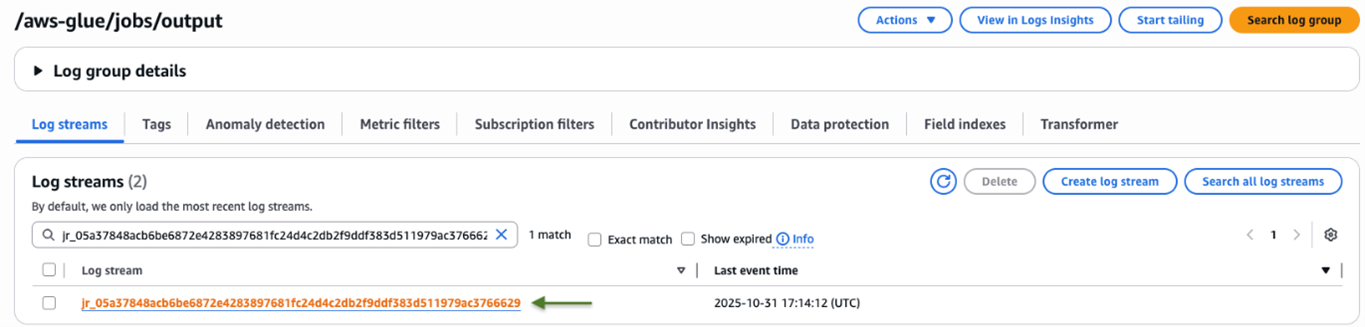
Figure 10 – Screenshot of DevInsuranceLakeGlueCollectJobTask Job run output logs and log stream selection
7. Choose Resume to watch the job progress as shown in Figure 11.

Figure 11 – Screenshot of DevInsuranceLakeGlueCollectJobTask Job output in CloudWatch Logs
To query results in Athena
- To view the results of the API call, open Athena in the AWS Console.
- Enter the following query:
select
startdate,
enddate,
policynumber,
effectivedate,
expirationdate,
term,
writtenpremiumamount,
calcmonthlyearnedpremium,
coherentearnedpremium
from syntheticgeneraldata.writtenpolicydata limit 100- Run the query and review the results in the
coherentearnedpremiumcolumn as shown in Figure 12 below.
You will notice a difference between the earned premium amount for the policy and period in the calcmonthlyearnedpremium and coherentearnedpremium columns. This demonstrates the difference between a simple linear calculation and the model’s calculation.
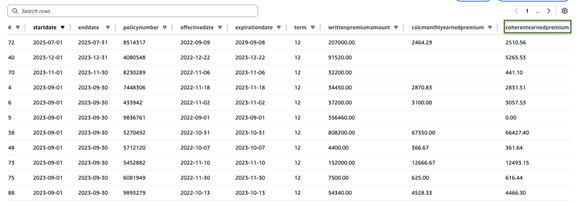
Figure 12 – Snapshot of earned premium transformed data in InsuranceLake
To repeat the test with the batch API
- If this was your first time running the ETL job, return to Configure the transform, Step 3, to modify the batch option and try the other Coherent Spark API.
Once the ETL jobs complete, take note of the Execution Time and DPU-hours used. Review the diagnostic Output Log to understand the data mapping and transformation steps taken. For a more complete understanding of the implementation and Apache Spark integration, review the source code of datatransform_premiumdemo.py.
Conclusion
Summary
In this post, you saw how insurers model earned premiums at scale in the analytics workflows by combining AWS InsuranceLake accelerator built on AWS services and the Coherent Spark solution. With only a small transform to call a hosted API, InsuranceLake works nearly out-of-the-box. You saw how an Excel-based earned premium model can be published as an API and maintained by business users, accelerating change without disrupting core systems. For more information, see the following resources:
- InsuranceLake Documentation
- Guidance for Modern Insurance Data Lakes on AWS
- Insurance Lake Scenario in the Financial Services Industry Lens
- Coherent Spark Batch API
- Coherent Spark Execute API
- Coherent Spark Python SDK
- Coherent Spark Hybrid Deployment with Neuron
- Coherent Spark Embedded NodeJS Runner
Clean up
Follow the InsuranceLake clean-up steps to remove all data lake resources from your AWS account.