AWS for M&E Blog
Generate live subtitles with AWS Elemental Inference Smart Subtitles
Live subtitling has moved from a specialty workflow into a baseline requirement for nearly every live event. Accessibility mandates, international audience growth, and platform-specific subtitling rules mean that live sports, news, conferences, government proceedings, and corporate broadcasts all need reliable, real-time subtitles on the wire.
AWS Elemental Inference Smart Subtitles automatically generates subtitles for your live content. The feature integrates seamlessly with AWS Elemental MediaLive, so customers can add subtitles to any MediaLive channel—there’s no external service to operate. For customers whose primary need is to quickly turn on automatic subtitles for a live event, it provides the shortest possible path from audio to subtitle track.
This post walks through what the feature does, how to enable it, and where it fits in a typical live streaming workflow.
What Smart Subtitles provides
At launch, the feature offers:
- Source-language speech-to-subtitle: the output is already subtitle-ready, with proper line breaks, aspect-ratio-aware wrapping, and speaker-change detection. This is distinct from raw transcription.
- Six source languages: English, Spanish, Portuguese, Italian, German, and French, including regional English variants (Australian, British, and American).
- Flexible subtitle output formats: The inference engine emits Timed Text Markup Language (TTML). For HTTP Live Streaming (HLS) outputs, MediaLive delivers subtitles as Web Video Text Tracks (WebVTT). For Common Media Application Format (CMAF) ingest to AWS Elemental MediaPackage, subtitles are delivered as TTML; MediaPackage can then emit any of its supported subtitle formats.
- Aspect-ratio-aware layout: Horizontal video can have more characters per line than vertical video. The server handles line length, so no player-side logic is required.
- Custom dictionaries: Use custom dictionaries for domain-specific vocabulary, sports team and player names, product names, brand names, place names.
- Profanity filtering for content sensitivities such as children’s programming.
- Speaker diarization: Diarization detects speaker changes and inserts a new line, so subtitles read naturally in multi-speaker content. The feature doesn’t insert speaker-change markers.
The feature is fully managed: AWS operates the inference infrastructure, the underlying models, and the integration with MediaLive.
Seamless integration with MediaLive
MediaLive integrates seamlessly with Elemental Inference. Through the MediaLive console and API, you can create Smart Subtitles Caption Selectors. Smart Subtitles Caption Selectors pull autogenerated subtitles from Elemental Inference and can be integrated into your MediaLive configuration, just like any other caption selector.
- Same console: You can enable subtitles from the MediaLive channel edit.
- Same AWS account and AWS Identity and IAM boundary: Content stays within your AWS environment, and existing AWS Identity and Access Management (IAM) role, logging, and audit controls continue to apply end-to-end.
- Same operational surface: CloudWatch metrics, channel start/stop behavior, and the operational behavior of MediaLive all extend to the subtitle track.
- Elemental Inference billing: Usage is metered as part of AWS Elemental Inference pricing.
If your live workflow already runs on MediaLive and MediaPackage, you can enable subtitles by changing the configuration on the existing channel.
How the feature fits in a MediaLive pipeline
Elemental Inference is a separate service that MediaLive communicates with to generate subtitles. MediaLive sends audio to Elemental Inference and receives subtitles back, then embeds the subtitle track into the channel’s output groups.
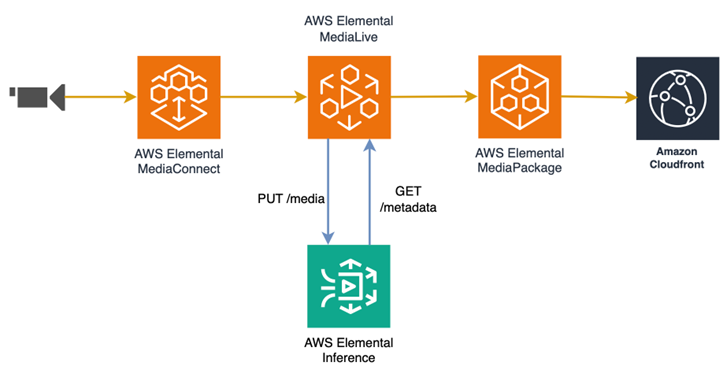
Figure 1: Smart Subtitles process
Enabling Smart Subtitles
Setting up Smart Subtitles is a three-step configuration inside an existing MediaLive channel.
1. Enable Elemental Inference on the channel:
- Open the channel in the AWS Management Console for MediaLive, choose Edit, and choose Elemental Inference settings.
- For State, select Enabled, then choose Create new feed.
2. Configure the subtitling feed:
- Use the following settings for the subtitles feed:
- For Feature, select Subtitling.
- For Language code, select the language of your source audio.
- For Aspect ratio, select the appropriate option.
- For Custom dictionary -optional, you can upload a JSON dictionary with domain-specific terms. See Bootstrapping a custom dictionary with an LLM for details.
- For Profanity filter, select the option required for your content.
- Choose Create feed and wait for the feature to provision.
3. Add the feed into the MediaLive outputs:
- In the Elemental Inference settings, in the Smart Subtitles section:
- Choose Add a Smart Subtitles caption selector and configure the language code.
- Add a caption output to your output group, referencing the new caption selector.
- For HLS output, use WebVTT. For CMAF ingest output, choose TTML.
- Choose Update channel and Start the channel. Subtitles begin flowing as soon as the channel is running.
That completes the setup.
Bootstrapping a custom dictionary with an LLM
Custom dictionaries are the biggest lever for improving subtitle accuracy on specialized content. Brand names, place names, player and coach names, product SKUs, medical terms, and domain jargon are the words a general-purpose Automatic Speech Recognition (ASR) model will most often get wrong and are the words your audience will notice most when they’re wrong.
Building the list by hand is tedious. A large language model (LLM) can do most of the work for you. Provide the LLM with the context for your event and ask it to produce a dictionary formatted for Smart Subtitles. The feature accepts custom dictionaries as JSON with content entries and optional soundsLike pronunciation hints:
{
  "entries": [
    { "content": "gnocchi", "soundsLike": ["nyohki", "nokey"] },
    { "content": "quinoa", "soundsLike": ["keen-wah"] },
    { "content": "MediaLive" }
  ]
}
The following is an example prompt:
The LLM produces a first draft in seconds. Review it, add anything domain-specific that it missed, and upload the JSON to your subtitling feed’s custom dictionary. The same pattern works for press conferences, conference keynotes, sports broadcasts, medical panels, or any live event with known participants and subject matter.
A few things that make the result better:
- Give the LLM the real sources: Provide sources such as rosters, program notes, and event pages instead of asking it to guess.
- Specify the target format: Set the target format at the start (the preceding Smart Subtitles JSON schema), so the output is ready to paste.
- Use
soundsLikefor difficult names: Phonetic hints help the ASR model pick up unusual pronunciations it wouldn’t learn from spelling alone. - Review before going live: Treat the LLM output as a draft, not a final.
Subtitle formats on the wire
The Elemental Inference engine emits TTML. From there, the subtitle format on the output depends on the MediaLive output group.
| Output destination | Subtitle format |
|---|---|
| HLS output group | WebVTT |
| CMAF ingest → MediaPackage | TTML |
MediaPackage ingests TTML and can emit any of its supported subtitle formats, giving you flexibility to match downstream delivery requirements from a single origin.
Why Smart Subtitles
Smart Subtitles is designed to make adding subtitles to live content as straightforward as possible:
- Ease of use: Enable subtitles on an existing MediaLive channel in minutes—no separate pipeline to build, no manifest manipulation, no additional account to manage.
- State-of-the-art accuracy: The underlying ASR models are purpose-built for live broadcast content, delivering high accuracy across supported languages.
- Resilient architecture: In the unlikely event that Elemental Inference experiences a disruption, the system fails gracefully. Subtitles might temporarily disappear, but video, audio, and all other tracks continue unaffected. Your stream stays live.
- Growing language and feature set: The supported language list is expanding, and additional capabilities are on the roadmap.
Conclusion
Elemental Inference Smart Subtitles brings automatic live subtitling into your MediaLive workflow as a directly integrated capability. By connecting MediaLive to Elemental Inference for subtitle generation, it gives you a straightforward path to subtitles on for live events—no external pipeline to operate, no manifest manipulation, no additional account to manage.
To learn more about MediaLive, see AWS Elemental MediaLive. To learn more about Elemental Inference, see Elemental Inference.