Microsoft Workloads on AWS
Customize your SQL Server to Aurora PostgreSQL conversion with AWS Transform
Introduction
In this blog post, we show how to review and customize the transformation plan in AWS Transform before you convert Microsoft SQL Server databases to Amazon Aurora PostgreSQL (Aurora PostgreSQL).
A database migration rarely stalls on the objects that convert cleanly. It stalls on the decisions. You decide whether MONEY carries four decimal places or two, whether dbo maps to public or keeps its own namespace, and whether a column that was case-insensitive in SQL Server stays case-insensitive in PostgreSQL. You can make these choices intelligently in the transformation plan now. AWS Transform then applies them consistently across every object helping you avoid fix later.
With AWS Transform, you make these decisions once, up front, in a single reviewable artifact called a Transformation plan.A Transformation plan is the set of rules that controls how AWS Transform converts your databases. It covers which databases convert and in what order, which phases run, how SQL Server objects map to PostgreSQL, and where the converted schema deploys. AWS Transform generates the plan from your assessment and fills in default rules. You can change any editable setting before a single object is converted. Most settings are editable, a few are locked because the conversion depends on them. Every object downstream then follows the same rules, and the rules are the ones you chose.
We walk through where the plan fits, what each section controls, and how to customize it. We then work through one data type decision in detail: how SQL Server character types map to PostgreSQL. It shows how a setting that looks purely technical is really a question about your application.
This blog post builds on Modernize Microsoft SQL Server databases to Aurora PostgreSQL using AWS Transform, which covers the full Offline Source workflow from assessment to deployment. Here we focus on the step between assessment and conversion, where you shape how the conversion runs.
Where the transformation plan fits
The Offline Source workflow moves through assessment, conversion, validation, and deployment. After AWS Transform analyzes your database objects for complexity and dependencies, and before it converts anything, it generates the transformation plan.
The assessment tells you what you have: the object inventory, complexity scores, dependency maps, and a level of effort estimate. The transformation plan is where you decide how it converts. Changing a rule here can cost you a few minutes. Finding a wrong assumption after conversion, once it is baked into hundreds of generated objects, costs you the rework cycle you were trying to avoid as shown in Figure 1.
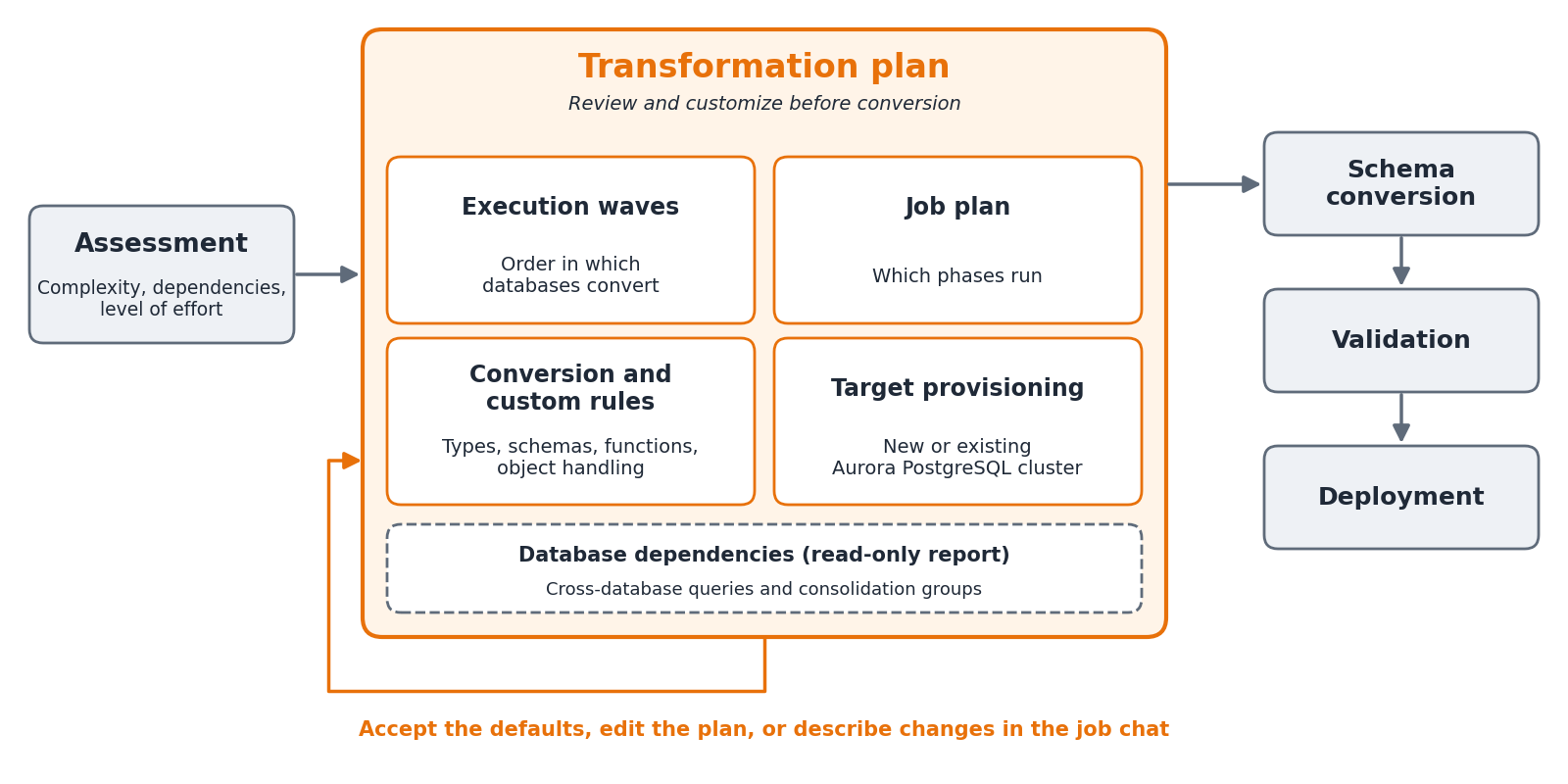
Figure 1: Where the transformation plan fits in the Offline Source workflow
What the transformation plan controls
The transformation plan brings four editable areas together: execution waves, the job plan, conversion and custom rules, and target provisioning. It also includes a read-only report on database dependencies. Each editable area ships with defaults, so you only change what doesn’t fit in your use case. AWS Transform presents the plan in the Review transformation plan window. The Preview tab shows the plan, and the Edit tab lets you change it as shown in Figure 2.
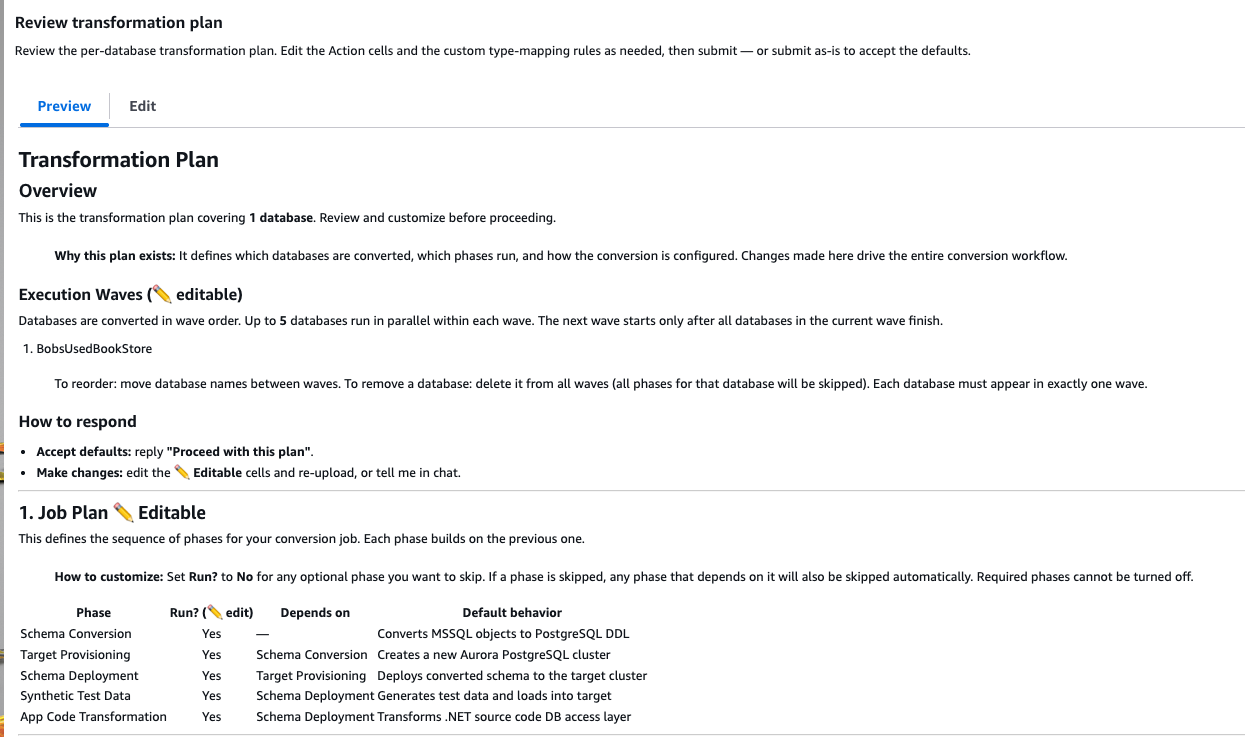
Figure 2: Execution waves and job plan in the Review transformation plan window
The rest of this section walks through each area: what it controls, what you set in it, and when you would change it from the default.
Execution waves
What it controls: The order in which your databases convert. AWS Transform groups databases into waves. It generates this grouping from the assessment, based on the dependencies it detects between your databases, and you can adjust it. Up to five databases run in parallel within a wave, and the next wave starts only after every database in the current wave finishes.
What you set: Which databases go in which wave, and the order of the waves. You can move databases between waves or remove a database entirely, in which case all phases for that database are skipped. Each database must appear in one wave, and only one.
When to change it: Use waves to sequence by risk. Put a small, low-risk database in an early wave to shake out your conversion rules. Then move your largest, most dependency-heavy database to a later wave once the rules are proven. For a single-database job, there is no need to change anything.
Job plan
What it controls: The sequence of phases the conversion job runs. Each phase builds on the one before it, as shown in the following table.
| Phase | Can be skipped | Depends on | What it does |
|---|---|---|---|
| Schema Conversion | No | None | Converts SQL Server objects to PostgreSQL data definition language (DDL) |
| Target Provisioning | Yes | Schema Conversion | Creates a new Aurora PostgreSQL cluster, or connects to an existing one |
| Schema Deployment | Yes | Target Provisioning | Deploys the converted schema to the target cluster |
| Synthetic Test Data | Yes | Schema Deployment | Generates test data and loads it into the target |
| App Code Transformation | Yes | Schema Deployment | Assess and Transforms the database access layer of your .NET source code |
What you set: Which optional phases run. Every phase runs by default. To skip an optional phase, set Run? to No. When you skip a phase, any phase that depends on it is skipped automatically. Schema Conversion always runs.
When to change it: Skip the phases you don’t need. If there is no .NET application in scope, skip app code transformation. For example, if your database is accessed only by an application or a third-party reporting tool or if your application team updates the data-access code separately, skip app code transformation and convert the schema on its own.
Conversion and custom rules
What it controls: How SQL Server constructs convert to PostgreSQL constructs. This is the area you are most likely to touch and the one that most affects whether the converted schema behaves the way your application expects.
What you set: The rule categories include the following:
- Type mappings: How SQL Server data types convert to PostgreSQL types. For example, the default maps MONEY to NUMERIC(19,4) and BIT to NUMERIC(1,0). To override a mapping, add a rule with the same source type and your preferred target type. Each rule applies to every column of that source type in the job.
- Schema name mappings: How source schemas map to target schemas. By default, dbo becomes a database-specific name such as mydb_dbo, and every other schema follows <db_name>_<schema>. This lets several databases land in one target without colliding. A target schema name must end with the source schema name, so that AWS Transform can find each schema again after conversion. The exception is dbo, because validation treats dbo and public as the same default schema. For a single-database migration, the common choice is to map dbo to public. Don’t map more than one database to one shared schema such as public, because tables with the same name conflict.
- Strip schema prefixes: Prefixes to remove from source schema names during conversion, for example staging_. None are set by default.
- Function mappings: How built-in functions translate. For example, NEWID() maps to uuid_generate_v4() from the uuid-ossp extension, and you can map GETDATE() to CURRENT_TIMESTAMP. You can also map a SQL Server function or user-defined function to a native PostgreSQL equivalent instead of carrying a stub. For example, map fn_Split to STRING_TO_TABLE, which requires PostgreSQL 14 or later (refer to the PostgreSQL 14 release notes).
- Identity column strategy: Whether identity columns are generated as GENERATED BY DEFAULT (the default, and migration-friendly) or GENERATED ALWAYS. As described in CREATE TABLE in the PostgreSQL documentation, GENERATED ALWAYS rejects explicit values unless the INSERT statement includes OVERRIDING SYSTEM VALUE. That matters if your application or data-load process sets identity values directly.
- Procedure result handling: Whether a stored procedure returns a refcursor (the default, where the caller fetches a cursor) or becomes a function the caller selects from. The function style is an application code change, so align it with what your application expects.
- Identifier conventions and abbreviations: The prefixes for generated identifiers, such as p_ for parameters, v_ for variables, and temp_ for temp tables. Also, the abbreviations used when an identifier exceeds the PostgreSQL 63-byte identifier limit.
A few settings are locked and always applied: a set of extensions (citext, uuid-ossp, pgcrypto, and postgis), lowercase identifier casing, and common Transact-SQL (T-SQL) pattern conversions, such as TRY/CATCH to EXCEPTION and OUTPUT to RETURNING. These settings are locked because the conversion depends on them. The generated code uses the extensions for its target types and functions (for example, citext for case-insensitive text and uuid-ossp for UUID defaults). Lowercase casing keeps identifiers consistent without quoting, and the T-SQL pattern conversions are applied the same way every time. The Default Conversion Rules section of the plan lists each configuration field, its default, and whether you can override it. It then lists the effective PostgreSQL target for each SQL Server type as shown in Figure 3.
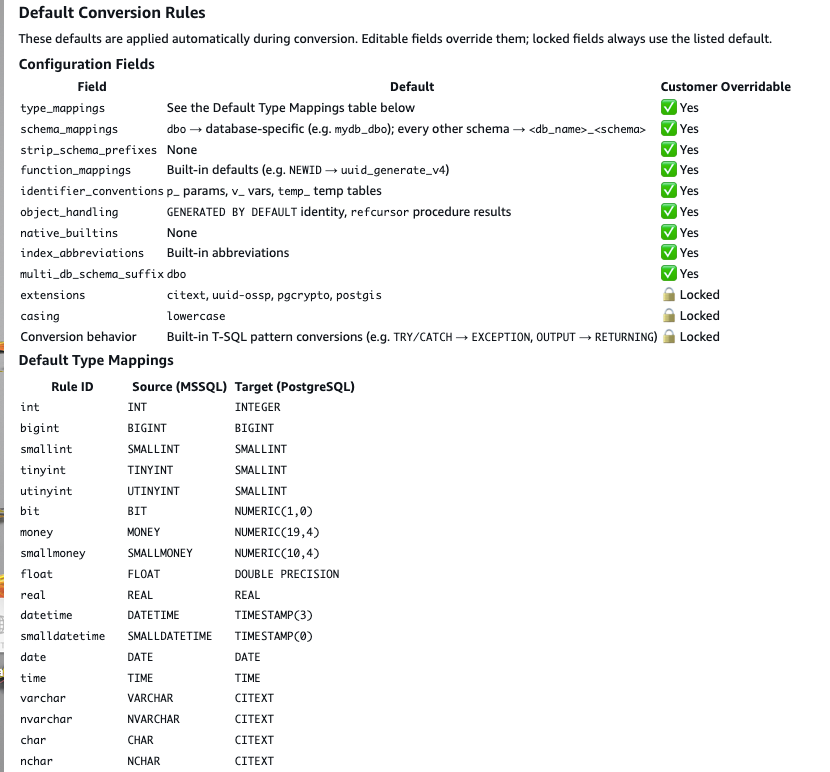
Figure 3: Default conversion rules and type mappings in the transformation plan
When to change it: Change a rule when a default doesn’t match your application’s behavior or your target standards. The worked example later in this post covers the character-type default end to end, because it’s the clearest example of a rule that is a question about your application.
Database dependencies and cross-database queries
What it controls: Which databases must deploy together. AWS Transform reports the cross-database queries that it detects between the databases in the job. Databases that depend on each other form a consolidation group, and each consolidation group deploys to a single shared cluster.
What you set: Nothing. This section is a report, not an editable setting.
When it matters: In a multi-database job, review this report before you configure target provisioning, because it determines which databases share a cluster. In PostgreSQL a single connection reaches only one database as described in the PostgreSQL documentation, so SQL Server cross-database references don’t work across separate PostgreSQL databases. You have one option to preserve them: deploy the databases that reference each other to a single shared cluster, and consolidate them into one database, which you can name whatever you want. Their cross-database references then become cross-schema references inside that one database. For a single-database job, the report shows that no cross-database queries were detected.
If a database references another database that you didn’t include in the job, AWS Transform can’t convert that reference, because it doesn’t have the referenced definitions. It comments out these references in the converted schema and lists them so that you can resolve them manually after conversion. To convert them automatically instead, include the referenced databases in the same job as shown in Figure 4.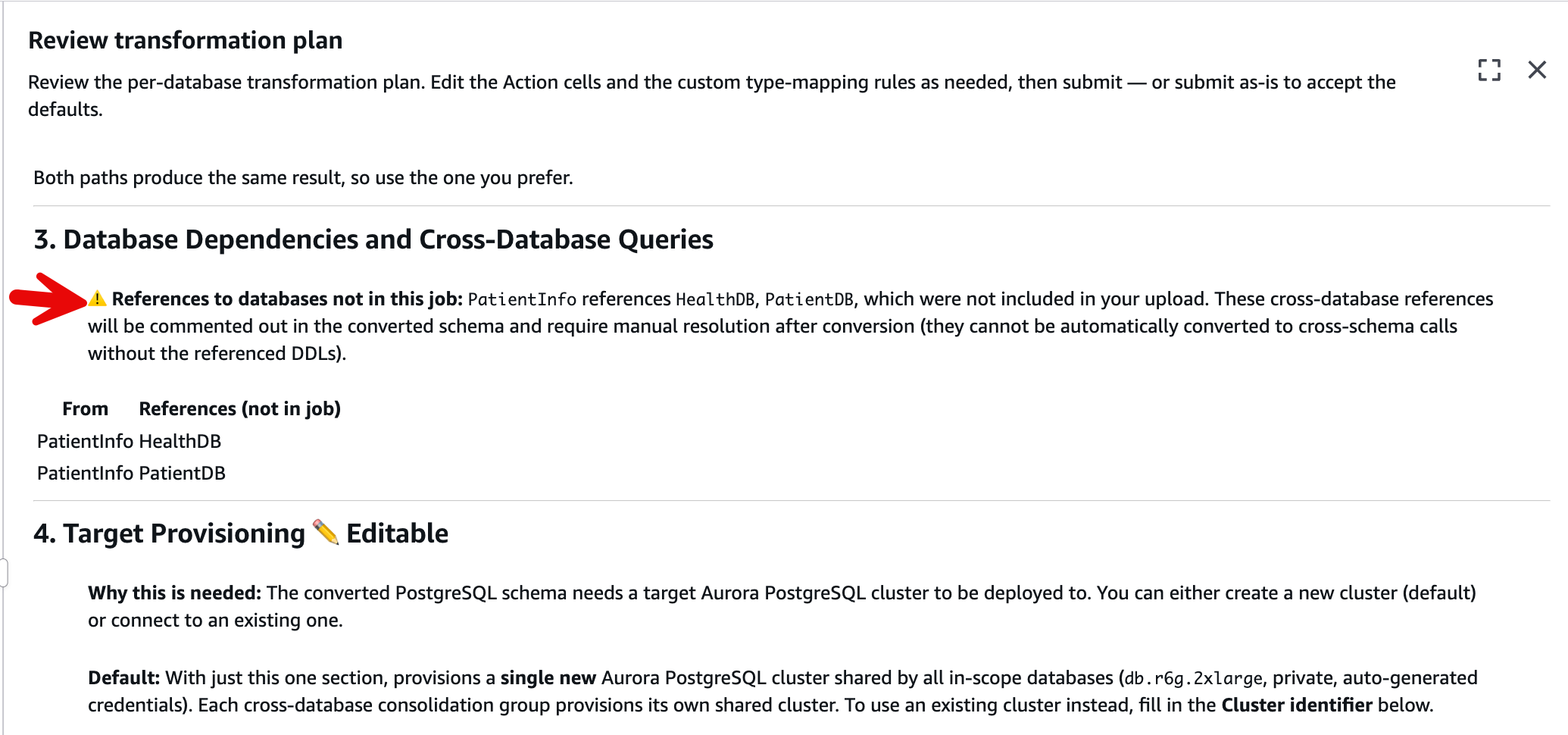
Figure 4: Cross-database references to databases that were not included in the job
Target provisioning
What it controls: The target Aurora PostgreSQL cluster where AWS Transform deploys the converted schema.
What you set: You choose whether AWS Transform creates a new cluster (the default) or connects to an existing cluster that you provisioned beforehand. You can also set the instance class, public accessibility, credentials, target database name, network placement and target Region. By default AWS Transform provisions one new private db.r6g.2xlarge cluster with generated credentials saved in AWS Secrets Manager, shared by the in-scope databases. The default target database is postgres.
The target Region applies to the whole job. To deploy different databases to different clusters, copy the Target Provisioning section once for each additional cluster. Each copy is its own cluster: leave Cluster identifier empty to create a new cluster, or enter an identifier to use an existing one. AWS Transform then asks in the job chat which databases deploy to which cluster as shown in Figure 5.
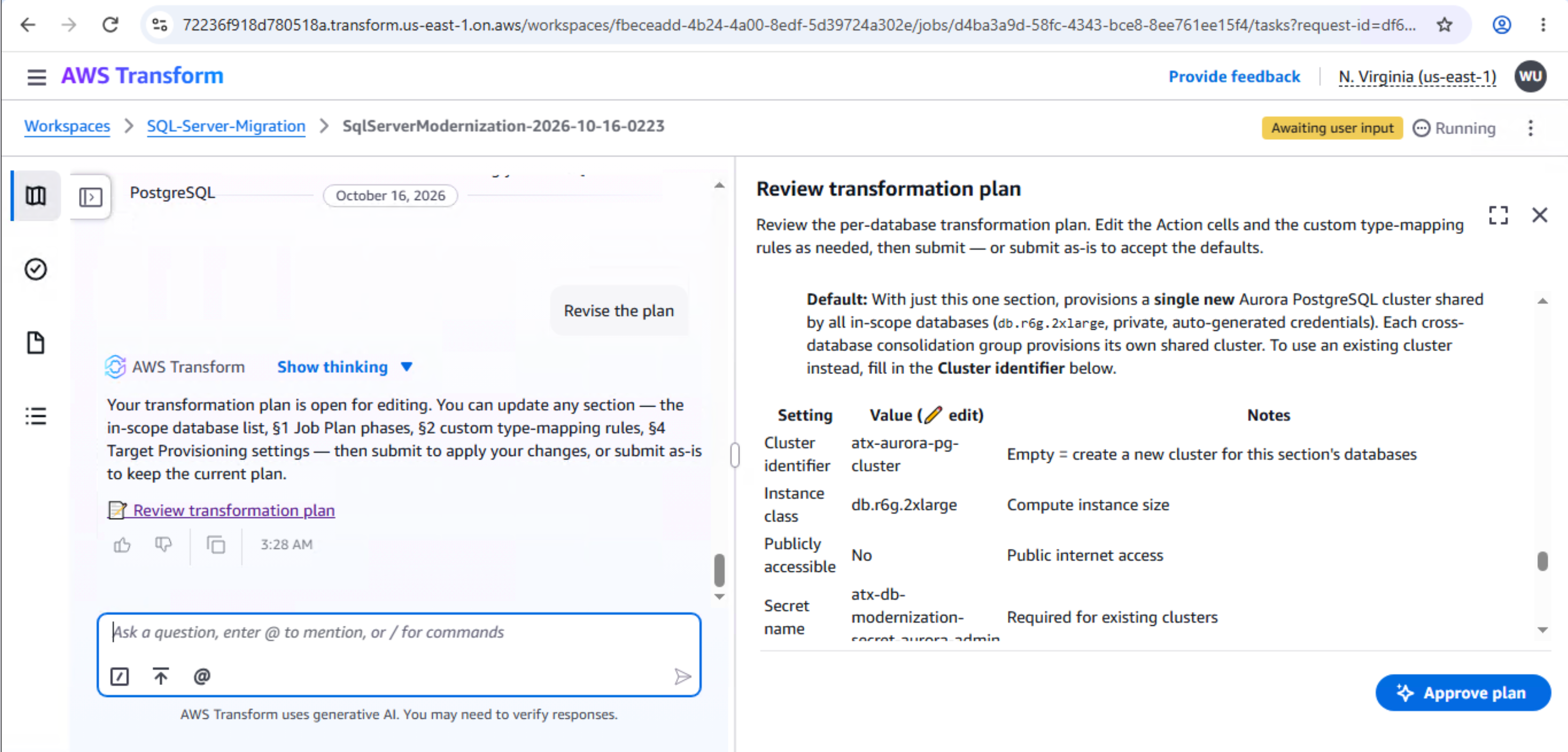
Figure 4: Target provisioning settings and existing cluster requirements
When to change it: Point at an existing cluster when you’re deploying into an environment that you already manage. Let AWS Transform create the cluster when you want a clean target. Either way, size the instance class for the migration workload rather than eventual production load, because you can scale later. An existing cluster must meet the following requirements:
- The cluster runs Aurora PostgreSQL and is in the available state.
- The cluster credentials are stored in an AWS Secrets Manager (Secrets Manager) secret in the same Region as the cluster. The secret contains username and password fields.
- The cluster and the secret are both tagged Project=atx-db-modernization and Owner=database-connector.
The tags are required because the AWS Identity and Access Management (IAM) role of the database connector is scoped to them, so AWS Transform can’t use an untagged cluster or secret. AWS Transform checks all of these requirements together and reports anything missing in one message. It doesn’t create credentials for a cluster that it didn’t provision, and it never modifies your secret.
How to customize the plan
AWS Transform gives you two ways to change the plan and you can mix them. Every field is optional so you include only what you want to change. Anything you leave out keeps its default. Locked settings such as the extensions and identifier casing can’t be changed.
- Edit the plan: In the Review transformation plan window, choose the Edit tab. Change the values in the editable cells, and then submit the plan. For example, change a target type in the type-mapping table, or add a row to the schema name mapping table.
- Describe your preferences in the job chat: Write the request in plain language, and AWS Transform interprets it and applies the matching rules. For example: “Map MONEY to NUMERIC(19,2), strip the staging_ schema prefix, and generate identity columns with GENERATED ALWAYS.”
Both paths produce the same result, so use whichever is easier. Writing the standard down once, in either form, lets a team apply the same conversion rules on every job instead of deciding again for each migration.
To accept the plan, submit it without changes, or reply Proceed with this plan in the job chat. AWS Transform then converts the schema with your rules.
A worked example: character types and case sensitivity
Character columns are a good example of a default worth understanding, because getting it wrong produces defects that no error message catches.
In SQL Server, character columns such as VARCHAR and NVARCHAR are usually case-insensitive, because the default collations compare text without regard to case. A query for ‘Smith’ matches a stored ‘SMITH’. For details, refer to Collation and Unicode support in the Microsoft documentation. Most applications built on SQL Server rely on this behavior without ever stating it as a requirement.
PostgreSQL behaves differently. Its standard varchar and text types are case-sensitive, so the same ‘Smith’ query doesn’t match ‘SMITH’. If you map SQL Server character columns straight to varchar and change nothing else, logins, lookups, and joins that worked before can return empty results. There’s no error and no warning. The SQL is valid, but the behavior is wrong.
This is why the transformation plan maps the standard character types to citext, the PostgreSQL case-insensitive text type. The citext extension is one of the extensions that the plan always installs. The default type mappings send VARCHAR, NVARCHAR, CHAR, NCHAR, TEXT, and NTEXT to CITEXT. SYSNAME is the exception: it maps to VARCHAR(128). As a result, case-insensitive comparisons keep working after conversion, and the converted database behaves the way the application did on SQL Server. For most migrations, that is what you want, so you leave it alone.
One detail matters because the plan renames schemas. As described in the citext documentation, the citext operators must be in the current search_path. If they aren’t, PostgreSQL uses the ordinary case-sensitive text operators instead. If your application connects with a custom search_path, include the schema where the citext extension is installed.
The decision comes in when a character type doesn’t need case-insensitive matching in your application. For example, the type might hold case-sensitive tokens or opaque identifiers, or your application might already normalize case before it queries. In that case, you might prefer varchar for performance. The citext documentation notes that citext is less efficient than text, because comparisons copy and lowercase the values. You make that choice in the type-mapping rules, and one mechanism determines whether your override takes effect.
The pipeline applies type mappings in sequence, so overrides can chain. Suppose that you override NVARCHAR to VARCHAR but leave the default VARCHAR to CITEXT rule in place. Your NVARCHAR columns still land on CITEXT. The first rule rewrites NVARCHAR to VARCHAR, and the second rewrites that VARCHAR to CITEXT. To get true varchar output, also override the VARCHAR rule (VARCHAR to VARCHAR) to break the chain. Each character type has its own row in the mapping table. Override the row that matches your column’s type.
A reasonable approach is to keep the citext default so that every character column preserves its SQL Server behavior. Type mappings apply to a source type across the whole job, not to individual columns. If a whole type can safely be case-sensitive, override that type in the plan once. If only a few columns need case-sensitive varchar, keep the default and change those columns after deployment with ALTER TABLE. Either way, the transformation plan records the standard once, so you don’t revisit it one procedure at a time during review.
Conclusion
In this blog post, we showed how the transformation plan turns a SQL Server to Aurora PostgreSQL conversion into something you direct, rather than something you inspect after the fact. The plan brings execution waves, the job plan, conversion rules, and target provisioning into one artifact that you review before any object is converted. Time spent on the conversion rules keeps the fix-review-refix cycle from taking over the back half of your project.
To get started, open the AWS Transform console and start a SQL Server modernization job. When the assessment finishes, review the transformation plan, adjust the rules to match your application, and submit the plan. For the end-to-end workflow from assessment through deployment, refer to Modernize Microsoft SQL Server databases to Aurora PostgreSQL using AWS Transform.