Microsoft Workloads on AWS
Running mission-critical Microsoft SQL Server databases on Amazon FSx for NetApp ONTAP
Introduction
Running mission-critical Microsoft SQL Server databases on AWS requires storage infrastructure that can deliver consistent high performance, enterprise-grade data protection, and cost efficiency at scale. Database administrators and solutions architects face several persistent challenges: managing I/O performance bottlenecks during peak workloads, scaling storage seamlessly as data volumes grow, and optimizing storage costs without compromising performance or availability.
Amazon FSx for NetApp ONTAP (FSx for ONTAP) addresses these challenges by combining AWS’s fully managed infrastructure with NetApp’s proven enterprise storage capabilities. FSx for ONTAP delivers consistent sub-millisecond latencies for solid state drive (SSD) storage, supports up to tens of GB/s of throughput and millions of IOPS per file system.
In this blog, we provide comprehensive best practices for configuring Amazon FSx for ONTAP, specifically for SQL Server workloads. We’ll guide you through the essential configuration parameters at each level—from the Performance Tier SSD and aggregate level, through volume creation and management, to LUN provisioning and OS-level optimization. Whether you’re deploying a simple two-volume database layout or a complex multi-filegroup architecture with tiering policies for archive data, you’ll learn the specific commands, parameter settings, and architectural decisions that ensure optimal performance, reliability, and cost efficiency
Prerequisites:
- An AWS account.
- FSx for ONTAP file system (Gen 1 or Gen 2)
- EC2 Windows instance with iSCSI Initiator enabled, and familiarity with SQL Server storage architecture.
Understanding FSx for ONTAP: Performance Tier vs. Capacity Pool
FSx for ONTAP offers two distinct storage tiers that work together:
| Tier | Purpose/Best Practice | Key Features |
| Performance Tier SSD | Hosts SQL Server files (e.g. data, log, backups etc.) for predictable performance | SSD-backed, provisioned, scales without downtime |
| Capacity Pool | Stores cold/Archive data (e.g. backups, snapshots, inactive filegroups) | Elastic, cost-effective, virtually unlimited |
Note: The SSD Tier should be sized at 1.35x your total database size. This 35% headroom ensures smooth operation and leaves room for enterprise features like snapshots and clones.
The data can move seamlessly across tiers without disruption when volume tiering policies are applied (Figure 1).
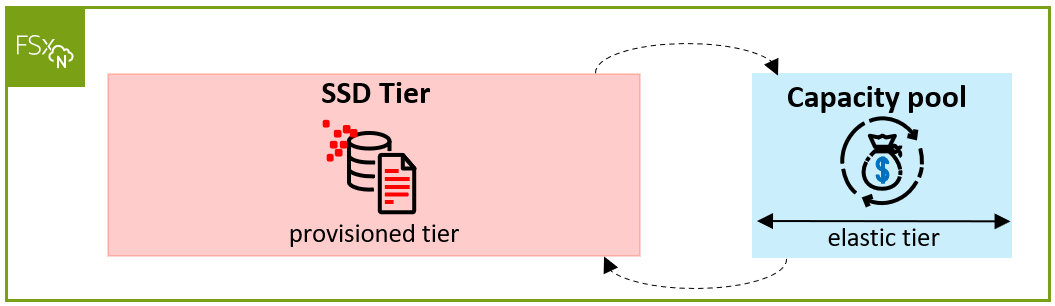
Figure 1 Storage Tiers on FSx for ONTAP
Generations and deployment options
FSx for ONTAP has two generations:
- Generation 1 (Single-AZ 1, Multi-AZ 1): Powered by a single High-Availability (HA) Pair (2 nodes) in an active/passive configuration. The Performance Tier supports up to 192 TiB SSD, and it can run Single-AZ or Multi-AZ. This is a scale-up architecture.
- Generation 2 (Single-AZ 2, Multi-AZ 2): Powered by up to 6 HA Pairs (12 nodes). The Performance Tier reaches up to 1 PiB. Supports both scale-up (a single HA Pair) and scale-out. Scale-Out is available only with Single-AZ 2.
The three performance influencers are: throughput, cache (In-memory and NVMe), and SSD IOPS, which vary by generation and Region.
Multi-tenant isolation with Storage Virtual Machines
FSx for Ontap provides robust tenant isolation through Storage Virtual Machines (SVMs). An SVM is a virtualized storage server carved from the FSx for Ontap file system as shown in Figure 2.
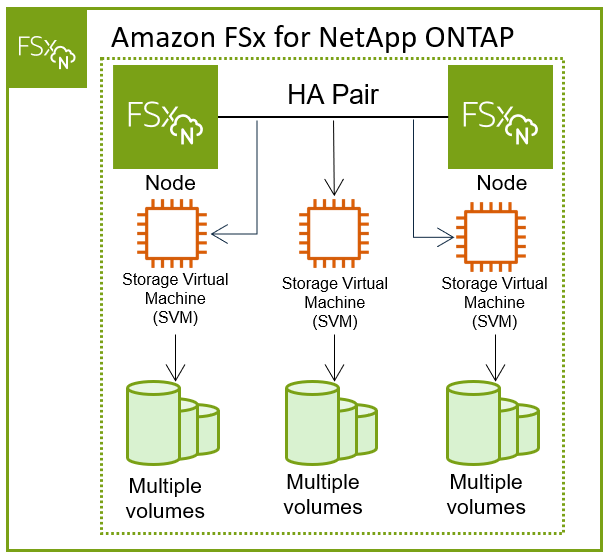
Figure 2 Multi-tenant isolation with Storage Virtual Machines
Each SVM has:
- Its own administrative credentials and security domain
- Its own performance domain
- Its own volumes and endpoints
- 4 network endpoints total: 2 for management/NFS/SMB + 2 for block-storage protocols (iSCSI or NVMe-over-TCP)
The number of SVMs you can create is tied to your allocated throughput capacity. See the FSx for Ontap documentation for current maximums.
Note: There are no strict rules on SVM isolation boundaries. A common pattern is to isolate by environment – Production, Staging, and Development each get their own SVM.
Within an SVM, volumes act as data containers that host one or more LUNs (Logical Unit Numbers) essentially virtual hard drives presented to the EC2 instance’s operating system as shown in Figure 3.
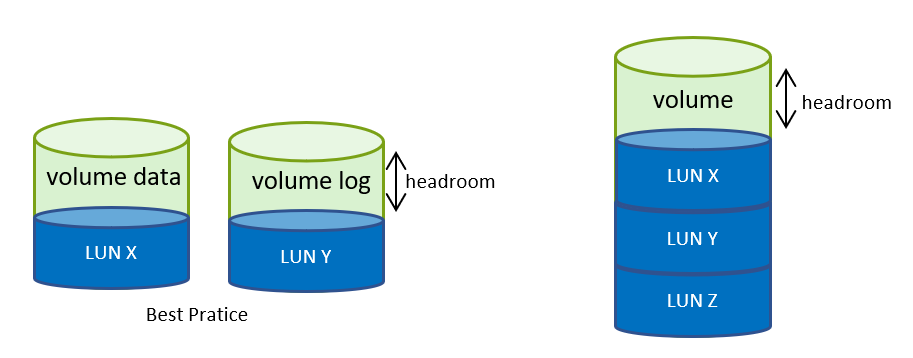
Figure 3 Volume and LUN configuration
Controlling disk access with Initiator groups
To control which servers can see which disks, FSx for Ontap uses a concept called Initiator groups (igroups). Igroups connect block devices (LUNs) to the compute resources that are allowed to access them. Unlike NFS or CIFS, where a volume is broadly accessible and user permissions control access, block storage permissions operate at the machine level. Typically, only one operating system must access a block device at a time to avoid data corruption, unless you use a software layer that can coordinate concurrent IO and handle write conflicts (e.g., cluster disks in Windows Server Failover Clusters)
An igroup acts as a permission layer for block storage. When a server connects to the storage system, it identifies itself using its iSCSI qualified Name (IQN) host initiator. If that IQN belongs to one or more igroups, then the server gains access to all LUNs associated with those igroups. Both an igroup and an iSCSI host connection are required for iSCSI to function properly.Here’s how it works:
- Initiator = EC2 instance, identified by its unique IQN
- Target = The SVM’s iSCSI endpoints (2 IP addresses)
- igroup = A logical grouping of one or more initiator IQNs
- LUN Mapping = The step that associates specific LUNs with an igroup, granting access
Example: In a SQL Server Failover Cluster Instance (FCI) with two nodes, the igroup should include both nodes’ IQNs so that both servers can access shared disks.
Scaling beyond a single file system
FSx for Ontap has performance profiles tied to capacity, throughput, and IOPS. For workloads whose requirements exceed what a single file system can deliver, you can stack multiple FSx for Ontap file systems and spread the load (Figure 4).
For example, Database A’s data filegroups (.mdf and .ndf files) can reside on one FSx for Ontap file system optimized for random I/O (IOPS-heavy), while its transaction log (.ldf file) lives on another optimized for sequential I/O (throughput-heavy) (Figure 5). Understanding your workload’s I/O patterns is key to architecting high-performance SQL Server deployments.
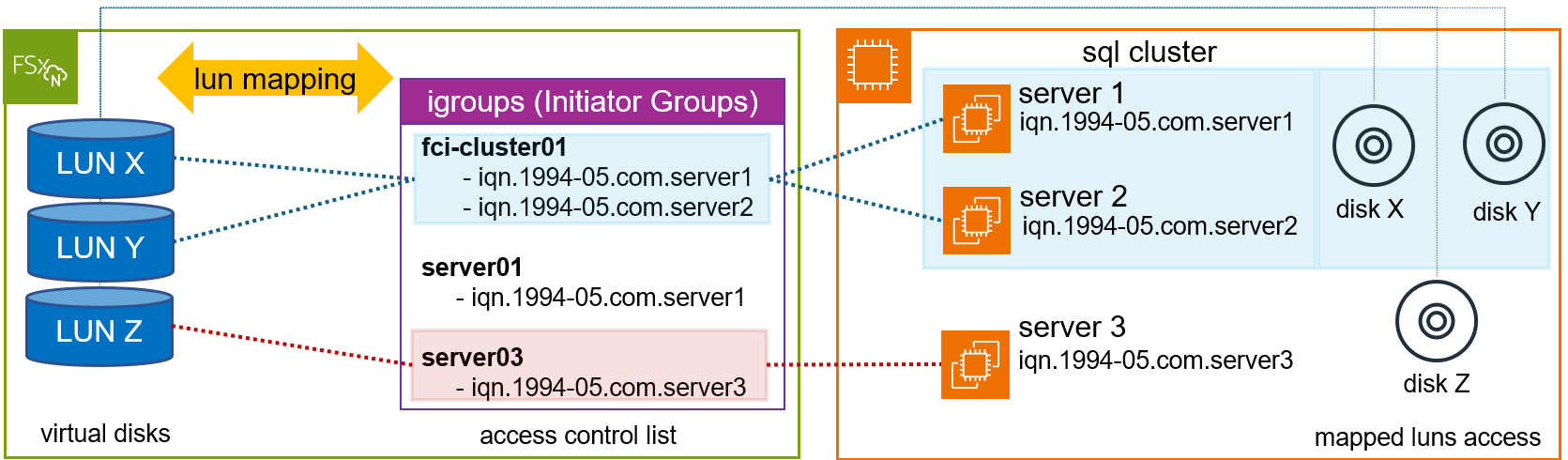
Figure 4 Scaling beyond a single file system
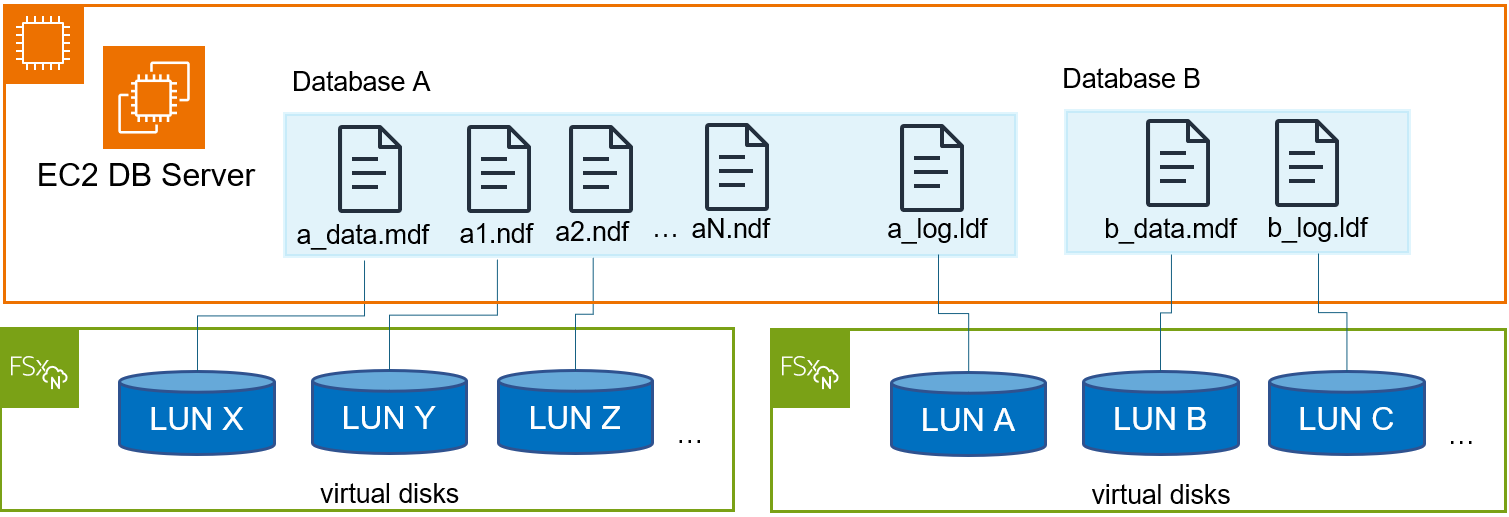
Figure 5 Scaling beyond a single file system- database configuration
SQL Server storage layout patterns on FSx for Ontap
The database configuration and disk layout directly influence performance, backup speed, restore time, and even costs. FSx for Ontap is designed to deliver maximum performance when data is spread across multiple volumes. As a rule, maintain a 1:1 relationship between each volume and its LUN.
Why 1:1? If you plan to use FSx for ONTAP snapshots to protect and restore your database, place user data files (.mdf) on separate volumes because they are random read/write workloads. It is common to create transaction log backups more frequently than database backups. For this reason, place transaction log files (.ldf) on a separate volume. Deduplication and snapshots operate at the volume level. A single LUN per volume ensures backup/restore granularity – you can restore one database’s data without affecting others.
Scenario 1 – storage layout configuration for a single database (MDF+LDF)
The simplest layout. A database with a PRIMARY filegroup (one .mdf file) and a transaction log (one .ldf file) should be placed on separate volumes and LUNs (Figure 6).This separation is critical for Recovery Time Objective (RTO): when restoring via snapshots, the process takes minutes regardless of database size, because you restore at the volume level.
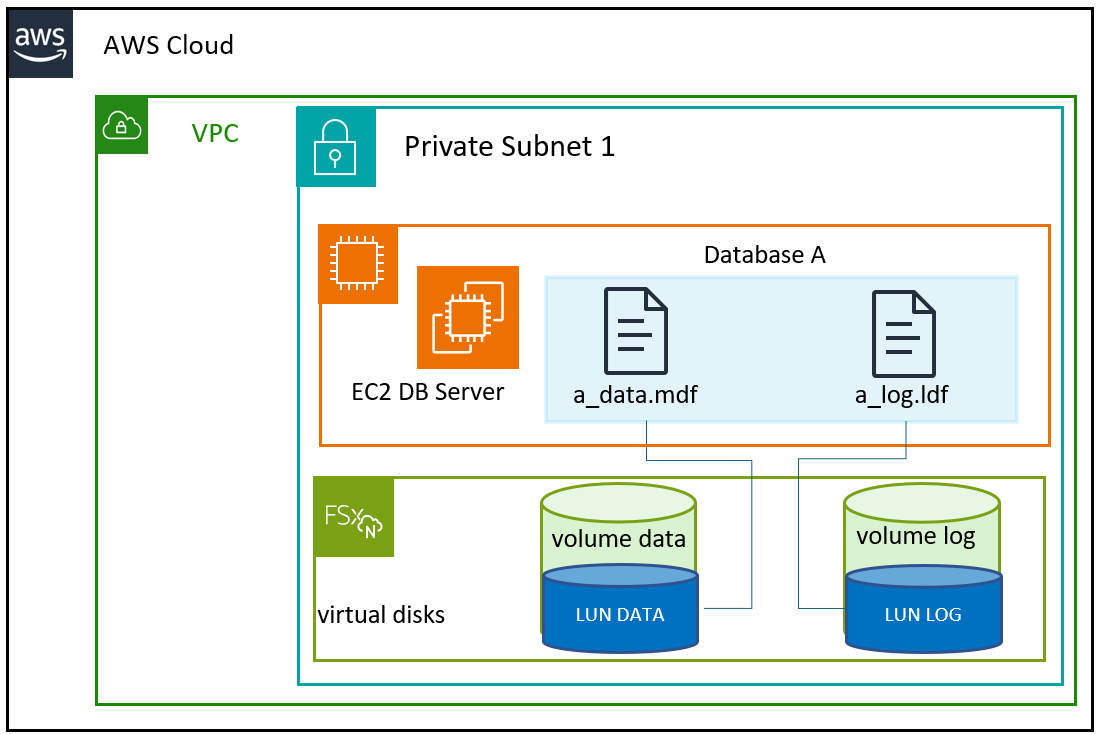
Figure 6 Storage layout configuration for a single database (MDF+LDF)
Scenario 2 – database consolidation (hundreds of databases on one EC2 SQL Server instance)
This is very common – a server hosting hundreds of databases (Figure 7). The ideal 1:1 volume-to-LUN ratio for every database creates significant provisioning overhead. The practical approach:
- Isolate critical databases: If Database A has the strictest SLA, give it dedicated data and log volumes. This ensures granular performance tuning and the lowest possible RTO.
- Consolidate the rest: Remaining databases share pooled data and log volumes, accepting that they share I/O resources and have a coarser recovery granularity. Therefore, consider this for mid to low-performance databases.
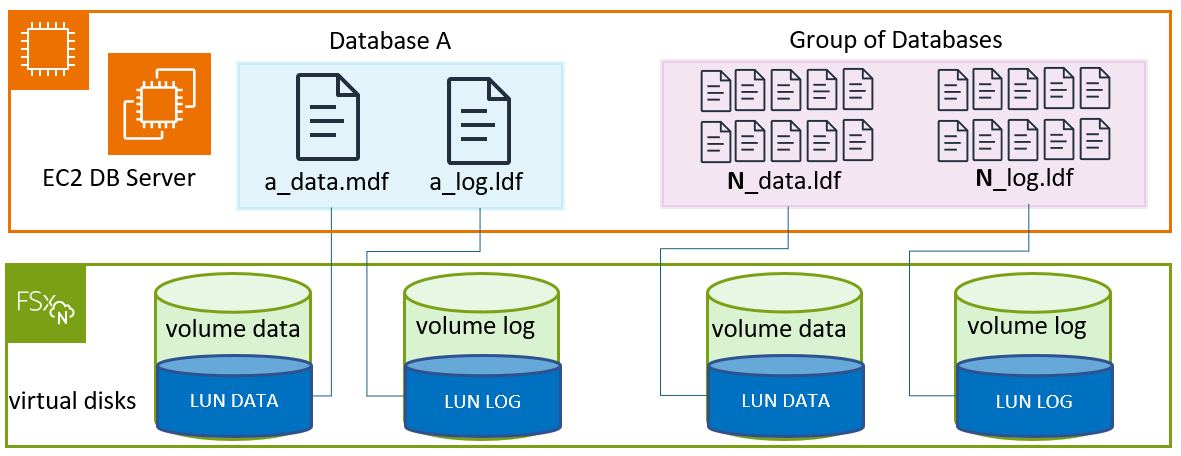
Figure 7 Database consolidation
Scenario 3 – single database with filegroups (MDF+NDF files)
Filegroups spread load across multiple disks. In FSx for Ontap, placing each filegroup on separate volumes/LUNs provides both performance isolation and recovery granularity. The Filegroup contains the *.mdf and one or more *.ndf files, which are responsible for tables, indexes, data pages, and metadata (Figure 8).Key insight about SQL Server I/O patterns:
- Data files (.mdf, .ndf): SQL Server flushes data to these during checkpoints – this is random I/O, happening in parallel across multiple files
- Log file (.ldf): Writes are strictly sequential – SQL Server only writes to one log file at a time.
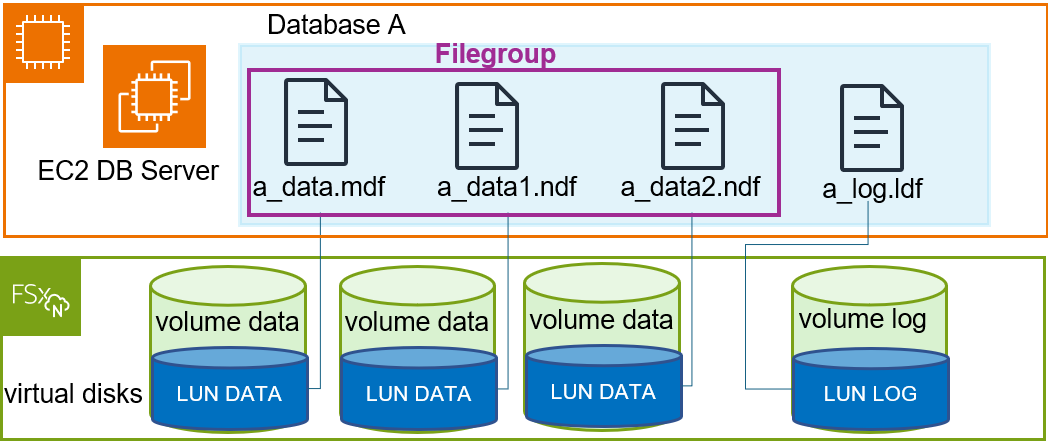
Figure 8 Single database with filegroups
Scenario 4 – Database with read-only/inactive filegroups (tiering to Capacity Pool)
If a filegroup contains historical data primarily accessed for reads, you can mark it as read-only. This creates an optimization opportunity: move that inactive filegroup’s data to the Capacity Pool – a less expensive tier.
Tiering is applied at the volume level:
- Active filegroups and logs → remain on the SSD Tier (tiering policy: none)
- Inactive/read-only filegroups → tier down to Capacity Pool (tiering policy: snapshot-only or auto) (Figure 9)
| Tiering Policy | Behavior | Best For |
|---|---|---|
| none | All data stays on SSD | Active data/log volumes |
| snapshot-only | Only snapshot data moves to Capacity Pool after cooling period | Data volumes with snapshots |
| auto | Hot blocks move to capacity tier after cooling period; random read moves them back to SSD tier, sequential read keeps them in capacity tier. | Read-only/archive filegroups |
| all | All data blocks will be moved to Capacity Pool | Pure archive volumes |
If you want to know more about how data flows across the SSD and Capacity pool, please check the volume storage capacity documentation.
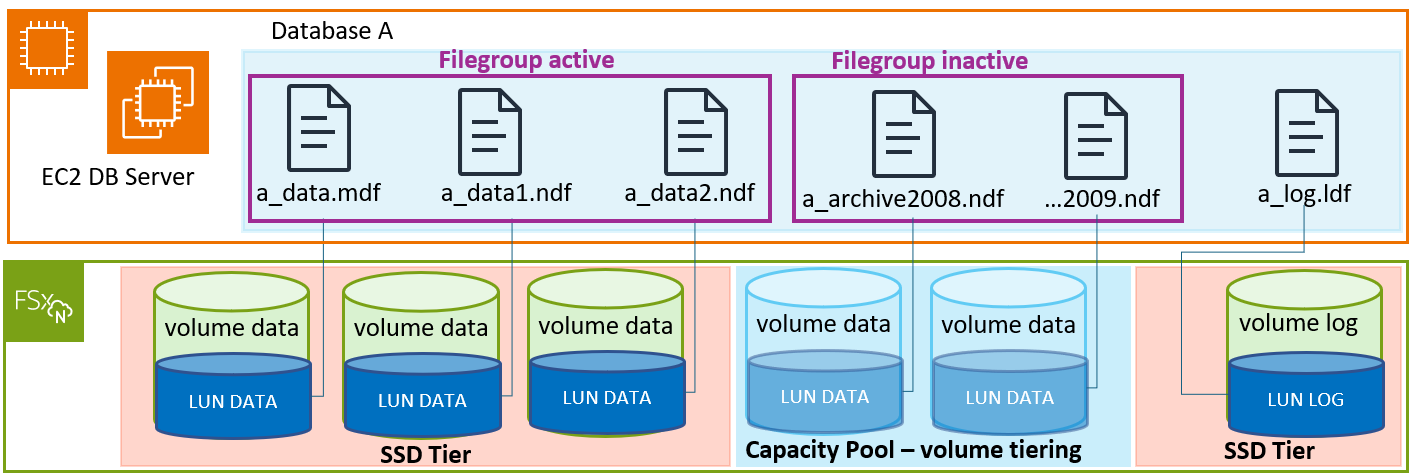
Figure 9 Database with read-only/inactive filegroups
Scenario 5: TempDB placement
TempDB is SQL Server’s system database used for temporary tables, sorts, hash joins, and version store. It experiences heavy, unpredictable I/O. Place TempDB on its own dedicated volume/LUN, separate from user database data and logs. This prevents TempDB’s volatile I/O from interfering with production database operations. Use the same volume configuration as a data volume, but size it based on your workload’s TempDB requirements (typically 10–25% of total database size for OLTP workloads).
Note: If you are using an EC2 instance with local NVMe , it’s recommended to use instance store for better performance
Conclusion
We went deep on this topic, here are the three principles worth pinning to the wall when you architect SQL Server on FSx for ONTAP:
- Database layout matters: Separating data files, transaction logs, and TempDB onto dedicated volumes and LUNs keeps one workload I/O from stepping on another’s, and it lets you restore a single database at the volume level.
- A 1:1 volume-to-LUN ratio buys you recovery granularity: Because deduplication and snapshots work at the volume level, one LUN per volume means you can back up and restore one database without touching the others.
- Tiering keeps cold data at low cost: Moving read-only and archive filegroups to the Capacity Pool lowers storage cost while your active data and logs stay on the SSD tier.
Optimizing Microsoft SQL Server on AWS is about more than raw performance – it’s about building a scalable, highly resilient, and cost-effective foundation for your most mission-critical applications.