Networking & Content Delivery
Distributing Amazon VPC IP Address Manager costs to member accounts in AWS Organizations
In this post, we demonstrate how to distribute Amazon VPC IP Address Manager (IPAM) costs from the IPAM owner account to the member accounts in AWS Organizations and implement chargeback. We walk through analyzing IPAM usage in AWS Cost Explorer from both member and management accounts. Furthermore, we cover key considerations and best practices for communication and governance when applying cost distribution across your organization, providing smooth adoption and clear understanding of the new cost allocation model among all stakeholders.
Although VPC IPAM provided centralized IPv4 and IPv6 address management across all accounts in an AWS Organizations, the associated costs are by default always consolidated in the IPAM owner account. Organizations managing large-scale AWS deployments have to manually reconcile IPAM usage for individual member accounts and allocate the costs to the respective business teams for their usage.
Amazon VPC IPAM now supports granular cost distribution, so that you can automatically allocate IPAM costs to the AWS Organizations member accounts that consume IP addresses. This enhancement removes manual usage reconciliation and streamlines internal cost accounting, so that finance and operations teams can align costs directly with application or business unit ownership while maintaining centralized IP address management.
An example AWS Organizations setup
Before we dive into the details, we look at a typical AWS Organizations setup that is used throughout this post. Figure 1 shows a typical AWS Organizations hierarchy structure, which is a common approach to managing multiple AWS accounts in an enterprise environment. In this example, the AWS Organizations has four Organizational Units (OUs): Infrastructure, Production, Non-Production, and Development. Each OU contains multiple AWS accounts serving specific business functions.
- Infrastructure OU – hosts shared services such as the centralized IPAM delegated admin account.
- Prod OU – contains four production accounts for customer-facing workloads.
- Non-Prod OU – contains three testing and staging accounts.
- Dev OU – includes two development accounts used by engineering teams.
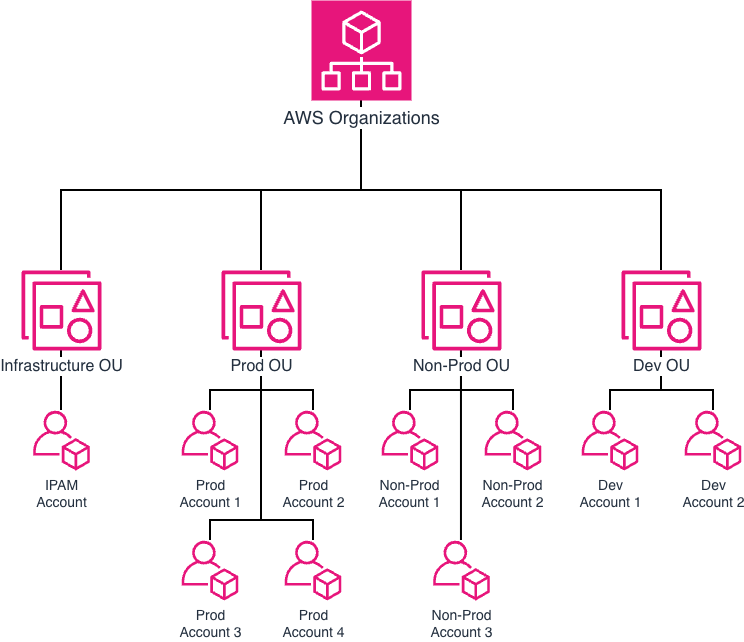
Figure 1: High-level AWS Organizations structure
Figure 2 shows an AWS Organizations structure with workload distribution and IP management
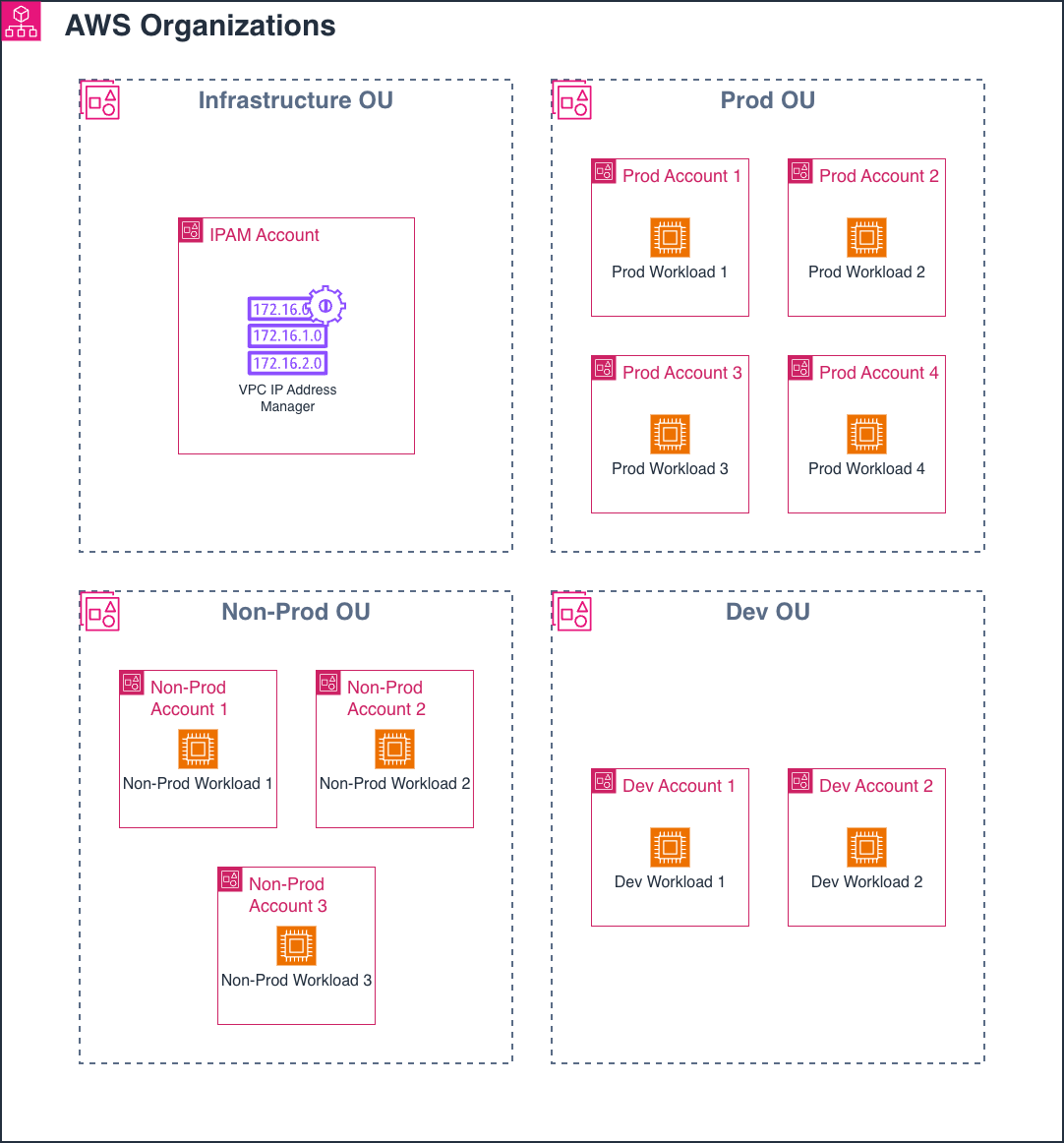
Figure 2: Detailed AWS Organizations structure and workload distribution
In this model:
- The Infrastructure OU hosts the IPAM delegated admin account, which creates and manages IP address pools.
- The IPAM is created in N. Virginia (us-east-1) as the home AWS Region. The operating Regions are N. Virginia (us-east-1) and Oregon (us-west-2).
- IPAM pools are shared across OUs using AWS Resource Access Manager (AWS RAM).
- The Advanced Tier of IPAM is used, which incurs costs based on active IPs being managed. Refer to IPAM pricing for details.
- IPAM tracks both IPv4 and IPv6 address pools across accounts and AWS Regions, providing centralized visibility and management for all address types used by workloads.
This centralized approach provides resource management, governance boundaries, and IP address management across the organization’s AWS infrastructure.
Understanding VPC IPAM metering modes
Amazon VPC IPAM supports two metering modes that determine how costs are allocated within an AWS Organizations:
- IPAM owner mode – All active IP address costs managed in IPAM are metered to the IPAM owner This is the default behavior.
- Resource owner mode – All active IP address costs are metered to the AWS accounts that own the IP address assigned to the resource.
Switching to Resource owner mode enables automated allocation of charges, where each account pays for its actual IP usage. This usage is visible in AWS Cost Explorer, while the management account retains consolidated oversight. When cost distribution is enabled, IPAM applies metering across both IPv4 and IPv6 address usage.
Understanding how VPC IPAM billing visibility works
Before enabling cost distribution, all IPAM costs are billed to the management (payer) account, even if IPAM is created and managed in the delegated admin account.
- When a member account filters by Usage type = IPAddressManager in AWS Cost Explorer, it doesn’t observe any IPAM usage or charges.
- The IPAM owner (delegated admin) account also doesn’t observe IPAM usage in AWS Cost Explorer unless the management account grants it billing access. Without these specific AWS Identity and Access Management (IAM) permissions, you can observe the total costs but not the detailed breakdown by member account.
- Only the management account has full visibility into IPAM charges.
We recommend that you notify all member account owners and finance teams in your organization before enabling this feature. After you enable the feature, member accounts start seeing IPAM-related line items even if they do not have IPAM created in their account. This is expected behavior. The charges reflect the active IP addresses that IPAM tracks centrally on their behalf as a part of integrating VPC IPAM with AWS Organizations. Proactive communication means that everyone understands the new chargeback behavior within your organization, preventing surprises.
Analyzing VPC IPAM usage and cost in member accounts before enabling cost distribution
Member accounts have no visibility into IPAM usage before enabling cost distribution. Figure 3 shows the AWS Cost Explorer interface where the Dev BU Account 1 doesn’t observe any IPAM usage against their account for the month of July 2025.
In this step, sign in to Dev BU Account 1 member account and navigate to Cost Explorer.
- Choose a date range and specify time granularity of Monthly. Set the date range to the month of July 2025.
- Under the Group By filter, you choose the dimension as Service.
- In the Filters panel, choose Service = VPC (Virtual Private Cloud), Linked account = Dev BU Account 1, and Usage Type = IPAddressManager.
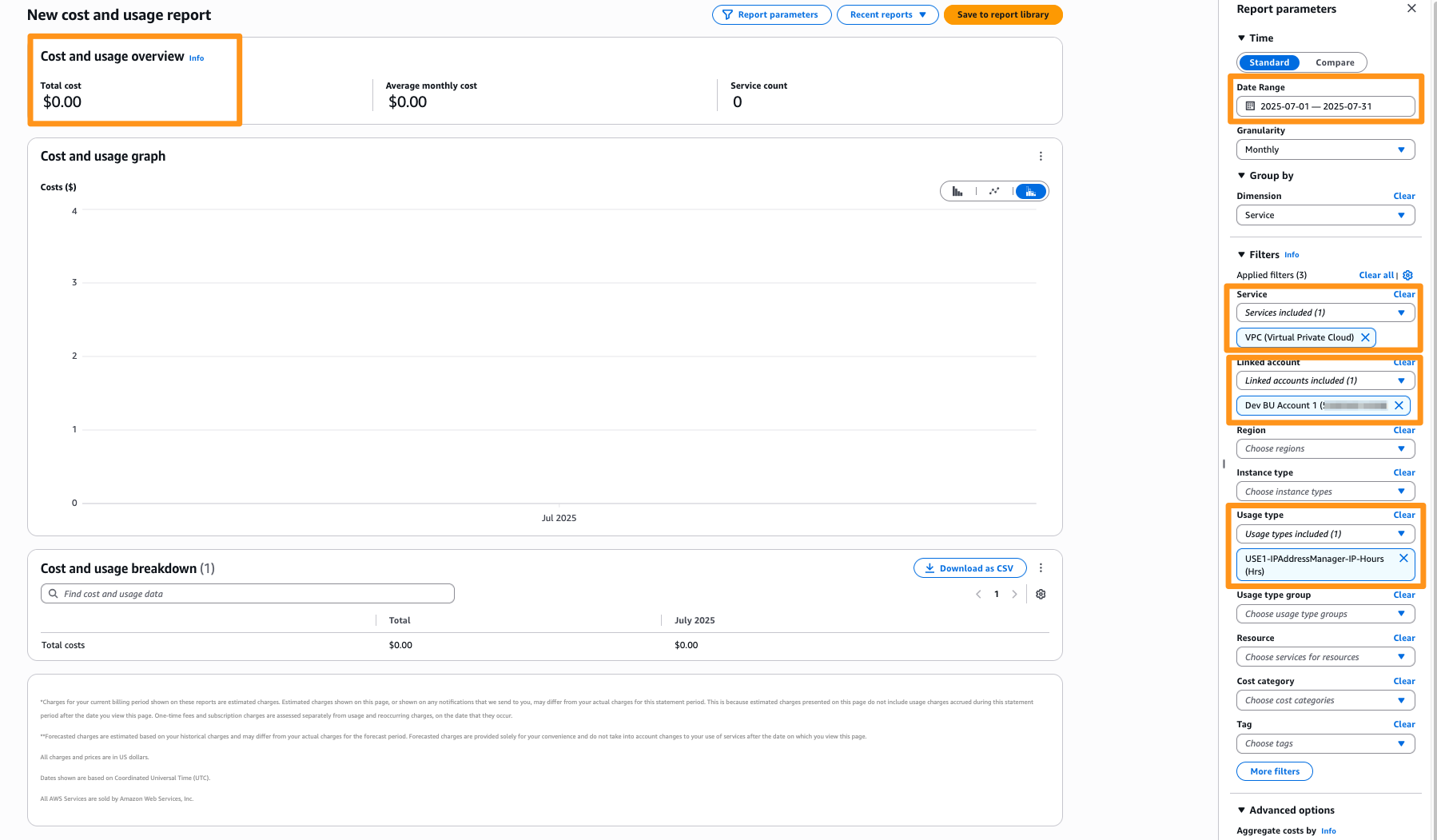
Figure 3: No IPAM usage for member account before enabling cost distribution
Enabling cost distribution for automated chargeback
You can enable cost distribution when creating a new IPAM or by modifying an existing IPAM by setting the Metering mode to Resource owner. If you have a brownfield deployment where you have already integrated VPC IPAM with AWS Organizations, then you can enable cost distribution by modifying your existing IPAM through the AWS Management Console, API, AWS Command Line Interface (AWS CLI) or SDK. For a greenfield deployment, satisfy the prerequisites in the documentation before enabling this feature when creating the IPAM. Figure 4 shows the option to enable the cost distribution feature.
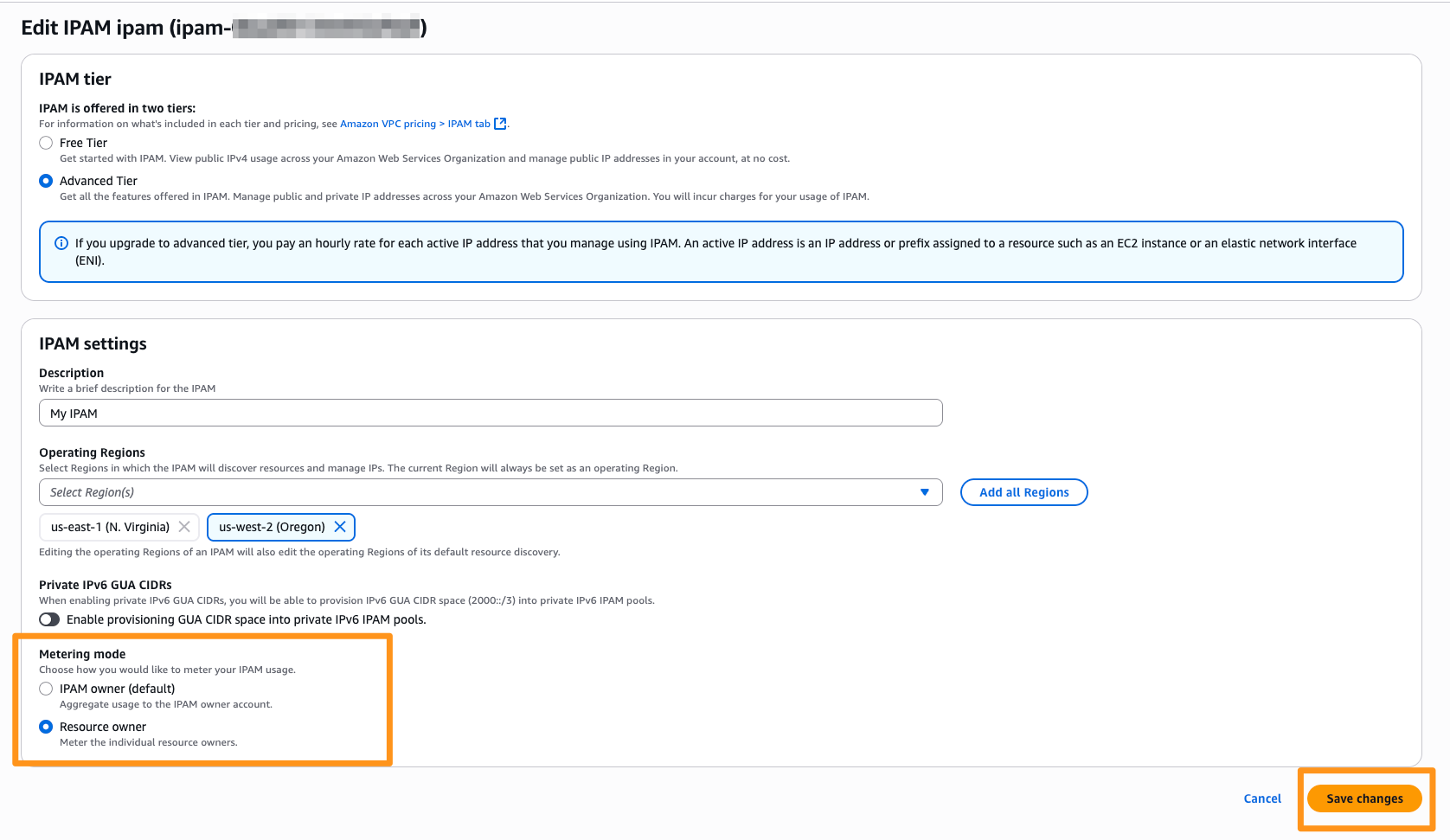
Figure 4: IPAM settings showing Metering mode set to Resource owner
You can set the Metering mode to Resource owner in both the Free Tier and Advanced Tier IPAMs. For Free Tier IPAMs, this setting doesn’t generate cost allocation. However, it can still be useful for validating visibility or maintaining configuration consistency across accounts.
After enabling cost distribution
After setting the Metering mode to Resource owner, IPAM begins allocating usage and costs to the member accounts that own the active IP addresses. When it is configured:
- Each member account gains visibility into their own IPAM usage and associated costs in AWS Cost Explorer.
- The management account maintains a consolidated, organization-wide view.
- The IPAM owner (delegated admin) account doesn’t receive billing visibility unless the management account explicitly grants billing permissions.
This behavior means that that IPAM’s cost visibility aligns with your organization’s governance boundaries and least-privilege model.
In the next section, we explore how to analyze IPAM costs from these different perspectives.
Analyzing VPC IPAM usage and cost in member accounts after enabling cost distribution
From a member account’s perspective, when cost distribution is active, IPAM usage and cost data automatically appear under the IPAddressManager usage type in AWS Cost Explorer. This visibility means that each application team can understand its IP consumption and related costs. This provides accurate forecasting and streamlined chargeback across different accounts, teams, and business units without needing access to the IPAM owner account. Figure 5 shows the IPAM cost and usage graph from Dev BU account 1 between July and September 2025.
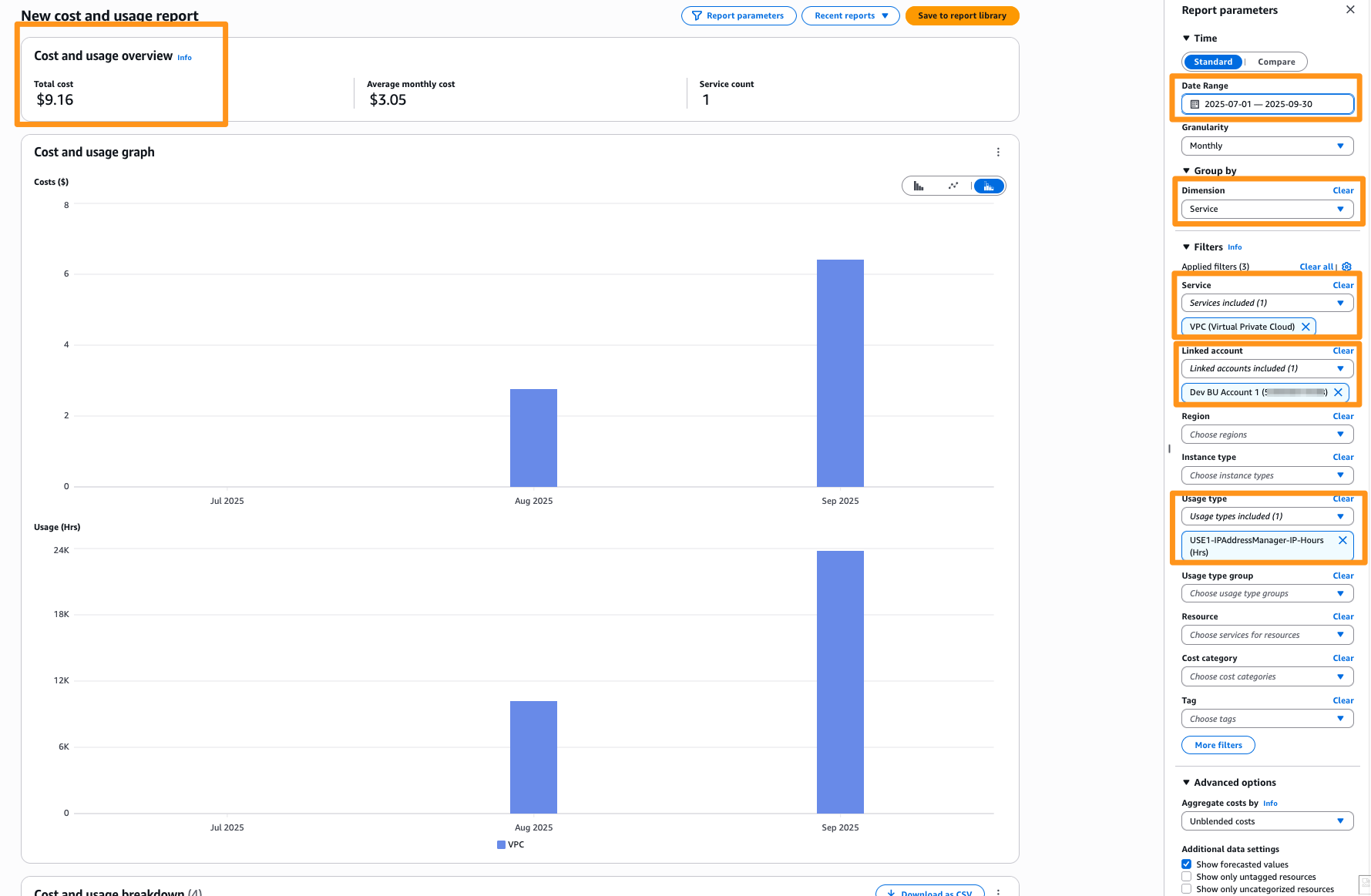
Figure 5: Member account view—IPAM cost and usage graph shown in AWS Cost Explorer for Dev BU Account 1
Figure 6 shows the IPAM cost and usage graph for the Dev BU Account 1 from July and September 2025.

Figure 6: IPAM cost and usage breakdown for Dev BU account 1 member account
You can observe IPAM charges associated with this account’s own resources. Therefore, application owners can track and forecast their own IPAM costs without needing access to the central networking account. Each member account’s AWS bill also includes the VPC IPAM Amazon Resource Name (ARN) associated with the tracked IP addresses. This ARN identifies the specific IPAM responsible for metering those IPs, so that account owners can track active IP address usage managed by VPC IPAM. Using AWS Data Exports, IPAM charges are reported with the same IPAM ARN in each individual member account’s bill.
Analyzing VPC IPAM usage and cost in the management account
By default, the management account in AWS Organizations has full access to all AWS Billing and Cost Management information for costs incurred by both the management account and member accounts. Although member accounts can now view their own usage, central finance or networking teams often need organization-wide visibility.
To view the IPAM costs from the management account, open AWS Cost Explorer and apply the same filters as mentioned in the previous section. You can include the Group By filter set to Linked account to observe charges per account across the AWS Organizations. Figure 7 shows the AWS Cost Explorer interface of the management account showing the distributed IPAM cost and usage across member accounts.
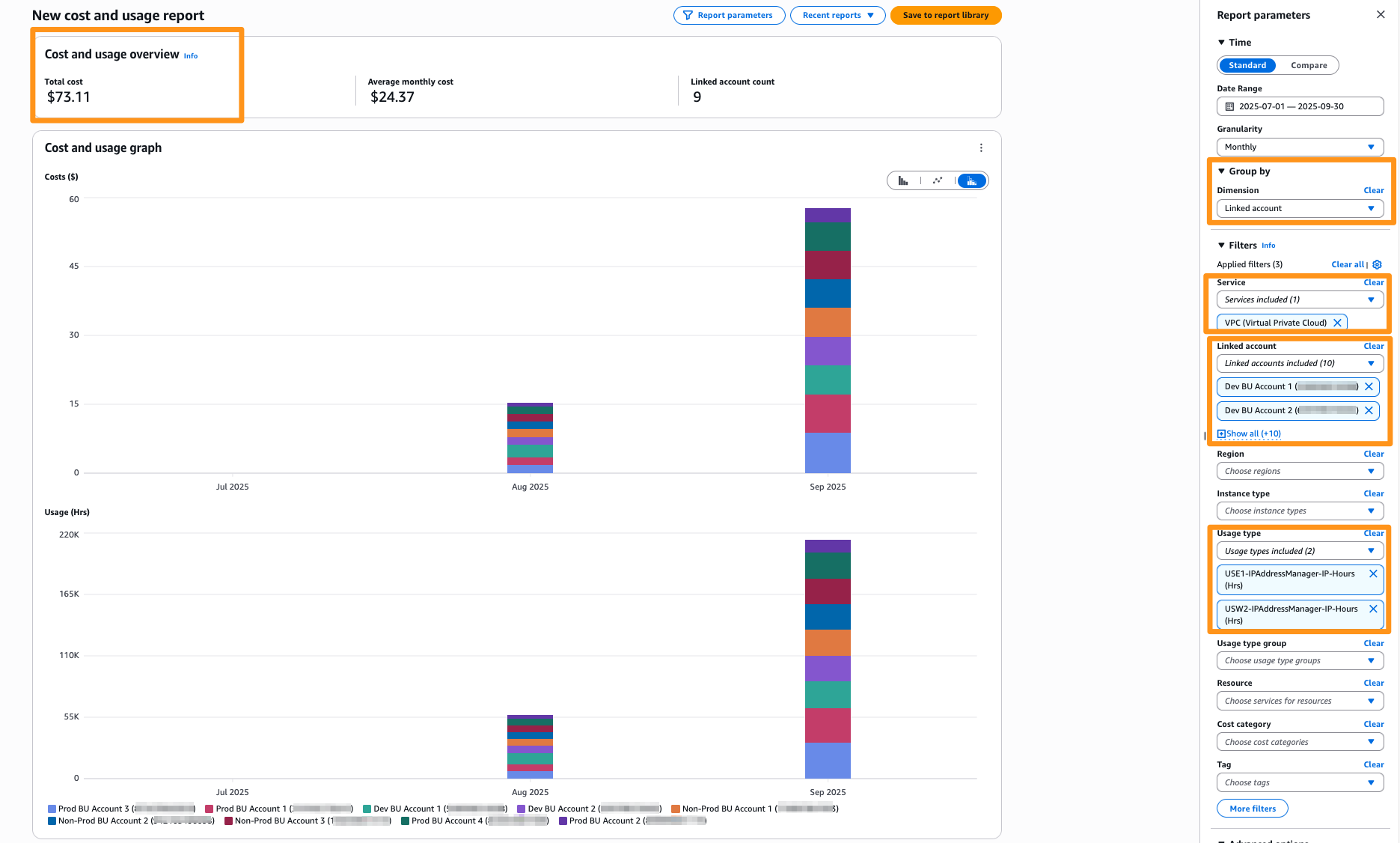
Figure 7: Management account AWS Cost Explorer showing IPAM cost distributed across member accounts
Figure 8 shows the IPAM cost and usage breakdown for member accounts in AWS Cost Explorer in the management account.
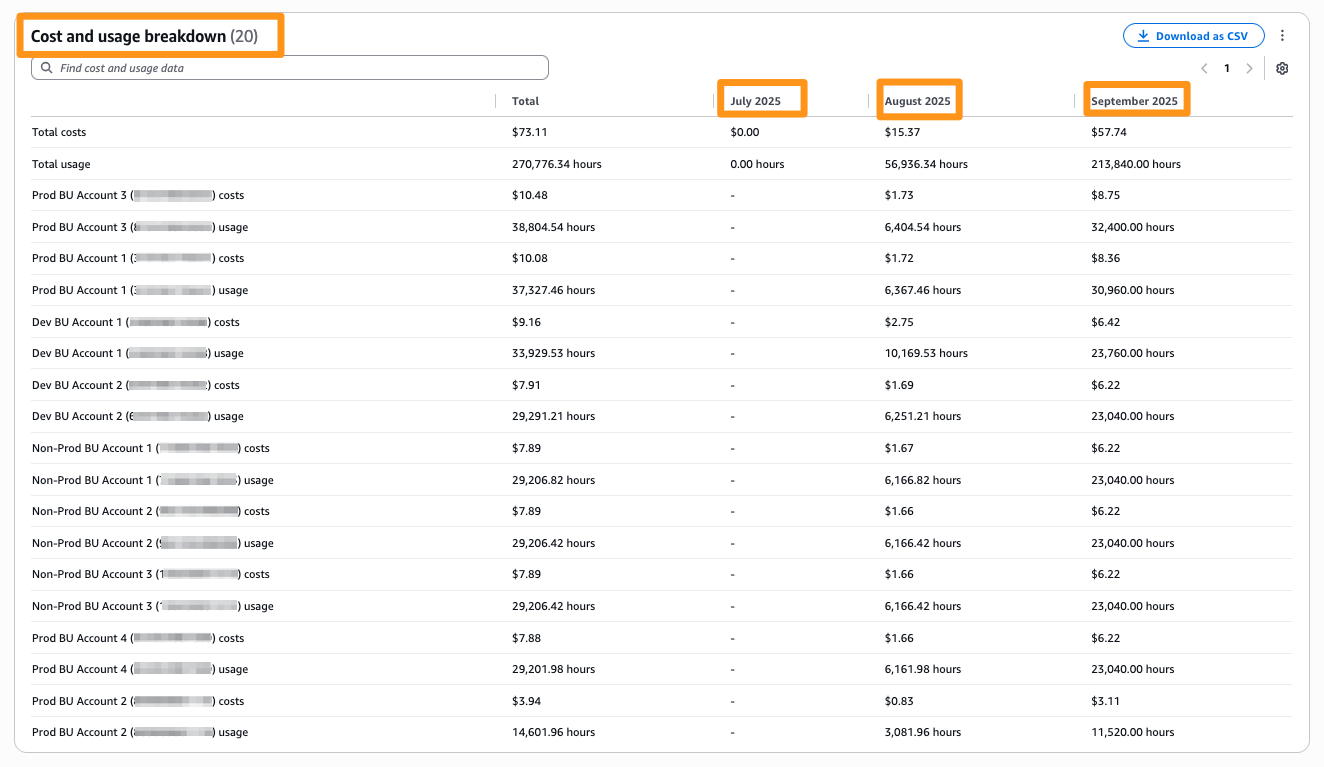
Figure 8: Management account AWS Cost Explorer showing IPAM cost and usage breakdown across member accounts
Similarly, you can use AWS Data Exports to view the IPAM charges using the VPC IPAM ARN in the consolidated billing file for the management account.
In some scenarios, you want to grant the IPAM delegated admin account visibility into IPAM usage across all member accounts. This is common when network operations teams manage IP addressing centrally but want to monitor cost trends and usage across environments without needing full billing access to the management account. To enable this, the management account creates a cross-account IAM role that grants the delegated admin read-only access to AWS Cost Explorer APIs. The IPAM administrator can use this setup to analyze cost distribution data directly from the delegated admin account while keeping billing permissions isolated from other workloads. For more details and example policies, refer to the overview of managing access permissions documentation.
Considerations
When using the cost distribution feature in VPC IPAM, consider the following.
- When you enable cost distribution, the changes take effect after 24 hours. AWS Cost Explorer and AWS Data Exports reflect the distributed billing only after this period has elapsed. No manual action is needed during this waiting period.
- You have 24 hours to opt out after enabling cost distribution. After 24 hours, you can’t change the setting for seven days. After seven days, you can disable cost distribution.
- This feature functions in conjunction with OU level exclusion filtering in AWS Organizations.
- When you review IPAM usage in AWS Cost Explorer, the usage type IPAddressManager-IP-Hours (Hrs) appears under the home Region of your IPAM. This occurs because IPAM usage is entirely tracked against IPAM’s home AWS Region, regardless of the operating Regions.
- VPC IPAM cost distribution is supported in all AWS Commercial Regions where IPAM is available, including AWS China Regions, and AWS GovCloud (US) Regions.
Conclusion
The cost distribution feature in Amazon VPC IP Address Manager (IPAM) brings transparency and accountability to IP address management in multi-account AWS environments. With this feature, IPAM costs are allocated to the member account within AWS Organizations that consumes IP addresses. This removes manual reconciliation so that each team can manage its own IP spend. Finance and operations teams gain clear visibility into IP usage patterns, while networking teams retain centralized governance. Although this capability changes who is billed, it doesn’t change who can view the billing data. Combining it with appropriate IAM billing permissions means that networking, finance, and leadership teams all share a single source of truth for IPAM costs. Organizations adopt cost distribution in VPC IPAM to achieve scalable, fair, and auditable chargeback for shared network infrastructure. To get started with VPC IPAM, check out the VPC IPAM documentation. If you have questions about this post, then start a new thread on AWS re:Post or contact AWS Support.
About the authors

Rohit Aswani
Rohit is a Principal Networking Specialist Solutions Architect in the Worldwide Public Sector organization at AWS, where he helps customers build and design scalable, highly-available, secure, resilient and cost effective networks. He helps customers and partners adopt and accelerate IPv6 deployment to meet federal government mandates. He holds a MS in Telecommunication Systems Management from Northeastern University, specializing in Computer Networking. Outside of work, Rohit enjoys hiking, traveling and exploring new coffee places.

Raunak Tibrewal
Raunak Tibrewal is a Senior Product Manager at AWS. He has spent 14+ years in the computer networking industry, and he is currently working in the Amazon VPC team building capabilities to simplify IP management for AWS customers. In his spare time, he enjoys traveling, hiking and other outdoor activities.

Mandar Alankar
Mandar is a Senior Networking Solutions Architect at AWS. He is passionate about networking technologies and loves to innovate and help solve complex customer problems. He holds a master’s degree in Telecommunications from University of Colorado Boulder. Mandar lives in Seattle and loves travel and outdoor activities.