Networking & Content Delivery
Implementing secure file uploads to Amazon S3 at the edge: Choosing the right pattern
Uploading files to Amazon Simple Storage Service (Amazon S3) is a common requirement for modern applications. Although the concept is clear, there are several ways to implement S3 uploads, each with distinct trade-offs in security, user experience, and scalability. Understanding these patterns and their best-fit scenarios is essential for making informed architectural decisions that align with your specific requirements.
This post guides you through key considerations for implementing secure S3 uploads, including when to choose PUT or POST operations, how to accelerate transfers using Amazon S3 Transfer Acceleration, how Amazon CloudFront enables custom domains and edge security for uploads, and how to secure the upload process end-to-end. We also explore an architecture solution for browser-based uploads through HTML forms while using Transfer Acceleration and CloudFront to maintain your branded domain presence and optimize performance for globally distributed users.
The Amazon S3 journey starting point: Choosing between PUT and POST
One of the first decisions is choosing between what is best for your use case: PUT or POST operations. Although both methods accomplish the task of uploading files, they serve different use cases and offer distinct advantages.
S3 PUT operations are for scenarios where you need direct and deterministic control over your uploads. When you know precisely where you want to store your file in S3, including the bucket name and the complete object key, PUT is your natural choice. Multiple instances of the same S3 PUT operation result in the same final state. This characteristic, called idempotency, means you can safely retry a failed upload without creating duplicates or unintended side effects. This idempotent behavior is important for scenarios where you need to overwrite files predictably, such as periodic snapshot uploads or log rotations. S3 PUT also benefits from tuning connection pools, threads, timeouts, and concurrent operations to maximize throughput based on available network resources.
S3 POST operations are designed for browser-based file uploads through HTML forms, making them the natural choice for web applications. They support multipart/form-data, which is the standard format browsers use for file uploads. With S3 POST operations, you can define a key prefix and let S3 generate unique keys automatically. This helps in multi-user environments where preventing filename collisions is important, removing the need for complex naming schemes in your application. Another characteristic of S3 POST operations is that they are not idempotent: repeating the same POST action may create multiple objects in your bucket. For example, if a user’s upload request times out and they retry, S3 may create two separate objects with different keys, resulting in duplicate files.
Finally, the authentication mechanism for S3 POST differs from S3 PUT operations. Understanding this distinction helps you choose the right approach: PUT for server-side uploads with runtime signing, or POST for browser-based uploads with pre-generated policies.
S3 PUT vs S3 POST: Authentication mechanisms compared
S3 PUT and POST authenticate requests differently. PUT signs requests at runtime using HTTP headers, while POST uses pre-generated policy documents embedded in form fields.
S3 PUT authentication follows standard Amazon Web Services (AWS) API patterns, where the entire HTTP request (method, headers, and payload) is signed using AWS credentials at run time with authentication data sent to S3 through HTTP headers. A typical S3 PUT request includes headers similar to the following example:
PUT /example-file.jpg HTTP/1.1
Host: my-bucket.s3.amazonaws.com
Date: Fri, 19 Sep 2025 12:00:00 GMT
Authorization: AWS4-HMAC-SHA256 Credential=AKIAIOSFODNN7EXAMPLE/20250919/us-east-1/s3/aws4_request...
Content-Type: image/jpeg
Content-Length: 1234567
x-amz-content-sha256: e3b0c44298fc1c149afbf4c8996fb92427ae41e4649b934ca495991b7852b855
[File Content]
S3 POST was designed for browser-based form uploads, where browsers automatically construct the request body with form fields and file content. At that time, JavaScript wasn’t as developed as it is today, most forms were HTML-only, and developers couldn’t easily set arbitrary headers from browsers. Therefore, S3 chose to implement POST with authentication in form fields specifically to support browser-based uploads. This design decision enables direct uploads from web browsers without needing custom request headers. It was a specific S3 implementation choice for browser compatibility, not a general requirement of HTTP POST operations. Other services might handle POST authentication differently, typically using headers like PUT operations do. In the following example, you can see how an S3 POST request looks with the form field names related to AWS authentication highlighted.
POST / HTTP/1.1
Host: my-bucket.s3.amazonaws.com
Content-Type: multipart/form-data; boundary=----WebKitFormBoundaryABC123
Content-Length: 1234567
------WebKitFormBoundaryABC123
Content-Disposition: form-data; name="key"
example-file.jpg
------WebKitFormBoundaryABC123
Content-Disposition: form-data; name="AWSAccessKeyId"
AKIAIOSFODNN7EXAMPLE
------WebKitFormBoundaryABC123
Content-Disposition: form-data; name="policy"
[Policy Content]
------WebKitFormBoundaryABC123
Content-Disposition: form-data; name="signature"
[Signature Content]
------WebKitFormBoundaryABC123
Content-Disposition: form-data; name="file"; filename="example-file.jpg"
Content-Type: image/jpeg
[File Content]
------WebKitFormBoundaryABC123--
The form fields names related to AWS authentication in an S3 POST request are “AWSAccessKeyId”, “policy”, and “signature”. The “policy” has a base64-encoded value of a JSON document that the client needs to set up, specifying constraints for the object upload. It is a useful feature to control/restrict the characteristics of the expected uploaded file, such as the range of acceptable file sizes, Content-Type, key, and many others.
{
"expiration": "2025-09-19T12:00:00Z",
"conditions": [
{"bucket": "my-bucket"},
{"key": "example-file.jpg"},
["content-length-range", 1, 10485760],
{"success_action_redirect": "https://myapp.com/success"},
["starts-with", "$Content-Type", "image/"],
{"x-amz-meta-userid": "12345"}
]
}
To prove to S3 that the “policy” is authorized, you use a valid access key (“AWSAccessKeyId”) to sign the policy, producing a “signature”. The access key, policy, and signature are all included in the S3 POST form fields. Therefore, in an S3 POST, the request itself isn’t signed; only the policy is. This difference in authentication means you cannot simply substitute PUT operations with POST operations. S3 expects different authentication semantics for each operation type.
In summary, S3 PUT is ideal for programmatic uploads where file characteristics are well-known and controlled by your application. Use PUT for file replacement scenarios and mobile app integrations where the filename, size, and content type are predetermined by your backend logic.
S3 POST excels in browser-based uploads requiring complex validation, such as file type restrictions, size limits, or custom validation rules. It is also useful for use cases needing content moderation and compliance requirements.
Accelerating and securing your Amazon S3 transfer
Once you’ve chosen between PUT and POST operations, the next step is optimizing how those uploads reach S3. Both methods can benefit from acceleration and security techniques that reduce latency and protect data in transit.
This section covers client optimizations and two acceleration approaches: Amazon S3 Transfer Acceleration and Amazon CloudFront. We’ll explore how each works, when to use them, and how they integrate with PUT and POST operations to improve upload performance and security.
Client optimizations
For large file uploads, S3 PUT operations support multipart uploads. This approach splits files into smaller chunks, uploads them in parallel, and reassembles them into the original object. This improves throughput and enables resuming interrupted uploads, providing fault tolerance for unexpected errors.
The optimization options for S3 POST operations are more limited because they are designed for browser-based uploads. S3 POST cannot use the multipart upload API. Although you can split files into chunks and upload each through separate POST operations, your application code must manage file splitting, individual uploads, and reassembly. Unlike S3 PUT, where you can tune connection pools and thread settings, browsers control these settings for POST operations. This leaves file compression and AWS Region selection as the primary optimization options for POST uploads.
Amazon S3 Transfer Acceleration
S3 Transfer Acceleration is beneficial for customers with a global presence needing long-distance transfers or those with unreliable or limited network performance, because it uses AWS edge locations and the backbone network to optimize upload speeds to the regional bucket. Instead of uploading directly to your S3 bucket, data is routed through the nearest edge location and forwarded to S3 through an optimized network path. The implementation is direct, needing minimal code changes, and is well-supported by existing S3 tools and SDKs. When using S3 Transfer Acceleration all S3 security controls remain in effect, so you can continue using AWS Identity and Access Management (IAM) policies, bucket policies, and encryption settings exactly as you would with regular S3 operations. To enable S3 Transfer Acceleration, you need to explicitly switch it on per bucket and use the endpoint format: bucket-name.s3-accelerate.amazonaws.com. Testing the performance improvement before implementation is recommended using the Amazon S3 Transfer Acceleration Speed Comparison tool.
Modern applications uploading to Amazon S3 commonly use presigned URLs. S3 Transfer Acceleration fully supports this pattern for both PUT and POST operations. Presigned URLs are an elegant solution to traditional upload architecture challenges that required either embedding AWS credentials in client applications or routing uploads through application servers, which creates performance bottlenecks and increased infrastructure costs. Presigned operations shift the security model from credential-based to signature-based authentication, removing these concerns. Instead of sharing permanent credentials, applications generate time-limited, cryptographically signed URLs that encode specific permissions and constraints, enabling direct client-to-Amazon S3 communication while maintaining centralized security control.
Although S3 Transfer Acceleration offers significant benefits and is transparent to use, there are two key considerations. First, although standard Amazon S3 doesn’t charge for data transfer into Amazon S3, S3 Transfer Acceleration does charge for both the data transfer in and requests when using the accelerated endpoint. Second, there is an important naming restriction: bucket names can’t contain dots. This limitation exists because S3 Transfer Acceleration uses the format bucketname.s3-accelerate.amazonaws.com, and bucket names containing dots would conflict with SSL/TLS certificate validation, because AWS uses wildcard certificates for *.s3-accelerate.amazonaws.com.
Amazon CloudFront
Amazon CloudFront and Amazon S3 Transfer Acceleration both use AWS edge locations to optimize file transfer speeds. CloudFront provides more extensive security and customization capabilities than S3 Transfer Acceleration. Use CloudFront when you need centralized control over upload endpoints, custom logic at the edge, or consistent domain branding across your application.
The different layers of protection that CloudFront can add on top of the S3 security controls are:
- AWS WAF integration: The CloudFront integration with AWS WAF enables inspection and validation of file uploads before they reach S3. You can enforce upload rate limits, validate custom headers, and protect against automated attacks. AWS WAF rules can examine presigned URL parameters and authorization tokens so that uploads only occur through authorized paths.
- Geographic restrictions: CloudFront enforces geographic access control at the edge using IP geolocation, blocking restricted requests before they reach your origin. You can configure allow or deny lists for specific countries, providing an added layer of access control for compliance requirements.
- Edge computing: CloudFront Functions provide lightweight, cost-effective request validation and manipulation at the edge, which is ideal for basic authorization and naming conventions. For complex scenarios, Lambda@Edge enables custom authentication, dynamic path manipulation, and metadata processing during upload.
- Custom domains and SSL: CloudFront supports custom domain names with SSL/TLS certificates managed through AWS Certificate Manager (ACM) at no added cost. You can use this to maintain consistent branding while establishing secure uploads through your own domain instead of using AWS endpoints.
- CloudFront Origin Access Control (OAC): This represents the next-generation solution from AWS for securing access between CloudFront and S3 buckets, superseding the legacy Origin Access Identity (OAI) system. The most significant improvements include support for all AWS Regions and compatibility with S3 server-side encryption using AWS Key Management Service (AWS KMS) (SSE-KMS). Security has been strengthened through the implementation of CloudFront service principal authentication, providing more robust access controls through S3 bucket policies. From an operational perspective, OAC supports dynamic operations including PUT and DELETE requests, enabling diverse upload scenarios. However, OAC doesn’t support automatic signing of POST policies for form-based uploads. In these cases, S3 Transfer Acceleration remains the recommended solution, particularly for applications needing POST-based uploads with policy validation.
While this approach provides greater control over upload behavior, the setup and ongoing maintenance are more involved than direct S3 uploads. You need to manage the CloudFront distribution, configure origins and origin access control, set up cache behaviors, manage custom domain names, and handle the SSL/TLS certificates associated with them. The operational overhead is higher when compared to direct S3 uploads, which makes this approach best suited for scenarios where the added control and security features justify the complexity.
A serverless file upload architecture with S3 Transfer Acceleration and CloudFront
The following reference architecture combines S3 POST operations, S3 Transfer Acceleration, and CloudFront to create a secure, scalable file upload system. It solves a common challenge: enabling browser-based uploads while maintaining your branded domain, implementing robust security controls, and optimizing performance for globally distributed users.
The proposal consists of four primary components working together:
- Access layer: A CloudFront distribution serves as the unified entry point, routing requests to appropriate backends while maintaining your custom domain. Static content (HTML, JavaScript, CSS) is served from an S3 bucket through the CloudFront OAC. API requests for authentication and generation of S3 presigned POST URLs are routed to Amazon API Gateway through the CloudFront path-based routing.
- Authentication layer: Amazon Cognito user pools manage user identities without requiring custom authentication code. A REST API Gateway with AWS Lambda integration supports different endpoints for registration, confirmation and login (for example
/auth/register,/auth/confirm, and/auth/login). The Lambda function directly invokes the relevant Cognito User Pool APIs. Upon successful authentication, it returns a JWT token for secure session management. - Presign layer: The API Gateway Cognito User Pool Authorizer verifies if incoming request present a valid JWT Token. If successful, then a Lambda function can validate the upload characteristics (file type, size, and name) against your security policies and generate a presigned POST policy with appropriate constraints. The policy could also include the user ID in the object key path ensuring logical separation of uploads by the user.
- Upload layer: The S3 presigned POST URL directs browsers to upload directly to the S3 Transfer Acceleration endpoint, optimizing upload speeds from any global location.
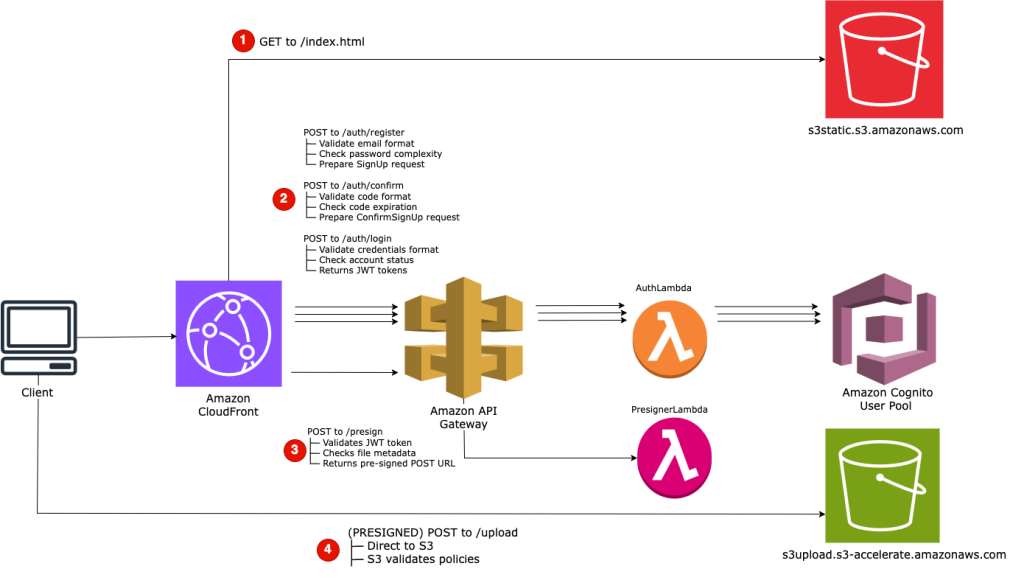
Serverless file upload architecture using Amazon CloudFront distribution, Amazon API Gateway REST API, AWS Lambda functions for authentication and pre-signed URL generation, Amazon Cognito User Pool for identity management, and direct S3 uploads with Amazon S3 Transfer Acceleration for optimized global performance
Upload workflow
- Users navigate to the CloudFront custom domain and receive a single-page web application. CloudFront retrieves static assets from an S3 bucket using OAC, loading the application with client-side logic to handle registration, email confirmation, login, and file uploads through API calls to the backend services.
- Users register by submitting credentials to
/auth/register. CloudFront routes this to API Gateway, which invokes the AuthLambda function. The function calls Cognito’s SignUp API, which sends a verification code to the user’s email. - Users retrieve the code from their email and submit it to
/auth/confirm. This triggers the AuthLambda function to call Cognito’s ConfirmSignUp API. - Once confirmed, users log in through
/auth/login. The AuthLambda function invokes Cognito’s AdminInitiateAuth API and returns a JWT token containing the user’s identity claims to the frontend. - Authenticated users select a file for upload. The frontend sends file metadata (filename, size, and content type) along with the JWT token to the /presign endpoint. The API Gateway’s Cognito User Pool Authorizer validates the token and invokes PresignerLambda. This function can validate upload characteristics and generates an S3 presigned POST URL with a policy defining constraints such as content type, file size limit, expiration, and user-specific object key (for example,
uploads/{user_id}/{YYYY/MM/DD}/{filename}). The function returns the S3 Transfer Acceleration endpoint URL to the frontend. - The browser submits a multipart/form-data POST request directly to the S3 Transfer Acceleration endpoint. The request routes through the nearest AWS edge location and transfers to the regional S3 bucket over the AWS private network backbone. S3 validates the presigned POST policy (signature, expiration, content type, size, and key) and completes the upload without your application infrastructure ever handling the file content. The following figure shows this workflow.

Serverless file upload request and response flow
Security considerations
This architecture implements defense-in-depth through multiple independent security layers.
The static content S3 bucket remains private through CloudFront OAC. The upload bucket uses a different approach: access is controlled exclusively through presigned POST policies with no bucket policies allowing direct access from CloudFront or any other source. The upload bucket can be configured with automatic encryption at rest using AWS KMS with a customer-managed key. The IAM role used by PresignerLambda requires kms:Decrypt and kms:GenerateDataKey permissions on the CMK, restricted by the kms:ViaService condition to ensure the key is only used through the S3 service.
Cognito User Pools manage all user identities, removing the need to build custom authentication systems or store user credentials. Cognito handles password policies, email verification, account recovery, and token management. The JWT tokens issued by Cognito contain cryptographically signed claims about the user’s identity, which API Gateway validates directly through the Cognito User Pool Authorizer.
The file upload operation undergoes validation at three distinct points:
- Client-side validation (optional): The web application can perform initial checks on file type and size before requesting the presigned POST URL, providing immediate user feedback.
- Presigning validation: PresignerLambda can validate upload characteristics such as filename extension against an allowlist (for example, .jpg, .png, and .pdf) and verify content type against permitted MIME types. This prevents users from obtaining presigned POST credentials for prohibited file types.
- S3 policy enforcement: The presigned POST policy includes conditions that S3 validates server-side during upload. If any condition fails, S3 rejects the upload before storing any data
Conclusion
The Amazon CloudFront and Amazon S3 Transfer Acceleration pattern with presigned POST offers a strong solution for web applications, balancing security, user experience, and global availability. The architecture example in this post shows how you can use AWS services to deliver secure, branded file upload capabilities.
Whether you’re building a consumer-facing web application, a mobile app, or a backend service, S3 provides the patterns needed to implement secure, scalable file uploads. Use these patterns and their optimal use cases to choose the approach that best serves your application’s needs while maintaining security and performance.
To get started, apply these patterns to your next file upload implementation.
About the authors

Goncalo Filipe Borges
Goncalo is a Senior Support Engineer at AWS with over 6 years of experience specializing in content delivery and media services. A physics enthusiast at heart, when he’s not optimizing CloudFront configurations, you’ll find him spending quality time with his family and his beloved dog.

Pawan Prabhu
Pawan Prabhu is a Cloud Support Engineer at AWS and a subject matter expert in Amazon CloudFront and Amazon Simple Email Service. He specializes in providing support to enterprise users across various sectors. Outside of work, he enjoys traveling to new places and exploring their unique cultures.