Networking & Content Delivery
Introducing AWS Client VPN native AWS Transit Gateway attachment
Amazon Web Services (AWS) announced native AWS Client VPN attachment on AWS Transit Gateway, allowing you to provide centralized remote access to multiple virtual private clouds (VPCs) and on-premises networks. With this native attachment, you can simplify your network architecture by using Transit Gateway as a central hub for remote access, while gaining enhanced visibility for security monitoring, compliance auditing, and troubleshooting.
Client VPN is a fully managed, client-based VPN service that allows remote users to securely access AWS resources and on-premises networks using an OpenVPN-based or AWS provided VPN client. Previously, connecting a Client VPN endpoint to multiple VPCs required you to create an endpoint in a dedicated VPC, configure that VPC’s route tables, and then connect it to resource VPCs through services like Transit Gateway or VPC peering—a multi-step process that added operational complexity as environments scaled. The new attachment model eliminates these intermediate steps by allowing direct attachment to Transit Gateway without a hosting VPC, while preserving original client IP addresses and eliminating the Source Network Address Translation (SNAT) for IPv4 connections that previously obscured user identity.
In this post, we explain how the Client VPN attachment on Transit Gateway works and how it differs from the VPC association model. We walk through a step-by-step configuration of the new integration, cover how to migrate from an existing VPC-based Client VPN setup, and help you decide which association model fits your environment.
How native Client VPN attachment on AWS Transit Gateway works
With VPC association, the Client VPN endpoint creates Elastic Network Interfaces (ENIs) in the associated subnets. Traffic from VPN clients is source-NATed to the Client VPN endpoint ENI IP address before reaching Transit Gateway, meaning destination servers, firewalls, and security systems see the ENI IP address rather than individual client IP addresses. Figure 1 shows the VPC association model, where organizations deploy separate Client VPN endpoints per business unit for traffic segmentation, with client IP addresses replaced through SNAT before traffic reaches Transit Gateway and destination resources.
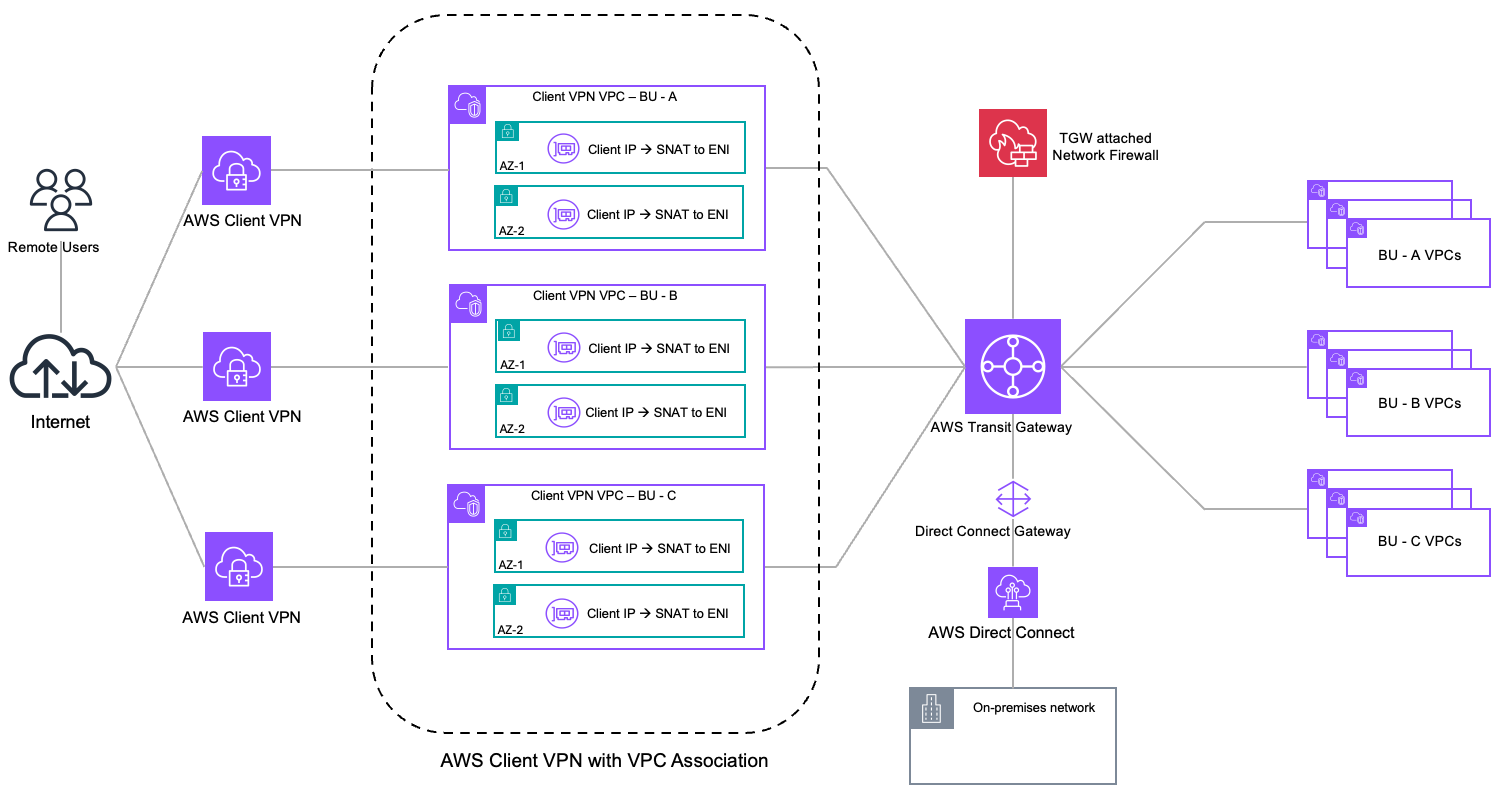
Figure 1. AWS Client VPN architecture with VPC association
With this launch, AWS Client VPN supports a native attachment on Transit Gateway, expanding your architectural choices for remote access. Instead of associating a Client VPN endpoint with subnets from a dedicated VPC, you can now associate it directly with Transit Gateway, using it as a central routing hub for your remote users. Figure 2 shows how Client VPN endpoints connect directly to Transit Gateway, removing the need for a dedicated Client VPN VPC. This in turn eliminates SNAT and preserves the original client IP addresses.
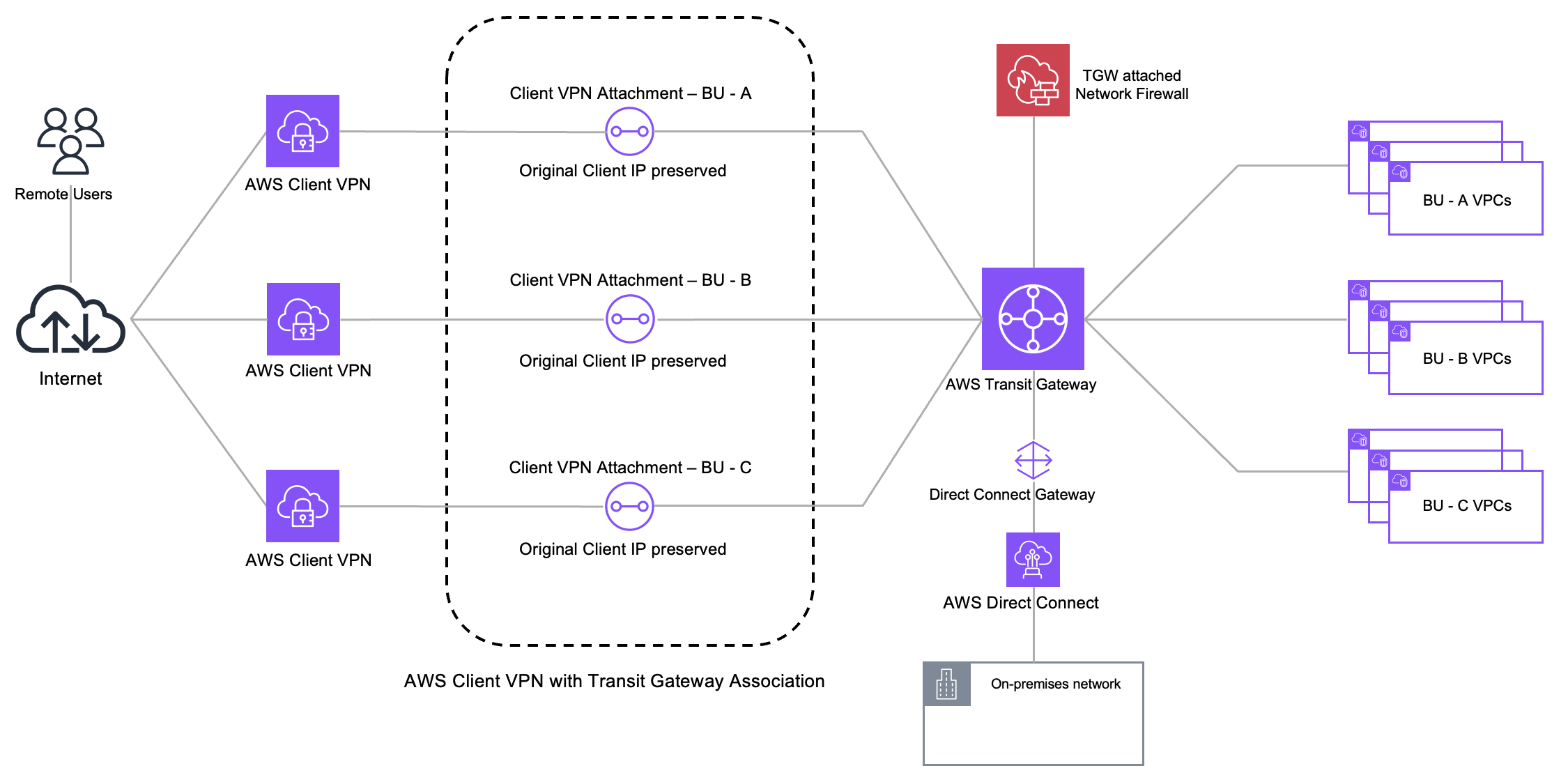
Figure 2. AWS Client VPN architecture with AWS Transit Gateway association
This architecture delivers the following key benefits:
- Simplified architecture with centralized connectivity – Transit Gateway acts as a Regional network hub, connecting your VPCs, on-premises networks, and now your Client VPN endpoint through a hub-and-spoke topology. The native attachment directly connects your Client VPN endpoint to Transit Gateway without requiring a separate VPC for the association. This eliminates the need to provision a dedicated VPC, manage its route tables, configure subnet associations, and establish connectivity through services like Transit Gateway or VPC peering, streamlining your network architecture and reducing operational overhead. You can also route Client VPN traffic through centralized security inspection points such as AWS Network Firewall using Transit Gateway, with security policies applied based on the client CIDR block. This enables more granular security controls, accurate audit logging, and precise threat detection by identifying the specific remote user or device initiating each connection. As your network grows, adding access to new VPCs or inspection points requires only updating routes and authorization rules.
- Preserved source IP addresses – When remote users connect through a Client VPN endpoint associated with Transit Gateway, their original client IP addresses are preserved end-to-end. Traffic maintains the actual source IP assigned from the client CIDR block. For security teams, this means correlating suspicious network activity with specific users through their client IP addresses. For compliance auditors, this provides the user-level attribution required for SOC 2, PCI-DSS, and HIPAA audit trails. For network operators troubleshooting connectivity issues, this eliminates the ambiguity of multiple users sharing a single NAT address. This eliminates the source NAT that occurs with VPC associations, where traffic appears to originate from the Client VPN endpoint ENI IP address rather than the actual client.
- Multi-account support – Your Transit Gateway and Client VPN endpoint can reside in different AWS accounts. This helps organizations maintain Transit Gateway ownership in a central networking account while application or development teams deploy and manage Client VPN endpoints in their own accounts, providing agility and clear ownership boundaries.
This architecture is well-suited for organizations with multi-VPC environments that require source IP visibility for security monitoring and compliance, and hybrid architectures that combine AWS resources with on-premises networks through a unified remote access point.
Prerequisites
Before creating a Client VPN endpoint with Transit Gateway association, ensure you have the following:
- Transit Gateway with IPv4 CIDR block assigned, and IPv6 CIDR block if you plan to use IPv6 or dual-stack configuration.
- Client authentication configured using mutual authentication, Active Directory, or SAML-based federated authentication.
- Client IPv4 CIDR range with a netmask between /12 and /22 that does not overlap with your VPC CIDRs, on-premises ranges, or Transit Gateway CIDR blocks. For IPv6, AWS automatically assigns a /56 CIDR block to the endpoint.
- AWS Identity and Access Management (IAM) permissions to create and manage Client VPN endpoints and Transit Gateway resources.
AWS Client VPN native Transit Gateway attachment setup
This section walks through the new Transit Gateway association experience. For general Client VPN setup including certificate configuration, authentication options, and client distribution, see the AWS Client VPN Administrator Guide.
In this example, you connect remote users to a VPC through Transit Gateway using the native Client VPN attachment. Remote users use client CIDR 10.114.0.0/19, Transit Gateway uses CIDR 169.253.0.0/16, and the target VPC uses CIDR 10.10.0.0/16.

Figure 3 shows the architecture you build in this walkthrough.
Step 1: Create Client VPN endpoint with Transit Gateway association
In this step, you create a new Client VPN endpoint through the Amazon VPC console. Configure your endpoint settings like endpoint and traffic IP address type (IPv4, IPv6, or Dual stack), server certificate Amazon Resource Name (ARN), authentication options, and optional settings as you would for any Client VPN endpoint.
When configuring the network infrastructure, select Transit Gateway as the association type instead of selecting a VPC. Transit Gateway can be in the same account or shared from a different account through AWS Resource Access Manager. For Availability Zones, select at least two for high availability. If you skip this, Client VPN automatically assigns two Availability Zones.
If the Auto accept shared attachments setting is not enabled on Transit Gateway, you must manually accept the attachment in the Transit Gateway owner account before the Client VPN endpoint creation process can complete.
The Transit Gateway association is completed as part of endpoint creation. There is no separate target network association step required.
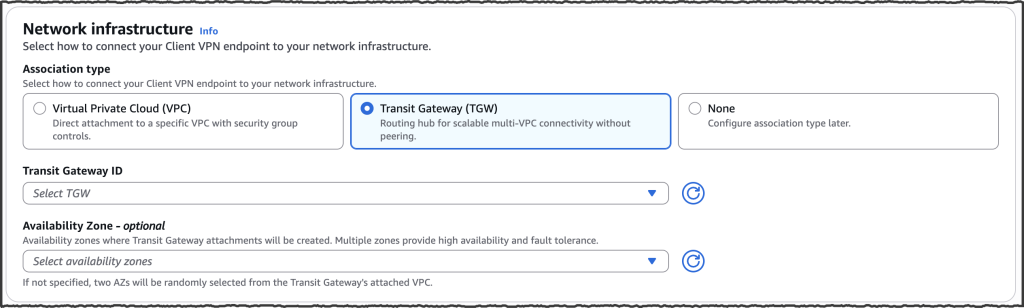
Figure 4. Amazon VPC console showing AWS Transit Gateway selection during endpoint creation
Step 2: Configure authorization and Client VPN routes
In this step, you configure authorization rules and routes to control and direct Client VPN traffic to destinations in your Transit Gateway network. Authorization rules control who can access which destinations based on user identity, and Client VPN routes control how traffic is directed to those destinations. For split-tunnel configuration, both authorization rules and routes must be configured for traffic to flow. For full-tunnel configuration, only authorization rules are required, as all traffic is routed through the VPN tunnel by default.
To configure authorization rules, add rules for each destination CIDR range you want to make accessible, as shown in Figure 5. In this example, you add 10.10.0.0/16 as the destination CIDR for the target VPC. You can grant access to all users or restrict access to specific Active Directory or SAML-based identity provider groups. For more details, see AWS Client VPN authorization rules.
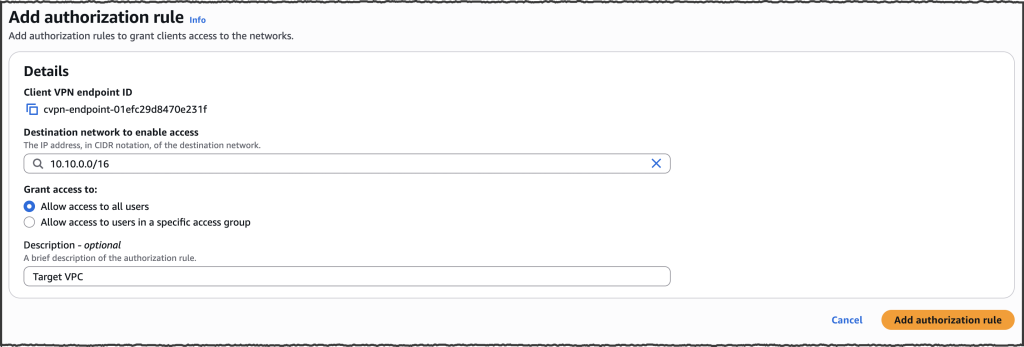
Figure 5. Add authorization rule to grant users access to destination networks
To configure Client VPN routes, add a route for each destination CIDR range you want your users to reach, as shown in Figure 6. In this example, you add a route for 10.10.0.0/16 to direct traffic to the target VPC through Transit Gateway. Unlike VPC association where the local route of the VPC is automatically added to the Client VPN endpoint route table, Transit Gateway requires you to configure Client VPN routes for split-tunnel configurations because no routes are installed on the client by default. For full-tunnel configurations, all traffic is routed through the VPN tunnel, so Client VPN routes are not required.
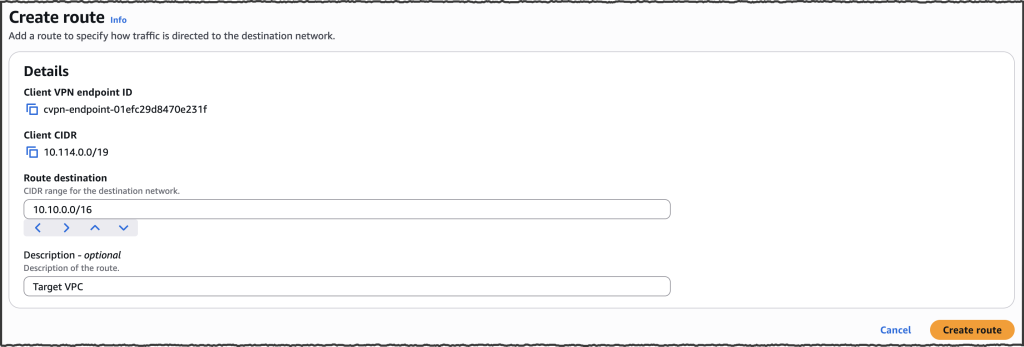
Figure 6. Creating an AWS Client VPN route to specify destination CIDR blocks accessible to clients
Step 3: Configure Transit Gateway routing
Ensure the Transit Gateway route table associated with your Client VPN attachment has routes to your destination networks, either through propagated or static routes. For return traffic, enable route propagation from the Client VPN endpoint attachment to the Transit Gateway route tables associated with your other attachments so return traffic can reach your VPN clients. If you have multiple routes for overlapping destinations, review Route evaluation order. Figure 7 shows the Transit Gateway route table with IPv4 and IPv6 propagated routes from the Client VPN endpoint attachment. For more information on Transit Gateway routing, review Transit Gateway route tables.
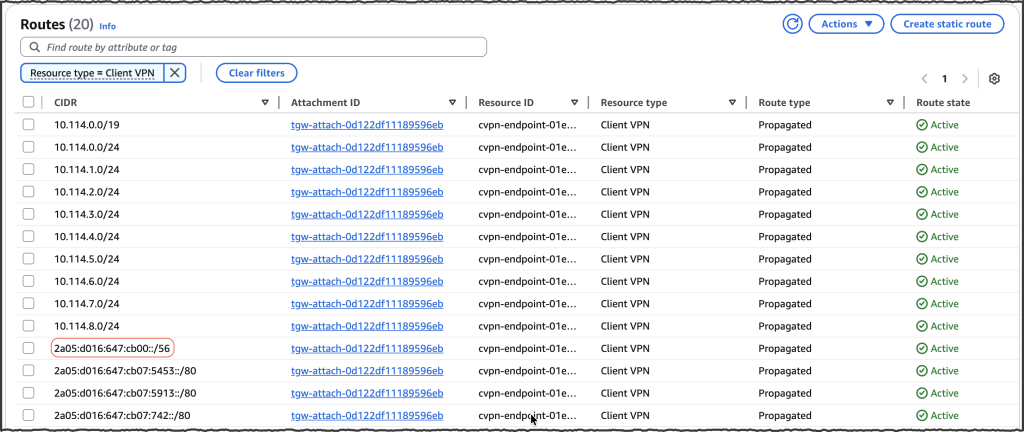
Figure 7. AWS Transit Gateway route table with propagated routes from the AWS Client VPN endpoint attachment
Additionally, ensure your destination VPC route tables and on-premises networks have return routes for the Client VPN CIDR ranges. If your VPC route tables don’t already have a default route (such as 0.0.0.0/0 or ::/0) pointing to Transit Gateway, add routes for the Client VPN CIDRs:
- IPv4 – The Client VPN CIDR is known at endpoint creation time and can be added to VPC route tables immediately.
- IPv6 – Because IPv6 client CIDR ranges are automatically assigned by Client VPN, use the describe Transit Gateway route table API or Transit Gateway console to identify the propagated IPv6 CIDR from the Client VPN attachment as shown in Figure 7 and add it to the VPC route table.
Step 4: Verify connectivity and source IP addresses preservation
In this step, you verify connectivity by connecting a VPN client and confirming that original client IP addresses are preserved in Transit Gateway flow logs. For this walkthrough, Transit Gateway flow logs are configured with a custom log record format and Amazon CloudWatch as the log destination.
Connect a VPN client using the configuration file downloaded from the Client VPN endpoint. After you’re connected, access one of the authorized resources in your VPC or on-premises network to generate traffic.
To confirm that original client IPv4 addresses are preserved, check the Transit Gateway flow logs. In the flow log entry, the source IP address field displays the actual client IP address from your Client VPN CIDR range rather than a NAT address. Figure 8 shows Transit Gateway flow logs where client IP 10.114.0.163 is communicating with target VPC resource 10.10.14.245, with the client’s original IP address visible in the source field. This confirms that the Transit Gateway attachment preserves client identity throughout the connection.
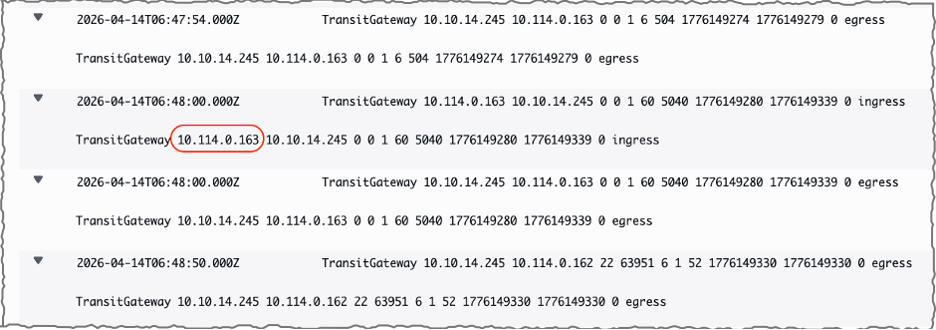
Figure 8. AWS Transit Gateway flow logs displaying preserved client source IP addresses from AWS Client VPN connection
Choosing the right association model
AWS Client VPN continues to support VPC association and now offers Transit Gateway association as a new option. Choose the model that best fits your environment:
- Use VPC association when you need remote access to resources within a VPC, when your multi-VPC connectivity is based on VPC peering or AWS Cloud WAN, when security group controls on the Client VPN endpoint ENI are part of your access control strategy, or when client source IP preservation is not a requirement.
- Use Transit Gateway association when you have a Transit Gateway in your environment and need remote access across multiple VPCs, on-premises networks, or both. This model is suited for environments that require client source IP visibility for security monitoring and compliance, or centralized traffic inspection through services such as AWS Network Firewall with policies based on true source IP addresses.
Migrating from VPC association to Transit Gateway
Transit Gateway association is available for new Client VPN endpoints at the time of this writing. To adopt Transit Gateway association for an existing deployment, complete the following steps:
- Create a new Client VPN endpoint with Transit Gateway association following the steps outlined in this post. Ensure your client CIDR range for the new endpoint doesn’t overlap with the existing endpoint’s CIDR.
- Configure authorization rules and routes on the new endpoint. Note that unlike VPC association, Transit Gateway association doesn’t automatically add routes. You must manually configure all Client VPN routes for destination networks your users need to reach.
- If you currently use security group referencing to control traffic from Client VPN endpoint ENIs to your workloads, this is not available with Transit Gateway association. Add rules to your workload security groups to allow traffic from the Client VPN IPv4 or IPv6 client CIDR range. Keep the existing security group reference rules in place until the VPC-associated endpoint is decommissioned (Step 7).
- Review your DNS configuration. If your existing endpoint uses the DNS Server IP address parameter, the DNS setup may need to change depending on your DNS type:
- On-premises DNS servers – Configure the same DNS server IPs on the new endpoint.
- Default VPC DNS resolver (VPC CIDR + 2 address) – This resolver is not directly accessible from the Transit Gateway attachment. Configure your Client VPN endpoint DNS to use Route 53 Resolver inbound endpoint IP addresses instead. If your organization already has Route 53 Resolver inbound endpoints deployed in a shared services VPC attached to Transit Gateway, point the Client VPN DNS configuration to those existing endpoint IPs. If not, create Route 53 Resolver inbound endpoints in a VPC attached to Transit Gateway. In either case, ensure the VPC where the inbound endpoints reside has the required private hosted zones associated with it for DNS resolution to work.
- Route 53 Resolver inbound endpoints or custom AWS-hosted DNS servers (such as Active Directory) – Use the same IP addresses in the new endpoint configuration.
- If you are using split-tunnel mode, add the VPC CIDR range containing the DNS server IP addresses to your Client VPN endpoint routes and authorization rules to ensure DNS traffic from the client reaches your DNS servers. With full-tunnel mode, all client traffic is routed through the VPN tunnel, so additional Client VPN endpoint routes for DNS are not required, but you must add authorization rules for the DNS server CIDR range.
- With both endpoints running in parallel, test connectivity on the new endpoint before migrating users. Connect a test client to the new endpoint and verify access to target networks, DNS resolution, and that workload security groups, network access control lists (ACLs), and any firewall policies in the traffic path allow traffic from the new client CIDR range.
- Distribute the new endpoint configuration to your users.
- After all users have migrated and you have confirmed stable operation, decommission the VPC-associated endpoint. You can also clean up the dedicated hosting VPC, its subnets, route tables, and any Transit Gateway or VPC peering attachments that were used solely for Client VPN connectivity. Remove the old security group reference rules from your workload security groups that were retained in Step 3.
Considerations
Review the following considerations when using Client VPN with Transit Gateway association.
- Concurrent connection capacity with Transit Gateway association follows the same scaling model as VPC association – based on client CIDR range size and number of Availability Zone associations. See Client VPN scaling considerations for details.
- At the time of this writing, Transit Gateway flow logs provide network-level traffic visibility for Client VPN connections traversing your Transit Gateway, with the client IP address visible in the flow log source address field. For additional details such as user name and connection ID, reference Connection logging for an AWS Client VPN endpoint.
- Automatic route propagation from Transit Gateway to client devices is not supported. For split-tunnel configurations, you must configure Client VPN routes on the endpoint. Review AWS Client VPN quotas for current route limits.
- Your Client VPN CIDR block and Transit Gateway CIDR block must not overlap with each other, or with VPC CIDRs, on-premises ranges, or other networks reachable through Transit Gateway. Client VPN reserves two Transit Gateway IPs per possible Availability Zone in the AWS Region for each endpoint irrespective of your Availability Zone selection (for example, 10 IPs per endpoint in a Region with 5 Availability Zones). Size your Transit Gateway CIDR block to accommodate IP usage across all your Transit Gateway attachments, including Client VPN. If you exhaust the available IP space, you can add additional CIDR blocks to your Transit Gateway. Review AWS Transit Gateway Quotas for the current limit on CIDR blocks per Transit Gateway.
- A Client VPN endpoint with Transit Gateway association automatically assigns two Availability Zones if you don’t specify them. You can select specific Availability Zones. We recommend selecting at least two for high availability. Per-hour charges apply per Availability Zone association, similar to VPC association. For more information, review AWS Client VPN pricing.
- Data transfer across Availability Zones through Transit Gateway within the same Region is free of charge. Standard Transit Gateway data processing charges apply to traffic flowing through Transit Gateway from Client VPN connections. See AWS Transit Gateway pricing for details. You can use Flexible Cost Allocation for Transit Gateway to attribute these costs to the appropriate teams based on your account structure and chargeback requirements.
Conclusion
The native Client VPN attachment on Transit Gateway expands your architectural choices for remote access by eliminating intermediate VPCs and simplifying what was previously a multi-step configuration process. This direct attachment model preserves client source IPv4 addresses without SNAT, delivers centralized connectivity across VPCs and on-premises networks, and supports multi-account ownership models. Whether you need enhanced visibility for security monitoring and compliance auditing, centralized traffic inspection through Network Firewall, or streamlined remote access across a growing hybrid environment, this integration provides these capabilities natively.
To get started, refer to the AWS Client VPN Administrator Guide or create your first Transit Gateway attached endpoint through the Amazon VPC console.
About the authors

Hardik Shah
Hardik is a Sr. Technical Account Manager at AWS. He brings extensive experience from finance, travel, and retail industries to support customers on their cloud journey. With deep expertise in AWS networking services and cloud architecture, he helps customers design resilient, scalable solutions and optimize their AWS infrastructure.

Anvesh Koganti
Anvesh is a Solutions Architect at AWS specializing in Networking. He focuses on helping customers build networking architectures for highly scalable and resilient AWS environments. Outside of work, Anvesh is passionate about consumer technology and enjoys listening to podcasts on tech and business.