Networking & Content Delivery
Provisioning AWS Interconnect – multicloud with the Kiro agentic IDE
Multicloud is no longer an edge case. Workloads end up spanning AWS and Google Cloud, Microsoft Azure, or Oracle Cloud Infrastructure after an acquisition, through a footprint that predates any consolidation decision, or because a key vendor operates on the other cloud. Sooner or later a network engineer gets the task: connect two environments privately and reliably. AWS Interconnect – multicloud is the managed service that does it, and this post works through the AWS and Google Cloud pair.
That task is harder than it sounds. You are proficient in one provider’s tooling, and a cross-cloud task pushes you into a different console, a different CLI, and constructs that map to yours conceptually but differ in every implementation detail. A security group becomes a firewall rule. An AWS Transit Gateway attachment becomes a Google Cloud Network Connectivity Center spoke. A managed BGP session sits behind a “transport resource” you have never heard of.
That was my starting point. I knew the AWS side well: AWS Direct Connect gateways, Transit Gateways, route propagation, security groups. I had never configured anything on Google Cloud, and I did not have to learn it first. Kiro, an agentic IDE, researched, planned, and provisioned across both clouds. It drove each provider’s CLI, read each provider’s documentation as it worked, and carried context across a multi-step workflow. Every step, from provisioning through testing to documentation, ran through Kiro, with no hand-typed commands. My part was prompts, approvals, and design decisions. That is the shift: you bring expertise in your own cloud, the agent covers the one you do not know, and because every command and its output stay visible, you learn the unfamiliar cloud as the work happens.
This post covers research, planning, implementation, testing, and documentation of a private interconnect between AWS (us-east-1) and Google Cloud (us-east4), completed in one session from a single interface. Kiro is provider-agnostic, and the same workflow carries to the other clouds AWS Interconnect – multicloud supports: Oracle Cloud Infrastructure today, with Microsoft Azure in preview at the time of writing. The provider-specific commands differ for those clouds; the five phases do not.
What is AWS Interconnect – multicloud?
AWS Interconnect – multicloud provides private, dedicated connectivity between AWS and other cloud providers. AWS and Google Cloud pre-build pools of backbone capacity between select Direct Connect and Google Cloud Interconnect Points of Presence. There is no physical order to place, no cross-connect to run, and no third party to coordinate. The matching Google Cloud product is Partner Cross-Cloud Interconnect for AWS.
Provisioning is a key exchange: one side creates the connection and generates an activation key, the other side accepts it, and either side can initiate. On Google Cloud, a single transport resource abstracts the underlying Cloud Routers, VLAN attachments, and BGP sessions. On AWS, the interconnect attaches to a Direct Connect gateway, which associates with a virtual private gateway, a Transit Gateway, or an AWS Cloud WAN core network. This post attaches to a Transit Gateway, which suits a single-Region deployment; for choosing among the attachment options and their Region reach, see Build resilient and scalable multicloud connectivity architectures with AWS Interconnect – multicloud.
Two service behaviors matter later in this post. AWS provisions each interconnect as four connections spanning at least two physically separate facilities, with Equal-Cost Multi-Path (ECMP) load balancing across them, so resiliency is built in rather than something you design. And every connection between the AWS and Google Cloud routers is encrypted with MACsec (IEEE 802.1AE) by default. MACsec covers that Layer 2 hop, not the full path from your Amazon Virtual Private Cloud (Amazon VPC) to your Google Cloud subnet, so add application-layer or IPsec encryption for end-to-end confidentiality.
How Kiro drives the provisioning workflow
Figure 1 groups the workflow into three stages: Kiro reads documentation and context sources, maps cross-cloud dependencies into a sequenced plan, then runs commands across both providers and generates reusable artifacts. The phases that follow break the third stage into implementation, testing, and documentation.
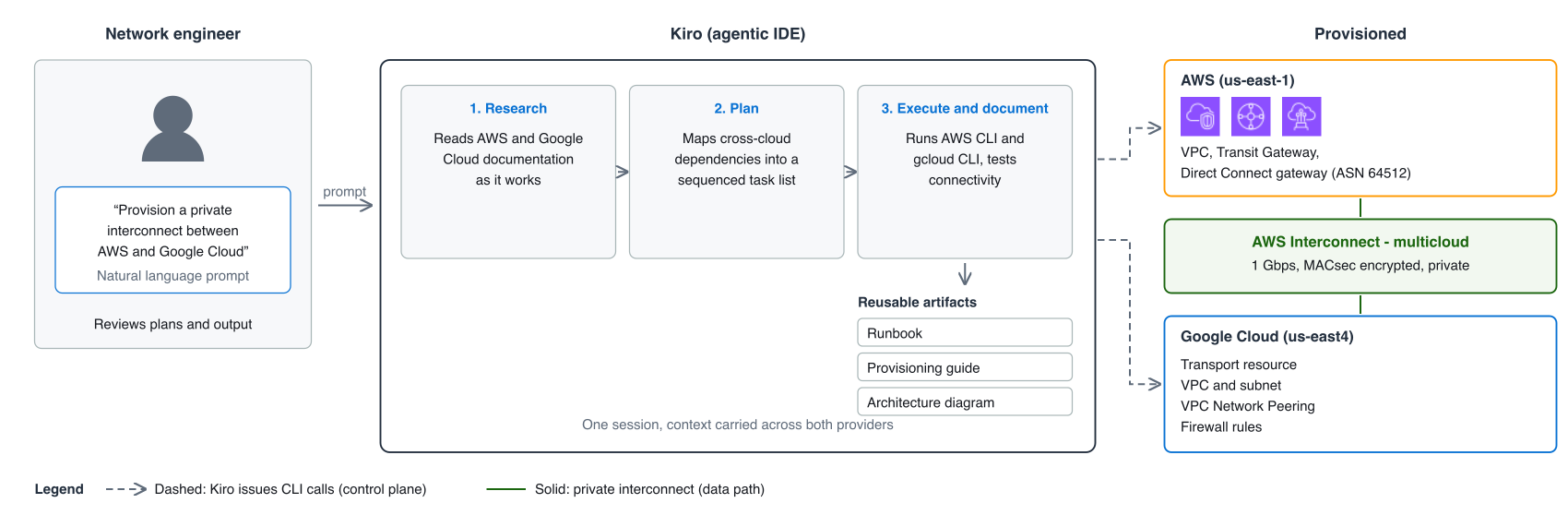
Figure 1: Kiro provisioning workflow
Kiro supports spec-driven development, where you define structured requirements and Kiro generates an implementation plan with discrete tasks, and conversational prompting, where you work interactively step by step. Both are covered in the Kiro documentation. This post uses conversational prompting.
Architecture
Figure 2 shows the architecture this post builds, and the path traffic takes across it.
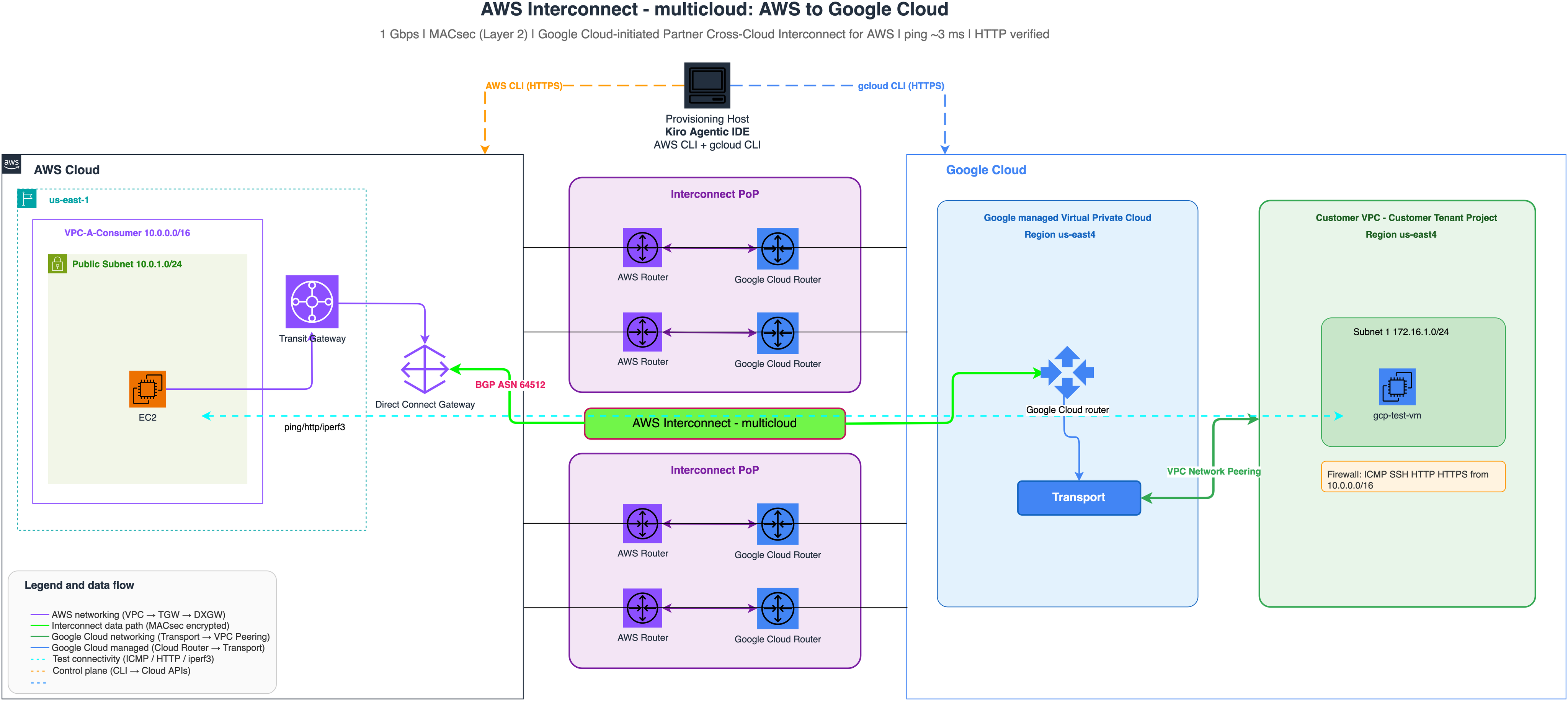
Figure 2: End-to-end architecture and data path
Traffic crosses that architecture in six steps:
- Traffic from the Amazon VPC (10.0.0.0/16) destined for Google Cloud (172.16.0.0/16) routes to the Transit Gateway on its route table entry.
- The Transit Gateway forwards it to the Direct Connect gateway (ASN 64512) on the propagated route for 172.16.1.0/24.
- The Direct Connect gateway sends it across the AWS Interconnect – multicloud connection, MACsec encrypted between the AWS and Google Cloud routers.
- On Google Cloud, traffic arrives at the Google-managed transport VPC, where the transport resource provisions and manages the Cloud Routers and VLAN attachments.
- VPC Network Peering between the transport VPC and the customer VPC delivers traffic to the destination subnet (172.16.1.0/24).
- Return traffic follows the symmetric path. BGP advertisements propagate the AWS prefix into the customer VPC as dynamic peering routes.
Prerequisites
Before starting:
- Kiro installed and configured, with a subscription that covers the agentic usage in this post. See the Kiro documentation for setup and Kiro pricing for the plans and their limits.
- AWS CLI configured with credentials permitted to create Direct Connect gateways, Transit Gateway associations, security groups, and route table entries.
- gcloud CLI installed and authenticated with single sign-on or a service account.
- A Google Cloud project with the Compute Engine and Network Connectivity APIs enabled.
- A supported Region pair. Google Cloud Regions pair with specific AWS Regions, so us-east-1 pairs with us-east4 here. See Region availability.
- Non-overlapping CIDR ranges on the two sides. This walkthrough uses 10.0.0.0/16 on AWS and 172.16.1.0/24 on Google Cloud. Overlapping ranges break routing across the interconnect, so settle the addressing before you provision anything.
- Variables defined for account IDs, project IDs, Regions, and CIDR ranges on both sides.
No Model Context Protocol (MCP) servers are needed for this workflow. Kiro drove both providers through their installed CLIs, so the agent can do only what the credentials on your workstation allow.
For the full list of prerequisites, AWS Identity and Access Management (IAM) permissions, and CLI setup, see the AWS Interconnect – multicloud getting started guide and the Google Cloud provisioning overview.
Interconnect bandwidth bills hourly based on the bandwidth and geographic scope you select, and Google bills its side separately. See the Interconnect pricing page and the Google Cloud pricing before you start, and check the Google Cloud transport resource quota for your project and region.
Using Kiro as a single provisioning interface
Provisioning this interconnect end to end means coordinating resources across both clouds in the right order. To cover that in a single pass, state the end goal first and then the stage you expect at each step:
Goal: a working, documented, private 1 Gbps interconnect between my AWS environment (us-east-1, VPC 10.0.0.0/16) and my Google Cloud project (us-east4, subnet 172.16.1.0/24) using AWS Interconnect – multicloud, that a colleague could rebuild or tear down from your documentation alone.
Research: read the current AWS and Google Cloud documentation for this service. Confirm the paired locations, the supported bandwidths, which side initiates, and the quotas and hourly billing on both sides.
Plan: give me a sequenced plan that shows the dependencies spanning the two clouds. Wait for my approval before you change anything.
Build: provision both sides through their own CLIs, showing me each command and its output as you go. Hand back to me for any step you cannot complete programmatically, and tell me why.
Test: validate the data path with ICMP, an HTTP request, and a throughput test. Report the numbers rather than summarizing them.
Document: produce a runbook with every resource ID and a teardown procedure, a parameterized provisioning guide, and an architecture diagram.
This is an example prompt rather than a template. Adjust the Regions, bandwidth, and CIDR ranges for your environment, and add whatever review steps your change process requires.
This is an example prompt rather than a template. Adjust the Regions, bandwidth, and CIDR ranges for your environment, and add whatever review steps your change process requires.
Phase 1: Research
The first prompt was open-ended: provision a private interconnect between AWS and Google Cloud. Kiro read the AWS Interconnect and Partner Cross-Cloud Interconnect for AWS documentation as it worked, identified the provisioning flow, and mapped the resources needed on both sides. It started on Google Cloud, which generates the activation key. Starting on AWS reverses that. Because it runs both CLIs without preference for either provider, it found the dependencies spanning the two clouds and sequenced the steps accordingly.
Phase 2: Detailed plan
Before running any commands, Kiro produced a step-by-step plan that accounted for those dependencies. Two of them chain. The activation key the Google Cloud transport resource generates is required to accept the interconnect on AWS, and the peeringNetwork URI that same command returns is required before VPC Network Peering can be established. Getting either out of order means backing out and starting again.
Phase 3: Implementation
Kiro ran the provisioning commands across both clouds through their respective CLIs, and it presented each command that created, accepted, or modified a resource for approval before running it. I read every one of those commands before allowing it. That approval gate is where your judgment enters the workflow, and it matters most on the cross-cloud handshake later in this phase, where the two sides commit to each other.
The provisioning ran as a sequence, each step feeding the next:
- AWS foundation. Kiro created the Direct Connect gateway (ASN 64512), associated it with an existing Transit Gateway, created a security group allowing ICMP, SSH, HTTP, HTTPS, and the iperf3 port from the Google Cloud CIDR (172.16.0.0/16), and pointed Google Cloud-bound routes at the Transit Gateway.
- Google Cloud foundation. Kiro authenticated, enabled the APIs, and created a custom VPC and subnet.
- Transport resource. Creating it returns the two values driving the remaining steps: a generatedActivationKey for accepting the interconnect on AWS, and a peeringNetwork URI pointing to a Google-managed VPC in a separate Google-controlled project.
- Acceptance on AWS. Kiro accepted the interconnect with aws interconnect accept-connection-proposal, passing the activation key and the Direct Connect gateway as the attach point.
- Peering and firewall. Kiro established VPC Network Peering from the customer VPC to the Google-managed transport VPC and configured the firewall rules.
There is no BGP or ASN to configure on the Google Cloud side: the transport resource abstracts all of it. The only ASN in this build is the Direct Connect gateway’s Amazon-side ASN (64512). The console and the API are alternatives for the acceptance, but nothing in the flow requires them: every step ran from the same interface.
Kiro wrote a runbook as it worked, recording each command with the resource IDs it returned; Phase 5 covers it. The following excerpt shows the commands behind steps 3 through 5, the cross-cloud handshake. The --remote-profile value comes from transports remote-profiles list.
The service supports dual-stack IPv4 and IPv6, with BGP exchanging both address families across the interconnect. This post walks through an IPv4 example. Both resources take a –stack-type flag, but the accepted values differ: ipv4-ipv6 for the transport, IPV4_IPV6 for the peering. Set dual-stack at creation, on both sides of the peering.
Figure 3 and Figure 4 show the provisioned interconnect in each provider’s console, used here to verify the result rather than to provision it.
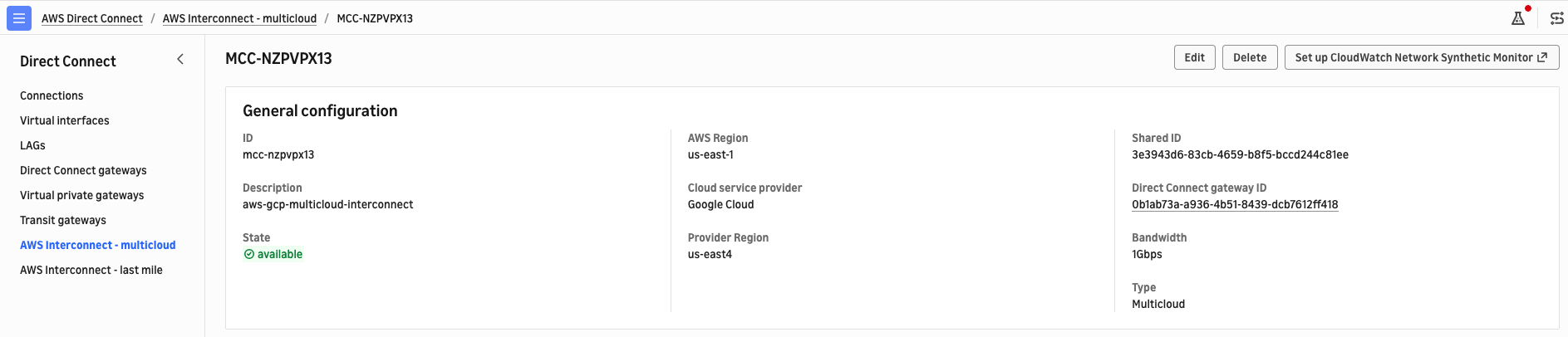
Figure 3: The active interconnect in the AWS Direct Connect console
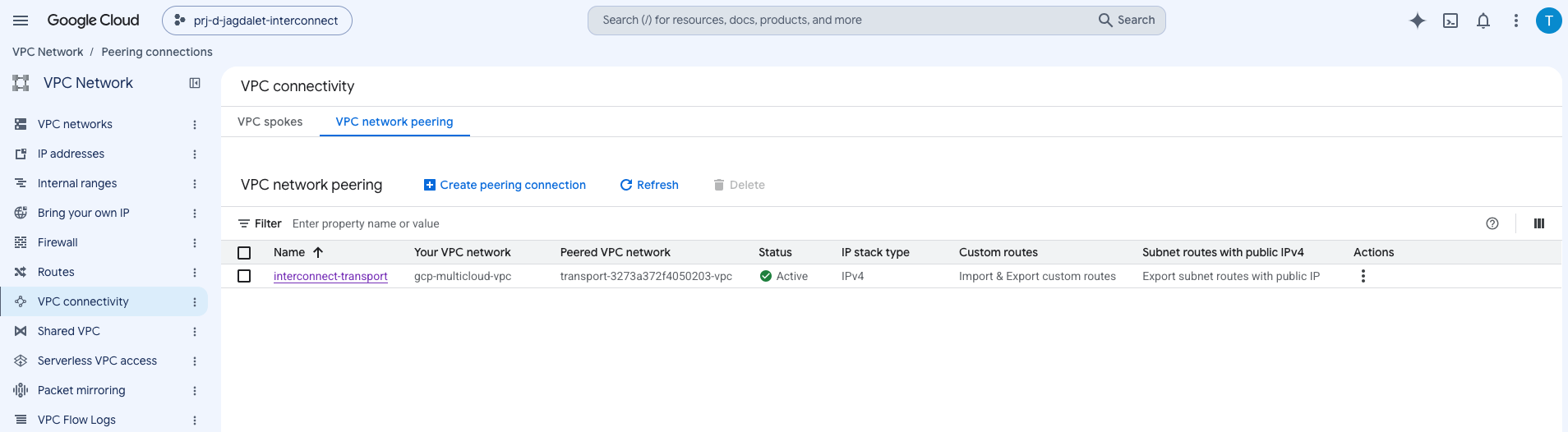
Figure 4: Active VPC Network Peering to the Google-managed transport VPC.
Figure 5 shows the routes the service imported into the customer VPC, with no manual route configuration on either side. The AWS prefix arrives as four equal-priority dynamic peering routes, so Google Cloud can load balance across them with ECMP.
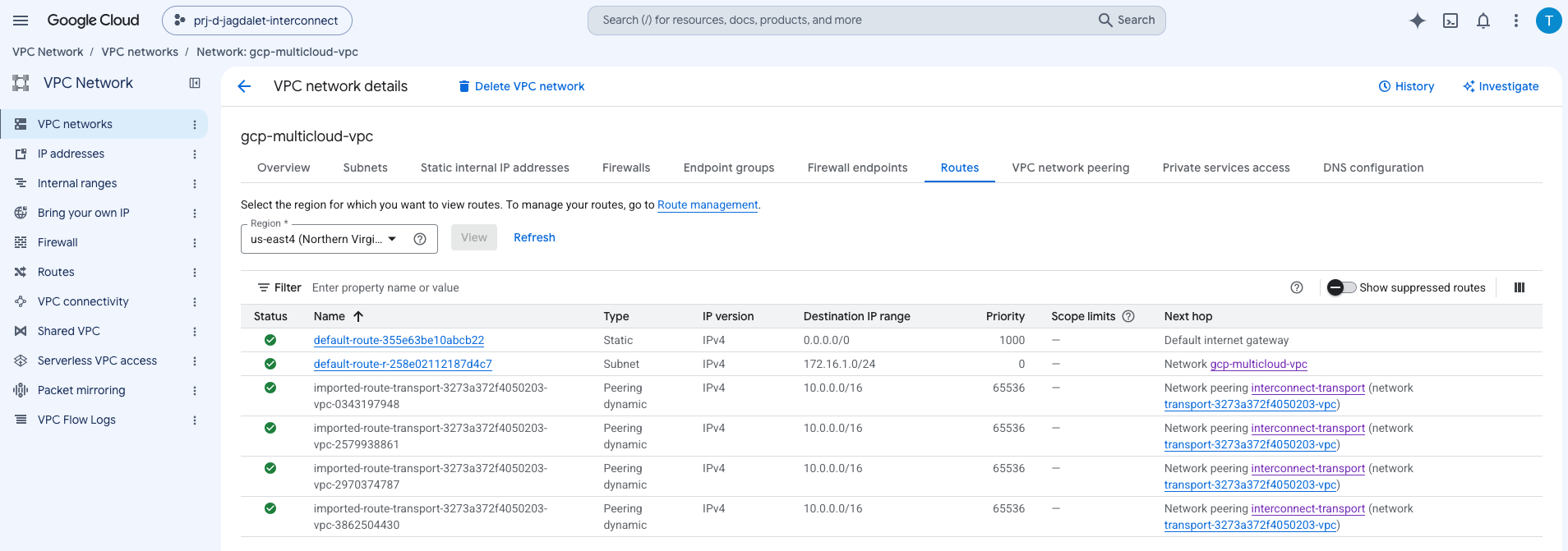
Figure 5: Four equal-cost BGP-learned routes installed on the Google Cloud side.
The AWS side mirrors that, and Kiro checked it the same way, by querying the route table rather than reading the console. The Google Cloud prefix arrives in the Transit Gateway route table as a propagated route through the Direct Connect gateway attachment, with no static entry anywhere in the path:
Figure 6 shows the same route in the console, filtered to the Direct Connect gateway attachment, which is the AWS-side counterpart to Figure 5.
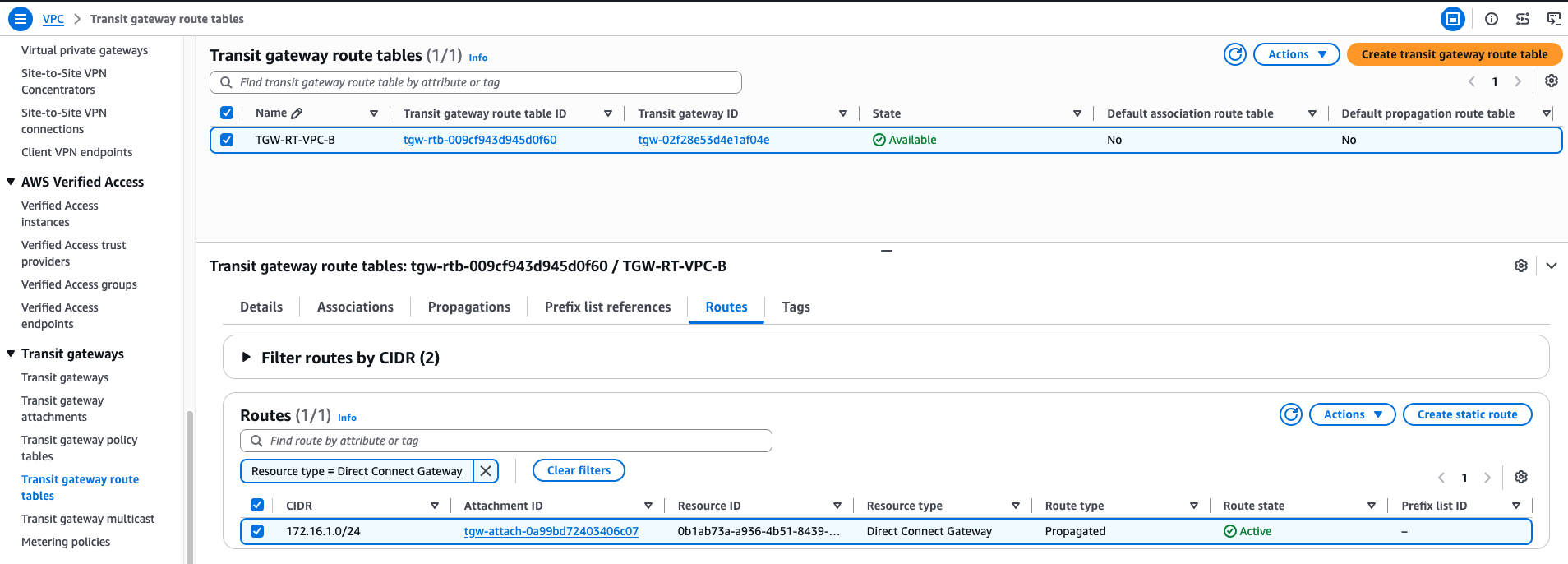
Figure 6: The Google Cloud prefix propagated into the Transit Gateway route table.
Phase 4: Testing
A connection in the available state proves provisioning succeeded, not that the path carries traffic the way your workloads need it to. Testing is what turns the routing, the security rules, and the provisioned bandwidth from console states into verified behavior, before anything depends on them. Kiro launched test instances on both sides: a t3.micro Amazon Elastic Compute Cloud (Amazon EC2) instance on AWS, and an e2-micro VM with no external IP address on Google Cloud, reached with Identity-Aware Proxy. The numbers that follow come from this single test deployment, not a benchmark. Run the same tests in your own environment and compare the results against what your applications need.
This phase ran unattended. The provisioning steps mutate infrastructure and stop for approval, as covered in Phase 3, and these tests only read the path, so there is nothing to gate. One prompt named the three tests and the endpoints, and Kiro worked through them in order, showing each command and its output. Figure 7 shows that run.
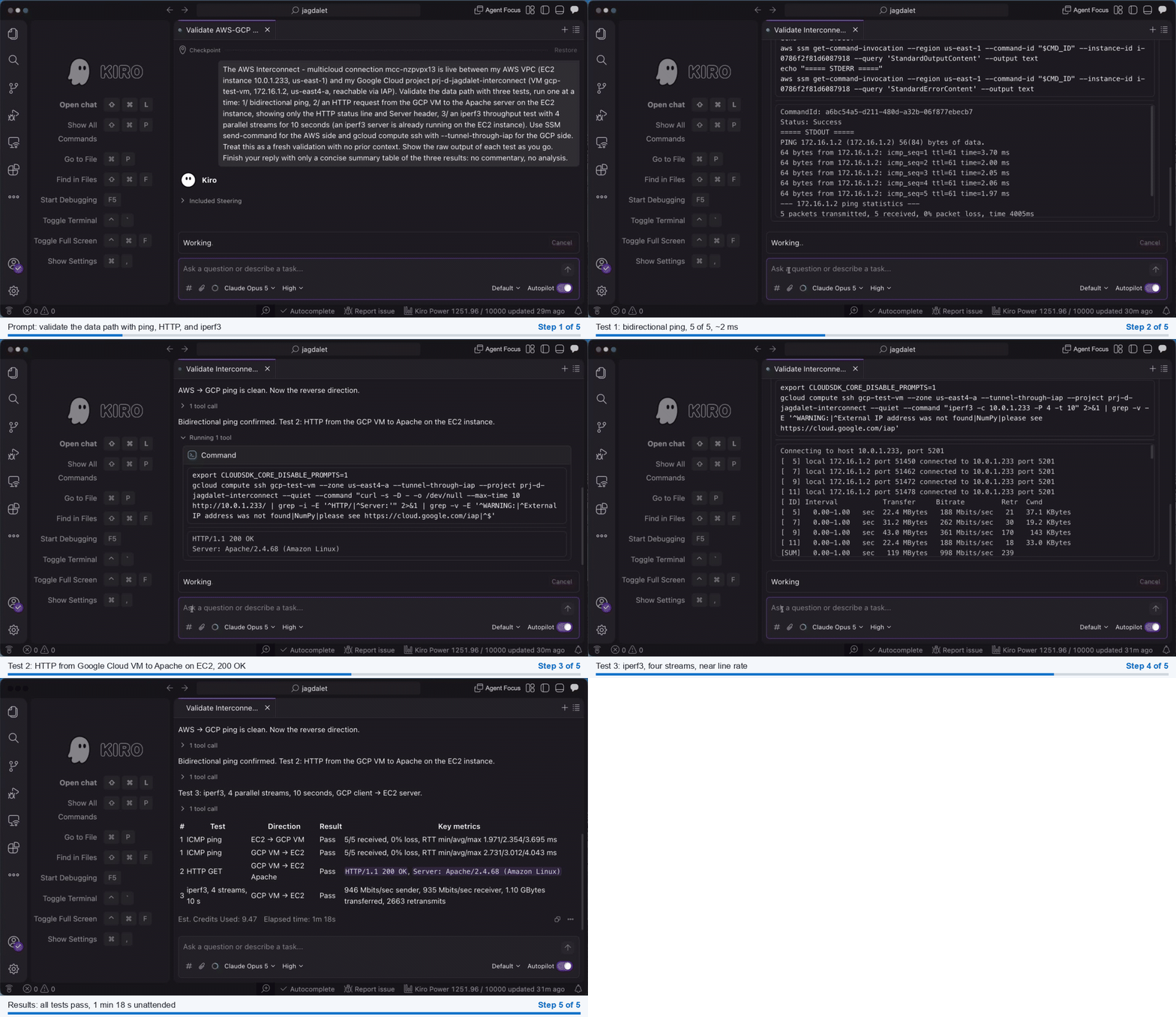
Figure 7: The validation run and its results, reported by Kiro.
The results from that run:
- Bidirectional ping. 5 of 5 packets each way between the EC2 instance (10.0.1.233) and the Google Cloud VM (172.16.1.2), with round-trip time averaging 2.354 ms from AWS and 3.012 ms from Google Cloud. Both endpoints sit in Northern Virginia, so single-digit latency is the expectation.
- HTTP. A curl request from the Google Cloud VM to Apache HTTP Server on the EC2 instance, which Kiro installed for the test, answered
HTTP/1.1 200 OK, confirming Layer 7 connectivity over the private interconnect. - Throughput.
iperf3with four parallel TCP streams over 10 seconds measured 946 Mbits/sec sending and 935 Mbits/sec receiving. That is near line rate, roughly 95 percent of the 1 Gbps provisioned, with MACsec active throughout. MACsec is designed to encrypt without sacrificing performance, so a result this close to line rate is what you should expect. - Path trace. From the EC2 instance, the trace to the Google Cloud VM completed in five hops: the second is a Direct Connect link-local address (169.254.133.25), and the two after it sit on the Google backbone, with the destination answering at 3.4 ms. Those backbone hops answer from public address ranges, which is how Google numbers those interfaces, and the traffic does not transit the public internet.
These tests validate the data path at a point in time. For continuous measurement, the connection page offers an Amazon CloudWatch Network Synthetic Monitor, and each interconnect includes one at no extra cost. The monitor is opt-in: set it up from the connection page in the Direct Connect console, shown in Figure 3, or have Kiro create it through the monitor’s own API, the same way it drove every other step in this post. Once the monitor runs, it reports round-trip time and packet loss on a schedule, and a bandwidth utilization metric publishes alongside it, which you can alarm on before an application saturates the connection. Figure 8 shows the monitor for this connection, healthy, with round-trip time holding near 2.5 ms, consistent with the ping results from the validation run.
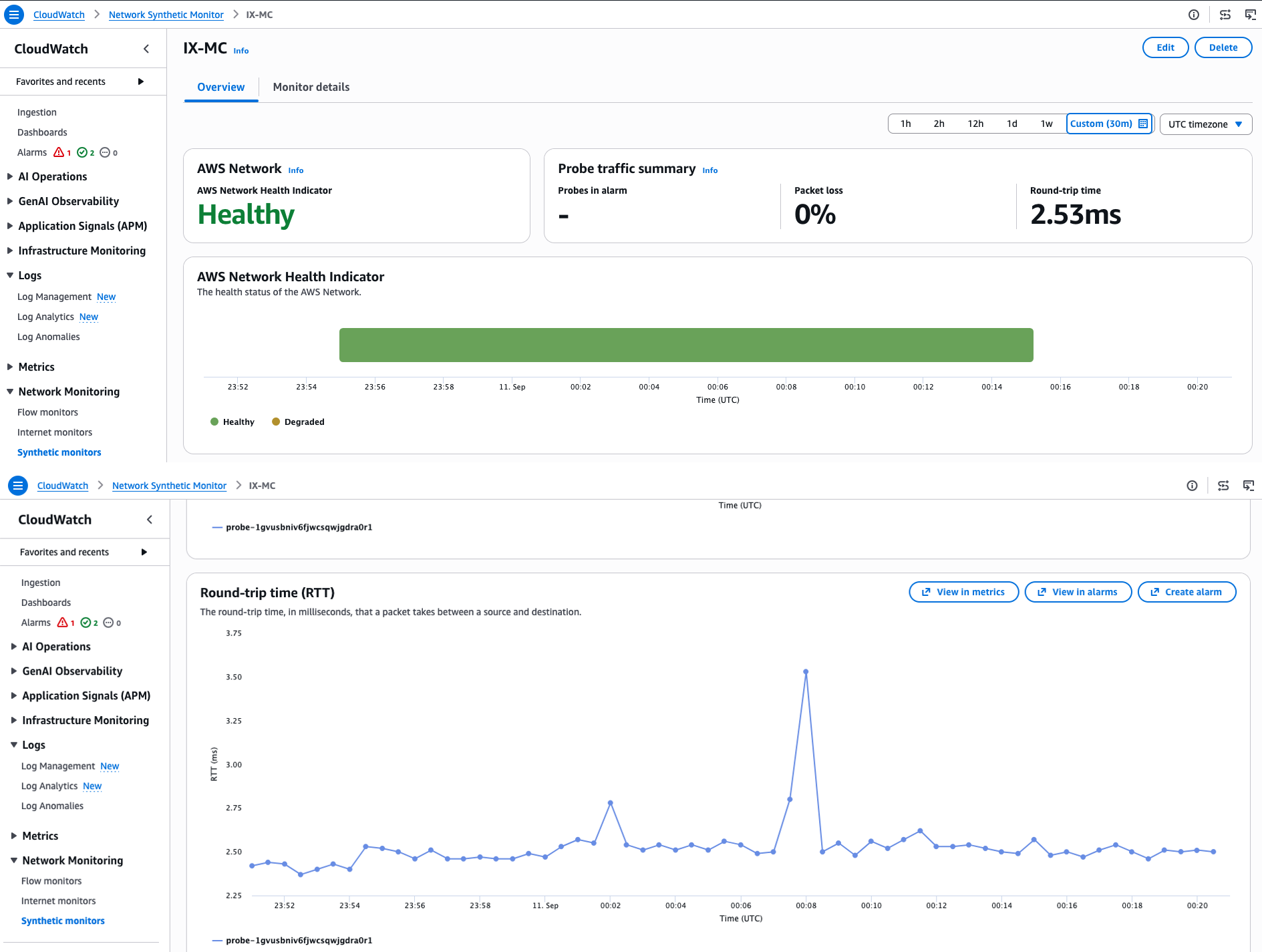
Figure 8: Continuous round-trip time and health from the CloudWatch Network Synthetic Monitor.
Phase 5: Documentation
Kiro produced three artifacts: a runbook capturing every resource ID and provisioning step, built for a redeployment or teardown; a provisioning guide with parameterized commands for different accounts, Regions, and CIDR ranges; and the architecture diagram shown earlier in Figure 2. Figure 9 shows the provisioning guide open in Kiro: change the variables block and the same playbook provisions a different environment.
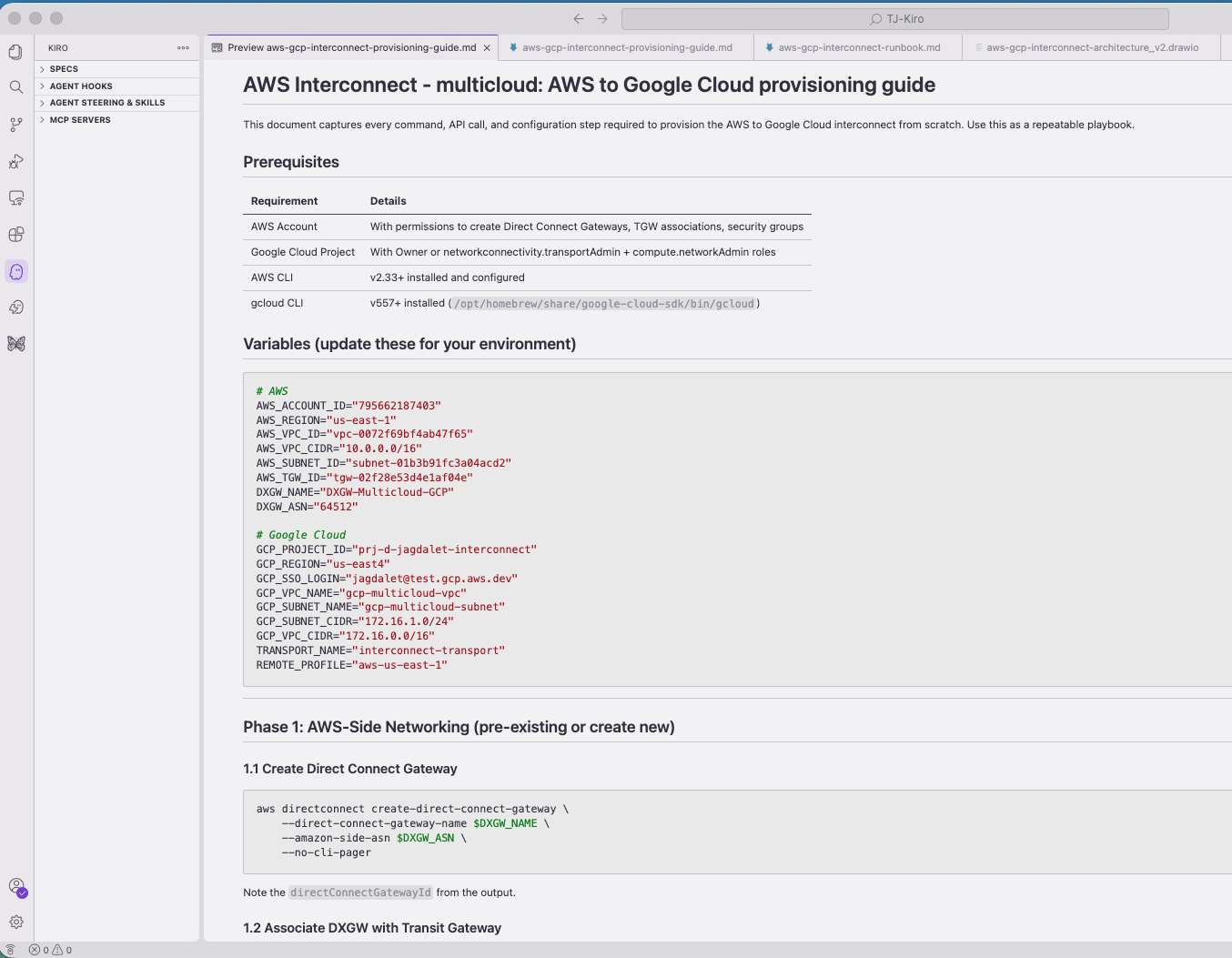
Figure 9: The parameterized provisioning guide Kiro generated, open in Kiro.
Read these artifacts before you rely on them. They are the record a colleague works from, and reviewing them is the last place in the workflow where your knowledge of the environment catches something the agent had no way to know.
Clean up
Interconnect bandwidth bills for as long as the connection exists, so tear down a test deployment when you finish with it. Delete these resources in order, confirming each step:
- If you set up the CloudWatch Network Synthetic Monitor, delete it first. Its probe places an elastic network interface in your subnet, which blocks the later network deletions until it is gone.
- Terminate the EC2 instance and delete the Google Cloud VM.
- Delete the VPC Network Peering, then the transport resource on Google Cloud. Deleting the transport also removes the AWS side: the connection moves to deleting within moments and to deleted a few minutes later. Confirm it shows as deleted under AWS Interconnect – multicloud in the Direct Connect console before moving on.
- Delete the Direct Connect gateway association and the Direct Connect gateway, then the security group, route table entries, and Google Cloud firewall rules.
- Delete the Google Cloud VPC and subnet.
The runbook captures the resource IDs, which makes teardown a matter of working the list.
Broader applicability
These five phases map to how network engineers already approach a deployment. The difference is that they happened in one session, across two providers. Nothing in the workflow is specific to AWS Interconnect – multicloud; it works as the example precisely because it spans two providers and forces the coordination. The same loop applies to single-cloud builds and to other cross-cloud work such as inter-provider IPsec VPNs and hybrid DNS.
Considerations
Weigh the following before you run this workflow in your own environment:
- Apply least privilege. The IDE acts with the credentials you give it, so the agent can do only what your IAM role grants. Start with read-only operations such as route table inspection.
- Ground the model in documentation. Point the IDE at specific API references and CLI guides rather than model training data, which is what surfaced the correct provisioning flow here.
- Keep the approval gate where it belongs. Read each command that changes state before you allow it, and treat the cross-cloud handshake as the step that most deserves that attention. Read-only work such as route inspection or a latency test can run unattended. Reviewing plans and making architectural decisions stay with you either way.
- Validate teardown as well as provisioning in a sandbox account. An agent that provisions correctly can still leave a billable resource behind, and the runbook is what makes that checkable.
- Fold the result into your delivery pipeline. This deployment is a sandbox build. For production, have Kiro express the validated design as infrastructure as code, AWS CloudFormation or Terraform. Promote that through your existing review and approval stages. AWS Interconnect supports AWS CloudFormation, and the connection resource takes the same attach point and activation key used here. The agent authors the templates and the pull request; the approval gates stay yours.
- Review the broader security and cost picture before a production rollout. Security in AWS Interconnect covers the identity and infrastructure security model, and Pricing for AWS Interconnect explains how the hourly fee scales with bandwidth and geographic scope. Google prices its side independently.
Conclusion
Kiro supplied a single, provider-agnostic operational interface for the whole lifecycle, which is what let an engineer with no Google Cloud background provision, test, and document the connection in one session. AWS Interconnect – multicloud supplied the managed infrastructure underneath, with resiliency and MACsec encryption built into the connection rather than designed on top of it. Together they address the two sources of friction in multicloud networking: the operational overhead of working across provider tools, and the infrastructure itself. The workflow is the reusable part: apply the same five phases to the next deployment on your list, and only the example changes.
For detailed provisioning steps, see the AWS Interconnect – multicloud getting started guide and the Google Cloud provisioning overview for Partner Cross-Cloud Interconnect for AWS.
About the author

Tushar Jagdale
Tushar is a Specialist Solutions Architect focused on Networking at AWS, where he helps customers build and design scalable, highly-available, secure, resilient and cost effective networks. He has over 15 years of experience building and securing Data Center and Cloud networks.