Networking & Content Delivery
Selecting the right AWS private connectivity options: A decision framework
Selecting the right AWS private connectivity option is harder than it used to be. The choices now span AWS Direct Connect, AWS Direct Connect SiteLink, and AWS Interconnect (last mile and multicloud). Picking the wrong option can lead to over-provisioning, slow time to market, or rework. In this post, we present a decision framework for selecting the right Direct Connect and Interconnect option for your workload. We group the portfolio into three connectivity patterns, walk through a real-world scenario for each, and give you a decision matrix and decision tree to reuse in design conversations. This post is the private-connectivity companion to Selecting the right AWS VPN solution: a decision framework, which covers IPsec VPN options. Here we focus on private connectivity that stays off the public internet:
- AWS to on-premises: AWS Direct Connect dedicated and hosted connections, and AWS Interconnect – last mile.
- Between data centers: AWS Direct Connect SiteLink.
- AWS to other clouds: AWS Interconnect – multicloud.
Prerequisites
To get the most from this post, you need familiarity with core AWS networking concepts, including Amazon Virtual Private Clouds (VPC), virtual private gateways (VGWs), AWS Transit Gateway (TGW), AWS Cloud WAN, AWS Direct Connect gateway (DXGW), and Border Gateway Protocol (BGP).
The options at a glance
Rather than re-explain each option (the posts in Further reading cover each in depth), the following table summarizes what each option does and where it fits. Each option carries traffic on the AWS global backbone and attaches to your AWS network through a DXGW.
| Option | Pattern | What it is | Bandwidth | Resiliency model |
|---|---|---|---|---|
| Direct Connect dedicated connection | AWS to on premises | A physical fiber-optic Ethernet connection you provision with AWS and control end to end | 1, 10, 100, and 400 Gbps | You design it (Resiliency Toolkit) |
| Direct Connect hosted connection | AWS to on premises | A logical connection delivered by a Direct Connect Partner | 50 Mbps to 25 Gbps | You design it; depends on partner |
| AWS Interconnect – last mile | AWS to on premises | A fully managed connection through a partner’s last-mile network | 1 Gbps to 100 Gbps | Built in (four links, two facilities) |
| Direct Connect SiteLink | Data center to data center | A feature that routes site-to-site traffic over the AWS backbone, bypassing AWS Regions | Inherits your VIF/port speed | You design it across locations |
| AWS Interconnect – multicloud | AWS to another cloud provider | A fully managed private Layer 3 connection to another cloud provider | Up to provider or Region tier | Built in (redundant facilities) |
Table 1. The AWS private connectivity portfolio mapped to the three connectivity patterns.
Pattern 1: Connecting AWS to on premises
This hybrid pattern is a private circuit between your data center, office, or colocation facility and an AWS Region. Pick based on how much control you want and how fast you need to be live.
Direct Connect – Dedicated connection
With Direct Connect dedicated connections, you get a physical port (1, 10, 100, or 400 Gbps) that you own end to end. AWS issues a Letter of Authorization and Connecting Facility Assignment (LOA-CFA), then you or your provider order the cross-connect. You can bundle ports into a link aggregation group (LAG) and add Media Access Control Security (MACsec) Layer 2 encryption on dedicated 10, 100, and 400 Gbps connections at supported locations. Choose dedicated connection for the highest bandwidth, full cross-connect control, or MACsec on your own port and SLA up to 99.99%.
Hosted connection
Direct Connect hosted connections are logical connections that a Direct Connect Partner provisions for you, from 50 Mbps to 25 Gbps. The partner owns the port and adjusts bandwidth, lowering the barrier when you have no equipment in a Direct Connect location. These connections use traffic policing (traffic above your rate is dropped). Choose hosted for a partner-managed physical layer, bandwidth from 50 Mbps to up to 25Gbps, or a faster start than your own port.
AWS Interconnect – last mile
AWS Interconnect – last mile is the newest and most hands-off option. In the AWS Direct Connect console, you pick a participating network provider and a bandwidth (up to 100 Gbps currently). AWS and the provider provision the connection in minutes. The service creates four redundant connections across two distinct locations and load-balances them with Equal-Cost Multi-Path (ECMP) routing. It also turns on MACsec encryption and jumbo frames by default. A 99.99% availability service level agreement (SLA) covers the connection to the Direct Connect port. You change bandwidth from the console without reprovisioning. Choose last mile for strong resiliency and an SLA, with no redundancy design or manual BGP and virtual interface (VIF) configuration.
The following diagram (Figure 1) shows the on-premises pattern, with all three options terminating on a DXGW.
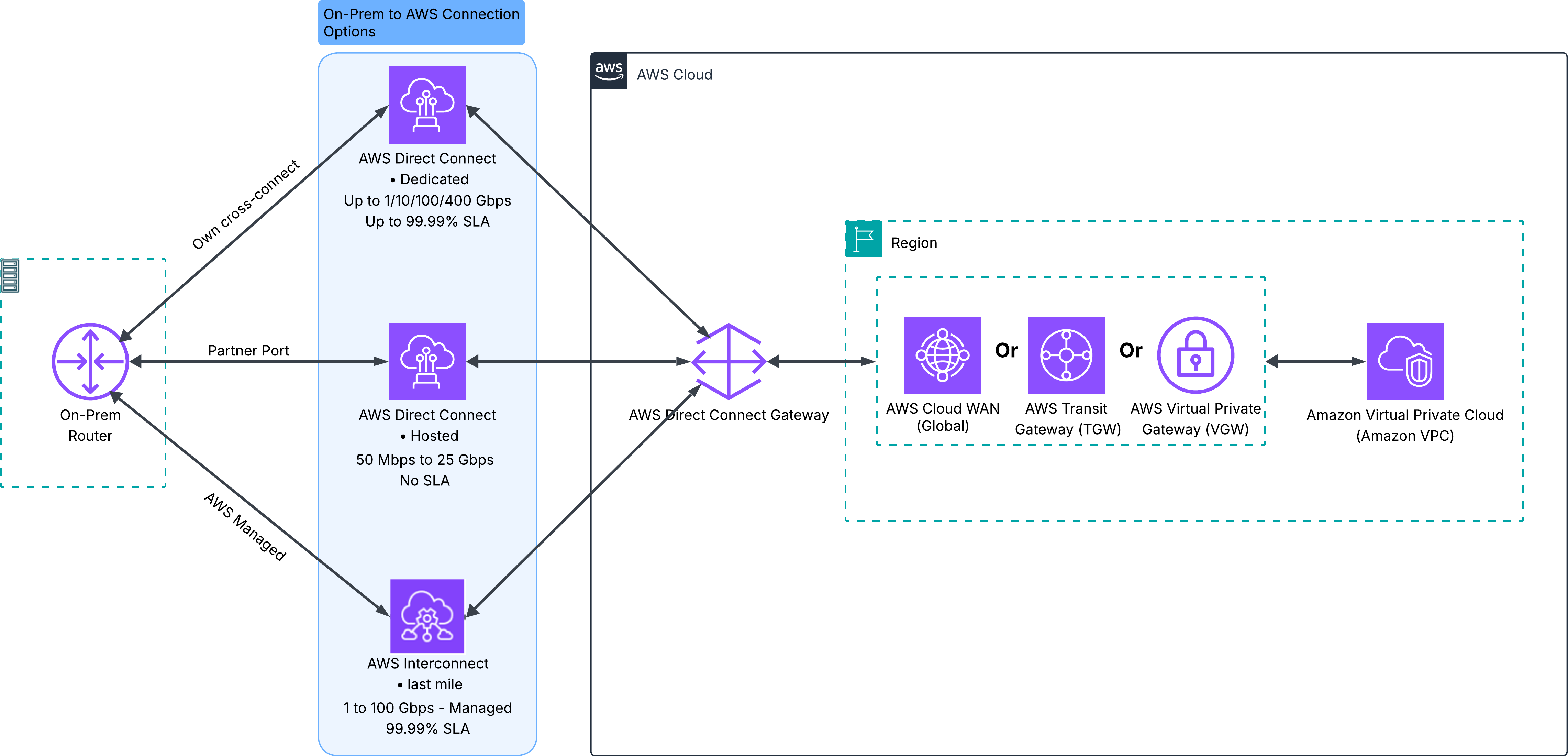
Figure 1. The three on-premises connectivity options converging on a single DXGW.
Real-world scenario: A retailer modernizing a regional data center
A retailer is migrating analytics data to AWS from one data center. It needs a predictable 10 Gbps path, owns rack space in a Direct Connect location, and requires MACsec on its own port. Using the AWS Direct Connect Resiliency Toolkit, the team provisions two dedicated 10 Gbps connections for resiliency. A branch office has no Direct Connect presence and must be online within days, with no staff for redundancy. For that site, the team picks AWS Interconnect – last mile: four redundant links across two facilities, with MACsec and a service-level agreement (SLA) from the console. At the time of writing, Interconnect – last mile is available with Lumen and as of this writing AT&T is live for Gated Preview, and you can sign up today.
Note these key considerations for this pattern:
- Resiliency ownership: With dedicated and hosted connections, you design redundancy using the Resiliency Toolkit. AWS Interconnect – last mile builds it in.
- Encryption: MACsec is available at select Direct Connect locations (on 10, 100, and 400 Gbps connections) and by default with last mile.
- Time to market: Last mile and hosted connections are faster to stand up than cross-connecting your own dedicated port.
Connecting your own facilities to an AWS Region is the most common hybrid pattern. The next pattern covers traffic that flows between your own sites, without an AWS Region as the destination.
Pattern 2: Connecting data center to data center
For site-to-site traffic between your own locations (not an AWS Region), evaluate AWS Direct Connect SiteLink. It routes traffic directly between Direct Connect locations over the AWS backbone, taking the shortest path. Turn it on for a private or transit VIF on a DXGW. Sites sharing that gateway form a mesh. Because there is no managed quality of service (QoS), size ports to avoid oversubscription.
Figure 2 shows three data centers forming a SiteLink mesh through a shared DXGW.
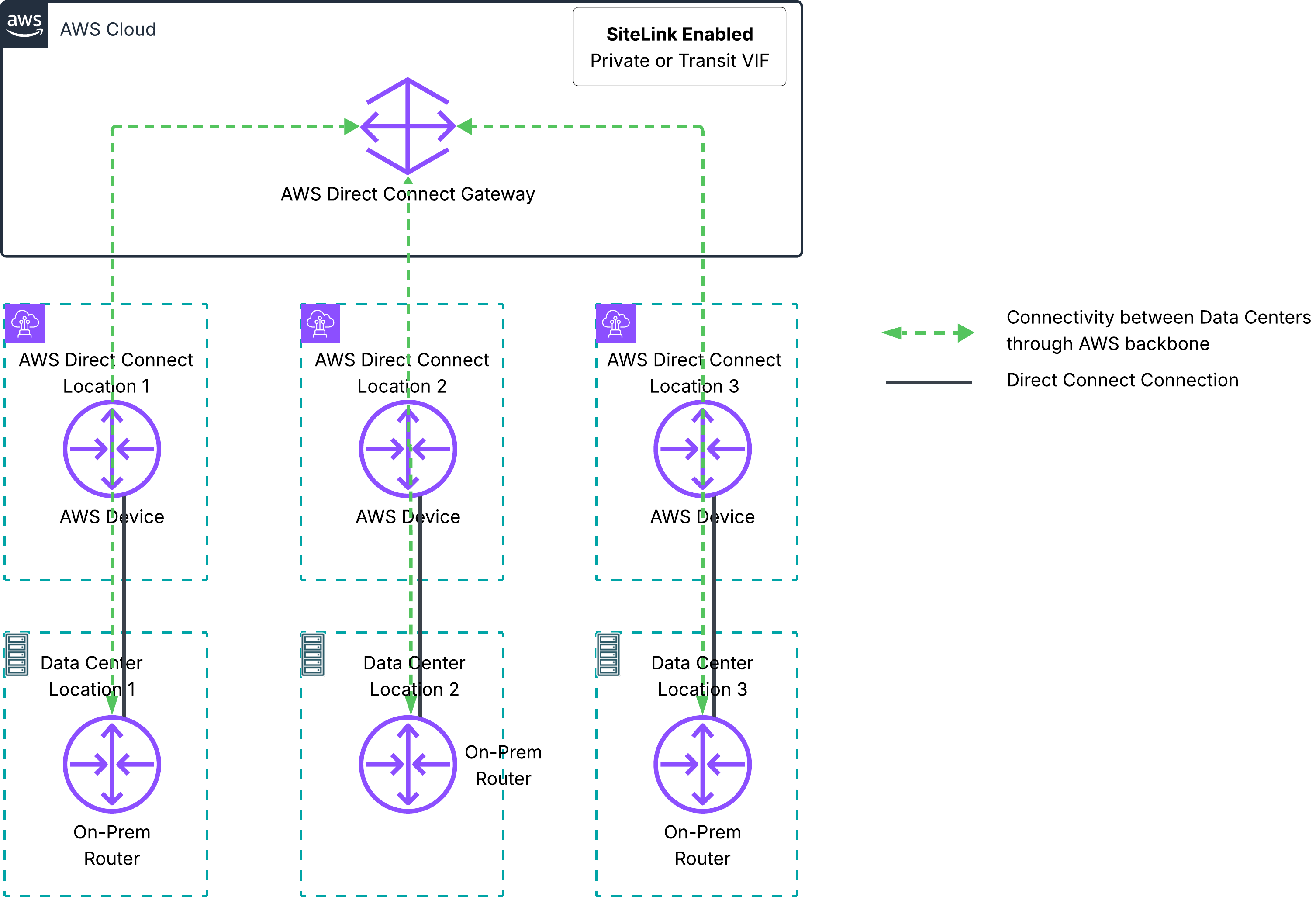
Figure 2. Three sites forming a SiteLink mesh over the AWS backbone.
Real-world scenario: A manufacturer replacing inter-site MPLS
A manufacturer runs three plants across three continents, connected by an expensive Multiprotocol Label Switching (MPLS) WAN that scales slowly. Each plant already has a Direct Connect connection to its nearest AWS Region. Instead of renewing MPLS, the team turns on SiteLink on those transit VIFs. The plants now exchange telemetry directly over the AWS backbone, without hair-pinning through a Region.
Note these key considerations for this pattern:
- Region independence: SiteLink connects locations to each other; it does not replace a Region attachment. Sites can still reach Regions over the same VIFs.
- Routing control: SiteLink uses BGP and AS_PATH prepending for path selection, so you can position it as a primary inter-site path or as a backup to an existing private WAN such as MPLS.
- No managed QoS: Size ports deliberately to prevent oversubscription.
SiteLink keeps site-to-site traffic on the AWS backbone between your own locations. When the other endpoint is another cloud provider rather than your data center, you reach for the third pattern.
Pattern 3: Connecting AWS to another cloud
For private connectivity between AWS and another cloud provider, AWS Interconnect – multicloud provides a fully managed, private Layer 3 connection. Traffic stays on the AWS backbone and the partner cloud’s private network. Each connection spans redundant facilities, with MACsec enabled by default. Provision it from the Direct Connect console in a few steps.
Figure 3 shows an AWS VPC connected to another cloud’s VPC through AWS Interconnect – multicloud and a DXGW.
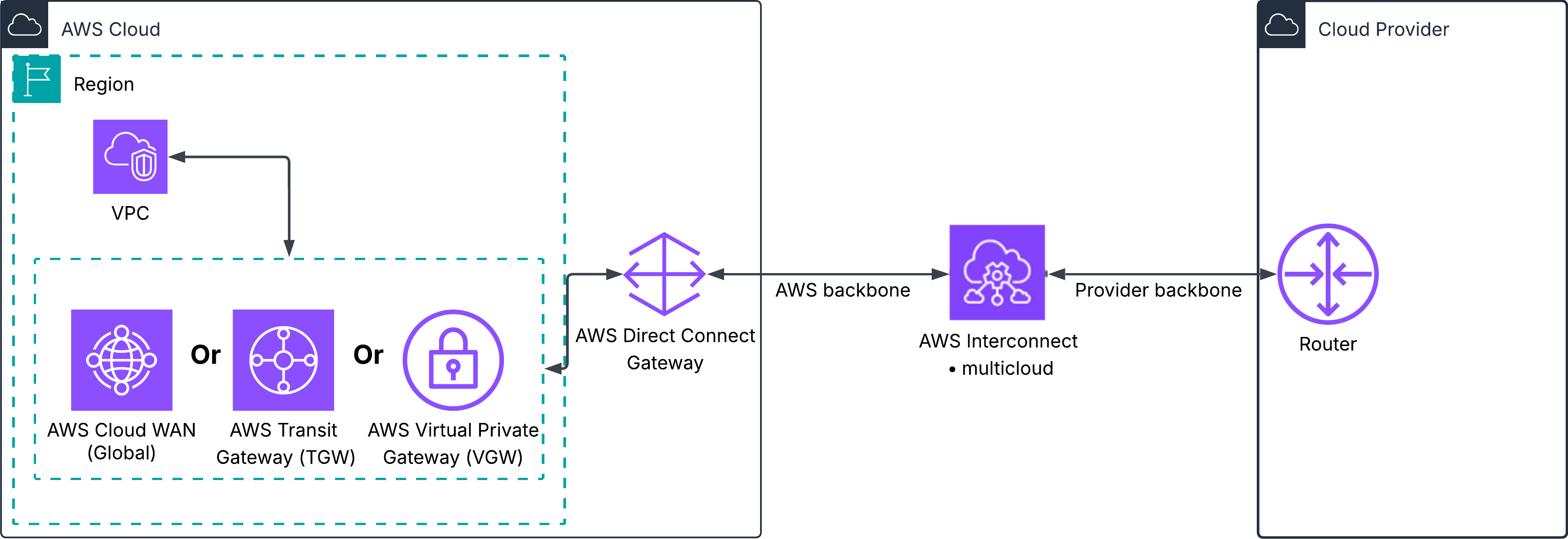
Figure 3. AWS connecting privately to another cloud provider through AWS Interconnect – multicloud.
Real-world scenario: A media company with a multicloud data pipeline
A media company keeps its content catalog and transcoding pipeline on AWS but runs a specialized analytics workload on another cloud. The two halves exchange large datasets on a schedule. Over a public-internet VPN, variable latency and throughput disrupted batch windows. The team replaced that path with AWS Interconnect – multicloud, attaching a private Layer 3 connection to the DXGW that already fronts their hybrid connectivity. Batch transfers now run over redundant facilities with MACsec and predictable throughput, sharing one gateway with the on-premises ingest path.
Note these key considerations for this pattern:
- Availability: AWS Interconnect – multicloud is generally available, with Google Cloud (GCP) as the first launch partner. The Oracle Cloud Infrastructure (OCI) preview is live at the time of writing and Microsoft Azure support is expected later in 2026. For current providers and Region pairs, see the AWS Interconnect – multicloud page.
- Architecture: A VGW or TGW reaches a multicloud Interconnect in its local Region, while AWS Cloud WAN can reach an Interconnect attached through DXGW globally.
- Encryption boundary: Each cloud provider manages encryption on its own backbone. Review the documentation for your deployment to confirm that it meets your compliance requirements.
With all three patterns covered, the next step is to compare them side by side. The following factors apply across every pattern and drive the option you choose.
Decision factors
Across all three patterns, the same factors drive the choice:
- Time to market: Managed options (last mile and multicloud) and hosted connections provision faster than a dedicated port you cross-connect yourself.
- Bandwidth and scalability: Dedicated connections scale highest (up to 400 Gbps per port, and higher in aggregate with a LAG); managed Interconnects scale elastically from the console.
- Encryption: MACsec is built into AWS Interconnect and available on dedicated ports.
- Resiliency and SLA: AWS Interconnect builds in four-link, two-facility redundancy with a 99.99% SLA (last mile). With Direct Connect, you design resiliency using the Resiliency Toolkit.
- Operational: Use dedicated for the most control and managed Interconnect for the least overhead.
- Reach: Use SiteLink for site-to-site, multicloud for cloud-to-cloud, and on-premises options for hybrid.
- Cost model: Review the Direct Connect pricing page and the AWS Interconnect – multicloud pricing and last mile pricing page before sizing.
Decision matrix
Use the following matrix to map a use case to a recommended primary and secondary option.
| Use case | Primary option | Secondary option |
|---|---|---|
| Highest bandwidth, full control, own cross-connect | Direct Connect dedicated connection | Direct Connect dedicated with LAG |
| Sub-1 Gbps or partner-managed port to AWS | Direct Connect hosted connection | AWS Interconnect – last mile (1 – 100 Gbps) |
| Strong resiliency and an SLA, minimal config | AWS Interconnect – last mile | Direct Connect dedicated (Resiliency Toolkit) |
| Branch or remote site, fast onboarding | AWS Interconnect – last mile | Direct Connect hosted connection |
| Site-to-site between your data centers | Direct Connect SiteLink | Direct Connect SiteLink as MPLS backup |
| Private connectivity to another cloud | AWS Interconnect – multicloud | AWS IPsec VPN or Direct Connect plus the other cloud’s private interconnect |
Table 2. Use case patterns mapped to recommended AWS private connectivity options.
Decision tree
The following flowchart (Figure 4) walks you from a use case to a recommended option.
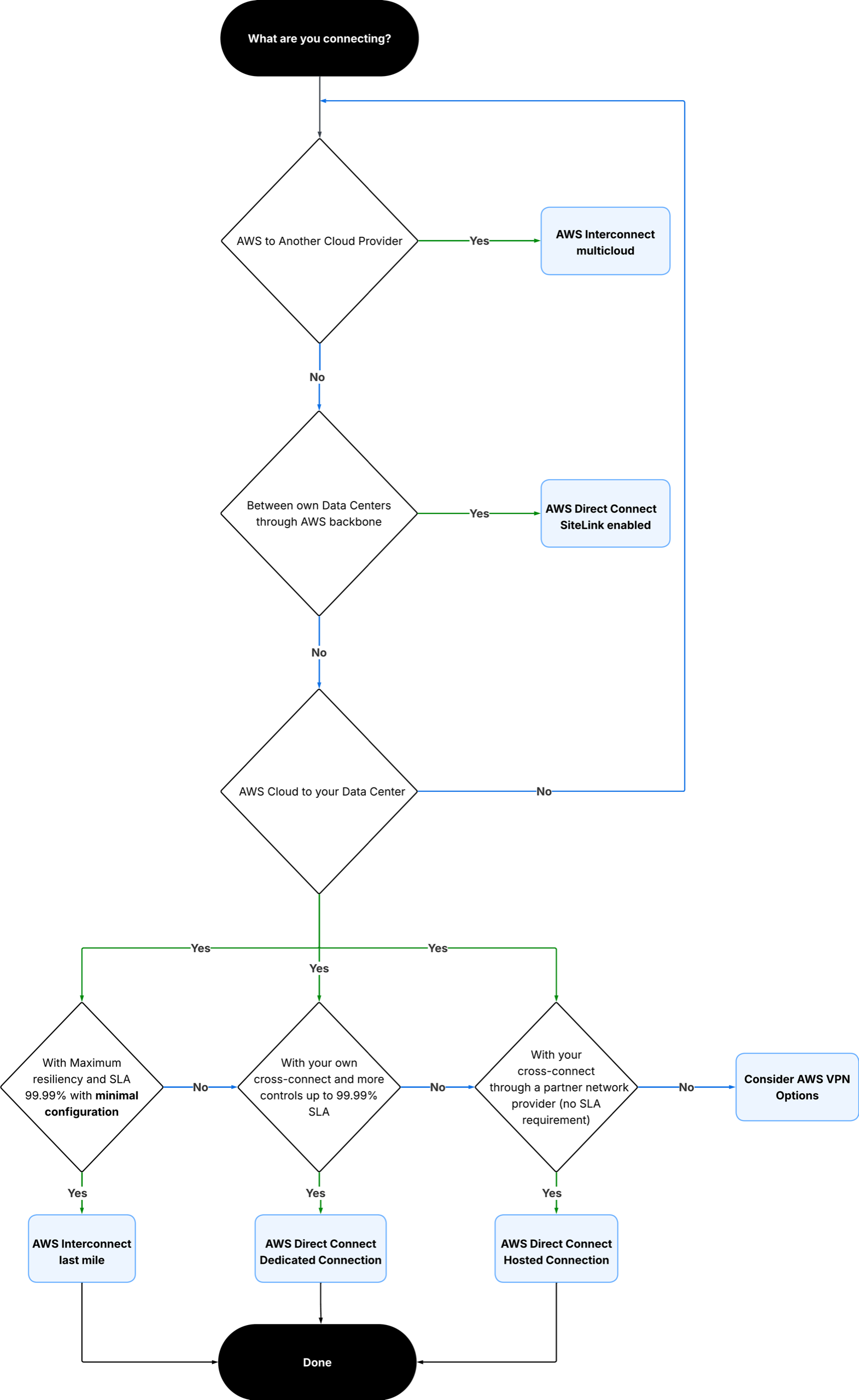
Figure 4. A decision tree from connectivity requirement to recommended option.
Conclusion
In this post, we showed how to choose a private connectivity option by answering three questions: Consider what you are connecting (on premises, another data center, or another cloud), how much operational control you want, and how fast you need to be live. Match the pattern first, then weigh time to market, bandwidth, encryption, resiliency, and cost. AWS Direct Connect dedicated and hosted connections, AWS Direct Connect SiteLink, AWS Interconnect – last mile, and AWS Interconnect – multicloud each fit a distinct pattern. They also compose: a single DXGW can front your hybrid, inter-site, and multicloud connectivity at once, as the scenarios show.
To get started, review the AWS Direct Connect User Guide and the AWS Interconnect User Guide, then open the AWS Direct Connect console to provision your first connection.
Further reading
For deeper coverage of each option, see the following resources.
- AWS Direct Connect User Guide: Complete Direct Connect documentation.
- AWS Interconnect User Guide: Multicloud and last mile concepts and setup.
- Introducing AWS Direct Connect SiteLink: SiteLink use cases and routing.
- Selecting the Right AWS VPN Solution: A Decision Framework: The internet-based VPN companion to this post.
- Build resilient and scalable multicloud connectivity architectures with AWS Interconnect multicloud: Reference architectures.
- AWS Direct Connect Layer 1 Explained: From Data Centers to Cloud Connectivity: Dedicated and hosted connections explained.
About the authors

Ravi Kulkarni
Ravi Kulkarni is a Technical Account Manager at AWS specializing in networking. He helps enterprises design and optimize network architectures and accelerate adoption of advanced AWS networking services. Outside of work, he enjoys exploring new places and experiencing different cultures.

Tushar Jagdale
Tushar is a Specialist Solutions Architect focused on Networking at AWS, where he helps customers build and design scalable, highly available, secure, resilient, and cost effective networks. He has over 15 years of experience building and securing data center and cloud networks.