AWS Physical AI Blog
Streaming Physical AI Digital Twins and Immersive Experiences to XR Headsets with NVIDIA CloudXR 6 on AWS
Physical AI is built in simulation and digital twins before it reaches the real world. Engineers validate a factory layout, inspect a robot work cell, or teleoperate a robot to collect training demonstrations, and these tasks are often best done from inside a 3D scene itself. The challenge is that photorealistic, physics-accurate scenes need workstation-class GPUs, while many extended reality (XR) headsets are lightweight, mobile devices, lacking the GPU capability to render heavily detailed, physics-intensive 3D scenes.
NVIDIA CloudXR 6 bridges that gap by streaming GPU-rendered OpenXR content to compatible XR devices over the network. Today we are sharing a new AWS Sample, NVIDIA CloudXR 6 on AWS, a tested reference architecture and deployment guide for running CloudXR 6 on Amazon Elastic Compute Cloud (Amazon EC2) GPU instances in a nearby AWS Local Zone or AWS Region for low-latency immersive streaming.
What is NVIDIA CloudXR 6?
NVIDIA CloudXR 6 is a GPU-accelerated streaming platform built on OpenXR. The server renders, encodes, and streams frames; an XR headset decodes and displays them while CloudXR compensates for network latency with techniques such as pose prediction. CloudXR 6 supports two XR client paths: a native framework for Apple Vision Pro, and CloudXR.js, a WebRTC-based client that runs in the browser of devices like Meta Quest and Pico headsets. To learn more, visit the NVIDIA CloudXR 6 SDK page.
CloudXR for Physical AI as well as for traditional immersive use cases
CloudXR puts people inside the simulations and digital twins that Physical AI depends on. NVIDIA provides examples of CloudXR use in its own robot teleoperation workflows, for example to record demonstrations in an NVIDIA Isaac Sim simulation with an XR headset as part of the Isaac GR00T end-to-end workflow. Other common Physical AI applications include:
- Digital twin reviews: walk through a facility, production line, or robot cell at full scale.
- Simulation and validation: collaboratively inspect simulated scenes and robot behavior from the inside.
- Teleoperation for data collection: control a robot in simulation to capture demonstrations for policy training.
CloudXR also serves traditional immersive use cases where cloud streaming removes the need for local GPU workstations, including.
- Location-based VR experiences: high-fidelity VR at theme parks and other entertainment venues.
- Enterprise design reviews: distributed teams meeting inside a full-scale 3D model before anything is built.
- Virtual sports training: realistic game scenarios athletes can run and repeat on demand.
Solution overview
This newly published sample follows NVIDIA’s cloud deployment model for CloudXR and separates the latency-sensitive media streaming path from the services that manage and orchestrate streaming sessions (Figure 1).
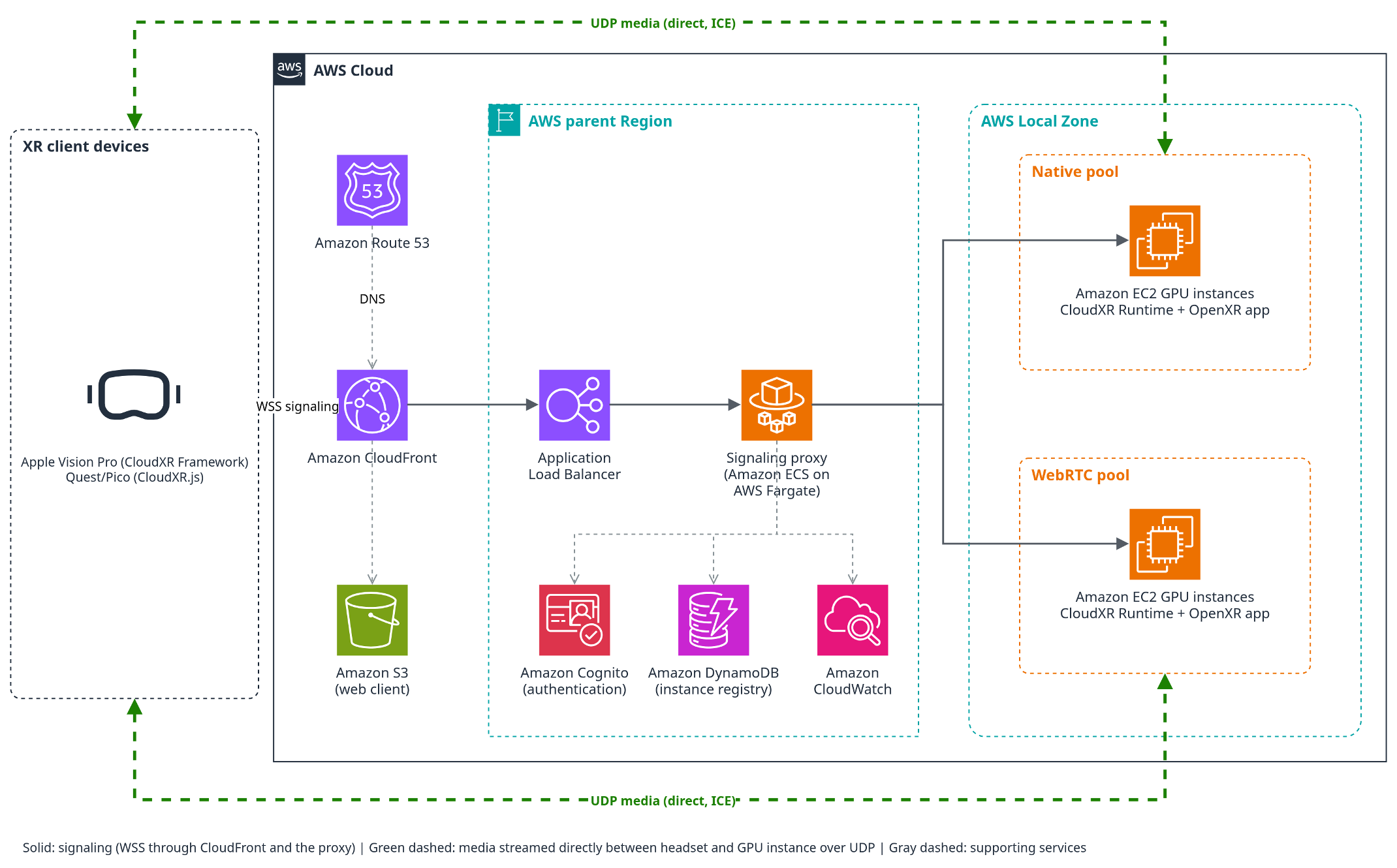
Figure 1: NVIDIA CloudXR 6 on AWS reference architecture
- Amazon CloudFront is the single entry point for all client traffic, forwarding signaling to a proxy. Amazon CloudFront also serves up a web client from Amazon Simple Storage Service (Amazon S3) for the CloudXR.js client path.
- A signaling proxy on Amazon Elastic Container Service (Amazon ECS) with AWS Fargate authenticates users with Amazon Cognito, selects an available GPU instance from an Amazon DynamoDB registry, and tunnels signaling to it.
- Amazon EC2 GPU instances in an AWS Local Zone run the CloudXR Runtime and an OpenXR application, in separate pools for native (Apple Vision Pro) and WebRTC (Quest and Pico) clients.
- Media streams directly between the headset and the Amazon EC2 GPU instance over UDP, bypassing the proxy. Amazon CloudWatch provides monitoring.
Placing Amazon EC2 GPU instances in an AWS Local Zone close to users keeps network round trips short, which is the largest factor in streaming latency. Session management stays in the parent AWS Region because it is not in the streaming path. It’s worth noting that if users are located near an AWS Region, deploying Amazon EC2 GPU instances in-Region is also a viable option with acceptable streaming latency, and this sample supports that deployment model as well.
Measured latency achievable with this sample
In XR, low latency is what makes an experience comfortable rather than nauseating: when rendered frames lag behind a user’s head movement, the mismatch between what they see and what their body senses causes motion sickness. That is why NVIDIA targets 20–30 ms of pose-to-render latency, the time from a head movement to the corresponding frame appearing in the headset, for an imperceptible experience, treating 100 ms as the upper bound before quality degrades noticeably. In our testing, a g7e instance in a Los Angeles Local Zone streamed to a Meta Quest 3 device also in Los Angeles (North Hollywood) at about 90 FPS with approximately 35 ms of pose-to-render latency (~8-9 ms coming from just round-trip network latency; the balance coming from rendering, encoding, decoding, etc.), which delivered a seamless user experience. Ultimately, streaming latency will always depend on users’ proximity to an AWS Local Zone or AWS Region; this sample provides guidance on how best to choose the right deployment setup for your use case.
Get started
The GitHub repository for this sample includes:
- An architecture design document covering latency and cost tradeoffs in more detail, including instance and location choices, plus some performance datapoints from real testing
- A complete deployment guide, plus a guide for building and testing an Apple Vision Pro client
- A minimal single-instance demo for a quick first stream to a Quest 3
Conclusion
NVIDIA CloudXR 6 on AWS lets teams bring people into Physical AI digital twins and simulations, and into immersive experiences, from lightweight headsets without local GPU workstations. To deploy it in your own account, visit the NVIDIA CloudXR 6 on AWS sample on GitHub.