AWS Public Sector Blog
Accelerating GovTech development with Kiro

Government agencies, educational institutions, and GovTech vendors face a unique challenge: delivering AI-powered applications while navigating compliance requirements, limited budgets, and legacy constraints. A single accessibility remediation cycle can cost $50,000 or more. Audit preparation takes weeks. Security reviews delay citizen services by months. Small IT teams struggle to maintain expertise across Federal Risk and Authorization Management Program (FedRAMP), Criminal Justice Information Services (CJIS), Section 508, and state-specific requirements while shipping features.
Kiro, an Amazon Web Services (AWS) AI-powered development platform, offers a different approach. Available as both an integrated development environment (IDE) and command line interface (CLI), Kiro provides capabilities designed for teams working under compliance constraints. This post shows how GovTech organizations can use Kiro to accelerate application development while maintaining compliance with security, accessibility, and audit requirements.
The following graphic compares the traditional GovTech development workflow (on the left), which has the compliance review at the end, and Kiro’s integrated approach with compliance validation happening throughout the development cycle.
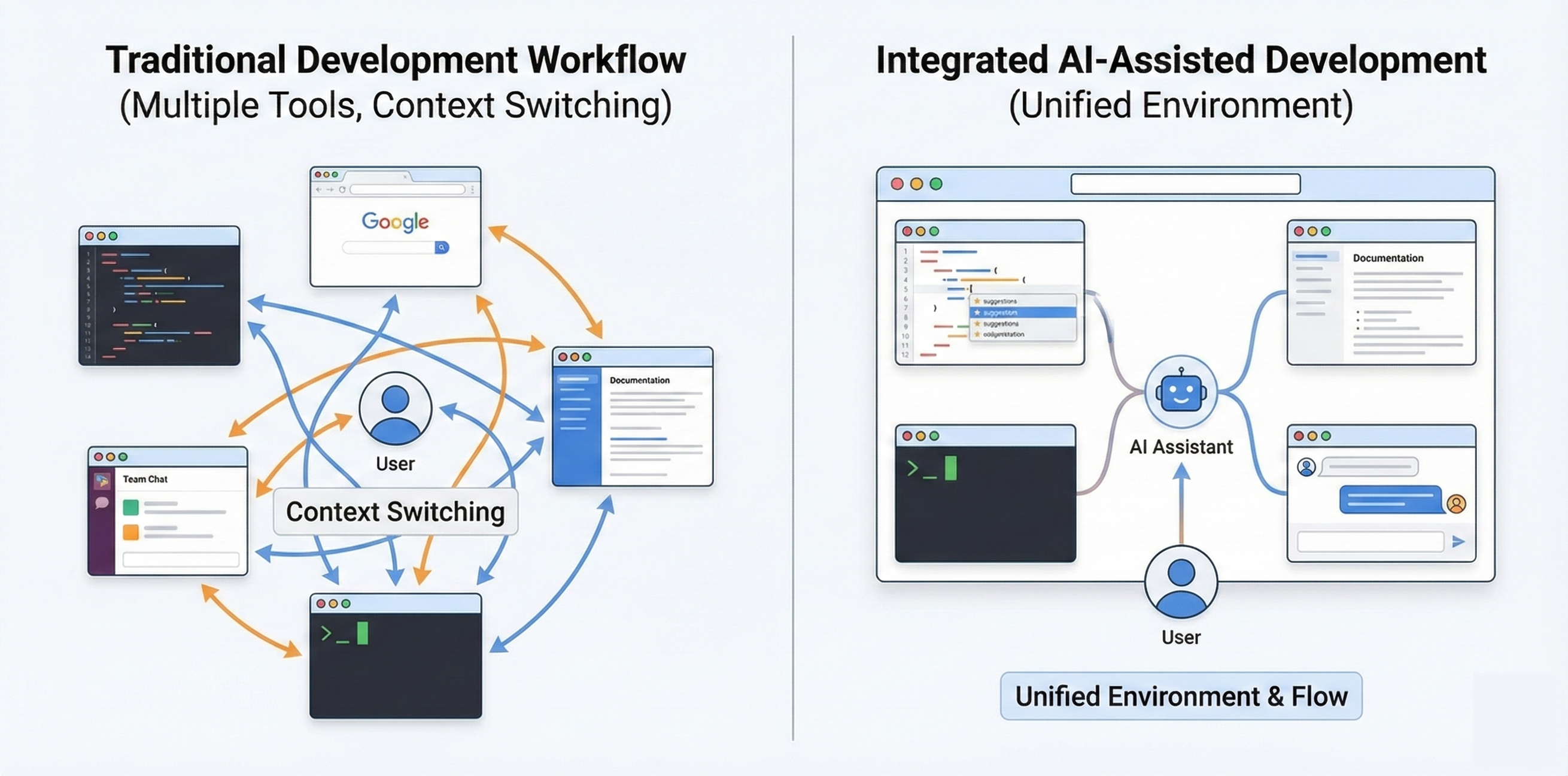
Figure 1: The traditional GovTech development workflow compared with Kiro’s integrated approach
Overview of solution
Kiro helps address a core GovTech challenge of needing to deliver applications faster while meeting compliance, accessibility, and audit requirements.
Kiro uses a spec-driven approach to translate requirements into structured implementation plans. Teams describe requirements in natural language, and Kiro transforms them into requirements with acceptance criteria. Kiro then proposes architecture based on your stated requirements and creates sequenced tasks with checkpoints for review.
Steering files are markdown documents that describe your organization’s compliance requirements, security standards, and development practices. When generating code, Kiro references these files to include required security controls, encryption patterns, and accessibility attributes automatically.
Agent hooks run automated checks at specific workflow points such as when you save a file or commit code. Teams use these for compliance checking, accessibility validation, and security scanning, catching issues during development rather than during expensive audits.
For teams that require terminal-based development, Kiro provides a full-featured CLI that brings agentic capabilities to your terminal. The CLI supports conversation persistence, custom agents for specialized compliance workflows, and enterprise proxy servers.
Kiro provides AWS integration through Model Context Protocol (MCP) support. MCP enables Kiro to connect with external tools, databases, APIs, and documentation sources. Whether building with Amazon Bedrock, Amazon Textract, or Amazon Comprehend, the development experience remains consistent.
The following graphic shows Kiro’s GovTech development workflow integrating spec-driven development, steering files for compliance standards, and agent hooks for automated validation.
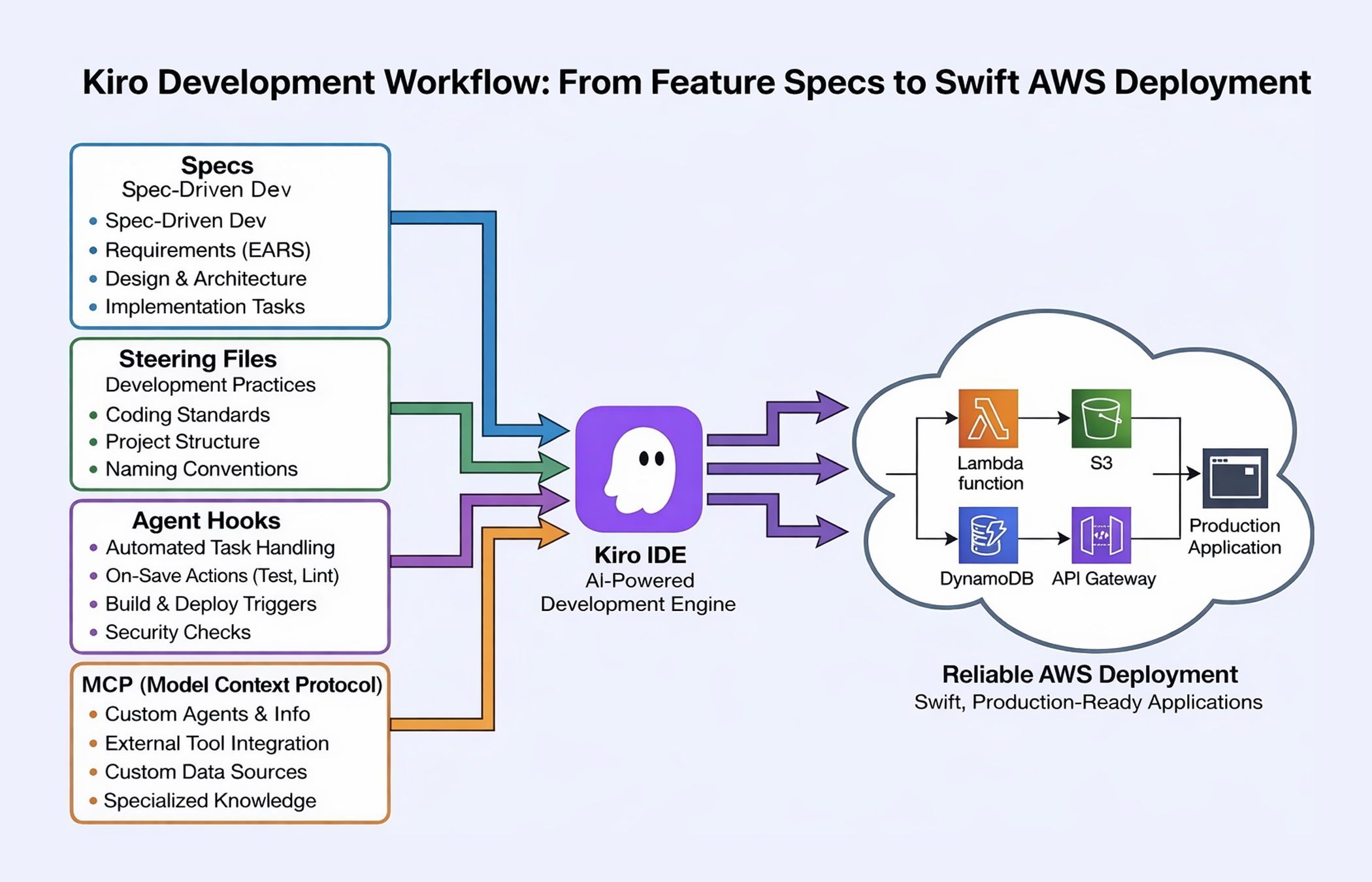
Figure 2: Kiro’s GovTech development workflow
Organizations using Kiro for modernization efforts have reported significant efficiency gains. As Brian Lichtle, CTO at Rackspace, noted, “We began using Kiro to enhance our modernization efforts, and the results were impressive. We completed 52 weeks of estimated work in just 3 weeks, resulting in a 90% increase in efficiency”.
GovTech use cases
Government agencies, educational institutions, and GovTech vendors can apply Kiro to address common development challenges while aiding you as you address your compliance needs.
State and local governments need to modernize citizen-facing portals for services such as permit applications, business licensing, and benefit enrollment. These portals may be required to meet Section 508 accessibility requirements based on Web Content Accessibility Guidelines (WCAG), integrate with legacy backend systems, and provide audit trails for all citizen interactions. With Kiro’s spec-driven approach, teams articulate requirements including accessibility mandates, legacy system integration points, and audit logging needs. Kiro generates implementation plans that include accessibility testing at each stage, proposes architecture that integrates with existing systems, and creates tasks with built-in compliance checkpoints. Agent hooks automatically validate accessibility attributes as developers write code, catching issues before code review.
Educational institutions manage decades-old student information systems built on mainframe or legacy platforms. Modernization requires extracting data, building new APIs, and creating modern interfaces while maintaining, where applicable, Family Educational Rights and Privacy Act (FERPA) compliance. Kiro helps education teams document legacy system behavior, generate modernization plans that preserve data integrity, and create implementation tasks that include FERPA compliance checks. The CLI enables integration into existing secure development pipelines, and agent hooks automatically verify that student data handling includes proper encryption, access controls, and audit logging.
GovTech vendors building software-as-a-service (SaaS) solutions for government customers may need to meet multiple compliance frameworks, such as, FedRAMP for federal customers, CJIS for law enforcement, and state-specific requirements for local government. Development teams spend significant time on compliance rather than building differentiating features. GovTech teams can use Kiro to codify compliance requirements in steering files. These are documentation files that describe security controls, audit logging patterns, and compliance-specific coding standards. As developers build features, Kiro references these standards and generates code that includes required security controls you outline. Agent hooks automatically verify compliance patterns, reducing the manual security review burden.
Note: These capabilities aid compliance efforts and can shorten time to compliance, but do not guarantee compliance. As always, generated outputs should be thoroughly reviewed.
Note: Kiro is not currently FedRAMP authorized. Verify authorization status aligns with your organization’s requirements before use.
Prerequisites
For this walkthrough, you should have the following prerequisites:
- AWS account with access to the services relevant to your use case (or AWS GovCloud (US) account for federal requirements)
- Kiro desktop application or CLI from kiro.dev
- Authentication credentials: AWS Builder ID, GitHub, Google, or AWS IAM Identity Center (subscription tiers)
- Understanding of your organization’s compliance requirements
Note: For GovTech teams, consider Kiro Enterprise for enhanced security features, including customer managed encryption keys, regional data storage options, and content privacy.
Walkthrough
This walkthrough demonstrates how to use Kiro to build a citizen inquiry system for a GovTech organization. You will create a spec file, configure steering files, and set up agent hooks.
Disclaimer: Kiro’s AI-generated code and recommendations are for development assistance only and are not intended to replace professional legal, compliance, or security reviews. All Kiro outputs should be thoroughly validated by qualified personnel before implementation in government or regulated environments.
Step 1: Configure steering files
Steering files are markdown documents that describe your organization’s compliance requirements, security standards, and development practices. When generating code, Kiro references these files to include required security controls, encryption patterns, and accessibility attributes automatically.
The following screenshot shows creating steering files to document organization-specific compliance requirements and security standards.
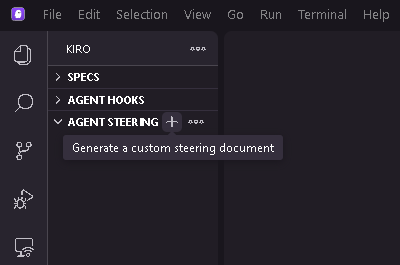
Figure 3: Creating steering files to document organization-specific compliance requirements and security standards
The following example shows how a GovTech team documents their security standards:
“`markdown
1. Create a markdown file that documents your organization’s compliance requirements and security standards.
# GovTech Security Standards
## Security Requirements
– All citizen data encrypted at rest (AES-256) and in transit (TLS 1.2+)
– FIPS 140-2 validated encryption modules required
– Multi-factor authentication required for all staff access
– Role-based access control with principle of least privilege
– All API calls logged to AWS CloudTrail
– PII must be redacted in application logs
## AWS Service Requirements
– Use only FedRAMP Moderate authorized services
– Deploy in US East (N. Virginia) or US West (Oregon) regions
– Use AWS KMS for encryption key management
“`
2. In Kiro, choose the option to create a steering file and enter your compliance standards. The following screenshot shows choices when creating a steering file
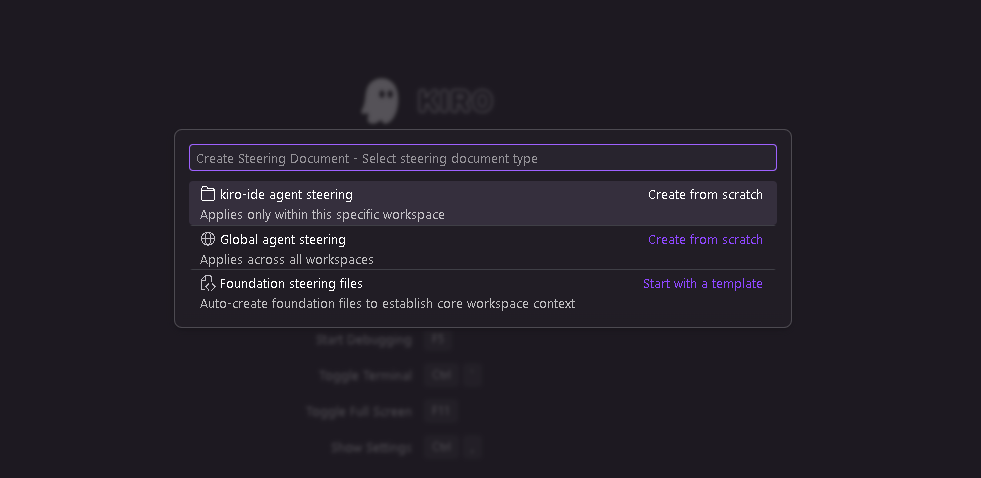
Figure 4: Creating steering files to document organization-specific standards
The following screenshot shows Kiro generated steering file content defining security requirements, encryption standards, and AWS service constraints for GovTech compliance.
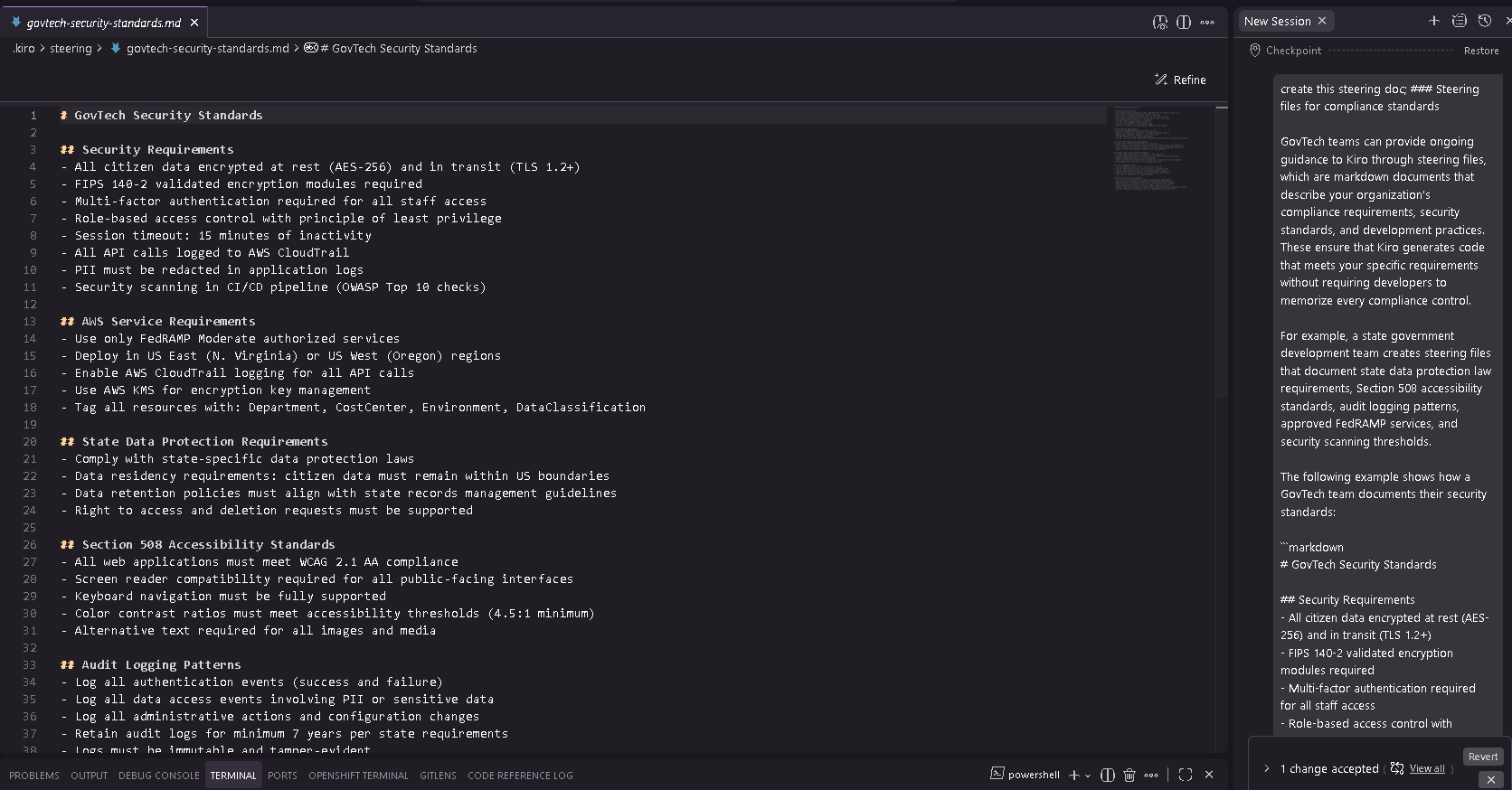
Figure 5: Steering file content
3. When you generate code, Kiro references the steering file to include encryption, audit logging, and error handling automatically.
Step 2: Create a spec file
1. Open Kiro and choose the option to create a new spec.
The following screenshot shows getting started with a new spec in Kiro.
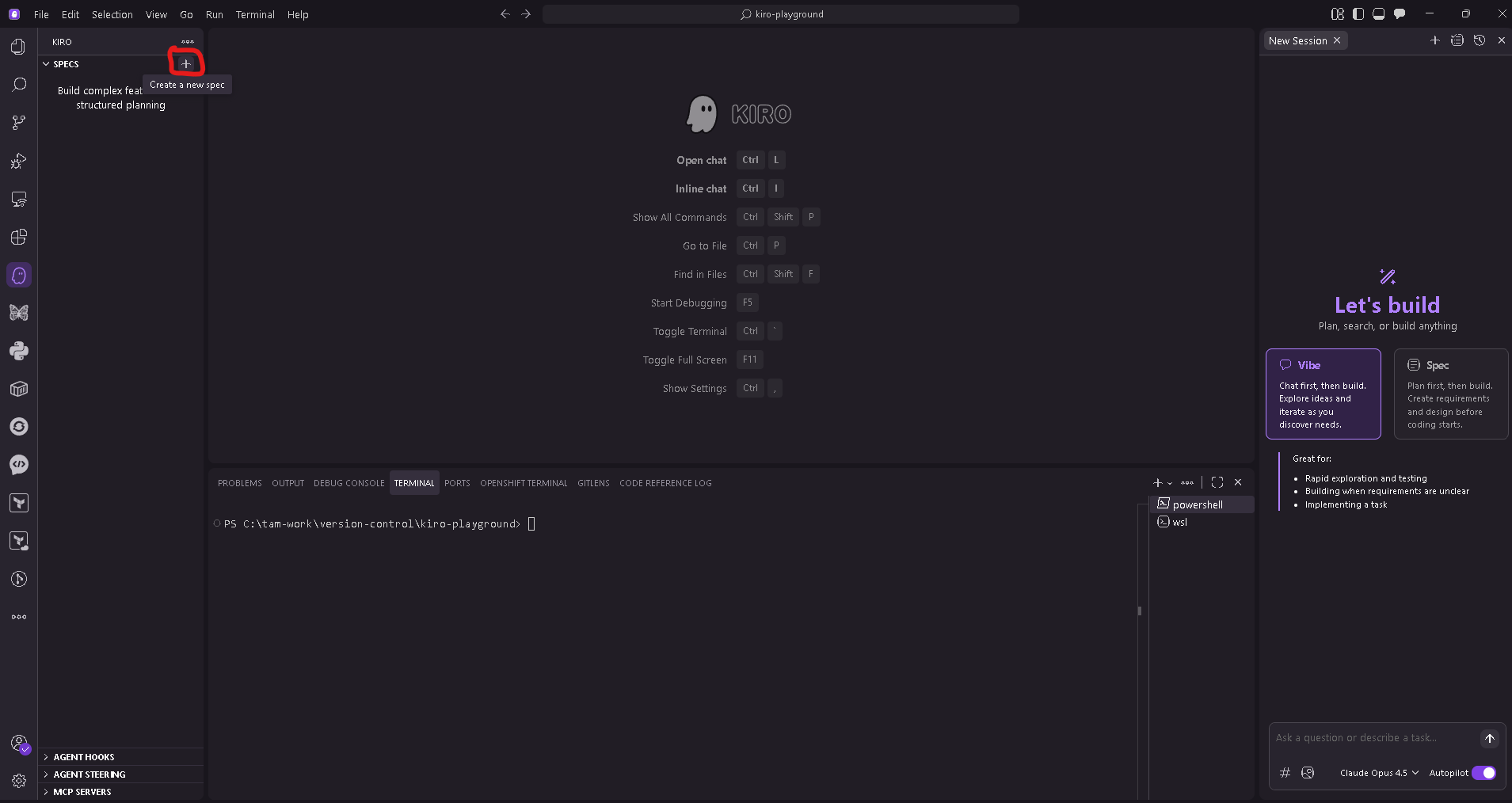
Figure 6: Creating a new spec in Kiro to define citizen inquiry system requirements
2. Enter your requirements in natural language, including compliance mandates, functional requirements, and security controls. The following example shows a spec input for a citizen inquiry system:
“`
Build a citizen inquiry system for our state government agency that handles
questions from residents across multiple channels (web portal, email, phone
transcripts).
COMPLIANCE REQUIREMENTS:
– Section 508 accessibility (WCAG 2.1 Level AA) for all citizen-facing interfaces
– State Data Protection Act compliance for all citizen PII
– 7-year audit trail retention for all citizen interactions
– Federal Information Processing Standards (FIPS) 140-2 validated encryption for data at rest and in transit
– FedRAMP Moderate authorized AWS services only
FUNCTIONAL REQUIREMENTS:
– Natural language processing to understand and categorize citizen questions
– Integration with existing case management system (legacy SOAP API)
– Mobile-responsive citizen portal
– Staff dashboard for inquiry management and reporting
SECURITY REQUIREMENTS:
– Role-based access control (citizen, staff, supervisor, admin)
– Multi-factor authentication for all staff access
– Session timeout after 15 minutes of inactivity
– All API calls logged to AWS CloudTrail
“`
The following screenshot shows entering requirements in natural language.
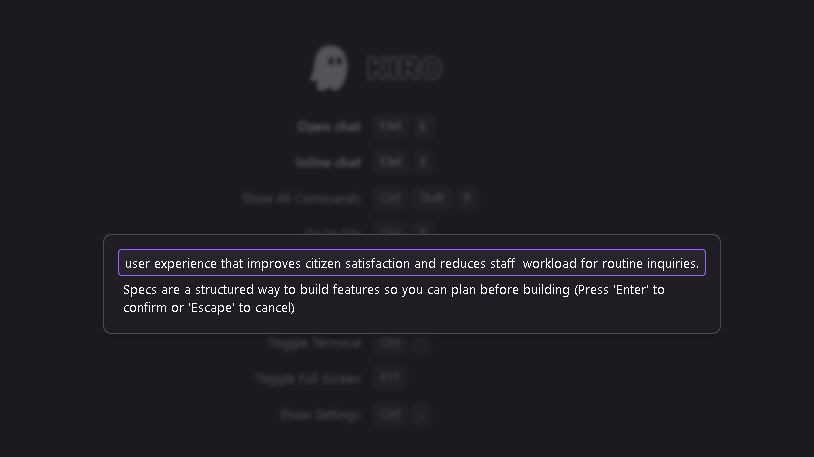
Figure 7: Kiro accepts the natural language input
3. Review the generated outputs. Kiro transforms your input into structured requirements with acceptance criteria, proposes architecture, and creates an implementation plan.
The following screenshot shows how Kiro transforms the natural language input into structured requirements, including acceptance criteria for compliance validation.
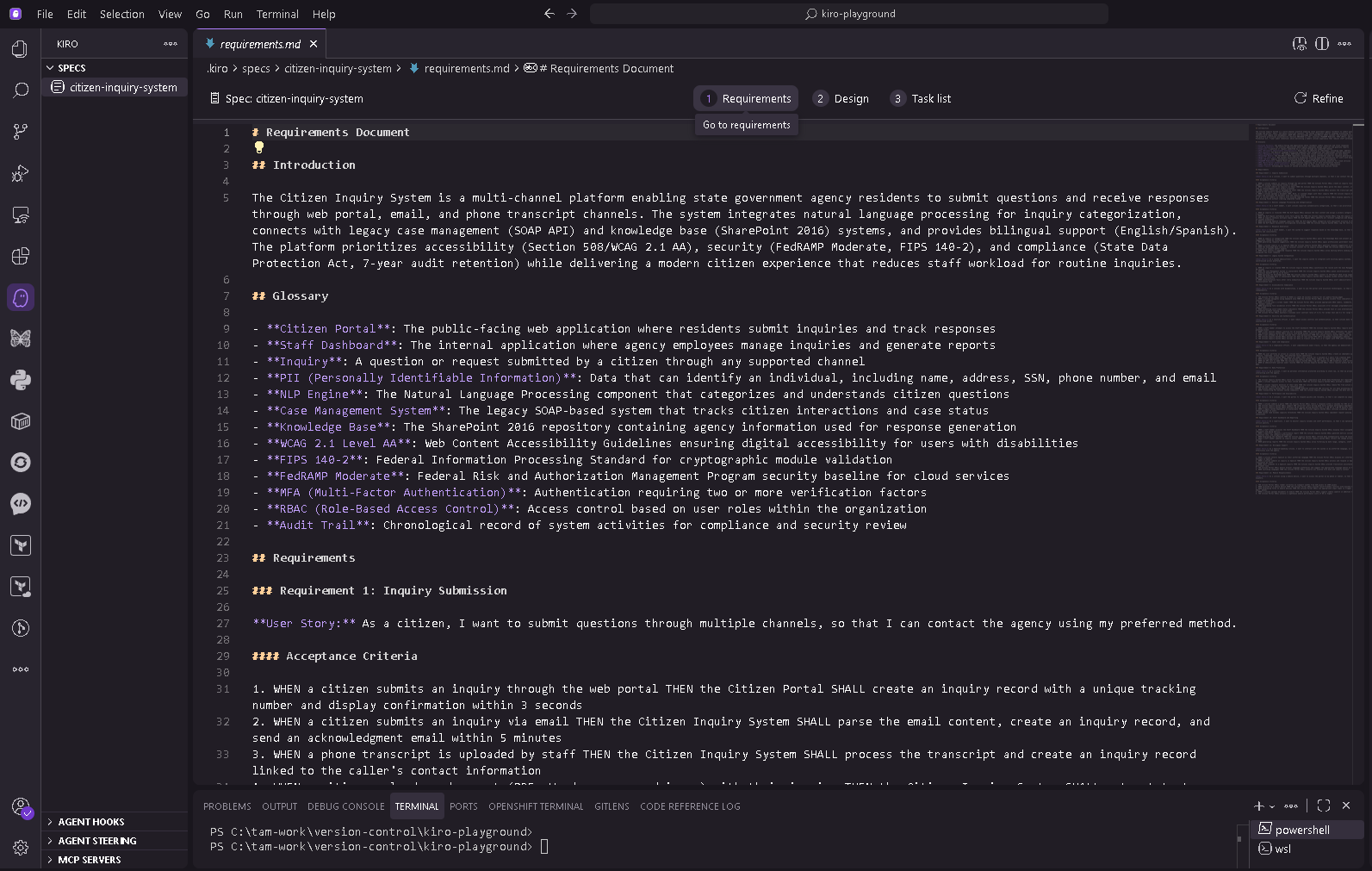
Figure 8: Kiro transforms the natural language input
The following screenshot shows Kiro proposing architecture based on the compliance requirements in the spec.
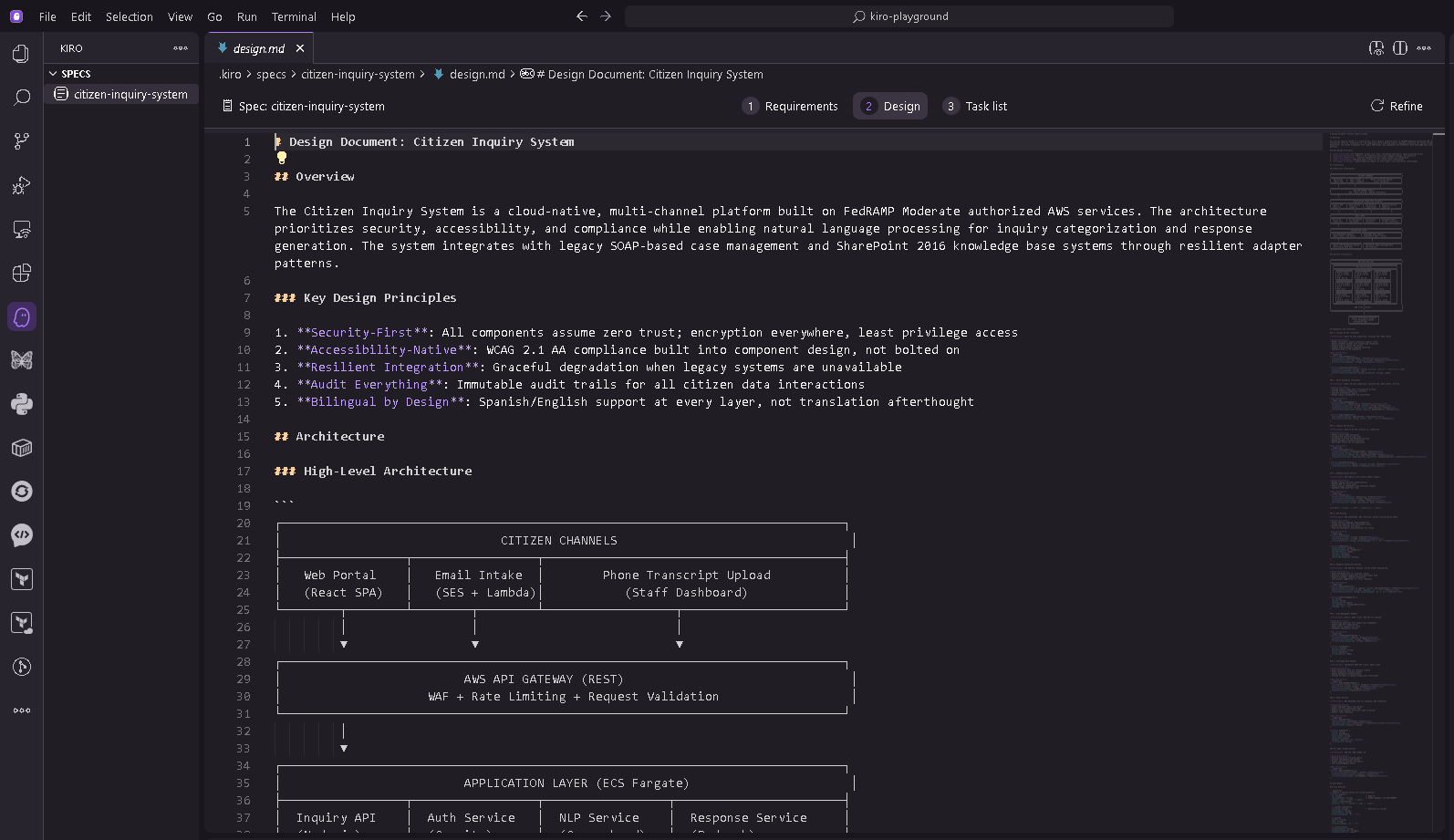
Figure 9: Proposed architecture in Kiro
The following screenshot shows Kiro offering an implementation plan with built-in compliance checkpoints, sequenced based on dependencies.
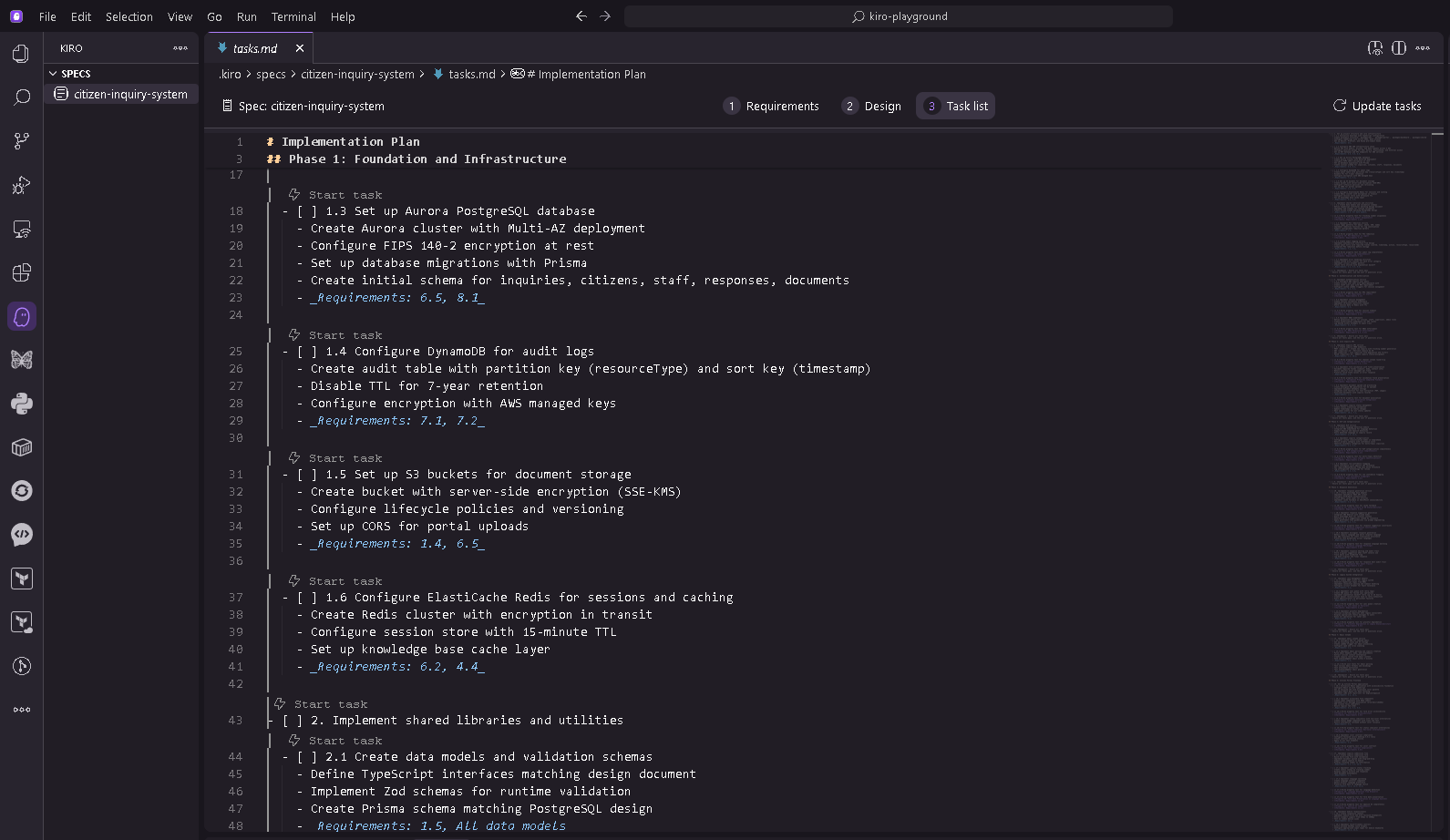
Figure 10: Implementation tasks in Kiro
Step 3: Set up agent hooks
The following screenshot shows the interface for configuring hooks in Kiro, where you can enable automated compliance checking at specific points in the development workflow.
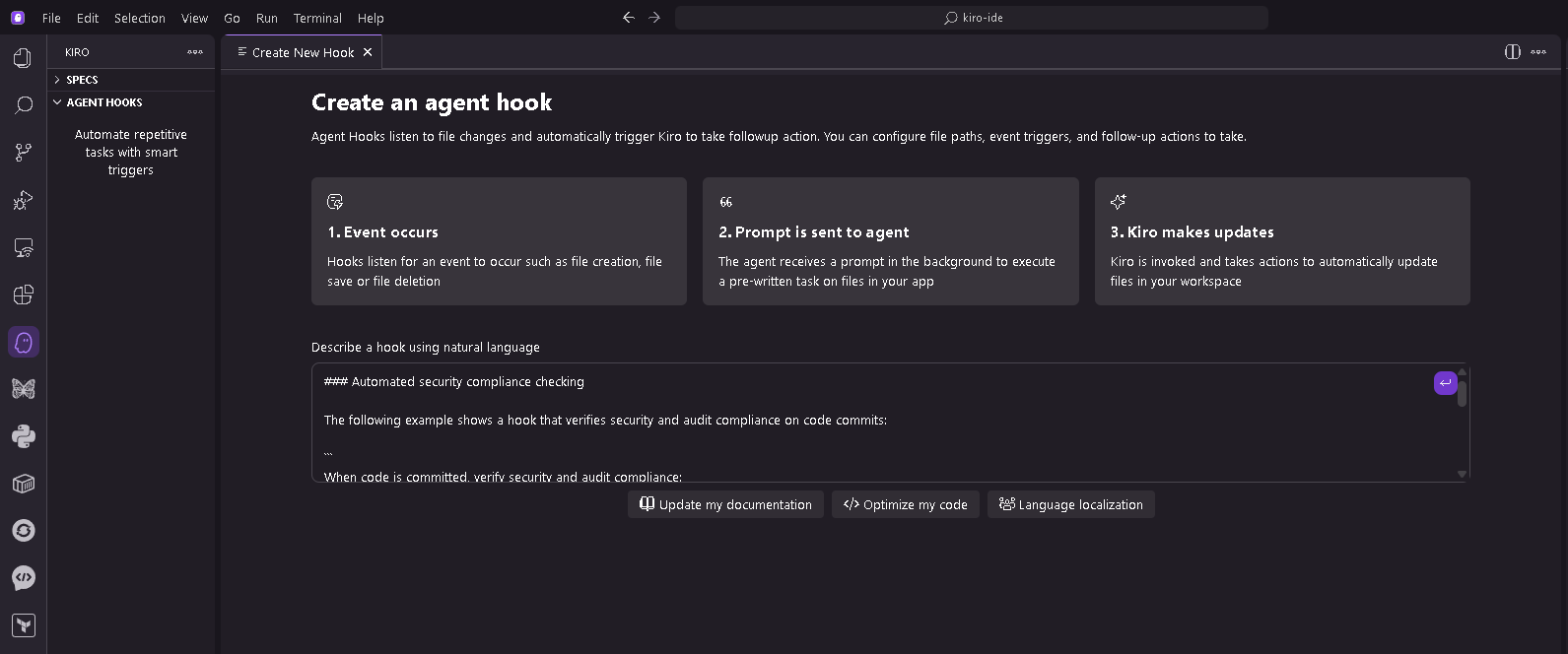
Figure 11: Agent hooks configuration in Kiro
1. Configure a security compliance hook that runs when code is committed:
“`
When code is committed, verify security and audit compliance:
– All citizen PII encrypted at rest (AES-256) and in transit (TLS 1.2+)
– Audit logging present for all citizen data access and modifications
– Authentication required for all administrative functions
– Database queries use parameterized statements (SQL injection prevention)
– Secrets not hardcoded in source code
Generate a security compliance report highlighting any concerns.
This catches common security issues before code reaches review, reducing the security team’s workload.
“`
The following screenshot shows the security compliance hook output, with automated verification of encryption, audit logging, and access control requirements.
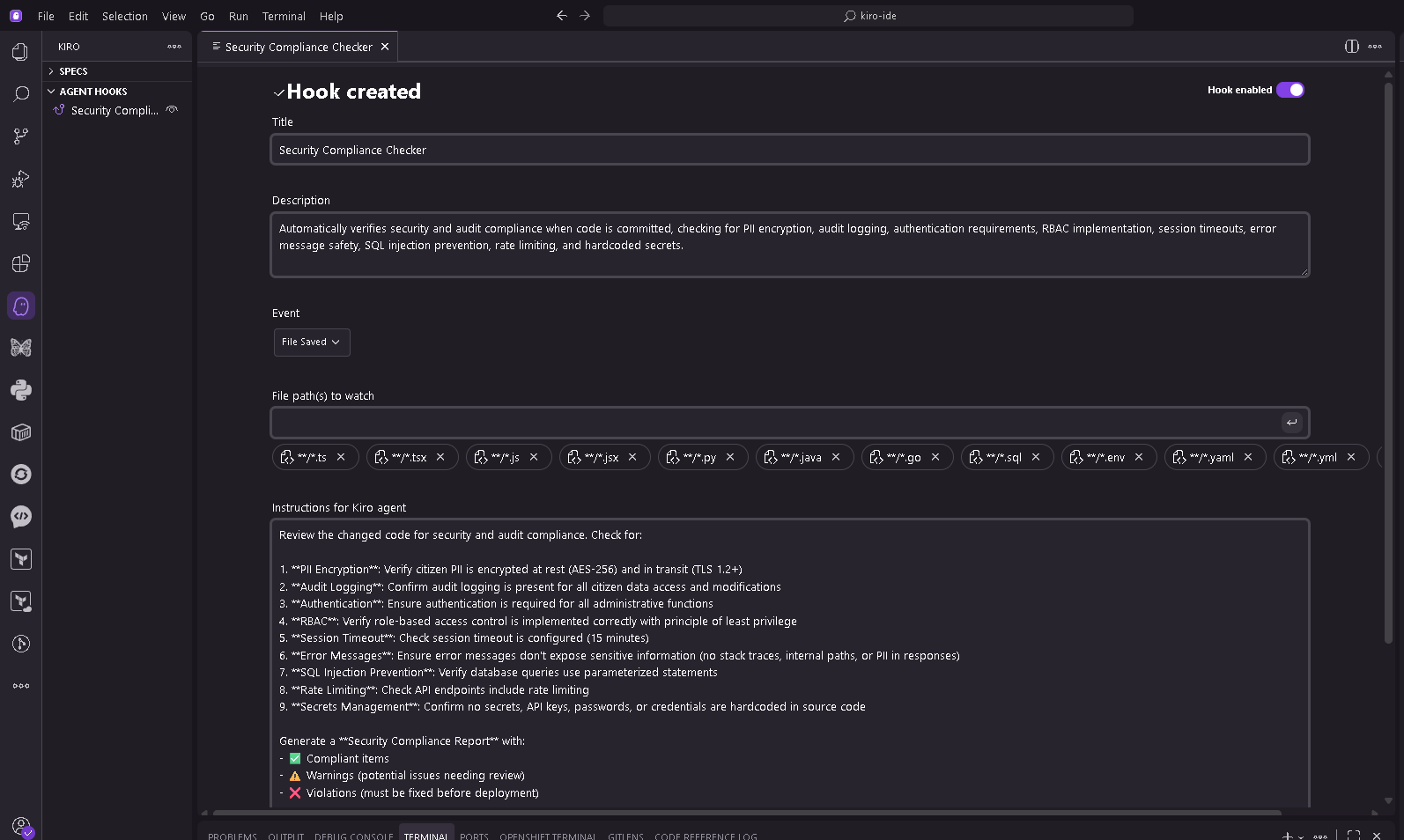
Figure 12: Security compliance hook output
2. Configure an accessibility hook that runs when UI code is saved:
“`
When UI component code is saved, verify Section 508 compliance:
– All interactive elements have keyboard navigation
– Form inputs have associated labels
– Images have descriptive alt text
– Color contrast ratios meet WCAG 2.1 Level AA (4.5:1 for normal text)
Generate an accessibility report highlighting any issues and
suggesting specific fixes based on WCAG 2.1 Level AA guidelines.
This provides immediate feedback, catching accessibility issues during development, rather than during expensive audits.
“`
The following screenshot shows the accessibility validation hook providing immediate feedback on Section 508 compliance, including WCAG criteria and ARIA attribute verification.
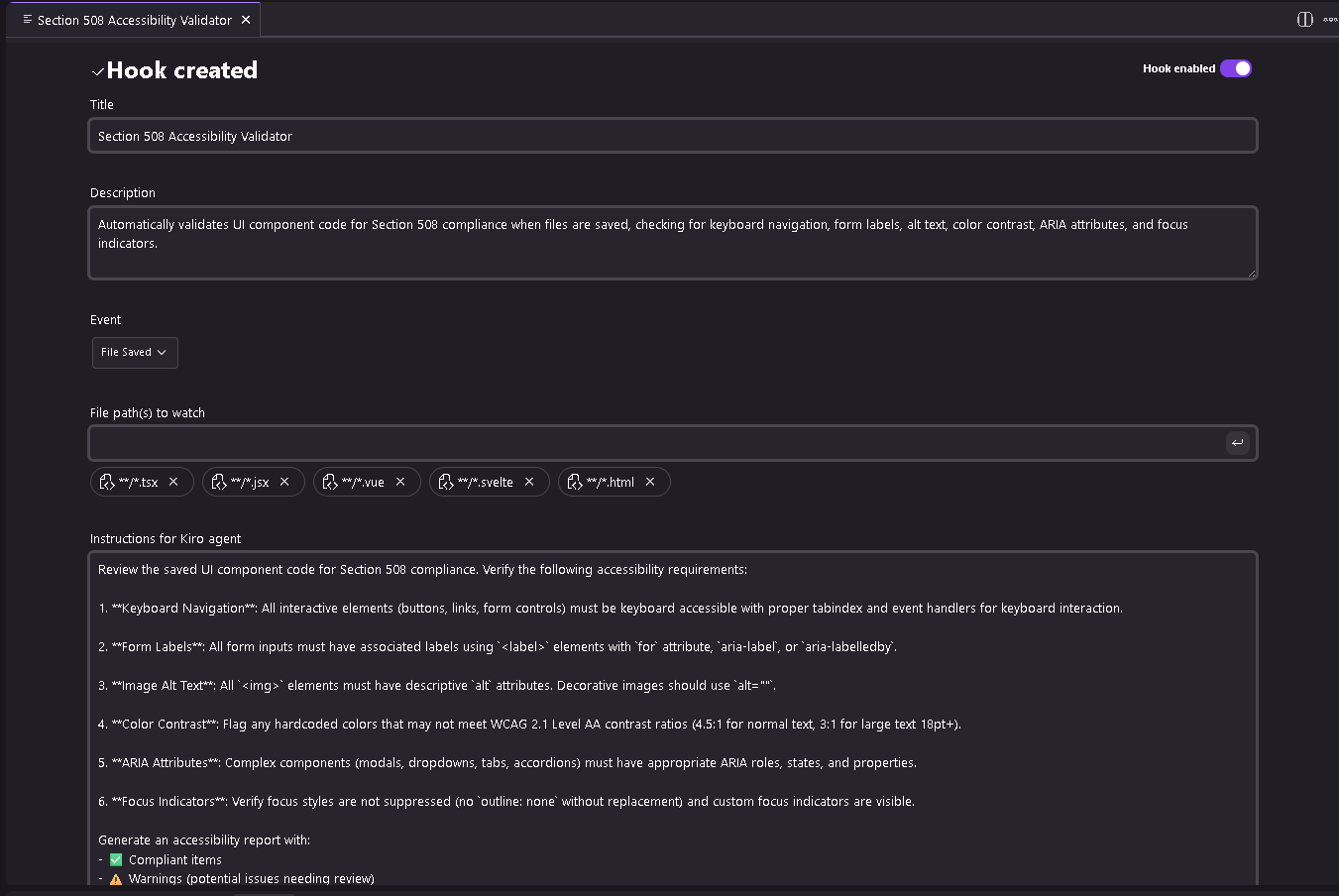
Figure 13: Accessibility validation hook
Step 4: Use the CLI (optional)
For terminal-based development or secure pipelines, use the Kiro CLI.
1. Install the CLI from kiro.dev and run kiro-cli in your terminal to start a session.
The following screenshot shows the Kiro CLI interface.
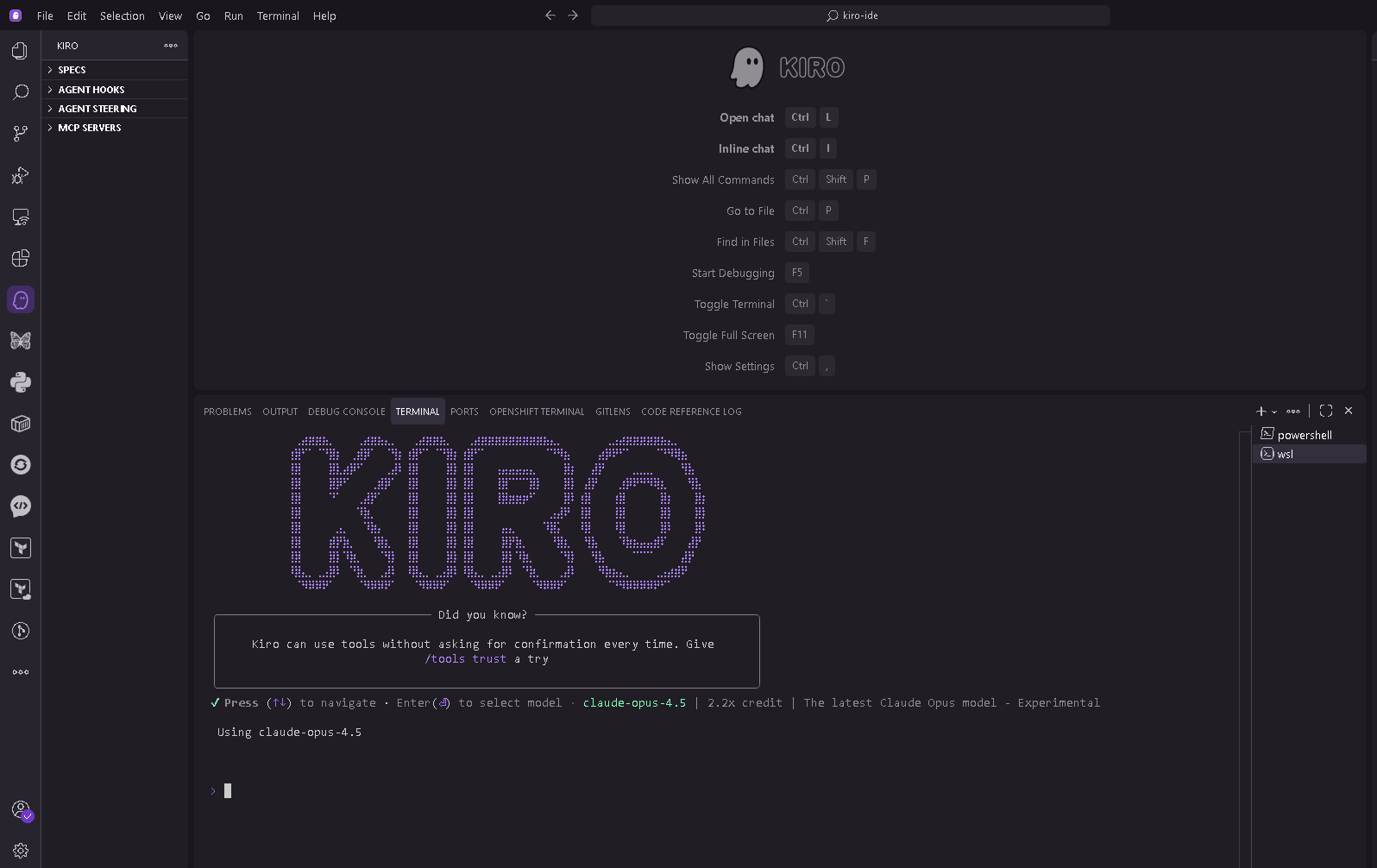
Figure 14: Kiro CLI provides agentic capabilities in terminal environments for developers who prefer command-line workflows
2. Use these commands during your session: /model to view and change model, /save to save conversation for later reference, /MCP to view connected MCP servers and their status, /context to check token usage for the current session, and /quit to end the session.
Step 5: Configure MCP in Kiro cli for AWS documentation (optional)
Before using MCP, make sure you have:
- Reviewed AWS MCP Servers site and prerequisites
- Any specific prerequisites for the MCP servers you want to use (listed in each server’s documentation)
Connect Kiro to AWS documentation MCP server using natural language:
1. Ask Kiro to create the configuration:
“Add the AWS documentation MCP server to my project so I can search
AWS docs while building. Save the config to the appropriate location.”
The following screenshot shows the user making the request in the cli
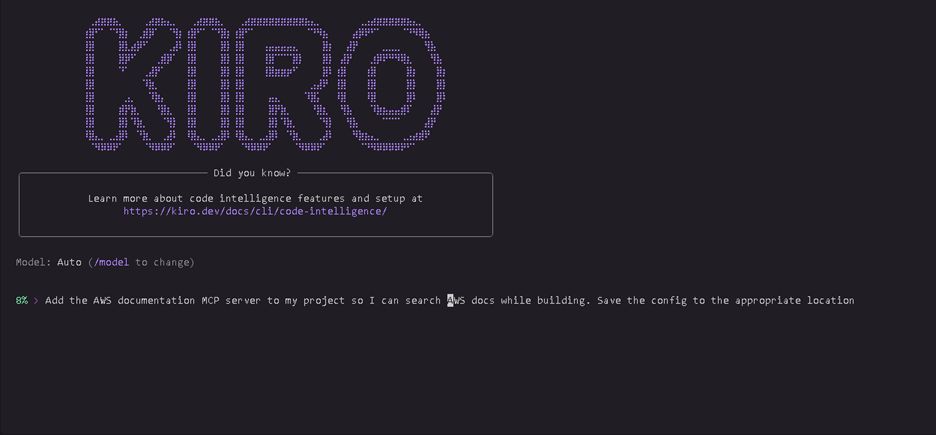
Figure 15: User requesting MCP configuration in CLI
Kiro generates the MCP configuration and saves it to the correct location.
The following screenshot shows the response from Kiro and the mcp.json file generated in the appropriate location.
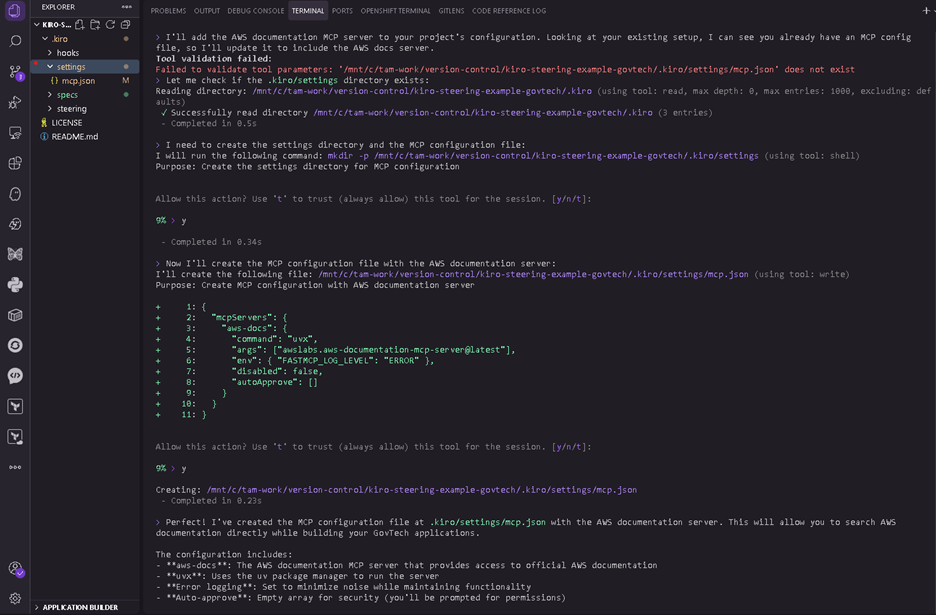
Figure 16: Kiro generates MCP configuration
2. Verify the server is active by running /MCP in Kiro to view connected servers or check the MCP status indicator in the Kiro interface.
The following screenshot shows the MCP server showing active in the Kiro interface
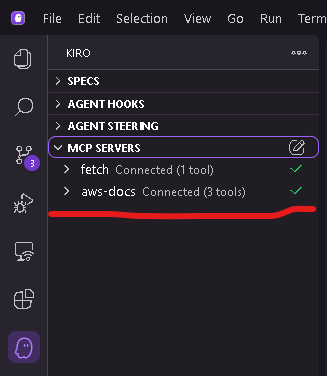
Figure 17: MCP server active status
3. Test the connection by asking Kiro: “Search AWS documentation for FedRAMP authorized services.”
The following screenshot shows the request and output from Kiro for FedRAMP authorized AWS services
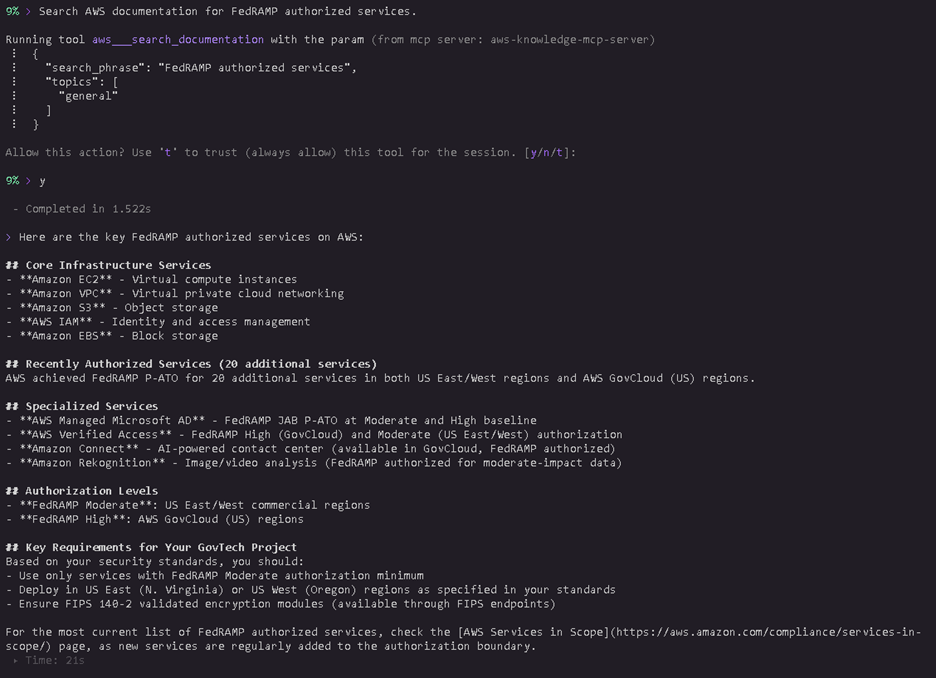
Figure 18: AWS FedRAMP services search results
With MCP configured, Kiro can search AWS service guides and provide compliance information while you build.
Compliance and security considerations
GovTech organizations must maintain strict compliance with federal, state, and local regulations. Kiro supports these requirements through capabilities that help teams build compliant applications from the start.
Kiro is built on AWS security infrastructure. For compliance program information, refer to AWS Services in Scope by Compliance Program. All communication uses TLS 1.2 or higher encryption. Kiro encrypts data at rest using AWS Key Management Service (AWS KMS). Kiro Enterprise supports customer managed encryption keys.
For organizations with data residency requirements, Kiro Enterprise stores content in the AWS Region where your Kiro profile was created (US East N. Virginia or Europe Frankfurt). With cross-region inference, content may be processed in a different Region within the geography where content is stored (for example, United States or Europe). For more information, see kiro documentation.
Kiro Enterprise provides enhanced privacy controls: your code and prompts aren’t used for service improvement. Supervised mode requires approval for all code changes; Autopilot mode runs autonomously for trusted workflows. You can review all changes and revert to previous states or checkpoints.
Kiro offers indemnity for its output. Refer to AWS Service Terms for details.
GovTech teams can use Kiro to develop applications that deploy to AWS GovCloud (US) regions for organizations with high compliance requirements. Kiro supports GovTech security requirements by suggesting encryption implementations using AWS KMS, implementing role-based access control, generating audit logging for citizen data access, and identifying personally identifiable information (PII) handling code for proper encryption and log redaction.
Cleaning up
To avoid incurring future charges, delete any resources created as a result of this walkthrough. Follow your organization’s standard procedures for resource cleanup. Kiro doesn’t automatically create AWS resources; any resources created result from your application code.
Conclusion
Kiro offers a different approach to AI-assisted development for teams working under compliance constraints and legacy system realities. GovTech teams can maintain their pace of development, build Section 508 accessible applications from the start, and generate comprehensive audit trails.
To get started, download Kiro from kiro.dev and create a steering file documenting your compliance requirements. For Kiro Enterprise features including customer managed encryption keys and enhanced privacy controls, connect with your AWS Public Sector representative.