AWS Public Sector Blog
Empowering government document understanding with Amazon Nova Multimodal Embeddings

Government agencies, healthcare organizations, educational institutions, and public safety departments manage vast repositories of complex documents containing both textual content and visual elements. These documents range from regulatory reports with compliance charts to medical records with diagnostic imagery, legislative bills with budget tables, and security protocols with facility diagrams. Traditional document processing approaches that separate text from visuals often miss critical context, making it difficult for public sector organizations to efficiently search, analyze, and extract insights from their document collections.

Figure 1: The rise of data leads to an increase in documents for the government to process (AI-generated image by Amazon Nova Canvas)
Amazon Nova Multimodal Embeddings addresses this challenge by processing documents as complete units, capturing both textual content and visual elements in a unified embedding space. This helps public sector organizations unlock the full value of their document repositories while maintaining the security, compliance, and accessibility standards required for government operations.
The challenge: Complex documents in public sector operations
Public sector organizations face unique document management challenges. Examples include:
- Regulatory compliance – Environmental agencies need to search regulations containing both legal text and emissions data charts.
- Legislative analysis – Policy analysts must compare policy versions with complex budget tables and timeline visualizations.
- Healthcare records – Medical professionals need access to patient records combining clinical notes with diagnostic charts, images, and lab results.
- Public safety – Emergency responders need quick access to protocols containing both procedural text and facility diagrams.
- Educational resources – Schools and universities manage curriculum materials and textbooks with explanatory text, instructional diagrams, and on-demand online course content.
These challenges make it difficult to answer questions like, “What are the acceptable emissions levels for manufacturing facilities?” when the answer requires understanding both regulatory text and supporting charts.
Introducing Amazon Nova Multimodal Embeddings
Most existing embedding models are built for only one or two modalities. This forces organizations to maintain multiple separated embedding systems without a way to align or map data across different content types, leading to data silos. Amazon Nova Multimodal Embeddings creates a unified vector space combining text, images, complete document pages, video and audio—enabling direct comparisons using standard similarity measures. The following graphic illustrates Nova Multimodal Embeddings in the unified space.
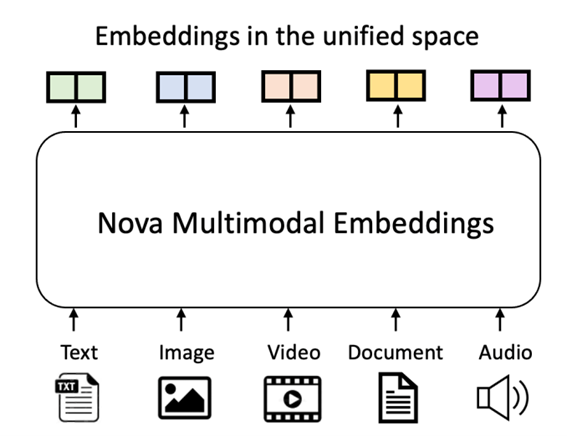
Figure 2: Amazon Nova Multimodal Embeddings model
Amazon Nova Multimodal Embeddings supports multilingual search query, which is one of the common use cases in the public sector. It supports multiple embedding dimensions—specifically 3072, 1024, 384, and 256—giving you the flexibility to balance between precision and performance. Smaller embeddings reduce the storage spaces and retrieval latency, whereas larger embeddings enable higher precision and retrieval accuracy. These features make Amazon Nova Multimodal Embeddings a scalable, cost-effective solution for production deployment. The following table—from the Amazon Nova Multimodal Embeddings: Technical report and model card—compares Amazon Nova with other enterprise embedding models.
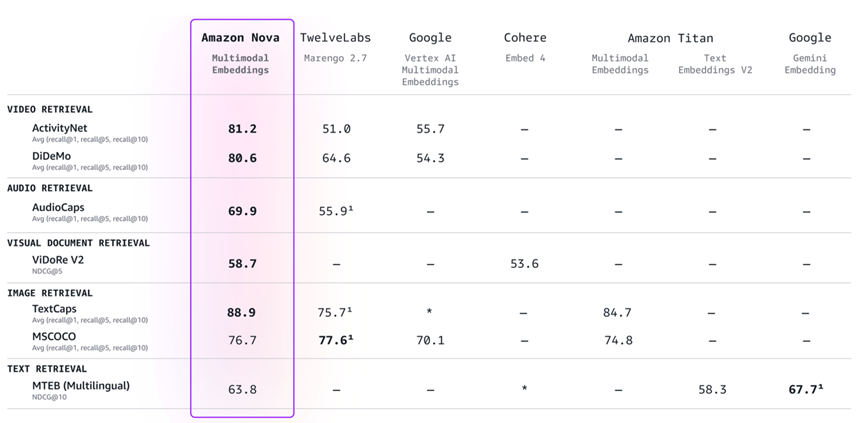
Figure 3: Amazon Nova Multimodal Embeddings performance comparison with selected available enterprise embedding models
With Amazon Nova Multimodal Embeddings, you can search and retrieve the document by conducting a contextual search using natural language, images, audio, or video to query across text, images, audio, and video. This “any-to-any” retrieval enables more complex use cases without manual intervention. Amazon Nova Multimodal Embeddings features intelligent question answering so government agencies can build a generative AI platform or agentic AI to perform queries across many data types without the need for complex optical character recognition (OCR) pipelines for different document templates. The offering includes document classification and organization, enabling government agencies to perform unsupervised clustering across documents (text, image, audio, and video) based on the content, meaning, and structure to group similar documents without manual tagging.
Sample document retrieval implementation approach
This post demonstrates the use of Amazon Nova Multimodal Embeddings using the public Amazon stock 10-K document, which consists of a text and table layout similar to the complexity of government documents. The following diagram illustrates how you can use Amazon Nova Multimodal Embeddings to build a Retrieval Augmented Generation (RAG) application.
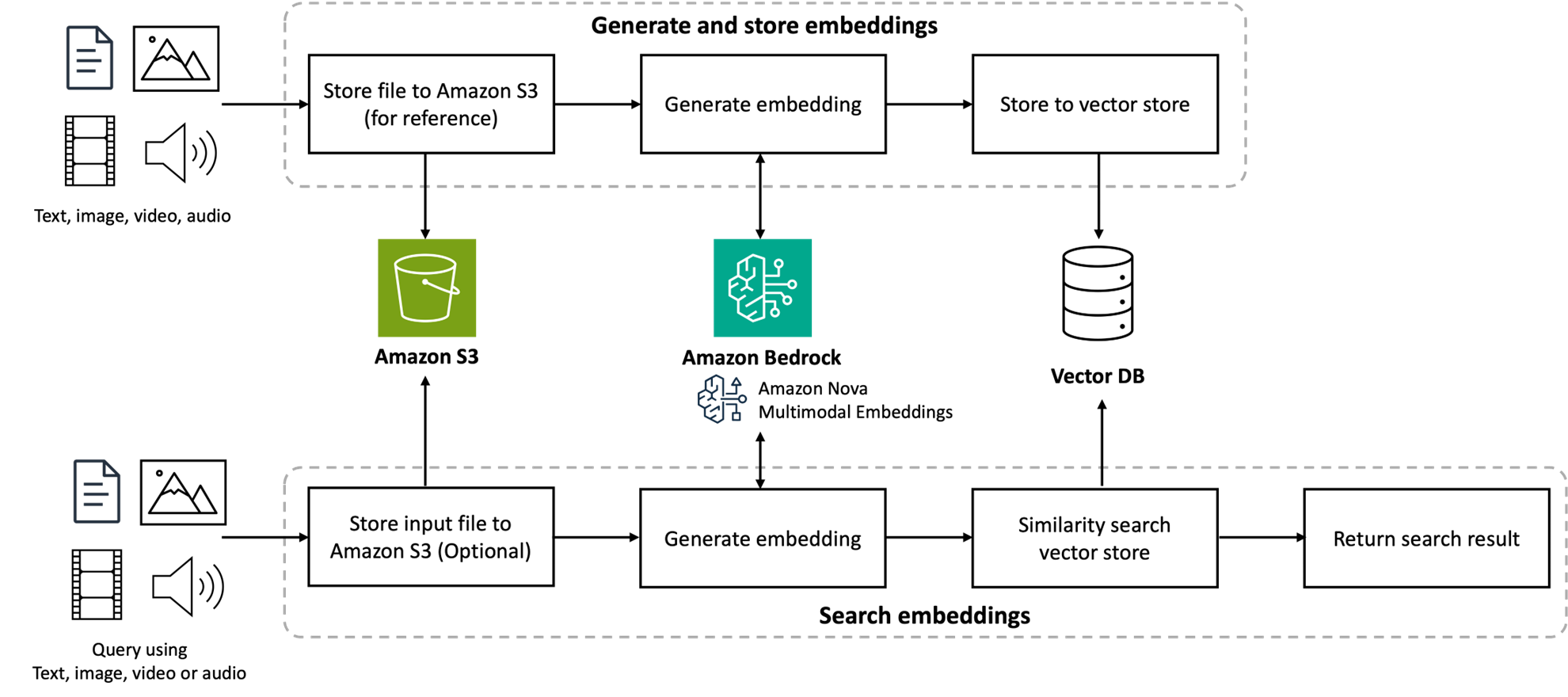
Figure 4: Architecture for building RAG application using Amazon Nova Multimodal Embeddings
Setting up vector store
This sample post uses Amazon S3 Vectors as vector store. S3 Vectors represent cloud-based support for storing and querying vector embeddings directly within Amazon Simple Storage Service (Amazon S3), which offers the same elasticity, scalability, and durability you expect from Amazon S3 with subsecond query performance. It seamlessly intregrates with Amazon Bedrock Knowledge Bases without requiring infrastructure provisioning. The following code is a snippet of how you can use AWS SDK for Python (Boto3) to create the S3 Vectors:
import boto3
# make change according to your configuration
VECTOR_BUCKET = "<your-vector-store-name>"
INDEX_NAME = "<your-index-name>"
EMBEDDING_DIMENSION = 3072 # you can change to 1024, 384 or 256
# create S3 Vectors client connection
s3vectors_client = boto3.client(
service_name="s3vectors",
region_name="us-east-1"
)
# create S3 vector bucket
try:
s3vectors_client.get_vector_bucket(
vectorBucketName=VECTOR_BUCKET
)
print(f"Vector bucket {VECTOR_BUCKET} already exists")
except s3vectors_client.exceptions.NotFoundException:
s3vectors_client.create_vector_bucket(
vectorBucketName=VECTOR_BUCKET
)
print(f"Created vector bucket: {VECTOR_BUCKET}")
# create index in the vector bucket
try:
s3vectors_client.get_index(
vectorBucketName=VECTOR_BUCKET,
indexName=INDEX_NAME
)
print(f"Vector index {INDEX_NAME} already exists")
except s3vectors_client.exceptions.NotFoundException:
s3vectors_client.create_index(
vectorBucketName=VECTOR_BUCKET,
indexName=INDEX_NAME,
dimension=EMBEDDING_DIMENSION,
dataType="float32",
distanceMetric="cosine"
)
print(f"Created index: {INDEX_NAME}")
In this script, you need to configure the S3 vector bucket name, index name, and the embedding dimension. You can refer to the Amazon S3 Vectors documentation and Boto3 documentation for more details.
Converting PDF to PNG
Before you can generate the embedding vectors from your documents, you need to convert your PDF document into a PNG image. If you’re using Python, you can use the pdf2image library or refer to the Amazon Nova samples GitHub repository for the Python script. In this step, each PNG image represents one whole page of your PDF document.
Generating embedding vectors and loading to S3 Vectors
After you have the document as an image file, you can generate the embedding vector for each image. You need to define the request body to pass to Amazon Nova Multimodal Embeddings:
- taskType – This parameter refers to the type of embedding operation to perform on the input content. This post uses
SINGLE_EMBEDDINGbecause it generates one embedding output per one model input. - embeddingPurpose – This parameter depends on the intended application. Examples include indexing the document, retrieving the document, classification, and clustering. In this step, we use
GENERIC_INDEXbecause we want to generate the embedding vector from the document to load into S3 Vectors. - Image – This parameter represents image content because we’ve converted the PDF into a PNG image. The
detailLevelis set toDOCUMENT_IMAGEto use a higher resolution image for better text and figure interpretation.
You can refer to the request and response format in the complete embeddings request and response schema documentation and the Boto3 invoke_model API documentation for more details. The following is a code snippet of generating the embedding vector and loading the embedding vector into S3 Vectors:
import base64
import json
import boto3
vector_list = [] # placeholder to load into S3 Vectors index
def load_file_as_base64(file_path: str):
with open(file_path, "rb") as file:
return base64.b64encode(file.read()).decode("utf-8")
# define the request body
request_body = {
"taskType": "SINGLE_EMBEDDING",
"singleEmbeddingParams": {
"embeddingDimension": EMBEDDING_DIMENSION,
"embeddingPurpose": "GENERIC_INDEX",
"image": {
"format": "png",
"detailLevel": "DOCUMENT_IMAGE",
"source": {
"bytes": load_file_as_base64(file_path),
}
}
}
}
try:
bedrock_runtime_client = boto3.client(
service_name="bedrock-runtime",
region_name="us-east-1"
)
response = bedrock_runtime_client.invoke_model(
body=json.dumps(request_body, indent=2),
modelId="amazon.nova-2-multimodal-embeddings-v1:0",
accept="application/json",
contentType="application/json",
)
# Decode the response body.
response_body = json.loads(response.get("body").read())
except Exception as e:
print(e)
print(f"Generating embedding for: {file_path}")
embedding = response_body.get("embeddings")[0].get("embedding")
vectors_list.append({
"key": f"filename_page:<file-name>_<page-number>",
"data": {"float32": embedding},
"metadata": {
"type": "<document-type>",
"s3_uri": "<s3-uri-to-full-pdf>"
}
})
print("Successfully converting to embedding!")
s3vectors_client.put_vectors(
vectorBucketName=VECTOR_BUCKET,
indexName=INDEX_NAME,
vectors=vectors_list
)
print(f"Successfully added {len(vectors_list)} vectors to S3 Vectors")
Note that you might need to loop the folder to process it all.
Querying S3 Vectors
You can query cross-modal search with text and find relevant content, graphs, and tables from documents. In this post, we input the search query in text form to retrieve the image stored in S3 Vectors. You need to pass GENERIC_RETRIEVAL in embedding. This purpose parameter is optimized for searching an index repository containing a mixture of modality embeddings such as images and audio. If you design the index to have only DOCUMENT_IMAGE, you can choose to use DOCUMENT_RETRIEVAL instead. The following code snippet shows how to generate the embedding vector for retieval from user text input, query the S3 Vectors, and show the queried document image results:
from IPython.display import Image
# Generate embedding vector from user text input
response = bedrock_runtime_client.invoke_model(
body=json.dumps({
"taskType": "SINGLE_EMBEDDING",
"singleEmbeddingParams": {
"embeddingPurpose": "GENERIC_RETRIEVAL",
"embeddingDimension": EMBEDDING_DIMENSION,
"text": {
"truncationMode": "END",
"value": <user-query-in-text-format>
}
}
}),
modelId=MODEL_ID,
accept="application/json",
contentType="application/json"
)
response_body = json.loads(response["body"].read())
query_embedding = response_body["embeddings"][0]["embedding"]
# Query and retrieve the document image from S3 Vectors
response = s3vectors_client.query_vectors(
vectorBucketName=VECTOR_BUCKET,
indexName=INDEX_NAME,
queryVector={
"float32": query_embedding
},
topK=3,
returnDistance=True,
returnMetadata=True
)
# Display results
for i, result in enumerate(response["vectors"], 1):
print(f"{i}. {result['key']}")
print(f" Distance: {result['distance']:.4f}")
if result.get("metadata"):
print(f"Metadata: {result['metadata']}")
display(Image(filename=result['metadata']['s3_uri']))
You can compare the retrieval results using multiple languages. In this example, we use Spanish, Japanese, and Thai. The question is Net sales of AWS from Q2 to Q3 2025.
Spanish: Ventas netas de AWS del segundo al tercer trimestre de 2025
Japanese: AWSの純売上、2025年Q2からQ3まで
Thai: ยอดขายสุทธิ AWS ตั้งแต่ Q2 ถึง Q3 ปี 2025
The query returns the exact same result of the document.
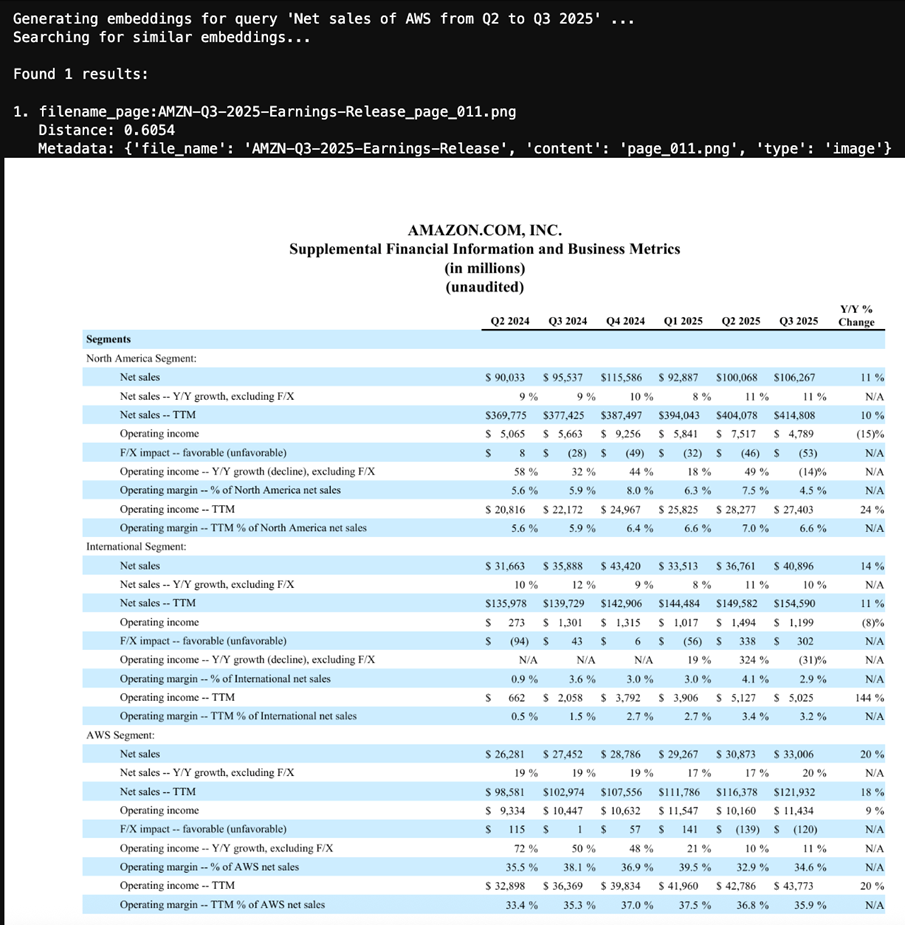
Figure 5: Result document image from the query
In this implementation, we focus only on the retrieval part. In an actual agentic AI application, you pass the retrieval document images (or audio, video, or text) to the AI agent for additional processing, such as summarization or deep research.
Conclusion
This post demonstrates how Amazon Nova Multimodal Embeddings can transform how public sector agencies interact with their document collections. By processing the documents as complete units, capturing both textual content and visual structure such as tables and graphs in one unified embedding space, government agencies can conduct semantic search across both narrative text and visual data, accurately classify the documents using its structure and contents, perform intelligent question answering that can reference charts, tables, and diagrams as evidence, reduce manual OCR document processing pipelines, and enhance compliance and audit capabilities.
Next steps
Amazon Nova Multimodal Embeddings is available in Amazon Bedrock in the US East (N. Virginia) AWS Region. To learn more, check out the Amazon Nova User Guide and announcement page for documentation, Amazon Nova Multimodal Embeddings AI Service Card for model details, and responsible AI aspects of the model and the Amazon Nova model cookbook on GitHub for code examples.
Start building multimodal AI applications with Amazon Nova Multimodal Embeddings today. Share your feedback through AWS re:Post for Amazon Bedrock or your usual AWS Support contacts.