AWS Public Sector Blog
How nonprofits can explore, document, and enhance applications using Kiro
Nonprofit technical teams are caught in a knowledge squeeze. On one side, staff departures walk institutional knowledge out the door. According to the 2026 Social Impact Staff Retention Project survey, nearly 7 in 10 nonprofit employees are considering new jobs, taking undocumented knowledge with them. On the other, new applications arrive from contractor handoffs, open source adoptions, and rapid prototyping sprints, each one adding complexity that no one has time to document. The gap between what your team owns and what your team knows continues to widen.
In this post, you’ll see how Kiro, an AI-assisted development environment powered by Amazon Bedrock, helps nonprofit technical teams close that knowledge gap from both sides. First, you’ll walk through techniques for exploring unfamiliar code bases, turning inherited applications into transparent, navigable systems rather than black boxes. Then, you’ll learn how to generate living documentation that captures institutional knowledge, accelerates onboarding for incoming staff, and stays current as your workloads evolve.
The challenge of knowledge loss and rising complexity
At Amazon Web Services (AWS), nonprofit technical leaders regularly tell us that understanding their own applications is one of their biggest operational risks. Consider these common scenarios:
- A community health organization inherits a patient intake application after its lead developer departs. They’re left with a running application, a code repository, and little to no documentation.
- A youth services nonprofit adopts an open source case management platform. The team customizes it to fit their workflows, but 6 months later, no one remembers why certain modules were modified or how they interact with the rest of the system.
- A small IT team needs to onboard a contractor to add a critical feature but spends the first 2 weeks explaining how the application works, impacting timeline and budget.
For many nonprofits, institutional knowledge lives in the heads of a few individuals, and when those individuals leave, the organization’s ability to maintain and improve its technology leaves with them. At the same time, new workloads keep arriving. Organizations explore open source solutions, contractors hand off deliverables from completed engagements, and each new project brings an unfamiliar tech stack that can take weeks to onboard. The knowledge deficit grows in both directions at once.
Solution overview
Kiro is an AI-assisted development environment that analyzes your existing code base and helps you generate documentation, architecture insights, and best-practice guidance without requiring deep prior knowledge of the application. Here’s how Kiro supports the knowledge gap at a high level:
- Analyze your existing code base using AI to understand application structure, dependencies, and logic flows.
- Produce steering files, which are best-practice configuration files that guide future development, so new features align with your organization’s conventions.
- Generate documentation and architecture diagrams, creating institutional knowledge that might never have existed.
- Model Context Protocol (MCP) connects Kiro to external knowledge sources, such as AWS documentation or your own internal tools, so that recommendations stay current and contextually relevant.
The key benefits for nonprofit teams include the ability to accelerate application discovery from weeks to hours through AI-assisted exploration, generate living documentation that evolves with your code automatically, and apply best practices consistently, even without deep expertise on every team. The walkthrough in this post explores these elements in Kiro.
Prerequisites
To follow along with this walkthrough, you need Kiro installed on your development machine. For reference, I will use the bedrock-chat repository from AWS samples to demonstrate a new code base exploration.
Discovery and documentation
As you begin exploring a new workload, use the built-in tools available in Kiro to explore the repository both at a high level and a more granular level.
Start with steering files
Use Kiro’s predefined steering file generation to create an overview of your project in three distinct markdown files. These foundational steering files establish core project context so Kiro can align with your goals and patterns during development and double as a useful summary as you onboard to the project.
To generate these steering files, follow these steps:
1. In the Kiro panel, choose AGENT STEERING & SKILLS
2. Choose Generate Steering Docs.
3. The Kiro agent will explore the repository and produce the following three documents automatically:
a. product.md – Describes what your repository does.
b. tech.md – Lists your frameworks, libraries, and tools.
c. structure.md – Maps out how your project is organized.
The following screenshots illustrate these steps.
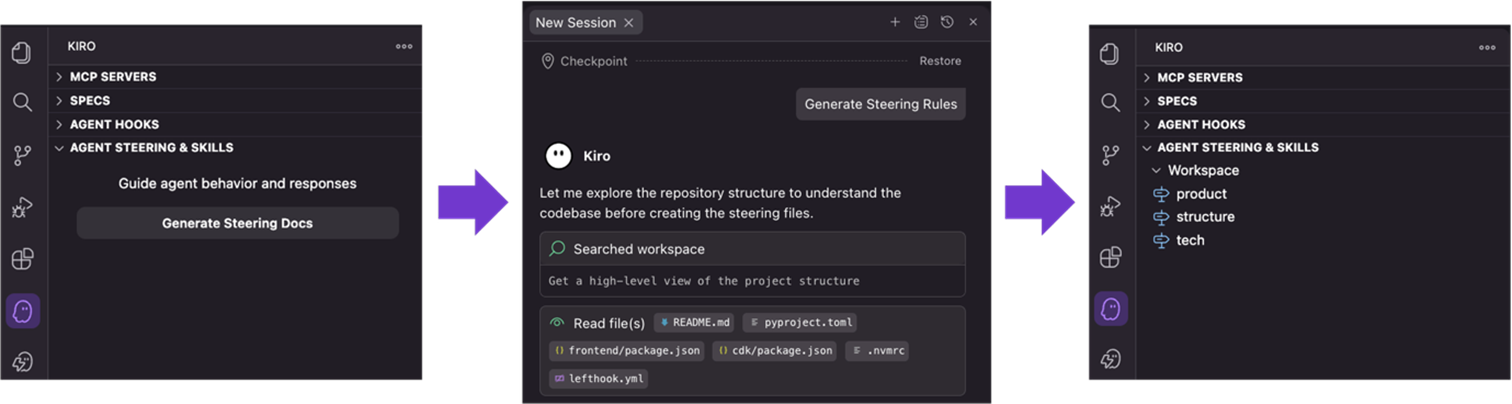
Figure 1: Foundational steering documents in the Kiro panel
These foundational files help your team onboard by providing a human-readable project summary, but steering files primarily help Kiro learn your organization’s patterns and best practices for development. As you encode standards, such as preferred naming conventions, security patterns, or architectural decisions into custom steering files, Kiro uses them to guide future code suggestions and feature development. This means new developers get consistent guidance from both the documentation and the AI tool itself, reducing the risk of diverging from established patterns. You can read more about this in the Keeping documentation up to date section later in the post.
Generate custom documentation with Kiro chat
For more tailored documentation, use the Kiro built-in context gathering subagent. Kiro automatically indexes your code base when you open a project so the subagent can explore your repository and generate custom documentation on demand.
Open a new Kiro chat session in Vibe mode and prompt it to generate an onboarding document. This document will contain useful context to help someone new better understand the project. It can align with common README context, or you can extend it to an onboarding narrative with service overviews and custom guidance. Consider prompting Kiro to personalize the onboarding communication to the capability of your team members. Kiro uses its context subagent to explore the repo and build context that will be summarized in a final markdown document.
Consider submitting this sample prompt to the Kiro chat to generate custom documentation:
The following screenshot shows Kiro’s response. First, it indicates it will explore the repository structure. Then, it creates and verifies a comprehensive onboarding document to orient new staff in a Kiro chat.
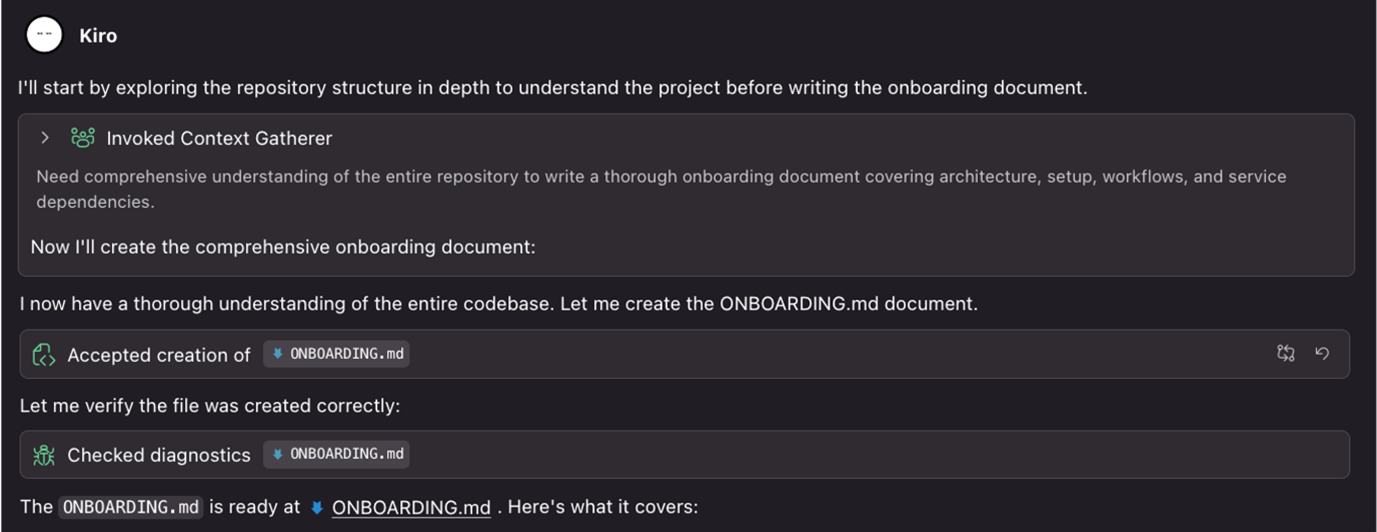
Figure 2: Kiro chat generates an onboarding document to orient new staff
For more granular exploration, Kiro chat is context aware. You can open a file and ask, “Summarize this file,” or reference specific files using the context mention icon (#). You can highlight a code snippet, right-click, and choose Kiro then Chat to ask targeted questions about that specific section of code. This makes Kiro chat a companion for ongoing code discovery as you learn more about the repository.
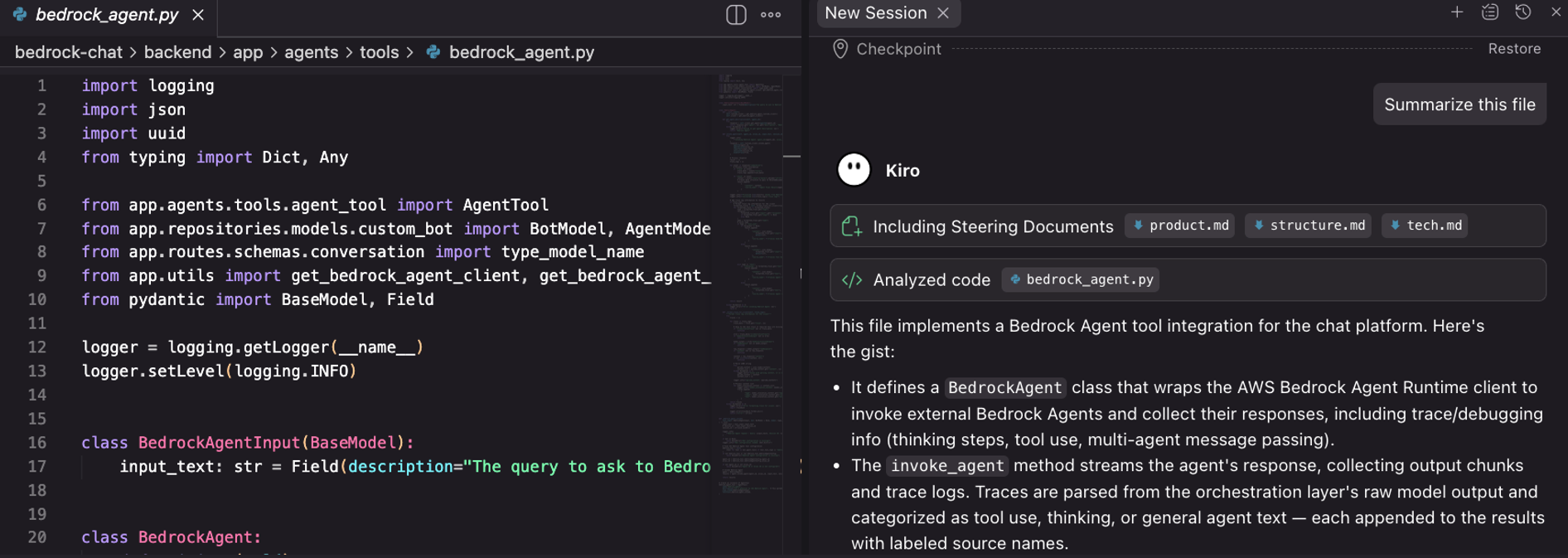
Figure 3: Context-aware file exploration in Kiro chat
Scale discovery with advanced tools
Foundational steering files and built-in subagents through Kiro chat are a good starting point for exploratory analysis. However, as your projects grow in complexity, you might require more sophisticated approaches. Many enterprise applications yield additional complexity, and documentation will need to persist in shared spaces beyond a local file system. This section addresses more advanced methods for generating onboarding documentation through multi-root workspaces, the use of MCP servers, and shareable agent skills.
Large-scale application discovery
Kiro supports multi-root workspaces for applications spanning multiple repositories, which is common in microservice architectures. Add additional folders to your workspace by choosing File and then Add Folder to Workspace, and the same discovery methods shared previously work across all roots. This simplifies exploration across the full stack of an application by unifying disparate repositories in one shared workspace.
Model Context Protocol
You can extend Kiro’s capabilities through MCP servers to develop more robust documentation and connect with downstream systems. For example, configuring the draw.io MCP server enables Kiro to generate architecture diagrams and visual workflows directly from your code base context. By adding the Atlassian MCP server, you can publish documentation to Confluence, creating a shared knowledge base accessible to your entire team. You might also consider the AWS Knowledge MCP for code bases with AWS infrastructure to reference the latest AWS documentation for service explanation.
The following screenshot shows a diagram generated by Kiro using the Draw.io MCP server.
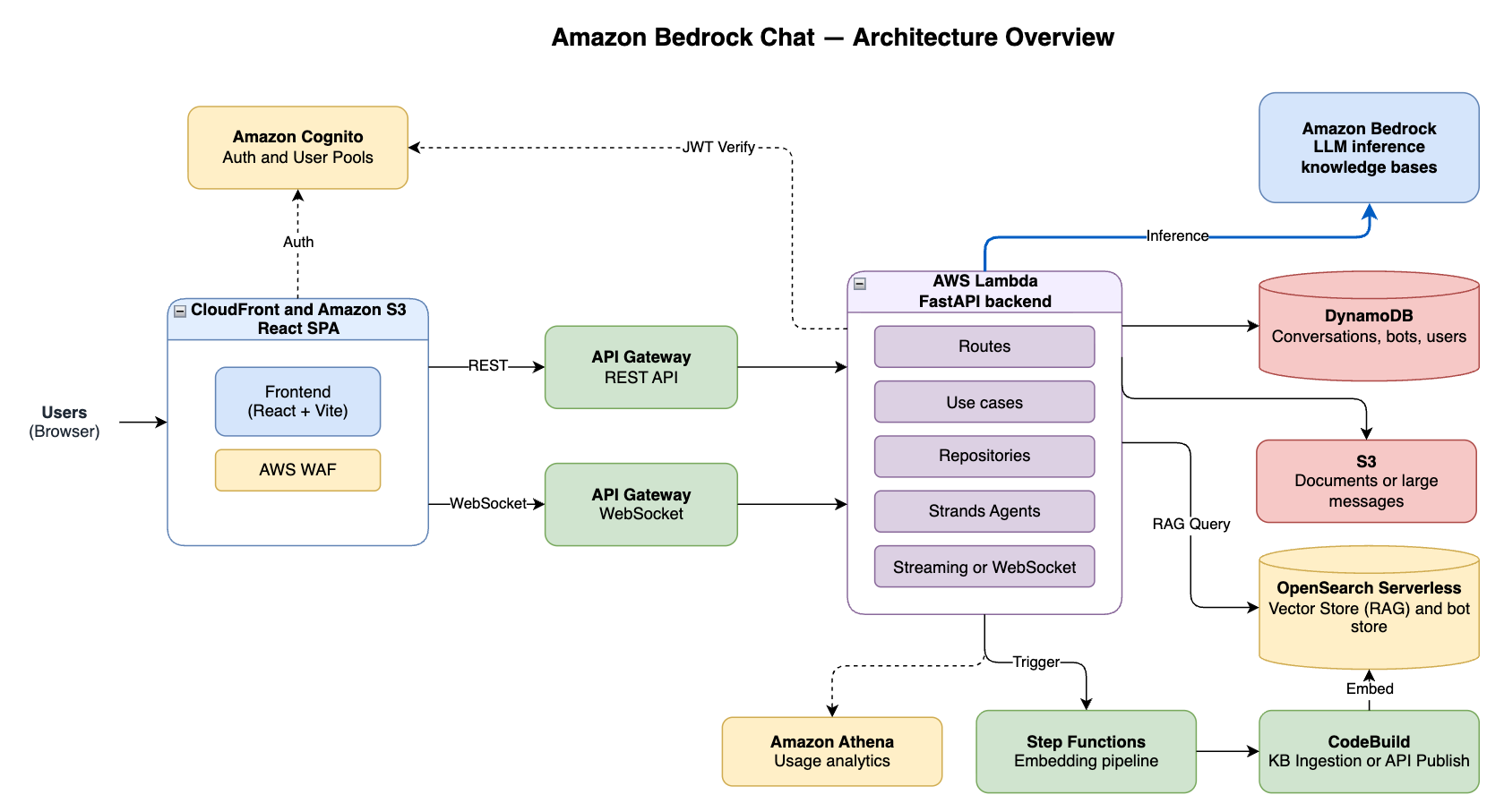
Figure 4: Draw.io diagram generated through Kiro chat using the Draw.io MCP server
These MCP servers include bundles of tools that are readily available for you to use through the Kiro chat. Next, you can compile prompts and MCP servers into a packaged agentic skill for repeatable tasks such as generating initial onboarding documentation for a new project.
Agent skills for repeatable documentation
Skills in Kiro are portable instruction packages that follow the open Agent Skills standard. They bundle instructions, scripts, and templates into reusable packages that Kiro can activate when relevant to your task. Skills live in your .kiro/skills directory and are version-controlled and shared across projects, driving consistent documentation practices organization-wide.
A documentation generation skill might break down into the following steps:
- Use the context-gatherer subagent to analyze the repository.
- Call MCP tools to add technical details from external knowledge sources such as AWS documentation.
- With this collected context, generate an onboarding document to orient new users and store it in a project onboarding directory.
- Use the architecture context to create a draw.io diagram as an XML file and store it in the onboarding directory.
- Create a new page in Confluence that includes the full content of the onboarding document and a section for the draw.io diagram.
The following screenshot shows the documentation uploaded directly to Confluence.
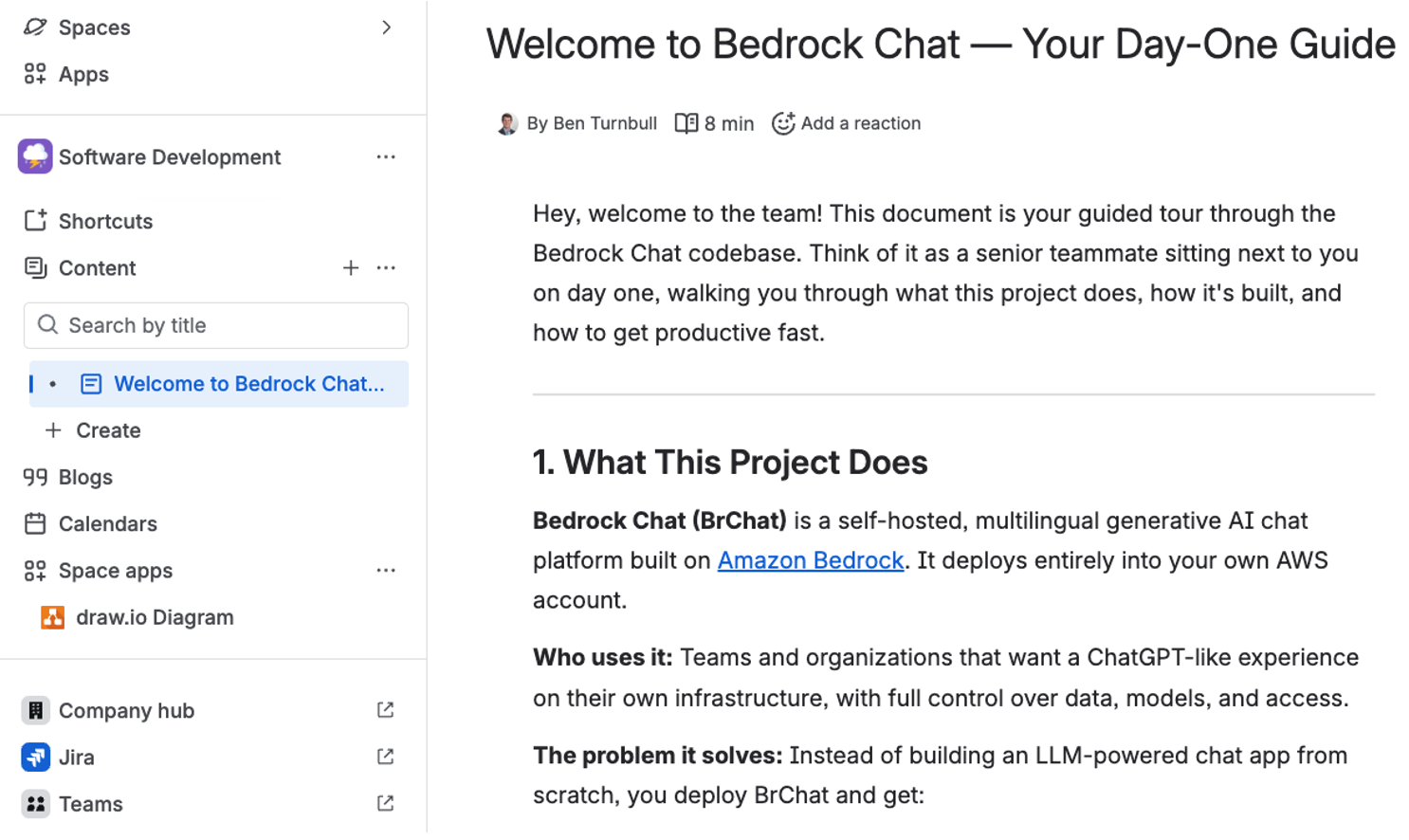
Figure 5: Confluence documentation published from the Kiro skill through the Atlassian MCP server
Keeping documentation up to date
Initial discovery is only half of the challenge. As your organization continues developing these systems, documentation must stay current to avoid the same knowledge gaps from resurfacing.
Agent hooks for documentation
Agent hooks execute predefined actions when specific events occur in your integrated development environment (IDE). For documentation, consider two approaches:
userTriggeredevent that updates docs on demand from a button clickfileEditedevent with tight path patterns that trigger updates when core files (such as API routes, components, or services) change
When a hook fires, Kiro can use your previously designed skill to automatically update your onboarding document, regenerate diagrams, and sync changes to Confluence, keeping your documentation current without manual effort.
Note: You’ll need to use the Kiro IDE to take advantage of agent hooks, which uses event signals from the IDE. As of this writing, hooks are currently unavailable if you’re using the Kiro command line interface (CLI).
Custom steering
Steering files also play a forward-looking role here. Beyond onboarding documentation, use custom steering files to encode your organization’s development standards and AWS best practices. When a new developer starts working on a feature, these files guide them toward consistent patterns and away from common pitfalls. The foundational steering files help people understand what exists today, and custom steering files help Kiro (and your team) build what comes next in alignment with your organizational standards.
Conclusion
For nonprofit teams, institutional knowledge shouldn’t depend on any single person. AI-assisted development tools such as Kiro make it possible for resource-constrained teams to rapidly document, explore, and enhance the applications they depend on. Automated discovery and documentation reduce onboarding time and close knowledge gaps that put mission-critical systems at risk, and MCP integration and steering files guide new features to follow best practices.
Ready to get started? Install Kiro and try it on one of your existing applications today. For organizations that want to assess and modernize legacy applications more broadly, explore AWS Transform to understand your full application portfolio and plan a path forward.
About the author