AWS Security Blog
Know the identity behind the role: Authorize and audit with trusted identity propagation
Today, AWS is making it easier to grant access and audit activity based on the user or workload (a non-human caller, such as an application, service, or an automated workflow) behind an AWS Identity and Access Management (IAM) role. Trusted identity propagation (TIP) carries the identity of the user or workload with each AWS request, so you can grant permissions to that user or workload and trace its actions in AWS CloudTrail. Until now, TIP was available only for users who access AWS through AWS IAM Identity Center. We’ve extended TIP to IAM federation and AWS IAM Roles Anywhere, making it work for users and workloads that federate directly into IAM roles or use X.509 certificates to obtain AWS credentials. We’ve also made TIP simpler to use with IAM Identity Center.
This post explains how TIP works and what’s new with this launch. It then shows two examples of how TIP improves auditability and access control based on the user or workload behind an IAM role. The post ends with how to get started depending on your preferred federation path into AWS.
How trusted identity propagation works
Customers have told us they want to control access to AWS resources and audit activity based on the user or workload behind an IAM role. Today, access control decisions apply to the role, and CloudTrail attributes each action to the role session. To give two users or workloads different access, you either create a separate role or share one role and write policies that check session attributes. Separate roles lead to role proliferation. Session attributes carry across role sessions only when you grant additional permissions, and the session doesn’t record who set each attribute.
TIP addresses this gap by attaching identity context from a trusted source, such as your identity provider (IdP), to the role session at the time of credential issuance. This identity context identifies the user or workload behind a request and can include optional claims for the session, such as a risk score or a continuous integration and delivery (CI/CD) workflow name. Trusted sources include external SAML or OIDC IdPs configured for IAM federation, IAM Identity Center, and X.509 certificates configured for IAM Roles Anywhere.
After AWS attaches identity context to a role session, the context can’t be changed for the lifetime of the session. This approach gives IAM policies and audit records a stable reference to the user or workload behind each request. The context also carries forward to supported downstream requests. When a TIP session (a role session that carries identity context) assumes another role, AWS Security Token Service (AWS STS) carries the context into the new role session. Similarly, when an AWS service makes a downstream request on your behalf, the request uses forward access sessions (FAS), and the FAS credentials carry the identity context from your session.
Note: TIP context propagates to a new role session only when the target role is in the account where the identity provider is configured, or if the target role is in another account in the same AWS organization. To learn how account and organization boundaries determine TIP context propagation, see Understand where TIP context propagates in the IAM User Guide.
Figure 1 shows how this flow works end-to-end. A user or workload obtains AWS credentials through one of three paths. With IAM federation, the source is a SAML assertion or OIDC token for a user or workload. With IAM Identity Center, the source is the username that IAM Identity Center receives from your identity source. With IAM Roles Anywhere, the source is an X.509 certificate for a user or workload. AWS validates the source and attaches identity context to the role session. That context stays with the session’s requests, whether the session calls an AWS service directly, assumes another role, or causes an AWS service to make downstream requests through FAS. IAM policies then evaluate the identity context to authorize requests, as the Amazon Simple Storage Service (Amazon S3) bucket policy example later in this post shows, and AWS CloudTrail records it, as the AWS Lambda example shows. With IAM outbound identity federation, the session can also request a signed JSON Web Token (JWT) that carries identity context to an external service.
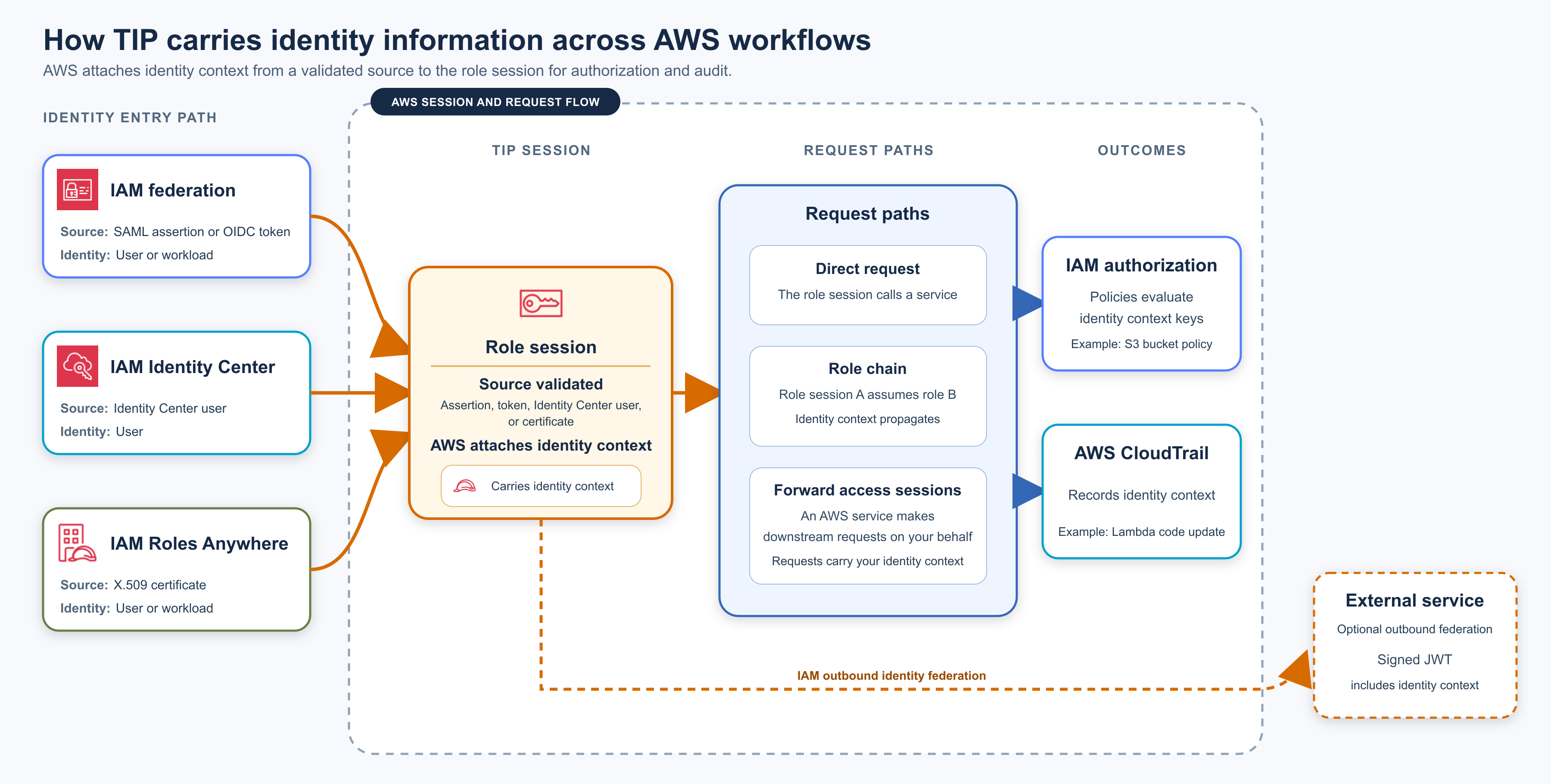
Figure 1: How TIP carries identity information into authorization and audit workflows
AWS represents the identity context carried in a TIP session through three groups of context keys. The following table summarizes their purpose and points to the corresponding documentation. For details about what these context keys contain and when they appear in a TIP session, see TIP context keys in IAM policies.
| Context keys | Purpose |
| aws:OriginIdentity/* | Identifies the user or workload that started the request and the source that issued its identity. |
| aws:TransactionContext/IdentityProvider/* | Carries optional claims from your IdP, such as a risk score or a CI/CD workflow name. Available only for IAM federation. |
| aws:IdentityCenterInstanceArn and aws:IdentityStoreArn | Identifies the IAM Identity Center instance and identity store behind a session. If you use IAM Identity Center permission sets or IAM account access manager, you can use these keys in IAM policy conditions. For example, you can allow access only to workforce users from a specific instance. |
Table 1: TIP context key categories and what they represent.
aws:OriginIdentity/* is the common namespace for identity information from IAM federation, IAM Identity Center, and IAM Roles Anywhere. Across all three paths, aws:OriginIdentity/Subject identifies the user or workload that started the request, aws:OriginIdentity/SubjectType indicates whether the request was started by a user or workload, and aws:OriginIdentity/Issuer identifies the source that issued the identity. For IAM federation and IAM Roles Anywhere, aws:OriginIdentity/FederatedProviderArn also contains the Amazon Resource Name ARN) of the IAM IdP or IAM Roles Anywhere trust anchor that authenticated the identity.
IAM policies can evaluate TIP context keys when those keys are present in the request. CloudTrail records identity context in the userIdentity element of events. The userIdentity.onBehalfOf section records the user or workload identity from aws:OriginIdentity context keys, and the userIdentity.transactionContext section records IdP claims from aws:TransactionContext/IdentityProvider context keys. For field definitions and examples see Logging TIP activity with AWS CloudTrail.
Key benefits of trusted identity propagation
TIP gives you the following benefits for authorizing and auditing access based on the user or workload behind an IAM role.
- Audit by identity, not only by role – CloudTrail records the user or workload behind each request.
- Authorize based on who’s asking – IAM policies can grant or restrict access based on the user or workload, or on optional claims from your IdP, such as a risk score. This gives you precise access control for each session.
- Rely on identity you can trust – AWS attaches identity context from a trusted source when it issues credentials. That context can’t be changed for the life of the session, and it carries forward when the session assumes another role or an AWS service makes requests on your behalf.
- Use one model across federation paths – IAM federation, IAM Identity Center, and IAM Roles Anywhere share the same core
aws:OriginIdentitycontext keys, so you write policies and review CloudTrail consistently across more than 250 supported AWS services. Across supported workflows, identity context propagates without adding thests:SetContextpermission to role trust policies.
What’s new with this launch
This launch extends TIP to IAM federation and IAM Roles Anywhere, and simplifies TIP in IAM Identity Center. You can also share identity context with services outside AWS through IAM outbound identity federation.
- AWS IAM Identity Center – TIP already allows AWS applications integrated with IAM Identity Center, such as AWS Lake Formation and Amazon S3 Access Grants, to audit user activity and control access based on the user’s identity. When you enable the simplified experience, Identity Center adds a username, an identifier from your identity source, alongside the system-generated identity store user ID. This identity information is carried consistently across all access paths, including application access, account access through IAM Identity Center permission sets, and IAM account access manager. With this launch, you can now use the propagated username, mapped to the
aws:OriginIdentity/Subjectcontext key, in IAM policy conditions and view it in CloudTrail events. For more information, see Simplified experience for trusted identity propagation. - IAM federation – For users and workloads that use direct SAML or OIDC federation into IAM roles, you choose the SAML assertion field or OIDC token claim that identifies the user or workload, and TIP attaches it to the role session. You can also map optional SAML attributes or OIDC claims, such as a risk score or a CI/CD workflow name, into
aws:TransactionContext/IdentityProvider/*context keys. TIP is turned on by default for new IAM IdPs, and you can turn it on for existing providers. For more information, see TIP for IAM Federation. - IAM Roles Anywhere – For users and workloads outside AWS that use X.509 certificates with IAM Roles Anywhere, TIP attaches the identity from the certificate to the role session. After IAM Roles Anywhere validates the certificate against the configured trust anchor, AWS sets
aws:OriginIdentity/Subjectto the certificate’s Subject common name by default, or to its URI Subject Alternative Name. TIP is turned on by default for new IAM Roles Anywhere profiles, and you can turn it on for existing profiles. For details, see Trusted identity propagation with IAM Roles Anywhere. - IAM outbound identity federation – A TIP session can now use the AWS STS GetWebIdentityToken API operation to request a signed JSON Web Toke that includes TIP session identity context for an external service. The external service validates the token and determines how to use the information. For details, see Federating AWS identities to external services.
Use identity context for auditability and access control
The following examples demonstrate two core benefits of TIP: auditability—tracing actions back to the user or workload—and access control based on that identity. In the first example, AnyCompany uses identity context logged in CloudTrail to identify the GitHub Actions workflow run that deployed new code to a production AWS Lambda function. In the second, AnyCompany uses an Amazon Simple Storage Service (Amazon S3) bucket policy that grants read access only to low-risk sessions initiated from a specific IdP.
Trace a Lambda deployment to its GitHub Actions run
This example shows how TIP improves auditability: identity context in CloudTrail identifies the workload, and the specific workflow run, behind an action taken with a shared role. AnyCompany stores the backend code for its payment-processing application in the anycompany/payments-api GitHub repository. A code change merged into the repository’s main branch triggers the GitHub Actions workflow defined in .github/workflows/deploy.yml. The workflow uses GitHub OIDC federation to assume a shared CICDDeployRole role, then calls the Lambda UpdateFunctionCode API operation to deploy the new code to the production payments-api-prod function. CloudTrail records this operation as an UpdateFunctionCode20150331v2 management event.
Before TIP, the CloudTrail event shows that the CICDDeployRole/GitHubActions role session updated payments-api-prod. It doesn’t identify the GitHub repository, workflow file, or workflow run that performed the update. Investigators must match the event timestamp with GitHub records to find the responsible workflow run.
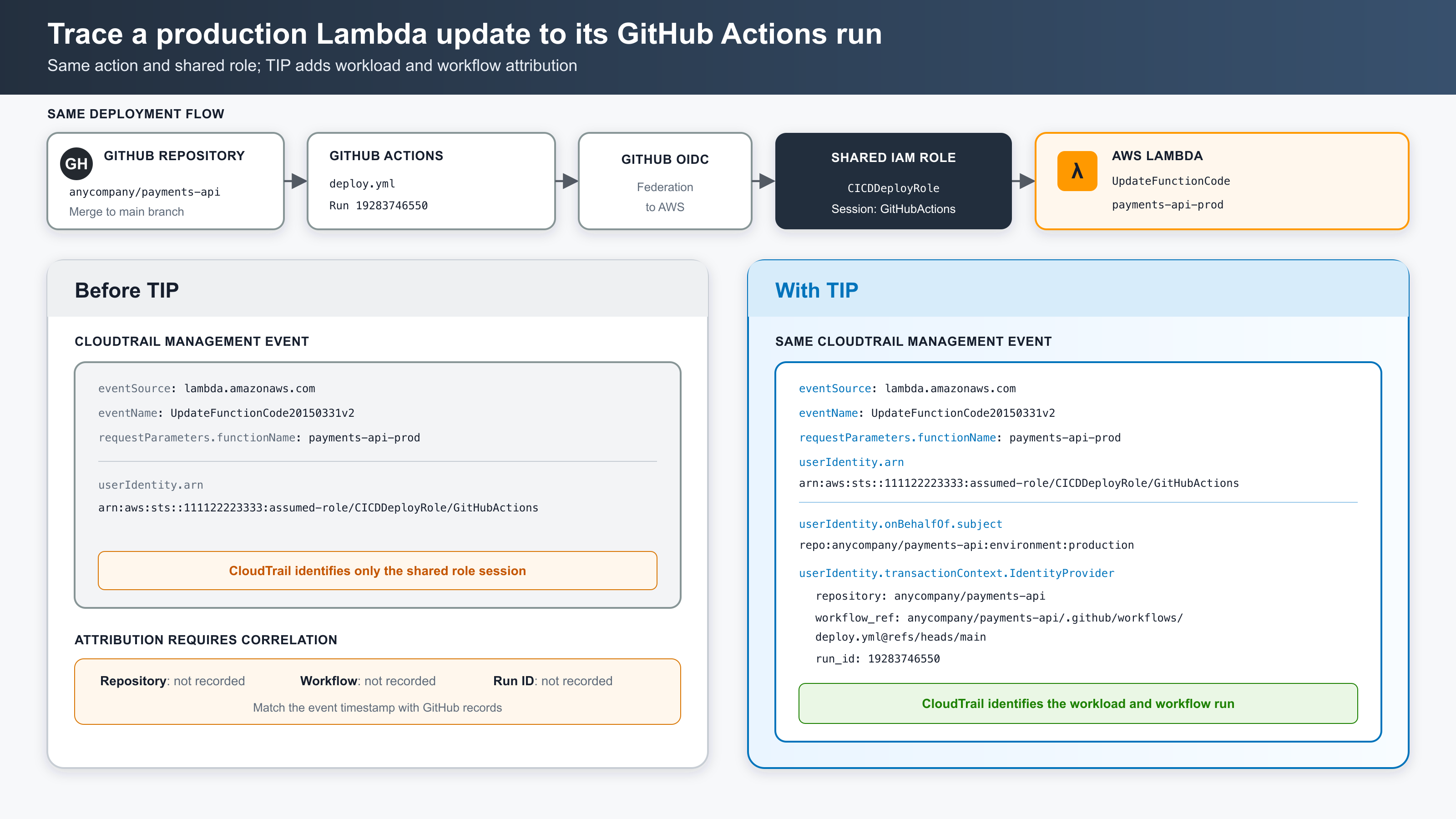
Figure 2: How TIP enables attribution of a production Lambda code update to the GitHub Actions run that performed it
AnyCompany enables TIP on its GitHub OIDC IdP. It maps the GitHub OIDC token subject to aws:OriginIdentity/Subject, configures aws:OriginIdentity/SubjectType as workload, and maps the repository, workflow_ref, and run_id claims into aws:TransactionContext/IdentityProvider/* context keys. The resulting role session identifies the workload and carries the information needed to trace the deployment to its GitHub Actions run.
With TIP, the CloudTrail management event for the Lambda UpdateFunctionCode API operation on payments-api-prod now contains the workload and workflow information:
An investigator can now see that GitHub Actions run 19283746550 from the anycompany/payments-api repository updated the production payments-api-prod function through the deploy.yml workflow. The shared role, its trust policy, and its permissions remain unchanged. TIP adds workload and workflow attribution to the existing deployment model.
Authorize access based on session risk
This example shows how TIP supports access control: an Amazon S3 bucket policy uses a runtime risk signal from an IdP to decide, per session, whether a user of a shared role can read sensitive data. AnyCompany’s workforce users federate to AWS through an OIDC IdP and use a shared DataAccessRole to read objects from an Amazon S3 bucket. AnyCompany configures its IdP to evaluate each authentication and add a numeric risk score, from 0 to 100, to the OIDC token as a custom claim. AnyCompany enables TIP on the IAM OIDC IdP and maps the riskScore claim to the aws:TransactionContext/IdentityProvider/riskScore context key. During federation, AWS validates the token and attaches the mapped riskScore value to the role session. AWS derives aws:OriginIdentity/Issuer from the iss (issuer) claim in the OIDC token.
Before TIP, a bucket policy that grants access to DataAccessRole gives every user who assumes the role the same access, regardless of how risky their authentication was. With TIP, an S3 bucket policy can evaluate both the IdP that issued the token and the risk score carried in the session. The following policy grants read access only when the expected IdP (issuer) issued the identity, and the current session has a risk score of 30 or lower. The issuer condition prevents a riskScore value from another IdP from satisfying the policy.
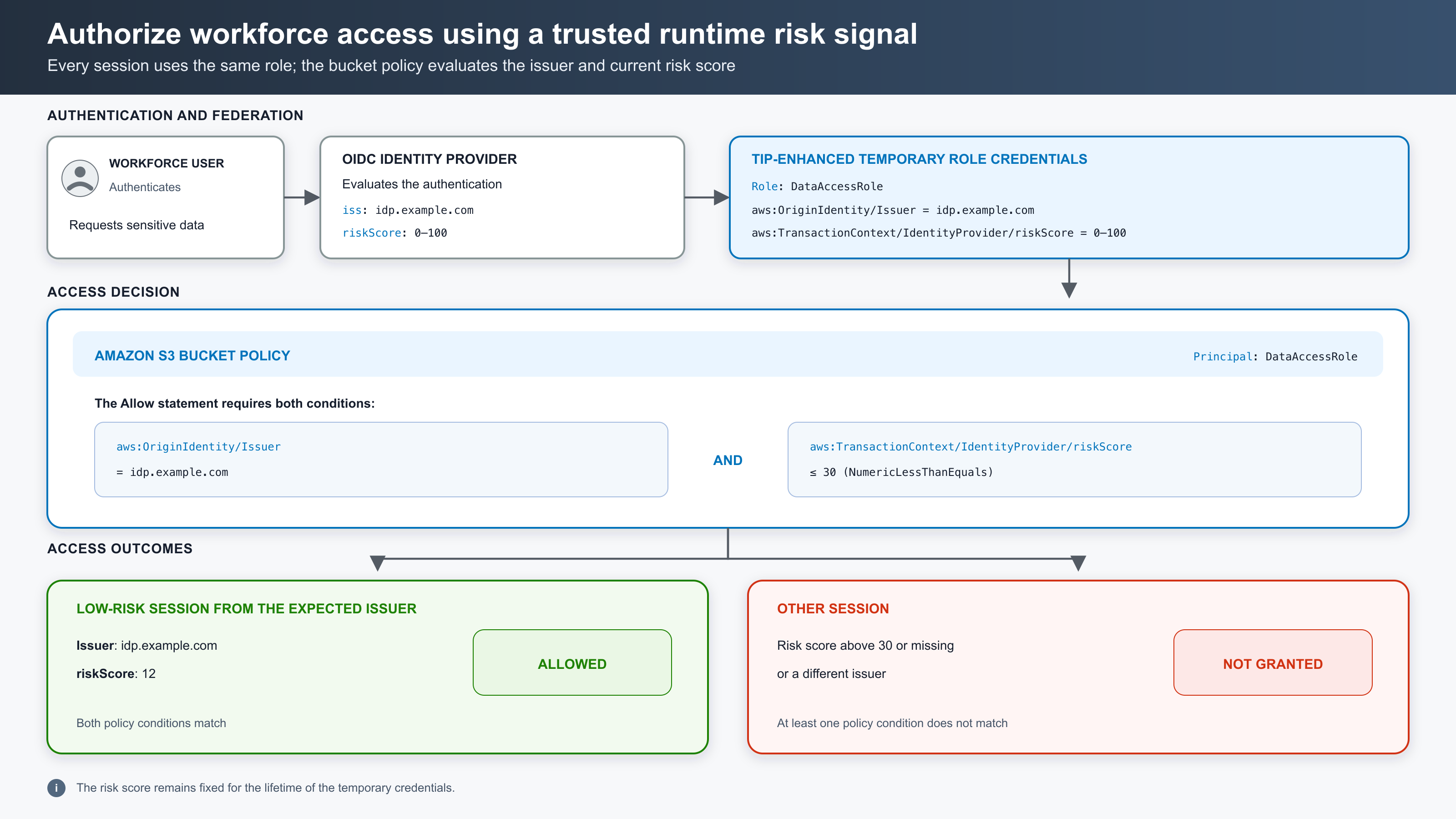
Figure 3: How an S3 bucket policy uses trusted identity context to make a per-session access decision
Note: This policy example is for the IAM federation access path. Mapping SAML attributes or OIDC claims to optional
aws:TransactionContext/IdentityProvider/*context keys is available only for IAM federation.
Amazon S3 bucket policy using trusted runtime context
The policy has two conditions: the identity must come from idp.example.com, and the session’s risk score must be 30 or lower. A low-risk session from idp.example.com satisfies both conditions. A session with a risk score above 30, a missing risk score, or a different issuer doesn’t receive access from this policy. The risk score remains fixed for the lifetime of the role session, so choose a session duration appropriate for the sensitivity of the access.
Additional considerations
Missing TIP context keys. A TIP context key is missing when the session carries no identity context or the request goes to an AWS service that doesn’t support TIP. To prevent an Allow statement from granting access when a required key is missing, use operators without IfExists, such as StringEquals or NumericLessThanEquals, as the preceding bucket policy does. Avoid operators such as StringEqualsIfExists in an Allow statement because they evaluate to true when the key is missing. In a Deny statement, add IfExists when the Deny should also apply if the key is missing. Such a Deny also applies to requests sent to AWS services that don’t support TIP, so confirm service support before adding TIP conditions. For more information, see Condition operators.
TIP conditions with cached AWS KMS data keys. Some AWS services, such as Amazon SQS, reuse cached AWS KMS data keys across requests from different sessions of the same IAM role, because the cache key is based on the role and does not include TIP context. When an AWS service reuses a cached data key, it does not send a new authorization request to AWS KMS, so AWS KMS does not evaluate the later session’s TIP context. If you use TIP context to control access to encrypted data, enforce the TIP conditions in the policy for the encrypted resource, such as an Amazon S3 bucket policy, rather than relying only on the AWS KMS key policy. For more information, see AWS KMS guidance for cached data keys.
Choose your TIP approach and get started
Your first step to getting started with TIP depends on how your users and workloads obtain AWS credentials. Use the following table to find the TIP option for your use case and get started.
| Use case | TIP option | How to start |
| Centrally managed workforce access | IAM Identity Center | All IAM Identity Center instances can upgrade to the simplified experience for TIP. Before you upgrade, review the considerations for the simplified experience. For more information, see Simplified experience for trusted identity propagation. |
| Direct SAML or OIDC federation into IAM roles | IAM federation | New IAM IdPs have TIP turned on by default. For an existing IdP, turn on TIP on that provider, then map the claim that identifies the user or workload, and any optional claims your policies need, to TIP context keys. For more information see TIP for IAM Federation. |
| X.509-based access for users and workloads outside AWS | IAM Roles Anywhere | New profiles have TIP turned on by default. For an existing profile, enable TIP on the profile. For details, see Trusted identity propagation with IAM Roles Anywhere. |
Conclusion
With this launch, TIP carries the identity of the user or workload from a trusted identity source into the role session for IAM federation, IAM Identity Center, and IAM Roles Anywhere. You can grant access based on the user or workload making the request and use CloudTrail to trace actions across more than 250 supported AWS services back to that identity. This gives you a consistent authorization and audit model across federation paths, without creating a separate role for every identity or adding the sts:SetContext permission to role trust policies.
To get started, find your federation path in the preceding table and follow the steps in the How to start column.
If you have questions about this post, contact AWS Support or start a new thread on AWS re:Post.