AWS Security Blog
Transforming Bedrock Guardrails events into OCSF with CloudWatch
Security teams investigating possible AI-related security events need guardrail intervention data alongside their existing security telemetry. When a guardrail identifies or blocks a prompt injection attempt or redacts sensitive data, that intervention carries additional investigative value comparable to a failed sign-in or a network intrusion alert. AWS Bedrock publishes this telemetry to AWS CloudWatch metrics and model invocation logs for operational monitoring.
In this post, I show you how to transform AWS Bedrock Guardrails intervention events into structured Open Cybersecurity Schema Framework (OCSF) Detection Finding records and land them in the CloudWatch unified data store. Launched in December 2025, the unified data store consolidates operational, security, and compliance data from AWS services and third-party sources into a single platform. Security operations center (SOC) and threat analysts can query guardrail events alongside identity, network, and endpoint data, including AWS CloudTrail and AWS Virtual Private Cloud (AWS VPC) Flow Logs, using AWS Athena or CloudWatch Logs Insights.
Use case
Consider an organization deploying AWS Bedrock across many applications, with guardrails applied as a governance control. The guardrails detect and block several categories of activity: harmful content, off-topic queries, sensitive information such as personally identifiable information (PII), and prompt injection attempts. Each time a guardrail intervenes, it produces a signal the security team wants to investigate alongside the rest of its telemetry.
Without a consolidation layer, guardrail interventions stay siloed as per-AWS Region CloudWatch metrics and entries in raw model invocation logs, separate from the identity, network, and audit data the security team already relies on. The CloudWatch unified data store is built to remove this kind of silo: it consolidates operational and security data across accounts and Regions into one store. Routing normalized guardrail records into it is what makes them correlatable with the rest of your security telemetry. To investigate effectively, the team needs to answer questions that span multiple data sources:
- Identify which user accounts trigger the most guardrail interventions, and whether those same accounts also show unusual AWS Identity and Access Management (IAM) activity such as failed API calls or privilege changes. A spike in prompt injection blocks from a role that’s also generating access-denied events is a stronger signal than either on its own.
- Determine whether prompt injection attempts correlate with specific source IP addresses that also appear in VPC Flow Logs, which helps distinguish a single misbehaving client from a coordinated pattern across the environment.
- Track the trend of guardrail violations across the organization and compare it against a baseline from 30 days ago, so the team can tell routine policy noise apart from an emerging change in attacker behavior or a misconfigured application.
AWS GuardDuty already helps here: its AI Protection feature analyzes CloudTrail data events from AWS Bedrock and produces managed threat findings, including a direct prompt injection finding and anomalous model invocation findings. GuardDuty AI Protection is a complementary managed detection layer for AWS Bedrock activity. The pipeline in this post works alongside it: it captures the raw guardrail intervention records themselves, normalizes them to OCSF, and lands them in the unified data store so you can run your own cross-source correlation and long-term trend analysis alongside GuardDuty findings, CloudTrail, and VPC Flow Logs.
Guardrail traces arrive as JSON embedded in the AWS Bedrock model invocation logs, in an AWS Bedrock-specific shape rather than a normalized security schema. After the pipeline transforms them to OCSF and ingests them into the CloudWatch unified data store, a single Athena query answers all three questions, because guardrail findings then share the same field structure as other security sources and sit in the same catalog as AWS CloudTrail events and VPC Flow Logs.
Solution overview
At a high level, the solution captures guardrail intervention events from AWS Bedrock model invocation logs, transforms them into OCSF Detection Finding records with an AWS Lambda function, and lands them in the CloudWatch unified data store, where SOC analysts query them with Athena or CloudWatch Logs Insights. The CloudWatch unified data store provides Apache Iceberg-compatible access through AWS S3 Tables, CloudWatch Logs Insights queries, and, for supported sources, built-in OCSF normalization at ingestion.
Why a custom transform step
CloudWatch offers native OCSF conversion through the ParseToOCSF log transformation processor for specific AWS log sources. As of this writing, that processor supports five AWS log sources: CloudTrail, AWS Route 53 Resolver, VPC Flow Logs, AWS EKS audit logs, and AWS WAF. AWS Bedrock Guardrails isn’t one of the sources that ParseToOCSF supports, so guardrail traces aren’t converted to OCSF automatically.
Guardrail traces also need transformation logic that ingestion-time processors don’t provide. A single model invocation log can contain multiple guardrail assessments (for example, a content policy filter and a sensitive information policy match in one request), and the transform step splits that one log entry into one OCSF Detection Finding per assessment rather than a single combined record. This one-to-many expansion, combined with conditional severity assignment based on policy type, is application logic rather than field normalization. For these two reasons, this solution uses a dedicated transform step to produce OCSF records, then uses built-in CloudWatch mechanisms for enrichment, storage, centralization, and query.
This solution captures AWS Bedrock model invocation logs containing guardrail trace data, filters for intervention events, transforms them into OCSF Detection Finding records (class_uid 2004), and writes the structured records to a CloudWatch Logs log group that is associated with AWS S3 Tables through the CloudWatch unified data store managed integration. Guardrail interventions are detection events: the guardrail detected and blocked prohibited content, so OCSF class 2004 (Detection Finding) under the Findings category is the appropriate classification.
How a source’s records are stored depends on whether it’s a vended source or a custom source. For the five vended sources that ParseToOCSF supports, the unified data store produces individual typed OCSF columns. For any custom source, including AWS Bedrock Guardrails in this solution, records land in the associated S3 Tables table as OCSF JSON in a single managed cwl__message column rather than as typed columns. This is a property of custom sources in general, not specific to AWS Bedrock. You read the OCSF fields at query time with Athena json_extract functions, and you can correlate them with the vended sources that share the same catalog. This post shows that query pattern.
The pipeline supports multiple AWS Bedrock event types by changing the filter pattern and OCSF mapping. This post demonstrates the guardrail interventions row:
| Bedrock event source | OCSF event class | class_uid |
| Guardrail interventions (this post) | DETECTION_FINDING | 2004 |
| Model invocation API calls | API_ACTIVITY | 6003 |
| Agent guardrail traces | DETECTION_FINDING | 2004 |
| Token consumption anomalies | DETECTION_FINDING | 2004 |
Architecture
The following diagram shows the end-to-end pipeline from guardrail intervention to CloudWatch unified data store ingestion. It shows the flow within a single account for clarity. In an organization, you deploy this transform pipeline in each workload account and use CloudWatch Logs centralization to bring the OCSF output into one central account, so you query organization-wide without standing up the query layer per account or per Region. The Multi-account deployment section later in this post covers this pattern.
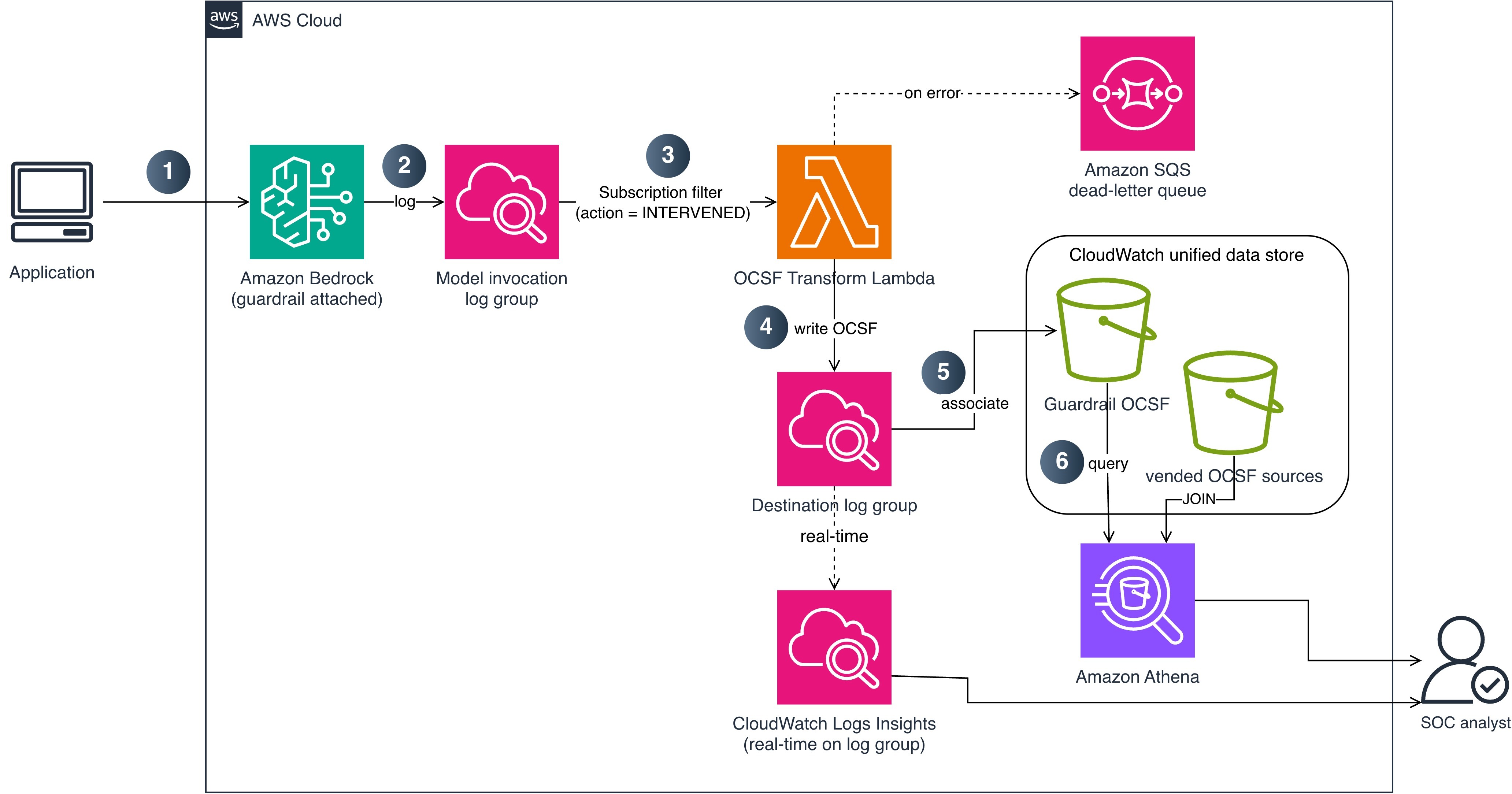
Figure 1: End-to-end pipeline from guardrail intervention to CloudWatch unified data store ingestion
The data flow consists of the following steps:
- An application calls AWS Bedrock (
InvokeModelor Converse API) with a guardrail attached. - AWS Bedrock evaluates the guardrail and logs the invocation, including guardrail trace data, to a CloudWatch Logs log group using model invocation logging. A subscription filter matches log entries where the guardrail action is INTERVENED (blocked or masked content).
- The subscription filter delivers matching records to a Lambda function (OCSF Transform). This step performs the custom transformation that native OCSF conversion doesn’t cover for AWS Bedrock, expanding each guardrail assessment into its own OCSF Detection Finding.
- The Lambda function writes the OCSF JSON records to a dedicated CloudWatch Logs log group and sets contextual fields (account ID and Region) on each record during transformation. If the Lambda function fails to process a record, the message routes to an AWS Simple Queue Service (AWS SQS) dead-letter queue for later analysis and redrive.
- The destination log group is associated with AWS S3 Tables through the CloudWatch unified data store managed integration, so the unified data store stores the OCSF records as an Apache Iceberg table. Because AWS Bedrock Guardrails is a custom source, each record is stored as OCSF JSON in a managed
cwl__messagecolumn. - SOC analysts query guardrail intervention data with Athena, using
json_extractto read the OCSF fields, and correlate it with vended security sources (CloudTrail, VPC Flow Logs) that share the same catalog. For real-time operational queries, analysts can also query the destination log group directly with CloudWatch Logs Insights.
OCSF mapping
The following table shows how AWS Bedrock Guardrails intervention fields map to OCSF Detection Finding (class_uid 2004) attributes.
| OCSF field | Source | Example value |
class_uid |
Static | 2004 (Detection Finding) |
category_uid |
Static | 2 (Findings) |
severity_id |
Derived from policy type | 3 (Medium) for content/topic; 4 (High) for prompt injection |
activity_id |
Static | 1 (Create) |
time |
Invocation log timestamp |
1721001600000 |
cloud.provider |
Static | AWS |
cloud.region |
Set by the transform function | us-east-1 |
cloud.account.uid |
Set by the transform function | 123456789012 |
actor.user.uid |
Invocation log identity.arn |
arn:aws:sts::123456789012:assumed-role/AppRole/session |
finding_info.title |
Derived from policy type | ContentPolicy Intervention |
finding_info.desc |
Guardrail trace action/topic | Blocked: HATE content detected on INPUT |
resource.uid |
Model ARN | arn:aws:bedrock:us-east-1::foundation-model/anthropic.claude-sonnet-4-20250514-v1:0 |
resource.type |
Static | AwsBedrock:Model |
metadata.product.name |
Static | Amazon Bedrock Guardrails |
metadata.product.vendor_name |
Static | AWS |
metadata.version |
Static | 1.3.0 |
unmapped.guardrail_id |
Guardrail trace guardrailId |
my-content-guardrail |
unmapped.guardrail_arn |
Guardrail trace guardrailArn |
arn:aws:bedrock:us-east-1:123456789012:guardrail/abc123 |
unmapped.guardrail_version |
Guardrail trace guardrailVersion |
3 |
unmapped.guardrail_content_source |
Guardrail trace | INPUT or OUTPUT |
unmapped.guardrail_policy_type |
Guardrail trace | ContentPolicy, TopicPolicy, SensitiveInformationPolicy, WordPolicy, ContextualGroundingPolicy, PromptAttack |
Prerequisites
The following prerequisites are needed to deploy the reference implementation. Before you begin, clone the repository:
Verify you have the following:
- An AWS account with AWS Cloud Development Kit (AWS CDK) bootstrapped in the target Region
- Python 3.12 or later
- Node.js 20 or later (for AWS CDK CLI)
- An existing AWS Bedrock guardrail (or create one during deployment)
- Model invocation logging enabled on AWS Bedrock (with guardrail trace data enabled)
- The target Region must support the CloudWatch unified data store and AWS S3 Tables integration (see the CloudWatch pipelines Regional availability)
Implementation
The reference implementation deploys two CloudFormation stacks: TransformPipelineStack and MonitoringStack. The following commands deploy the stacks in dependency order:
Or deploy both stacks at once:
Enable model invocation logging
Model invocation logging captures the guardrail trace data you need. Turn on full request and response logging to a CloudWatch Logs log group and configure textDataDeliveryEnabled to capture the text bodies that include the guardrail trace output when a guardrail is attached to the invocation. The following AWS Command Line Interface (AWS CLI) command enables it:
Because logging is an account-level prerequisite rather than part of the pipeline, the CDK stacks don’t manage it. Enable it once for each account before deploying.
Deploying the transform pipeline
The TransformPipelineStack deploys the Lambda function, subscription filter, destination log group, and dead-letter queue.
- Create the subscription filter: The stack creates a CloudWatch Logs subscription filter on your model invocation log group with a filter pattern that matches guardrail interventions. This captures only the events where a guardrail blocked or modified content, not the successful pass-through events, which reduces Lambda invocations and cost.
- Transform to OCSF: The Lambda function parses each CloudWatch Logs event and produces one OCSF Detection Finding record (
class_uid 2004) per guardrail assessment in the trace. The transformation maps guardrail trace fields to OCSF attributes as described in the OCSF mapping table and sets contextual fields such as account ID and Region. Severity is set toHighfor prompt injection interventions andMediumfor content, topic, or sensitive information interventions. The records contain structural metadata only; no prompt or response content is included. - Dead-letter queue: If the Lambda function fails to process a record, the message routes to an AWS SQS dead-letter queue with error metadata (error type, message, timestamp) for investigation and redrive.
Configure S3 Tables integration
To make the OCSF records queryable through Athena, associate the destination log group with AWS S3 Tables. This is a two-step managed setup: create an S3 Tables integration, then associate the log group as a data source. The integration delivers to the managed aws-cloudwatch table bucket at no additional storage charge.
- Tag the destination log group so the unified data store recognizes it as a data source. Use the tags
cw:datasource:name(for example,bedrock_guardrails) andcw:datasource:type(for example,ocsf). The generated table name joins the two tag values with a double underscore, so these example tags produce a table namedbedrock_guardrails__ocsf. - Create the integration with CreateS3TableIntegration (CloudWatch Observability Admin), supplying an encryption configuration and an IAM role. This returns an integration AWS Resource Name (ARN).
- Associate the data source with
AssociateSourceToS3TableIntegration(CloudWatch Logs), passing the integration ARN and thedataSourcename and type from step 1.
The reference implementation performs steps 2 and 3 with the CloudFormation resource AWS::ObservabilityAdmin::S3TableIntegration and a custom resource that calls AssociateSourceToS3TableIntegration, so cdk deploy sets up the association for you.
After association, the OCSF records become available as an Apache Iceberg table in the managed catalog, at the path "s3tablescatalog/aws-cloudwatch"."logs"."bedrock_guardrails__ocsf". You can query it with Athena, AWS Redshift, or any Iceberg-compatible tool.
As noted in the solution overview, AWS Bedrock Guardrails is a custom source, so each record is stored as OCSF JSON in a managed cwl__message column. You read the fields at query time with the Athena json_extract_scalar function, as shown in the next section, and correlate against vended sources such as CloudTrail in the same catalog.
Enable analytics access
The association delivers records to the managed table, but analytics engines can’t read them until you enable the AWS S3 Tables analytics integration and grant read permissions. Complete these steps once in each Region:
- In the AWS S3 console, choose Table buckets, then choose Enable integration. The first time you do this in a Region, AWS S3 creates a service role that lets AWS Lake Formation federate access to your tables in the AWS Glue Data Catalog. This is what makes the
s3tablescatalogcatalog visible to Athena. - In the Lake Formation console, under Data lake permissions, choose Grant, and grant Select and Describe on the
aws-cloudwatchtable bucket (and thebedrock_guardrails__ocsftable) to each IAM principal that runs queries, such as your SOC analyst roles. Without this grant, Athena queries return an access denied error even when the IAM policy allows Athena. - In the Athena query editor, choose the AWS S3 Tables catalog from the data source list, and select the logs database.
Deploy the monitoring stack
The MonitoringStack creates a CloudWatch dashboard and alarms for pipeline health. The dashboard includes widgets for intervention count by policy type, transform errors, Lambda duration, and dead-letter queue depth. Alarms notify your team when the error rate exceeds 5 percent, the dead-letter queue depth exceeds 0, or p99 Lambda duration exceeds 10 seconds. Notifications are sent through AWS Simple Notification Service (AWS SNS).
Query interventions
After deployment, guardrail interventions are available through two query paths. Use the one that matches your investigation:
- Athena (through AWS S3 Tables) for cross-source correlation and historical analysis. Athena joins the OCSF guardrail records with vended OCSF sources in the unified data store (such as CloudTrail and VPC Flow Logs) over long time ranges. Because AWS Bedrock Guardrails is a custom source, its OCSF fields live inside the
cwl__messagecolumn, so you read them withjson_extract_scalar. Use Athena when you need to join guardrail findings against other security data or run trend analysis across weeks or months. - CloudWatch Logs Insights for real-time, operational queries against the destination log group. Use Logs Insights when you need results in seconds on recent data, without a table join, such as during an active investigation.
The Athena queries in this section run against the managed table "s3tablescatalog/aws-cloudwatch"."logs"."bedrock_guardrails__ocsf". For readability, the examples reference it as bedrock_guardrails_ocsf after selecting the s3tablescatalog/aws-cloudwatch catalog and logs database in the Athena query editor.
Correlate with IAM activity in Athena
The following example identifies users who trigger both prompt injection interventions and failed CloudTrail activity. The guardrail side extracts fields from cwl__message; the CloudTrail side is a vended source with typed OCSF columns.
You can also track violation trends by policy type over time to establish baselines and detect spikes:
If you run these correlation queries frequently, you can materialize the extracted OCSF fields into a typed table with CREATE TABLE AS SELECT (CTAS) and refresh it on a schedule. Queries against the materialized table use plain column names instead of json_extract_scalar, which keeps recurring dashboards and joins concise.
Real-time queries in CloudWatch Logs Insights
For operational queries on recent data without a table join, query the destination log group directly in CloudWatch Logs Insights:
This query returns results in seconds on recently ingested records.
Multi-account deployment
For organizations running AWS Bedrock across multiple accounts, the recommended pattern is to transform locally and centralize the OCSF output, rather than replicating raw invocation logs and transforming centrally.
Deploy the subscription filter and transform pipeline in each workload account where model invocation logging is enabled. Each account produces OCSF records in its own destination log group. Then use CloudWatch Logs centralization to replicate those OCSF records into a central logging account automatically. Centralization integrates with AWS Organizations and picks up new accounts as they join, and you create the AWS S3 Tables integration one time in the central account (rather than in every workload account) for organization-wide querying.
Transforming in each workload account keeps the guardrail trace parsing close to the source, avoids moving raw invocation logs (which might contain prompt and response text) across account boundaries, and centralizes only the sanitized OCSF findings. If your organization prefers to keep transformation logic in one place, an alternative is to centralize the raw invocation logs first and run a single transform pipeline in the logging account; this concentrates the parsing logic but moves more data, including request and response content, between accounts.
Clean up
To avoid ongoing charges, destroy the stacks in reverse dependency order:
Conclusion
In this post, you learned how to transform AWS Bedrock Guardrails intervention events into OCSF Detection Finding records and ingest them into the CloudWatch unified data store. This integration gives SOC teams structured guardrail telemetry that correlates with CloudTrail, VPC Flow Logs, and the other security sources already available in CloudWatch. Because guardrail interventions are a custom source, their OCSF fields are stored as JSON and read with Athena json_extract functions, so you can join them with the vended OCSF sources that share the same catalog.
The pipeline filters for intervention events only, which keeps costs low while capturing the security-relevant signals. Athena over AWS S3 Tables provides cross-source correlation and historical analysis, and CloudWatch Logs Insights provides real-time operational queries.
Clone the reference implementation and adapt the OCSF mapping and subscription filter to your guardrail configuration. To extend the pipeline, apply the same transform pattern to agent guardrail traces, which map to the same OCSF Detection Finding class.
References
- AWS Bedrock Guardrails
- AWS CloudWatch unified data and telemetry
- Transform logs during ingestion
- ParseToOCSF processor
- AssociateSourceToS3TableIntegration
- AWS Bedrock model invocation logging
- Monitor AWS Bedrock Guardrails using CloudWatch metrics
- OCSF Detection Finding (class_uid 2004)
- CloudWatch Logs centralization
If you have feedback about this post, submit comments in the Comments section below.