AWS Storage Blog
Hybrid ML inferencing on Amazon EKS with Amazon FSx for NetApp ONTAP and on-premises NetApp
Machine learning (ML) models used for inference on Kubernetes are often several gigabytes in size. When these models are embedded in container images, images become oversized and pod scheduling slows. More critically, inference pods are inherently stateful. Model weights, tokenizer files, compiled GPU kernels, and runtime caches must persist across pod restarts, node failures, and scaling events. Without persistent, shared storage, every new pod re-downloads or recomputes these artifacts, turning fast scale-out into a minutes-long cold start. Organizations that train models on premises face an additional challenge. They need to deploy trained models to the cloud reliably and incrementally, without manual transfers or complex pipeline orchestration.
Amazon FSx for NetApp ONTAP is fully managed shared storage built on NetApp’s ONTAP storage operating system. It integrates with Amazon Elastic Kubernetes Service (Amazon EKS) through the Trident CSI driver, providing persistent shared volumes that pods across nodes can mount. This post provides guidance on solving the stateful inference problem with FSx for ONTAP on Amazon EKS. You will learn how to serve ML models from a single shared volume, replicate on-premises trained models from NetApp storage using NetApp SnapMirror, and automate volume provisioning with Trident as part of your Kubernetes workflow. As a working example, we use a fine-tuned Qwen2.5-1.5B model that classifies emails as safe or phishing, served with vLLM on an NVIDIA L4 GPU with model weights and compiled CUDA kernels cached on an FSx for ONTAP volume. The GitHub repository provides a deployable solution with Terraform for infrastructure provisioning (EKS cluster, FSx for ONTAP, Karpenter node pools, AWS Identity and Access Management (IAM), and Trident), Kubernetes manifests for the inference service, and automated benchmark scripts measuring cold start vs. warm start performance.
Why ML inference needs persistent shared storage
Storage decisions shape how well ML inference runs on Kubernetes. Inference workloads are stateful-model weights, tokenizer files, compiled GPU kernels, and runtime caches must outlive any individual pod. Three requirements matter most:
- Persistence – Without shared persistent storage, new pods re-download gigabytes of artifacts on startup, turning fast scaling into minutes-long cold starts. FSx for ONTAP provides a single shared copy that pods mount instantly, preserving state across the pod lifecycle.
- Shared access – During horizontal scaling, new pods must serve immediately using existing state, not rebuild it. FSx for ONTAP volumes, exposed through the Trident CSI driver, give nodes a shared mount into the same storage layer.
- Availability – Stateful inference can’t tolerate storage outages. FSx for ONTAP supports Multi-AZ deployments with automatic failover, keeping model artifacts accessible even during an Availability Zone failure.
Solution overview
In an end-to-end ML lifecycle process, after ML data processing and model development is complete, the model artifacts are published for deployment and monitoring. In this solution, trained artifacts are stored into two destinations: Amazon Simple Storage Service (Amazon S3) as the durable golden copy, and the FSx for ONTAP volume for fast inference access. Figure 1 illustrates this architecture.
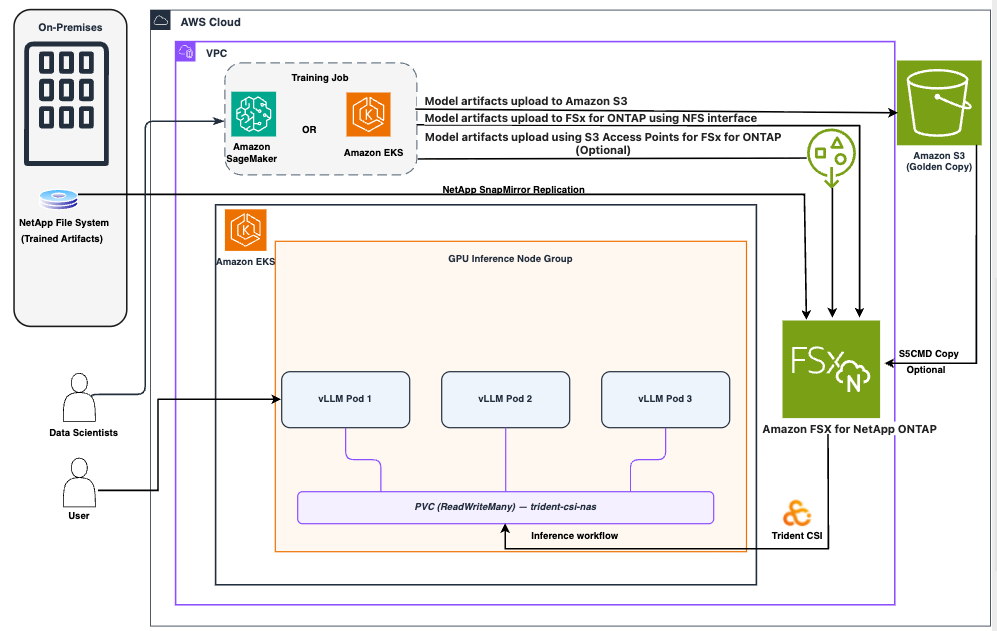
Figure 1: FSx for ONTAP model caching architecture
After fine-tuning is complete, whether on Amazon SageMaker, on premises, or Amazon EKS, the output is a set of model artifacts: weights, tokenizer, and config. As shown in Figure 1, these files go to two places. First, a versioned S3 prefix (s3://<bucket>/<model>/<version>/) serves as the golden copy for rollback, auditing, and compliance. Second, the same files are written to the FSx for ONTAP volume, either directly using NFS from the training pipeline or synced from S3 using s5cmd if NFS access isn’t available.
When the model is on FSx for ONTAP, inference pods mount the volume as a read-only PersistentVolume through the Trident CSI driver.
Alternatively, with S3 Access Points for FSx for NetApp ONTAP, S3 integrated services can read from and write to FSx for ONTAP volumes directly through the S3 API, without NFS connectivity or data duplication. Your file data continues to reside on the FSx for ONTAP volume and remains accessible through NFS and SMB to inference pods, while simultaneously being available to AWS services that work with S3 Access Points. This dual-protocol access means a single FSx for ONTAP volume can serve both as the publish target from your training pipeline (through S3 PUT) and as the shared mount for your inference fleet (through NFS), simplifying the end-to-end model delivery workflow.
Prerequisites
Before deploying this solution, you need to have the following:
- An active AWS account with permissions to create EKS clusters, FSx for ONTAP file systems, and IAM roles.
- AWS CLI installed and configured locally.
- kubectl installed.
- Terraform v1.0+ installed.
- Helm v3 installed (for Trident Operator deployment).
- Git installed (to clone the solution repository).
- Available NVIDIA GPU-backed instance quota (g5 or g6 family) in your target region.
The benefits of FSx for ONTAP for ML model caching
Earlier, we identified three challenges: eliminating cold starts from stateful inference pods, replicating on-premises models to the cloud, and automating storage provisioning with Amazon EKS. Here is how FSx for ONTAP solves each of these.
Single model copy with persistent shared storage
Inference pods mount the same FSx for ONTAP volume, where a single copy of the model (weights, tokenizer, config, and compiled GPU kernels) is stored. When pods restart, crash, get evicted, or scale out, the model is already there. There is no init container downloading weights, no sidecar syncing from S3, and no race condition between pods competing to populate a local cache. Pod startup skips the download phase entirely; horizontal scaling becomes near-instant because new pods serve traffic as soon as the model loads into GPU memory, and crash recovery is predictable because every pod reads from the same persistent volume. Rolling updates for framework upgrades (for example, a new vLLM version) are also faster because the model is already cached. Model storage is persistent, shared, and independently managed.
Multi-AZ resilience
FSx for ONTAP supports Multi-AZ deployments. Multi-AZ deployments synchronously replicate data across two Availability Zones and fail over automatically, so model artifacts stay accessible even during an Availability Zone failure.
NetApp SnapMirror: Bring on-premises models to FSx for ONTAP
Many organizations train models on premises because of data residency requirements, existing GPU clusters, specialized hardware like InfiniBand-connected nodes, or regulatory constraints that prevent training data from leaving the datacenter. NetApp SnapMirror provides a direct, block-level replication path from an on-premises ONTAP system to the FSx for ONTAP volume in your AWS virtual Private Cloud (VPC). After it’s configured, NetApp SnapMirror replicates model artifacts—weights, tokenizer, config files—from the on-premises training environment directly to FSx for ONTAP without intermediate steps through S3 or manual file transfers. This enables a clean hybrid architecture: train where your data lives (on premises), serve where your users are (AWS). NetApp SnapMirror also supports disaster recovery (DR) scenarios if your primary serving AWS Region is unavailable—you can fail over to a DR Region where NetApp SnapMirror has already replicated the model volumes.
Trident CSI: Kubernetes-native provisioning and data protection
The Trident CSI driver makes FSx for ONTAP a first-class Kubernetes storage resource. It translates Kubernetes storage primitives—StorageClasses, PersistentVolumeClaims (PVCs), VolumeSnapshots—into ONTAP operations. When you create a PVC, Trident provisions a volume on FSx for ONTAP automatically. When you create a VolumeSnapshot, Trident takes an ONTAP snapshot—a space-efficient, point-in-time copy that costs almost nothing until data diverges. This means Kubernetes data protection with no external tooling. You can snapshot a model volume before a version update and roll back with a single kubectl command if the new model underperforms. Trident also manages volume resizing (expand a PVC when model sizes grow), QoS policies, and export policy rules, all declaratively through Kubernetes manifests.
Understanding cold start vs. warm start
When a Kubernetes pod starts for inference, several phases run sequentially before it can serve requests. Understanding these phases clarifies why persistent caching on FSx for ONTAP significantly reduces startup time.During a cold start (no cached data), the pod goes through the following stages:
- Scheduling – Kubernetes finds a node with the required GPU resources.
- Image pull – The container runtime pulls the inference image.
- Model download – The inference server downloads weights from a remote source (such as Hugging Face or S3).
- Compilation – Frameworks like vLLM compile CUDA kernels for the GPU architecture.
- Model load – Weights load from disk into GPU memory.
- Readiness – The pod passes health checks and begins serving.
With FSx for ONTAP backed caching (warm start), phases 3 and 4 are eliminated. Model weights persist on the volume alongside compiled CUDA kernels from prior runs, skipping recompilation. For multi-gigabyte models, this reduces end-to-end pod startup time to GPU memory load time, bounded by PCIe bandwidth. This matters most during horizontal scaling (traffic spikes trigger new pods), crash recovery, and rolling updates. In all three cases, the model already resides on the volume. The new pod simply mounts the volume and loads, reducing total startup time.
How Terraform deploys the components
Figure 2 illustrates the deployment of Amazon EKS cold start optimization.
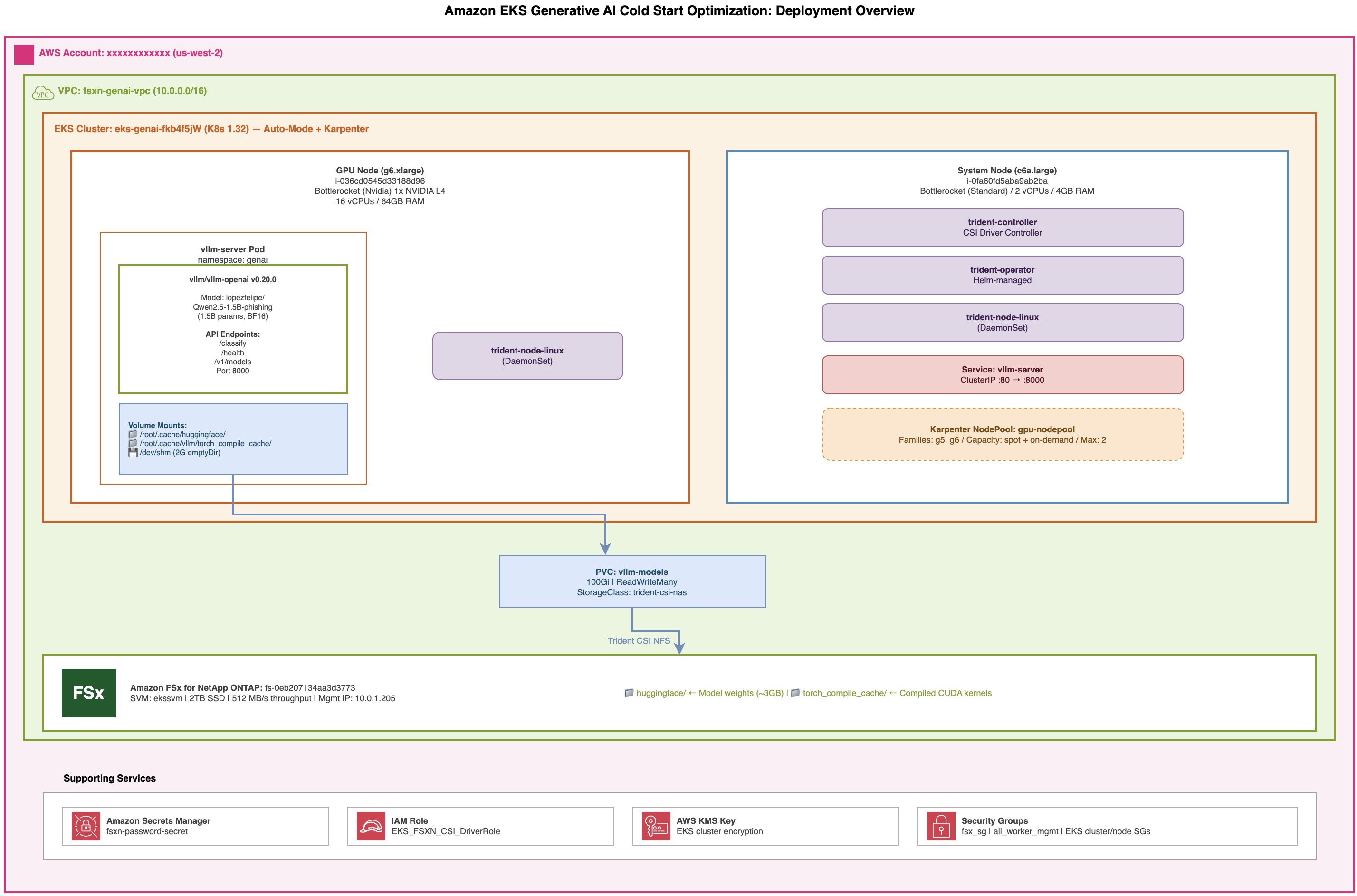
Figure 2: Amazon EKS generative AI cold start optimization: Deployment overview
The GitHub repository provisions the entire solution with a single terraform apply command and no manual kubectl commands required. Referring to Figure 2, the following table maps each component in the architecture diagram to its corresponding Terraform or manifest file, as shown in Figure 3.
Note: This solution was tested with NFSv4.1 and a Gen 1 FSx for NetApp ONTAP file system (512 MBps throughput). We recommend Gen 2 file systems over first-generation file systems for performance, scalability, and flexibility. Gen 2 allows you to create or expand file systems with up to 12 highly available (HA) pairs of file servers, providing your workloads with up to 72 GBps of throughput and 1 PiB of provisioned SSD storage. We recommend reviewing the latest Trident documentation for Kubernetes-specific requirements.
| Diagram Component | Repo File | Purpose |
| VPC fsxn-genai-vpc | terraform/vpc.tf | Network foundation for Amazon EKS and FSx for ONTAP |
| EKS Cluster (Auto-Mode + Karpenter) | terraform/eks-cluster.tf | Kubernetes cluster with IRSA, Pod Identity Agent |
| GPU NodePool (g5/g6, spot + on-demand, max 2) | terraform/nodepool_automode.tf | Karpenter NodePool, GPU-tainted for dedicated workloads |
| System Node (c6a.large) | terraform/eks-cluster.tf | Hosts Trident control plane components |
| FSx for ONTAP (2 TB SSD, 512 MBps) | terraform/fsx.tf | Shared persistent storage for model weights and compile cache |
| Trident Operator (Helm-managed) | terraform/trident.tf | Installs Trident CSI driver using Helm |
| Trident Controller + DaemonSet | terraform/trident.tf | CSI controller and per-node NFS mount agent |
| TridentBackendConfig → FSx | manifests/backendnas.yaml.tpl | Templated: auto-injected with FSx ID, SVM, Amazon Secrets Manager ARN |
| StorageClass trident-csi-nas | manifests/storageclass.yaml | NFS 4.1, 1 MB r/w buffers (rsize/wsize = 1048576) |
| PVC vllm-models (100Gi, RWX) | manifests/modelstorage.yaml | Shared model + torch compile cache volume |
| vLLM Deployment + Service (port 80 → 8000) | manifests/deploymentgpu.yaml | Inference pods with smart init container |
| AWS Secrets Manager (fsxn-password-secret) | terraform/fsx.tf | FSx admin credentials |
| IAM Role (EKS_FSXN_CSI_DriverRole) | terraform/iam.tf | Trident’s access to FSx |
| Security Groups (fsx_sg, cluster/node SGs) | terraform/security-groups.tf | Network access rules |
Figure 3: Table for Terraform provisioning resources and configuration
Terraform orchestrates all dependencies automatically. The Trident backend uses templatefile() to dynamically inject infrastructure identifiers, and a time_sleep resource checks Trident is ready before creating the backend and StorageClass.After it’s deployed, you can validate the inference endpoint using the approach described in the ‘Calling the vLLM server’ section of the GitHub: :
The repository also includes scripts/benchmark-coldstart.sh, a fully automated script that deploys replicas, monitors pod readiness using log streaming, and reports wall-clock startup times, confirming the caching layer is working correctly.
Performance observations
We deployed the phishing detection example on a g6.4xlarge instance (NVIDIA L4, 24 GB VRAM) with Amazon EKS 1.32 and a 2 TB FSx for ONTAP file system at 512 MBps throughput. We collected the following results using the benchmark scripts in the GitHub repository.
Cold start vs. warm start
To measure the caching benefit, we timed the initial pod startup (cold start—empty cache) and three subsequent pod restarts (warm starts—model and compiled kernels already on the FSx for ONTAP volume). Figure 4 compares our results.
| Phase | Cold start | Warm start (average of 3 runs) |
| Image pull | 177 seconds | 3 seconds |
| Model download + CUDA kernel compilation | Included in above | 0 seconds (served from FSx for ONTAP cache) |
| Model load into GPU memory | 51 seconds | 67 seconds |
| Total pod startup | 228 seconds | ~101 seconds |
Figure 4: Comparison table showing time taken cold start and warm start during the test
Figure 5 breaks down the pod startup phases.
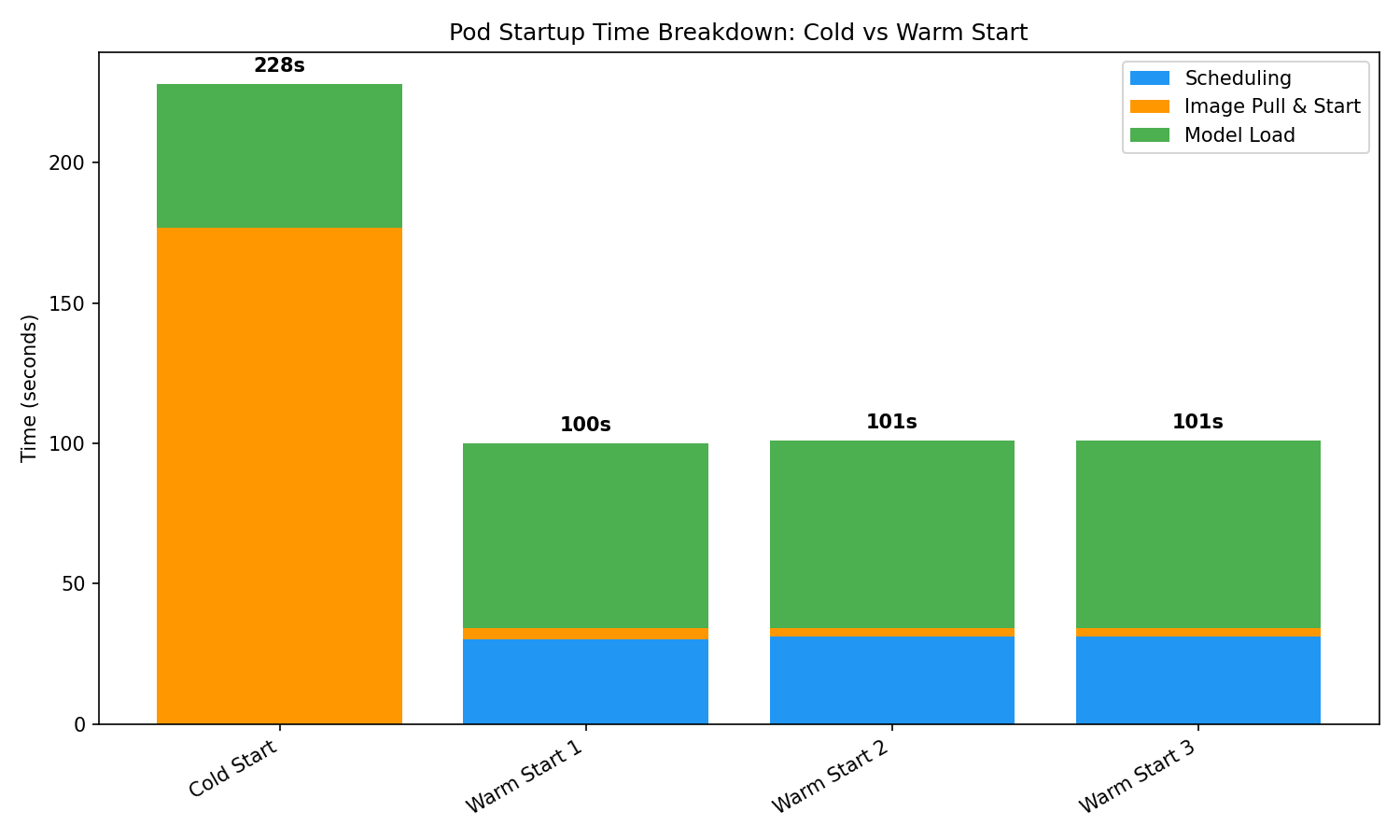
Figure 5: Pod startup phase breakdown—cold start vs. warm start
On warm starts, the pod skips the download and compilation phases entirely and proceeds directly to loading weights into GPU memory. The remaining startup time is dominated by Karpenter provisioning a GPU node (approximately 31 seconds) and the PCIe transfer of model weights into VRAM (approximately 67 seconds). Warm start results were consistent across all three runs (100 seconds, 101 seconds, 101 seconds), confirming the predictability of the FSx for ONTAP caching approach, as illustrated in Figure 6.
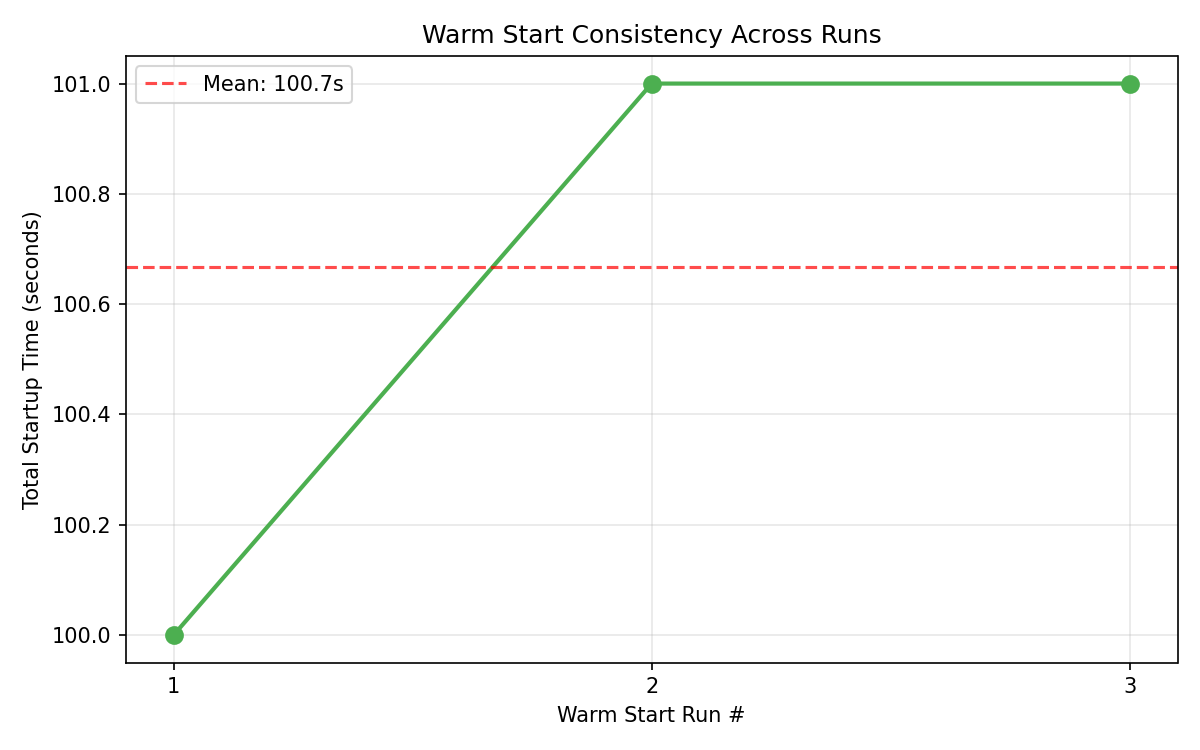
Figure 6: Warm start consistency across consecutive runs
Inference latency and throughput
After the model was serving, we measured inference performance at increasing concurrency levels. Each level sent 32 phishing classification requests to the /classify endpoint. Figure 7 summarizes the results.
| Concurrent Clients | P50 Latency | P90 Latency | Throughput | Error Rate |
| 1 | 156ms | 175ms | 6.2 req/s | 0% |
| 2 | 160ms | 176ms | 12.1 req/s | 0% |
| 4 | 165ms | 239ms | 22.3 req/s | 0% |
| 8 | 184ms | 277ms | 37.3 req/s | 0% |
Figure 7: Inference latency and throughput vs. concurrency
Figure 8 visualizes the results.
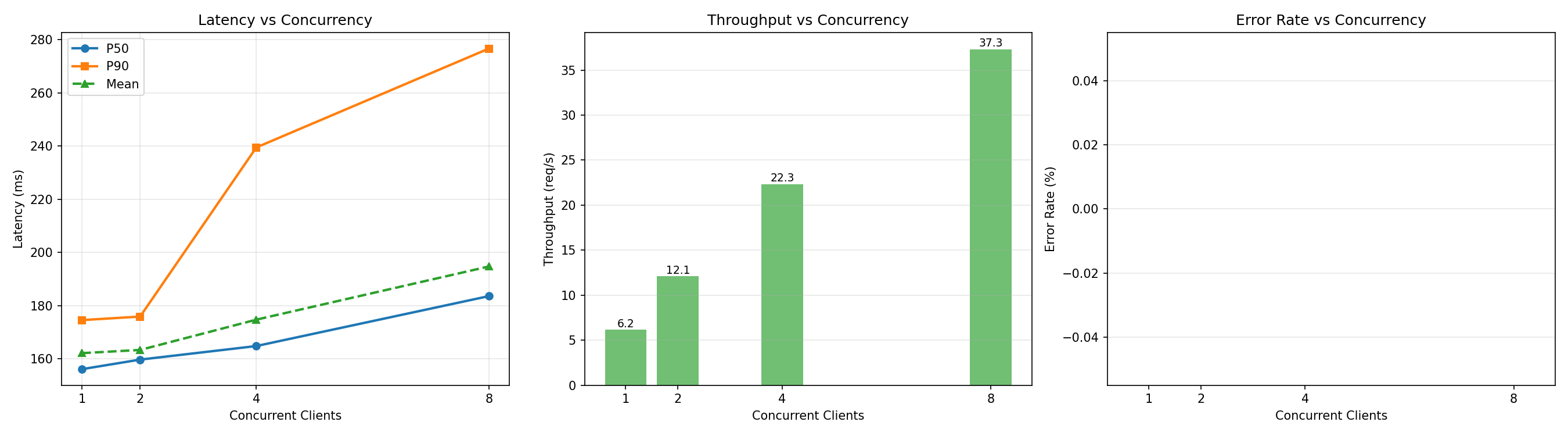
Figure 8: Inference latency and throughput vs. concurrency
Throughput scaled nearly linearly with concurrency—a sixfold increase at eight concurrent clients—with zero errors across all levels. P50 latency remained under 200 milliseconds even at peak load. After the model is loaded into GPU memory, the FSx for ONTAP volume isn’t on the inference hot path, so storage performance doesn’t affect request latency.
What persists across pod restarts
Figure 9 summarizes what the FSx for ONTAP volume preserves and what is recreated on each pod start.
| Persists on FSx for ONTAP | Recreated each start |
| Model weights (approximately 3 GB) | GPU memory state (model reloaded into VRAM) |
| Compiled CUDA kernels | Pod identity and IP |
| Tokenizer and configuration files | Shared memory (/dev/shm) |
Figure 9: Persistence and recreation of service during pod restart
Because the PVC uses ReadWriteMany access mode, multiple pods across different nodes share the same cached artifacts simultaneously. Only the first pod downloads from the model registry—subsequent pods, whether from scaling events, crash recovery, or rolling updates, mount the volume and load directly.These results reflect a specific configuration: g6.4xlarge instance, Single-AZ FSx for ONTAP at 512 MBps, and a 1.5B parameter model. Results in your environment will vary based on instance type, GPU generation, model size, FSx for ONTAP throughput capacity, and whether Karpenter schedules on an existing node or provisions a new one. The benchmark scripts in the GitHub repository allow you to reproduce these measurements in your own deployment.
Clean up
To avoid ongoing charges, you can run terraform destroy. This will delete the resources you provisioned.
Conclusion
In this post, we walked you through the design and architecture considerations for running stateful ML inference on Amazon EKS with FSx for ONTAP, spanning both on-premises and cloud environments. You learned how FSx for ONTAP provides persistent shared volumes that avoid cold-start downloads, enabling inference pods to mount a single copy of the model instantly across restarts, scaling events, and node failures. You learned how on-premises trained model artifacts flow into AWS through NetApp SnapMirror—incrementally, at block level, without manual transfers or pipeline orchestration. You also learned how the Trident CSI driver translates Kubernetes storage primitives into enterprise ONTAP capabilities—provisioning, snapshots, clones, and data protection—all managed declaratively through manifests and GitOps workflows.Whether organizations train and run inference entirely in the AWS cloud or train models on premises and serve in the cloud, this architecture offers a clean hybrid path. NetApp SnapMirror using block level replication replicates trained models from an on-premises training environment to AWS for serving. FSx for ONTAP keeps model state persistent and shared. Trident keeps operations Kubernetes-native. Together, they let you treat inference pods as stateless compute attached to intelligent, resilient storage.
For more on optimizing inference workloads on Amazon EKS, see AI on EKS documentation.