AWS Storage Blog
Reducing petabyte-scale S3 storage costs with evidence-based lifecycle rules
Storing data you rarely read is one of the most common sources of avoidable cost at scale and one of the hardest to get right. When a dataset grows into hundreds of terabytes or petabytes, the team that owns it often can no longer say with confidence how often it is read. The safe but expensive instinct is to leave everything on the fastest, most expensive storage. The access pattern is rarely uniform: a security team might need logs available for the occasional investigation, while an analytics team queries the same data only at quarter-end. Without evidence, both end up paying for fast storage they almost never use. The hard part isn’t deciding to act. It’s knowing which data has gone cold, and where it can safely live.
Amazon S3 is built for exactly this problem. It offers a range of storage classes at different price and access latency points. From S3 Standard for frequently accessed data, to S3 Intelligent-Tiering, which moves objects between access tiers automatically when access patterns are unpredictable, to S3 Glacier Instant Retrieval for rarely accessed data that still needs millisecond retrieval. To choose between them with confidence, S3 provides S3 Storage Lens and S3 Storage Class Analysis, which replaces assumptions about access patterns with measured evidence.
In this post, I show how to use S3 Storage Lens and S3 Storage Class Analysis together to right-size petabyte-scale storage based on evidence such as object size and age. I then show how to extend that analysis toward S3 Glacier Instant Retrieval when the access pattern and a millisecond-latency requirement call for it. The result is a repeatable way to cut storage cost for cold data while keeping it instantly available. This is an advanced (300-level) post that assumes working familiarity with S3 storage classes and S3 Lifecycle rules.
Solution overview
One number recurs throughout this method: the 128 KB object size. S3 Standard-IA, S3 Glacier Instant Retrieval, and S3 Intelligent-Tiering all treat 128 KB as a threshold: smaller objects are either billed as 128 KB, excluded from auto-tiering, or omitted from S3 Storage Class Analysis. A footprint dominated by sub-128 KB objects changes the savings math, so the first thing this method measures is how much data sits above that line.
The method rests on two ideas:
- Use S3 Storage Lens groups to identify candidate buckets and prefixes, breaking stored volume and object count down by object age (older than 30, 60, and 90 days) and by object size (larger than 128 KB) so you target the data a transition would move.
- Use S3 Storage Class Analysis to prove, by object age, when the data goes cold, observing long enough to catch seasonal access.
Treat the S3 Storage Class Analysis recommendation as an access-pattern data point, not the final storage-class decision. The analysis confirms when data goes cold. The class that best fits the real latency and cost requirements is a separate choice.
In a recent engagement, a customer stored roughly 5.8 PB of observability and search-index logs across two buckets, entirely in S3 Standard with no lifecycle rule, costing approximately $241,000 per month. Applying the following method reduced that bill by about 70 percent while preserving millisecond access. This is one example. Results vary with each customer’s storage footprint, object sizes, retention needs, and access patterns, so the roughly 70 percent reduction reflects this specific workload.
When this method delivers the biggest savings
This method fits a recognizable workload shape rather than a specific setup, and the savings are largest when all of the following are true:
- A large S3 footprint with hundreds of terabytes to multiple petabytes held predominantly in S3 Standard with no lifecycle rules.
- Write-once, rarely read data with a finite retention window. In the engagement, this was observability and search-index logs across two buckets, retained for about five years.
- A retained requirement for millisecond access even after the data goes cold for occasional queries, investigations, or compliance, which rules out asynchronous archive classes.
- A footprint made up predominantly of objects larger than 128 KB. As noted earlier, that is the minimum billable object size for S3 Standard-IA and S3 Glacier Instant Retrieval and the size below which S3 Storage Class Analysis doesn’t evaluate objects, so object size directly drives whether a transition saves money.
Find candidates and size the data with S3 Storage Lens
Before changing anything, start by finding where the opportunity is and understanding the shape of the data. S3 Storage Lens gives you an organization-wide view of your storage, so you can spot the buckets worth acting on and rule out the ones where the economics wouldn’t work.
Lead with S3 Storage Lens groups. An S3 Storage Lens group aggregates storage metrics using object metadata filters like prefix, suffix, object tag, object size, and object age so instead of a single bucket-wide number, you get object count and stored volume broken down by the dimensions that drive this decision.
Use groups to find candidate buckets and prefixes. Start from large buckets with no lifecycle rule (hundreds of terabytes to tens of petabytes) and attach groups that split each bucket two ways:
- By object size: objects larger than 128 KB versus smaller objects. S3 Storage Class Analysis evaluates only objects larger than 128 KB, and both S3 Standard-IA and S3 Glacier Instant Retrieval have a 128 KB minimum billable object size. A bucket consisting predominantly of tiny objects changes the cost calculation, and transitioning such objects could result in higher costs. Alternatively, you can use the performance metrics in S3 Storage Lens to view object size distribution per prefix. This approach is useful when you need to analyze more than 50 prefix groups, since a single S3 Storage Lens configuration supports a maximum of 50 groups.
- By object age: stored volume and object count older than 30, 60, and 90 days. A strong candidate is a bucket where a large share of the volume sits in the older age bands and in objects larger than 128 KB. That is the data a lifecycle transition would actually move.
The following image shows an example of S3 Storage Lens groups with objects distributed by age and size. You can configure your own groups for your workload and needs. For how to set up and get the most from S3 Storage Lens groups, see the AWS Storage Blog post Gain workload-specific storage insights with S3 Storage Lens groups.
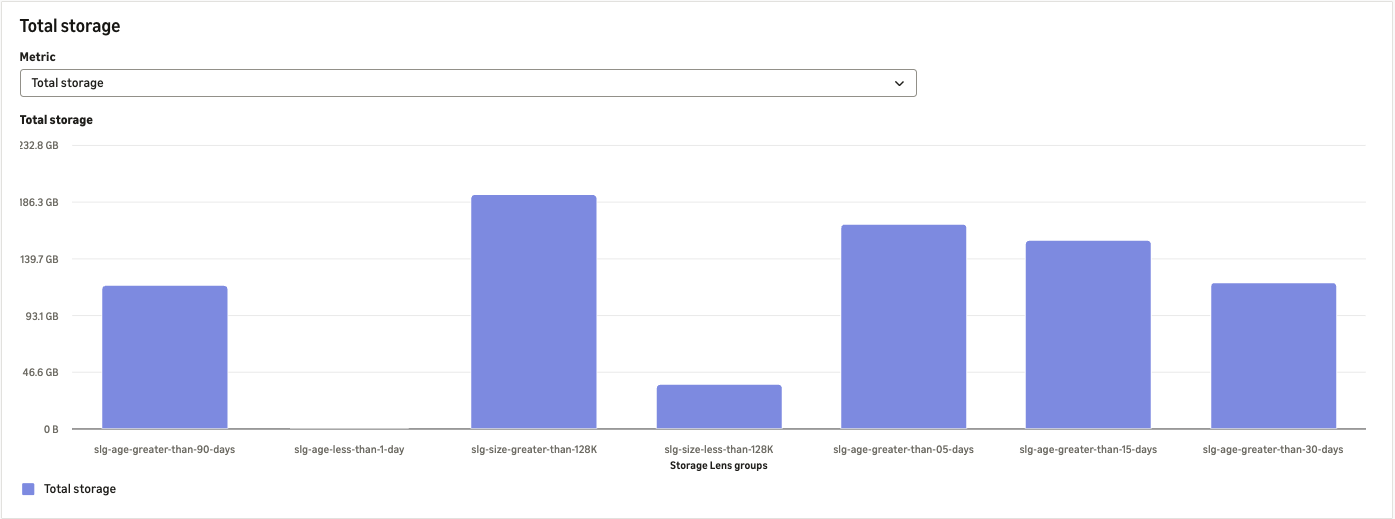
Figure 1: S3 Storage Lens group showing object distribution by size and age
With candidate buckets and prefixes sized this way, enable S3 Storage Class Analysis on them (filtered by prefix where it helps) to answer the question the groups can’t: within those older age bands, is the data still being read?
Prove the access pattern with S3 Storage Class Analysis
Configure S3 Storage Class Analysis on a candidate bucket or prefix. Since S3 Storage Class Analysis can be scoped to a prefix, apply it at the prefix level when different prefixes within the same bucket have different access patterns. It groups objects by age and reports how much data is retrieved per age group. Let evidence, not assumption, set the transition age.
Give it time. The console shows first results in 24–48 hours, but resist acting on that early snapshot. S3 Storage Class Analysis observes access for 30 days or longer. I recommend longer still. In the engagement, I observed access for more than 45 days to capture seasonal or periodic reads that a shorter window would miss. This matters because retrieving data from an archive tier is far more expensive than from S3 Standard. A seasonal read spike that arrives after you transition the data can erode the savings. In the engagement, objects older than 90 days showed an access ratio below 0.1 percent, a clear data-backed cold threshold.
It’s this boundary that keeps the “hot” (frequently accessed) layer protected. An S3 Lifecycle transition operates based on the object’s age (the number of days since its creation). A rule defined at the “cold” threshold moves only objects that exceed this milestone, keeping the most recent and still active objects in the S3 Standard class.
In the following example, this bucket has 17.6 GB of data in the 365–729 day age band with 647.3 MB of retrieval, an access ratio of about 3.6 percent. This makes it a good candidate to transition to a colder storage class.
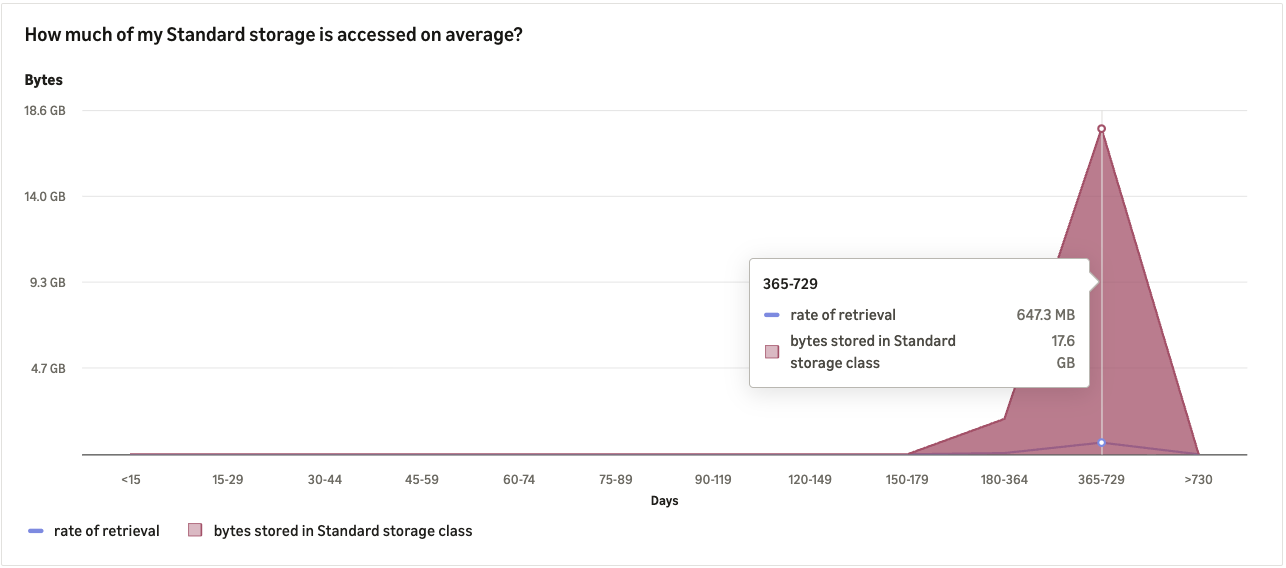
Figure 2: S3 Storage Class Analysis retrieval by object age band. The numbers in this screenshot are illustrative, meant to show how to read the chart and compute the access ratio. In the engagement described earlier, the cold threshold was below 0.1% retrieval past 90 days
Extend the analysis beyond the Standard-IA recommendation
S3 Storage Class Analysis focuses on the S3 Standard to S3 Standard-IA transition, which makes it an excellent first signal that your data has cooled and is ready to move to a lower-cost class. For data that is effectively never read but must stay instantly available, you can take that signal one step further: the same evidence that justifies a move to S3 Standard-IA can support a move to an archive class with millisecond retrieval, capturing additional savings. Use the recommendation as a confident starting point, and then match the final storage class to the real access and latency requirement.
Move cold data to S3 Glacier Instant Retrieval
For data with near-zero retrieval that still requires millisecond access, S3 Glacier Instant Retrieval is the better-fit class. It delivers the same millisecond latency and throughput as S3 Standard and S3 Standard-IA. For data accessed about once per quarter, it can cost up to 68 percent less than S3 Standard-IA. Confirm the workload fits its constraints before committing: a 90-day minimum storage duration, a 128 KB minimum billable object size, and per-GB retrieval plus higher per-request charges (see S3 pricing for current minimum storage duration and per-Region retrieval rates).
Set the transition age from the evidence
Choose the transition age conservatively. In the engagement, comparing a 60-day threshold against 90 days led to a 90-day rule because the marginal savings from the earlier transition didn’t justify the retrieval-fee risk if a brief access spike hit recently cooled data. Implement this as an S3 Lifecycle rule that transitions objects from S3 Standard to S3 Glacier Instant Retrieval at the chosen age.
Add a guardrail against retrieval-fee blowback
The per-request and per-GB retrieval costs for archive classes are substantially higher than for S3 Standard. A single full-prefix scan or a large recurring batch read over archived data can erase the storage savings. To prevent this, restrict query engines and batch jobs from scanning archive-class prefixes directly. For example, configure your query layer to route full-table scans to a separate copy or summary in S3 Standard. Set S3 request metrics alarms on the archive prefixes so that unexpected retrieval spikes are caught early. Pair the lifecycle rule with this guardrail rather than shipping the transition on its own.
Conclusion
In this post I showed how to use S3 Storage Lens and S3 Storage Class Analysis together to prove an infrequent-access pattern with evidence such as object size and age. I also showed how extending that evidence unlocks further savings when the access pattern and a millisecond-latency requirement point to S3 Glacier Instant Retrieval. In one customer environment, this reduced S3 storage cost by about 70 percent while preserving millisecond access.
To learn more, review the S3 storage classes overview and the documentation on managing your storage lifecycle, and explore S3 Storage Lens and S3 Storage Class Analysis in the S3 console. For help applying this to your own workloads, contact your AWS account team.